-
G 8.1 vellus hair included or not in base character ?
How is G8.1 vellus hair represented? Geometry, strand-based hair, texture map, etc. ?
Feature list doesn't explain it very much:
https://www.daz3d.com/victoria-8-1HowTo: Create missing Genesis 8.1 Head skin maps from Genesis 8/3 skin mapsHowTo: Create missing Genesis 8.1 Head skin maps from Genesis 8/3 skin maps
The new Genesis 8.1 base figure has an additional material zone called Head that also is a separate UV layout compared to Genesis8/Genesis3 skin materials. This is problematic when trying to mix these skins with new skin assets designed only for Genesis 8.1. I am experimenting with converting existing skin maps with a tool included in DAZ Studio that is called Map Transfer. For a basic introduction to Map Transfer see an amazing tutorial of L'Adair here: https://www.daz3d.com/forums/discussion/184696/tutorial-from-map-transfer-to-material-presets
Here is my working process so far tested with Millawa 8. Base Mixing settings for all surfaces from Millawa 8 are PBR Metallicity/Roughness. The process seems to fail for some maps, when it is PBR Specular/Glossiness instead! However you can manually plug the required maps into the Diffuse image slot one at a time and repeat the process multiple times as a workaround.
1) Load Genesis 8.1 Female Base Character
2) Select it in your Scene tab
3) Apply any Genesis 8 (or even Genesis 3) material settings
4) Open the Surfaces pane and start the Map Transfer tool (you do this by right clicking on the Surfaces pane and selecting it)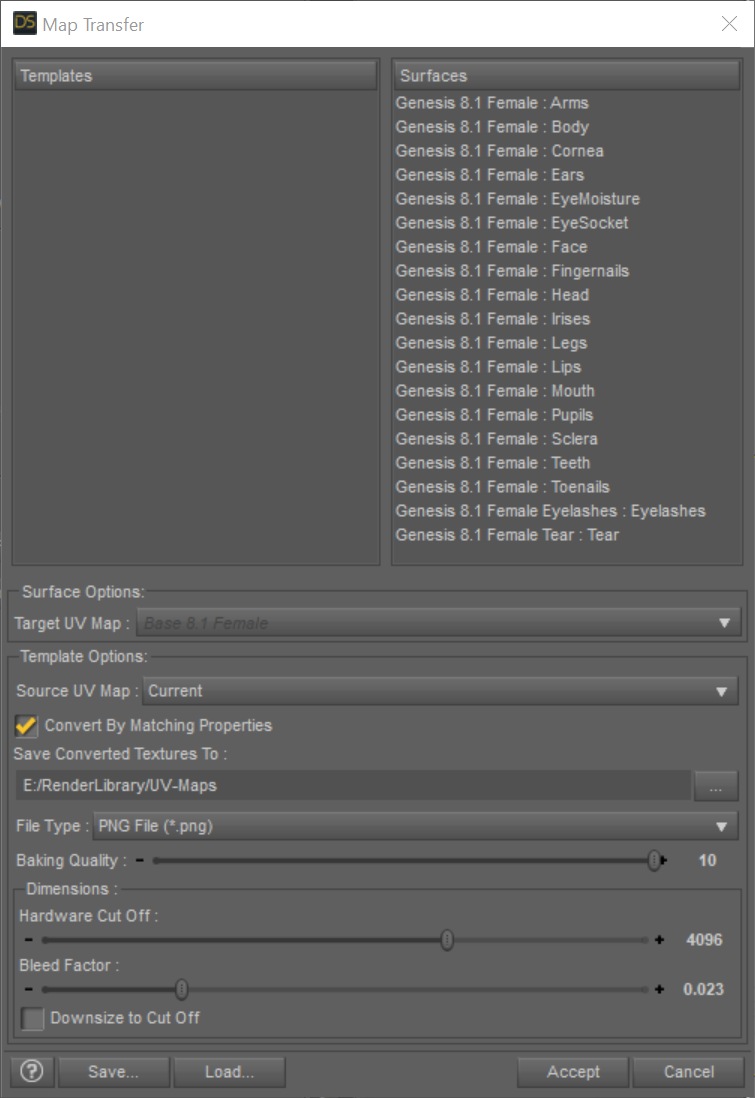
4a) Right click in the Templates area and select New Template
4b) Drag and Drop the Genesis 8.1 Female : Head from the Surfaces area on the right to the left Template1 you just created
4c) On the left select the new surface under Template1 and make sure the Surface Options: Target UV Map: say Base 8.1 Female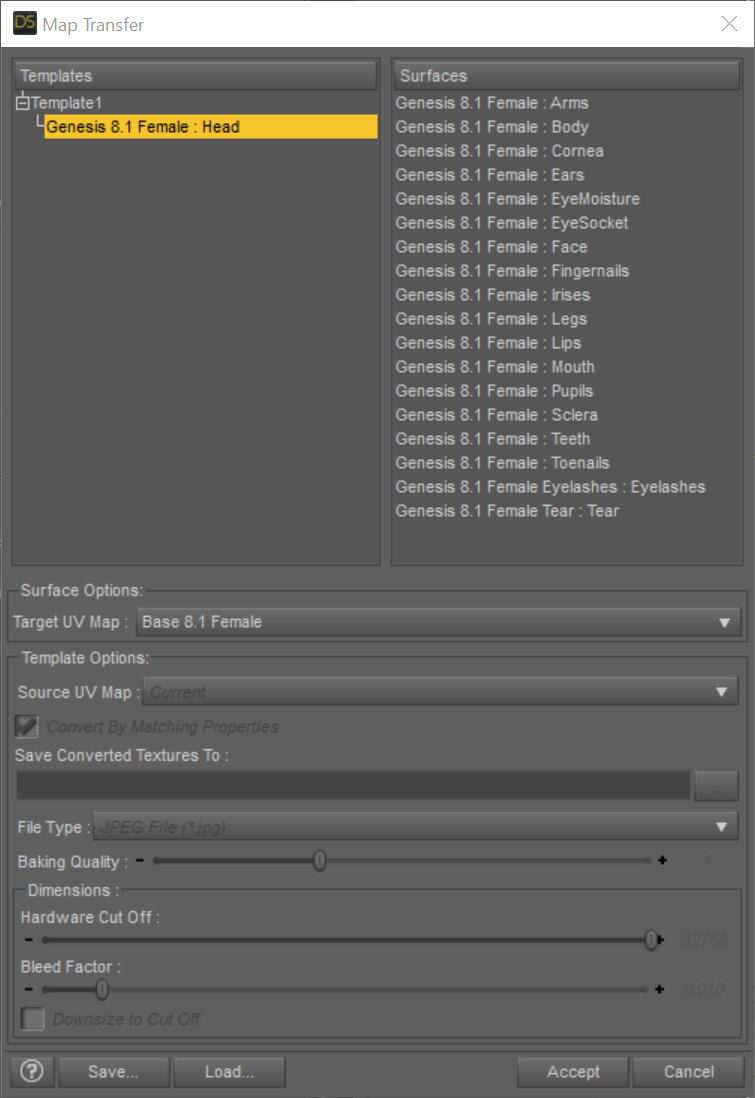
4d) On the left select Template1 and check the settings in the lower part of the dialog where it says Template Options. I used these:- Source UV Map: Current
- Convert by Matching Properties: Selected
- Choose a path where you find the generated textures later on
- File Type: PNG
- Baking Quality: 10
- Dimensions: Harware Cut Off: 4096 and Bleed Factor: 0.01
- Downsize to Cut Off: Not selected
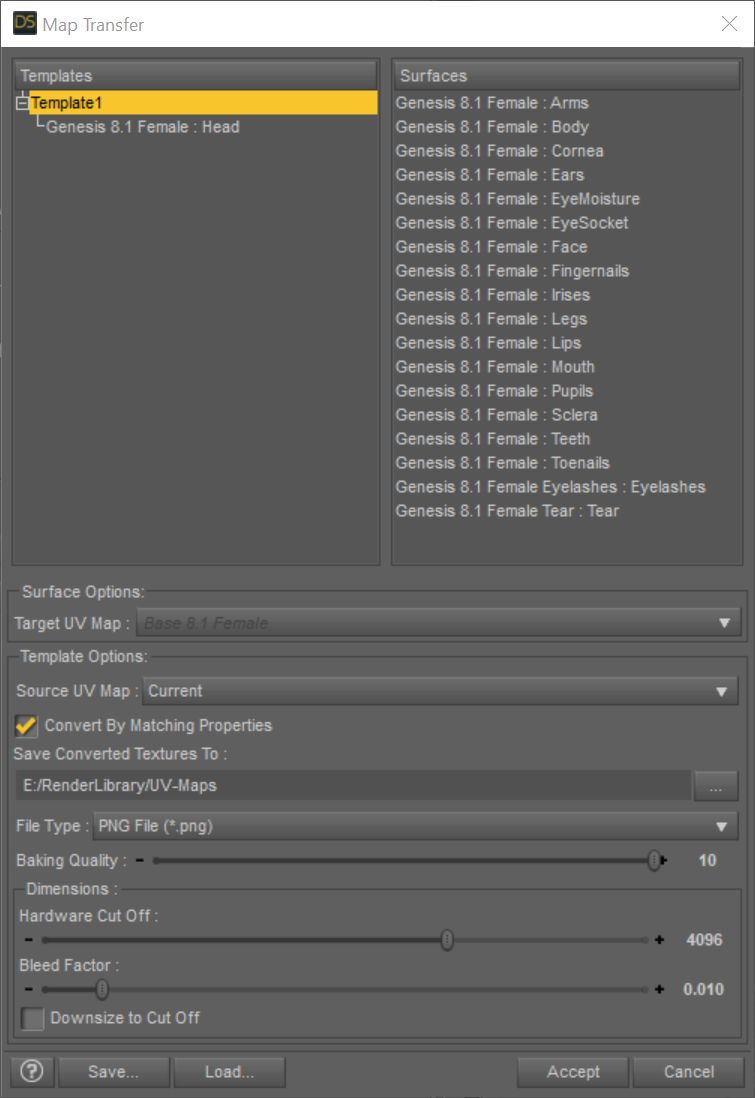
5) Optional: I saved the settings for later reuse using the Save... button
6) Hit Accept and the conversion process should start.
7) Open the Surfaces tab and open Head→Geometry. Change the UV Maps→UV Set from Base Female to Base 8.1 Female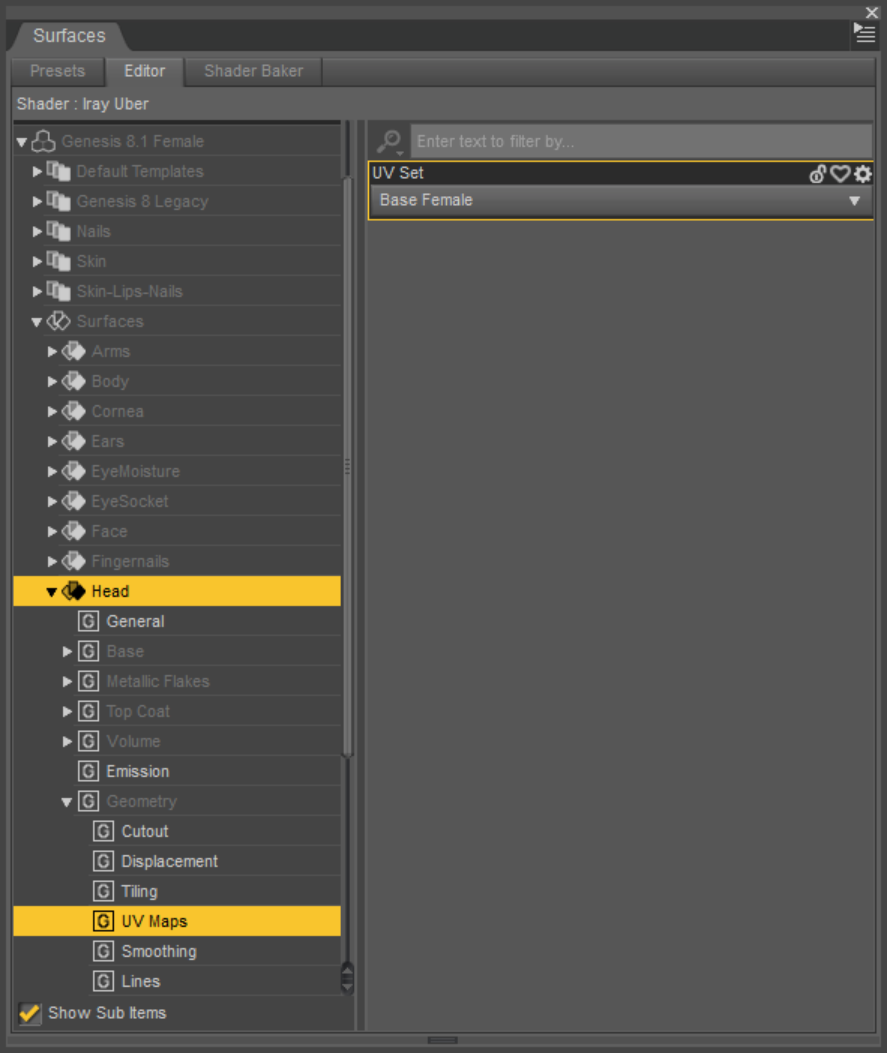
8) Apply the newly created maps to their appropriate slotsNOTE: This still uses the original shader!!!
But you are using the new UV layout and can apply LIE settings designed for the new 8.1 UV layout like the tattoos from Victoria 8.1
The following post shows the opposite process:
Victoria 8.1 Log WARNINGMasterstroke said:
Can you load G8, G8.1 or Victoria 8.1 into your scene?
If not, how do you try to load it into your scene?can into scene its a work. but error log when importing "Genesis 8.1" from "Daz studio"
and There is "facs_ctrl_Wink.dsf" facial expression
Genesis 8.1 / Victoria 8.1ricardoromanzini said:
Hello, I'm having a little trouble. I don't have a Genesis 8.1 and in my Genesis 8 folder doesnt have a 8.1 inside too. I update daz and the Genesis package. If I load Victoria 8.1 I get errors, missing pbrskin... Can someone help me please. :D thank you.
Reinstall Genesis 8 Female Essentials to get G8.1, and DS default resources to get the PBR shader.
Victoria 8.1 Log WARNINGnemesis10 said:
"I reinstalled G8.1 and basic resources today and have the same problem".....
That is Daz Studio 14.5, Genesis 8 essentials, and Daz Resources so all 3 things, correct?
yes i installed "Default DAZ Resources for 4.15" and "genesis 8 Female Starter" and "Victoria 8.1"
Victoria 8.1 Log WARNINGCan you load G8, G8.1 or Victoria 8.1 into your scene?
If not, how do you try to load it into your scene?Genesis 8.1 changes compared to Genesis 8My favorite part of the 8.1 characters is the improved face skin textures. Correct me if I am wrong but the face geometry had to be made finer to accommodate higher resolution face textures.
So, I expect new Genesis 8.1 characters to come out with more and more realistic skin textures soon.
Michael 8 has great skin textures but Gen 8 characters have come out after him and eclipsed that quality quite a bit.
I expect all of my future scenes will be based upon the Genesis 8.1 and Michael/Victoria 8.1 characters (When Gen8.1 male and Michael 8.1 are released).
This is a huge new jump of realism for Daz figures. Thank you Daz for making this!
I am anticipating the new characters to go with 8.1 and I hope "all" new characters are based upon 8.1 specifications
I have most of the Gen 8 skins I need... let's see a slew of new skins for 8.1!
I am interested mostly in the new skin textures and as I have stated before, Gen 8 hand textures could use a resolution upgrade too. :)
Hylas' corner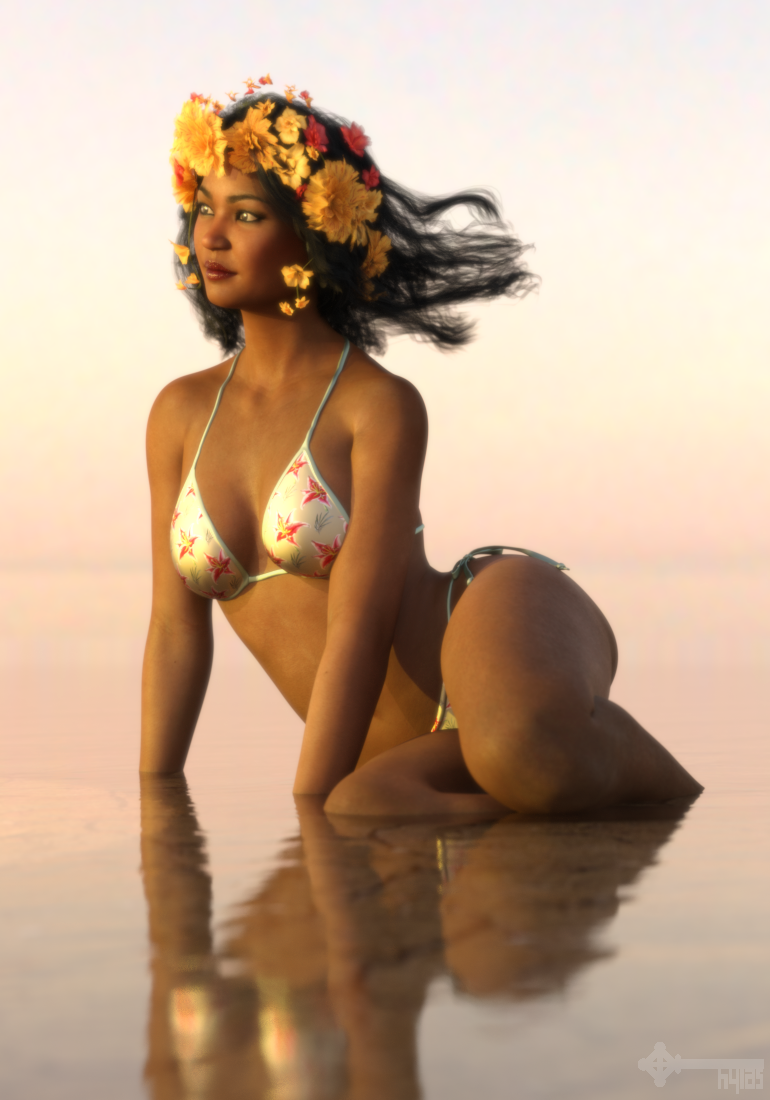
Kalea whom DAZ is generously offering as a freebie at the moment. I'm so excited that we're starting to get G3 content as bi-weekly freebies!
She is lovely but I think her head morph could use just a little extra oomph, so I dialled in a bit of Soraya's head morph and subtly tweaked her nose.
This is also my first render with the new 8.1 figure... not that it really matters in this case.
ETA: Now that I look at it again the image seems too yellow. But the Renderosity upload of the exact same file has a much softer tone. Not sure what's happening here...
 Genesis 8.1 / Victoria 8.1
I want G8.1M too, but I'd rather wait until DAZ has sorted out any potential issues. Seeing now some old customers are not entirely happy with G8.1F (I am kinda one of those to be honest, though I also kind of accepted that eventually the older genesis generations would be eliminated), I doubt that DAZ would rush.empty said:ricardoromanzini said:
We are gonna get a male version 8.1? I waaaaaaant :D
I know right!? I can see the business decision of releasing Victoria 8.1, and then her gender opposite counterpart* later down the line (*name withheld so as not to create pandemonium amongst forum users), but I cannot see the sense of not releasing both base figures at the same time? or am I completely wrong here? When G8 was released, did both sexes appear at the same time, or was G8F first, and then the other?
Genesis 8.1 / Victoria 8.1ricardoromanzini said:
Hello, I'm having a little trouble. I don't have a Genesis 8.1 and in my Genesis 8 folder doesnt have a 8.1 inside too. I update daz and the Genesis package. If I load Victoria 8.1 I get errors, missing pbrskin... Can someone help me please. :D thank you.
I uninistalled Genesis 8 Female starter essentials and re-installed it, and then it appeared.
Genesis 8.1 / Victoria 8.1ricardoromanzini said:
We are gonna get a male version 8.1? I waaaaaaant :D
I know right!? I can see the business decision of releasing Victoria 8.1, and then her gender opposite counterpart* later down the line (*name withheld so as not to create pandemonium amongst forum users), but I cannot see the sense of not releasing both base figures at the same time? or am I completely wrong here? When G8 was released, did both sexes appear at the same time, or was G8F first, and then the other?
Step-by-Step: Using the new PBR Skin on Genesis 8OK, I followed aldoreno's instructions (thank you) but in addition I enabled the 'Spectral Occlusion' and left that at it's defaults. For the source skin material set I used a recent character called Kjaer 8 (or something like that), applied the DAZ Iray PBR Skin shader preset and enabled all Surfaces shader features that where enabled on the original Kjaer that were in actual use. I then enable 'Spectral Occlusion' even though it wasn't present on the original Kjaer skin materials. About 1500 iterations in they are looking very similar except 'Spectral Occlusion' has amped up the slightest sheen highlights on the face to be more obviously present. Think of it as the original render with the over iRay Skin shaders looks like someone that has just showered and thouroughly dried off on a cool day compared to that same person after finished the day at about 5 PM at work, not sweaty or oily too much but the skin is doing it's job and perspiring and getting a tab oilier thoughout the day. That's what the DAZ Iray PBR Skin shader preset with 'Spectral Occlusion' did. I kind of like it as that give me a one on/off button that makes a character a bit more realistic in some scenes without making them too oily or plastic looking. Neither render looks plastic which is a huge step up since the intro of Victoria 8 and Michael 8 a while back.
There is still the problem though of very high gloss areas with bumpiness (looking at his shoulder socket area) in my eyes look like blistered skin rather than oily skin. Is that the bump & normals being too strong? If I'm right, probably but I didn't change them. However, I should state on saying that I've never systematically studied pictures of blistered skin in bright light versus slightly oily skin in bright light so I'm not an authority.
Genesis 8.1 / Victoria 8.1Hello, I'm having a little trouble. I don't have a Genesis 8.1 and in my Genesis 8 folder doesnt have a 8.1 inside too. I update daz and the Genesis package. If I load Victoria 8.1 I get errors, missing pbrskin... Can someone help me please. :D thank you.
G 8.1 vellus hair included or not in base character ?Anim said:
Sorry to create a new thread - I did not find a final answer in the G 8.1 thread.
Is the vellus hair included in the Genesis G 8.1 base female?
A: Yes, but not yet available in the starter essentials (you have to wait for an update of the package)
B. No, you have to buy Victoria 8.1 base package.
C. No, you have to buy the Victoria 8.1 University Bundle
B :D
G 8.1 vellus hair included or not in base character ?Sorry to create a new thread - I did not find a final answer in the G 8.1 thread.
Is the vellus hair included in the Genesis G 8.1 base female?
A: Yes, but not yet available in the starter essentials (you have to wait for an update of the package)
B. No, you have to buy Victoria 8.1 base package.
C. No, you have to buy the Victoria 8.1 University Bundle
Genesis 8.1 / Victoria 8.1A slightly customised HD Victoria 8.1 (narrowed the chin a wee bit and perked her boobs) - I also used the custom smile morph that comes with HD Kayla Remake by Nirvana/Rarestone (at around 70% strength).
 Victoria 8.1 Log WARNING
WARNING:\dzassetdaz.cpp(6843): Could not find target property for formula: Genesis8_1Female:/data/Daz 3D/Genesis 8/Female 8_1/Morphs/Daz 3D/FACS/facs_ctrl_Wink.dsf#facs_ctrl_Wink?value in file : /data/Daz 3D/Genesis 8/Female 8_1/Morphs/Daz 3D/Victoria 8_1/facs_Victoria8_1_ctrl_Wink.dsf
WARNING:\dzassetdaz.cpp(6843): Could not find target property for formula: Genesis8_1Female:/data/Daz 3D/Genesis 8/Female 8_1/Morphs/Daz 3D/FACS/facs_ctrl_Triumph.dsf#facs_ctrl_Triumph?value in file : /data/Daz 3D/Genesis 8/Female 8_1/Morphs/Daz 3D/Victoria 8_1/facs_Victoria8_1_ctrl_Triumph.dsf
WARNING:\dzassetdaz.cpp(6843): Could not find target property for formula: Genesis8_1Female:/data/Daz 3D/Genesis 8/Female 8_1/Morphs/Daz 3D/FACS/facs_ctrl_Scream.dsf#facs_ctrl_Scream?value in file : /data/Daz 3D/Genesis 8/Female 8_1/Morphs/Daz 3D/Victoria 8_1/facs_Victoria8_1_ctrl_Scream.dsf
WARNING:\dzassetdaz.cpp(6843): Could not find target property for formula: Genesis8_1Female:/data/Daz 3D/Genesis 8/Female 8_1/Morphs/Daz 3D/FACS/facs_ctrl_Sad.dsf#facs_ctrl_Sad?value in file : /data/Daz 3D/Genesis 8/Female 8_1/Morphs/Daz 3D/Victoria 8_1/facs_Victoria8_1_ctrl_Sad.dsf
WARNING:\dzassetdaz.cpp(6843): Could not find target property for formula: Genesis8_1Female:/data/Daz 3D/Genesis 8/Female 8_1/Morphs/Daz 3D/FACS/facs_ctrl_Pouty.dsf#facs_ctrl_Pouty?value in file : /data/Daz 3D/Genesis 8/Female 8_1/Morphs/Daz 3D/Victoria 8_1/facs_Victoria8_1_ctrl_Pouty.dsf
WARNING:\dzassetdaz.cpp(6843): Could not find target property for formula: Genesis8_1Female:/data/Daz 3D/Genesis 8/Female 8_1/Morphs/Daz 3D/FACS/facs_ctrl_Pain.dsf#facs_ctrl_Pain?value in file : /data/Daz 3D/Genesis 8/Female 8_1/Morphs/Daz 3D/Victoria 8_1/facs_Victoria8_1_ctrl_Pain.dsf
WARNING:\dzassetdaz.cpp(6843): Could not find target property for formula: Genesis8_1Female:/data/Daz 3D/Genesis 8/Female 8_1/Morphs/Daz 3D/FACS/facs_ctrl_Ill.dsf#facs_ctrl_Ill?value in file : /data/Daz 3D/Genesis 8/Female 8_1/Morphs/Daz 3D/Victoria 8_1/facs_Victoria8_1_ctrl_Ill.dsf
WARNING:\dzassetdaz.cpp(6843): Could not find target property for formula: Genesis8_1Female:/data/Daz 3D/Genesis 8/Female 8_1/Morphs/Daz 3D/FACS/facs_ctrl_Happy.dsf#facs_ctrl_Happy?value in file : /data/Daz 3D/Genesis 8/Female 8_1/Morphs/Daz 3D/Victoria 8_1/facs_Victoria8_1_ctrl_Happy.dsf
WARNING:\dzassetdaz.cpp(6843): Could not find target property for formula: Genesis8_1Female:/data/Daz 3D/Genesis 8/Female 8_1/Morphs/Daz 3D/FACS/facs_ctrl_Glare.dsf#facs_ctrl_Glare?value in file : /data/Daz 3D/Genesis 8/Female 8_1/Morphs/Daz 3D/Victoria 8_1/facs_Victoria8_1_ctrl_Glare.dsf
WARNING:\dzassetdaz.cpp(6843): Could not find target property for formula: Genesis8_1Female:/data/Daz 3D/Genesis 8/Female 8_1/Morphs/Daz 3D/FACS/facs_ctrl_Fierce.dsf#facs_ctrl_Fierce?value in file : /data/Daz 3D/Genesis 8/Female 8_1/Morphs/Daz 3D/Victoria 8_1/facs_Victoria8_1_ctrl_Fierce.dsf
WARNING:\dzassetdaz.cpp(6843): Could not find target property for formula: Genesis8_1Female:/data/Daz 3D/Genesis 8/Female 8_1/Morphs/Daz 3D/FACS/facs_ctrl_Fear.dsf#facs_ctrl_Fear?value in file : /data/Daz 3D/Genesis 8/Female 8_1/Morphs/Daz 3D/Victoria 8_1/facs_Victoria8_1_ctrl_Fear.dsf
WARNING:\dzassetdaz.cpp(6843): Could not find target property for formula: Genesis8_1Female:/data/Daz 3D/Genesis 8/Female 8_1/Morphs/Daz 3D/FACS/facs_ctrl_Disgust.dsf#facs_ctrl_Disgust?value in file : /data/Daz 3D/Genesis 8/Female 8_1/Morphs/Daz 3D/Victoria 8_1/facs_Victoria8_1_ctrl_Disgust.dsfI have purchased Victoria 8.1.
Before installing Victoria 8.1, there was no error log when importing "Genesis 8.1" from "Daz studio".
However, after installing Victoria 8.1, a warning message is displayedfacs_ctrl_Wink.dsf
facs_ctrl_Triumph.dsf
acs_ctrl_Scream.dsf
facs_ctrl_Sad.dsf
facs_ctrl_Pouty.dsf
facs_ctrl_Pain.dsf
facs_ctrl_Ill.dsf
facs_ctrl_Happy.dsf
facs_ctrl_Glare.dsf
facs_ctrl_Fierce.dsf
facs_ctrl_Fear.dsf
facs_ctrl_Disgust.dsfThere is no above file in the library folder.
What should I buy?Daz Studio 4.16[.0.x] Pro, General Release! (*UPDATED*)notiusweb said:
I yesterday installed 4.15 with Genesis 8.1, but I do not see any vellus hairs, it seemed this was a part of the new figure from the ads?
THX!
The ads were misleading.
If you want the vellus hairs you have to buy either
https://www.daz3d.com/victoria-8-1-loving-life-bundle
or
https://www.daz3d.com/victoria-8-1-university-bundle
Under what's included and features you will see the
- Genesis 8 Female Anatomical Elements
- Genesis 8 Male Anatomical Elements
- Genesis 8.1 Female Vellus Hair
without links to products. Which means the Vellus hair is like the Anatomical elements only available in "Pro" bundles.
Genesis 8.1 / Victoria 8.1Of course progress must be made. This is a business that can move very quickly and staying still for too long can result in...well it can result in where Poser is right now.
But at the same time, you cannot just abandon the past for the sake of progress if it can be avoided. As I already pointed out, some of the changes for this 8.1 are just so minor and odd. There are different ways for every solution. On one hand, I do appreciate that Daz took steps to maintain support for G8. But at the same time, when you look at the changes, it is kind of obvious since only one change is truly any kind of real upgrade. As I said before, so many of the changes are things that could have been done on the existing G8 without releasing a new 8.1 at all. People are STILL confused. We have posts on like page 30 of this thread where somebody asks how to get the new teeth for G8.1. The teeth are for Victoria, and they are nothing more than improved sculpting and textures, stuff that could be done on any model.
Is that progress? This is what Daz is touting as progress on their own front page.
There are two changes that somewhat break compatibility. The face rig and the UV. As I said earlier, the changes to the UV are largely debatable as for whether they provide improvement. I found another annoyance as well. Daz has now made the iris, sclera, pupil, eye moisture, and cornea ALL on single template. WHY?? The old Genesis 8 divided these into two templates, with the iris, pupil, and sclera logically on one template and the eye moisture and cornea were on another. This made applying eye textures and shaders easier. Now that all 5 of these are back together this will annoy the hell out of me for years to come.
So that is not what I consider progress. There are many things Daz could have done, and still kept most compatibility. The big key with most changes is how well can old content be moved up. Sure, old content and models do not go away from your content library, but if say clothing is no longer usable at all on a new model, that becomes a big problem. Sure you could use an old model and use the old clothes on them, but that old model looks, well, old. With so many shaders it is often easier to make old clothes look new, so well made clothing items can be used for a very long time.
I am of the belief that Genesis 8 is for the most part already right there where it needs to be. If anything, Genesis 8.1 proves my feeling correct, since all of the improvements really are just things they can do to the existing Genesis 8. The next frontier will be believably stretchy skin, and even then I think that can still work on Genesis 8. Most of the things Daz needs to do as a business revolve around getting Genesis adopted into other software. It almost seems like Daz is listening to me sometimes, as they have been building on their export tools. (Though I still argue they need genuine plugins for this, not scripts, they need to get over their terror of sharing small amounts of IP.) There are a ton of things Daz can do to move forward without killing G8 in the process.
I feel like they need to progress more with their Daz Studio software (getting the horrible loading times down really should be a top priority) and the store software should be items of focus for now.
Genesis 8.1 / Victoria 8.1Daikatana said:
Richard Haseltine said:
Daikatana said:
takezo_3001 said:
Daikatana said:
Well, this is interesting. While the product store page does state that the Vellus hair is included with the victoria 8.1 figure, that is apparently NOT the case. While I did put in a sales support ticket, those have been taking so long to answer recently that it just adds to my frustration. I had held off on purchasing the V8.1 figure in large part because of the somewhat misleading advertising-which I am choosing to believe was unintentional but with the statements on the forum that DAZ3D was including it with V8.1, I decided to go ahead with the purchase. Now, I find that even though the product store page states it is included, it is still apparently NOT included. I have uninstalled -and made sure to delete the download package- via DIM and still no vellus hair. Hopefully someone here can advise me?
I guess that it was delayed due to Daz needing to package the item, but that's my guess, Daz needs to confirm that, anyway it's coming soon as it's located on the V8.1 product page.
Its alreadly listed on the product page. I checked that. Its definitely NOT in my library though.
I've sent in a query on this.
Andd the Vellus hair just showed up in DIM. Thank you Mr. Haseltine!
Did it show up as an update to Victoria 8.1 or as a separate product? I'm still not seeing anything in my DIM.
Daz 3D is part of

Connect
DAZ Productions, Inc.
7533 S Center View Ct #4664
West Jordan, UT 84084Licensing Agreement | Terms of Service | Privacy Policy | EULA
© 2026 Daz Productions Inc. All Rights Reserved.