-
Morphs from G3 to G8
The revised G8 Morph Transfers info is working beautifully. While I was deciding which character morph to create next, I thought I'd see what happened if I dialed in Cross-Figure. I got a very nice looking male, that's what happened.
Here is Anicinabe for G3F combined with Cross-Figure:

This is not a very thought out render, just a quick attempt to showcase the morph. The skin is also Anicinabe for G3F. I used Brow Remover to get rid of the feminine brows, and it works just fine with G8F using the G3F mask, and I added the more masculine brows in Skin Builder 3. I did have to load the skin onto a G3F to use SB3, then copied the modified image files back to G8.
Victoria 8She's not exactly a looker, eh?
Also, can someone explain in simple terms what's the appeal of the new G8/V8 generation? As far as I can tell it's just the same as G3?
She can look like anything you want. I just brought over 35+ of my favorite morphs from G3F, including Toon Generations, Legacy Shapes for G3F (the main G2Fs) and various characters (Lilith 7, Olympia 7, V7, etc.) I also brought over Xameva's fantasy shapes from Renderosity (the elf and dwarf ones), which look really good. The ears dial in right on those.
Will be posting test renders of things as I can. If someone wants to see what a particular character looks like on G8 or mixed with V8, let me know. If I have it, I'll move it over and render it. You can also use Redz method to move over items you've ported in to G3 from GenX2 or created with FaceGen. I'm not even sure you need any body or head morphs for these, the morphs are ported over via Morph Loader Pro and dialed straight in. (But I have those packs installed, so I can't verify that.)
The posing and facial rigging are huge steps forward in realism. The autofits work pretty decently. Sometimes Studio has to think a bit if you load entire outfits with lots of items. I'd recommend doing those one piece at a time. Being able to use the skins from G3F is a huge advantage. I managed to get a G3M skin on G8 as well, though there are a few seams. Haven't tried tranferring any G3M morphs over yet. Did try the Centaur for kicks and it didn't work, but I didn't expect it to. Might have to make a V8 centaur the way people were making V7 ones before the female centaur came out.
The possibiities with G8 are pretty endless and you don't have to spend much or anything to enjoy the benefits, just a little time and patience.
Can you test Gwinneli
I transfered Gwennili to G8F via Redz morph transfer tutorial. She loses her HD morphs but one can almost make up for it by bumping up her Normal maps and her Bump maps to 2. Still, it's sad to lose here lovely HD details. Here is Gwennili transfered to G8F (with my own skin shader settings):


She still has a lot of detail due to me increasing her Normal maps and Bump maps to 2. But it would be nice to be able to have the HD parts as well.
G8/V8 backwards compatibility extents?These are rare but Some vendeor shoes include Morph which auto deform genesis3 foot mesh, when foot pose applied.
(pose preset, or wearable preset). When fit to shoes for G3 with foot pose, select G3, and check currently used . if there are morphs which you have not seen already, and it is not JCM, it deform genesis3 mesh for current shoes only. (eg XXXXX boots fit etc) Then vendor offer "zero morphs" for shoes, which overwrite auto-generate morph, then it do not defrom shoes.
About those shoes we need to transfer morphs from G3 to G8, (or manually adjust G8 mesh to fit to shoes well, then save as morph , delta from foot pozing shape) then save foot pose preset, or wearalbe preset for G8, . to work those morph for G8 as same as G3.
I do not think we need to overwrite generate morphs as same as vendor way, but simply set it not auto-follow , then shoes not deform.
Transfer of character morphs to G8F impressionsHi people,
I did tried the new Genesis 8 Female. It looks pretty much like G3F except it doesnt have heel bones and th emain pose is different.
As i read in several forums and tutorials it apears to be possible to transfer all FBM and character morphs from G3F to G8F with no poblem.
So i tried it with the character i have created.
It works pretty much but i have to say i encountered several dificulties. So i will post my tutorial here for anyone interested.
So the steps are basically the following:
1. Load G3F
2. Go to parameters tab and find the morph/s you want to transfer and set them as favorites
3. Load G8F
4. Start the Transfer Utility (Pane (Tab) : Scene (WIP) : Option Menu : Assets)
5. Select as source G3F then as target G8F with Clone G3F - It is important to set for target shape Clone G3F
6. Then at the advanced option screen uncheck everything except Morph targets and in the right pane (the options for Morph targets) unceck everything and in the source targets dropdown pick favorites.
7. If you try to transfer FBM or a morph that modify or scale the whole body including head you may experience a trouble with distortion near the hands, elbows or near the eyes. If that is the case check Use Near Vertices and pick nearness about 250% (that should be enough for most FBMs but please feel free to experiment). Or pose Genesis 3's arms at 45 degrees down and legs at 6 degrees out, and use "Current" rather than a clone as noted by SickleYield here. However in some cases the SickleYield's method doent seems to work quite well depending on the morph. On the other hand nearness can also cause trouble by not transfering the morphs enough correct. So just experiment. ;)
8. Uncehck Fit to Source and Add smoothing modifier
9. Press Accept and wait process to finish.
10. You should have the morph you want to transfer already available in G8F. dial it to 100% to see it is working.
11. If it is working is time to fix the bone structure which will be most probably out of the place. To do so with our morph dialed to 100% start the bone tool and select G8F. You should see the bones displayed in the scene. Then right click on empty space in the scene window and pick frm the menu Edit -> Adjust ridging to shape. In the opened window check all 3 checkboxes at the bottom and hit accept. You should see the bone changes a bit.
12. Now we have to stick that modfication of the bones to be available only to our morph.So go to Parameters tab and right click on our morph dial pad and pick "Edit mode". Then again right click on it and in the menu pick ERC freeze. Then Accept.
13. Now dial back the morph to 0 and back to 100% to see it is working.
14. Now if you like you can save the morph as a new G8F morph by using Save As -> Support Assest -> Morph Asset
Ofcource you can combine several morphs into one dial later and reimport the morph. That can happen like this:
1. After you transfered all the morphs you like with the method above Zero G8F shape.
2. Then dial the morphs you like to combine.
3. Now is the tricky part. Since the G8F have separate eyelashes child object be sure you hide is from the scene or delete it.
4. Now export G8F as object by using the script Export as base resolution obj provided with G8F
5. Then select G8F and zero it. Then start the Morph loader pro. Pick the newly exported obj with select morph objects button
6. The select Property group and set Reverse deformations to Yes
7. Click Accept. If everything is normal the process should complete with success and you will have the brand new combined morph with just one dial
Here is the result of the transfer of my Character Rina to G8F:
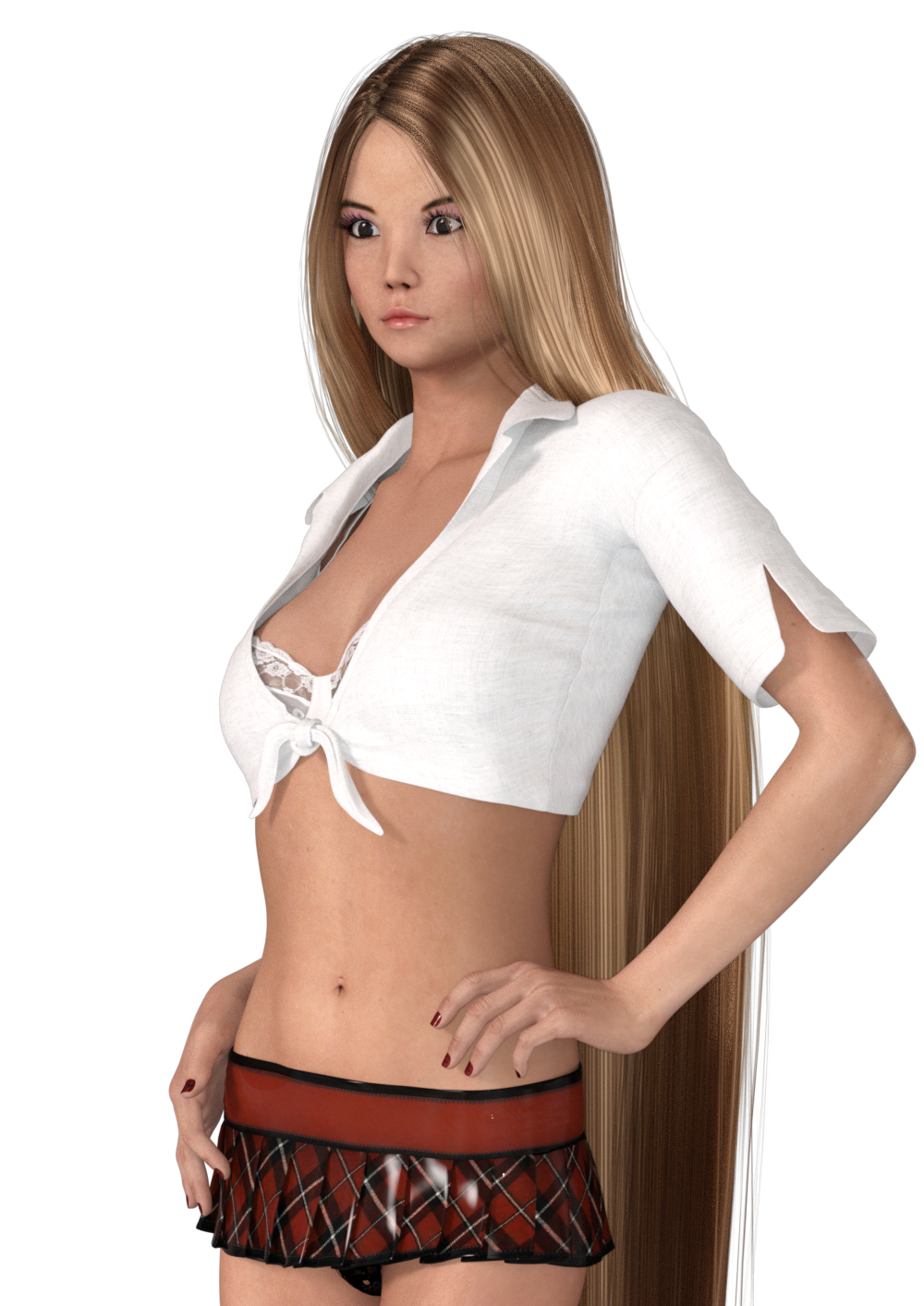
For skin is also used a G3F compartible shader.
I think conversion is quite well. However if someone have anything to ask or any suggestion feel free to post it here or contact me. :)
I really love Genesis 8!The more I use this figure and morph her the more I fall in love. I especially love how DAZ removed the useless nail bed geometry, and welded the fingernail and toenail geometry to the figure. They kept a bit of geometry under the nail tip which is absolutely what they should have done. Goodbye to those endless hours of shaping nail beds so the geometry doesn't protude through nail geometry and cause hot pixels in Octane. Now shaping fingernails and toenails are a breeze. She bends even better than Gen 3, and her facial expression detail is fantastic!! I would put a DAZ Gen 8/V8 up against any of the so called $600.00 and above professional figures found on other sites! DAZ has a huge winner here. I can't wait to see the HD morphs...I think we are well on the way to hyper realism.
Thanks again DAZ!!
Whoa - that close up of the feet looks amazing! Feet is often such a dead give away and often ruins photorealism. Is that a custom morph? Or a certain figure? It doesn't look that good on my base G8F figure.
Hey divamakeup, thanks so much! Yes, its a custom morph I made in Zbrush....it took about 15 minutes to do with GoZ. To make the same morph with Gen 3 it would have taken hours as Octane shows any poke through with overlapping geometry such as seperate fingernail and toenail geometry on the older figures. Thanks again DAZ for this fantastic new nail geometry! I totally agree about feet. They may not be the most important body part, but often times when ignored they do break the realism if they are fake looking. Another thing I noticed is sometimes HD morphs go light on foot detail because most people may not care. If you get good HD morphs such as Beauty toe (hope he releases a new version for Gen8) it goes a long way in realism. You can usually stuff feet into shoes, and not have to worry about them, but most people (women especially) wear sandles so you have to make them look real.
They turned out beautifully! You inspired me to try my own feet morph:

They didn't come out nearly as good as yours, but I think they at least look better then the default feet.
Any chance you'd share your feet morph? If not I understand. I'll just keep working on improving mine if you'd rather not share it. :)
Genesis 8: Some Stats and our ThanksThank you @nonesuch00 and @Havos ... you have given me some information to consider. I know G8 is free but I was wavering about committing to the morphs, etc., so I just wanted some impressions from those who have already used the new figure.
So it kind of boils down to natural looking bends, muscles and expressions - all welcome but I need to decide whether they are worth trying to adapt my G3F characters/clothing, etc. If I follow my usual habits I'll probably pick up all the morphs and Zev0 Add-ons gradually over a long time. To jump to the defence of the dissenters - this is the reason people feel frustrated: it takes a long time (if you have restricted funds) to build up a decent catalogue of content for any particular figure and, just when you feel you are getting there - Bang - there's a new kid on the block. Not that I would want to deny those who want the latest and greatest - I'm just questioning whether it is worthwhile for me to jump in early for a change.
I recommend playing around with the base G8F figure and seeing how you like her before deciding. I've not purchased a thing yet for G8F (though am definitely going to be getting Victoria 8) and have managed to create a few lovely characters with Redz's G3F to G8F morph tutorial. At least I think they're lovely:
... So far I'm more than happy with the figure and am looking forward to purchasing some G8F content - particularly V8 and some other recently released goodies! :)
I have to say that I actually like the look of G8. She seems more natural to me than the glamour models of the past. I will experiment but, from what I've read, the backwards compatibility only works to a point. Then I would have to start with morph transfers and pose adjustments, etc., in order to use my stock of content for G2/G3. I'm not really concerned about V8 if I can get some of my favourites transferred - Cridwen, Gwenelli and Georgia being some of those favourites. I also dial-in a lot of older characters using Zev0's aging morphs and I'm not sure they will transfer, being mostly HD.
You an use your G3F poses - you just need this: http://www.sharecg.com/v/88560/browse/21/DAZ-Studio/G3F-G8F-pose-adjust-scripts-Legs-Arms-and-Full
I did manage to transfer Gwenelli via Redz morph transfer tutorial:

I miss her HD bits. But I managed to get around that sort of by bumping up her Normal maps and Bump maps to 2.
It's still a little bit of work to transfer morphs though, so I understand if you wouldn't want to jump on the G8F train yet. :)
V8 new skin is a BIG step in the right direction, but...Huh, I didn't realize that was the issue with ears. That makes a lot of sense, thanks.
i can also imagine why, because trying to get ears to not evert when morphed is... hard
yeah and I imagine they're so thick because they need to be able to morph into dozens of alien / elf ears etc. Just a guess tho.
I really love Genesis 8!The more I use this figure and morph her the more I fall in love. I especially love how DAZ removed the useless nail bed geometry, and welded the fingernail and toenail geometry to the figure. They kept a bit of geometry under the nail tip which is absolutely what they should have done. Goodbye to those endless hours of shaping nail beds so the geometry doesn't protude through nail geometry and cause hot pixels in Octane. Now shaping fingernails and toenails are a breeze. She bends even better than Gen 3, and her facial expression detail is fantastic!! I would put a DAZ Gen 8/V8 up against any of the so called $600.00 and above professional figures found on other sites! DAZ has a huge winner here. I can't wait to see the HD morphs...I think we are well on the way to hyper realism.
Thanks again DAZ!!
Whoa - that close up of the feet looks amazing! Feet is often such a dead give away and often ruins photorealism. Is that a custom morph? Or a certain figure? It doesn't look that good on my base G8F figure.
Ooh. That reminds me, this generation I need to make some feet morphs at least for myself. I always find the defait foot shape wierd lookin (mostly because I'm so used to my own feet, which could be generously described as looking like a greek statue's)
LOL, post your morphs j cade I would love to see them! Happy morphing!
Genesis 8: Some Stats and our ThanksThank you @nonesuch00 and @Havos ... you have given me some information to consider. I know G8 is free but I was wavering about committing to the morphs, etc., so I just wanted some impressions from those who have already used the new figure.
So it kind of boils down to natural looking bends, muscles and expressions - all welcome but I need to decide whether they are worth trying to adapt my G3F characters/clothing, etc. If I follow my usual habits I'll probably pick up all the morphs and Zev0 Add-ons gradually over a long time. To jump to the defence of the dissenters - this is the reason people feel frustrated: it takes a long time (if you have restricted funds) to build up a decent catalogue of content for any particular figure and, just when you feel you are getting there - Bang - there's a new kid on the block. Not that I would want to deny those who want the latest and greatest - I'm just questioning whether it is worthwhile for me to jump in early for a change.
I recommend playing around with the base G8F figure and seeing how you like her before deciding. I've not purchased a thing yet for G8F (though am definitely going to be getting Victoria 8) and have managed to create a few lovely characters with Redz's G3F to G8F morph tutorial. At least I think they're lovely:
... So far I'm more than happy with the figure and am looking forward to purchasing some G8F content - particularly V8 and some other recently released goodies! :)
I have to say that I actually like the look of G8. She seems more natural to me than the glamour models of the past. I will experiment but, from what I've read, the backwards compatibility only works to a point. Then I would have to start with morph transfers and pose adjustments, etc., in order to use my stock of content for G2/G3. I'm not really concerned about V8 if I can get some of my favourites transferred - Cridwen, Gwenelli and Georgia being some of those favourites. I also dial-in a lot of older characters using Zev0's aging morphs and I'm not sure they will transfer, being mostly HD.
I really love Genesis 8!The more I use this figure and morph her the more I fall in love. I especially love how DAZ removed the useless nail bed geometry, and welded the fingernail and toenail geometry to the figure. They kept a bit of geometry under the nail tip which is absolutely what they should have done. Goodbye to those endless hours of shaping nail beds so the geometry doesn't protude through nail geometry and cause hot pixels in Octane. Now shaping fingernails and toenails are a breeze. She bends even better than Gen 3, and her facial expression detail is fantastic!! I would put a DAZ Gen 8/V8 up against any of the so called $600.00 and above professional figures found on other sites! DAZ has a huge winner here. I can't wait to see the HD morphs...I think we are well on the way to hyper realism.
Thanks again DAZ!!
Whoa - that close up of the feet looks amazing! Feet is often such a dead give away and often ruins photorealism. Is that a custom morph? Or a certain figure? It doesn't look that good on my base G8F figure.
Hey divamakeup, thanks so much! Yes, its a custom morph I made in Zbrush....it took about 15 minutes to do with GoZ. To make the same morph with Gen 3 it would have taken hours as Octane shows any poke through with overlapping geometry such as seperate fingernail and toenail geometry on the older figures. Thanks again DAZ for this fantastic new nail geometry! I totally agree about feet. They may not be the most important body part, but often times when ignored they do break the realism if they are fake looking. Another thing I noticed is sometimes HD morphs go light on foot detail because most people may not care. If you get good HD morphs such as Beauty toe (hope he releases a new version for Gen8) it goes a long way in realism. You can usually stuff feet into shoes, and not have to worry about them, but most people (women especially) wear sandles so you have to make them look real.
RedactedHmmm...just checked mine I had 4 tickets created and 4 are closed. However I had about 15 - 20 (in approximately 1 year's time mostly) that had been open & solved using my old eMail address. When I changed my eMail address for every online account I had due to my CC card getting stolen online DAZ 3D did not transfer my old tickets to me new email account.
Morphs from G3 to G8We are in the process of converting all our original Genesis 3 morph resource kits to Genesis 8, including the hard to transfer bits like the eyes and lashes These work on Genesis 8 directly and are set up in separate folders in the same way as the G3 versions. The original Genesis 3 versions were merchant resources for Genesis 3 only, but we will be offering the Genesis 8 versions soon in the store as merchant resources with major discounts for those who already have the Genesis 3 versions.

Beauty mate @Thorne! Please make it an escalating discount where the percentage is multiplied the more you have (like the V8 orange banner Victoria Pro Bundle escalating discounts). I own ALL of your morph kits for G3F & M, and I do not relish the prospect of repurchasing them, even at a percentage.
I'll talk to marketing, sounds like a good idea :)
Yes! That would be amazing! I own all your morphs for every character!
Morphs from G3 to G8Hey Redz -
I tried your tutorial and it worked. Thanks!
Is it possible to transfer a partial morph? I.e., the head only, or maybe an elf ear or vampire fangs? I tried your tutorial with the head morph for G3F Sushmita, and when I dialed the morph, I noticed that the body shape changed - I assume to G3... base?
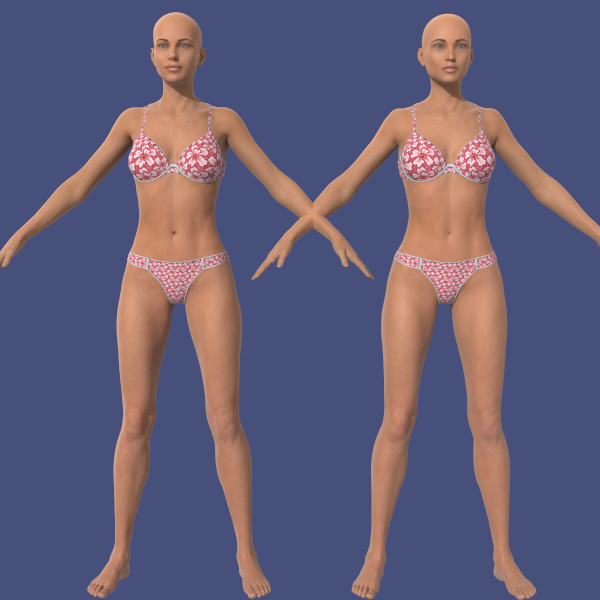
I answered my own question. I dialed up Vicki 8's body only. So this would work with any G8 body or other transferred body only morph. Here's the comparison, with Vicki 8 on the left, and G8F with Shushmita's face (G3F) and Vicki 8's body on the right.
 Morphs from G3 to G8
Hey Redz -
I tried your tutorial and it worked. Thanks!
Is it possible to transfer a partial morph? I.e., the head only, or maybe an elf ear or vampire fangs? I tried your tutorial with the head morph for G3F Sushmita, and when I dialed the morph, I noticed that the body shape changed - I assume to G3... base?
I really love Genesis 8!The more I use this figure and morph her the more I fall in love. I especially love how DAZ removed the useless nail bed geometry, and welded the fingernail and toenail geometry to the figure. They kept a bit of geometry under the nail tip which is absolutely what they should have done. Goodbye to those endless hours of shaping nail beds so the geometry doesn't protude through nail geometry and cause hot pixels in Octane. Now shaping fingernails and toenails are a breeze. She bends even better than Gen 3, and her facial expression detail is fantastic!! I would put a DAZ Gen 8/V8 up against any of the so called $600.00 and above professional figures found on other sites! DAZ has a huge winner here. I can't wait to see the HD morphs...I think we are well on the way to hyper realism.
Thanks again DAZ!!
Whoa - that close up of the feet looks amazing! Feet is often such a dead give away and often ruins photorealism. Is that a custom morph? Or a certain figure? It doesn't look that good on my base G8F figure.
Ooh. That reminds me, this generation I need to make some feet morphs at least for myself. I always find the defait foot shape wierd lookin (mostly because I'm so used to my own feet, which could be generously described as looking like a greek statue's)
I'd be interested in feet morphs or toe morphs for G8F. Would you consider putting them in the Daz store for sale (or giving them to the community). I'd be happy to pay for good realistic feet or toe morphs. :)
I really love Genesis 8!All hail blender! (and oh, my inibility to go "hey that sound doable" and not at least try) Seriosly, I didnt even have to manually select anything for this, And using grid fill meant blender automatically filled in the UVs, so there was no UVing at all. It could probably do with a morph to smooth it out, but thats super easy Seriously this took me like 20 minutes, max
If you want I can package it up tomorrow-ish? (I'm very itermittently on my computer this week)
(and yes, I did the toes too, as a seperate geograft)
Released-Keri for Victoria 8 [Commercial]Her facial morph is a mix of a custom and V8 and her body is a mix of V8 and the body morph pack for G8F. You will get a variation of her, but she won't look the same as if you had the morph pack and V8.
And thank you! The white tats are emissives, actually. XD If I get time tomorrow, I'll do a quick render of her without V8 and post it.
I really love Genesis 8!The more I use this figure and morph her the more I fall in love. I especially love how DAZ removed the useless nail bed geometry, and welded the fingernail and toenail geometry to the figure. They kept a bit of geometry under the nail tip which is absolutely what they should have done. Goodbye to those endless hours of shaping nail beds so the geometry doesn't protude through nail geometry and cause hot pixels in Octane. Now shaping fingernails and toenails are a breeze. She bends even better than Gen 3, and her facial expression detail is fantastic!! I would put a DAZ Gen 8/V8 up against any of the so called $600.00 and above professional figures found on other sites! DAZ has a huge winner here. I can't wait to see the HD morphs...I think we are well on the way to hyper realism.
Thanks again DAZ!!
Whoa - that close up of the feet looks amazing! Feet is often such a dead give away and often ruins photorealism. Is that a custom morph? Or a certain figure? It doesn't look that good on my base G8F figure.
Ooh. That reminds me, this generation I need to make some feet morphs at least for myself. I always find the defait foot shape wierd lookin (mostly because I'm so used to my own feet, which could be generously described as looking like a greek statue's)
Day 4 of Generation 8 and.......so people talk about transferring G3 morphs to G8. Does that mean the general G3 Body and Head moprhs will work? Does the same go for G3 moph vendor resoruce content?
I think so. I just transfered the G3F "Heavy" morph without any problems.
 Genesis 8: Some Stats and our Thanks
Thank you @nonesuch00 and @Havos ... you have given me some information to consider. I know G8 is free but I was wavering about committing to the morphs, etc., so I just wanted some impressions from those who have already used the new figure.
So it kind of boils down to natural looking bends, muscles and expressions - all welcome but I need to decide whether they are worth trying to adapt my G3F characters/clothing, etc. If I follow my usual habits I'll probably pick up all the morphs and Zev0 Add-ons gradually over a long time. To jump to the defence of the dissenters - this is the reason people feel frustrated: it takes a long time (if you have restricted funds) to build up a decent catalogue of content for any particular figure and, just when you feel you are getting there - Bang - there's a new kid on the block. Not that I would want to deny those who want the latest and greatest - I'm just questioning whether it is worthwhile for me to jump in early for a change.
I recommend playing around with the base G8F figure and seeing how you like her before deciding. I've not purchased a thing yet for G8F (though am definitely going to be getting Victoria 8) and have managed to create a few lovely characters with Redz's G3F to G8F morph tutorial. At least I think they're lovely:

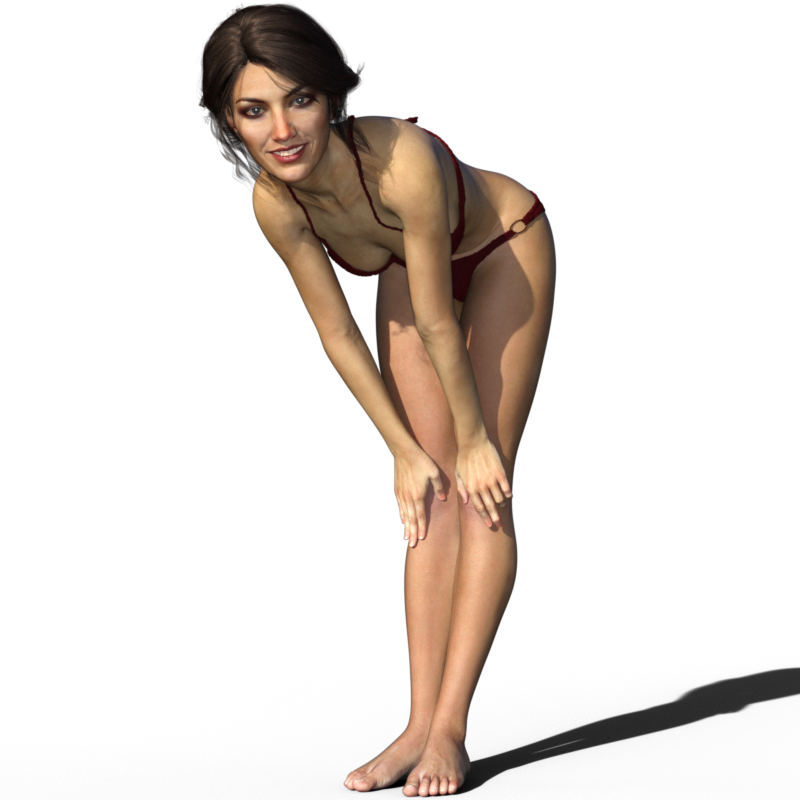
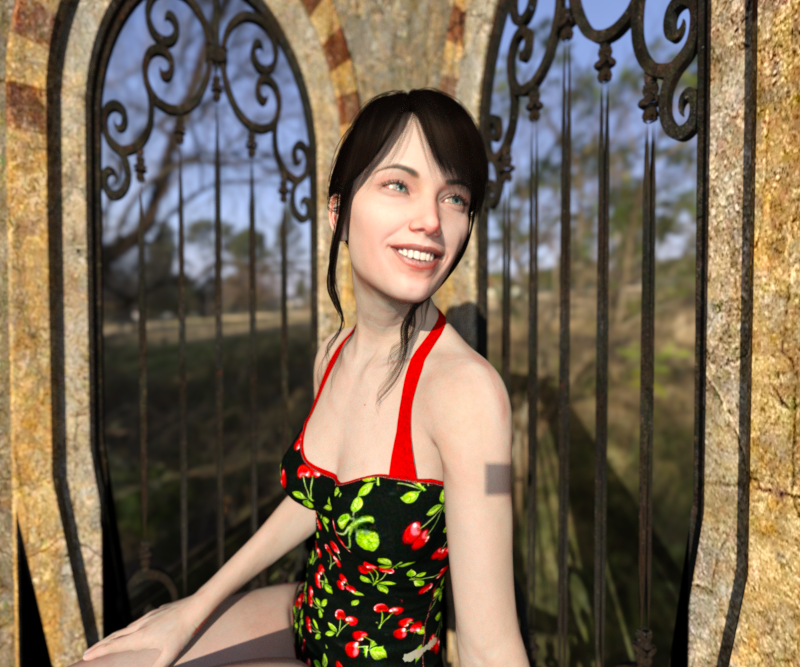
I recommend playing around with G8F first and seeing how you like it. So far I'm more than happy with the figure and am looking forward to purchasing some G8F content - particularly V8 and some other recently released goodies! :)
Daz 3D is part of

Connect
DAZ Productions, Inc.
7533 S Center View Ct #4664
West Jordan, UT 84084Licensing Agreement | Terms of Service | Privacy Policy | EULA
© 2026 Daz Productions Inc. All Rights Reserved.











