-
Run Carrara 7/7.2 Pro in Windows 10?
Wanna know more Carrara Cool Stuff?
I have a bit of a Carrara Museum going on at Dartanbeck.com's Carrara Zone
Carrara Info has a ton of categorized links to Q&A here in the forum, but there's a Whole Lot More to Explore there - just a small example being:
-
Cripeman Memorial (with video tutorial index)
And fun tips like this:
 Where to find Iradiance HDRI packs in program?
wildbillnash said:
I just bought 6 of the Iradiance HDRI packs and I have no idea how to find it unless I search for it on the content file. What I want to do if find which folder each pack is in and move them to another folder where I can easily find them. How can I do that?
UPDATE: I just found I could download the folder as a zip file so I can manually install it. But I'm not sure how to do that. Any help will be appreciated.
I only have one Iradiance HDRI pack (Sunny Sky) so I cannot duplicate your pain of keeping track of six. A few years ago I decided to clean up Daz Studio’s installs of files that I thought were either located weirdly or named strangely. What I did was to break links in many products because product files were attempting to load various assets from expected locations and with expected filenames. I ended up uninstalling and reinstalling many products. Strangely enough, Poser doesn’t care if you change names/locations of many types of files; it still puts it all together and loads a product without throwing errors.
My recommendation would be to leave the files located where they were installed by DIM. If you want to organize them in Smart Content differently than they are from the installation process, I recommend using one of the two following approaches.
-
Create a new Product or Products from the Content Library files. You can name a new Product as you wish and put files from multiple Content Library folders into a new Product. A new Product shows up in Smart Content with a default ! product icon because it does not have a reference icon image file to use yet. You can create an icon image file from a downloaded image file or a rendered image file and place that icon image file (once properly named to match the metadata dsx filename in Runtime/Support) in Runtime/Support.
-
Delete the DIM installed Product from the Content Library’s Products listing. This will remove the existing Smart Content icon. Follow the procedure in approach 1. above.
Deleting a Content Library Product does not remove any installed files from your computer.
If you want to manually install a product’s files instead of using DIM, download the zip file or files, unzip them, and then drag and drop them into your Daz Studio content library on your computer. It’s possible to left-click and drag a zipped file to your Daz Studio content library and choose Extract All. Your operating system will take care of the unzipping. I prefer to unzip first so that I can examine the unzipped files for anything that I might not want to install such as a ReadMe folder.
Gallery Ads/Popupsfrank0314 said:
WendyLuvsCatz said:
in the store now too
accept all cookies doesn't work
I submitted a ticket asking if they still want me as a customer because right now in addition to avoiding the forum I am quite happy to save my money if they don't

I just inquired about this again and they said they are still working on it.
I can get it to stop showing on Opera
but see previous post what happens if I dare wander into the forum
(which I will only do on Chrome now to be safe and to reply to posts about the forum AdSense situation, I don't intend casually browsing around here on other devices or browsers)
Gallery Ads/PopupsRichard Haseltine said:
WendyLuvsCatz said:
that's it, I am out of here
(only posting to show what your site has become, Malware city)
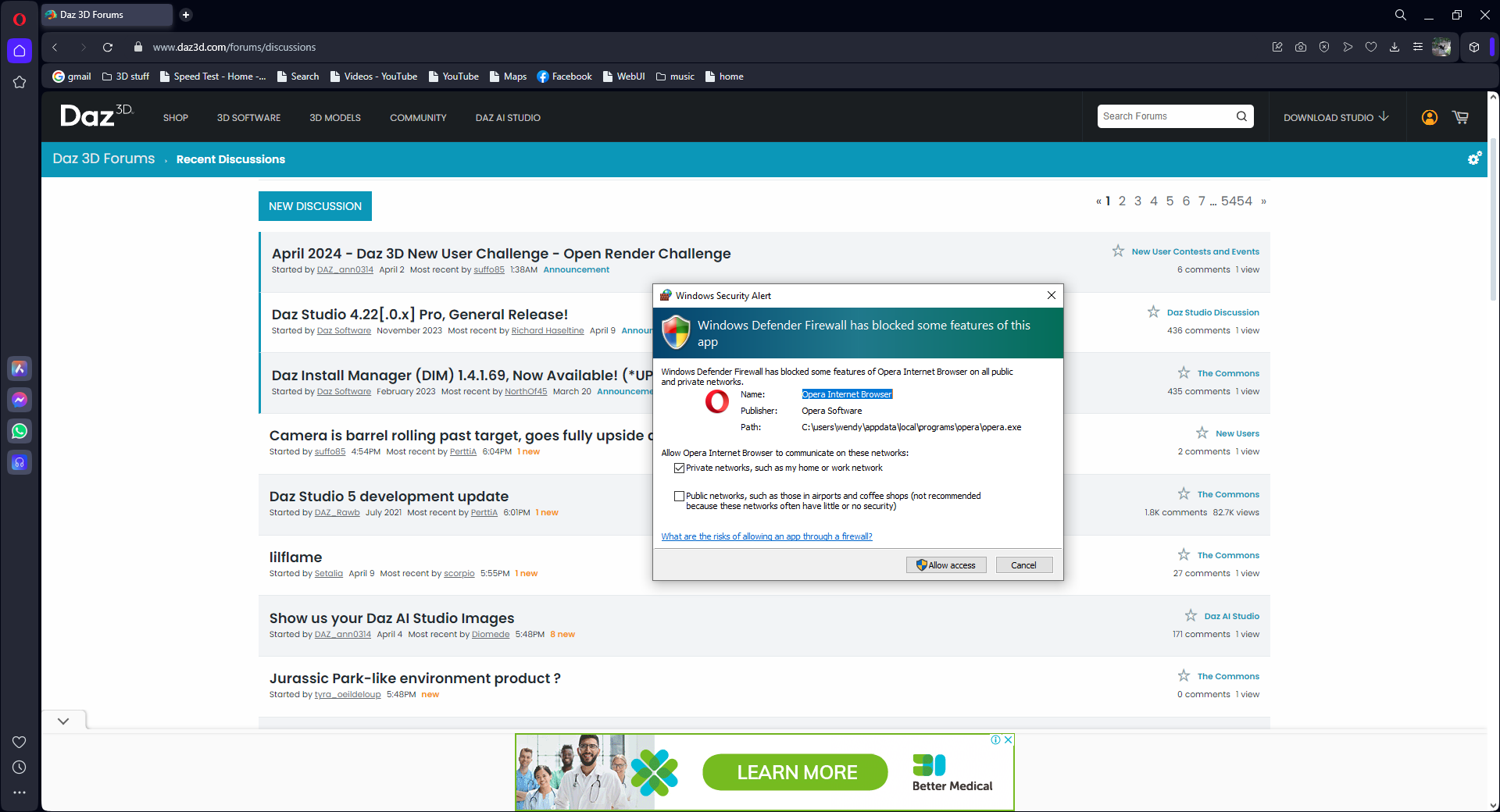
What does Windows limiting Opera have to do with Daz? The message doesn't indicate a specific issue, still less malware on the page.
the dialogue only popped up going to this forum which shows ads on it
It reacted to an Ad!!!
Gallery Ads/PopupsWendyLuvsCatz said:
in the store now too
accept all cookies doesn't work
I submitted a ticket asking if they still want me as a customer because right now in addition to avoiding the forum I am quite happy to save my money if they don't
I just inquired about this again and they said they are still working on it.
Gallery Ads/Popupshorrible ! good bye forum
Off Topic Thread #2Bunyip02 said:
Richard Haseltine said:
Bunyip02 said:
WendyLuvsCatz said:
my days on this forum are numbered
(DAZ forum not just Carrara)
now I get cookie popups accepting will not make go away
I actually don't mind ads on other sites I use, they are not intrusive like here
so blocking them was unneeded if DAZ3D had only played nice
but since they won't, I will just go away
I get the Cookie popups the first time I open DAZ website each session then again when I log in, click on the preferences and decline. It's a pain but it looks like the price of doing business with DAZ.
Don't go away, we value you !!!
Are you running ad blockers? Is your browser set to delete cookies (if you have to log in every tiem that sounds possible)?
Adblockers and Browser is set to delete Cookies on exit.
If you delete site cookies it will clear many settings, including I would think the cookie options. Cookies are not inherently malign.
lilflamescorpio said:
Leana said:
xyer0 said:
Leana said:
xyer0 said:
i'm going to wishlist the 124 items I bought from Rendo until I can think of a better solution.
I've used the daz deals add-on wishlist comment feature to tag them as "bought at Rendo" for now.
Good idea, but I need something I can see in Shop view or her Vendor page as well.
I agree, but it's better than nothing.
edit: actually I just discovered that if you add a comment with a "+" (eg "+Rendo") it becomes a tag which is visible in shop lists! It doesn't seem to work in search results but that's already quite good.
But unfortunately the Dealz add-on is a paid for subscription, not everyone can afford it.
Some features of Daz Deals add-ons require a subscription, but not all, and whishlist comments is a free feature.
lilflameLeana said:
xyer0 said:
Leana said:
xyer0 said:
i'm going to wishlist the 124 items I bought from Rendo until I can think of a better solution.
I've used the daz deals add-on wishlist comment feature to tag them as "bought at Rendo" for now.
Good idea, but I need something I can see in Shop view or her Vendor page as well.
I agree, but it's better than nothing.
edit: actually I just discovered that if you add a comment with a "+" (eg "+Rendo") it becomes a tag which is visible in shop lists! It doesn't seem to work in search results but that's already quite good.
But unfortunately the Dealz add-on is a paid for subscription, not everyone can afford it.
Camera is barrel rolling past target, goes fully upside downI've seen a few posts around about this, one dated back to even 2012. I haven't seen a solution though, outside of parenting the camera.. but my camera *is* parented..
My camera is pointing at Null 1, and my camera is parented to Null 2.
When moving Null 2 in a straight line past Null 1, my camera does a barrel roll like it's an F-14 fighter jet airplane instead of just, ya'know, turning....like a sane person would imagine it would do....
How can I stop this roll effect and get my camera to just turn when moving it past the target it's Pointing at?
EDIT -> Had made a .gif of this happening and tried to attach that here but apparently it won't play on this forum. So here's 3 stills instead.
Gallery Ads/Popupsin the store now too
accept all cookies doesn't work
I submitted a ticket asking if they still want me as a customer because right now in addition to avoiding the forum I am quite happy to save my money if they don't
Off Topic Thread #2I can still use Firefox on iPad unhindered but honestly sick of playing browser Jenga just to use this forum
so taking a break, I am conceding defeat. as DAZ doesn't care about Carrara users in particular anyway
I do and will still use it while I can but also use a diverse number of other softwares
I will still check in on iPad until that too gets compromised by Ads
Off Topic Thread #2Richard Haseltine said:
Bunyip02 said:
WendyLuvsCatz said:
my days on this forum are numbered
(DAZ forum not just Carrara)
now I get cookie popups accepting will not make go away
I actually don't mind ads on other sites I use, they are not intrusive like here
so blocking them was unneeded if DAZ3D had only played nice
but since they won't, I will just go away
I get the Cookie popups the first time I open DAZ website each session then again when I log in, click on the preferences and decline. It's a pain but it looks like the price of doing business with DAZ.
Don't go away, we value you !!!
Are you running ad blockers? Is your browser set to delete cookies (if you have to log in every tiem that sounds possible)?
Adblockers and Browser is set to delete Cookies on exit.
Rendo migrations and the risk of duplicate purchasesFabiana said:
Hello everyone!
I want to come and drop som lines for the interest and easy life :)
None of the products that were migrated from my Renderosity store to Daz store in this promotion from yesterday was changed, or edited, or modified at all: They are the same, so as I said in another forum post, if you already have them, you are safe and owning the latest file.
I will make very sure to put it clear if some of those get an update or a re-version to fit newer figures.
I don´t think there is away to have records here of what you bought at any other given place. I myself do what other commenters here explained, before to buy.
As was said above too, I kept the names and images as they were from start so it is less confusing.
I am here if someone needs more info or help, I would gladly answer!
Thank you so much for the interest!
Fabi
I really appreciate you keeping the same name/similar pictures. I could have sworn some were just g3 on Rendo that go updated to g8 as well on Daz. Looking forward to being able to just buy your products on Daz instead of using Content Wizard to import and doing it semi-manually :D
Marahzen's Musings on Creating Characters (and other matters)It occurs to me that for the possible benefit of anyone else who wanders across my ramblings and wants to see more conversation about the subject of FaceGen/Face Transfer/etc, I should include some of the other Daz forum threads I've been involved in, in addition to the FT2 thread mentioned above. Surely there's others, but here are ones I found in my bookmark list:
https://www.daz3d.com/forums/discussion/597876/face-transfer-on-genesis-9#latest
https://www.daz3d.com/forums/discussion/381026/facegen-vs-face-transfer-vs-headshop-12-pros-cons#latest
https://www.daz3d.com/forums/discussion/571066/face-transfer-so-much-better#latest
https://www.daz3d.com/forums/discussion/623396/can-any-facegen-users-help-me-here#latest
https://www.daz3d.com/forums/discussion/621496/face-transfer-unlimited-g8-expressions-morphs#latest
https://www.daz3d.com/forums/discussion/351636/is-there-a-face-transfer-thread#latest
https://www.daz3d.com/forums/discussion/421111/artbreeder-and-prototyping#latestGallery Ads/Popupsfrank0314 said:
namffuak said:
The 'NEXT' link does not show anything when I roll over it - so I clicked it. It took me to read 247chatter com - and I didn't click on anything there, so I don't know if it was selling or talking about the mass of unrelated items that showed up.
@frank0314 - any link that does not mention a product or service or the web site it links to is not an ad; at best, it is click bait, at worst it is an attempt to get us to a malware installation site. In any case, these unidentified links are completely unacceptable and Daz needs to inform the agency providing them that these are grounds for terminating the contract.
This may be Daz's forum, but it is my computer, and I will not tolerate these being sent to me.
They removed those 2 ads so in theory you shouldn't get them again, barbult. If you guys get any other let us know, please.
I'll keep an eye out for it, but really, this whole ad thing is very off-putting. I don't spend much time here now.
Gallery Ads/Popupsnamffuak said:
The 'NEXT' link does not show anything when I roll over it - so I clicked it. It took me to read 247chatter com - and I didn't click on anything there, so I don't know if it was selling or talking about the mass of unrelated items that showed up.
@frank0314 - any link that does not mention a product or service or the web site it links to is not an ad; at best, it is click bait, at worst it is an attempt to get us to a malware installation site. In any case, these unidentified links are completely unacceptable and Daz needs to inform the agency providing them that these are grounds for terminating the contract.
This may be Daz's forum, but it is my computer, and I will not tolerate these being sent to me.
They removed those 2 ads so in theory you shouldn't get them again, barbult. If you guys get any other let us know, please.
Gallery Ads/Popupsnamffuak said:
The 'NEXT' link does not show anything when I roll over it - so I clicked it. It took me to read 247chatter com -
You're braver than I am !!
If I saw a ridiculous pop-up like that I would never click on it, plus since the site that was displaying it to me appeared to be on the sketchy side (otherwise they wouldn't show that stuff) so I would never go back to that site or forum. How many customers have you lost, Daz?
Contacting vendorsDaz does support on the PA products, so you will need to submit a ticket. If the PA posts to the forum you can see if there is a commercial thread on the product so you can PM them.
Hot New (Northern) Season, New Sales Thread: Report Issues Here "Reporting Only"NorthOf45 said:
Tomhip said:
Some items listed under Lilflame in store search show up with "Page not found" error.
https://www.daz3d.com/freestyle-outfit-for-genesis-8-females
https://www.daz3d.com/dforce-boyfriend-boxers-for-genesis-8-and-8-1-female
I see the same, but you can actually add them to your cart, so it is likely just a URL error.
ETA: Add https://www.daz3d.com/little-holiday-nook to that list
"Outline for Genesis 3 Female" keeps trying to redirect to https://www.daz3d.com/outline-ii-for-genesis-3-females then back to https://www.daz3d.com/outline-for-genesis-3-females -> ERR_TOO_MANY_REDIRECTS
Checking on this. Thank you for reporting it.
Daz 3D is part of

Connect
DAZ Productions, Inc.
7533 S Center View Ct #4664
West Jordan, UT 84084Licensing Agreement | Terms of Service | Privacy Policy | EULA
© 2026 Daz Productions Inc. All Rights Reserved.