-
Problem with the morphs - The figure becomes small
Did you make sure that all of the morphs, transforms and poses where zeroed except for the single morph that you are trying to export?
everything that is not at zero will come back in as part of your morph.Problem with the morphs - The figure becomes smallHi. I have a problem with the morphs. I have tried to create the Morphs but I can not find the form. I have done the following:
1 - I took the base Genesis 3 (Male) and put the figure with the right eye closed (I use pose controls).
2- I export it with low resolution as OBJ.
3 - Then I use the Morph Loader and I load the OBJ file with the eye closed.
4 - The problem is that when I apply the morph and slide the bar my figure becomes small.
Which is the error?
Thanks.
Reasons not to rush into Genesis 8...I have to agree. Besides "realistic" characters there was a wide variety of toon and creature shapes as well a fit clones which has not been seen since. I'd like to see G8 work with say, Sadie or Mavka without using GenX/GenX2/GenX3
AMEN to that! I think Genesis is still my favorite generation because I could use the whole slew of morph shapes on either M ot F and clothes the same way.I think to truly find a place of backwards compatibility we need to be able to work with our content with out converters. I have GenX and am tempted to move everything back to Genesis to make that the MOST versatile character ever.
Genesis (1) will likely always be my favorite. When I first started w/ Daz, V3/M3 were the big deals, but I liked A3/H3, and only reluctantly used V3/M3. When M4/V4 came out, I don't think I picked them up until after H4/A4 came out as well. Took me awhile to get around to Genesis once D|S4 came out, but once I did, I couldn't get enough! One of my favorite things about Genesis was how I could use the same clothes for males and females, which was especially handy for uniforms. It was hard (and really annoying) wanting to have males and females dress the same across the board, because men would have these really practical suits of armor or tactical gear, and women would always bare their midriffs (just asking to be gutted) and wear high heels (snap that ankle!). Since I mainly use Daz to illustrate the stories I write, and the majority of my characters are sensible, I was always having to swap out footwear for the same one pair of flat boots, lol.
On top of that, it's way easier to make families using Genesis. I can make a daughter look like her dad by using maybe 25% M4 morph on Genesis where he uses 100%. I think that's probably what I miss the most from future Genesis incarnations. If I was using a custom morph for Mother Dearest, like, say, Anabelle, I could just turn that down a bit and add in some appropriate male morphs to make her son resemble her. And, of course, my shapeshifters appreciate the freedom. I mean, I get why they didn't continue with it (in a word: boobs), but things like Fit Control and various smoothers basically made up for that. I wonder: would there be a way to just update the original Genesis so that it has the new morphs and fits the clothes easily? I've been wanting to get GenX (etc.) for a looooooooooooooong time, now, but I never seem to catch it on sale, and whenever I think I'll get it, some other sale is on so that I can get hundreds of dollars worth of stuff for $30...
Reasons not to rush into Genesis 8I saved out the GF8 surfaces as shader presets so that I could easily apply them to other figures. Of course ain't going to bother with trying a likely fail like trying to transfer the facial changes back to Genesis 3, Genesis 2, and Genesis (Genesis is where I'd like to really see all or most of the G8 improvements transfered too).
I agree get it all back to Genesis! And I have bought some really great packages for G2 & G3, but feel limited to the Male or Femal version. To mix all fo it together into ONE AWESOME BASE that has the versatility that the original Genesis carried would ROCK IT ALL!
You cannot do it. The most of beauty of G8 expressions come from HD morphs and they're tied to mesh and base meshes are very different between 1 and 8. It's better to convince some PA with access to HD tool to make a set of HD expressions for Genesis 1. Predatron did it for Genesis 3 and it was cool job :)
Edit: You can get even better expressions with Genesis 1 as it's facial mesh has more details :)
Morphs from G3 to G8Just to see if I could do it, I transferred Elijah 7 to G8F. I transferred the skin maps with map transfer. The tif normal maps were transferred to jpg, so I'm sure there was some loss there. The pose is a G3M pose with the free pose converter applied. The shoulder bend looks a littly wonky, but everything else looks OK to me. Hands and fingers look good. I didn't transfer eye or mouth textures.
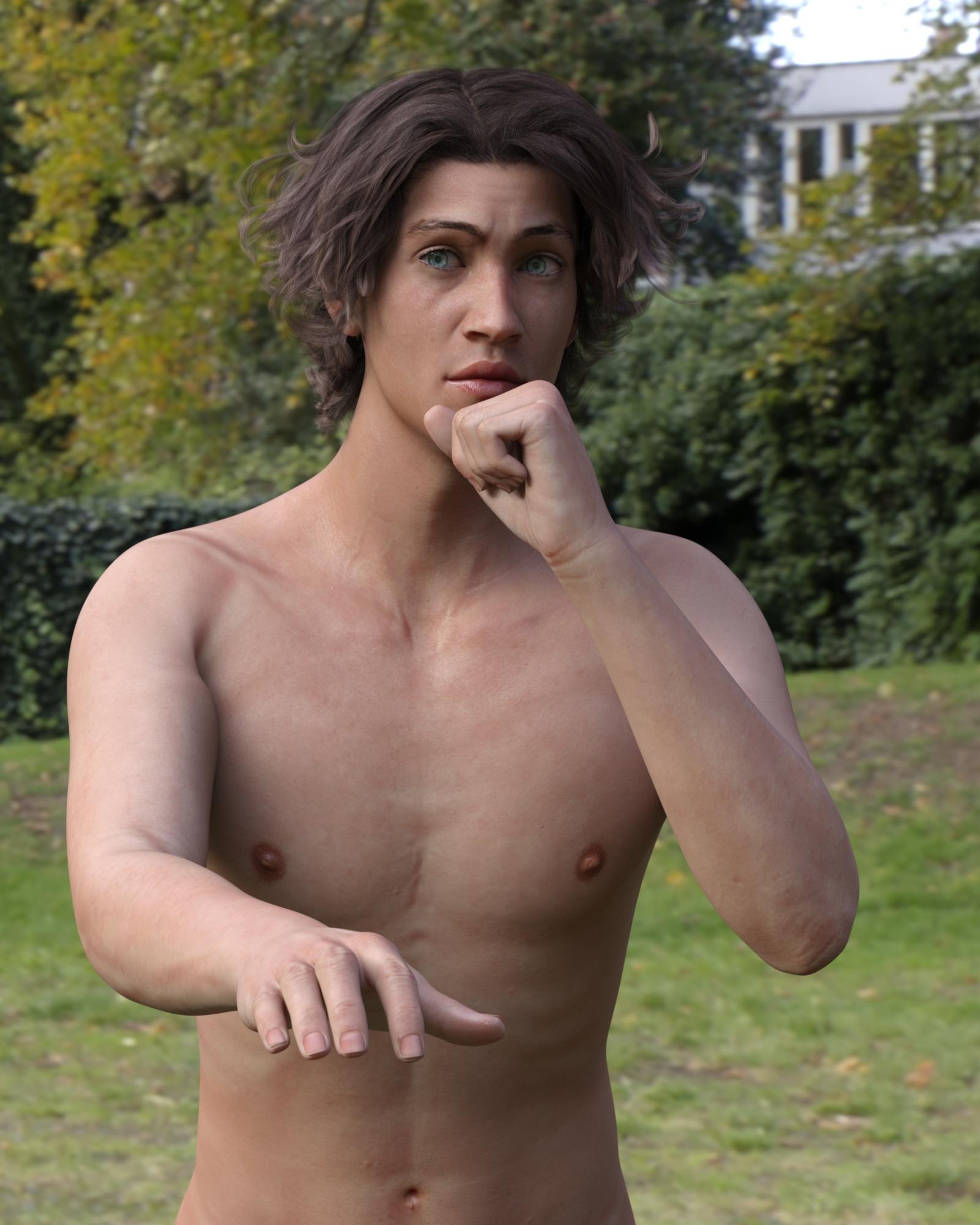 Reasons not to rush into Genesis 8
I saved out the GF8 surfaces as shader presets so that I could easily apply them to other figures. Of course ain't going to bother with trying a likely fail like trying to transfer the facial changes back to Genesis 3, Genesis 2, and Genesis (Genesis is where I'd like to really see all or most of the G8 improvements transfered to).
I'll have to do that. The skin materials aren't half bad. I applied them to G3F earlier and ended up putting together a scene and rendering it. There are two versions, the postwork free version is a good representation of the skin, but could be a better finished image, and the postworked version, which is a bit more dramatic. Drama first:
Blue

Click here to view the gallery page with larger image and full list of products used.
And here's the postwork free version:

Click here to view the larger image.
Show Us Your Iray Renders. Part VII got distracted when I was getting ready to transfer some G3F morphs over to G8F... and applied the G8F materials to the G3F. Just good old copy and paste, eveything but the eyelashes. (Could have done those as well, but I'd already deleted them...) The lips were too pale and shiny, so I tweaked the parameters and added in a bit of color using Skin Builder 3. The fingernails were more difficult. Ulimately, I turned off Top Coat and set refraction to .30, along with lowering glossy and increasing roughness. Because I wanted to share how well, (or not,) it turned out, I didn't tweak the parameters any further.
Here's the original finished render:
Click here to view the larger image.
And here is the finished work, after using Viveza from the NIK Collection:
Blue
Click here to view the gallery page with larger image and full list of products used.
Genesis 8 PowerPose templates are encrypted (.dse). Seriously?So no external facial mocap software can work on them either in DAZ studio.Use FBX to transfer motion. I don't know if iClone can export animations in FBX format thou :) MoBu works great.
yes but OMG the mess you get importing them into DAZ studio and no animatied pose saved from one will work on the original, I have tried numerous ways even going into Carrara first and exporting as Dazcollada which does bring Carrara native rigging into D|S and V4 etc
Genesis 8 PowerPose templates are encrypted (.dse). Seriously?So no external facial mocap software can work on them either in DAZ studio.Use FBX to transfer motion. I don't know if iClone can export animations in FBX format thou :) MoBu works great.
Clothing item changes figure textures?This is probably something simple that the more experienced artists know all about, but it has me stumped.
I am trying to fit the pants from the Vigilante outfit to a custom G3 character with morphs applied to her feet. When I add the pants to the figure, they seem to make part of the figure's shins invisible.
It's not the whole calf though - if I manually toggle visibility on the shins, a small part visible in the ankle area appears and disappears. But where the figure's shins would disappear into the pantlegs if the morph were not applied, there is nothing of the shins visible. The feet of the figure look like they are cut off just above the ankle.
Do clothing items generally alter the transparency of the underlying figure? I'm not even sure where I would look to tweak this.
Genesis/Genesis 2 characters in Carrara - inconsistent behaviorHi all,
So, I just went through some trial and error to make sure I wasn't going crazy, and it appears I'm not.
I'm going through Phil W's Carrara basics videos, and have been following through the bit about using DAZ Characters.
As I'm trying to follow, I've had to close and start a new scene several times because something would go wonky with the character in some way. Sometimes things wouldn't work correctly, sometimes they wouldn't work at all, sometimes they'd work just fine - and always with me using exactly the same approach. Sometimes clothing is applied properly, sometimes it isn't. I'm doing it as Phil does in the video, selecting the character and dragging the item over to the character model name in the scene list.
In one case, the clothing loaded fine, but refused to morph to the character shape.
In another attempting to morph it (via the 'General' tab when the clothing item is selected) caused Carrara to crash.
Another time, it said it couldn't do it, or that some kind of error had occurred.
Another time it worked just fine.
One time, I was unable to use any face morphs because everything but Neck and Head disappeared from the list.
Started a new scene, used the same character and clothing.. and it was fine.
Tried it a third time, and Carrara crashed.
I've been able to apply hair, but not hair color.
I've been able to change eye colors, but not make-up.
And so on... It just seems to be behaving very erratically, despite me using the same processes and items/clothes/etc.
I'm using items that appear in 'Smart Content', which I *assume* means they're compatible with the figure I have loaded, yet there's very erratic, hit-or-miss behavior when applying them.
Can anyone shed some light on why this might be happening?
Appreciate it.Morphs from G3 to G8I got my first elf ears done. Argghhhh! One down, 154 more to go and that's just G3F.
Did you catch my last response about the ears? If they are on G3F, there is a very simple method to get them over to G8F. Same goes for head/face morphs that are dependant on just a single dial.
Here are the steps
1. Load and zero G3F
2. Load and zero G8F
3. Favourite all the ear/face/head morphs you wish to transfer. If you're in edit mode on parameters, you can search 'ears', select multiple morphs, right click and add them all to favourites at once.
4. In the scene tab, go to Assets, transfer utility and use the settings in the picture. Source G3F, Target G8F. Leave item shape at default. Do NOT select any clone (or it will alter the body too). Uncheck everything except Morph Targets - From Source - Favourites. Click Accept.
5. Select G8F and find your transferred morphs. I find it easiest to add them to favourites so I can batch edit them.
6. On the parameters tab in edit mode, multiple select your new morphs, right click and enable limits. Right click again and set limits min 0. If they are ear morphs you may want to right click and disable autofollow so they won't distort hairs.
7. If they are just ear morphs you can save your morphs as morph assets at this point. If you have transferred full head morphs with this method, you will need to adjust rigging to shape and ERC freeze so the facial rigging is correct, then save as morph asset.
Notes: This method won't work for shapes dependant on multiple dials, eg Izabella 7 and Teen Josie 7's head morphs. It works because the head shapes are virtually identical between G3F/G8F. This is not the case for body morphs, and transferring using the default clone results in finger/arm deformities. It also won't transfer full characters. The tutorials get better results for body morphs, but for a large number of ear/head shapes that are already on G3F, the transfer utility is definitely your friend.
Ummm.... minor detail, Redz. I'm not sure what version of DAZ Studio that screen shot came from, but I'm on 4.9.4.117 and the From Source drop-down box in the Extended Options isn't there anymore. I tried clicking on everything and nothing would activate the Extended Options. See screenshot.
You have to highlight "Morph Targets." The right side display is context senstive to what is selected on the left.
Morphs from G3 to G8I got my first elf ears done. Argghhhh! One down, 154 more to go and that's just G3F.
Did you catch my last response about the ears? If they are on G3F, there is a very simple method to get them over to G8F. Same goes for head/face morphs that are dependant on just a single dial.
Here are the steps
1. Load and zero G3F
2. Load and zero G8F
3. Favourite all the ear/face/head morphs you wish to transfer. If you're in edit mode on parameters, you can search 'ears', select multiple morphs, right click and add them all to favourites at once.
4. In the scene tab, go to Assets, transfer utility and use the settings in the picture. Source G3F, Target G8F. Leave item shape at default. Do NOT select any clone (or it will alter the body too). Uncheck everything except Morph Targets - From Source - Favourites. Click Accept.
5. Select G8F and find your transferred morphs. I find it easiest to add them to favourites so I can batch edit them.
6. On the parameters tab in edit mode, multiple select your new morphs, right click and enable limits. Right click again and set limits min 0. If they are ear morphs you may want to right click and disable autofollow so they won't distort hairs.
7. If they are just ear morphs you can save your morphs as morph assets at this point. If you have transferred full head morphs with this method, you will need to adjust rigging to shape and ERC freeze so the facial rigging is correct, then save as morph asset.
Notes: This method won't work for shapes dependant on multiple dials, eg Izabella 7 and Teen Josie 7's head morphs. It works because the head shapes are virtually identical between G3F/G8F. This is not the case for body morphs, and transferring using the default clone results in finger/arm deformities. It also won't transfer full characters. The tutorials get better results for body morphs, but for a large number of ear/head shapes that are already on G3F, the transfer utility is definitely your friend.
Ummm.... minor detail, Redz. I'm not sure what version of DAZ Studio that screen shot came from, but I'm on 4.9.4.117 and the From Source drop-down box in the Extended Options isn't there anymore. I tried clicking on everything and nothing would activate the Extended Options. See screenshot.
Scaling TransferHi guys, anyone know an easy way to pass scaling infor from one figure to another? I'd like to to move AMR's scaling sliders to G8F, but for some reason the transfer utility doesn't move those to it. Could be my settings...
Morphs from G3 to G8Which morphs are you attempting to transfer? Eye morphs are going to be tricky because the eye geometry has changed between G3 and G8. If the morphs affect only the face/ears I recommend you use the transfer utility method I described a few posts ago (it was about ear morphs but applies to any face morphs)
Hi Redz. I'm only trying to move eye morphs over. Specifically I need these morphs to recreate a character I had created for g3: Eyes arched, Eyes lower middle A, Eyes outer height, Eyes slant in. Alternatively I considered turning her into a character that includes all the morphs and trying to move the entire character over to g3. I just can not remember how to save the entire character. Really if I could do the entire body and face that would be best, but it was built on a g7 body so that may be out.
Who said Blender was hard?There's only one thing to learn: How to move a vertex/verticies. Because if you do anything other than move them, you'll break the vertex order, and the morph won't load.
This depends on what one is trying to accomplish with Blender. It is true with creating morphs, as mentioned. However, Blender is also used for importing from DAZ to use the powerful animation and post effect tools for instance.
Is it possible to import figures from DAZ Studio and animate them in Blender? I guess I'm thinking about scenes more than individual figures because they need to interact with each other and the environment. I was under the impression that most of the export options from DAZ Studio to Blender lose the rigging but, then, I really don't know much at all so my impressions could be way off base.
I am one of those who only use Blender to create morphs - mostly to fit or move clothing. I use the sculpt tools and, occasionally, the proportional edit. I also use the Video Sequence Editor for creating movies from my image sequences from the DAZ Studio timeline. I don't use the Teleblender script because, to be frank, I don't see the point. It could take hours to tweak the materials for Cycles and for what? To end up with a similar quality render to the one I could have produced with IRay in 20 minutes?
So I'd love to explore the animation or soft body physics capabilities of Blender but only if it doesn't mean starting with a Genesis 3 shaped piece of digital clay and going through all the rigging, weight mapping, etc., etc., that would take months to learn.
Yes, you can. I don't know how. As I understand it, however, JCMs and MCMs will not be carried over. Blenders function of shape keys and Daz morphs don't have a format of exchange that I'm aware of. You can still transfer them, but you'd have to do it manually. Unless something exists I don't know about.
As far teleblender goes, the basic code would, indeed, but a time waster, unless you are happy with default materials it creates for cycles.
However, teleblender has two options that mitigate this somewhat. The first involves rewriting some code in the python, and is what I use at present. The second, probably more reasonable, method involves the fact that the teleblender code can load previously saved materials. The instructions for doing so are on the mcj site somewhere, I forget where. This is one of those things I know how to do, but thinking about explaining is giving me fits.
Anyway, the answer to question of why you'd bother: Depends on you need. There are some things Iray does better than Cycles. OTH, there are things Cycles does better than Iray. (there's a reason Poser Superfly is a port of Cycles. It's good at what it does.)
Then there's this: Which, frankly, Iray can't do.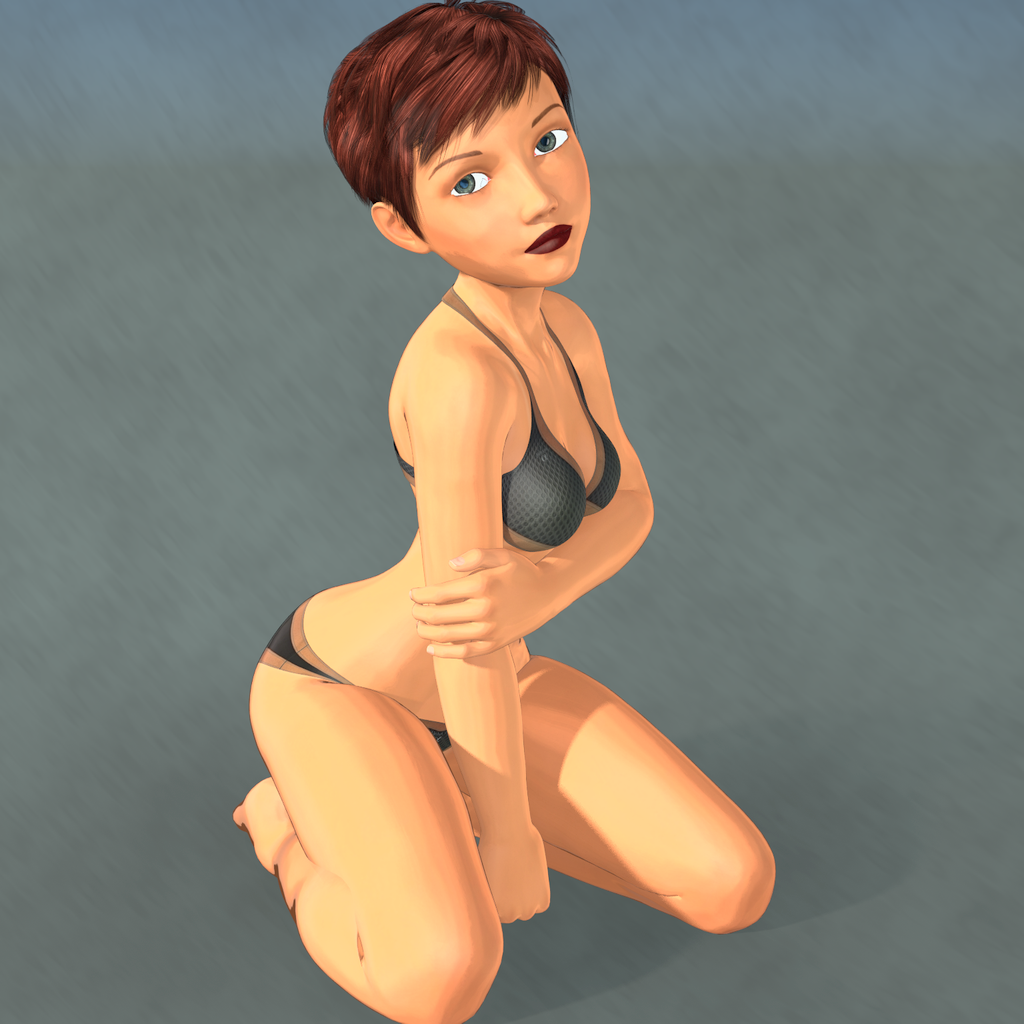
(That's Genesis 8, BTW) Obviously, you choose the tool that serves your need. If Cycles can't do anything (or do it better) you need that Iray can't, you've no real use for Cycles.Quite nice job of it too.
Morphs from G3 to G81. I noticed Ears didn't work. I need my elf ears. I've got dozens of elf ears, all the way back to V3. I've already pulled my favorites from V4 into G3F but I couldn't even morph my clone with Izabella's ears. How do I get the ears in?
2. There's been some discussion about head morphs and how you have to use the vertex editor in order to save them. Does that apply to head-only morphs? Like SickleYield's Faces of Asia, etc.?
3. If I create a custom G3F with a whole bunch of partial morphs, you know - dial the eyes, the nose, the mouth, pear shaped hips, give her fangs, what wever. Can all that be transferred as a complete morph?
4. How do I save Favorites? I'd love to have to the morphs that I use the most available with one click every time I load a character (or at least the base characters).
By the way, Dimension-3D has some awsome DUF editor tools - one's called DSON Edit and the other is Morph Organizer. You'll probably want to wait for a sale on those but they're super useful.
It's usual for ear morphs that autofollow is disabled (so the hair doesn't deform around them.) In this case you'll need to enable autofollow on the morphs you wish to transfer. The autofollow won't apply until you unfit your G8 clone (right click and fit to none) then refit the clone to the donor figure and the ears should work.
This method is ideal for transferring custom dialled characters because you are basically transferring the entire shape as a single morph. That's also why you may get some unwanted vertex changes when transferring individual head/body part morphs.
You may find the transfer utility method better for individual head/body part morphs, as the transfer utility doesn't transfer the base figure shape. In fact if you use the transfer utility method, to get the exact shape of a character, you would need to dial in the donor figure's clone. (though that has it's own problems)
I don't think there's a way to save favourites. I wish there were.
Ack! I think it's time to crank up my source-code editor and other tools and just hack all the files at one time. This could get time-consuming.
And, of course, they're compressed. Google said something about a batch decompress tool in DS? I can't find anything except DSF Toolbox in the store. The OP made it sound like something built into DS.
Do you have an unzipping tool? I use 7zip - you can run it on a compressed .dsf or .duf and it will uncompress it for you - it won't work on encrypted files like .dse (for obvious reasons) and I've run into a few other files it won't do, but for morphs files it's generally fine.
Yes, I have 7Zip. Do I need to rename the files to .zip?Sorry I missed this question yesterday (I had to go out between my post and yours), but I see Singular Blues has given you a very full response (thanks to SB for that!) I don't rename, like SB said I just let it create a file without a suffix and edit that. I used this process to transfer all the 200-Plus-Head-and-Face-Morphs for G3F to G3M (before the G3M version came out).
Yeah, those are on my list, too. I love those morphs. But I think I've bought them at least 3 times.
Who said Blender was hard?There's only one thing to learn: How to move a vertex/verticies. Because if you do anything other than move them, you'll break the vertex order, and the morph won't load.
This depends on what one is trying to accomplish with Blender. It is true with creating morphs, as mentioned. However, Blender is also used for importing from DAZ to use the powerful animation and post effect tools for instance.
Is it possible to import figures from DAZ Studio and animate them in Blender? I guess I'm thinking about scenes more than individual figures because they need to interact with each other and the environment. I was under the impression that most of the export options from DAZ Studio to Blender lose the rigging but, then, I really don't know much at all so my impressions could be way off base.
I am one of those who only use Blender to create morphs - mostly to fit or move clothing. I use the sculpt tools and, occasionally, the proportional edit. I also use the Video Sequence Editor for creating movies from my image sequences from the DAZ Studio timeline. I don't use the Teleblender script because, to be frank, I don't see the point. It could take hours to tweak the materials for Cycles and for what? To end up with a similar quality render to the one I could have produced with IRay in 20 minutes?
So I'd love to explore the animation or soft body physics capabilities of Blender but only if it doesn't mean starting with a Genesis 3 shaped piece of digital clay and going through all the rigging, weight mapping, etc., etc., that would take months to learn.
Yes, you can. I don't know how. As I understand it, however, JCMs and MCMs will not be carried over. Blenders function of shape keys and Daz morphs don't have a format of exchange that I'm aware of. You can still transfer them, but you'd have to do it manually. Unless something exists I don't know about.
As far teleblender goes, the basic code would, indeed, but a time waster, unless you are happy with default materials it creates for cycles.
However, teleblender has two options that mitigate this somewhat. The first involves rewriting some code in the python, and is what I use at present. The second, probably more reasonable, method involves the fact that the teleblender code can load previously saved materials. The instructions for doing so are on the mcj site somewhere, I forget where. This is one of those things I know how to do, but thinking about explaining is giving me fits.
Anyway, the answer to question of why you'd bother: Depends on you need. There are some things Iray does better than Cycles. OTH, there are things Cycles does better than Iray. (there's a reason Poser Superfly is a port of Cycles. It's good at what it does.)
Then there's this: Which, frankly, Iray can't do.
(That's Genesis 8, BTW) Obviously, you choose the tool that serves your need. If Cycles can't do anything (or do it better) you need that Iray can't, you've no real use for Cycles.Morphs from G3 to G8As I mentioned in my original post about ERC way back on page 3 or 4, you do not individually edit files. The use of FAR (or similar mass file editor) is implied to be mandatory. I admit, it isn't, but who wants to manually edit 40 files? The head and body morphs alone have something like 1000 items that have to be changed. (FAR tells you how man edits it makes to each file when you run it.) So, I suppose you can edit files by hand, but why?
Oh, no! I had no intention of editing one at a time. I have a source code editor that can do search & replace across file folders without even loading them. I was trying to avoid the tedious process of having to manually click each morph into Daz studio and turn auto-follow on. Unfortunately that option wasn't in the file which meant manually adding it to every single file. It's nice to have an explanation. There's so much I don't understand about the inner workings of Daz studio. Thanks.
Oh, that. Adding entries to a Daz file is tricky but it can be done using FAR. Of course, what Redz told you to do is much easier but here's how you would do it with brute force editing.
First you make a backup of the character's morph folder. That way, if you break it, you can just overwrite what you broke. You would then somehow isolate all the files you want to change. There will be a method for doing this simply in my tut, but I'n not going into that now. I'm going into this because it won't be in the tut.Now, the Daz file is particular about how things are formatted, so you get your files ready for FAR (or FAR ready for your files but I don't recommend that). Then you search for this string:
",
                "value"
This should populate all of the files in your group that do not have Autofollow turned on. Once you have that, you replace with this string:
",
                "auto_follow" : true,
                "value"
Mass editing to add something is a case of figuring out where that thing goes, if it always looks the same, and what the file looks like when it's not there. You then search in FAR for a string matching not-there and replace with is-there.
Even the most careful exploration might lead you to overlook something else that might be changed by your search and replace, and that's why you always backup your morphs before you begin, or create a copy of the files you want to change, and work on them separately. (Which is what the tut will do.) Always have a backup before committing rocket srgery on anything in you data folder. Yep, sounds just like programming. I know all about backups. I found auto-follow by looking in a morph file that I knew had it set. The overlooking part is what had me worried.G8f Breast Morphs break autofitted clothes
Greetings,
I show a few attempts to resolve something like that in this post about one of the outfit releases. Typically I have to use the Hexagon bridge (File | Send to Hexagon), rotate the scene so I can see the cracking part, select the object, click the UV & Paint tab, select the 'Soften Tool', and then...well, as weird as it sounds, just rub the magic dot along the underbreast 'teeth' to smooth them out. Once you've done it enough that the chest area of the clothing seems relatively clean looking, you can go to File | Send to DAZ Studio to send it back.
It'll automatically create a morph, you just give it a name (I usually use 'Foo Correction' where Foo is the character I'm adjusting for), put it somewhere in the heirarchy (I usually use Actor/Adjustments or Actor/Morphs), make sure you switch 'reverse deformations' to 'Yes', and go ahead and create the morph. Now go to Parameters / {whatever path you stored the morph at} and dial it up to 100%. It should dial in the change you made in Hexagon.
Someday I'll upload a video to Youtube of me going through the process. I fix a LOT of clothes that way, both autofit and native clothes that don't conform right. Young characters, especially, end up getting weird chest deformation that makes textured t-shirts look awful and have to be fixed up, but breast tweaks can also cause problems.
-- Morgan
Daz 3D is part of

Connect
DAZ Productions, Inc.
7533 S Center View Ct #4664
West Jordan, UT 84084Licensing Agreement | Terms of Service | Privacy Policy | EULA
© 2026 Daz Productions Inc. All Rights Reserved.