-
How can import facs from daz as arkit blendshapes into blender?
Diffeomorphic includes a tool to convert morphs to shapekeys, this way the daz FACS can be converted for Arkit. What Richard explains is true but that is an inherent issue with Arkit, or facial shapekeys in general.
Whatever happened to Crosstalk?so clicking on Transfer Active morphs didn't fix it?
Did you try a smoothing modifier too?
you want to apply a morph to V4?
she is Unimeshexport an obj of M4 and use morphloader
as to what happened to Crosstalk
you are using DAZ studio
try Poser
SaveGuard: Ultimate Scene Saver for Daz Studio Win 64 v1.2Artini said:
Yes, Persona system looks to me like https://www.daz3d.com/wardrobe-helper
https://www.daz3d.com/forums/discussion/714031/wardrobe-helper-commercial#latest
but maybe it is not.
Yup, quick scan and looks like another preset-maker, or similar to Persona.
Just want to make sure it is underlined, that the difference or importance of Wearables Manager is about whatever you have on any character (not preset driven), click script and it's all stripped and put to side until you want to put on again, then click 2nd script to redress.
Main benefits are for (1) way faster posing/animating and (2) morph-making to Hex (and maybe other apps ?).
Because this scripts works so fast and well, it's actually useable in a production environment.This script reminds me of other 3d environments where features made by 3rd parties are way advanced compared to base program.
One such addon is ComfyUI and you need to install the whole Manager separately. Like why is that not included today so long after it appeared?
Sure the reasons vary from addon to addon, but still to be celebrated when base programs faciltate or encourage ADVANCED addon-creation more readily, and not just low-medium bolt-ons.Whatever happened to Crosstalk?Do the clothes actuall have the right morphs? If so then crosstalk will trigger them, as long as they have the correct names. If not then you need the Transfer Active Morphs command to project morphs into the clothing - which is what DS has doen for a fair while. If the scenes were set up in Poser then it is possible that they triggered the accidental cross-talk in Poser but not the deliberate cross-talk in DS.
Whatever happened to Crosstalk?Ron Knights said:
I guess you don't understand what I meant. I was talking about Crosstalk that happened 25 years ago.
I just wondered if Crosstalk had been "solved" I don't work with those particular characters any more.
AFAIK that was the Poser workaround for Transfer Active Morphs in DAZ Studio pro
likewise buying magnet fits
DAZ studio does those natively
There's Always Another Sale Thread -- Discussions Only Pt 5That morph kit looks useful! It's now on my wishlist (along with a few more morph kits).
I got https://www.daz3d.com/labrador-for-daz-dog-8 (even though I don't have DAZ dog 8... yet) and https://www.daz3d.com/sci-fi-battle-outfit-for-genesis-8-females...both strongly contested by plants. :D
Whatever happened to Crosstalk?did you try selecting the figure and right click or under edit transfer active morphs?
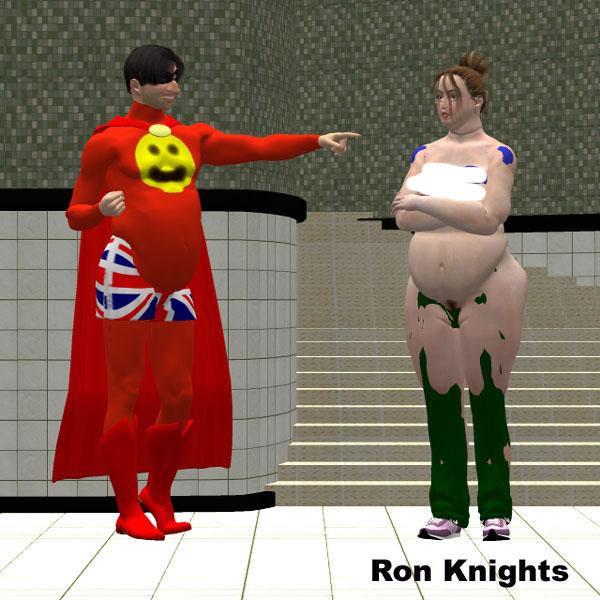
Whatever happened to Crosstalk?I remember sometime around 2000 I created my first version of Marlin Fingle, (based on Michael 1). He was a rather absurd, "portly" character with a huge nose.
I posed him together wtih my first version of Jill Chill (based on Victoria 1). The result was explosive. Jill took on Marlin's portly size.
I remember doing "surgery" on Michael 1. I eliminated every morph except a newly created "Marlin" morph.
Over the years I decided to use the default Michael's body size, but keep the huge nose. I lost track of Crosstalk.
I know Crosstalk had some benefits. It allowed clothes to follow the morphs of your character.
Whatever happened to Crosstalk? Is it still around?
I censored this pic because Jill's nipples were showing!
 There's Always Another Sale Thread -- Discussions Only Pt 5
yesterday https://www.daz3d.com/dforce-1920s-evening-gown-outfit-textures
today https://www.daz3d.com/genesis-8-male-head-morph-resource-kit-2
I will likely grab more texture sets for stuff I own if the selection stays the same as there are no outfits or sets I want, maybe more morphs or a character
free is free so certainly not disappointed, I mostly pass on buying textures so plenty to choose fromEnglevinge Monokini G8F(Images Removed by mod)
A model of an angel wing-themed monokini style ladies' swimsuit, rigged in DAZ Studio for Genesis 8/8.1 Female. 2648 polys. A good assortment of Iray materials are included, as well as some shaders that allow for various degrees of transparency simulating thread weave. NB: the material files included are shared with my various other swimsuit models.
NB: There is a special adjustment morph for the front side strings below the breasts called "BB Strings" that will work with the smoothing modifier to help the strings have a more natural appearance with much larger or smaller breasts from the default morph. You may also want to tinker with the Push/Offset modifier in some cases.
Download: RenderHub (login required)
Download: Google Drive
The new "blender to Daz plugin"Azure Thessian said:
Matt_Castle said:
Azure Thessian said:
Does this plugin work as a reverse bridge back to DAZ when you first export G8 figure using DAZ Bridge to Blender?
As a general thing, I would say "no".
While yes, you can export a figure to Blender with the bridge, then get the figure back into Daz Studio, you turn it into a stand-alone figure by doing so, losing most of the benefits of the Genesis base.
When creating a character morph, you will normally instead want to use OBJ exports and the built-in Morph Loader Pro in order to load your edits as a morph.
Cases where you would want to export G8 back and forth using the bridges are going to be pretty niche and going to involve needing to do edits that change the geometry or skeleton that would prevent it then being able to be a morph on the standard G8 figure.
Thank you for the answer.
Shame it doesn't work like that (exporting back all the rigs and stuff which were imported into Blender in the first place). For morphs I prefer my old 2022 ZBrush bridge. I doesn't work with strand-hair, but it simplifies creating morphs enormously.
I was thinking about actually really Sub-D the figure. DAZ Sub-D in Parameters tab doesn't actually increase number of polys/verts to morph with MeshGraber.
Yes, Mesh Grabber only works on Base mesh. Even if you export the figure with High Resolution and sculpt in Blender, you're not able to bring the HD morph back to DS without Multi-Resolution plugin for Morph Loader Pro which is only available for PAs.
Help me understand the calculation for Toon outline visibilitymmdestiny said:
crosswind said:
I don't have solid answer (maybe Daz team can well explain it...), but you can check my experiment in this post : https://www.daz3d.com/forums/discussion/comment/8909406/#Comment_8909406 not sure if it applies for all cases.
In my test cases, increasing thickness as well as adding SubD on borders with Thickener plugin always work on my side ~~
Does Thickener blow up rigging and weights? That's my biggest headache that keeps me from fixing some of these things by hand - going back to C4D just to extrude an edge means I have to re-transfer the rig and make all the adjustments again.
Using Thickener is usally the final step before rendering. It thickens the figure as per the settings and converts the figure into a Prop so as to give the clothing much better / more natural looking (you know lots of Daz clothing items are just like "paper thin"...)
So, there's no rigging / weight on the thickened Props. The plugin mostly serves a rendering purpose... and the thickened Props can be freely deleted from the scene at anytime as needed ~
The new "blender to Daz plugin"Matt_Castle said:
Azure Thessian said:
Does this plugin work as a reverse bridge back to DAZ when you first export G8 figure using DAZ Bridge to Blender?
As a general thing, I would say "no".
While yes, you can export a figure to Blender with the bridge, then get the figure back into Daz Studio, you turn it into a stand-alone figure by doing so, losing most of the benefits of the Genesis base.
When creating a character morph, you will normally instead want to use OBJ exports and the built-in Morph Loader Pro in order to load your edits as a morph.
Cases where you would want to export G8 back and forth using the bridges are going to be pretty niche and going to involve needing to do edits that change the geometry or skeleton that would prevent it then being able to be a morph on the standard G8 figure.
Thank you for the answer.
Shame it doesn't work like that (exporting back all the rigs and stuff which were imported into Blender in the first place). For morphs I prefer my old 2022 ZBrush bridge. I doesn't work with strand-hair, but it simplifies creating morphs enormously.
I was thinking about actually really Sub-D the figure. DAZ Sub-D in Parameters tab doesn't actually increase number of polys/verts to morph with MeshGraber.
Help me understand the calculation for Toon outline visibilitycrosswind said:
I don't have solid answer (maybe Daz team can well explain it...), but you can check my experiment in this post : https://www.daz3d.com/forums/discussion/comment/8909406/#Comment_8909406 not sure if it applies for all cases.
In my test cases, increasing thickness as well as adding SubD on borders with Thickener plugin always work on my side ~~
Does Thickener blow up rigging and weights? That's my biggest headache that keeps me from fixing some of these things by hand - going back to C4D just to extrude an edge means I have to re-transfer the rig and make all the adjustments again.
UV Map Has Changed For Graft (Resolved)Hey guys,
I hope everything has been treating you well and you are ready for the holidays.
Even though I've been a daz user for a long time, I have never had something like this happen before.
One of the third party grafts I have seems to have an issue. A couple months ago, the last time I used it, everything was fine.
Now the UV has changed anytime I load a new version of it. If I load my old save file, the UV is correct on the asset but even if I transfer it from the genesis it is on to a new genesis, the map changes.
I have never encountered this issue before.
Model : Genesis 8 Male
Asset : 3rd Part Gen Geograft
Problem : UV Map Incorrect, used to work, now does not.
Here is what the UV should look like, I believe this is the same for most gen assets.
When I load a new instance of this graft though, I get 1 of 2 different UV's it's random I feel like when it gives me one or the other however both are incorrect.

I just need to somehow get the UV to display correctly again so I can get back to work. Seems like it's probably going to be something simple that got changed somewhere along the way but I just don't know what that can be.
Thank you in advance for any help and I hope you all have some blessed holidays.The new "blender to Daz plugin"Azure Thessian said:
Does this plugin work as a reverse bridge back to DAZ when you first export G8 figure using DAZ Bridge to Blender?
As a general thing, I would say "no".
While yes, you can export a figure to Blender with the bridge, then get the figure back into Daz Studio, you turn it into a stand-alone figure by doing so, losing most of the benefits of the Genesis base.
When creating a character morph, you will normally instead want to use OBJ exports and the built-in Morph Loader Pro in order to load your edits as a morph.
Cases where you would want to export G8 back and forth using the bridges are going to be pretty niche and going to involve needing to do edits that change the geometry or skeleton that would prevent it then being able to be a morph on the standard G8 figure.
[SOLVED] After using Transfer Utility Template, a bunch of unused, 0% body shapes are savedmmdestiny said:
crosswind said:
There's no inter-dependency, so yes, you can delete them.... just like you never transferred the morph targets, as long as you gave them no default value on the main item.
Edit: However, you can keep cbs files... if you'd like to, as they're corrective morphs that're better than default Auto Follow ones ~~
Thank you crosswind.
No problem !
[SOLVED] After using Transfer Utility Template, a bunch of unused, 0% body shapes are savedcrosswind said:
There's no inter-dependency, so yes, you can delete them.... just like you never transferred the morph targets, as long as you gave them no default value on the main item.
Edit: However, you can keep cbs files... if you'd like to, as they're corrective morphs that're better than default Auto Follow ones ~~
Thank you crosswind.
[SOLVED] After using Transfer Utility Template, a bunch of unused, 0% body shapes are savedmmdestiny said:
crosswind said:
That's because Daz provided lots of morphs (body morphs from Daz Originals as well as PBMs, etc.) within the projection template(s) ~~ For instance, you can check the template of Bodysuit Loose in : your Daz Library\data\DAZ 3D\Genesis 9\Base\Tools\Projection Templates\G9 Bodysuit Loose\Morphs\Daz 3D\Base
If you don't want to have those morphs transferred, you either can replicate the template to a new one and delete the morphs that you don't want (in fact some partial body morphs are really useful...)... How to create a projection template with a Category, pls check: https://www.daz3d.com/forums/discussion/comment/9257551/#Comment_9257551
or just simply uncheck Morph Targets > From Projection Template option in Transfer Utility when rigging the clothing ~~ (screen shot 1) In this way, no morphs will be transferred ~~
Since they're already transferred and I did some work on the objects I don't want to have to replicate, can I simply delete those 0% morphs from the project's Base folder, or will that create dependency warnings?
There's no inter-dependency, so yes, you can delete them.... just like you never transferred the morph targets, as long as you gave them no default value on the main item.
Edit: However, you can keep cbs files... if you'd like to, as they're corrective morphs that're better than default Auto Follow ones ~~
[SOLVED] After using Transfer Utility Template, a bunch of unused, 0% body shapes are savedcrosswind said:
That's because Daz provided lots of morphs (body morphs from Daz Originals as well as PBMs, etc.) within the projection template(s) ~~ For instance, you can check the template of Bodysuit Loose in : your Daz Library\data\DAZ 3D\Genesis 9\Base\Tools\Projection Templates\G9 Bodysuit Loose\Morphs\Daz 3D\Base
If you don't want to have those morphs transferred, you either can replicate the template to a new one and delete the morphs that you don't want (in fact some partial body morphs are really useful...)... How to create a projection template with a Category, pls check: https://www.daz3d.com/forums/discussion/comment/9257551/#Comment_9257551
or just simply uncheck Morph Targets > From Projection Template option in Transfer Utility when rigging the clothing ~~ (screen shot 1) In this way, no morphs will be transferred ~~
Since they're already transferred and I did some work on the objects I don't want to have to replicate, can I simply delete those 0% morphs from the project's Base folder, or will that create dependency warnings?
Daz 3D is part of

Connect
DAZ Productions, Inc.
7533 S Center View Ct #4664
West Jordan, UT 84084Licensing Agreement | Terms of Service | Privacy Policy | EULA
© 2026 Daz Productions Inc. All Rights Reserved.