-
Hitoshi Sensei by Mechasar... AMAZING!
function said:
Mechasar said:
Hi there!
Thank you Rkane_1! I'm glad you like it, guys.
Hello Mechasar, I have a question on your product - Hitoshi Sensei HD for Genesis 8 Male, the old man's teeth is rare, how can I add some teeth for him?
I tried to slide the Hitoshi Sensei bar to 0 in the Shaping, he then goes back to normal G8M, and his teeth is full, but I don't know how to keep those full teeth when slide to 100% Hitoshi Sensei, please help. Thanks.
I apologize for the delayed reply, but without a tag it’s hard for me to find requests. So, Hitoshi’s character doesn’t come with an opacity map for the teeth, the entire mouth is part of the head morph, teeth included. This means that trying to reposition his teeth won’t achieve anything except distorting the whole character. But the great thing about DAZ Studio is that you can always find out-of-the-box solutions. So, follow the steps below and you’ll be able to easily fix old Hitoshi’s teeth.
If you’ve already installed the Genesis 9 model, you’ll know that the inside of the mouth is a separate mesh, then proceed like this:- Load a basic Genesis 9 model in your scene, then attach the Genesis 9 Mouth and apply its basic material (that is because the mouth material is a hierarchical preset, and it wouldn’t work without loading the model first).
- Delete the Genesis 9 model from the scene but keep the Genesis 9 Mouth attachment.
- Load Hitoshi Sensei, and put his teeth opacity value to zero in the 'Surface' pane.
- Move and scale the Genesis 9 Mouth using the following parameters:
- Genesis 9 Mouth
- Y translate: -19.92
- Z translate: -0.76
- X scale: 124.9
- Z scale: 99.4
- Genesis 9 Mouth/Head
- Bend: -7.32
- Genesis 9 Mouth/Head/Upper Teeth
- X scale: 99.2
- Y scale: 104
- Genesis 9 Mouth/Head/Lower Teeth
- Y translate: 0.097
- Z translate: 0.63
- X scale: 99
- Z scale: 102.2
- Genesis 9 Mouth
- Load a second Genesis 9 Mouth, copy and paste the same parameters of the first Genesis 9 Mouth on it (also copy and paste the materials too).
- Parent one Genesis 9 Mouth to the Hitoshi’s ‘Upper Teeth’ bone, the other one to the ‘Lower Jaw’ bone, but make sure the ‘Parent item in place’ option has been checked first (‘Scene’ pane, right click on it, then select the ‘Parenting’ options).
- in the 'Scene' pane, turn off the visibility of the lower teeth of the Genesis 9 Mouth parented to Hitoshi's upper teeth, then turn off the visibility of the upper teeth of the other Genesis 9 Mouth parented to Hitoshi's lower jaw.
- Select both Genesis 9 Mouth, go to the ‘Surfaces’ pane, then put the values of the ‘mouth’ opacity to zero (this will make only the teeth visible, while hiding the gums).
At this point, dear Hitoshi should be sporting a bright, shiny smile ;)
Unwanted JCMs1. File bug reports. I personally think you should name the characters so when people search the forums about faulty character they will find this thread.
2. Two options to fix
- Option 1: Non-permanent solution. Identify any JCMs which shouldnt be active under 'currently used'. Disconnect/unlink the faulty JCMs so they are no longer controlled by their drivers, and set them to zero, as per what Crosswind described here: https://www.daz3d.com/forums/discussion/comment/9359131/#Comment_9359131
- Option 2: Permanent solution. Update controllers via the Property Heirarchy and resave the updated modifier assets so they overwrite the originals (may want to take backup first if you are worried).
- Parameters > Preferences > Show Hidden Properties
- Paramaters tab > go into Edit Mode (right click a parameter and choose Edit Mode)
- Parameters tab > Find the faulty JCM > Right click > Show in Property Heirarchy
- Property Heirarchy tab > Go to Controllers> Stage 2
- Drag over the character's Body morph from Parameters tab into the Property Heirarchy tab Multiply slot
- File > Save As > Support Asset > Save Modified Assets (or you can manually save out indiidual Modifier Asset(s) to relevant content library)
Again, this is vendor's job.
Morph for "Cookie" and "Chip" charactersIs there a daz3d or poser morph to make the "Cookie" and "Chip" characters look de-toonified?
In other words look realistic or only slightly stylised but still able to wear all of the Cookie and Chip clothes?
There could be halfway stages of stylisation.
There could be a whole semi-toon world of partly realistic characters where slightly stylised Cookie meets slightly stylised Genesis 9.
Daz Studio 4 Scene Tools 4 - Morph ToolsI am using this product https://www.daz3d.com/daz-studio-4-scene-tools-4--morph-tools in DS 4.24.0.3. There are no instructions for this product other than what is in the product description and promo images. I am continually having problems with these tools. I am trying to use it on LowPi. The product description does not say there are any limitations to what it is used on, so LowPi should be fine.
- I load LowPi and run the tool "Check object vertex symmetry". It responds that "LowPi has symmetrical geometry using a tolerance of 0.001 cm." OK, that looks pretty good to me.
- I select any LowPi body or head morph in the Parameters pane and run the tool "Check Morph Symmetry". It responds that "Geometry is not sufficiently X-symmetric to evaluate." When I click OK, it says an error occurred. When I look at the DS log file, it says:
2025-11-28 20:48:09.163 [INFO] :: Loading script: N:/DAZ 3D/Studio/My DIM Library/Scripts/3D Universe/Scene Tools 4/Scene Tools 4 - Check Morph Symmetry.dse
2025-11-28 20:48:56.746 [WARNING] :: Script Error: Line 296
2025-11-28 20:48:56.746 [WARNING] :: SyntaxError: Invalid return statement.
2025-11-28 20:48:56.746 [WARNING] :: Stack Trace:
So, the tool crashed. I tried lots of different LowPi morphs and always got this error. But the previous tool told me the LowPi was symmetrical using a tolerance of 0.001, so if that is not symmetric enough to test its morphs for symmetry, what is good enough, and why would this just crash to tool? This tool has so far been useless. -
The tools talk about morph X-symmetry. That is strange and confusing, because figure morphs are symmetric around the Y axis (symmetric left to right) not around the X axis (front to back). I think the tools are really implementing symmetry around the Y axis, but calling it "X-Symmetric", because the X axis runs left to right. That terminology doesn't follow the Daz standards of referring to the axis of symmetry, though (e.g. the DS Symmetry tool). I just found this non-standard terminology a frustrating impediment to trying to understand the product.
-
I'll submit a help request about the tool crash, but I haven't had good luck with getting fixes to verified 3D Universe product bugs in the past.
Request #482688
Check Morph Symmetry crashes Scene Tools 4 - Morph Tools
[Solved] Simple way to limit morph area of effectYou can do it, but if the morph chnages the overall shape then the morphed hands will not line up with the unmorphed arms (or wherever you put the transition). You will also need to redo any joint adjustments or corrective morphs. You will also lose any HD details as we don't have the toold for creating those.
[Solved] Simple way to limit morph area of effectHi! So I want to know if there is a relatively simple way to limit morph effect area. For example, if I like how the character hands look and want to apply the character morph only to hands.
I know I can export and do that in some external software, but that's quite complicated, so I want to be able to do that within the Studio.
I know that morphs are essentialy the movement of the polygon vertices, and DAZ supports polygon selection, so I don't see technical limitations here, so maybe there already is a tool for that which I've just missed?
DAZ custom character creation servicesHello! Can someone recommend a top daz character artist, that can create a hyperrealistic Genesis 9 character based on reference images? With head morph, body morph, eyebrows, expressions, makeup options, skin textures etc.
Whatever happened to Crosstalk?richardandtracy said:
Crosstalk in Poser was a programming fault that was used beneficially to create an easy way for the clothes follow the figure pose/morph. The existence of the fault was proven by the fact all characters recieved the same morph.
DAZ Studio has implemented a pretty strict object oriented approach to its dataset - just look at the scripting help files to get an idea of how data is obtained from the data objects only through pre-defined methods that hide a large part of the object data. As a result, the data objects only know about the object above and possibly below them in the tree, and only know a limited amount about the objects attached to them. Consquently, they will not know anything about another branch in the tree and cannot the affected by anyhing in that branch. So, in actual practice: 'Nothing has been done about cross talk' in DS, because crosstalk just wasn't possible in the first place.
I'm not quite sure what you are saying here, but I think it is not entirely correct. Daz was certainly aware of, and wanted to support, fitted items picking up the values of matching morphs on the base figure and took care to implement it as a feature rather than an exploit.
As for whether it has been fixed in Poser, I'm afraid I don't know. It would have required a complete re-vamp of the way the character & clothing data was stored in Poser. As it was an error, it needed to be fixed, and I imagine it has been fixed since the V1/M1 days. I can't recall having problems with it when I had P4 and was using V3 - but I didn't use P4 a great deal, it has to be said, because DS 0.7.x.x came out not long after I bought P4 and it was more capable and FREE.
Regards,
Richard
Daz directory confusionThe first issue I see in your setup is that you have nested content directories: both "C:/Daz 3d/Appplications/Data/DAZ 3d" and "C:/Daz 3d/Applications/Data/Daz 3D/My Daz 3D Library" are listed as DS content directories, and that can cause problems.
What do you have in "C:/Daz 3d/Appplications/Data/DAZ 3d"?Secondly, it seems you used several different installation tools to instal the same content multiple times (G8 starter essentials and the G8 morphs, for example)
- C:/Daz 3d/Applications/Data/Daz 3D/My Daz 3D Library looks like the default path used by Daz Central
- C:/Users/Public/Documents/My Daz 3D Library is the default one used by DIM
- E:/Daz3d/My Daz Connect Library would be for content you install via Connect (directly from within DS)
Since items are installed multiple times it's wasting space and there are likely old versions of some products in one directory and updated versions in another.
For the record, if a product is installed both via Connect and via DIM, the Connect version will be the one used, so if you updated the DIM version DS likely will ignore the update.
Morphs are a special case: DS will look in all content directories listed and load all morphs it can find (not sure how it handles finding multiple versions of the same morph though).
Another thing you should know is that Connect can't install plugins, and complex script products often don't work properly when installed via Connect. So for scripts and plugins it's recommended to useWhatever happened to Crosstalk?Crosstalk in Poser was a programming fault that was used beneficially to create an easy way for the clothes follow the figure pose/morph. The existence of the fault was proven by the fact all characters recieved the same morph.
DAZ Studio has implemented a pretty strict object oriented approach to its dataset - just look at the scripting help files to get an idea of how data is obtained from the data objects only through pre-defined methods that hide a large part of the object data. As a result, the data objects only know about the object above and possibly below them in the tree, and only know a limited amount about the objects attached to them. Consquently, they will not know anything about another branch in the tree and cannot the affected by anyhing in that branch. So, in actual practice: 'Nothing has been done about cross talk' in DS, because crosstalk just wasn't possible in the first place.
As for whether it has been fixed in Poser, I'm afraid I don't know. It would have required a complete re-vamp of the way the character & clothing data was stored in Poser. As it was an error, it needed to be fixed, and I imagine it has been fixed since the V1/M1 days. I can't recall having problems with it when I had P4 and was using V3 - but I didn't use P4 a great deal, it has to be said, because DS 0.7.x.x came out not long after I bought P4 and it was more capable and FREE.
Regards,
Richard
How can import facs from daz as arkit blendshapes into blender?Diffeomorphic includes a tool to convert morphs to shapekeys, this way the daz FACS can be converted for Arkit. What Richard explains is true but that is an inherent issue with Arkit, or facial shapekeys in general.
Whatever happened to Crosstalk?so clicking on Transfer Active morphs didn't fix it?
Did you try a smoothing modifier too?
you want to apply a morph to V4?
she is Unimeshexport an obj of M4 and use morphloader
as to what happened to Crosstalk
you are using DAZ studio
try Poser
SaveGuard: Ultimate Scene Saver for Daz Studio Win 64 v1.2Artini said:
Yes, Persona system looks to me like https://www.daz3d.com/wardrobe-helper
https://www.daz3d.com/forums/discussion/714031/wardrobe-helper-commercial#latest
but maybe it is not.
Yup, quick scan and looks like another preset-maker, or similar to Persona.
Just want to make sure it is underlined, that the difference or importance of Wearables Manager is about whatever you have on any character (not preset driven), click script and it's all stripped and put to side until you want to put on again, then click 2nd script to redress.
Main benefits are for (1) way faster posing/animating and (2) morph-making to Hex (and maybe other apps ?).
Because this scripts works so fast and well, it's actually useable in a production environment.This script reminds me of other 3d environments where features made by 3rd parties are way advanced compared to base program.
One such addon is ComfyUI and you need to install the whole Manager separately. Like why is that not included today so long after it appeared?
Sure the reasons vary from addon to addon, but still to be celebrated when base programs faciltate or encourage ADVANCED addon-creation more readily, and not just low-medium bolt-ons.Whatever happened to Crosstalk?Do the clothes actuall have the right morphs? If so then crosstalk will trigger them, as long as they have the correct names. If not then you need the Transfer Active Morphs command to project morphs into the clothing - which is what DS has doen for a fair while. If the scenes were set up in Poser then it is possible that they triggered the accidental cross-talk in Poser but not the deliberate cross-talk in DS.
Whatever happened to Crosstalk?Ron Knights said:
I guess you don't understand what I meant. I was talking about Crosstalk that happened 25 years ago.
I just wondered if Crosstalk had been "solved" I don't work with those particular characters any more.
AFAIK that was the Poser workaround for Transfer Active Morphs in DAZ Studio pro
likewise buying magnet fits
DAZ studio does those natively
There's Always Another Sale Thread -- Discussions Only Pt 5That morph kit looks useful! It's now on my wishlist (along with a few more morph kits).
I got https://www.daz3d.com/labrador-for-daz-dog-8 (even though I don't have DAZ dog 8... yet) and https://www.daz3d.com/sci-fi-battle-outfit-for-genesis-8-females...both strongly contested by plants. :D
Whatever happened to Crosstalk?did you try selecting the figure and right click or under edit transfer active morphs?
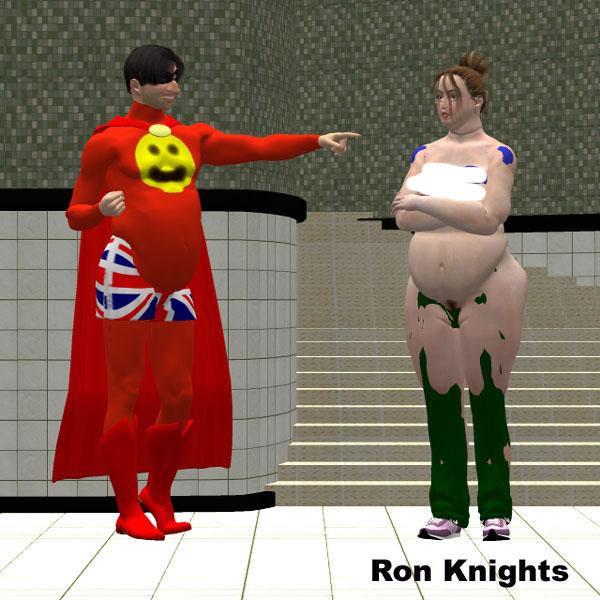
Whatever happened to Crosstalk?I remember sometime around 2000 I created my first version of Marlin Fingle, (based on Michael 1). He was a rather absurd, "portly" character with a huge nose.
I posed him together wtih my first version of Jill Chill (based on Victoria 1). The result was explosive. Jill took on Marlin's portly size.
I remember doing "surgery" on Michael 1. I eliminated every morph except a newly created "Marlin" morph.
Over the years I decided to use the default Michael's body size, but keep the huge nose. I lost track of Crosstalk.
I know Crosstalk had some benefits. It allowed clothes to follow the morphs of your character.
Whatever happened to Crosstalk? Is it still around?
I censored this pic because Jill's nipples were showing!
 There's Always Another Sale Thread -- Discussions Only Pt 5
yesterday https://www.daz3d.com/dforce-1920s-evening-gown-outfit-textures
today https://www.daz3d.com/genesis-8-male-head-morph-resource-kit-2
I will likely grab more texture sets for stuff I own if the selection stays the same as there are no outfits or sets I want, maybe more morphs or a character
free is free so certainly not disappointed, I mostly pass on buying textures so plenty to choose fromEnglevinge Monokini G8F(Images Removed by mod)
A model of an angel wing-themed monokini style ladies' swimsuit, rigged in DAZ Studio for Genesis 8/8.1 Female. 2648 polys. A good assortment of Iray materials are included, as well as some shaders that allow for various degrees of transparency simulating thread weave. NB: the material files included are shared with my various other swimsuit models.
NB: There is a special adjustment morph for the front side strings below the breasts called "BB Strings" that will work with the smoothing modifier to help the strings have a more natural appearance with much larger or smaller breasts from the default morph. You may also want to tinker with the Push/Offset modifier in some cases.
Download: RenderHub (login required)
Download: Google Drive
Daz 3D is part of

Connect
DAZ Productions, Inc.
7533 S Center View Ct #4664
West Jordan, UT 84084Licensing Agreement | Terms of Service | Privacy Policy | EULA
© 2026 Daz Productions Inc. All Rights Reserved.