-
How do you install PostgreSQL
I tried all of the above (before NorthOf45's post) and followed it all to the letter. None of it worked. But NorthOf45's post led me to the following:
1. I went to Preferences/CMS settings and, using the elipsis to the right of the Cluster field, I typed in C:/Users/[username]/AppData/Roaming/DAZ 3D/cms as NorthOf45 instructed.
2. I closed out Daz Studio.
3. I opened DIM and left clicked on the system gear (upper right corner) Selected Basic settings.
4. That brought up the window of the basic locations:
5. I selected the option for Content Database Base and entered the same location as in preferences: C:/Users/[username]/AppData/Roaming/DAZ 3D/cms. and accept.
6. I then found PostgreSQL in the Installed list and left clicked on the elipsis to the right. That brought up options.
7. I selected the option: Reinstall the "PostgreSQL CMS (Win 64-bit)" Package and gave it time to reinstall them (about 3 minutes)
8. I closed out DIM.
9. I then brought Studeo back up again.
10. I right clicked on the Smart Content tab and selected Content DB mantenance, then the Reimport metadata option and hit the accept button.
I now have a working CMS
Many thanks to NorthOf45 for the information that actually worked. Many, many, many gold stars to you.
How do you install PostgreSQLLyn Buchanan said:
I have tried to follow every one of the answers on the web and on this site. I still can't get the postgreSQL to work. This has been a problem with DAZ for years. Why can't they fix it.
In general it is working and there is nothing for Daz to fix, the issues are usually security software/settings or other system-speicific issues (such as folder permissions)
OK - asking for step by help in human terms - please.
I downloaded the PostgreSQL.exe file from DAZ. I installed it and it installed in the C:/program directory. So, I evidently have it on my machine. It does not show up as a running program in my Task Manager.It is a back ground process, when DS (or DIM) is running. You canb show it in Task manager, but you need to enable the More Details option at bottom-left.
I now bring up DAZ3D. In the Edit/Preferences/CMS setttings tab, it shows a field for the location of the PostgreSQL, but nothing can be typed in there, so I can't let the program know where the PostgreSQL files are. There is a field under that, called Cluster, that has the correct location. Over to the right is a button called Start. I started it.
The field is for the database, which you populate using the ... button - ContentCluster is what postgreSQL calls its database location.
Now, I bring up DAZ and in the Smart Content window IT says Start CMS. I click it. Nothing. I still don't have my smart content.
My installation of MY Daz3d Library is on the E: disk, but as I understand it, that shouldn't matter. The files for all my Daz content are too much for the C: disk.If PostgreSQL was started using the button in preferences I would expect it to be showing as started in the Smart Content pane, with the button saying Stop.
If it is working now, but PostgreSQL wasn't installed when you installed the content, or if you installed manually, then the details won't have been entered into the database. You can reimport metadata to fix this - right-click on the Content Library or Smart Content pane tab and select Content DB Maintenance, check Reimport Metadata and click Accept, then in the next diualogue seelct all products using the master checkbox, click Accept, and let it run.
Can anyone help? So far, every "help" sends me to places that don't exist on the latest version or now have a different name. I have version 4.24 (the latest). If anyone has that version (everyone should) and can guide me step-through-sep on how to set up the PostgreSQL, I would be in forever gratitude. It shouldn't be this hard.
Mixamo animation in Studio?No, if you use diffeomorphic then you can import the mixamo fbx and export the daz pose preset directly.
steps:
- import G9
- import the mixamo fbx
- save the daz pose preset
https://github.com/Diffeomorphic/retarget_bvh/wiki/Main_Load_And_Retarget
https://github.com/Diffeomorphic/import_daz/wiki/Posing_Save_Pose_Preset
If for whatever reason you don't want to use diffeomorphic then a simple process is to import the mixamo fbx in blender and save as bvh. Then you import the bvh in daz studio, on the G9 figure.
skin bug with facsI had this problem with all my models, but I think I had an issue with my import settings. Now, it seems to work with any model (the models are completely unmodified; they're the stock Genesis 9). Only mine is having problems. Regarding baking, I do it before converting the rig and before any animation or pose modification to the character, for convenience. Importing and baking are the most time-consuming phases without having to touch the computer.Mixamo animation in Studio?Does this mean???
- Export G9 from Studio to Blender via Diffeo
- In Blender, import and apply a Mixamo animation
- Export from Blender in BVH
- Import into Studio as BHV
How to remove breasts?if you export the character as an obj at base resolution, you could reimport it in morphloader apending it by only the pectoral section and create a morph slider for that
or use the Dformer tool in DAZ studio
or send to Hexagon and use the smoothing tool
also https://www.daz3d.com/shape-splitter
the Premier member build also has the advanced Mesh Grabber but you can buy the original bundle still
https://www.daz3d.com/mesh-grabber-bundle-win
too much to explain how to do each of these but all basically the same thing, reshape the mesh and create morphs
I myself use Zbrush and morphloader/obj import/apend (for the morph creation)which is probably the most expensive option but since I own it, having bought it a decade ago, I never really bother much with alternatives
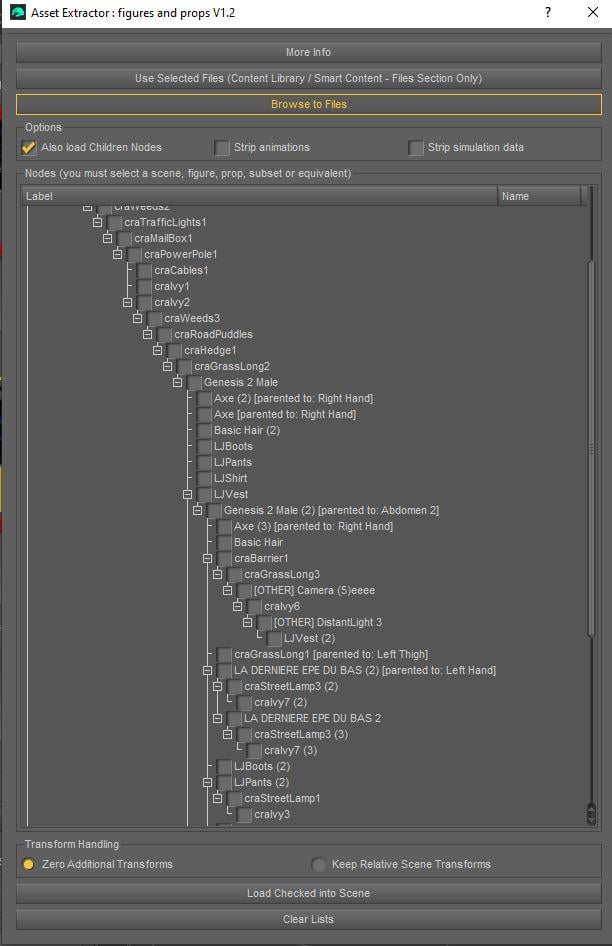
V3D Magic Extract And Append Bundle (Commercial)Going on with version 1.2 development.
I am currently testing the new hierarchical interface display with a heavily nested scene, including figures parented to bones of outfits/figures nested inside other figures, already nested in other props/figures/other nodes, where some "fit to" outfits are also children of children props..
The hyper-nested loading itself already works in the current 1.0 version. The real work here is about the interface: displaying this kind of complex hierarchy in a clear and usable way before loading.
Of course, the hierarchy can be collapsed and expanded.
Bones are not displayed as separate items, since they are not useful geometry import targets. However, when an item is parented to a bone, it is displayed under the corresponding figure, and the bone name is mentioned directly in its label, for example: [parented to: Right Hand].
And yes, what you see here is a typical dev test file: ugly, heavily nested, and intentionally made to stress-test the scripts.
 skin bug with facsSorry for my mistake, I deleted it. I'd have to try again to be 100% sure, but I'm having these issues with all my G9 characters. Can I post a Mega link for the DUF file? As soon as I can, I'll try playing with the factions before baking, then create a new G9 character and import it. My goal is to try to make the most realistic model possible.Deleting materials when deleting a figure as well? [Solved]
Yes this is annoying. Blender has the strange habit to keep in memory deleted content until you save and reopen as a new scene. Never understood why. However it is easy to get rid of unused data.
file > cleanup > purge unused data
p.s. However, being Blender an animation software, usually we link figures together with the rig, rather than importing multiple figures in the scene. I mean the import process from DAZ is usually targeted at a single figure to be saved in its own file.
Dicktator Shell, Diffeomorphic & SSSPadone said:
Doesn't happen here, tried both BSDF and principled materials they work fine. Of course BSDF doesn't work with eevee as it is intended for cycles, if this is what you mean. However, if you believe you catched a bug you can always report it at github for Thomas and me to review.
https://github.com/Diffeomorphic/import_daz/wiki/Material_Methods
Sorry for taking too long, I thought the post was deleted.
I indeed was using eevee, but weirdily when I switched to Cycles the same happens. I really don't know if I'm doing anything wrong or if it's a bug.
This is my setup: I import the character, joing all the rigs, remove the subdivisions then join the geografts. The materials go all to the main mesh. I replace the setup with a simpler one (just diffuse and bump maps) and do the same inside the dicktator node group. Everything looks right at sight, the transparency, etc. Then I go and enable the SSS INSIDE the node and outside.
Easily identify products and assets in DAZ Studio .duf scene files (seeking feedback)richardandtracy said:
Does it work with freebies/paid for items where manually loaded from places other than the DAZ store? These items very rarely have manifest files, and definitely no DIM entry.
It did detect freebies / third party stores' products for which I have created metadata, but will ignore them when they don't have metadata.
It'll generate a list of all detected nodes though, so if you want to look for unknown items, I would start here.
Figure setup makes the model load in the wrong positionThe OBJ import dialogue in DS has options for scale and orientation, since theya re not fixed in the file format. If the plain File>IMport OBJ is correcftly sized and oriented then make a note of the prest it is set to use (or if it says Custom then save a new preset), then use that preset in the import options for Figure Setup.
Figure setup makes the model load in the wrong positionThere are a number of programs that use the Y axis for the 'Up' direction (like DS) and a number use the Z axis instead. If you are using one of the latter, it will look as if the model has rotated +90 degrees around the axis, so a normal figure is lying face down in DS. This can be corrected in the DS import window.
If the X axis rotation is happening on import to a figure that normally has the Y Axis vertical and the DS OBJ import is incorrectly treating it as if it's a figure with Z Axis vertical, then the figure will be lying on its back. This way you should be able to determine where the problem is.
Regards,
Richard
How can I fix missing thumbnail images in Smart Content?beingcouy_4e18de9f5e said:
Wha? The last post was from Feb 2022?? I got a new computer and installed everything fresh from Daz through DIM (as Daz's page suggested).
It's ALL brokem. My entire library of over 2,500 items have no thumbnails.
Please tell me that the manual way is not the only way to fix this?
I have run into this and found three reasons:
1. No thumbnail included. Check Runtime>Support. I have a file of all the previous thumbnails I had to create and move it again into place. Otherwise I make a new one. I keep a master copy of my created thumbnails on Google Docs but also on each computer.
2. Daz has been changing the Support line on the Content DB Editor that you can open up on your Smart Content page by selecting it, clicking 'Edit Metadata' and then comparing that line to what is in your actual Runtime>Support list, which will need to match. I copy the Content DB Editor support line to 'Notes' and trim out /Runtime/Support/ and often when I have done that, my Mac has updated the actual Runtime>Support .dsx line to match. I then copy and paste the line to the existing .dsb and .jpg or .png files.
3. Recently I am finding for unknown reasons, some files don't want to see .jpg so I have to make the file into a .png. Or vice versa. No clue why.
As to why the support line is changing, I can't find a specific pattern, on some they are adding '(s)' on others they are removing the '(s)'. But this change is not making it to the files we have in our actual file structure, only on the Smart Content. And I just set up two new computers, a MacMini M4 and Windows 11, and had to deal with this twice. Not fun. But I am a visual person and look for those thumbnails. I also get rid of those dreadful 'DAZ Logos' that replace valid thumbnails for some unknown reasons.
skin bug with facsIn general baking must be done before loading morphs, you bake the HD shape alone then use the HD maps on the base resolution alone. Otherwise tranferring morphs may go wrong depending on the distance between the base mesh and HD mesh, this may be what happens in your case.
If you can explain the exact steps you do follow I may have other ideas what it can be. Instead of going blind. Otherwise here's what I'd do without Simplebake.
steps:
- import HD without morphs and without merge geografts
- use the HD tools to bake multires
- apply multires
- load morphs and merge geografts
p.s. Blender 5.1 needs the dev version 5.2 that's why it crashes, either way to eventually report bugs you have to update to dev first.
p.s. However, multires works fine enough in general apart a few cases, if you can reference the specific figure and geograft I may be able to try it myself and let you know how it goes.
skin bug with facsI'll try that, but the problem is that without using the HD model, the genitals are detached from the body. I haven't tried it that way, but it might look bad if I use modifiers on it, right?
And I'm almost certain that multires isn't an issue here because I've disabled it. I baked my textures with Simplebake to get the effect of multires level 3, but without it, to make animations easier.
Smoothing modifier last in the stack... I'm not sure I understand how to apply that to a specific area. Are you talking about a modifier on the entire body mesh, or am I misunderstanding?
Regarding the Blender version, I tried the latest one, but I can't import a DAZ model into it; it crashes. That's why I'm sticking with version 5.0.1 for now.
Figure setup makes the model load in the wrong positionlilweep said:
Just to comment that when you say things such as "my settings are all perfect" , "when I Import normally" or "it is rotated automatically", as a reader it is difficult to know what you actually mean.
Anyway, if you need to bake transforms/rotations so they are all 0 again, you can put your imported model into correct position/scale in Daz and then export/import again as obj. When it imports those values will all be zero.
I am not aware of Daz setting anything to non-zero values on import of obj. Daz should import obj with zero transforms and rotations usually. But if for some reason it doesnt you can do what I posted above. If you still have issues, I would suggest you check your "perfect import settings" again. Perhaps even post them?
Apologies, will do better next time. I was sleep deprived when I wrote that.
Basically, I had a hat model that kept ending on the floor after I used Figure Setup to import its rigging. I found out that the model, directly from Marvelous Designer, loaded at a 90 degree rotation on the X axis in Blender. The tutorial I used said not to check the 'apply transforms' box when importing the model from Blender. Which resulted in the model in the wrong position after Figure Setup.
What I meant by importing normally, was using the import option from the File menu.
I figured that I needed to apply the transforms when exporting the model from Blender to Daz.
Does this explain it better?Easily identify products and assets in DAZ Studio .duf scene files (seeking feedback)Elor said:
The new version is very nice: I checked on a couple of scenes, with products using metadata from multiples folders, and as far as I can see, it found everything that it could (including elements I didn't remember using
 but seeing them in the list refreshed my memory).
Once the gallery is back, it should make filling the used products list much faster (if it's still part of the gallery).
Thank you!
I am glad it's working for you!
Honestly, one of the main reasons I originally started to create this tool was because I wanted an easier way to accurately list all of the products used in my gallery images and give the product creators proper credit without accidentally missing anyone out.
So hearing that it’s successfully picking up forgotten items and refreshing your memory is actually really encouraging to hear. Thank you!
Figure setup makes the model load in the wrong positionJust to comment that when you say things such as "my settings are all perfect" , "when I Import normally" or "it is rotated automatically", as a reader it is difficult to know what you actually mean.
Anyway, if you need to bake transforms/rotations so they are all 0 again, you can put your imported model into correct position/scale in Daz and then export/import again as obj. When it imports those values will all be zero.
I am not aware of Daz setting anything to non-zero values on import of obj. Daz should import obj with zero transforms and rotations usually. But if for some reason it doesnt you can do what I posted above. If you still have issues, I would suggest you check your "perfect import settings" again. Perhaps even post them?
Loading issue with the “Z in the shower” contentHello!
https://www.daz3d.com/z-in-the-shower-pose-mega-set-for-genesis-9-8-and-81-female
So I bought the product, installed it with DIM, but it doesn't work. I uninstalled it and reinstalled it with DIM, but the same thing happened. I tried installing it directly in Daz Studio, but nothing worked.
I checked the files—everything is in the right place.I also tried converting the G8 poses to G9, but nothing works.
I also quit and restarted after reinstalling and tried it on an older G9.
What can I do?
Here is my log file:2026-05-10 10:08:47.790 [WARNING] :: \src\sdksource\cloud\dzcloudtasknotifier.cpp(203): Invalid reason for encrypted file: "E:/Daz 3d/My DAZ connect library/data/cloud/1_93624/people/genesis 9/poses/zeddicuss/z in the shower/01 full body/z intsh full 20 g9f standing washing legs.duf.enc"
2026-05-10 10:08:47.790 [WARNING] :: \src\sdksource\cloud\dzcloudtasknotifier.cpp(203): Invalid file header for encrypted file: "E:/Daz 3d/My DAZ connect library/data/cloud/1_93624/people/genesis 9/poses/zeddicuss/z in the shower/01 full body/z intsh full 20 g9f standing washing legs.duf.enc"
2026-05-10 10:08:47.790 [ERROR] :: Open Stream Error - No stream for CloudFile: E:/Daz 3d/My DAZ connect library/data/cloud/1_93624/people/genesis 9/poses/zeddicuss/z in the shower/01 full body/z intsh full 20 g9f standing washing legs.duf.enc
2026-05-10 10:08:47.790 [ERROR] :: Open File Failed - Could not read asset information: /people/genesis 9/poses/zeddicuss/z in the shower/01 full body/z intsh full 20 g9f standing washing legs.duf
2026-05-10 10:08:48.574 [INFO] :: Prepare asset load (merge): /People/Genesis 9/Poses/Zeddicuss/Z In The Shower/01 Full Body/Z INTSH Full 20 G9F Standing Washing Legs.duf
2026-05-10 10:08:48.574 [INFO] :: Locking viewport redraw...
2026-05-10 10:08:48.574 [INFO] :: Viewport redraw locked.
2026-05-10 10:08:48.673 [VERBOSE] :: Native format content directories: 5
2026-05-10 10:08:48.673 [VERBOSE] :: Poser format content directories: 3
2026-05-10 10:08:48.673 [VERBOSE] :: Other import format content directories: 0
2026-05-10 10:08:48.673 [INFO] :: Begin asset load (merge): /People/Genesis 9/Poses/Zeddicuss/Z In The Shower/01 Full Body/Z INTSH Full 20 G9F Standing Washing Legs.duf
2026-05-10 10:08:48.673 [WARNING] :: \src\sdksource\cloud\dzcloudtasknotifier.cpp(203): Invalid reason for encrypted file: "E:/Daz 3d/My DAZ connect library/data/cloud/1_93624/people/genesis 9/poses/zeddicuss/z in the shower/01 full body/z intsh full 20 g9f standing washing legs.duf.enc"
2026-05-10 10:08:48.673 [WARNING] :: \src\sdksource\cloud\dzcloudtasknotifier.cpp(203): Invalid file header for encrypted file: "E:/Daz 3d/My DAZ connect library/data/cloud/1_93624/people/genesis 9/poses/zeddicuss/z in the shower/01 full body/z intsh full 20 g9f standing washing legs.duf.enc"
2026-05-10 10:08:48.674 [ERROR] :: Open Stream Error - No stream for CloudFile: E:/Daz 3d/My DAZ connect library/data/cloud/1_93624/people/genesis 9/poses/zeddicuss/z in the shower/01 full body/z intsh full 20 g9f standing washing legs.duf.enc
2026-05-10 10:08:48.674 [ERROR] :: Open File Failed - Could not read file: /People/Genesis 9/Poses/Zeddicuss/Z In The Shower/01 Full Body/Z INTSH Full 20 G9F Standing Washing Legs.duf
2026-05-10 10:08:48.674 [WARNING] :: Error loading asset: E:/Daz 3d/My DAZ connect library/data/cloud/1_93624/people/genesis 9/poses/zeddicuss/z in the shower/01 full body/z intsh full 20 g9f standing washing legs.duf.enc
Operation failedDaz 3D is part of

Connect
DAZ Productions, Inc.
7533 S Center View Ct #4664
West Jordan, UT 84084Licensing Agreement | Terms of Service | Privacy Policy | EULA
© 2026 Daz Productions Inc. All Rights Reserved.