-
Had to reinstall and lots of packages NOT installing at all
Are you sure DIM is setup to install them in a directory recognized by DS?
How/where to check? To me the DIM setup dir is the one that DS recognizes since all other content (regular ones as well as the 'non base/morph' v4 content) is imported normally.
Had to reinstall and lots of packages NOT installing at allYou can't install generation 4 base figures and morphs with Connect due to the morph system they use.
That explains one thing, but they're also not installing when using the Daz Installer. I have tried that a couple of times already without any luck either :'(
Had to reinstall and lots of packages NOT installing at allYou can't install generation 4 base figures and morphs with Connect due to the morph system they use.
Nipple poking through in some clothingWhats the best way to remove poke through in clothing? The piece I'm talking about has dforce but it does it in others as well. Is there an easy fix?
A dforce simulation turns off the mesh smoothing of the clothes. Try turning it on again. If it's on, just dial down the nipple morph.
Released-Lorenzo for Genesis 8 Male (Commercial)Well, it looks wonderful. But the thing is, what happens when Genesis 9 (or whatever) comes along? Will we be able to transfer the skins? What about the body morphs? I wish someone would work on a body morph transfer product. But, yes, he looks great.
Well, if you have genesis 8, you can continue to render him untill the cows come home; generally, if you have a scene with a mixed population of the current generation and the previous generation, most viewers would be had pressed to tell them apart...
Akeytsu is an affordable option for character animation for DazThanks.
Here is a simplified overview.
It works best with Gen 1 and Gen 2 because its reverse foot rig relies on a joint structure without the twist joints that are in Gen 3 and Gen 8. You morph and cloth your Gen 2 figure in Daz then export as fbx. Import the fbx into Akeytsu then select each toe joint and click the reverse foot rig button and you are ready to animate. After animating, export as fbx and then import back into Daz. Daz does not handle the fbx import cleanly so the workaround is to then export back out of Daz as bvh then load a Gen 2 and reimport the bvh onto the figure including only rotations and only on the hip to you apply translation.
There are a few additional steps to take advantage of Akeytsu's very powerful pose and animation mirroring features but this gives you the basic workflow. The additional steps are to export the fbx as ascii then do a search and replace to rename the nodes so the right limbs use "right" as the prefix and the left limbs use "left" as a prefix. Currently the nodes just use "l" and "r" as the prefix for the node names in the fbx exported from Daz. Also when importing back in the bvh, you then make sure the left and right nodes are correctly mapped.
There is also a workaround to address the fact that Akeytsu does not read the pre rotation values in the fbx export out of Daz so all joint rotations are 0,0,0 on the intial bind pose which can cause issues like the joints are not aligned along the fingers. The trick is to create a pose preset in Daz that straightens the hand and fingers and thigh then bake the joint rotations. Save that character and use that character as the source for the fbx export and the target for the bvh import.
Here is a run cycle that I threw together. It's mirroring features allow you to animate the first step and let it generate the second step and cycle. It has a cool feature for keyframe management that is setup like a traditional x-sheet. It also has animation layers but currently they are not additive.
 Nipple poking through in some clothing
Dial the nipple morph down to zero, under the Parameters tab. Hide the breast area, unless the clothing is low cut. Expand the clothing item, either with scaling, or using in-built morphs. It would help if you could tell us what figure and clothing you are using, then we can be more specific
 True Anime Character - Male and Female.
Why has no one really done a true anime figure...a good one. Aiko and Hero really don't cut it for anime figures. I mean they are great but not as anime as they probably could be.
Look up the term Anime Figures and you'd see what I'm talking about. You can use those types of figures for reference.

And what would be cool is if you had them morph between style types. DBZ, OnePiece, FATE and sell those morphs.
Maybe something at least on par with Black Desert
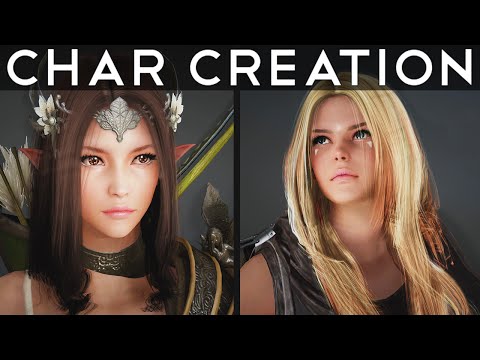
And if you do a girl version you need a boy version. It is really sad to see characters that have no match. I love the Cartoon versions of Genesis 3 but there is really no equivalent female version. If you release please do both at the same time.
Lorelei Mertail on G3?Ok, parenting to the hip seems to leave all the poses intact, so that's cool. A little resizing makes it look believable. I'll have to work on fixing the texture where the torso meets the tail, if that's even possible.
I don't know anything about transfer utility, is there a good tutorial on that? Would there be an advantage to using that over just parenting to hip?
If you're comfortable parenting to the hip and everything works the way you want, then I'd keep working with that.
I don't know if there's a good tutorial for what you need. This one describes the process for going from Genesis 2 to original flavor Genesis, but I don't know how well it will work to reverse the process from G2 to G3: https://sickleyield.deviantart.com/journal/Tutorial-Custom-Bone-Rigs-G2F-to-Genesis-Convert-398192766
As I say, if parenting and postwork give you results you're happy with, I might just stick with that workflow.
?? Philemo plugin dynamic hair to mesh ??beaut hair!!
@PhilW trick is to add a bone to the object before exporting the obj
except I note the poly count is different (simple sphere was test obj)
edit i reran test again
this time I centred bone and object before attaching skeleton
I attached bone before making my morph (previpusly I added a morph before boning object)
I then exported with all first four options ticked (in export window)
when I bring morphed obj back it has correct number of polys
I assume attach bone before making morph was the winner step
Facegen Help with Eye DistortionI figured it out. I'm not sure exactly how I did it, but essentially it's the same as above without converting the morph and eyeballs to polymesh tools and then just merging them down. Worked like a charm.
Lorelei Mertail on G3?Ok, parenting to the hip seems to leave all the poses intact, so that's cool. A little resizing makes it look believable. I'll have to work on fixing the texture where the torso meets the tail, if that's even possible.
I don't know anything about transfer utility, is there a good tutorial on that? Would there be an advantage to using that over just parenting to hip?
Released-Lorenzo for Genesis 8 Male (Commercial)Well, it looks wonderful. But the thing is, what happens when Genesis 9 (or whatever) comes along? Will we be able to transfer the skins? What about the body morphs? I wish someone would work on a body morph transfer product. But, yes, he looks great.
PhilW Hairs Discussion ThreadAre you planning any version for male hair?
yeah, it would be really cool if the new hair would also support males and have like Morena hair a short to long morph. But I don't see both coming ;)
I think it's female only and proable the length from shoulder/neck to bladebones. Which is still a good thing. ;) But Morena hair was genius with it's short to shoulder length morph. I wished we have more such hair products like Morena hair Facegen Help with Eye Distortion
So I figured out how to do it, but with one small problem. I exported just the eyeballs into Zbrush, added it as a subtool to my Facegen morph, deleted the mesh of the distorted eyeballs, and replaced them with the pristine eyeballs, merged them and voila! I had perfect eyeballs inside my facegen's head. But I had to create a polymesh 3d in order to do it and I lost the grouping (not sure what that exactly means) and now it exports as a prop obj, not as a morph for a triax weighted figure. So I would now need to convert this "prop" into a genesis 8 female rigged figure. That's gotta be a piece of cake, right?
If Daz would finally bring out Carrara 9...I rather like it as it is. It SHOULD be able to work with ALL Genesis versions, withOUT having to buy some script somewhere ... I'm really ok with C8.5 as it is ... there are morph packets (mostly made for Poser) that fix that joint problem nicely ... Fenric made us a neato script for [Pose Saves] already [and many other tasks] ... Dear DAZ do not muff up my super fast rendering!!!!! Some of us animate 1920 screens @ 30 frames per second, and have NO patience for like Studio needing how long??? per frame. And Carrara can do those HD frames in less than a minute each with beautiful lighting, multiple lights ... We don't need newer smarter software all the time. We need to learn, practice, and become seriously proficient with what we've already got ... they will sell us new stuff that does what the old stuff did. So I vote there never is a Carrara 9.
Good points all. I recently finished my 4 minute animation as an entry in the Houston 48 Hour film Contest. All done in Carrara at 1280x720 framesize, I generally got about 10sec/frame on a Win10 Core i7 machine, very important in a two day contest. I can't upload the video until after the theater screenings this coming Thursday, but here is the 48 second trailer:
 Boom Chica Morphs Question
Reading the Details section, it seems like the product includes quite a few body morphs, but in the What's Included section, there's only one plus body morph mentioned? Seems like an oversight? Anyone know how many body morphs are actually included?
Edited to add: Looks like first promo states there are 10 body morphs. They just didn't make it into the What's Included section.
Same problem, same question What's better than Parent and pins?I'm losing it over this and I hate losing HOURS reading fake manuals, bad youtube tutorials and OLD FORUM POSTS that do not help.
Rant over.
I'm trying to PIN AN OBJECT TO ANOTHER - without it EVER MOVING. I want to WELD them together.
NOT move with.
NOT follow
NOT reach some kind of IK limit and start moving.
Transfer (insert word) will not work because it is a LINK in a chain and not the chain, itself. We need to get that ONE LINK to stay in place while the rest of the chain (not that link) still acts like a chain.
If I pull on it, it bends and pulls the other links along, but does NOT move that first link.
I tried parenting and it moves WITH the object, fine, but moving or changing the pose of chain eventually moves the "anchored" link.
A few other suggestion I read in old posts crashes my Daz 10.xxxx.
---------------
Sorry for the salt, but damn, sometimes the simplest things are almost impossible.
Anyone have an idea?------------------------
If Daz would finally bring out Carrara 9...To clmoonriver: and all:
Save with local settings means you must have the same content in the library when you go to open X file later that was there when you saved it. The other option keeps all in the saved file itself, which makes it much larger, but then later your library content can be empty and the scene will still open fine. As to saving a preview, very handy to have a little thumbnail to remind you what it looked like.
What would I like to see in Carrara 9? I rather like it as it is. It SHOULD be able to work with ALL Genesis versions, withOUT having to buy some script somewhere, since DAZ wants us to buy their new stuff, and that should be a free upgrade, but I'm really ok with C8.5 as it is. Iray? Just another render machine requiring a whole new bunch of shaders to buy or spend hours building. I've had LuxRender plugged into Carrara for years, like it better. And Lux wants its own variations on shaders too, lol.
Before Iray, some DAZ Studio users used Octane, or was it Oxygen, I forgot. And Lux can be, or could be some time ago plugged into Studio. I am not complaining about Iray, just noting that other similar rendering machines have been around since 2005 or before, so I am not, was not all jazzed about yet another one. It seriously slows down production when we are pushed to every week seems like stop and learn new stuff that usually doesn't do anything the old stuff couldn't do.
Like Genesis 8 has better weight mapping and smoother joints than the old standard v4? Yeah, maybe, but there are morph packets (mostly made for Poser) that fix that joint problem nicely, and I'm sure the weight thing could be done too without needing a whole new system. I think if we are half decent artists we could make our own joint smoothing morphs, and I get on fine with Carrara posing. Do like that Puppetter gizmo in Studio though.
Would be nice if Carrara could save poses as easily as Studio and Poser, but Fenric made us a neato script for that already.
What I do NOT want to see in a new Carrara version is, insert drum roll here, Dear DAZ do not muff up my super fast rendering!!!!! Some of us animate 1920 screens @ 30 frames per second, and have NO patience for like Studio needing how long??? per frame. And Carrara can do those HD frames in less than a minute each with beautiful lighting, multiple lights, with out a serious graphics gaming machine, nor an array of cuda cores. Curiouser and curiouser.
And now a note to the many people who have trouble with Hexagon crashing. The only thing I find wrong with Hex is there is no spinning icon telling you to wait a few seconds it is matriculating, so people type in another command too soon, and it stalls because it is busy, so another frustrated keystroke, and it overwhelms and crashes. The cure - just KNOW that Hex needs a few seconds especially on more complicated vetice commands, and don't hammer the thing.
My overall opinion is - and stop here if you're easily offended!!! We don't need newer smarter software all the time. We need to learn, practice, and become seriously proficient with what we've already got. The Dreamlight guy did a totally excellent and very real looking car scene animation many years ago with Studio 3. Perfect motion on the car, beautiful lighting. Fuzzy memory you know, I don't recall the year but most of us did not even have 64 bit machines back when. Not sure if Studio itself was 64 bit yet. Just one example.
The trouble with sending a wishlist to software designers is we're likely to get a bunch of stuff we don't need, and find that our favourite things no longer work. Of course if we have 6 months of patience they will sell us new stuff that does what the old stuff did. So I vote there never is a Carrara 9. Ciao Babies - R
How to Use dForce: Creating a Blanket, Draping Clothes on Furniture, and Much More [Commercial]If you turn subdivision on the shirt off you can see that the vertex points are in exactly the same spot on the shirt and add on - using the transfer utility you conform the add on to the shirt and set it as a dynamic surface add-on.
Daz 3D is part of

Connect
DAZ Productions, Inc.
7533 S Center View Ct #4664
West Jordan, UT 84084Licensing Agreement | Terms of Service | Privacy Policy | EULA
© 2026 Daz Productions Inc. All Rights Reserved.