-
My Renders, Now I can go to bed
yeah, again, it's been a while since I last did a render
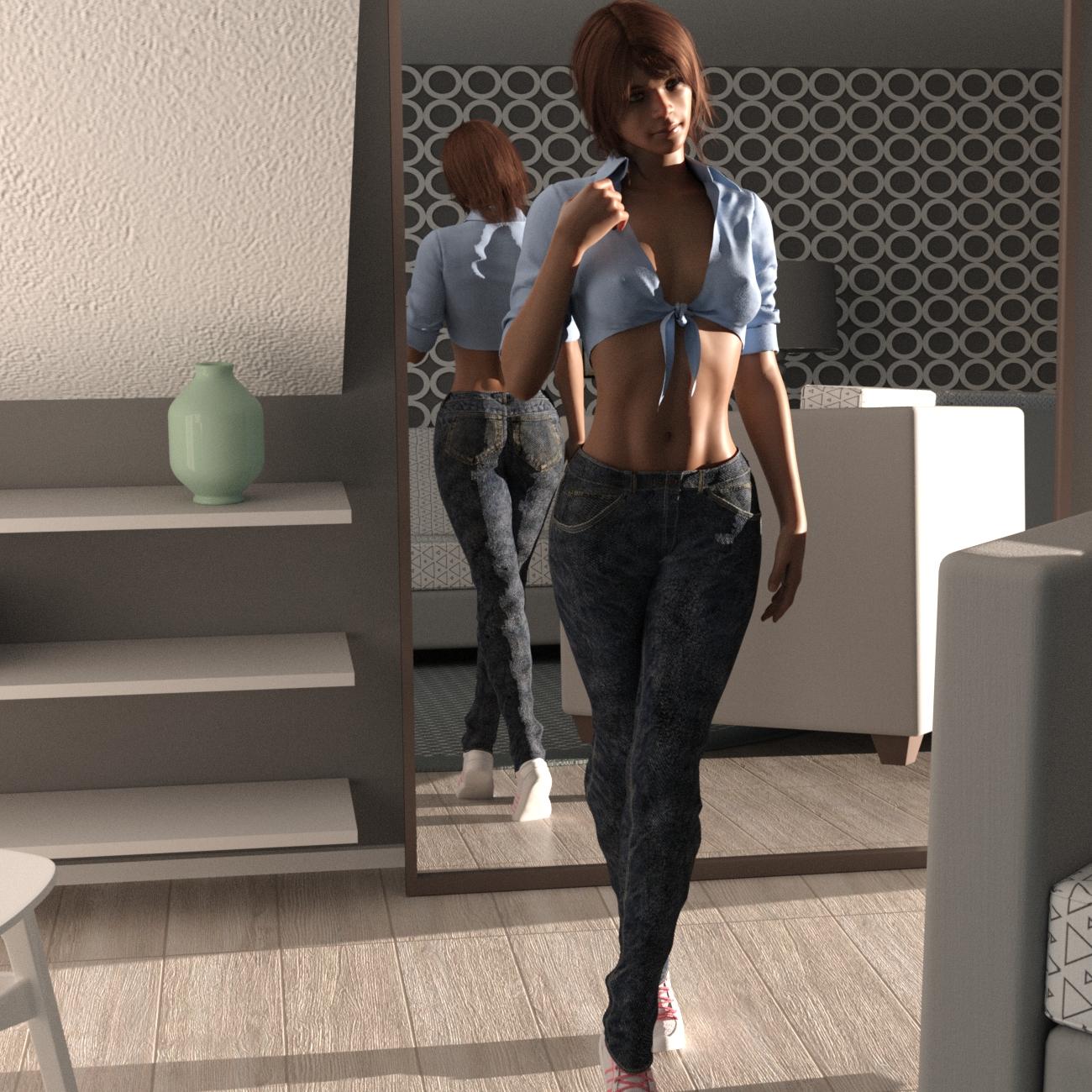
so I did this one,
I don't place names on any models I dial up.just letters, this one is G8F cC, 5'4", did have 3 hair choices, the one in the render Ruo XI Hair, from the Ruo Xi Collection for Genesis 8 Female(s), shirt from
the Summer Outfit For Victoria 8, pants Graybro Jeans , shoes from the dforce Kitten Dress , the room used was TheSimpleRoom .
.
 "Why it’s so hard to make CGI skin look real" - VOX
Dartanbeck said:
 Just a quick FYI:
While on the subject of Liquid Rust stuff on sale, I'd just like to point out that we can use products like Calvin for V4 for Genesis.
Simple method:
Load in the Genesis Basic Female character preset and dial off the Basic Female morph and shape Genesis however you'd like.
Now it's just a simple process of setting up the shaders with Calvin for V4's maps ;)
Yes, and he's not the only male built for V4 UVs, in fact I was surprised to find a lot of them as I was going through my character sets and saving out a shader set for each one. V4 was the queen of crossdressing UVs, lol. Here's the ones I found:
The GW bundle is probably pretty obvious:
https://www.daz3d.com/victoria-4-gw1-male-texture
https://www.daz3d.com/victoria-4-gw2-male-texturehttps://www.daz3d.com/victoria-4-gw3-male-texture
https://www.daz3d.com/victoria-4-gw4-male-textureThere was Vittorio, although I don't own that one and it isn't in the store anymore, there are still some textures built to fit Vittorio, which is V4 UV, the ones Morris did for Vittorio:
https://www.daz3d.com/zere-for-vittorio-4
https://www.daz3d.com/jinn-for-v4-male-vittorio
Also Xavier by Morris, but apparently that's no longer available in the store.
Calvin, as you mentioned, by Liquid Rust: https://www.daz3d.com/calvin-for-v4But then I found some that were suprising:
Aaron for young teen Justin: https://www.daz3d.com/aaron-for-genesis-young-teen-justin
Edward Odd by Silver/Jessai: https://www.daz3d.com/emelie-and-edward-odd ; (probably not surprising that Emelie from that bundle is a V4 UV too)
Also there was Paul by 3dream over at Rendo
And I'm not sure how to classify this, but the Genesis Baby also uses V4 UVs.
I also found a lot of other oddities, strangest perhaps of all was that Stephanie 5 is a crossdresser too!Hayden for young teens is built on a Steph5 UV: https://www.daz3d.com/hayden-for-young-teen
On the other side of the coin, I could only find one female texture that was built for an M4 UV, which was Mina by pdxjim, apparently no longer available in the DAZ store.But the weirdness didn't stop there. I found several products that were advertised as being Michael5 exclusives, but found that the UV was actually Michael4:
Ohia: https://www.daz3d.com/ohia-for-michael-5
Nigel: https://www.daz3d.com/nigel-for-m5
Tyrese: https://www.daz3d.com/tyrese-for-m5
In the same vein, I found a lot of Michael 6 products that were actually built with Michael 5 UVs, here's some examples:Ash for teen Jayden: https://www.daz3d.com/fw-ash-character-and-accessories ;
Dan for M6: https://www.daz3d.com/fw-dan-megapack
Ja-long for Lee 6: https://www.daz3d.com/fw-ja-long-hd-for-lee-6
There were even more on the female side that use different UV maps than the figure they advertise, such as V6 characters actually built with V5 uv maps, but I kind of ran out of oomph to go find and list them all (maybe later I'll edit to add more).
Btw, I don't think of it as false advertising, since in each case the character does actually require the advertised morph, even if it's built using a different UV. It's just odd that they don't advertise it as also being compatible with the character of the UV it's actually using.
Free Poser ItemsSempie said:
richardandtracy said:
FP said:
Byrdie said:
The sweater will probably work well enough though you may need to adjust the materials because they're set up for Poser not iray. The other product however would be useless in Daz because Studio and Poser have completely different lighting systems. That said, they're both free so you've nothing to lose but your time should you decide to download and play around with them.
Why offer a useless or difficult item to use? That's like my next door neighbor giving me a bicycle tire when I don't own a bike. They may have good intentions but it's ultimately pointless.Possibly because Poser users still come to DAZ for Victoria 4 and accessories, and they are still customers.
You bet. I almost exclusively buy old Poser compatible stuff. Stuff for V4, M4, Poser compatible sets and lighting sets. Don't have a big nVidia card, don't have a fancy new computer, can't use the recource hungry Genesis 8 generation. So I don't buy it. I have a 15 year old dual quadcore Xeon workstation with 36 GB RAM and a GTX 1050ti, and no budget to upgrade it.. Good for Poser 11, not for DS 4.12 with iRay. .DAZ started out as a Poser content website, you know. Before there even was a DAZ Studio. There would not even have been a DAZ if not for Poser. Happy that Jack Tomalin, David Brinnen, Forbidden Whispers & co still make some new Poser compatible stuff. Keep it coming. Most big sales are almost exclusively DS only, I see no reason to complain too much.
And don't worry; DAZ is putting most of its old Poser content in clearance, Soon, we'll all be gone...
Your old computer has the same graphics card as mine and three times as much RAM as I've got. I try to use Iray and it does work sometimes but it is a bit of a struggle. I keep looking for alternatives, Octane is just as bad on my PC, filament might be good if I can work out how to get Iray materials to look OK in it. I'm going to have a go at Unity and/or Unreal Engine, since they are designed as game engines I expect the renderers should be more speed optimised. But I keep coming back to Poser, I'm on version 12 and it renders nicely on my computer.
Nifty Iris shader trick (mini tut?)Just gorgeous eyes on Rosie there.
I'm chuckling in a bit of a chagrin; sounds like a lot of people already noticed this effect before me and were already using various techniques to emulate it in renders. lol I didn't really invent anything new here at all, just re-invented a technique others were already using and claimed it was mine in typical villain fashion (muhahahah) :)
The Eyedeas+ product is definitely an excellent way to go, looks like it's still available in the DAZ store (for now, who knows what the future holds): https://www.daz3d.com/eyedeas-3-for-victoria-4-and-michael-4 ; For anyone who doesn't have it in their toolkit, I recommend picking it up before DAZ vanishes it.
I don't know if it was one of the morph pack add-ons I bought way back when, or whether this is a morph that comes with Genesis1 by default, but it is important to make your Iris at least flattened, if not concave. If using Genesis1 native eyes instead of a replacement, I recommend always using the morph 'eye cornea bulge' or 'eyes cornea bulge' (I just looked and saw I have 2 similarly named morphs that do the same thing), as well as the Eye Iris Correction morph and the AoA Iris Depth morph (looking at that name, I'm guessing it came with the Subsurface Toon product: https://www.daz3d.com/subsurface-toon-shaders ; which is well worth picking up).
Without an adequate cornea bulge, we can't get realistic refraction to enhance the iris color and look, and without the iris at least being flattened, if not a little concave, then it won't look right, imo.
Free Poser Itemsrichardandtracy said:
FP said:
Byrdie said:
The sweater will probably work well enough though you may need to adjust the materials because they're set up for Poser not iray. The other product however would be useless in Daz because Studio and Poser have completely different lighting systems. That said, they're both free so you've nothing to lose but your time should you decide to download and play around with them.
Why offer a useless or difficult item to use? That's like my next door neighbor giving me a bicycle tire when I don't own a bike. They may have good intentions but it's ultimately pointless.Possibly because Poser users still come to DAZ for Victoria 4 and accessories, and they are still customers.
You bet. I almost exclusively buy old Poser compatible stuff. Stuff for V4, M4, Poser compatible sets and lighting sets. Don't have a big nVidia card, don't have a fancy new computer, can't use the recource hungry Genesis 8 generation. So I don't buy it. I have a 15 year old dual quadcore Xeon workstation with 36 GB RAM and a GTX 1050ti, and no budget to upgrade it.. Good for Poser 11, not for DS 4.12 with iRay. .DAZ started out as a Poser content website, you know. Before there even was a DAZ Studio. There would not even have been a DAZ if not for Poser. Happy that Jack Tomalin, David Brinnen, Forbidden Whispers & co still make some new Poser compatible stuff. Keep it coming. Most big sales are almost exclusively DS only, I see no reason to complain too much.
And don't worry; DAZ is putting most of its old Poser content in clearance, Soon, we'll all be gone...
V2/M2 mesh breaking on joint bendsbelieveinhumans said:
FSMCDesigns said:
It's very possible it's due to changes in Daz Studio over the years. Rigging has changed, properties have changed, lots of older products have issues or don't work at all in newer versions of DS. Any particular reason you can't use a newer figure?
Honestly Im just interested in the history of Daz and their products. Thanks to a friend of mine who had V1/V2 on an old machine and shared them with me, I now have every version of Victoria 1 through 8 and its been fun to load each one in and see the progress that has been made with each version. In all fairness its kind of hard to even find much information on the older models, probably due to the internet being in its early years and that it was just a long time ago. I have so many questions........Questions like who actually modeled the first victoria? was it one person or a group effort.....who makes any of the victoria models? I know its 'Daz Originals' but I often wonder who the actual Genius is? .
I realise I may not ever get the answers to some of these crazy questions, and im ok with it, its just been fun searching and exploring the world of Daz (and Poser)! :)
fair enough. Enjoy the journey
Make sure your friend knows they can't share any DAZ assets, it's against the EULA (illegal)
Cut it outFrom a member since 2008 - Shout out to all of those who keep that Carrara fire alive.
ALSO give it up for the actual DAZ family - from the software engineers to Victoria herself!!There are many posts about a possible Carrara v.9. These post range from software improvement 'wishlists' to rational and guesses to what is happening behind the scenes at Daz.
Yes, v.9 software improvements would be great - but even better would be the celebration from die hard Carrara fans!
...even an email from Daz (or partner company) about development would send many users into the clouds.
"Carrara don't ever change for me." - you are already great.Each new software feature adds to the already crowded interface, plus requires more user knowledge.
and..."Don't you dare say node based system."
While software development does take work behind the scenes --
Here are some suggestions that reduce the existing Carrara software footprint and improve function WITHOUT additonal User learning curves:#1. Make Modifiers able to drag and drop reorder with on/off checkbox. Requires no new user knowledge. Improves existing user experience.
#2. Remove Storyboard. - This reduces software resources and development. Clears UI space. Requires less user knowledge.
#3. Combine the Primative and Vertex model experience. - Many of these features overlap.Keeping new features to a minimum and streamlining what already exists is the key to v.9.
Its not a wishlist it's a checklist. - CARRARA NEXT
V2/M2 mesh breaking on joint bendsFSMCDesigns said:
It's very possible it's due to changes in Daz Studio over the years. Rigging has changed, properties have changed, lots of older products have issues or don't work at all in newer versions of DS. Any particular reason you can't use a newer figure?
Honestly Im just interested in the history of Daz and their products. Thanks to a friend of mine who had V1/V2 on an old machine and shared them with me, I now have every version of Victoria 1 through 8 and its been fun to load each one in and see the progress that has been made with each version. In all fairness its kind of hard to even find much information on the older models, probably due to the internet being in its early years and that it was just a long time ago. I have so many questions........Questions like who actually modeled the first victoria? was it one person or a group effort.....who makes any of the victoria models? I know its 'Daz Originals' but I often wonder who the actual Genius is? .
I realise I may not ever get the answers to some of these crazy questions, and im ok with it, its just been fun searching and exploring the world of Daz (and Poser)! :)
The models I like are Genesis 3. Does that mean they won't work?mortonmccastle said:
The models I want are for Genesis 3. Does that mean they are not compatible with the current version of Daz Studio?
I'm still working with Genesis (the original 1st gen) at the time of writing so... don't worry about age. Just because something is older doesn't mean it no longer works. DS provides support for all generations of Genesis.
However... do make sure that any props or clothing is made for Genesis 3. Clothing for Genesis 1,2 and 3 will (often) work on Genesis 8 but clothing made for Genesis 8 is highly unlikely to work on older generations. Of course there are no guarantees either way.
I am very new to Daz 3D. I signed up yesterday. I used to spend a lot of time on DeviantArt and I noticed that a lot of people were using the same models, and those people were using the same program - Daz3D.
Daz Studio is an excellent program for building up 3D renders, and it provides support for just about everything, including Poser material (Poser is another 3D program).
I understand that the latest Genesis is Genesis 8.1, and the skip from G3 to G8 was to be consistent with the Victoria and Michael models. Are models called meshes?
Basically every 3D figure, whether it's a Genesis based figure or a prop such as a barrel, wall or a lamp is a mesh. A mesh is a 3D figure that's made up from polygones, which are basically the smallest part of a 3D model. This may be a good read / starting point:
https://en.wikipedia.org/wiki/Polygon_mesh
I heard that older Genesis (like 2 and 3) clothes are compatible with newer Genesis (8 and 8.1) but meshes are not. Is Genesis 8.1 the current version of Daz Studio? If so, then it sounds like G3 models/meshes will not work.
That information is somewhat incorrect. Clothes are also meshes.
As to Genesis: 8.1 is the latest version of Genesis but that doesn't mean anything. At best it means most artists will be focusing their attention to this because it's "new and hot" yet that only means so much. Like I said above I still use Genesis and Genesis 2 based figures on a frequent basis myself. Nothing wrong with that and it's stil fully supported.
Best female for runway model frameThe measurements of the ideal runway fashion model are 72 inches tall and 32-22-33.
The measurements of the ideal Victoria's Secret model are 69 inches tall and 34-24-34.
I used Measure Metrics to make my figures these exact dimensions (don't ask me how - I don't remember).
The chest of the fashion model will likely be somewhat flat, but if you make her torso narrower, you can dial in a few inches of breasts so that the circumfrence of the chest is still 32 inches.
Here is an iimage of Genesis3Female with the ideal runway model measurements. The 2nd image is the same figure, but I made the chest narrower to balance them with the width of the hips, and added a few inches of breasts.
The head morph is 100% Chara. The hair is Chace. The skin texture is Brittany with the translucency lowered. The clothing is the Dance Gear leotard. The third image is the 2nd image model wearing the Ghost Bride outfit.
This body is just the base G3Female body with no character dialed into the body. I just altered the chest-waist-hip measurements. There are some really great products in the store for shapiing body parts - such as https://www.daz3d.com/killer-legs-morphs-for-genesis-3-female-s
If you want a figure that looks like a model in a fashion illustration, my choice would be Aiko 6.
Best female for runway model frameStepanida, Noemi, Misumi, RY Alison, Evangeliya, and RY Adeline are great characters and combine pretty well together too
https://www.daz3d.com/ry-adeline-for-victoria-8
https://www.daz3d.com/ry-alison-for-victoria-8
https://www.daz3d.com/evangeliya-hd-for-genesis-8-female
https://www.daz3d.com/stepanida-hd-for-genesis-8-female
https://www.daz3d.com/misumi-hd--signature-smile-hd-expression-for-genesis-8-female
https://www.daz3d.com/noemi-hd--smile-hd-expression-for-genesis-8-female
They are all very tall like supermodels and while some might be more athletic than you're looking for they combine really well and I'd get face and body morphs too like others said
Best female for runway model frameArabella 7 is the model thin frame you probably want. https://www.daz3d.com/arabella-7
She is Genesis 3, but can be converted to 8. If you are not into her skin, then that makes it even easier as you only need to convert her morph. Keep in mind HD morphs cannot transfer, so don't get the HD Add On unless you want to use the Genesis 3 outright. Genesis 3 does have a lot of skinnies. But you should be able dial in Genesis 8 with various morphs. Use the thin morph on some other character instead of the base for example. You can make Victoria 8 model thin with some morphs. Fairy type characters are always on the thin side. Karyssa 8 is SUPER thin, maybe even too thin. If you think her hips are too thin, just use a dial that adjust hips. There are tons of fairy and elvish characters for Daz. Some of the Asian characters by Rarestone, CrocodileLui, and others are pretty thin as well. Some my have toonish faces, but they have the model body, you can use any face. Some of the anime like characters also fit this mold.
Sometimes the promo pics don't really convey how thin a character is. There are plenty of characters that are super thin, but it isn't really obvious in their promos. Karyssa is great example. You can probably tell she is thin, but it isn't until you place her in a scene with other more normal characters that you see just how thin she is. I've bought several Asian characters and have been surprised how thin they are compared to others.
If you need more defined features, several HD morph packs will add them.
Best female for runway model frameEveryone's opinion differs, so just buy the V8 morphs and the Killer Legs morphs and make her the way you want. I would start with Victoria 8.0. I find that she is compatible with most poses, as she has been DAZ's "standard."
https://www.daz3d.com/genesis-8-female-body-morphs
https://www.daz3d.com/genesis-8-female-head-morphs
https://www.daz3d.com/killer-legs-2-0-morphs-for-genesis-8-female
Costume help neededcclesue said:
Any ideas on the dress?
I would say it is the one included in the product.
Edit to add link: https://www.daz3d.com/vyk-robyn-character-and-outfit-for-victoria-81
Best female for runway model frameIf you are ONLY looking for runway type poses that won't push the ancient Victoria 3 based joint geometry beyond what it can cope with, this V3 based but standalone model is old fashioned runway fodder: https://www.daz3d.com/glamorous-vicki-set-for-victoria-3-0. Because it's a standalone figure, and not a morph of V3, alternative clothing is pretty limited, though dForce draping helps these days. To show the figure can be updated to IRay and provided joint limits are observed it can look pretty decent: https://www.renderosity.com/rr/mod/gallery/older-figures-updated-/2936479/.
Beyond fairly limited joint ranges, it's probably better to use a much more sophisticated G8F character. There are a few. For an Easter European vibe, Anastasia. Legs can be lengthened if need be: https://www.daz3d.com/anastasia-for-genesis-8-female
Then there is the very, very leggy and slender Aniyah: https://www.daz3d.com/aniyah-for-darcy-8
The Aniyah body with different head and texture can make any character into a runway model, like this one: https://www.renderosity.com/rr/mod/gallery/show-us-yer-muscles-girlie/2925860/
Free Poser ItemsFP said:
Why offer a useless or difficult item to use? That's like my next door neighbor giving me a bicycle tire when I don't own a bike. They may have good intentions but it's ultimately pointless.Byrdie said:The sweater will probably work well enough though you may need to adjust the materials because they're set up for Poser not iray. The other product however would be useless in Daz because Studio and Poser have completely different lighting systems. That said, they're both free so you've nothing to lose but your time should you decide to download and play around with them.
Possibly because Poser users still come to DAZ for Victoria 4 and accessories, and they are still customers.
The models I like are Genesis 3. Does that mean they won't work?Since you are so new, I strongly suggest watching some video's about the models and the characters created for them so you know what they are and how to use them. You will also find video's on fitting clothes, included fitting clothes made for another model.
Buying converters for your preferred model can eventually empty your bank account, so it's best to know what these converters are and how to use them. Again there are video's about this.
My last suggestion is to get the head and body morphs, as many characters created will require these, that is why Parallax mentioned Olympia and Victoria, those are morphs, each model has their own version of these. Each model has their own set of head and body morphs.
When you look in the store and see a character you like, read the information, as morphs made for G8 will not work on other Genesis models without the use of a converter, same goes with clothes and skin textures.
This person has some very good beginner video's you might want to check out.
Who are the most realistic Genesis 8 characters in 2020?Since I'm an old guy I tend to gravitate to older figures. Realistic to me is RY Frida
https://www.daz3d.com/ry-frida-for-victoria--8
And RY Martha
https://www.daz3d.com/ry-martha-for-genesis-8-female
Just picked up this figure Izolda the other day from Rendo by EichhornArt
https://www.renderosity.com/rr/mod/bcs/?ViewProduct=136734
Anyway I think these are realistic older babes.
The models I like are Genesis 3. Does that mean they won't work?mortonmccastle said:
Richard Haseltine said:
All versions of Genesis still work - each has its own Starter Essentials, which you will need to get the base figure available so that the character can be used.
Ok, so this thing (Genesis 3 Starter Essentials) contains a Base Figure, and as long as I have that installed and the Base Figure in use, any G3 models I purchase should work. Is that correct? Thank you for the quick answer!Unless stated otherwise by the artist who you're buying from. Some may require you have Victoria 7, Olympia 7 or Monique 7 installed for example.
Otherwise, just look at them as DLCs for a game. It's all good to go :)The models I like are Genesis 3. Does that mean they won't work?The models I want are for Genesis 3. Does that mean they are not compatible with the current version of Daz Studio? I am very new to Daz 3D. I signed up yesterday. I used to spend a lot of time on DeviantArt and I noticed that a lot of people were using the same models, and those people were using the same program - Daz3D. I understand that the latest Genesis is Genesis 8.1, and the skip from G3 to G8 was to be consistent with the Victoria and Michael models. Are models called meshes? I heard that older Genesis (like 2 and 3) clothes are compatible with newer Genesis (8 and 8.1) but meshes are not. Is Genesis 8.1 the current version of Daz Studio? If so, then it sounds like G3 models/meshes will not work.Daz 3D is part of

Connect
DAZ Productions, Inc.
7533 S Center View Ct #4664
West Jordan, UT 84084Licensing Agreement | Terms of Service | Privacy Policy | EULA
© 2026 Daz Productions Inc. All Rights Reserved.