-
does daz support help people making G8F characters?
was wondering if they could help me with a bug i found in G8F for using in Carrara.
been trying for over 6 months to figure out why 3 of her toenail beds wont morph properly
the only option i see is a toenail bed corrective morph for every single G8F character.
dont really have the money to buy every g8f characterthanx
how to syntax a morph preset ignore the scaling?what the syntax to call a morph (for example Victoria 8) but not call the scaling in the morphs dsf file?
thanks.
Refreshing DAZ between several opened sessionsOtherwise said, If I have two DAZ windows open at the same time, and I use Morph Loader to create and save a morph in one of them, how can I refresh the other one so my morph is available?
Where Can I Find This CritterThank you Steve, so now I know I need the rabbit. Any chance that morph might be made available to the public, he is so cute? I will definitely try that noise option for fur, have messed around with such before but not with very good results so far.
Realistic BulgeThe instructions of where to find the morph can be found in the zip file, there is a readme. You will find your morph in the parameters tab, it is slightly different for Genesis 3 models than Genesis and Genesis 2.
For Genesis and Genesis 2 it is under Parameters, Actor, Lower Body, Hip, Real World -> Pants Masculanizer
For Genesis 3 it is under Parameters, Actor, Hip, Real World -> Pants Masculanizer
May your men be manly.
I guess it must be something I still need to purchase. The head and body morphs for Gen3. Id like to avoid buying G8M. FOr some reason it wont let me attach another photo. on Parameters Tab under hip there is no bulge option. I only have a cornea bulge option for all of G3M.
Thank you. Did not see a bulge preference however.
It's not going to be in the Scene tab with all the bones, which is what your attachment shows. It's going to be in either the Parameters tab or the Shaping tab, under the hip region. (Either one should work; I usually use the Parameters tab for that.) Alternately, if you've installed the Genesis 3 Head and Body Morphs, you can just select your character, then search for the word "bulge" in either tab, and they'll be in the results list.
Yes, the Head&Body morphs for G3 give you some needed basic morph functionalities.
Genesis 8 pose problem. When some Pose is applied,The thigh of Genesis 8 has a strange deformation.The offending morph is named CTRLMD_N_XRotate_80. This is on the Left & Right shin. The issue arrises when a pose is applied and the user opts to "Turn limits off" and the shins Bend amount is !=0.
Check to see if it happens in 4.10.0.123 - if it does then it's a different issue and should be reported.
Genesis 8 pose problem. When some Pose is applied,The thigh of Genesis 8 has a strange deformation.The offending morph is named CTRLMD_N_XRotate_80. This is on the Left & Right shin. The issue arrises when a pose is applied and the user opts to "Turn limits off" and the shins Bend amount is !=0.
Refreshing DAZ between several opened sessionsI have several DAZ sessions open at the same time. This helps with my workflow.
Now, if I save a morph (created with Morph Loader) in a session, is there a way to refresh another already opened session, so the morph shows in the directory where it was saved?
Regards,
Genesis 8 pose problem. When some Pose is applied,The thigh of Genesis 8 has a strange deformation.It’s an issue that has (for my self) seemingly existed for a while. I want to say since 4.9/10, but yes currently 4.11. I’m not for sure, I’ve just learned to deal with it. Yes keeping limits on as you mentioned does work. When it’s not possible to keep limits on I just go in to the current morphs list and force limits or 0 out the JCM. When I get home I will look at the offending morph and report back what it’s called.
How can I add craters to a road?Another method. First the mesh needs to have enough resolution to support the type of deformation desired. Export the object out to Blender,ZBrush or any modeling app and sculpt the shapes and details you want then you can import the changes back into daz as a morph.
Morph Imported With Morph Loader Pro Not As ExpectedOK! It looks like my setup is more compicated and that may be what is messing things up.
So, I have my entire character attached to a Null which resolved problems I was having with Animations (recommended from another one of my posts). I also have the Null in a Group so that I can hide the character in the scene when necessary. It looks like, over time, I have moved each of the Group, Null, G8 Figure and Hip.
What I have discovered is that if I unconform the clothing from the G8 Figure (Fit To None), regardless of the Parenting, it jumps back to the center of the scene. So my guess is that when I create this Morph it is Morphing towards the center of the Scene instead of staying put on the G8 Figure.
Does that make sense? Should I be doing all of the positioning using the Null since I have to use that for Animation issues?
Realistic BulgeThe instructions of where to find the morph can be found in the zip file, there is a readme. You will find your morph in the parameters tab, it is slightly different for Genesis 3 models than Genesis and Genesis 2.
For Genesis and Genesis 2 it is under Parameters, Actor, Lower Body, Hip, Real World -> Pants Masculanizer
For Genesis 3 it is under Parameters, Actor, Hip, Real World -> Pants Masculanizer
May your men be manly.
I guess it must be something I still need to purchase. The head and body morphs for Gen3. Id like to avoid buying G8M. FOr some reason it wont let me attach another photo. on Parameters Tab under hip there is no bulge option. I only have a cornea bulge option for all of G3M.
Thank you. Did not see a bulge preference however.
It's not going to be in the Scene tab with all the bones, which is what your attachment shows. It's going to be in either the Parameters tab or the Shaping tab, under the hip region. (Either one should work; I usually use the Parameters tab for that.) Alternately, if you've installed the Genesis 3 Head and Body Morphs, you can just select your character, then search for the word "bulge" in either tab, and they'll be in the results list.
About dynamic clothing option in dazstudio1. If the sash is a separate, non dynamic item just place it and expand it (via scaling or a morph) at frame 0, then pull it more-or-less in (leave a slight gap for the fabric) in the last frame.
2. You can make ana rea non-dynamic (via a surface group) or weaken the dynamic strength (by weight map). You can also use weight-maps to adjust other properties, but be aware that making an area very stiff can lead to the mesh exploding (giving more iterations can help).
Thanks
Jaffa Staff WeaponOooh, nice! Been waiting for someone to produce good Stargate models of zappy things. Any chance of an articulated Zat next?
Hmm... can anyone get this converted properly into a D|S asset? Every time I convert to weightmapped, the open/close morph freezes — the only thing that works is saving as a Scene Asset, and that just loads in again as a Poser figure, not full D|S file format.
Only problem is, according to Michael Shanks, it would probably have to be hosted over at Renderotica

 Geograft Issues - G3M
Matching the morph is not going to help, it has to match the base shape - and I would not expect the reversal process to be precise enough for that.
'2b Nier automata'-like hairNot sure how the outfit would affect the skin, there are no Geoshells in it and that is the only thing that would cause the skin colour to change that I am aware of.
As I mentioned in my post the are some other things going on in my image. Guhzcoituz has a face morph and a face texture for 2B on his/her Deviantart account -
https://www.deviantart.com/guhzcoituz/art/2B-Face-For-Genesis-3-Female-695299046
The texture matches Aiko 7. Aiko 7 materials are applied to G3F and then the face texture is applied manually to the diffuse cannel via the surfaces tab. This is probably why my character texture looks a lot lighter than the V7 one you are using. The face morph is called '2B face' and is manually dialled in once the file is put in the data folder.
The stockings can be found here
https://sharecg.com/v/90870/gallery/21/DAZ-Studio/Geoshell-2B-Stocking-For-Aiko-7
I found the original stockings to be too baggy around the thighs so I made some based on Forged3DX's work. The setup and links are in the ReadMe.
Guhzcoituz's outfit textures are actually based on the original XNALara/MMD rip. I found a 'clean' version of the model and used the textures from that for the outfit textures which is why the boots in my image will appear less muddy that you will be getting.
If you need any more help let me now.
BTW I found a 9S as well (MMD import again) :)
About dynamic clothing option in dazstudio1. If the sash is a separate, non dynamic item just place it and expand it (via scaling or a morph) at frame 0, then pull it more-or-less in (leave a slight gap for the fabric) in the last frame.
2. You can make ana rea non-dynamic (via a surface group) or weaken the dynamic strength (by weight map). You can also use weight-maps to adjust other properties, but be aware that making an area very stiff can lead to the mesh exploding (giving more iterations can help).
[Released] Clothing Converter from Genesis 3 Female to Genesis 8 Female [Commercial]Another example of the clothes without metadata - Gladiatrice Futuristica.
After conversion, it looks ok.
As one can see, the shoulder of the dress is lifted up a bit - I've just wonder, if that is relly necessary?
May be other kind of dresses/shirts coould take advantage of that - will have to try more shirts and dresses to test it.
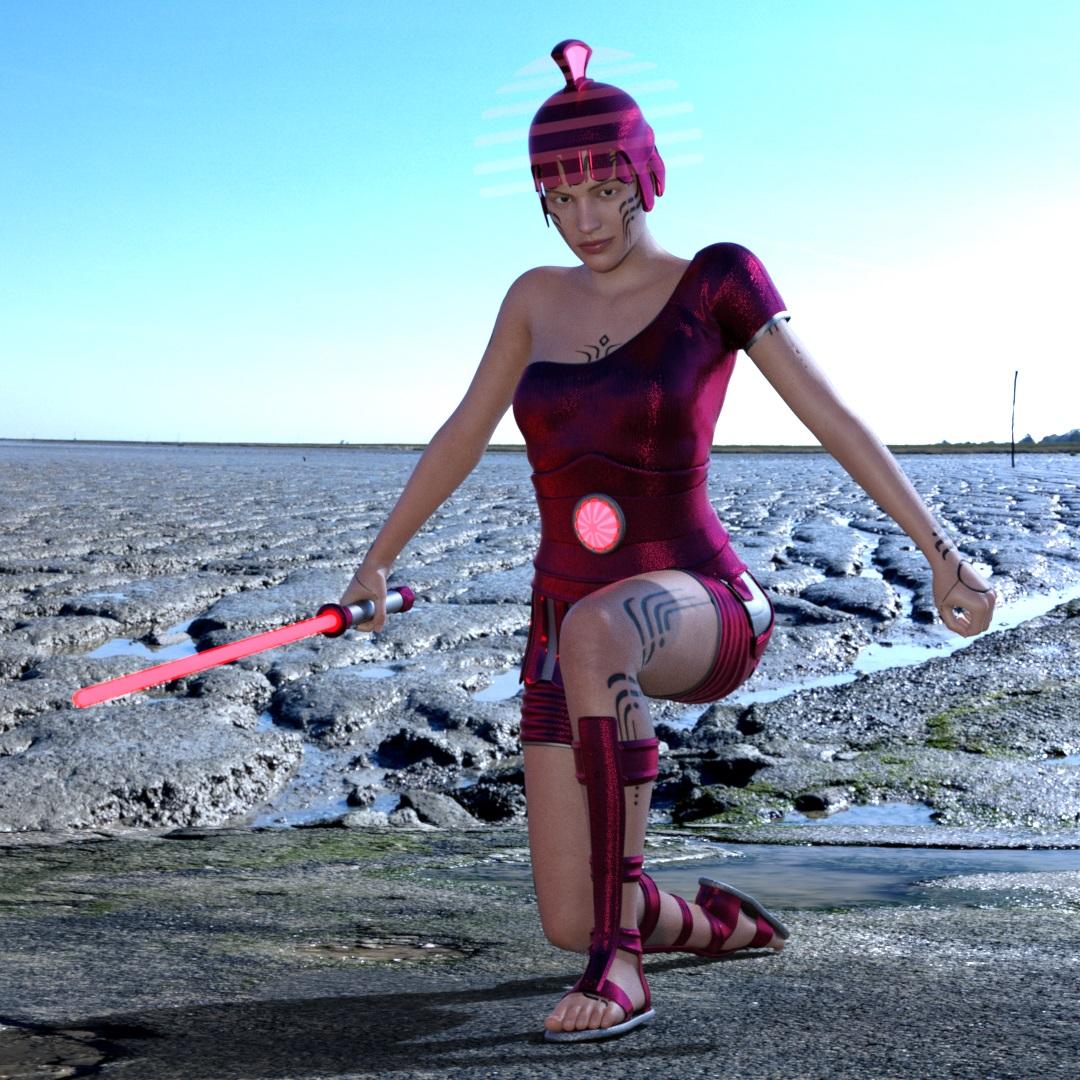
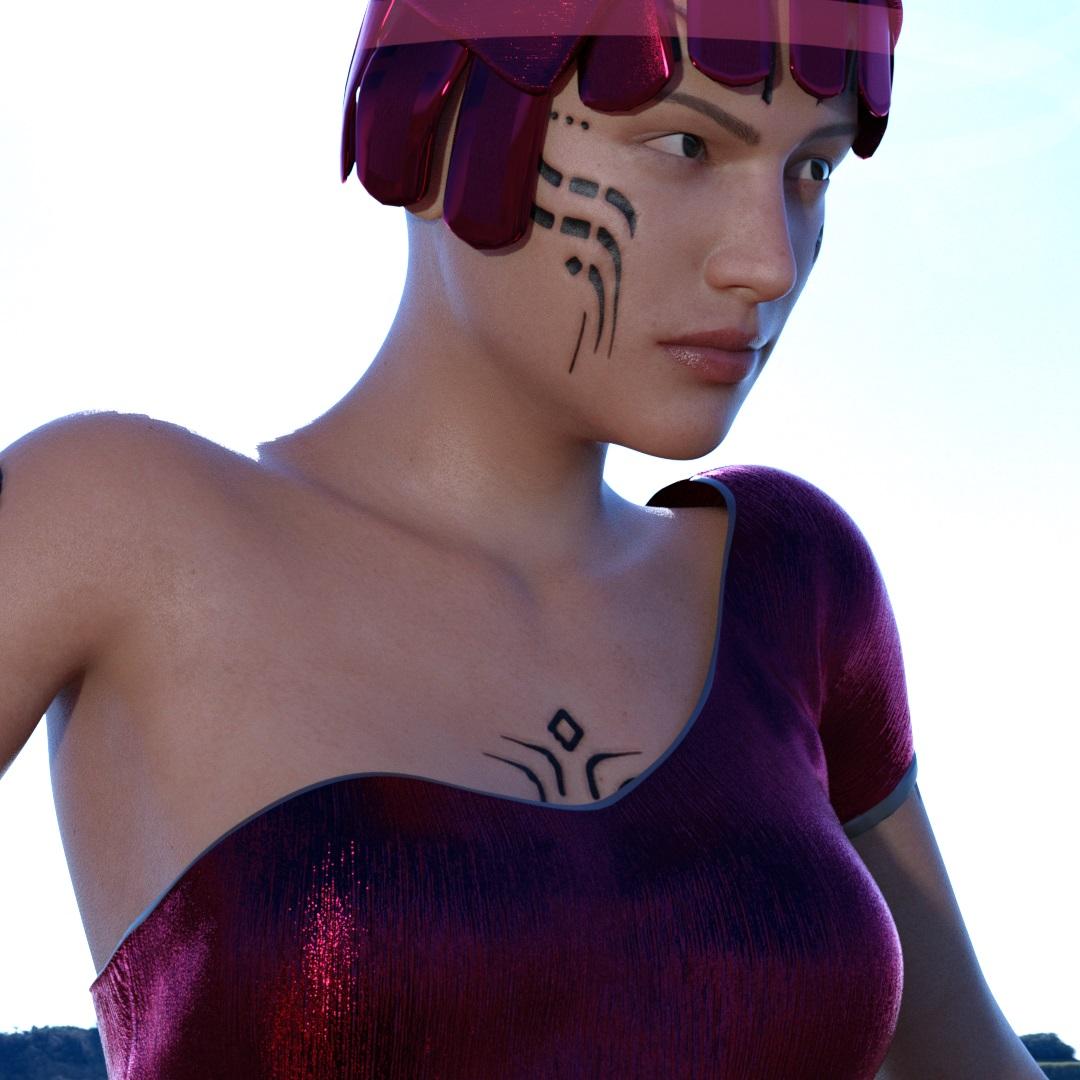
Cool clothing BTW. The script does not alter geometry except for whatever Daz functions might do. I tried to modify the script to move a shirt down and then bake, etc but that doesn't work. In my admittedly limited understanding, I think there would need to be a morph or actual geometry altered to make that better. I will just have to say that this is a limitation of the product.
Thanks for the explanation. You are the best.
You're welcome
 [Released] Clothing Converter from Genesis 3 Female to Genesis 8 Female [Commercial]
Another example of the clothes without metadata - Gladiatrice Futuristica.
After conversion, it looks ok.
As one can see, the shoulder of the dress is lifted up a bit - I've just wonder, if that is relly necessary?
May be other kind of dresses/shirts coould take advantage of that - will have to try more shirts and dresses to test it.
Cool clothing BTW. The script does not alter geometry except for whatever Daz functions might do. I tried to modify the script to move a shirt down and then bake, etc but that doesn't work. In my admittedly limited understanding, I think there would need to be a morph or actual geometry altered to make that better. I will just have to say that this is a limitation of the product.
Thanks for the explanation. You are the best.
You're welcome.
Not So Fast! Interactive Game ~~ DONE~~Read The Moves!Just going back over the thread now, and I see I owe a big THANK YOU to a bunch of people for getting me a more interesting mix of items. I have no idea what I'm going to do with them, but that's the fun, right?
Quick question about my character Toon Generations Two Essentials Gen3 (Character). I own it but have never actually used it, so this will be an adventure. Looking at the product description, it seems like the character is actually a really morphable toon that can be a whole bunch of different characters. Am I supposed to use one specific character, or is figuring out which character to use part of the challenge?
I picked it with the ideal that you could morph male, female, child, adult, baby, all of them.
Daz 3D is part of

Connect
DAZ Productions, Inc.
7533 S Center View Ct #4664
West Jordan, UT 84084Licensing Agreement | Terms of Service | Privacy Policy | EULA
© 2026 Daz Productions Inc. All Rights Reserved.










