-
Rigged Blender file to DAZ
I've looked through tutorials and up and down the forum and I haven't seen this question addressed. Is it possible to import a rigged Blender file into DAZ?
Thanks
Log warnings of files not found in Daz Studio, yet show installed and Metadata IssueHello,
On my MacBook Pro M1, back in the spring I was updating metadata on the Beta at the time, now on 4.21.1.80, when it crashed. This is the primary version I use of DAZ Studio. After updating today's purchases and saving my work I checked my Public Release version, 4.21.0.5 to see if it reflected the updates I had made to the metadata, and it had. One older file had everything dumped into General and I had sorted them into Enviroments, Props, Funishings... I saved that as well. The crash also brought back all the bogus 'Lost and Found' lines inserted into the metadata by Daz, where otherwise correct data was there. I used to be able to delete it. I can still do it on my other computers, Win10 Betas.
It got me to wondering if I could copy my saved 4.21.0.5 as the Support files for 4.21.1.80 and maybe the Beta would clear out all the Lost and Found files I had cleaned up before that one crash and which I can't fix now. I always install with DIM, never turn on DAZ Connect, and I verified that all my CMS and file structures match in DIM and DAZ Studio.
But I also compared both logs for each version and I found some similar warnings:
2023-09-19 12:47:53.549 [WARNING] :: /src/pluginsource/DzIrayRender/dzneuraymgr.cpp(369): Iray [WARNING] - LINK:PLUGIN :: 0.0 LINK plug warn : Loading /Applications/DAZ 3D/DAZ 3D/DAZStudio4 64-bit/libs/iray/ffmpeg_video_decoder.so: dlopen(/Applications/DAZ 3D/DAZ 3D/DAZStudio4 64-bit/libs/iray/ffmpeg_video_decoder.so, 0x0001): Library not loaded: @executable_path/libavutil.56.dylib
2023-09-19 12:47:53.549 [WARNING] :: /src/pluginsource/DzIrayRender/dzneuraymgr.cpp(369): Iray [WARNING] - LINK:PLUGIN :: 0.0 LINK plug warn : Referenced from: <8171360D-13FB-37A1-AC01-06996946A556> /Applications/DAZ 3D/DAZ 3D/DAZStudio4 64-bit/libs/iray/libavcodec.58.dylib
2023-09-19 12:47:53.549 [WARNING] :: /src/pluginsource/DzIrayRender/dzneuraymgr.cpp(369): Iray [WARNING] - LINK:PLUGIN :: 0.0 LINK plug warn : Reason: tried: '/Applications/DAZ 3D/DAZ 3D/DAZStudio4 64-bit/DAZStudio.app/Contents/MacOS/libavutil.56.dylib' (no such file), '/usr/local/lib/libavutil.56.dylib' (no such file), '/usr/lib/libavutil.56.dylib' (no such file, not in dyld cache)Library not loaded: @executable_path/libavcodec.58.dylib
2023-09-19 12:47:53.549 [WARNING] :: /src/pluginsource/DzIrayRender/dzneuraymgr.cpp(369): Iray [WARNING] - LINK:PLUGIN :: 0.0 LINK plug warn : Referenced from: <A945A99D-5D49-3CE6-966A-917EA4C84C37> /Applications/DAZ 3D/DAZ 3D/DAZStudio4 64-bit/libs/iray/libavformat.58.dylib
2023-09-19 12:47:53.549 [WARNING] :: /src/pluginsource/DzIrayRender/dzneuraymgr.cpp(369): Iray [WARNING] - LINK:PLUGIN :: 0.0 LINK plug warn : Reason: tried: '/Applications/DAZ 3D/DAZ 3D/DAZStudio4 64-bit/DAZStudio.app/Contents/MacOS/libavcodec.58.dylib' (no such file), '/usr/local/lib/libavcodec.58.dylib' (no such file), '/usr/lib/libavcodec.58.dylib' (no such file, not in dyld cache)Library not loaded: @executable_path/libavutil.56.dylib
2023-09-19 12:47:53.549 [WARNING] :: /src/pluginsource/DzIrayRender/dzneuraymgr.cpp(369): Iray [WARNING] - LINK:PLUGIN :: 0.0 LINK plug warn : Referenced from: <CCB2D1CA-2DA6-3726-97C9-4F9DD9B99A0F> /Applications/DAZ 3D/DAZ 3D/DAZStudio4 64-bit/libs/iray/libswscale.5.dylib
2023-09-19 12:47:53.549 [WARNING] :: /src/pluginsource/DzIrayRender/dzneuraymgr.cpp(369): Iray [WARNING] - LINK:PLUGIN :: 0.0 LINK plug warn : Reason: tried: '/Applications/DAZ 3D/DAZ 3D/DAZStudio4 64-bit/DAZStudio.app/Contents/MacOS/libavutil.56.dylib' (no such file), '/usr/local/lib/libavutil.56.dylib' (no such file), '/usr/lib/libavutil.56.dylib' (no such file, not in dyld cache)I have checked the file locations and they are where they are supposed to be. Also, DIM shows they are installed.
But I am getting these additional warnings:
2023-09-19 12:47:53.577 [WARNING] :: /src/pluginsource/DzIrayRender/dzneuraymgr.cpp(369): Iray [ERROR] - PLUG:PLUGIN :: 0.0 PLUG plug error: Library /Applications/DAZ 3D/DAZ 3D/DAZStudio4 64-bit/libs/iray/libnvindex.so: symbol "mi_plugin_factory" not found.
2023-09-19 12:47:53.584 Iray [INFO] - PLUG:PLUGIN :: 0.0 PLUG plug info : Loaded library "/Applications/DAZ 3D/DAZ 3D/DAZStudio4 64-bit/libs/iray/libnvindex_application_layer_application_layer.so".
2023-09-19 12:47:53.584 [WARNING] :: /src/pluginsource/DzIrayRender/dzneuraymgr.cpp(369): Iray [ERROR] - PLUG:PLUGIN :: 0.0 PLUG plug error: Library /Applications/DAZ 3D/DAZ 3D/DAZStudio4 64-bit/libs/iray/libnvindex_application_layer_application_layer.so: symbol "mi_plugin_factory" not found.
2023-09-19 12:47:53.597 Iray [INFO] - PLUG:PLUGIN :: 0.0 PLUG plug info : Loaded library "/Applications/DAZ 3D/DAZ 3D/DAZStudio4 64-bit/libs/iray/libnvindex_plugin_openvdb_integration.so".
2023-09-19 12:47:53.597 [WARNING] :: /src/pluginsource/DzIrayRender/dzneuraymgr.cpp(369): Iray [ERROR] - PLUG:PLUGIN :: 0.0 PLUG plug error: Library /Applications/DAZ 3D/DAZ 3D/DAZStudio4 64-bit/libs/iray/libnvindex_plugin_openvdb_integration.so: symbol "mi_plugin_factory" not found.And for these plugin which I am not sure are related:
2023-09-19 12:47:54.357 [WARNING] :: Object::connect: No such slot ABFluidosCompanionAction::handleInterfaceColorsChanged() in /Volumes/HDD/Sources/DAZStudio4.5+SDK/samples/interface/FluidosCompanion/abFluidosCompanion.cpp:57
2023-09-19 12:47:54.357 [WARNING] :: Object::connect: (sender name: 'Style')
2023-09-19 12:47:54.357 [WARNING] :: Object::connect: (receiver name: 'EditAction')
2023-09-19 12:47:54.391 [INFO] :: Creating Pane Manager...
2023-09-19 12:47:55.644 [INFO] :: Successfully created OpenGL viewport for AuxViewportView.
2023-09-19 12:47:55.913 [WARNING] :: QFile::flush: No file engine. Is IODevice open?
2023-09-19 12:47:56.181 [WARNING] :: QLayout: Cannot add null widget to QGridLayout/
2023-09-19 12:47:56.201 [WARNING] :: Object::connect: No such slot ABFisioPane::deleteKeyframes()
2023-09-19 12:47:56.201 [WARNING] :: Object::connect: (sender name: 'StyleBtn')
2023-09-19 12:47:56.201 [WARNING] :: Object::connect: (receiver name: 'Fisio')I tried uninstalling the plug-ins and refreshing the data, then re-installing them and the log shows the same errors.
If anyone has any help to offer, understanding I am not a programmer, and I will need guidance for a MacOS and a lot of patience I would deeply appreciate it. I opened a technical work order with Daz at the time and it has never been responded to.
Thank you,
Mary
is it possible to insert an image and use it as an help?Hello,
If I have an image of someone I would like to model in Daz, is it possible to import this image into Daz and use it as an help to model the character?
Thank you in advance for your answer!
Mimic: Who owns what?wsterdan said:
Dartanbeck said:
Back to the PoseRecorder idea, like I said before - it suggests using a smart phone for recording the performance, trying not to move the head while performing.
The promo page has three example videos - one shown here. This is the result to expect from the software, which is really quite good performance capture for something so incredibly inexpensive.
The reason I'm showing this video: Watch closely - even a few times over. Perhaps also the other two on the store page. Watch the facial performance of the actor and watch the results on the figure. You'll see what I mean that we don't need any embellishment from the actors. Just deliver the lines as if acting.
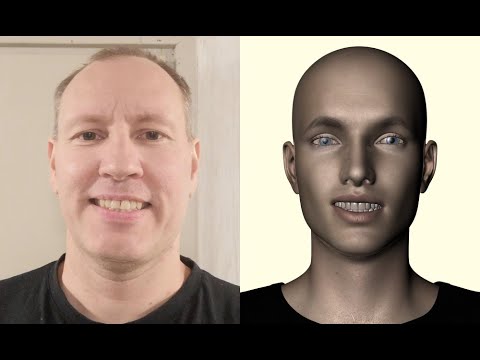
I plan to buy a bracket for the head that holds the phone directly in front of the face, so that my actors can actually act while delivering the speach if they want/need to. My cast of actors is very small, so this won't be a problem as far as I can tell. I do most of the background people, creatures, monsters and many sound effects, etc., Rosie does Rosie, and my crew from the sound studio said that they would love to do whatever I need - just for the fun of it.
What I love about this product is how well it translates the video performance into facial morph recognition. I mean... it works the morph dials really well!
Sounds pretty cool, looking forward to seeing more. I have a plug-in for Cartoon Animator that uses the computer camera to do face tracking, but I find that if I have the computer-generated audio (which, as wolf359 mentioned, are getting better all the time) it was easiest and fastest to just use the face puppeteering instead. Select a character, apply the audio, next character, their lines, and so on until everyone has said their llines, then select the first character and select face puppeteering and start recording; as different people say their lines, you use the mouse to change the character's focus until the scene is complete, then do the same for the next character, and so on. Once you have everyone animated, render out the whole scene or parts to change camera focus, etc. Everything is done in almost real-time.
-- Walt Sterdan
Wow! really? That is really cool!
Oh... do you have aniMate 2? I know that there's an Import Audio on that. I wonder if that would work/give you a waveform? Never tried it.
I haven't even done any dialog stuff yet except for tests.
Mimic: Who owns what?Back to the idea of Mimic Pro for Carrara, there are workarounds for getting Genesis 3 through 9 into Carrara, and Fenric's plugins (BVH/PZ2 Exporter, in this case) are now free.
So we could import Genesis 9, for example into Carrara, create a new (whatever it's called) config file, and use Mimic in a much less realtime way, then save the result as a BVH or PZ2 animated pose file.
The attractive part of this idea is that we could do a lot more with it before exporting the PZ2.
Even better, we could export the PZ2, then make changes and export as another option, rinse and repeat.
Again... just more food for thought - and Mimic Pro for Carrara really does have a lot of power with a nice little manual explaining how to configure and use it, etc., with tips and such.
Wait... I was just looking to grab a link for you. Mimic Pro for Carrara is no longer available? What a freaking Crime!!! This is starting to go Too Far!
Can I create hair and clothes in blender and import them to Daz?yuyu.atem said:
Hello,
Is it possible to create assets like hair and clothes in blender, and import them into Daz to use the on a figure? If it's possible, could you telle me how I can do it, please?
How can I know if the asset I created wil be compatible with a figure?Thank you in advance!
Hi, I used Edit>Figure>Transfer Utility to the hair I imported from blender, but after that, I don't understand where to find it. When I open a new Daz file, I would like to use my new hair on a charactern but I don't find it. Could you tell me where it should be, please?
Thank you in advance!
What can be done when help requests get no CS response?This has me looking at my reports.
Oldest at 2 years was resolved but I was not notified and I have sent a comment back to them but the report form doesn't have a button to consider it closed. # 373218
Reported 3 months ago and fixed 2 months ago, but no notification or closure of the report. I sent a comment back and used the button to consider it closed. #438657
Reported 5 months ago, no human answer. During an update to Lost and Found metadata on the Beta version, my MacBookPro M1 crashed and when I rebooted, all the fixed files I had previously worked on (52) came back. Since then, I have not been able to fix bad metadata on that computer, although the bad metadata doesn't appear on the public release 4.21.0.5. New updates to the Beta don't change the issue. I now have 56 files with imbedded 'Lost and Found' lines. # 435487
Reported 8 months ago, last contact in April 2023, most of Easy Environments HDRIs showing up as magenta from at least 4.21.1.29 on, on both my Win 10 and Mac computers. Okay in 4.21.0.5. # 429976
I have found that when it comes to how my MacBook Pro M1 interacts with DAZ Studio, i.e. crashes a lot, especially after the latest Beta update, Customer Service is often stymied. Normal file issues are easy to fix.
Mary
Opinions sought, Animating Daz characters in C4DI'd like to do the animation work in DAZ rather. There are awesome scripts or plugins for DAZ animation (recommend 3D UNIVERSE STUDIO'S scripts) and the final work will be more natural than C4D. But I'll finish the animating part first then export the model in Alembic format, import it to C4D and fix some specific details, like jinggle, collides etc.
After Cinema 4D imports DAZ characters, there is a problem with the bone name, screenshot, thank youC4D bones system has its own name of each skeleton, thus you need to rename the import DAZ model's skeletons name to auto-matching in C4D. I've been struggling with the bridge GO C4D for long and finally decide to animate in DAZ, then export in Alembic format, import the ABC file to C4D, etc. if you tried import FBX model to C4D with the genital, the shape of the model will become funny.
Daz to UE 5.2 has 3 hour long import timeI've been trying out the new Daz to UE bridge. It taking about 3 hours once it gets to the Unreal side to import the FBX. I'm selecting the Skeletal mesh option for export. My model has clothes and hair but no animation. Any idea why it takes so long to import?
Also, the first few times it imported correctly with textures already applied but lately with the same options selected it imported with no textures applied or materials made. Thank you.
I have a 3060 rtx with 8gb of DDR ram and 64gb of on board ram.
Where is the script tool?Hello,
I saw in the tutorial that to import a character from Daz to Blender with the DazTo Blender Bridge, I have to do "script -> bridge -> DazToBlender", but I can't see the script tool on the top bar:
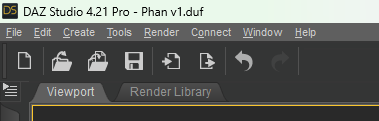
Could you help me, please?
Thank you in advance!
Daz and Cilinder Booleanswhy daz doesn't like obj files with holes made by circular booleans? it always make weird artifacts.
for example, take a cube in blender, make a hole in the middle with cillinder boolean, export as obj and import to daz.
any way to use booleans and fix it? making a lot of holes with just geometry takes ages
thanks
Question: Diffeomorphic, Posing, Mesh DeformationIf you use easy import then jcms are transferred to the outfit, vendor morphs are used if available, and you get the same deformations as daz studio. If you don't use easy import then you have to transfer by hand. Then if you don't like the deformations you can sculpt over, and/or edit or disable the affected jcms in the blender shapekeys list, and/or edit the weightmaps. The choice is wide and up to you.
https://bitbucket.org/Diffeomorphic/import_daz/wiki/Import/Easy Import DAZ
Using Categories to organize contentpaid said:
Just found this thread and have a question: If I categorize an asset of an vendor other than DAZ how can I provide a thumbnail in my own category for these assets?
I’ve done this hundreds of times for content that I've installed manually that I’ve gotten from Renderosity, ShareCG or even old content/Poser content in the DAZ3D store and from free holiday content at DAZ3D that does not show up in the Product Library.
- In most cases I save a promo image of the content item; if there is no promo image, or it is too small or otherwise undesirable, I render a simple image file. I use JPG file format although you can use PNG, if desired.
- I then create a product from the manually installed files. The product will not yet have a thumbnail image in the Content Library or in Smart Content; see the first screen capture. Since content manually installed in Daz Studio comes without a thumbnail image, I use a copy of the saved promo image or rendered image. Sometimes I decrease the size of the copy; it does not have to be 91 by 91 pixels. I like it substantially larger so that when I hover over it in Smart Content or the Content Library I get a view larger than a 91 by 91 pixel image.
- To get the filename that is needed for the thumbnail that will be stored in the Runtime/Support folder, I edit the product metadata and copy the filename without the .dsx extension. I then paste that as the filename for the copy of the promo image or rendered image that I am using for the thumbnail and then move the image file to Runtime/Support; see screen capture.
- I refresh the product list in Smart Content and the thumbnail displays.
Help with G8 eye mistake when sculpting morphHi all,
I've been using Daz for around 2 years and never made a post here before. I use this forum all the time to help me problem solve. I hope I'm posting my question in the correct place.
I have been learning to sculpt my own morphs with Nomad Sculpt on my ipad and after a rough start it has been going suprisingly well. I was pretty happy with my fullybody morph, focusing on the face but upon loading Iray mode I've realized I've made a mistake. At some point in my sculpting I've accidentally touched the eyeballs of my G8M. So when I load up the morph I made, the eyes are no longer perfectly round on the surface and while it's doesn't look too bad in texture mode, it is incredibly noticable in Iray and creates these horrible cracks all through any eye texture I try and use.
My question is, is there an easy fix for this besides going back into Nomad and trying my best to smooth them out/making a new morph? Is there a way to either seperate the eyeballs from the morph completely so they're not going to be changed when I dial it up? Is there a way to delete the eyeballs with the morph active and then import in new default G8 eyes and have them not changed by the morph or will they just immediately be effected? Can you even delete the eyeballs?
Sorry for so many questions. I just reallyyy don't want to go back to the drawing board with the morph. Especially seeing as I'm a beginner with sculpting it is liable to happen again.
Thanks in advance for any replys.
keyframe advice pleaseRichard Haseltine said:
- how are you currently deleting in Intermediate?
I'm not that was my point. Up until now it was faster to just start again from my last saved file before I needed to delete something. That was actually faster than opening advanced mode and then finding all the keys and deleting them. I've redone the entire animation from scratch (1000 frames) at least four times now and that was still much faster than trying to mess with the keyframes in advanced mode on a tiny laptop screen. 90% of the animation is just move fish and apply a pose, move again and apply a pose... problems come when I run it and okay wasn't fast enough I need to drag some keyframes or delete and make new ones closer together... stuff like that. It's getting more and more complex though so starting again all the time is no longer feasible because I'm animating seaweed and bubbles and other fish as well now.
To be honest everytime it starts getting too complex I used to throw up my hands in despair and go to Lightwave and import the Daz figure and then rig it myself from scratch. That's way too much work for this project though. I'm not complaining and I appreciate your advice and taking the time to answer. You helped me a lot many years ago when I was first starting out with Daz Studio and you probably know more about the program than anybody. I'll just grit my teeth and dive into advanced mode on the timeline. Thankyou for your help. The video is no big deal just an intro for my youtube fishing videos.
Created morphs for daz studio not working. - Resolved!Thanks ...
The figure distorts like a stretched Gumby. Tried saving as .obj and import via Morph Loader, still same.
Tried about every combination I can think of.
Seems that previos version of Studio worked fine, but after updating to latest Studio and Beta a few weeks ago, nothing works right.
I could simply be having a senior moment!!
Thanks
Created morphs for daz studio not working. - Resolved!Distort in what way? Check that the import option still give a correctly oriented and scaled figure (set the morph to 100% and see what you get, or try importing the OBJ itself into the scene with the same preset/settings).
How to create a prop?yuyu.atem said:
Hi everyone! I have a question about creating props. Once I created my base mesh an exported it into an .obj format, what have I to do next? I gess I have to import the .obj file into Daz, but how can I create an asset that will "stay" in Daz? I mean, what have I to do in order the prop appears with the other Daz props, in any file, without I have to use the "import tool" each time I want to use it?
Thank you in advance for your answer!
Before you import it into DS, youi need to make sure it is UVMapped
How to create a prop?Hi everyone! I have a question about creating props. Once I created my base mesh an exported it into an .obj format, what have I to do next? I gess I have to import the .obj file into Daz, but how can I create an asset that will "stay" in Daz? I mean, what have I to do in order the prop appears with the other Daz props, in any file, without I have to use the "import tool" each time I want to use it?
Thank you in advance for your answer!
Daz 3D is part of

Connect
DAZ Productions, Inc.
7533 S Center View Ct #4664
West Jordan, UT 84084Licensing Agreement | Terms of Service | Privacy Policy | EULA
© 2026 Daz Productions Inc. All Rights Reserved.