-
Maxx HD Mega Pack for The Brute 8 [Commercial]
In the Pro-Mo Pictures for the Product, one of the images says "4 anatomical elements morphs." (1) I would like to know what this means. Gens, right. But usually two morphs at most are provided, circumcised and uncircumcised. What are the 4 for? (2) Also, once I know what this means, can these morphs be used on other Genesis 8 characters? I would guess "yes," but I'd like to know before I buy. (3) Again, are these morphs independent of the skin textures? That is, can I use a morph on another character without using Max's texture? (4) I'm guessing that I can use Max's skin texture and the various shaders on other characters, is this correct? The Pro-Mo Pictures say "Custom Skin Shade Layer Set a New Skin Color On Top Without Messing Several Options to Achieve It 15 Presets Included." (5) Now, can this Custom Skin Shade Layer be used on other Genesis 8 male characters who have skins that are not Max's? Or, is this available only for the Max skin texture?
I don't have the Brute, but I'm really tempted to buy this product. Still, I need to know more.
UltraScatterPro Experiments and ExperiencesI decided to create a thread to house my UltraScatterPro experiments. I'll try to document what I did and what I learned along the way.
Lessons Learned/Tips:
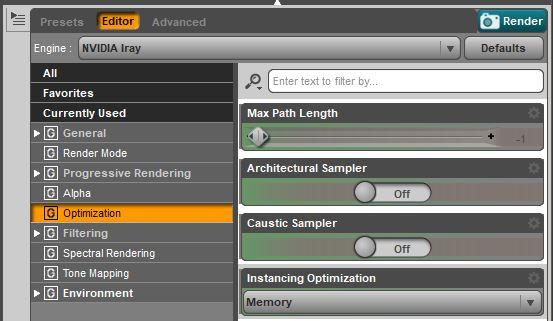
- Before I ever use instances in an Iray scene, the FIRST thing I do is change Render Settings Instancing Optimization from Speed to Memory. You find this setting on the Editor tab in the Render Settings pane. This is documented in the UltraScatterPro manual and is very important. If you leave it on Speed and create a lot of instances, Daz Studio will either become unresponsive or crash.
- When scattered instances will be constrained to small areas of the target surface (by distribution image maps, for example) set the number of instances/iterations much larger than the number that you expect to need, because UltraScatterPro will have to try a lot of positions to find ones in the constrained scatter area.
- Settle on the final morph and pose of the target object before scattering the instances. If the target object is reposed or the shape is changed later, the instances will have to be rescattered.
- If you have the Geometry Editor Tool or the Weight Mapping Tool selected, UltraScatterPro will not generate instances on polylines and polylines will not render.
- The Spacing parameter in the UltraScatterPro Distribution tab will prevent UltraScatterPro from placing instances any closer than this (origin to origin, not edge to edge). It will NOT make UltraScatterPro place them exactly that distance apart. As far as I know, it is not possible to specify and exact distance between instances with a Surface Scatter unless you use a distribution map to control the exact placement of each instance.
- Ground Position Auto in Iray Render Settings ignores instances in computing the "ground" level. This is true for regular Daz Studio instances as well as UltraScatterPro instances.
- UltraScatterPro alignment option "Point At" uses the built-in Daz Studio Point At behavior and it has some unexpected rotation of the XZ plane in some cases. UltraScatterPro has a custom implementation of "Point At with Clamp Y Axis", which behaves consistently without the wonky rotation of the Daz implementation.
- Scattering a group of items creates more variety than scattering just one item, because UltraScatterPro randomly selects one of the items in the group for each instance, instead of using the same one item for every instance. Use the "Create>New Group,,," menu item and then parent your items you want to scatter to the Group. Try this the next time you want to scatter some landscape items. Create a group with a mix of grass, flowers, weeds, etc. and get a more interesting lawn.
- UltraScatterPro lets you import all the settings from a previous scatter into a new scatter. This wasn't possible in the original UltraScatter product and is a huge feature of UltraScatterPro. I used this feature in the Topiary experiement to copy the bottom topiary leaf ball scatter settings to the middle and top leaf balls without having to remember and reenter all the settings.
- A bunch of objects and UltraScatterPro instance groups can be combined into a Daz Studio Group and duplicated. The UltrsScatterPro instance groups in the duplicate remain functional and can still be modified and rescattered! I used the technique to duplicate a topiary tree I created from 4 primitives and 4 UltraScatterPro instance groups.
- If you run UltraScatterPro on an existing scatter group and you change only the Preview instances type (None, Full, Bounding box, Lores tree), you can click on the Cancel button and exit UltraScatterPro. It will keep your new choice of Preview instances without having to rescatter all the instances. This is a huge time saver if you just want to turn off a lot of instance previews in a cluttered viewport, or want to change between Full and Bounding Box, etc.
- You can't scatter instances of instances. If the props you are scattering (like Urban Sprawl 3) contain instances, those instances will not show up in the UltraScatterPro instance groups. They won't cause an error, they just won't be processed.
- All three UltraScatterPro scatter types (Surface, Volume, and Matrix) have an Affinity option for Density Control. Affinity has both Attract and Repel settings. These settings allow you to control how close to and how far from another object's origin your scattered instances will be placed. I think of Attract and Repel kind of like magnetic poles. Attract pulls instances toward the other object and Repel pushes them away from the other object. The Attract settings specify the distance over which instances will be placed, and Repel settings specify a keep-away distance. The Falloff is an ease in/ease out type of control for the boundary of the Attract and Repel range.
- UltraScatterPro version 1.0 "forgets" the target of the Rotation "Point at..." after a scene is closed and reopened. I'm hoping for a future update to fix it.
- Elevation (on the Distribution tab) is measured in Meters. I think everything else in UltraScatterPro is measured in Centimeters. The titles of the numerical entry fields are labeled with the units they use (m or cm), but if you are not observant, and wonder why your elevation values aren't working, it may be that you are thinking in centimeters and not meters.
Measure MetricsThe thing about Measure Metrics that has always bugged me is that it offers you an enormous amount of information, measures a host of figure dimensions. But only allows you to adjust a small subset of them, regardless of which version of the script you load. I was initially excited by the apparent utility of the script, but while I still use it with virtually every character I build I find myself feeling cheated somehow. Why give me all those other measurements and not allow me to adjust them?
You can adjust them, by specifying which morph or property to use, and you can then save your set-up for future use.
There is documentation for Measure Metrics and, lined near the bottom of the page, Figure Metrics http://docs.daz3d.com/doku.php/public/software/dazstudio/4/referenceguide/plugins/measure_metrics/start
Hierarchical ERC Freeze? (Don't know what else to call it)I want to ERC freeze some bone center and end point movements along with a morph. That is pretty simple.
But...I also want to ERC freeze a joint rotation of a figure parented to that bone. Everything looks good in property hierarchy and works as expected, but it seems the erc freeze info is not being saved to the morph dsf file. Next time I open the file, the parented figure's rotation is no longer freezed to the morph.
Is this a bug? Or am I missing a step or two?
Transfer Products or FilesHi.
Is it passible to transfer files, from one account to another?
I build a new account and want to tranfer the old products. Is it possible and allowed?
Thanks!
Transfer Utility FreezesEvery time I try and apply the Transfer Utility to fit clothing to a non-standard morph to Gen 8 female, daz freezes at 22% when creating the "projection map".
Any ideas at a work around?
G8 Male Anatomical Elements.How do we know if our files are compressed. WHen I do
Did you all know that you can easily have all your G3M anatomical element addons also for G8M - simply copy the morph data folders to G8M (same folder structure) and search/replace with notepad G3M and Genesis 3 Male with G8M and Genesis 8 Male for the non compressed files. Compressed files need to be decompressed first of course to be editable. Geometry for G3M AE and G8M AE are exactly the same. And did you know that we once named the AE "penis"? - man those past times....
Hey @jepe Thanks very much for this suggestion. I'm not very advanced at this, so I hope you'll help me with a question? I need just a little more detail. You say "search/replace with notepad G3M and Genesis 3 Male with G8M and Genesis 8 Male for the non compressed files. Compressed files need to be decompressed first of course to be editable."
Would you mind explaining this a little bit further? What files should I be opening to then do the search/replace on? What text am I searching and replacing? This whole sentence, unfortunately, goes clean over my head.
I really appreciate any and all help!Notepad++, do Find in Files, make your directory the G8M Male Genitalia morphs folder.
Replace "/data/Daz%203D/Genesis%203/Male%20Genitalia" with "/data/Daz%203D/Genesis%208/Male%20Genitalia"
Replace "G3MGenitalia.dsf" with "G8MGenitalia.dsf"
If you replace "G3M" with "G8M" you can break folder structures, don't do this.
How do we know if our files are compressed. WHen I do the search you suggest, it comes up with nothing in the folder.
Open the file in notepad++, if you get text you can read and not gibberish then it’s not compressed.
Ok, so it seems most of my morph files are compressed. How do I uncompress them? And will that pose problems for my use of the morphs?
If the G8M gens behave the same as the female version (I don't have the male gens for G8M) then you don't need to rename anything. I have copied all the folders in the morphs folder of G3F (except the the DAZ 3D one already there) and not renamed anything within the files. All morphs work fine on G8F version.
Copy folders from data/Genesis 3/Male Genitalia/Morphs/ to data/Genesis 8/Male Genitalia/Morphs/ and see if they appear when you load the G8M gens.
Again, don't copy the data/Genesis 3/Male Genitalia/Morphs/DAZ 3D folder.
how to create initial morphs for 'Classic Long Hair with Dforce'Followed all suggestions and success! Not sure exactly which suggestion did the trick, but this time I changed the subd of the hair to 0. By default it is set to 2. Thanks for all your comments.
That would work; selecting Base Resolution does the same, and then no need to remember what it was before changing.
Hi there,
In video tutorial " Create Custom Initial Morph" is in the second minute of the video text that says that hair has to be exported in Base Resolution as OBJ.
Wind Node is mentioned in PDF Introduction in section Knowledge and Known Issues - we are openly saying that with Wind Node hair doesn´t work well and we didn´t find a way how to fix it.
And yeah, we know that all those Tutorials can be overwhelming and not everyone has patience to go through all of them ( and that music
 ....and PDF!), we were trying to put there all the informations we thought might be useful, though.
 Thanks
After selecting 'Base Resolution' for the hair, I noticed that the Subd level and Subd Level minimum values were still at 2. I had to manually change the values to 0.
Permanently change a morph labelJust delete the surplus .dsf files, there isn't a way to delete saved assets from within DS (except with a custom script).
I allowed it to save to the default location [ My Library\data\DAZ 3D\Genesis 8\Female\Morphs\me\Product ], which seem to duplicate every morph possible into that folder (like in the other thread that I linked).
So I should just delete everything in that 'me\Product' folder that I've just created (or just the folder iteself)? Or do you mean somewhere else?
G8 Male Anatomical Elements.How do we know if our files are compressed. WHen I do
Did you all know that you can easily have all your G3M anatomical element addons also for G8M - simply copy the morph data folders to G8M (same folder structure) and search/replace with notepad G3M and Genesis 3 Male with G8M and Genesis 8 Male for the non compressed files. Compressed files need to be decompressed first of course to be editable. Geometry for G3M AE and G8M AE are exactly the same. And did you know that we once named the AE "penis"? - man those past times....
Hey @jepe Thanks very much for this suggestion. I'm not very advanced at this, so I hope you'll help me with a question? I need just a little more detail. You say "search/replace with notepad G3M and Genesis 3 Male with G8M and Genesis 8 Male for the non compressed files. Compressed files need to be decompressed first of course to be editable."
Would you mind explaining this a little bit further? What files should I be opening to then do the search/replace on? What text am I searching and replacing? This whole sentence, unfortunately, goes clean over my head.
I really appreciate any and all help!Notepad++, do Find in Files, make your directory the G8M Male Genitalia morphs folder.
Replace "/data/Daz%203D/Genesis%203/Male%20Genitalia" with "/data/Daz%203D/Genesis%208/Male%20Genitalia"
Replace "G3MGenitalia.dsf" with "G8MGenitalia.dsf"
If you replace "G3M" with "G8M" you can break folder structures, don't do this.
How do we know if our files are compressed. WHen I do the search you suggest, it comes up with nothing in the folder.
Open the file in notepad++, if you get text you can read and not gibberish then it’s not compressed.
Ok, so it seems most of my morph files are compressed. How do I uncompress them? And will that pose problems for my use of the morphs?
In DS you can use Window>Panes(Tabs)>Batch Convert, or you can use an archive tool (WinZip, 7Zip, etc.) which will usually allow you to right-click on the file to select an extract option.
G8 Male Anatomical Elements.How do we know if our files are compressed. WHen I do
Did you all know that you can easily have all your G3M anatomical element addons also for G8M - simply copy the morph data folders to G8M (same folder structure) and search/replace with notepad G3M and Genesis 3 Male with G8M and Genesis 8 Male for the non compressed files. Compressed files need to be decompressed first of course to be editable. Geometry for G3M AE and G8M AE are exactly the same. And did you know that we once named the AE "penis"? - man those past times....
Hey @jepe Thanks very much for this suggestion. I'm not very advanced at this, so I hope you'll help me with a question? I need just a little more detail. You say "search/replace with notepad G3M and Genesis 3 Male with G8M and Genesis 8 Male for the non compressed files. Compressed files need to be decompressed first of course to be editable."
Would you mind explaining this a little bit further? What files should I be opening to then do the search/replace on? What text am I searching and replacing? This whole sentence, unfortunately, goes clean over my head.
I really appreciate any and all help!Notepad++, do Find in Files, make your directory the G8M Male Genitalia morphs folder.
Replace "/data/Daz%203D/Genesis%203/Male%20Genitalia" with "/data/Daz%203D/Genesis%208/Male%20Genitalia"
Replace "G3MGenitalia.dsf" with "G8MGenitalia.dsf"
If you replace "G3M" with "G8M" you can break folder structures, don't do this.
How do we know if our files are compressed. WHen I do the search you suggest, it comes up with nothing in the folder.
Open the file in notepad++, if you get text you can read and not gibberish then it’s not compressed.
Ok, so it seems most of my morph files are compressed. How do I uncompress them? And will that pose problems for my use of the morphs?
Modelling Software - Overview?Things you may want to look for, though to an extent they are supported to soem degree in most of the applications:
- Support for morphs (blend shapes, morph maps) so that you don't need a separate file for each shape (assuming morphs are something you do)
- UDIM support (for the mapping on the recent daz figures, for example)
- Ability to edit mesh without losing UVs, morphs etc.
- Ability to edit a mesh shape without breaking vertex count or order (for morph creation)
- Ability to regroup without breaking morphs, UVs, etc.
- Ability to bake maps from one mesh to another of similar shape
- Retopology tools (auto and manual) for reworking mesh produced elsewhere
- Ability to selectively apply morphs (useful for splitting them, or for corecting things like deformed eyes from a sculpting session)
- Mesh sculpting (to deform shapes with brush like tools)
*Takes-notes-conscientiously* Thank you!
Have a look at 3DCoat
Ha... Looks promising... And so intuitive... Nice. Remembers me of Z-Brush (I dont own it) from first look, but I assume there are differences...?
Physics Simulation
This was a part that totally fascinated me about blender. Not because of animation, but, for example for illustrating debris, crashes, or a character jumping through a window... I simulate an object breaking through a window, select a still-frame and export this one as obj to DAZ to use in a scene. Is there a program that crosses your minds?
G8 Male Anatomical Elements.How do we know if our files are compressed. WHen I do
Did you all know that you can easily have all your G3M anatomical element addons also for G8M - simply copy the morph data folders to G8M (same folder structure) and search/replace with notepad G3M and Genesis 3 Male with G8M and Genesis 8 Male for the non compressed files. Compressed files need to be decompressed first of course to be editable. Geometry for G3M AE and G8M AE are exactly the same. And did you know that we once named the AE "penis"? - man those past times....
Hey @jepe Thanks very much for this suggestion. I'm not very advanced at this, so I hope you'll help me with a question? I need just a little more detail. You say "search/replace with notepad G3M and Genesis 3 Male with G8M and Genesis 8 Male for the non compressed files. Compressed files need to be decompressed first of course to be editable."
Would you mind explaining this a little bit further? What files should I be opening to then do the search/replace on? What text am I searching and replacing? This whole sentence, unfortunately, goes clean over my head.
I really appreciate any and all help!Notepad++, do Find in Files, make your directory the G8M Male Genitalia morphs folder.
Replace "/data/Daz%203D/Genesis%203/Male%20Genitalia" with "/data/Daz%203D/Genesis%208/Male%20Genitalia"
Replace "G3MGenitalia.dsf" with "G8MGenitalia.dsf"
If you replace "G3M" with "G8M" you can break folder structures, don't do this.
How do we know if our files are compressed. WHen I do the search you suggest, it comes up with nothing in the folder.
Open the file in notepad++, if you get text you can read and not gibberish then it’s not compressed.
Should I Always Use Victoria 8?I haven't gotten my hands on Victoria or Michael yet, since I'm still a bit new with Daz3D. My current main character is a G8 Female who has some elements of the Keriann morph.
Sydney 8Got her, including the HD add-on. Thinking about returning her immediately. When you dial out the Sydney body the G8F base shows a folding-out wrinkle below her breasts.
I don't believe anyone addressed this definitively yet, so I brought both Sydney and Sydney HD into DS and dialed out just the body morph on each. The wrinkle below the breasts is only there when you remove the body morph, but leave the HD body morph.
I won't return her because of it, but it's a shame the wrinkle is there. I've been known to use a different body on a figure while still using the HD morph. However, with clothing covering the chest, it might not cause an issue. On the other hand, the added detail around the base of her large breasts adds realism to the skin. After half a century, the skin that's pulled by the weight of the mammary glands has it's own set of lines and wrinkles, something I've not seen in a 3D figure before.
I didn't do any rendering as it's well past my bedtime, but I wanted to reassure anyone wondering about this issue, that it isn't a problem with the base morph.
Normal maps can also add such detail; not got the character so cant check.
In this case, I also dialed out the HD morph and the wrinkle went away. However, I didn't render either one, so I can't yet say how the normal maps affect them.
A small section of Olympia 8 Normal map; as you can see, that detail at the base of the breast will cause creasing. As, what appears to be, an uncompressed tiff, it will have lots of detail too.
@nicstt, I think there is a misunderstanding based on the use of the word "wrinkle". Sydney is an older gal and she has lots of wrinkles, which I love. However the issue with the breasts if one tries to use the HD morph with the G8F Base Female is a crease in the mesh. Here is an image I put together in Photoshop from saving viewport draws that should show you exactly what I mean. Normal Maps are off. I have not tried the HD on any other figure/character morph.

As many of us like to use the face of one character with the body shape of another, it's important to know about this in advance. I think it would be great if there were a separate morph to dial this out, kind of like the Nose smaller morphs for Ollie and Edie, so the HD morph could be used with other body shapes,
I've gone back to my earlier posts and changed wrinkle to crease, for clarity.
The creases mainly relate to bust size; it causes the skin to fold, much like it folks at the groin and abdomen when bending over - even with very slim folks.
As an older woman, I have first-hand knowledge of how the skin beneath the breasts creases at various stages of age and breast size. I assure you, my skin has never doubled over on itself into a crease below the breasts. Perhaps I'm the odd-woman out…?
Regardless, I hope we can agree to disagree on this issue…
of course; it is likely some issue with trying to create wrinkles for a 3d object on a 2d plain.
AWE Shading Kit for DAZ Studio and 3delightOK. I think I found out what the deal is with Genesis 8 eyes. I was troubleshooting RAMWolff's Gino when I noticed I couldn't get any type of reflection/specular highlights, no mtater what I do. The only way I can get any sort of highlights is by turning on opacity. Once that's done, I tried re-enabling transmission and of course, the black spots shows up. No matter what settings I used, they simply won't go away.
So I sent the model to Hexagon and tried pulling out the eyes out of the head to see if something in the head was messing around with the render. Didn't help, but I forgot to turn on subdivision again and then I noticed the dark spots changed shape. OK. Then i guess it must be a geometry issue, since subD changes geometry. I sent the model to Hexagon again, selected the eyesurface and pull it out slightly so it slightly bulges outward. Re-render things in DS and the black spots are gone.
It does look like the cornea and eye moisture polygons of Genesis 8 are placed too close together for the default bias used by 3delight. The easiest workaround would be a morph to slightly bulges them outward, though I don't know how this would behave with closed eyelids (at the moment).
Edit:
OK. Worked out a possible solution in the shader, by adding a 0 (zero) bias to transmission. Hey, would that make AWE Surface "unbiased" ?

Is that my Gino skin? Looks like a really nice reflection. Funny, in my set up, which seems weird to all that's looking over Gino right now, most of what works for me doens't work for them... LOL I must be really weird in how I have my set up going or something is amiss in my DAZ Studio! LMAO
Looking forward to your updates for AWE wowie! Thanks for your help so far. Oh and by the way there are maps for SSS in the folder for Gino but I probably don't have them created properly to have the dark and light where they would give more of a translucency to ears and what not..
G8 Male Anatomical Elements.How do we know if our files are compressed. WHen I do
Did you all know that you can easily have all your G3M anatomical element addons also for G8M - simply copy the morph data folders to G8M (same folder structure) and search/replace with notepad G3M and Genesis 3 Male with G8M and Genesis 8 Male for the non compressed files. Compressed files need to be decompressed first of course to be editable. Geometry for G3M AE and G8M AE are exactly the same. And did you know that we once named the AE "penis"? - man those past times....
Hey @jepe Thanks very much for this suggestion. I'm not very advanced at this, so I hope you'll help me with a question? I need just a little more detail. You say "search/replace with notepad G3M and Genesis 3 Male with G8M and Genesis 8 Male for the non compressed files. Compressed files need to be decompressed first of course to be editable."
Would you mind explaining this a little bit further? What files should I be opening to then do the search/replace on? What text am I searching and replacing? This whole sentence, unfortunately, goes clean over my head.
I really appreciate any and all help!Notepad++, do Find in Files, make your directory the G8M Male Genitalia morphs folder.
Replace "/data/Daz%203D/Genesis%203/Male%20Genitalia" with "/data/Daz%203D/Genesis%208/Male%20Genitalia"
Replace "G3MGenitalia.dsf" with "G8MGenitalia.dsf"
If you replace "G3M" with "G8M" you can break folder structures, don't do this.
How do we know if our files are compressed. WHen I do the search you suggest, it comes up with nothing in the folder.
How Do You "Bake" Character Morphs?If you simply want to combine morphs into one morph...you dial up all the morphs you want..
Right click on the parameters tab and go into edit mode...
Right click on "actor" and select "create new property.....fill out the pop-up with the name you want to give the dial, and where you want the dial to appear...then press "create"
After creating this new property, right click on the new dial you made and click "ERC Freeze"..make sure all the elements you want are selected and press"accept".
Then your new dial will dial in all those other dials.
You can save this as any other new morph,...save as/morph assets
Very helpful.
Getting Gino set up but previously I had set up a shaping file (INJ) and a remove file (REM) and while I can get the INJ file working as expected the REM file removed just Gino's face but the rest of the body remains engaged and I've tried every trick I can think of to get the REM file to work correctly. So I'm stuck with that little puzzle. I thought it would be as easy as saving out a Shaping preset with NOTHING selected. NOPE, the body stays! So there may be some connection to my newly made body dial slaving all the morphs I used to make up Gino's body shape (using the DAZ3D in house body shaping morphs).
Help?
Thank you
Richard
Noob questions on making a morphYou think that's a nube question? Hell, I don't even know what a morph is. I think I win.
Tutorial For Installing Freebies?Hi Richard, no, I don't yet really understand what a morph is.
However, I just came across some other clothes which did work correctly when the figure's pose is adjusted. So maybe it was those other clothing items that were the issue. Or maybe I didn't know how to fix those items, or maybe the 3D realm is an immature industry where every other file doesn't work.
I obviously have no idea.However, the fact that you don't have an answer yet suggests that there may be something wrong with those particular clothing objects. If I was doing something wrong you'd likely be able to point to what that is, but obviously you can't be expert on every clothing item I might download from somewhere.
So far, all my clothing etc are free items, so perhaps that's the problem. Maybe it's a "get what you pay for" operation. I'll keep experimenting and will report any new information I can develop.
Thanks as always, you're a big help.
Daz 3D is part of

Connect
DAZ Productions, Inc.
7533 S Center View Ct #4664
West Jordan, UT 84084Licensing Agreement | Terms of Service | Privacy Policy | EULA
© 2026 Daz Productions Inc. All Rights Reserved.