-
Changing the labels in Smart Content
I think that explains things. I installed it using DIM but I had the update metadata on start turned on. I turned it off and we will see how things go from there.
Issues after upgrading to 4.22ZBrush: I don't know why you would be having trouble, but this isn't a general issue. The scaling is because OBJ has no set size, so you have to tell DS how long its unit is - if the values of export (implicitly, via Bridge, or explicitly via OBJ export) and import as miorph do not match the result will be unwanted scaling - in this case, ZBrush seems to use the metre as its unit but the default DS scale is the cm - change the preset in the Morph Loader options (modo is a good basic choice for this scale) and it shoild match up.
On rendering, the new DS has a more recent version of iray which has a later minimum driver version - see https://www.daz3d.com/forums/discussion/comment/8513136/#Comment_8513136 - and I suspect your driver is too old.
Issues after upgrading to 4.22So it appears I made the big mistake of downloading the latest release of Daz Studio, and now i`m having trouble with multiple issues.
The GoZ bridge no longer works properly. I can send a model to ZBrush, but am unable to send it back to Daz from ZBrush. If I then manually export from ZBrush, and use Morphloader Pro to add the change, it then shrinks the model down to 9500 - 10,000% smaller than the original model (If I manually export from Daz, and import into ZBrush, then export out of Zbrush, and import to Daz, it works okay, so the issue is specific to the bridge).
I also noticed that renders were also taking significantly longer to make, with something that would previously have taken 6-7 minutes, now taking 1 hour 20 minutes just to reach 68% (A single G9 char with hair, and a JPG backdrop with only the standard HDRi lighting set to 30% rotation, 2400 x 3000). The initial period while it collates all the information before starting a render is noticably longer, but after looking into it, I can see that in the preview window, when in Iray mode, the gfx card is fully fired up so everything is quick. But when I start a render, despite having both CPU and GPU set for renders (and previews), only the CPU works and the GPU does nothing. If I set it to GPU only it instantly finishes the render, and only produces a black screen. I am running the latest Nvidia drivers (31.0.15.5123).
Any help would be appriciated
Two different hair simulations in 1 sceneSo you need two simulations on the same object? The only way to do that would be to export the first as OBJ, then import as a morph and have that applied at the beginning of the simulation - but if the hair is exploding I wouldn't expect that to help, more likely you need to adjust the Simulation Settings to allow itt o cope with the rapid movement (and then you can use the Timeline or initialisation time to allow the first simulation to drape the hair followed by the movement onto the ehad, being careful not to force the hair into existing geometry).
Diffeomorphic - rigify not creating controllers for breast bone, fingers EtcHello.
Ive used both Daz and Blender alot but I'm a bit new to Diffeomorphic. Can't believe I've overlooked this great addon all this time.
Could someone kindly help me.
Ive impoerted a female daz character with breast bones into Blender 3.6 using both easy import and the standard, (1st image) but when i apply the Rigify it doesnt create all the IK controllers for breast bones, fingers, toes Etc (2nd image)
What am i not doing? or doing wrong please?
I did manage to get a rig with all the controllers - breast, fingures toes etc, ( 3rd image), but I dont know how I did it! ( sounds dumb I know). I was just pressing buttons
Shoe fit issue with Toon Heroes for Genesis 9It's a common isssue on stylized and toon characters...If you know a sculpting tool e.g. Blender... the best way is to fix the distortion in Blender and import the shape to update the full body morph on the shoes.
An alternative: do not dial Toon Vixen's body morph (Toon Hero Body), you shape the character's body with morph products, e.g. Shape Shift...
New User/Basic QuestionsWhen you click on File - Import you will see a list of file types that are supported.
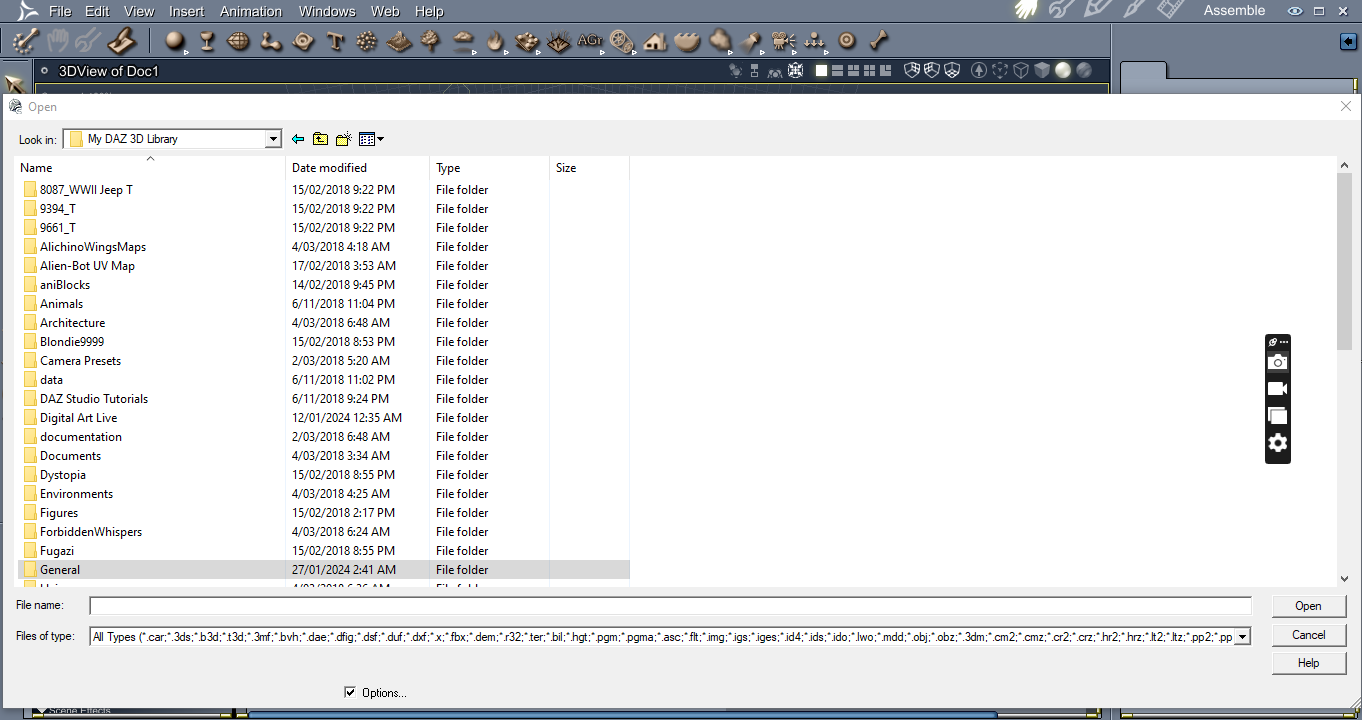
Click on the arrow at the end of Files of type to see the full list
How do you deal with face expressions for your customized characters?Dissendior said:
Okay... just for clarification:
- it's actually the case that the expressions may need morphs for a specific character to really fit his face shape. And many expressions already come with character specific morphs which are activated when I dial in an expression
That's right... Technically, the character specific expressions / corrective morphs can be Zeroed in Parameters pane (some in hidden properties), but that'll be cumbersome. You may leave them there, fix the expressions in blender as needed, and import as a delta morph.
- when I customize a character it's not unusual that I may need to adjust the face for a expression
Fairly usual and common... and that could always the last step of customizing a character. Then save the character's specific expression presets.
- additionally there are different sets of expressions / controls for G8 and G8.1 and I shouldn't mix them. I had a view at the pose controls for my G8.1 figure and found a "Expressions" and a "Expressions 8.1" sub-categorie where the "Expressions" is greyed out, tweaking the controls here has none to just a very little influence on the expressio of the figure. I thik you mean these expressions which are for G8?
- As I used the G8.1 figure in Blender with Diffeomorphic I might have dialed in a G8 expression on this figure, I am not sure
That's correct. "Expressions" path is for G8.0. If you don't remove the "blockers" in data folder, they won't work. Just refer to the attached SS to test...
- the FARC expressions are all just for G8.1?! I can't use them on G8?
Nope... G8.1 can read and load G8.0's morphs / pose controls, but not conversely, which is "backward compatible" only.
Moving DAZ to a New Computer - The Complete GuideRichard Haseltine said:
nonesuch00 said:
Thanks.
I configured DIM to point to my content library locations after installing it and before installing the DAZ Studio & such binaries. In that way, with the new versions of DIM & DAZ Studio/DAZ Studio Public Beta, the content library locations were autofilled out in the DAZ Studio install process. I still manually checked that the content library locations were correct and I still had to manually add non-standard content location. eg, like my Poser 12 Pro content library.
I no longer use DAZ Studio to log into the DAZ Servers and it saves me metadata & content updates from being done via DAZ Studio with often conflict with DIM locations for whatever reason. Now it gets only done via DIM only so no conflicting data updates happen.
There is now an option, off by default, on the sign-in dialogue controlling whether or not the emtadata is updated automatically.
Also, you have to still update your serials manually. In the future, when DAZ 3D hardens it's security, I would like all my serials revoked and new ones issued for those revoked and DAZ Studio itself connect to DAZ 3D servers and activate my bought / free plugins automatically. I don't want the metadata/DS online product updates to happen though with that automatic serial activation so they would need to be checkboxes in DAZ Studio to disallow metadata and product updates within DAZ studio but a check to autoactivate serials. With each data breach, DAZ can deactivate the breached serials and issue new ones. The old serials would get left behind in old obsolete versions of DAZ Studio with future updates of DAZ Studio and it's plugins that disallow revoked serials.
Thanks. I will look at that when I go to my other computer that has DAZ Studio installed.
.obj importchange the scale when importing or re-scale after import.
.obj importCan anyone suggest a percentage or how I get a .obj imported into DAZ Studio 4.22 so I can see it at a reasonable size? Cheers
Changing the labels in Smart ContentAlric said:
I am 99% certain that I installed it using DIM, but not 100%. I will try it on something that I know 100% that I installed on DIM and see what happens.
Oh... I hope so, however, as I said before, your screenshot proves that you're online with Daz Connect and might've ever installed it or updated Metadata via Daz Connect.
Besides, pls also try with Work-Offline... If you always install products via DIM, pls DO NOT Login when launching DS. If you occasionally updated metadata from Cloud, that'll limit your user's modification to the metadata.
Moving DAZ to a New Computer - The Complete Guidenonesuch00 said:
Thanks.
I configured DIM to point to my content library locations after installing it and before installing the DAZ Studio & such binaries. In that way, with the new versions of DIM & DAZ Studio/DAZ Studio Public Beta, the content library locations were autofilled out in the DAZ Studio install process. I still manually checked that the content library locations were correct and I still had to manually add non-standard content location. eg, like my Poser 12 Pro content library.
I no longer use DAZ Studio to log into the DAZ Servers and it saves me metadata & content updates from being done via DAZ Studio with often conflict with DIM locations for whatever reason. Now it gets only done via DIM only so no conflicting data updates happen.
There is now an option, off by default, on the sign-in dialogue controlling whether or not the emtadata is updated automatically.
Also, you have to still update your serials manually. In the future, when DAZ 3D hardens it's security, I would like all my serials revoked and new ones issued for those revoked and DAZ Studio itself connect to DAZ 3D servers and activate my bought / free plugins automatically. I don't want the metadata/DS online product updates to happen though with that automatic serial activation so they would need to be checkboxes in DAZ Studio to disallow metadata and product updates within DAZ studio but a check to autoactivate serials. With each data breach, DAZ can deactivate the breached serials and issue new ones. The old serials would get left behind in old obsolete versions of DAZ Studio with future updates of DAZ Studio and it's plugins that disallow revoked serials.
Moving DAZ to a New Computer - The Complete GuideThanks.
I configured DIM to point to my content library locations after installing it and before installing the DAZ Studio & such binaries. In that way, with the new versions of DIM & DAZ Studio/DAZ Studio Public Beta, the content library locations were autofilled out in the DAZ Studio install process. I still manually checked that the content library locations were correct and I still had to manually add non-standard content location. eg, like my Poser 12 Pro content library.
I no longer use DAZ Studio to log into the DAZ Servers and it saves me metadata & content updates from being done via DAZ Studio with often conflict with DIM locations for whatever reason. Now it gets only done via DIM only so no conflicting data updates happen.
Also, you have to still update your serials manually. In the future, when DAZ 3D hardens it's security, I would like all my serials revoked and new ones issued for those revoked and DAZ Studio itself connect to DAZ 3D servers and activate my bought / free plugins automatically. I don't want the metadata/DS online product updates to happen though with that automatic serial activation so they would need to be checkboxes in DAZ Studio to disallow metadata and product updates within DAZ studio but a check to autoactivate serials. With each data breach, DAZ can deactivate the breached serials and issue new ones. The old serials would get left behind in old obsolete versions of DAZ Studio with future updates of DAZ Studio and it's plugins that disallow revoked serials.
SketchUp Importer - Early Progress ReportBut the script for import SKP in DAZ. is dead?
Moving DAZ to a New Computer - The Complete GuideI just got done moving Daz to a new computer. Although there is a substantial amount of information available on how to do this, it is quite fragmented spread across different posts, within posts, and across the internet. This is my attempt to organize the steps into one place. There are other ways to do this but this is what I did in January 2024 and everything worked after I got done.
I do need to give credit to WP Guru. His YouTube video below is the core of what I did.
https://www.youtube.com/watch?v=UZau8cv5saQ&t=2s
1.) Install Daz Import Manager (DIM) or Daz Central to new computer.
WP Guru explains this in detail. I am more use to DIM so I used that. He gives directions on where you can find the download link for that on the Daz website, Account>Product Library.
2.) Use the newly installed DIM to install a fresh version of Daz Studio on the new computer.
Again, WP Guru does a good job of explaining how to do this. I installed to the default location on the C drive.
3.) Move your content Libraries to the new computer.
WP Guru does a good job of explaining what and how to find these. If you have everything on an external hard drive then it is just a matter of plugging these into the new computer. Otherwise, I have everything on a second internal drive, so I had to copy everything to an external USB and move them to the second hard drive on the new machine.
4.) Map those newly moved content Libraires in Daz so Daz can find them.
WP Guru explains this pretty well. Essentially what you have to do in DAZ is go to:
Edit Menu>Preferences>Content Tab>Content Directory Manager>click on DAZ Studio Formats>click on your directory name>chose Edit. Then you can navigate to the location of your directory. Do this for each library you have. The two important default ones are My DAZ 3D Library and My Library.
5.) Tell DIM where the content libraires are on the new computer so it knows where to install new content. Again, WP Guru explains this but you need to open DIM and then:
Gear Icon in upper right> Advanced Settings>Installation> click the “+” button on the bottom. It is going to make you type in the name of your directory and then you can navigate to the location.
6.) Save your layout. If you changed your work place layout at all from one of the default layouts then you should save it so you do not have to redo on the new machine.
Windows>Work Space>Save As> name your layout
7.) Move/copy the CMS and the Studio4 folder. These are your saved user settings. The CMS folder contains custom categories you may have created and the Studio4 folder contains user settings such as the saved layout from above. Here is the default location for both of these folders:
C:>Users> (Your user name) AppData>Roaming>DAZ 3D
AppData is hidden so you have to enable show hidden files.
There are other ways to do this but I just copied both of these folders to a USB drive and moved them to the new computer. Before I copied them onto the new machine, I moved the native folders on the new computer to a new folder just in case. If you installed Daz to the default locations, these folders are in the same location above and you just copy the folders from your old machine to the same location but now on your new machine. Also, it’s not a bad idea to make backups of these folders from time to time.
8.) Move your DIM Manifest folder to new computer. If you do not do this, then all your installed content will show in DIM as uninstalled and ready for down load. This can be found at at:
Daz 3D Insatall Manager>Install Manager>manifest files.
After that has been moved, you need to tell DIM where to find it. For that:
Start DIM>click on the gear in the upper right hand corner> go to the Installation tab. The top field is the Manifest field where you can navigate to the correct location. Also, if you do not know where this is, you can use this field on your old computer to find it. I keep mine with nmy content libraires.
9.) Reinstall purchased plugins. You can do this from DIM and they are going to show up as installed. I did uninstall and then reinstalled one at a time. A curve ball here is that some of them may not show up after they are installed until you reenter the license serial number. To do this you need to go into DAZ to the Main Menu and then Help>About Installed Plugins. You can find the license codes at the Daz website > Account>Serial Numbers. Then just cut and paste the serial number into Daz.
Another complication is remembering what was a plugin that needs to be reinstalled. One place to look is the Serial Number page on the Daz website above. Another thing is that it seems like all the plugins have Win-64 bit in their description. So I searched DIM for 64-bit to get a list of plugins.
10.) Backup. After I verified everything worked, and it did. I initiated a backup using BackBlaze.
Transferring a hand morph from Genesis 8 to Genesis 9?I don't know what way you're gonna use... with a converter or manually ? I always convert G8 to G9 or vice versa manually with Clones or with FaceForm Wrap.
The way of using Clone is simple. Main steps: Dial G9 Clone on G8, import G9 Base OBJ and rig it on G8 with Transfer Utility, dial an HFS Hand Morph on G8, export rigged G9 to OBJ and import it to G9 Base figure as a Morph.
Hair color issueAh, I went and updated the Metadata to the Starter Essentials and now it works. Thanks!
Signed out & Cloudflare errors all over again[fixed]Opened DAZ, looked at today's offerings, went to forum, logged out... sigh
It's a sign I have work to continue to do on my new computer's metadata's sub-categories.
The Doctor Appreciation threadYup, that's the one. TYTY.
edit: Actually, the one at Thingaverse is Creative Commons Attribution, which I'd say means there'd be no real need to get premission to distribute the converted version, so long as you mention TheBigWoogle made the original, and give the link to the thingaverse page.
edit2: I used 3D-Convert.com to get my OBJ version, then after a quick bit of experimenting to see what the right scale to import it was (by loading a key-ring prop and then comparing the imported TARDIS key to one of the keys on the key-ring... while comparing my actual TARDIS key replica I bought in the 90s to a real life key) it seems the best choice is to set the import to Daz Studio scale, then before actually importing it, change the scale number on that down from 100% to 15%.
That said, the imported TARDIS key I got seemed to have a reasonably low triangle count. I'm happy with it. Now I just need to find an appropriate Daz necklace to attach it onto.
Daz 3D is part of

Connect
DAZ Productions, Inc.
7533 S Center View Ct #4664
West Jordan, UT 84084Licensing Agreement | Terms of Service | Privacy Policy | EULA
© 2026 Daz Productions Inc. All Rights Reserved.