• Daz 3D
  • Shop
  • 3D Software
    • Daz Studio Premier
    • Daz Studio
    • Install Manager
    • Partnerships
    • AI Training data
    • Exporters
    • Daz to Roblox
    • Daz to Maya
    • Daz to Blender
    • Daz to Unreal
    • Daz to Unity
    • Daz to 3ds Max
    • Daz to Cinema 4D
  • 3D Models
    • Genesis 9
    • Genesis 8.1
    • Free 3D Models
  • Community
    • Gallery
    • Forums
    • Blog
    • Press
    • Help
  • Memberships
    • Daz Premier
    • Daz Plus
    • Daz Base
    • Compare
  • Download Studio
ADVANCED SEARCH
  • Menu
  • Daz 3D
ADVANCED SEARCH
Add image
  • Shop
  • 3d Software
    • Daz Studio Premier
    • Daz Studio
    • Install Manager
    • Partnerships
    • AI Training data
    • Exporters
    • Daz to Roblox
    • Daz to Maya
    • Daz to Blender
    • Daz to Unreal
    • Daz to Unity
    • Daz to 3ds Max
    • Daz to Cinema 4D
  • 3D Models
    • Genesis 9
    • Genesis 8.1
    • Free 3D Models
  • Community
    • Our Community
    • Gallery
    • Forums
    • Blog
    • Press
    • Help
  • Memberships
    • Daz Premier
    • Daz Plus
    • Daz Base
    • Compare

Notifications

You currently have no notifications.

Loading...
    • Categories
    • Recent Discussions
Daz 3D Forums > 3rd Party Software > Blender Discussion

Diffeomorphic - rigify not creating controllers for breast bone, fingers Etc

trebor_gb_37ba5b8bb6trebor_gb_37ba5b8bb6 Posts: 33
January 2024 in Blender Discussion

Hello.

Ive used both Daz and Blender alot but I'm a bit new to Diffeomorphic. Can't believe I've overlooked this great addon all this time.

Could someone kindly help me.

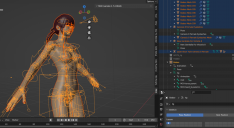
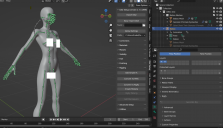
Ive impoerted a female daz character with breast bones into Blender 3.6 using both easy import and the standard, (1st image) but when i apply the Rigify it doesnt create all the IK controllers for breast bones, fingers, toes Etc (2nd image)

What am i not doing? or doing wrong please?

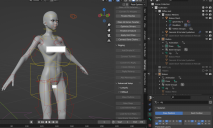
I did manage to get a rig with all the controllers - breast, fingures toes etc, ( 3rd image), but I dont know how I did it! ( sounds dumb I know). I was just pressing buttons


Non rig.PNG
1641 x 941 - 520K
rigify.PNG
1521 x 914 - 544K
meta rig with all bones.PNG
1656 x 906 - 652K

Comments

  • PadonePadone Posts: 4,001
    January 2024

    You can find the controls located in the different rigify layers, as usual, specifically "torso tweak" and "fingers detail".

  • trebor_gb_37ba5b8bb6trebor_gb_37ba5b8bb6 Posts: 33
    January 2024

    You rock

  • trebor_gb_37ba5b8bb6trebor_gb_37ba5b8bb6 Posts: 33
    January 2024

    After importing a pose, where would the panel by to switch from FK all to IK All as per the manual, please?

    attached image


    ik.PNG
    1512 x 691 - 90K
Sign In or Register to comment.
Adding to Cart…

Daz 3D is part of Tafi

Connect

DAZ Productions, Inc.
7533 S Center View Ct #4664
West Jordan, UT 84084

HELP

Contact Us

Tutorials

Help Center

Sell Your 3D Content

Affiliate Program

Documentation Center

Open Source

Consent Preferences

JOIN DAZ

Memberships

Blog

About Us

Press

Careers

Bridges

Community

In the Studio

Gallery

Forum

DAZ STORE

Shop

Freebies

Published Artists

Licensing Agreement | Terms of Service | Privacy Policy | EULA

© 2025 Daz Productions Inc. All Rights Reserved.