-
Nic Cage - 8K
What else to say than... Nicolas Cage...
THE CAGE IN 8K!
Nicolas Cage, from Call of Duty: Black Ops 7 made into a Genesis 9 Morph for my personal use.
PS!
What is going on with the Daz Gallery?
Been down since April?
And with the kinda disapointment with Daz6 (my opinion), hope the Gallery could be better...Diffeo Question About Anatomical ElementsPadone said:
That works as expected. You need to export at zero for no morphs applied, as in daz studio reset and zero are different things, aka the default values can be different to zero morphs. Then daz favorites will import the morphs and set them at default values, so they work the same as daz studio. If you try the controls everything works fine.
p.s. Probably the difference with other geografts is that they have default same as zero, but this is not always the case.
p.s. If you export a morph as non-zero this will be baked in the dbz and will affect the shape and imported morphs, of course, as the baked shape is the base added to the morphs.
Thank you for the explanation, Padone, now I understand.
Is there a way to fix a texture showing a strange line on a G8.1F character?The seam issue can be seen with Texture Shaded drawstyle, so the issue must come from diffuse maps of Head and Body. It can be easily fixed in Blender by using Smear or Clone brushes, then bake the diffuse maps out.
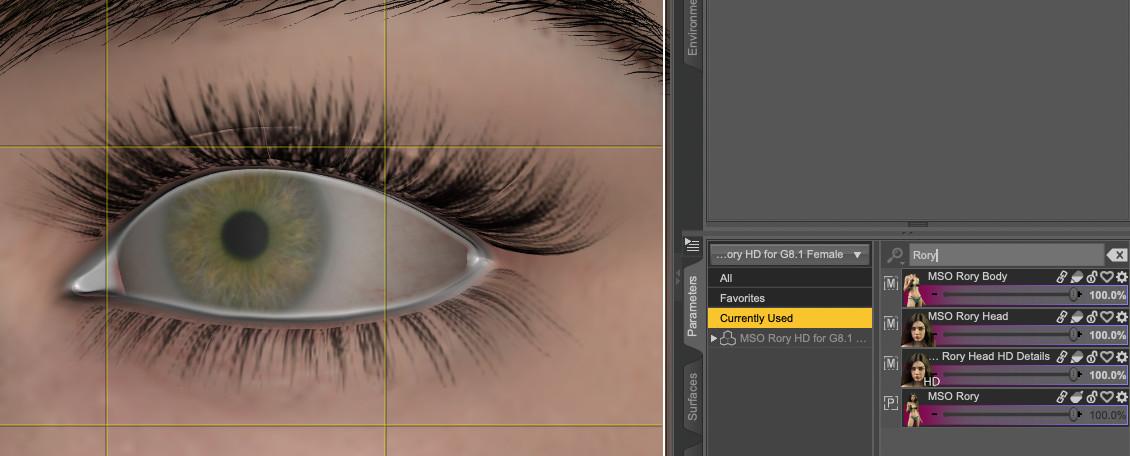
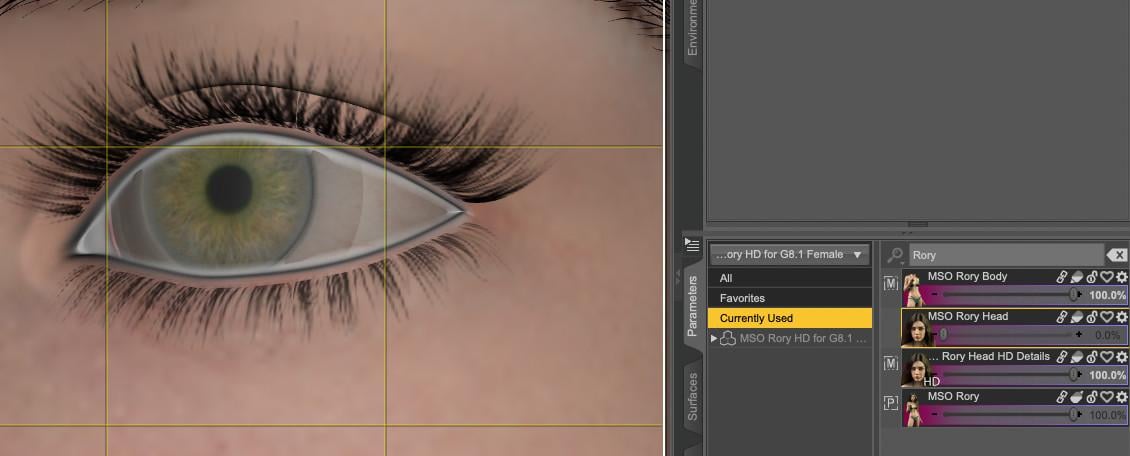
As for the eye issue, I've seen the similar issue before. It's because the solely-used HD head morph makes the Sclera surface sink into the eyeball. You also can fix it in Blender or if you have Mesh Grabber, switch to Geometry Editor firstly, Select by > Surfaces > Sclera, active Mesh Grabber, zero radius, then drag out the sclera a little bit ~~
Is there a way to fix a texture showing a strange line on a G8.1F character?Thank you :)
felis said:
Will be have to be corrected in 3D painting, as it borders the body.
I don't know how to do that, so I hope the ticket will be successful.
And there is likely a problem with the HD Head morph when Rory Head morph is not applied:
With Rory Head morph:
Without:
 Diffeo Question About Anatomical Elements
That works as expected. You need to export at zero for no morphs applied, as in daz studio reset and zero are different things, aka the default values can be different to zero morphs. Then daz favorites will import the morphs and set them at default values, so they work the same as daz studio. If you try the controls everything works fine.
p.s. Probably the difference with other geografts is that they have default same as zero, but this is not always the case.
p.s. If you export a morph as non-zero this will be baked in the dbz and will affect the shape and imported morphs, of course, as the baked shape is the base added to the morphs.
Diffeo Question About Anatomical ElementsUsing Diffeomorphic to export the Genesis 9 male anatomical elements, 3rd party morphs behave as expected--if I don't zero the morph before exporting, it shows up active in Blender (meaning I can see it's effect on the mesh/bones in Blender the same way it affected the mesh/bones in Daz) but zeroed on the morph slider (i.e. the morph slider loads in Diffeo under custom morphs but it's value is 0). I'm working specifically with Jepe's morphs (example, "JP Gens Adjust Shaft Biiiig") although I don't remember what asset pack they are from. On the other hand, if I zero the morph before exporting then it shows up inactive in Blender (i.e. it's both zeroed on the morph slider and I can't see any effect on the mesh/bones). This is all expected behavior.
However, the base morphs that Daz ships with the anatomical elements do not behave as expected. If I zero the morphs before exporting, then they still show up in Blender at their default values. For example, there is a morph slider in Daz called "Default Pose" and the default value for this is 100%. If I zero this value and then export it to Blender, the morph nevertheless appears in Blender at it's default Daz value of 1.00.
Can anyone shed some light on what's going on here?
Please help me find a Dforce skirt with a ruffle that starts out as a circle around waistcrosswind said:
Yes, it should bring you better draping in most cases from simulation perspective... as long as you give it an optimal settings (on dynamic surfaces, with a dForce Weight Node... etc.), but it may also bring issues when rigging the skirt to the figure because the skirt is much more closer to the arms, Transfer Utility may bring unexpected weights to the edge of the skirt, then you have to further tweak the weights... otherwise when you bend figure's Arms, the skirt will follow. That's a common issue on quite a few products.
As per my experience, in some specific cases, initial shape is a critical successful factor. You may see the screenshot 1 down below, the default shape of the dress can never drape well on the desk. I gave it a better initial shape by using Blender in screenshot 2, it draped pretty well and naturally as expected, in ss3.
I did it here in my work:
...
This is amazing work!! Your talent is just amazing. To be able to change a product to do what you want is fantastic!! Just Beautiful! Thank you for doing this experiment.
Make this character a reality... meaning on the store!eman said:
It's an original character made from scratch in ZBrush. Maybe I'll release it someday.
It does look incredible.
Like a big Bad guy, like a King Pin, it's difficult to get that "size" from morph packs...
I do hope it would be released somewhere... or even privateMorph MasterAre there any plans for an update for DS6, now that it's out? The main morph scripts still work but the self colision node script doesn't.
How to transfer pose from daz3d to unity correctly.However, setting aside some technical and labor-intensive aspects, I want to highlight a few things I’ve learned over the years. Anything done in game engines these days is labor-intensive in itself—even in Unreal (which is famous for tools that streamline workflows).
In my view—specifically regarding the solutions themselves—nothing beats Daz Studio. That’s quite a contradiction, isn't it? But why is that the case?
It evolved that way. Daz maintained a "free" policy for its character composition, animation, and rendering software; this attracted a large user base and fostered greater engagement, with people creating content specifically for Daz. Naturally, this created—and continues to create—pressure for the tool's development; it couldn't be any other way. To me, Daz is superior to MetaHuman. You don't animate natively in MetaHuman, nor can you really produce anything without resorting to Blender, Maya, Cinema 4D, or 3ds Max. Daz offers a more complete ecosystem, even though—for various reasons—it still has limitations here and there (such as the timeline, which is hard to tame—though I’m comparing it to Cascadeur here, and I admit I don't fully grasp the underlying engineering of these software programs).
The visuals in CC5 are impressive, but—in my opinion—that’s where it ends. Do they make exporting and using assets in game engines easier? Yes, but that’s not the whole story; what you export often still relies heavily on models created for Daz (such as clothing, for instance).
With dedication, patience, and study, it has become relatively easy to use Daz Studio models in Unity. In my view, the interactive license is worth the price—you get an ultra-realistic model licensed for a game, whereas obtaining something similar outside of Daz Studio could easily cost an exorbitant amount. There are morph sets, for instance, that give you the freedom to create various characters—you pay for the base license plus the morph license (on top of the product's price itself, which is usually low), and *voilà*: something that would cost thousands of dollars outside of Daz ends up costing a hundred or two at most (games are investments—that's just how it is!).
In short, that’s why I haven’t abandoned Daz; I’ve been part of this community for years, exploring ways to make things "fit my reality"—and that’s only possible thanks to the foundation Daz provides. Models? I have plenty. Morphs? I’ve created many myself (the models' topology makes it much easier to deform them without messing everything up). Textures? I have plenty; I use Photoshop sometimes, but I mostly use Krita (which now comes with excellent offline AI image tools like Z-Image).
:)
How to transfer pose from daz3d to unity correctly.James said:
I've manage to transfer a pose using daz3d to unity bridge.
In Unity I use animator controller assing to the character.
But the problem is, though it poses, but the position changes. It goes very high in the sky and rotate a bit.
So how to apply the pose in unity but the position stays exactly the same as when it was in daz3d?Short or long explanation?
Short explanation or long one? Either way, Daz models will continue to cause issues because they weren't designed for game engines, but rather for animations strictly within Daz itself (a poor decision by Daz's owners, in my view; today, other software surpasses Daz for this very reason—they didn't want to lock themselves into a proprietary ecosystem).*** But all is not lost—the short answer to your question is that you will always, invariably, have to put in work to rebuild models, shaders, and animations in Unity when using Daz (and don't rely on the Daz Bridge; it's broken, outdated, and extremely resource-heavy).
There are ways around this, though they do require effort. Don't use the "Humanoid" setting; use "Generic." The Humanoid system cannot handle the sheer number of bones found in Daz models.
Rigging Facial - Unity's Humanoid system is limited. It maps only a standard set of human body bones and ignores complex structures. The problem with Humanoid: The Genesis 8/8.1 skeleton features dozens of extra facial bones for micro-expressions and precise eye movements. The Humanoid system discards or breaks the hierarchy of these bones. The advantage of Generic: It imports the bone structure exactly as it was built in Daz. This ensures that your facial animations for speech (lip-sync) and blinking (crucial for idle states) work perfectly.
Prevents Joint Deformation (Shoulders and Fingers) – Daz’s mesh and skeleton are hyper-detailed, featuring automatic weight corrections for complex joint rotations such as shoulders and hips. The Humanoid issue: To force the character to fit Unity’s "standardized avatar," the Humanoid system recalculates rotations. This often results in displaced shoulders, crooked fingers, or bizarre armpit distortions during movement. The Generic advantage: Unity does not attempt to "guess" or remap rotations; instead, it reads Daz animation data directly and purely (1:1 scale), preserving the visual integrity of the Genesis 8 anatomy.
CPU Performance and Usage – The Humanoid issue: At runtime, Unity must constantly calculate the remapping of animation data to the humanoid avatar before applying it to the model. The Generic advantage: Animation data is applied directly to the corresponding bones. There is no intermediate translation layer, resulting in slightly lower CPU usage in your game.
When does using the "Generic" option become a disadvantage? You’ll have to animate everything in Daz Studio, and Daz’s animation system is still stuck in the last century; unfortunately, not much has been improved, in my view. That’s where Cascadeur comes in: there’s a script (in the top "Commands" menu) that makes it easier to export FBX files to Daz Studio, and even helps prepare your Daz model for export to Cascadeur.
The fact is that animations produced in Daz, using humanoids, will always be problematic. But there are alternatives, fixes.
Regarding your specific problem – even if you – by sheer luck – eventually fix a small problem in a specific animation in Unity, you'll have a thousand others on the other side of the door when trying to import other sequences to your Daz Studio character. There's no 'easy fix' here, unfortunately. But I've given you the path.
Don't use Daz Bridge, export directly via FBX. Rebuild the shaders (there aren't many) in Unity itself using Unity's own resources (HDRP preferably). Don't use hair from Daz Studio, it's not 'game ready', use solutions (Unity's own Strand) from the engine itself (there are tutorials online about it). For clothing, use Magica Cloth 2 (there's a free and a paid version).
***And don't be fooled by other software like CC5, for example... they will have the same problems, although it's more geared towards game engines. Use Daz Studio; it's the best available today, whether for the vast array of assets the library possesses—but not especially for that reason, but for the number of people who currently use Daz and will quickly evolve to 'game engines'—despite the tons of problems due to the current limitations of the software (apparently they are working on this, updating the core of the program/Daz).
And even if you insist on Daz Bridge, you will still be limited to certain versions of Unity—an engine that is also undergoing a general overhaul, from its core to its edge. Daz Bridge would only be useful and functional if it were updated in line with Unity's own engine:
- Use 'generic' instead of humanoid (in retargeting);
- Use the hair offered for free by Unity (search for it) based on 'strand' and accurate physics;
- Recreate your shaders from scratch, obviously using maps from Daz Studio/the template you acquired - just rearranging them (note that HDRP shaders are different, there are condensed channels in 'mask', but Unity also has a native solution for this, search for 'mask converter' or SubstancePainter in the export);
(Good tip for you: search for Google AI Studio. Use it, the 'Gemeni Flash Lasted' template - set the temperature to 0.3. Learn to communicate with this AI, it's extremely efficient for code and various tasks that will help you in Unity. Its daily token limit is high, and there are ways to use it, legal ways allowed by Google, for hours on end in a single day with gigantic texts, 100k tokens+ without problems).
(Google Translate messed up my formatting) -_-
*
 Please help me find a Dforce skirt with a ruffle that starts out as a circle around waist
Jan_Scrapper said:
WendyLuvsCatz said:
LOL, don't thank me yet, looking at it, its a tad more complicated than I thought, not being able to use DAZ Studio because I am rendering isn't helping
I am working on a project, as well. Please only do this if it interests you and only when you are not working on something else.
None of you guys have said that you see my point about starting a skirt at the waist in full circle to allow for pretty draping on the ground. If I am not right, please tell me.
Yes, it should bring you better draping in most cases from simulation perspective... as long as you give it an optimal settings (on dynamic surfaces, with a dForce Weight Node... etc.), but it may also bring issues when rigging the skirt to the figure because the skirt is much more closer to the arms, Transfer Utility may bring unexpected weights to the edge of the skirt, then you have to further tweak the weights... otherwise when you bend figure's Arms, the skirt will follow. That's a common issue on quite a few products.
As per my experience, in some specific cases, initial shape is a critical successful factor. You may see the screenshot 1 down below, the default shape of the dress can never drape well on the desk. I gave it a better initial shape by using Blender in screenshot 2, it draped pretty well and naturally as expected, in ss3.
I did it here in my work:
...
Please help me find a Dforce skirt with a ruffle that starts out as a circle around waistElor said:
Jan_Scrapper said:
I tried, and while I didn't get an explosion, it doesn't seem possible to get the dress to drape over the legs of the characters if they are on their knees or sitting:
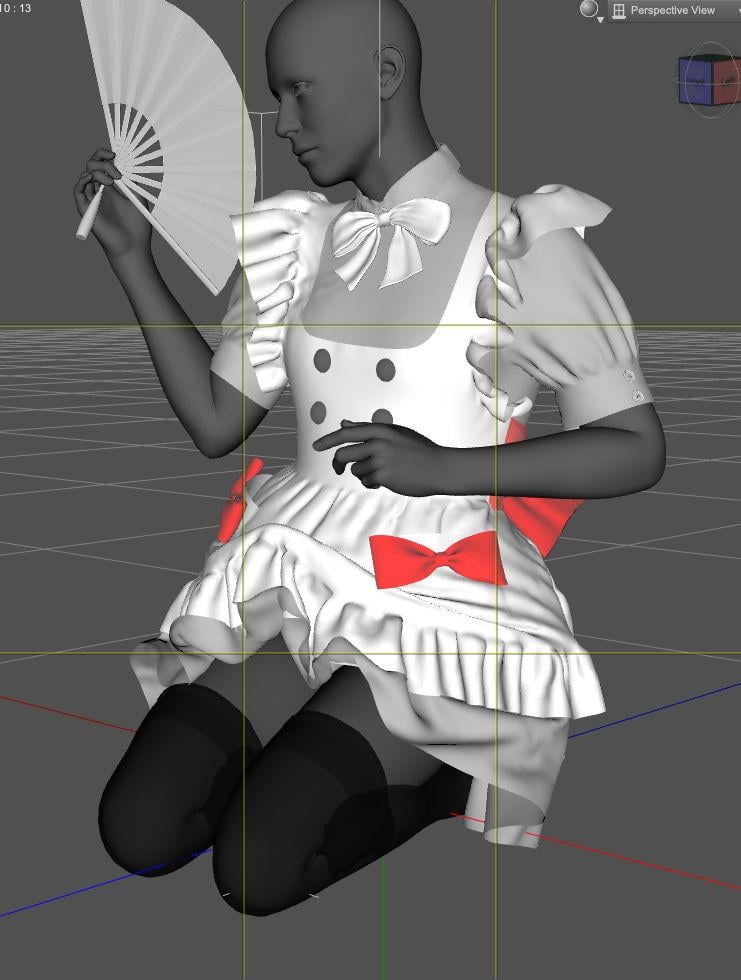
Initially, I thought it could be related to the morph (I initially used Hanako 9, because it's among the supported shape), but going back to Genesis 9 Base didn't solve the problem. Then, maybe it was because the pose applied a Y translation on the hip bone but even after moving it to the root bone, the part that is up still went up
 I have no idea why that part is going up.
That's a common issue on some clothing like this type of dForce dress.
1) There're rigging weights not well defined on thigh bones of the dress (esp. for lower skirt). When you simulate no matter by using Start from Memorized Pose or a Timeline, figure's thigh Bend will push up and distort the lower skirt.
2) The vendor gave settings on dynamic surfaces to maintain a lovely shape of such a skirt by cranking up Buckling Stiffness / Damping as well as lowering Dynamics Strength, so the skirt has very less energy to drape during simulation.In such a case, resetting Dynamics Strength / Buckling Stiffness may not be a good way because it'll bring full or more energy to the skirt, i.e. the skirt will lose its designed shape ( to be a bit rigid)... If you want to simulate it but also maintain its shape to certain extent, a trick is to: a) tweak weights or Attenuate weight on the related Bone, or b) add a dForce Weight Node to finetune the inflence weight with full dynamics strength set on the dress. Optionally create dynamic surface add-ons to preserve the frills shape, etc.
Edit: With this maid dress, I brutally deleted the weight map on Left Thigh Twist 2, it worked better with a simulation... but option b) could be even much better ~~
Sagan: A DAZ Studio to Blender Alembic ExporterHi Guys,
Sagan 5 is up.
It includes the Hitchens plugin for Blender that supports exporting animations back to DS. For this, you'll want to choose a port for Hitchens and enable it in Sagan. If you run DS and Blender on the same computer, choose localhost for the server address. Then go to Blender, where you've got the plugin installed, and Import Figures. It can take a long time, so you may have to adjust the timeout value. If you have a recent version of the excellent Diffeomorphic tool, it should import materials automatically (The Import Diffeo Materials button is for Alembic exports done via Sagan). Note that the figure won't have JCMs or any geoshells. This is for animation only.
The kinda big deal: To apply a retargeted animation, load it (probably an FBX file), and that is the Source. Your imported armature is the Actor. You can get a few bone map file presets from
https://iwasserious.com/hitchens_bonemaps
It's kind of a pain right now, so I only did a few. If what you need is not found there, you can create your own; it's just JSON.
For simulations, you might want to apply a pre-roll; I use 120 frames.
The retargeter will create collections for the cubes and spheres, that link the two armatures together. If you're using a preset bonemap, you can just hide them. If not, you'll need to rotate the spheres corresponding to bones whose orientations don't match the source animation. Do not rotate the cube objects.
Create your animation. You'll probably want Auto Rig Pro Quick Rig and Animation Layers for this.
Then bake it.
Then, with Hitchens still running and Idle, use Put Animation. It will send the animation back to DS. It should match precisely.
I'm really tired, but these instructions should work.
Other things that should also work are:
Import Diffeo Materials - Select the scene file the Alembic import came from, and apply the materials automatically
Load DS Morph - load a (vertex only) DS Morph file as a shapekey
Put Morph - transfers a vertex-only morph back to DS
Load Shape Key - load a shape key you previously saved
Save Shape Key - save a shape key
Partial Shape Keys - load a shape key and have it affect only a part of the mesh
Hair Curves - Use the external SBH hair data created by Sagan (if you chose the option not to embed SBH data in the Alembic file)
As always, please try it, test it, and let me know.
Character files missing, even though the character shows up in Content.I've had this issue with both Dain 9 and Julian 9. The files are installed via DIM, and show up in my Content tab. However, when I go to load the character, I get error messages, specifically:
"The files listed below could not be found:
/data/Daz 3D/Genesis 9/Base/Morphs/Daz 3D/Julian9/Julian9_body_bs_Veins_HD4.dsf
/data/Daz 3D/Genesis 9/Base/Morphs/Daz 3D/Julian9/Julian9_figure_ctrl_Character.dsf
/data/Daz 3D/Genesis 9/Base/Morphs/Daz 3D/Julian9/Julian9_figure_ctrl_Proportions.dsf"
I uninstalled and reinstalled Julian previously, and then he loaded correctly. I saved the character I built as a persona preset. Now, though, when I try to load that preset, the errors are back. They also appear again when I attempt to load Julian 9 directly. What the heck is going on?
I should also note that when I load my entire morph set in TurboLoader for G9, Julian doesn't show up at all.
This is maddening, and any help anyone can offer would be great.Please help me find a Dforce skirt with a ruffle that starts out as a circle around waistElor said:
Jan_Scrapper said:
I tried, and while I didn't get an explosion, it doesn't seem possible to get the dress to drape over the legs of the characters if they are on their knees or sitting:
Initially, I thought it could be related to the morph (I initially used Hanako 9, because it's among the supported shape), but going back to Genesis 9 Base didn't solve the problem. Then, maybe it was because the pose applied a Y translation on the hip bone but even after moving it to the root bone, the part that is up still went up
I have no idea why that part is going up.I suspect this is down to the simulation settings on the dress. Ensure that for the skirt part the dynamic strength is 1.0, and the collision offset is not too high (knock it down to 0.05 if you can) Lower values are more likely to settle properly, but can cause layers to poke through each other, so try different values for the best result,
Please help me find a Dforce skirt with a ruffle that starts out as a circle around waistElor said:
Jan_Scrapper said:
I tried, and while I didn't get an explosion, it doesn't seem possible to get the dress to drape over the legs of the characters if they are on their knees or sitting:
Initially, I thought it could be related to the morph (I initially used Hanako 9, because it's among the supported shape), but going back to Genesis 9 Base didn't solve the problem. Then, maybe it was because the pose applied a Y translation on the hip bone but even after moving it to the root bone, the part that is up still went up
I have no idea why that part is going up.Thank you so much for doing that!! I did this a couple of months ago, so perhaps this cute dress did not blow up on me either. I love this dress so much!!
Please help me find a Dforce skirt with a ruffle that starts out as a circle around waistJan_Scrapper said:
I tried, and while I didn't get an explosion, it doesn't seem possible to get the dress to drape over the legs of the characters if they are on their knees or sitting:
Initially, I thought it could be related to the morph (I initially used Hanako 9, because it's among the supported shape), but going back to Genesis 9 Base didn't solve the problem. Then, maybe it was because the pose applied a Y translation on the hip bone but even after moving it to the root bone, the part that is up still went up
I have no idea why that part is going up.Please help me find a Dforce skirt with a ruffle that starts out as a circle around waistI have seen and done many Dforce blanket sims.
I want the skirt to be like a circle blanket with a hole in it.
Richard, I definitely understand what you are saying.
I should have qualified my statement about a morph I could use BEFORE the sim. The skirt would start in a circle at the waist, then flows down toward the ground as the animation timeline plays.
This was was I was wanting several months ago. I finally made an actual posed dress in MeshyAI. Then I posed G9F upper body with the dress. A LOT of work LOL. Turned off the lower part of her body.

Here are some of my posts which shows this is something I have wanted for a long time.
Solved! I am looking for skirt like the one in Graceful Blooming promos - Daz 3D Forums
Can I turn off the morphs in a Dforce Clothing Item? - Daz 3D Forums
I have many skirts with ruffles now and everyone I tried for my Alice In Wonderland scene blew up :(
Please help me find a Dforce skirt with a ruffle that starts out as a circle around waistJan_Scrapper said:
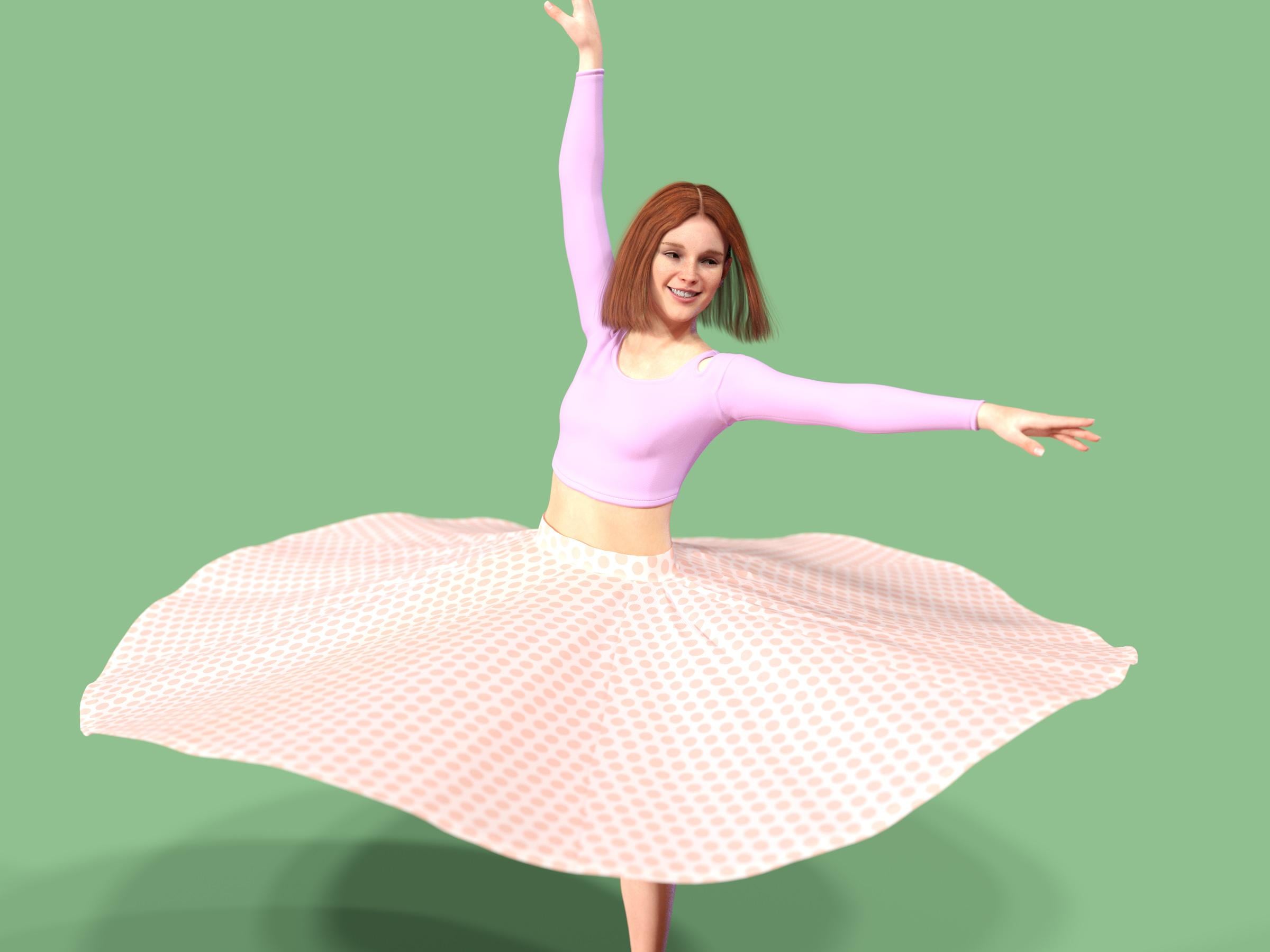
This is so beautiful!!! Did you just do that???
Something I did some time back, originally because someone was having trouble getting their own effort to work, and I threw something together for testing purposes.
It's hypothetically in the pipeline as something I might release, but needs a load of boring stuff done like figure fits, presets and thumbnails.
There could be a morph which lifted the skirt up into a circle.
That it can do. There was half a mind to include several pre-done simulations for various spins and the like, because it's difficult to do without dForce deciding to snag on something.
Daz 3D is part of

Connect
DAZ Productions, Inc.
7533 S Center View Ct #4664
West Jordan, UT 84084Licensing Agreement | Terms of Service | Privacy Policy | EULA
© 2026 Daz Productions Inc. All Rights Reserved.