-
Scalp on certain hairs showing on face as grain shadow
I guess beside of the issue with Iray and that the character is not placed at the Zero World position, the issue with the artifacts on the forehead comes from intersecting mesh geometry of the figures head and the hairs scull cap. The scull cap may be invisible on the forehead but usualy the edges of the mesh reaches the eye brows.
The scull cap of the hair item can be the exact copy of the genesis figure head mesh geometry but there can still be intersections. By default the scull cap part of the hair is invisible on the forehead due to the opacity map.
The genesis figures are using the SubD modifier to subdivide the base mesh even with different resolution levels in preview and by render time (see Mesh Resolution settings in the Parameters pane) and the current character on the Genesis figure also uses a displacement map on the forehead, while the hair items I've see so far dosn't use the SubD modifier see Mesh Resolution: Base. This can cause slight mesh intersections that Iray seems to have issues with while the figure is not placed in the center of the scene, at least thats my explanation of the artifacts.
It seems with Displacement Strength silder in the Surfaces pane you pushed the head scalp further away from the head resulting in no more intersecting meshes and the artifacts are gone. To me it dosn't seem like a good solution that will not work for all hair items and it seems to depend on the gray value on the forehead area of the Displacement Map image texture applied to the hairs scull cap while this is actualy blank space not used in the texture.
My suggestion
You may want to try to add a Smoothing Modifier to the hair. Select the hair then go to Edit>Figure>Geometry>Add Smoothing Modifier. I add this almost everytime to hair items it prevents poke thrughs resulting in better fitting hair. The settings can be found in the Paramertes pane under Mesh Smoothing. By default if you fit the hair to the genesis figure the Collision Target is set automaticly to be the genesis figure resulting in the hair mesh colliding with the figures head and pushing the hair further away from the figures head. You will notice a progess bar and a slight delay of the Smoothing Modifier calculating the collision while you pose the figure or dial some morph sliders. There is a way to bake the smoothing modifier collision shape of the hair to a morph and add this maybe to the character shape morph generated in the hair item to prevent the Smoothing Modifier delay.
By default the settings for the Smoothing Modifier are Smoothing Iterations: 2 and Collision Iterations: 3. The mesh Smoothing effect with higher Iterations can cause fine hair strands to collapse to prevent this you can set the Smoothing Iterations to zero. Higher Collision Iterations can help to better detect mesh intersections. All in all knowing how to setup the Smoothing Modifier can be useful not just for the current hair issue.
3D Art Freebie Challenge-March 2019-"Lady Luck" -Main Thread Only3D Art Freebie Challenge March 2019 "Lady Luck"
"Lucky Ladies"
Starring: Tika (by RenderGuyNY)The tale:
Instead of drinking the cherry blossom tea geiko Kimiha and geiko Tsunemomo both had two cups of sake and were having a lot of fun when suddenly the doors slide open. Fortunately it was just maiko (an apprentice) Ayumi and not one of the instructing full geisha because then they would have been in serious trouble! "Pfeww!" (幸運の女神 means 'Lady Luck')
Soundtrack:
Alphaville - Big In Japan (1984)
https://www.youtube.com/watch?v=tl6u2NASUzU
COUNTABLE FREEBIES: (Alphabetic order)#01! AA Satin Dot Shaders for Daz Studio - Iray by AllenArt
https://sharecg.com/v/86624/gallery/21/DAZ-Studio/AA-Satin-Dot-Shaders-for-Daz-Studio-Iray **#02! AllenArt Iray Jewelry Shaders by AllenArt
https://www.sharecg.com/v/85120/gallery/21/DAZ-Studio/AllenArt-Iray-Jewelry-Shaders **#03! Amy AiMei for Genesis 8 Female (morphs only) by Amy AiMei
https://www.deviantart.com/amyaimei/art/Amy-AiMei-for-Genesis-8-Female-morphs-only-687709757#04! Aoi-marked Pill Case by Zippo (Laboratory108)
http://lab108.x0.com/lab108/misc.html (item 24)#05! Asa Akira for G3F by Desterotica
https://sharecg.com/v/90971/gallery/21/DAZ-Studio/Asa-Akira-for-G3F **#06! Bonsai Stand by 3Zi
http://sanzisannzi.blog83.fc2.com/category6-11.html (Scroll down to '3Zi_BonsaiStand.zipDownload')#07! Cherry Corsage by 3Zi
http://sanzisannzi.blog83.fc2.com/category6-8.html (Scroll down to '桜の髪飾り(3Zi_CherryCorsage)の配布')
[Single Cherry Blossom]#08! Cyclide Ritual Earrings (OBJ) by LuxXeon
https://www.deviantart.com/luxxeon/art/Free-3D-Model-Cyclide-Ritual-Earrings-555485992#09! Daruma by Zippo (Laboratory108)
http://lab108.x0.com/lab108/misc.html (item 15)#10! Fancy Candle (Iray) by AllenArt
https://www.sharecg.com/v/87930/gallery/21/DAZ-Studio/Fancy-Candle-Iray **#11! Helena Promo Makeup by AprilYSH
http://shop.aprilsvanity.com/helena-hair.html#12! G3F 6 Gored Skirt & TShirt by Wilmap's Digital Creations
https://www.wilmapsdigitalcreations.co.uk/view_product.php?id=469 **
[Skirt used]#13! Ginkgo biloba by Xfrog inc.
http://xfrog.com/product/BN08.html **#14! Gwennili Hair for Genesis 3 Female by kayleyss
https://www.renderosity.com/mod/freestuff/gwennili-hair-for-genesis-3-female/77151 **#15! Iray car related shader presets 'megapack' by Tom2099
https://www.deviantart.com/tom2099/art/Iray-car-related-shader-presets-megapack-539622361#16! Japanese Lanterns by nergal83
https://www.renderosity.com/mod/freestuff/japanese-lanterns/76668 **#17! Japanese Umbrella by Tweety
http://park.geocities.jp/flashformobile/since2013/download/download_2.html (item 8)#18! Kakejiku by Zippo (Laboratory108)
http://lab108.x0.com/lab108/furniture.html (item 18)#19! Kanza-si Asian Hair Pin by MeshWorks
https://www.renderosity.com/mod/freestuff/kanza-si-asian-hair-pin/81019 **#20! Komachi-Hair for V4 by Fujiko
https://www.sharecg.com/v/38698/Poser/Komachi-Hair-for-V4 **
[Used the comb and hairpin]#21! Magazine by Zippo (Laboratory108)
http://lab108.x0.com/lab108/household.html (item 2)#22! mcjJapaneseStyleScreens by mCasual Jacques
https://sites.google.com/site/mcasualsdazscripts9/mcjjapanesestylescreens#23! mcjSlideWall02 by mCasual Jacques
https://sites.google.com/site/mcasualsdazscripts9/mcjslidewall02#24! Miko for G8F by Ocelot1300
https://sharecg.com/v/93218/browse/21/DAZ-Studio/Miko-for-G8F **#25! Morph Expansion Pack for Wilmap's G2F Short Skirt by BlackFeather1973
https://www.sharecg.com/v/76461/gallery/21/DAZ-Studio/Morph-Expansion-Pack-for-Wilmaps-G2F-Short-Skirt **#26! Oiran Clogs by Fujiko
https://www.sharecg.com/v/34015/gallery/11/Poser/Oiran-Clogs **#27! Oiran Decanter by Fujiko
https://www.sharecg.com/v/34087/gallery/11/Poser/Oiran-Decanter **#28! Oiran Rouge by Fujiko
https://www.sharecg.com/v/33987/gallery/11/Poser/Oiran-Rouge **#29! Orchid Flower in Hexagonal Pot by CGAxis
http://free.cgaxis.com/product/3d-orchid-flower-in-hexagonal-pot/ *1#30! Pillow by kratzdistel
https://www.renderosity.com/mod/freestuff/pillow/80880 **#31! Sago Palm by Xfrog inc.
http://xfrog.com/product/HP05.html **#32! Sake Bottle by Zippo (Laboratory108)
http://lab108.x0.com/lab108/food.html (item 36)#33! She's A Lady Poses for Genesis 3, Genesis 8 Female by Marlene Turcotte
https://www.sharecg.com/v/90074/browse/21/DAZ-Studio/Shes-A-Lady-Poses-for-Genesis-3Genesis-8-Female **#34! Shimmery Sheer II Shader Presets for Iray by AllenArt
https://sharecg.com/v/91062/gallery/21/DAZ-Studio/Shimmery-Sheer-II-Shader-Presets-for-Iray **#35! Shiny Wood Tiles Free PBR Texture by CGAxis
https://free.cgaxis.com/product/shiny-wood-tiles-free-pbr-texture/ *1#36! Tatami and Pedestal Set by Aarki
https://www.deviantart.com/aarki/art/Tatami-and-Pedestal-Freebie-148688210#37! Tika for G8F by RenderGuyNY
https://sharecg.com/v/93222/browse/21/DAZ-Studio/Tika-for-G8F **#38! Trish Hair for Genesis 3 Female by kayleyss
https://www.renderosity.com/mod/freestuff/trish-hair-for-genesis-3-female/77150 **#39! Uchiwa by Zippo (Laboratory108)
http://lab108.x0.com/lab108/household.html (item 3)#40! V4 Free Pearls & Fans by Rick Bridenbaker
https://www.sharecg.com/v/35896/Poser/V4-Free-Pearls-&-Fans **#41! Vase 03 by OneSix
https://www.renderosity.com/mod/freestuff/vase-03/77360 **#42! Villainous Masks Props for DAZ Studio by MDO2010
https://sharecg.com/v/87391/browse/21/DAZ-Studio/Villainous-Masks-Props-for-DAZ-Studio **#43! Wind Bell by Zippo (Laboratory108)
http://lab108.x0.com/lab108/household.html (item 8)#44! Wind Chimes by Jim Farris (Xaa)
https://www.sharecg.com/v/41919/gallery/11/Poser/Wind-Chimes **#45! Woodland Forget-me-not 3D Model by CGAxis
https://free.cgaxis.com/product/woodland-forget-me-not-3d-model/ *1
NO-COUNT ITEMS:--- IDG Vibrant Light Probes (The Holiday Loyalty Sale 2018 Free Item)
PURCHASED/PAID FOR ITEMS: None. 100% Free
*1 E-mail address required
** Registration required
#x! Countable Items (Bold ones are used by me for the first time.)
--- No longer available freebies
++ Free with DAZ Studio (or the Essentials)
$x. Purchased/Paid For Item
Rendered with DAZ Studio 4.10.0.123 (nVidia Iray)Other free software used: GIMP v2.10.8 and Irfanview 4.52
Postwork: (oa) used the AltaLux Image Enhancement Filter (Effect) by Stefano Tommesani that comes with Irfanview and the Lens Flare that come with GIMP.
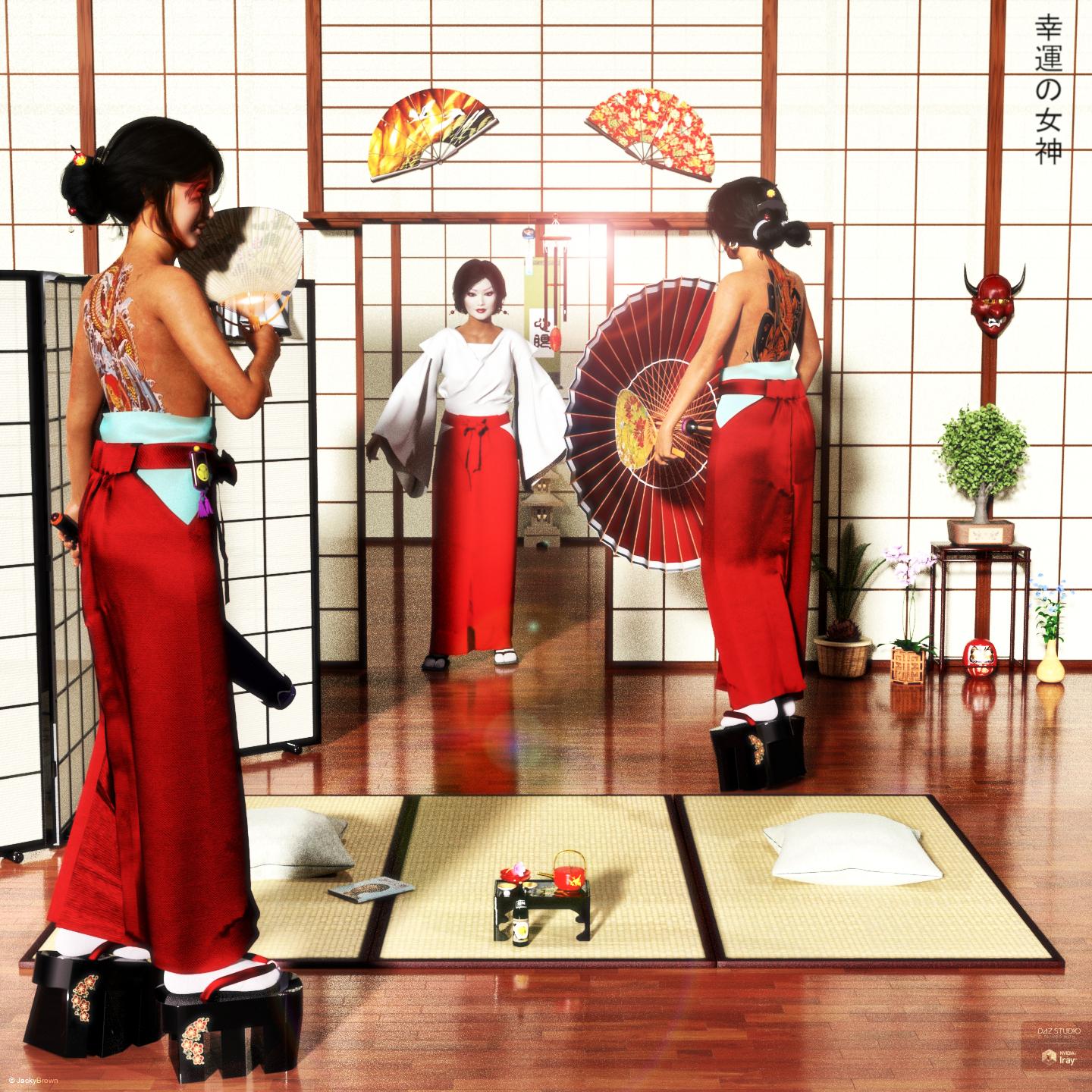
"Lucky Ladies"
Saving new (combined) morphsIs there an easy way to create a single "full body" morph in DAZ Studio once a (Genesis 8) figure is adjusted?
Simply select your character and save as a shaping preset.
Hmmm. It looks like that may just save the individual morph settings.
There used to be a way to save a new morph target so the system didn't have to use all of the individual morph resources. Is still an option without buying a utility?
With the morhs dialed in, zero the figure pose, set resolution to base and export as .obj. Load a new G8 base character and use morphloader to import the morph. That will create a single morph slider. You will probably have to check the auto-follow box in slider settings.
Saving new (combined) morphsIs there an easy way to create a single "full body" morph in DAZ Studio once a (Genesis 8) figure is adjusted?
Simply select your character and save as a shaping preset.
Hmmm. It looks like that may just save the individual morph settings.
There used to be a way to save a new morph target so the system didn't have to use all of the individual morph resources. Is still an option without buying a utility?
Saving new (combined) morphsIs there an easy way to create a single "full body" morph in DAZ Studio once a (Genesis 8) figure is adjusted?
Simply select your character and save as a shaping preset.
Mesh not binding to Bone after Bone SplitI also tend to give the items that I save with the Figure/Prop Asset Save dialog an increamental version number at the end just in case something goes wrong with saving.
Don't try to overwrite an already saved Figure/Prop Asset with the same item name because older Morph Assets from the previous may remain in the data folder.
For the final Product Item name you can save the item without the incremental number at the end. They all end up side by side in the Product folder and you can delete the older items once you have tested that your final version works.
Mesh not binding to Bone after Bone SplitI came to the conclusion that you need to save the Figure/Prop Asset set as Source figure in the dialog first and reload it from the library before the Transfer Utility can work properly.
Great - important to know. Cheers, Lx
Update Custom morphs?Here are a few recources of information about ERC-Freeze:
This is what can be found in the Documantation Center: Saving Morphs (WIP) 2014
Some kind of reference manual about the how ERC-Freeze works:
Information on ERC Freeze feature
My latest instructions on how to use ERC-Freeze:
How do I save a eye morph/ translation with a new character?
My first post about how to use ERC-Freeze:
Mrs. Chow 8I’m curious if there is a way to tone down the breast sag. It’s a tad overdone especially if she wears a bra.
If you turn the limits off on the "Breasts Natural" morph you can give her a chest lift:

Thanks! Good to know, for times Mrs. Chao wants to dress formally. =)
Mesh not binding to Bone after Bone SplitI just remember why I named the last video Transfer Utility Failed. I was working on the figure that was saved embedded in the scene file.
I came to the conclusion that you need to save the Figure/Prop Asset set as Source figure in the dialog first and reload it from the library before the Transfer Utility can work properly.
RenderGuyNY's Freebies (latest freebie updated 5-24-20)Life is a Cabaret! Well, at least your DAZ life can be. This set has been created from scratch and includes a main stage, bridge, and circle stage. There is a front curtain and a back curtain you can load. You can also load in left and right front curtains that can morph open. The set also includes a back wall the stage is set against, carpeting, tables, and chairs (1 real and 4 instances). I hope you have as much fun in my cabaret as I did creating it. As always, Happy Rendering!
https://sharecg.com/v/93374/view/21/DAZ-Studio/Cabaret-Stage


Follow me on Facebook!
https://www.facebook.com/RenderGuyNY/
- Scenes (.DUF)
- The Cabaret Stage.duf
- Stage Right Curtain Open
- The Cabaret Stage.duf
- Props (.DUF)
- Back Curtain.duf
- Back Wall.duf
- Bottom Circle Cloth.duf
- Cabaret Stage.duf
- Carpeting.duf
- Chair.duf
- Front Curtain Closed.duf
- Side Stairs.duf
- Stage Left Front Curtain.duf
- Stage Left Curtain Open
- Stage Right Front Curtain.duf
- Stage Right Curtain Open
- Table Cloth.duf
- Table.duf
- Top Circle Cloth.duf
- Materials Iray (.DUF)
- Blue.duf
- Green.duf
- Red.duf
- Text files (.txt/.rtf)
- Documentation.txt
- 16 Texturemaps (.jpg) for Base Color, Normal (1200 x 1200 to 2500 x 2500)
Night & Day City - Product Promo [Commercial]Maybe I'll finally be able to use DS for more than just a figure optimizer/creator, aniBlock manipulator, and morph plugin!
Are you going to go in-depth like you did in your Carrara releases?
It depends what you mean by "in-depth". It won't be the quite same as the Carrara release as there isn't an equivalent to the Instance Randomizer plugin. So I have included the ability to turn on and off parts of buildings manually and change color sets on them. It will include both day and night sets (which with the Iray rendering looks great!) and there will be some preset blocks and scenes as well as the individual buildings and other props. I will position it as a modular city-building set. Does that answer the question?
Ooops... I thought I was still in the thread about your tutorial videos! LOL
Still... Night and Day City for DS will be waaay awesome as well!
Update Custom morphs?Yeah Richard came up with the term embedded but it descripes it quiet well.
By reading my post again I should have made clear what happens in the case "Conflicts with Duplicate Formulars found". It seems the described conflict is caused by previously saved morph assets loading from the data directory in the content library and still existing embedded morphs saved in the Scene or Subset file it only occures if you reload the older scenes.
Also I see the line "File>Save As>Support Asset(s)>Save Modified Assets" at the end of the Saving Morph Assets section sliped in there that I wanted to write more about but forgot. I don't suggest you to use the Save Modified Assets command for added properties its better to use the Save Morph Assets dialog. One reason beside of other unpredictable issues is if there is not yet a Product defined in which the morphs/properties should be saved to Daz Studio saves them in the Base folder of the Figure/Prop Asset directory.
AIUTO...CHI CONOSCE L’ITALIANO? PARTE UNDICINuovi free items!!!
Bieco tentativo di indorare la pillola sull'apparizione della signora: https://www.daz3d.com/mrs-chow-8
A quanto stiamo? 57 figure per Genesis8? Gente, state sicuri che è sabbia e sale stavolta...
Ma almeno abbiamo dei regali!
Infatti, avevo capito come funzionavano, ma sono geograffati oppure no? Credo di no a questo punto.
Dipende dal prodotto, di solito sono proprio come gli abiti, stanno sopra la pelle e seguono i morph relativi.
Nuovi free items!!!
Bieco tentativo di indorare la pillola sull'apparizione della signora: https://www.daz3d.com/mrs-chow-8
A quanto stiamo? 57 figure per Genesis8? Gente, state sicuri che è sabbia e sale stavolta...
Ma almeno abbiamo dei regali!Infatti, avevo capito come funzionavano, ma sono geograffati oppure no? Credo di no a questo punto.
Dipende dal prodotto, di solito sono proprio come gli abiti, stanno sopra la pelle e seguono i morph relativi.
...e non va bene mai nulla però .... XD XD
Mrs. Chow 8I’m curious if there is a way to tone down the breast sag. It’s a tad overdone especially if she wears a bra.
If you turn the limits off on the "Breasts Natural" morph you can give her a chest lift:
Saving new (combined) morphsWith the product of X-morphs, it is an option.
https://www.daz3d.com/forums/discussion/314456/save-a-combination-of-morphs-as-a-single-morph
Linking PropertiesGlad you got it working.
By the way, the steps above are the basic technique for setting up ERC controls too. You just add multiple channels to a single controller property for various effects.
#As a random example - Ytrans (Scalar = 100) + Morph (Scalar = 1) to make an object rise into the air and morph with 1 slider
Saving new (combined) morphsIs there an easy way to create a single "full body" morph in DAZ Studio once a (Genesis 8) figure is adjusted?
Daz3D model export into substance properlyMoved to Technical Help as it is a question, not a Product Suggestion.
You exported a morph or a model? Is this something you made yourself, or one of the standard Daz figures?
Daz3D model export into substance properlyI have exported my morph to Substance However, I need to make ID maps and have my figure properly make maps without turning black. Could someone explain how to fix this problem?
Daz 3D is part of

Connect
DAZ Productions, Inc.
7533 S Center View Ct #4664
West Jordan, UT 84084Licensing Agreement | Terms of Service | Privacy Policy | EULA
© 2026 Daz Productions Inc. All Rights Reserved.