-
Diffeomorphic DAZ Importer version 1.6.0 released
Padone said:
@surody I found a couple minutes and tested this I can confirm the bug. But don't know if Thomas may consider this a limitation rather than a bug. Since the issue is that in the duf file there's not the uv map path, so the plugin scans the current figure folder, and can't find uv maps outside.
If I load the missing uv map by hand then everything works fine here. Test scene included.
https://bitbucket.org/Diffeomorphic/import_daz/issues/934/missing-uv-map
Do you know how daz studio searches for uv maps ? I mean is there a uv map path somewhere because I can't find it in the duf file.
No idea how Daz searches for UV maps.
I've the same UV in the 8.1 folder too. Anyway, I tested it with 8.1 (base figure) and your work around works. But keep in mind that the 8.1 base figure has iray uber materials. I used exactly the same scene but applied Victoria 8.1 skin to the base figure which is PBR.
As soon as I do that, it breaks apart. I've a feel this is also related to the geoshell for the eyes issue I had recently. I added a node comparisons of both tests.Paper Plates Over Eyes - Help? Poser 11 Comic RenderI am using Poser 11 (64 bit). Comic Book Mode for rendering. I set up toon renders on every body part on Victoria 4 and removed textures for a black and white render. After struggling to get the irises of the eye to render as plain white with a black border, I discovered that there were two "paper plates" blocking the view of the character's face. These blocks do not render, but they block the Preview view of the face. I cannot select them, but when I make each eye invisible, the plate corresponding to each eye disappears with the eye.
Any thoughts on how I can make these invisible again?
Edit: Added second screenshot
Naturally Real Material Options for Victoria 8.1If you want to use other textures for this (if you don't have Victoria 8.1), how should they be arranged in the shader?
Anyone know what model this is? Might be the prettiest model i've ever seen.Gordig said:
MelissaGT said:
RL_Media said:
Yeah, sometimes people just wanna load stuff up fast and render. Not everyone is a dial spinning madman like me lol. The main reason I switched from V4 to genesis at all was the ability to mix morphs to create something unique.
That's what I don't get...I wouldn't want my artwork to look like anybody else's, so my characters are all unique.
Two different artists could use the exact same assets and produce completely different art with them.
Yeah, but you could potentially still say "Oh, that's Victoria 8" in both of those renders. I make artwork that is personal to me, or to a client, and I wouldn't want those specific characters to be so common as to show up in someone else's artwork. Like the lady in my avatar. That's Frida. I wouldn't want Frida to show up in anybody else's artwork, because she's my own personal player character from Guild Wars 2. That's why I don't use models out of the box.
Unofficial Poll - Products that use Custom Shaders?Yes, the Ireal Shaders are the basis of the improved materials (the theoretical freebies in this case) because they offer features the Iray Ubershader does not.
My only concern is how to widely distribute the freebies. For instance I just released a freebie on the forum and on my DeviantArt. It seems many liked it, but I wondered if more people who could really use it will ever find out about it. I wonder if most people don't just buy the product and never would go looking for any possible associated freebies.
[Released] Turbo Loader for Genesis 8 and 8.1 [Commercial]RiverSoftArt said:
mathiasdeckman said:
RiverSoftArt said:
diogenese19348 said:
OK, I have a problem, I am either misunderstanding something or my setup on the PC is bonked. When I load the Genesis8 Female figure, 5 zillion or so morphs show up, all unknown products which isn't surprising, I like to use manual folders so if the database is bonked I'd never know.
I uncheck everything except the morphs I want to use as a mininal set, the script runs, fine, everything else has been renamed. But then when I load a specific product that uses disabled morphs, I get the message they can't be loaded, run the script, and the morphs don't show up to re-enable, the only ones that show up were the originally enabled ones.
Any idea what I am doing wrong, or what secret button I'm missing?
Just to be sure... you are running the Turbo Loader Manager? The Scene Config script would only show morphs in use. If you are running the Turbo Loader Manager, did you by accident clear the morph list and re-inspect the figure? That could give you the behavior you are seeing as inspecting the figure (after clearing) that only has the enabled morphs would only show those morphs. If you did, don't panic. Use the Reset Morph Directories button in options to turn everything back on and start over.
So yeah, I likely did exactly this (i was so...excited to be able to load a G8F/G8.1F character in less tahn 20 minutes that I completely forgot to read the user manual to see how to properly use the product). When I loaded up a file- the figure had a crushed side torso cavity (looked like the hulk punched her). I tried reloaded the scene three times. Didn't work. So I reloaded the same figure, figuring the current one was corrupted. No difference. Tried to reload the same figure in a brand new file, same problem. I then loaded the base figure and tried bending joints. Same problem.
I tried to restore things manually thinking missing morphs were the problem (I didn't know the reset button existed until i read the above) (found all the .tlOff files and switched them back to dsf), but it hasn't solved the problem. I'm currently using the 'reset morph' button- as you mentioned above, hoping that undoes the goof I did. If it doesn't...any idea how to fix this? I've already re-installed the base G8F product and updates. I kinda wanted to use Daz studio this weekend for a few things and this self inflicted snafu isn't helping.
I can't reinstall my library due to it being absolutely massive (like multiple terabytes massive) so I'm basically forced to do whatever necessary to fix this. I'll be testing and trying my own fixes inbetween posts and suggestions.
The 'collapsed' mesh- 'smooth shaded' is selected for visual representation.
I would load the deformed G8F and try the Scene Configuration script. It will show you what morphs are actually engaged (and where they are). I think it is a morph too (maybe a JCM?) You need to find them. With Daz Connect, you can have these morphs scattered all over.
Ok, I will do that. However, loading the G8F figure- she doesn't come in deformed, she looks correct in the default pose. Its only when I start moving the limbs, do these crushed meshes show themselves. Just trying to clarify, that's all. Sometimes I get into too big of a rush to get my question posted that I don't include all the details. so apologies for that.
EDIT: I did what you instructed and quite a few came up. Including a few JCM morphs- but they were all selected. So i checked them all and hit the accept button. Time will tell in a bit to see if that worked. Thank you for pointing me in a direction, because I was clueless before.
EDIT 2: your suggestion did not work, sadly. i checked both daz studio 4.11 and 4.15 versions and they had the same issue. I checked g3f and it was fine. I also checked another g8f model and it had the same issue, so something is wonky at the base level. I'm starting to run out of ideas of what it could be, other than reinstalling the content that I had selected in the script.EDIT 3: So I found what went wrong. Remaining a morph's extension from .dsf to .tlOff caused one of them to become corrupted. I went through the ones I changed and deleted them, and extracted brand new files from their IM000 packages. worked.
The following are the ones I replaced:
- Zev0: Body Mixer
- PS: Whimsical Girls
- K.H. Image Studio: Ultimate Natural Bend Morphs for Victoria 8
- HellFishStudios: Ultimate Shapes Collection
Beyond that, I do not know which exact morphs caused the problem and frankly, I don't care. I'm just glad it's working again. But unfortunately, after this episode of my daz studio environment getting borked and me having to spend literally a day to figure it out, I won't be using your product (trust me, I really, really want to!), but I can't risk this happening to the dozens upon dozens of projects I'm working on. However, if the time comes to where Daz Studio / your loader becomes dynamic at loading and unload morphs (wink wink but not @ u), then I'll jump in feet first.
Can't export morphs (not showing on )Hello, i have a Genesis 8 Female with Genitalia added from Victoria 8 pro, the thing is that i want to export the genesis 8 with a few morphs AND the genitalia with some morphs too, but when i open the exportr options window the genitalia is not appearing, so i can't export the morphs.
I tried to merge fitted figure geometry, but when i do that the genitalia doesn't follow the body morphs (for example, i change the weight morph from Genesis and the genitalia stays with the original form). I can't find the approach to do this correctly.
Workspace, panes and aspect frame.I assume you mean Daz Studio 4.20(.x.x) rather than Victoria 4.2. Losing layouts on a system which didn't have pre-existing layout files is a known issue, fixed in the current Public Build. Pending an update, there is a workaround for 4.20.0.2 My workspace resets every time I reopen Daz. - Daz 3D Forums
PoserDAZ Freebie SiteHi everybody. It has been about 2 weeks since the last update. This time I was busy cataloging some of Poser 4 Nude Woman (Posette) and Poser 4 Nude Man (Dork) and a little of something for the other poser clan of figures. Most of what I identified is from the early 2000s. Blast from the past right! There is a strong feeling about P4 Woman going both ways. She came before Victoria 1. There was huge support for her but then as Victoria evolved Posette lost favor but Poser did not invest in updating her but introduced figures like Judy, Miki, Sydney, and the like. Poor Posette. She fell into disfavor. And I must admit that from seeing all of the renders from that era of the poor girl she kinda looked like a dog. But this trek of going into the past and pulling out some of the things creators made for her has made me think differently about our Posette. Here are some of the things I have found.
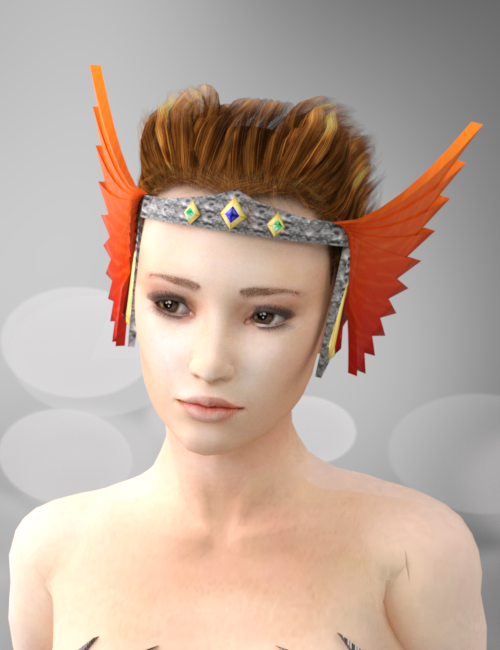
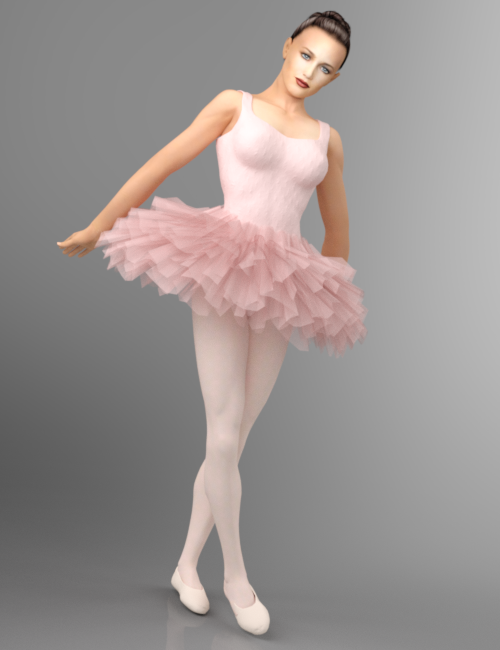
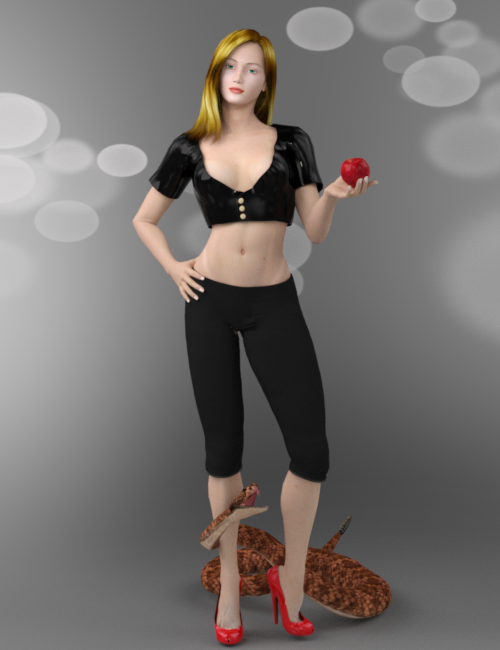
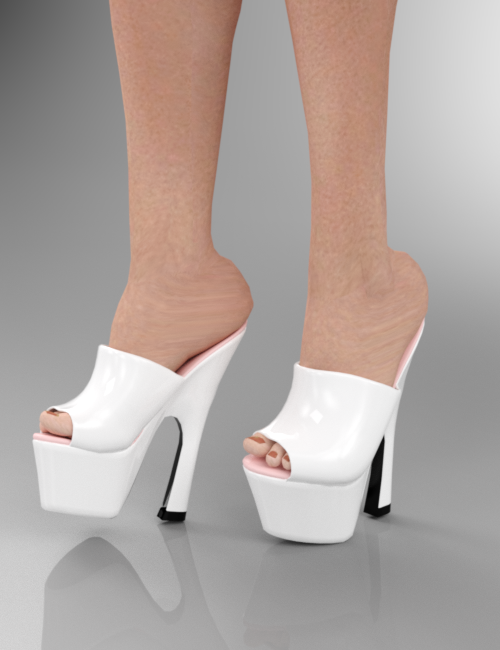
3Dream Carla 2010 3D Angel Nikita Ballerina 1999 Arduino Eve 2001 Billy-T P4 Fem High Heels 2002
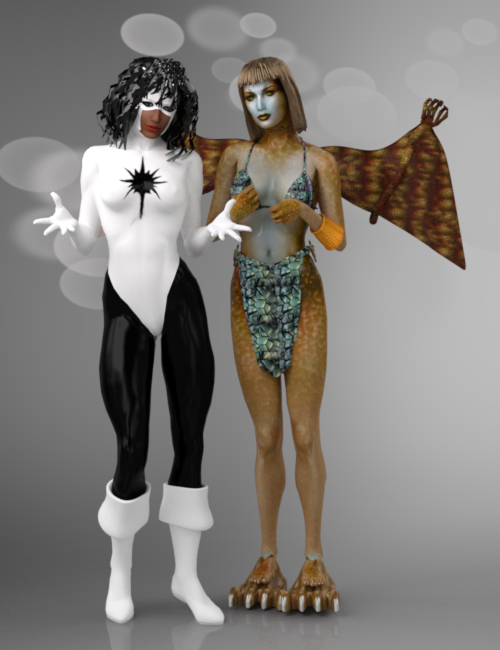
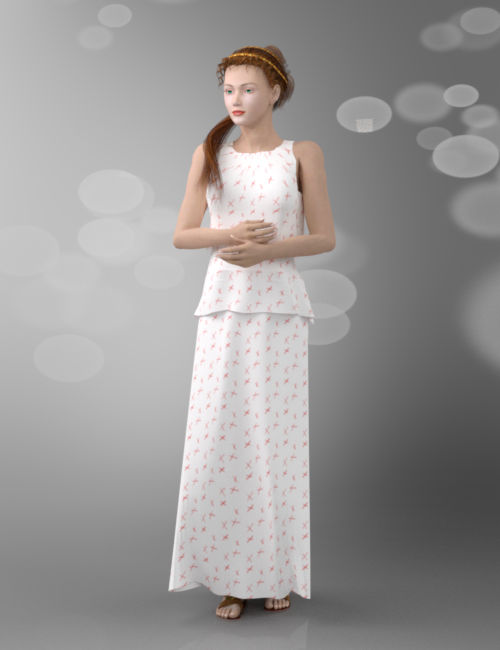
Marvel1 Photon and -renapd- Arcania Poser World Chiton (1999) with AprilYSH Alysadae Hair (2004)
All of the things you see in these images either are modified base clothing that came with Posette or are free articles of clothing, morphs, and full body constructs given by the community. The links to the free stuff are provided on the PoserDAZ freebie wiki under the figure P4 Woman. Those Billy-T shoes are the bomb.
Upgrading Genesis 8.0 charactershaveCodeWillTravel said:
Richard Haseltine said:
Michael 8.1 and Victoria 8.1 are new characters, they are not updates to Michael 8 and Victoria 8.
Hi,
Richard, We are a production environment having used Carrara for a long time. Last September we switched to DAZ Studio on Mac M1s. We find that iRay renders too slow for our work timeline compared to Carrara and 3DL. Are there currently any 3DL skins available for Michale 8.1? (Please don't think this is a complaint, it's not. It's a business question. Thanks.)
There are no 3Delight settings for the specific Michael 8.1 materials, as far as I know.
Upgrading Genesis 8.0 charactersRichard Haseltine said:
Michael 8.1 and Victoria 8.1 are new characters, they are not updates to Michael 8 and Victoria 8.
Hi,
Richard, We are a production environment having used Carrara for a long time. Last September we switched to DAZ Studio on Mac M1s. We find that iRay renders too slow for our work timeline compared to Carrara and 3DL. Are there currently any 3DL skins available for Michale 8.1? (Please don't think this is a complaint, it's not. It's a business question. Thanks.)
Silly question… Why would you ever create a morph without reverse deformations?Cris Palomino said:
Catherine3678ab said:
Well if one is morphing based off of Victoria or Michael, depending upon what one is doing -- for one's self, one can dial out those character morphs as the incoming morph would contain that character plus the new work. However if one is planning to share that new morph, then one has to dial out the character morph period OR "reverse deformations." This is to prevent the illegal sharing of morphs that do not belong to us. And this is why some characters sold in the store say they require V8 or M8, etc. The new morphs can be made to also dial in those shape presets so the customer is not left wondering why their precious purchase bears little if any resemblance to the promo ads.
ok, yes, that was what I thought and the reasoning behind my doing it.
Thanks very much both!
Silly question… Why would you ever create a morph without reverse deformations?Catherine3678ab said:
Well if one is morphing based off of Victoria or Michael, depending upon what one is doing -- for one's self, one can dial out those character morphs as the incoming morph would contain that character plus the new work. However if one is planning to share that new morph, then one has to dial out the character morph period OR "reverse deformations." This is to prevent the illegal sharing of morphs that do not belong to us. And this is why some characters sold in the store say they require V8 or M8, etc. The new morphs can be made to also dial in those shape presets so the customer is not left wondering why their precious purchase bears little if any resemblance to the promo ads.
ok, yes, that was what I thought and the reasoning behind my doing it.
Silly question… Why would you ever create a morph without reverse deformations?Well if one is morphing based off of Victoria or Michael, depending upon what one is doing -- for one's self, one can dial out those character morphs as the incoming morph would contain that character plus the new work. However if one is planning to share that new morph, then one has to dial out the character morph period OR "reverse deformations." This is to prevent the illegal sharing of morphs that do not belong to us. And this is why some characters sold in the store say they require V8 or M8, etc. The new morphs can be made to also dial in those shape presets so the customer is not left wondering why their precious purchase bears little if any resemblance to the promo ads.
Silly question… Why would you ever create a morph without reverse deformations?AndrewJJP said:
Just curious really. I've often wondered why you would not want to reverse deformations when creating a morph? Presumably as that's the default it must be the common case. As far as I can see, if the figure is a base figure / base pose, it makes no difference either way (?) and it the figure is posed, you need to do it to get any sort of predictable results (?)
Like I said, just curious. Maybe I'm missing out on some great feature!
You're reversing out a figure that you're morphing into another shape so that the figure, base or otherwise (as in Michael, Victoria which are characters built on the base), requires the figure/characters that were reversed out in order to work as expected.
Can't get eyebrows on The GirlHave you tried a test render ?
I ask because Victoria 8 is the same, her face texture doesn't have eyebrows on it, instead the eyebrows use overlayed PNGs with alpha channels, and they only show up during a render.
Attached image is a quick and dirty spot render of V8's default face settings.
Oso3d, thanks for the sheep!Cybersox said:
Oso3D said:
I do not, alas, have plans on sheep lingerie.
Too bad, as I had the perfect product name: Mutton Sexy Going On
Victoria's Sheepcret
Any Questions for iMetal or iFabric Shaders? {Commercial]I have my first new product out today which uses these shaders for optional versions of each texture set: https://www.daz3d.com/dforce-lt-sci-fi-outfit-for-genesis-81-female
Also, check out the freebie "Naturally Real Material Options for Victoria 8.1" I posted here: https://www.daz3d.com/forums/discussion/558406/naturally-real-material-options-for-victoria-8-1
Naturally Real Material Options for Victoria 8.1This is a full set, with metadata, of improved material presets for Victoria 8.1. These presets will increase realism, especially in the eyes and mouth. Resulting in a more attractive and expressive Victoria 8.1. Just unzip and copy the two folders (People and Runtime) into your DAZ runtime (on my system it is here C:\Users\Public\Documents\My DAZ 3D Library). Enjoy!
If you want to see these in action, I used these materials for the promo renders for my newest product out today https://www.daz3d.com/dforce-lt-sci-fi-outfit-for-genesis-81-female
Looking for the outfit and hat in this pictureSeven193 said:
Scroll down at the bottom of the page.
Daz 3D Items Used:
https://www.daz3d.com/vintage-rose-for-genesis-3-females
https://www.daz3d.com/neck-romance-collars-for-genesis-8-and-81-females
https://www.daz3d.com/victoria-iven-for-genesis-3-females
Hat is missing, but here are some other suggestions:
https://www.daz3d.com/vintage-bouquet
https://www.daz3d.com/vintage-floral-i
https://www.daz3d.com/vintage-noirThanks for the suggestions.
I've already seen what the item was used but what confused me was the white dress in the picture is only knee length but the item mentioned below seems to be longer covering the whole knee.
Daz 3D is part of

Connect
DAZ Productions, Inc.
7533 S Center View Ct #4664
West Jordan, UT 84084Licensing Agreement | Terms of Service | Privacy Policy | EULA
© 2026 Daz Productions Inc. All Rights Reserved.