-
Daz Studio 6 Beta - version 6.25.2026.19821! (Updated July 23, 2026)
jjb24 said:
Pickle Renderer said:
Oh. Just looking at this. Texture Shaded is nice. You should remove Filament
 . Not sure what Universal is. Maybe answered in this thread. Somehow does seem to load characters faster.
 I realize you're joking with the smiley face but I find both texture shaded and filament useful because they interpret colors differently. I am currently working on a scene where a character's clothing and the couch they are sitting on are the same color in texture shaded making it hard to pose the character but in filament they look quite different making it much easier to pose the character. I also don't know what universal is and perhaps I'm missing something subtle but to me it looks the same as texture shaded.
For Universal, see https://www.daz3d.com/forums/discussion/comment/9137796/#Comment_9137796
Daz Studio 6 Beta - version 6.25.2026.19821! (Updated July 23, 2026)Pickle Renderer said:
Oh. Just looking at this. Texture Shaded is nice. You should remove Filament
. Not sure what Universal is. Maybe answered in this thread. Somehow does seem to load characters faster. I realize you're joking with the smiley face but I find both texture shaded and filament useful because they interpret colors differently. I am currently working on a scene where a character's clothing and the couch they are sitting on are the same color in texture shaded making it hard to pose the character but in filament they look quite different making it much easier to pose the character. I also don't know what universal is and perhaps I'm missing something subtle but to me it looks the same as texture shaded.
Daz Studio 6 Beta - version 6.25.2026.19821! (Updated July 23, 2026)Pickle Renderer said:
Oh. Just looking at this. Texture Shaded is nice. You should remove Filament
. Not sure what Universal is. Maybe answered in this thread. Somehow does seem to load characters faster. Filament is not likely to go away, it is a very popular option (Mac users were very happy to get it with DS 2025). Texture Sahded is useful too, and does require fewer system resources. Use the one that suits your needs.
Daz Studio 6 Beta - version 6.25.2026.19821! (Updated July 23, 2026)Oh. Just looking at this. Texture Shaded is nice. You should remove Filament
. Not sure what Universal is. Maybe answered in this thread. Somehow does seem to load characters faster. Starting Over and Overwhelmedhjake said:
whispers65 said:
hjake said:
If a DAZ product that you own has only iRay (MDL) materials then you could consider these converters:
Please note that 3Delight will not be supported in DAZ Studio 2025.
NOTE: 3Delight materials are RSL.
What will be supported? Thanks for the tip!
I think the focus will be Nvidia Iray and Google Filament. Filament is a fourth method for rendering in DAZ Studio.
https://www.daz3d.com/filament-information-page
https://www.daz3d.com/forums/discussion/690191/what-is-filament
https://google.github.io/filament/dup/intro.html
https://blenderartists.org/t/google-releases-open-source-rendering-engine-filament/1121322
Thanks. Iray is the only thing I have experience with or did have anything. I'll check out filament with the links you gave.
Face Control for Genesis 9 Product IssueYou see black in Viewport because a Script from Face Control (when you load 3DU Face Control ADD with Camera) switches Draw Style to Texture Shaded....
You just need to switch back to Filament draw style...
Starting Over and Overwhelmedwhispers65 said:
hjake said:
If a DAZ product that you own has only iRay (MDL) materials then you could consider these converters:
Please note that 3Delight will not be supported in DAZ Studio 2025.
NOTE: 3Delight materials are RSL.
What will be supported? Thanks for the tip!
I think the focus will be Nvidia Iray and Google Filament. Filament is a fourth method for rendering in DAZ Studio.
https://www.daz3d.com/filament-information-page
https://www.daz3d.com/forums/discussion/690191/what-is-filament
https://google.github.io/filament/dup/intro.html
https://blenderartists.org/t/google-releases-open-source-rendering-engine-filament/1121322
Face Control for Genesis 9 Product IssueI put a help desk ticket in for this , but I'm just curious if anyone using Face Control for Genesis 9 has experienced this (because it's admittedly strange). I'm running DAZ Studio 4.24.0.3 (64-bit) on Windows 10. Disclaimer: It could be I'm just stupid and missing something very obvious (it's possible).
I installed the product and then loaded up a save scene scene of a Gen 9 character. The scene had Filatoon shaders on the figure and on the clothes on the figure and was displaying on the Viewport as a normal Filatoon scene with outlines, hard shadows, etc. The whole cartoon effect was visible and displaying normally.
Clicked the option to load the face control with camera in the Face Control Tool. Through the FC camera, the Filatoon settings were not visible, but I didn't think anything of it. I adjusted the facial expression and then removed the FC control overlay.
The scene did not go back to normal (the Filatoon effect was gone from all surfaces in the perspective view camera). I tried all the different cameras and all the same. I did not save the scene and just closed out of Studio, and then restarted and reloaded the same scene. The Filatoon effect was still not visible even though I had not saved the scene after I used Face Control for Genesis 9. I loaded up a different Filatoon scene, and still no Filatoon effect. I loaded several alternate scenes that had the Filatoon shaders applied and none of them displayed the Fialtoon effect normally.
Loaded up a new blank Scene
Loaded Basic Filatoon Environment into new scene which loads:
1. Distant Light
2. Filament Draw Options
3. Tonemapper Options
4. Environment Options
Loaded a primitive (Sphere)
Adjusted the distant light so it would point to the sphere on one side.
Selected the sphere in the Scene Tab and the sphere surface in the Surface Tab.
Went to the Shaders folder and applied the following:
Filatoon Base
Filatoon General (Preset)
LUT 01 (Preset)
MatCap Round (Preset)
Outline Add (Preset)
And I'm looking at a solid black ball (no Filatoon effect). I've been working with Filatoon for a while and never had any issues getting the effect to work using these steps. Could the Face Control for Genesis 9 put some general overlay that is affecting the way Filatoon displays, because every scene I have that uses Filatoon is affected.I uninstalled Face Control for Genesis 9. I re-installed my DAZ Studio program for a fresh start. I rebooted my computer and cleaned out my registry.
Then launched the new install of Studio and loaded a primitive (Sphere)
Adjusted the distant light so it would point to the sphere on one side.
Selected the sphere in the Scene Tab and the sphere surface in the Surface Tab.
Went to the Shaders folder and applied the following:
Filatoon Base
Filatoon General (Preset)
LUT 01 (Preset)
MatCap Round (Preset)
Outline Add (Preset)
And I'm still looking at a solid black ball (no Filatoon effect). The Fialtoon environment is loaded and I have the distant light in the scene pointing at the object so not sure what I could be missing. This has always worked with no issues. I reloaded some of my older Filatoon scenes and they are all missing the effect. It has to be a general display issue because all files I have that use Filatoon are affected (or as I mentioned before, I'm just being stupid).I have questions about landscape products!Jan_Scrapper said:
If I mess up my current Daz Studio, I do not have a backup up that version :( I still cannot believe I did that, but I did! I tried to use Daz Studio 15 years ago, but never actually learned. Then, I wanted to use Genesis so badly, that I began using Daz Studio in 2018, I believe. I downloaded the current version at that time and installed it. Where my downloaded copy is, I just do not know!! I am showing my versions of Daz Studio that I have. Of course, when I open DIM to download products, it shows the 4.24 version of Daz Studio. I attached a copy of that. I go to my products listing on the Daz3d Site and it shows Daz Studio version 4.25. So, I am a little confused about which version to install and why I have to have DIM install my Daz Studio software.
Daz Studio 4.24 is the current stable version of Daz Studio. I don't know what are the differences between that version and Daz Studio 4.12 (I started with DS 4.21).
Daz Studio 2025 is the current Alpha version of Daz Studio. It's useful to have it in maintly two cases (outside of the obvious case of you wanting to track and report bugs):
- To use Iray with any Nvdia Geforce 5X00, because the Iray plugin in Daz Studio 4.24 is not compatible with them and can't be upgraded to a compatible version.
- To use Filament on Mac.
You'll have to ask someone else because I don't remember doing it on Windows, but you can have multiple versions of Daz Studio installed at the same time on your computer, but it's best to check how to do it before trying it, because I think on top of having an install directory made for each version, you have to save the Default ressources of that older versions.
I think @richardandtracy did it and maybe is still doing it.
Threed printsHeadwax said:
thanks aurora tech is a go to channel, also mytechfun for testing things with honesty,
seldom trust others, Nathan Builds robots isnt bad,
a lot of rubbish out there in youtube land.
I use a creality printer, so far so good, their after sales non-service is legendary, so don't buy a Monday printer,
E3V3 very simple, very stable.
Bambu lab has a locked ecosystem - or are tring to have - so beware if you go that path
I made that mistake with the XYZ DaVinci printer, is tanked basically, flags it's own expensive filament as not genuine, no support outside the USA
its in a corner of my laundry long forgotten
Iray making textures fully whiteThat's Filament rather than Texture Shaded. I would guess that a material property that isn't used in Filament is overwhelming the Base Colour in Iray. Applying the Iray Uber base doesn't chnage proeprties that are pesent, but it may add new properties (depending on which shader is applied on importing the FBX).
Can you help me with a college project?- How long have you used Daz 3D Studio?
About 20 years. - Do you use any other software with Daz 3D? (bridges, photo editing, or other rendering software)
Cascadeur, Gimp, and occasionally Blender and Hexagon (oh, and I sometimes try working with a render with image to image AI) - How easy or difficult was it to learn Daz Studio?
Fairly easy, I was able to create decent renders after about 8-12 hours (but I already had experience with Poser. Carrara Studio Pro, Cinema 4D, Vista Pro, and Visual Nature Studio) - Did you have to purchase a specific computer to use the application?
No, I use the same computer that I use for work (at home). I do Photogrammetry, Lidar Processing, and use other 3D software that also needs a fairly robust computer. - How much money have you spent at the marketplace or other third-party sites for content?
I'm not sure ... but probably too much. I try to keep my spending to an average of $30 a month. Some months I don't spend anything, others I will spend more (like if there is a new Genesis generation released). - What kinds of bugs or errors have you ran into?
Not real show stoppers, mostly just annoyances that have workarounds. - Is there anything you would change about the application?
Scalable fonts in the UI!!!! Old eyes with a laptop screen make using DAZ Studio extremely difficult at times (I quit using it for several months, but eyesight has improved just a bit).
I think changing to Vulcan over Open GL would be a massive improvement.
If they won't replace Open GL with Vulcan, then improving Filament, especially how it handles opacity maps, would be a big plus.
Improving the animation tools.
Giving us full access to all of the features in Iray (i.e. motion blur).
I think having another professional render engine available in DS would be a huge plus (something designed for production environments with access to all available tools/options). Or, probably an even better option would be to have a full, comprehensive, and pro level implementation of USD. This would open up the use of other render engines and other software without writing and maintaining a bridges to various additional applications.
Yes, this may be old fashioned, but a real up to date manual would be HUGE! I recently started using Cascadeur, they have an extensive set of video tutorials as well as an outstanding manual. There is often critical information in well written manuals that can't be easily provided in a video tutorial.
Daz Studio 6 Beta - version 6.25.2026.19821! (Updated July 23, 2026)Not a bug really, but an observation. I have been using the alpha as my every day Daz on an M4 Macbook Air for a few weeks now. The speed of loading of G9 has allowed me to finally make that switch to using G9 characters, Plus having faster iray and finally being able to use filament in addition to pretty good stability (Daz 4 on Mac has not been the most stable thing) has been enough that I only open the regular Daz 4 release when I need a script I'm missing (though many scripts crash Daz 4 on Mac anyway). Two days ago I upgraded my MacOS to Tahoe. Yesterday I updated Daz to the latest alpha. I used to be able to start a scene rendering and then go an watch youtube with no issues. Now I have noticed youtube stutters very badly when Daz is rendering. I don't know if it is something different in the latest Daz alpha or in Tahoe's load management. When I have some time I need to experimment and see how Daz 4 behaves or switch back to the previous alpha (which is backed up). Just wondering if any of the Mac users have seen a difference since updating.
Official Release of Carrara 8.5 **Update - 8.5.1.19**Carrara 20X - it's a Way of Life!!!
- New - Export Particle Simulation Results directly as DUF animated scene files that open Directly within Daz Studio
- New - Export Physics Simulation Results directly as DUF animated scene files that open Directly within Daz Studio
- New - Export Dynamic Hair Simulation Results directly as DUF animated scene files that open Directly within Daz Studio
- New - Automatically Add new Morph Shapes Directly from Carrara's Powerful Vertex Modeler into Daz Studio via MorphLoader Pro
- New - Send Custom Made Clothing, Hair, Props and Accessories Directly to Daz 3D Figures (Genesis lineup) as DUF Outfits, Styles, Smart Props, and More
- New - Filament and Iray Options Directly within Carrara
- New - New Texture Rooms Specifcally for Filament and Iray respectively - Save Material Presets Directly to your My Daz 3D Library as Presets
- New - High Density Sculpting Modeler - Sculpt from Scratch, or Sculpt New Morphs for Existing Items and Figures
- New - More Robust 3D Paint features that support a PBR workflow, with access to Thousands of Surface Material Presets
- New - The Sequencer and entire NLA (Non-Linear Animation) system now fluidly connect with Daz Studio's Timeline - think aniMate on Steroids!
- New - AI Assisted Auto-Posing with Surface Interaction for Objects and other Figures
Becoming a Daz 3D Published Artist has Never been Easier! With the New Carrara, Your Imagination is Your Only Limit!!!
Filament FX and HairWhile I find filament renders great and the filatoon characters are great for making comics, I soon found the limits of it, namely that a lot of great sets I own just simply cannot be used with it. Particularly annoying, the toon characters are based on G9 figures, but a lot of G9 hair products don't render in filament, nor have I been able to re-color them with filament materials and instead I find myself having to reinstall ancient hair styles of previous generation figures and use these instead.
Therefore I'm currently, desperately looking for:
- A program, plug-in or script that allows me to convert new (G9) hairstyles to filament.
- Similarly something that allows me to convert volumetric files (explosion, clouds, smoke etc.) to render in filament
- Or optionally explosions, magic effects, clouds, lightning, rain, smoke, water etc. made specifically for filament renders, I'll gladly just buy new sets if I can't convert what I have.
- There used to be a set called "Fantasy and Sci-Fi effects". I have it, I reinstalled it, problem is I don't seem to be able to apply the material files to the props anymore :(, So if the original artist makes a remake of that set, or anyone else makes something similar for filament renders I'll buy that too
Write Anywhere Plus Advanced LIE and Aging Tools (Commercial)Elor said:
Imago said:
Works only on IRay? Can use props to paint on surfaces?
Decal nodes are a function of the Iray render engine so they are only visible in Iray Preview or through an Iray render.
3Delight can (could, with respect to DS 2025) do projected materials through Sahder Mixer - see the old Shades of Life shader products, if I am recalling the names correctly. I don't know about Filament.
My scene is too brightRichard Haseltine said:
bstanle said:
stripe6499_9253833ae8 said:
Brightness can be altered in a few ways. The sledgehammer approach, which works regardless of lighting method, is Render Settings tab > Tone Mapping > Exposure Valuie. 14 is the default, and anything above that will reduce the brightness of the entire scene. If you're using Sun-Sky lighting, then you can go to Render Settings > Environment > Sun Disk Intensity and reduce that setting. If you are just using scene lighting, then select each individual light source in the Scene tab, then click on the Light tab, go to the Luminous Flux slider and amend that. The default value here is 1500, which is usually far too low. For spotlights, i usually end up with somewhere between 50k-150k depending on the scene. I hope this helps.
Hi,
I looked under RENDER SETTINGS and there is nothing about TONE SETTINGS. Also there is nothing about ENVIRONMENT. It seems that there might be something wrong. I am using the latest versiion of studio which I downloaded last week. Maybe, should I erase everything (DIM in C:/program files, STUDIO in C:/program files and in C:/users/public/documents DAZ and My DAZ library) it seems desperate but since I haven't made any scenes, I won't lose any user data.
Bill
They are in the Editor tab of Render Settings. The settings will not be available until Tonemapper Settings or Environment Settings nodes, respectively, exist in the scene. They will be created by doing an iray render or preview, or for Tonemapper by using the Filament Drawstyle. They can also be added from the create menu.
Oops... As Richard said., It's all in the Editor tab of Render Settings. I have that open all the time and kinda forget there are other options
My scene is too brightbstanle said:
stripe6499_9253833ae8 said:
Brightness can be altered in a few ways. The sledgehammer approach, which works regardless of lighting method, is Render Settings tab > Tone Mapping > Exposure Valuie. 14 is the default, and anything above that will reduce the brightness of the entire scene. If you're using Sun-Sky lighting, then you can go to Render Settings > Environment > Sun Disk Intensity and reduce that setting. If you are just using scene lighting, then select each individual light source in the Scene tab, then click on the Light tab, go to the Luminous Flux slider and amend that. The default value here is 1500, which is usually far too low. For spotlights, i usually end up with somewhere between 50k-150k depending on the scene. I hope this helps.
Hi,
I looked under RENDER SETTINGS and there is nothing about TONE SETTINGS. Also there is nothing about ENVIRONMENT. It seems that there might be something wrong. I am using the latest versiion of studio which I downloaded last week. Maybe, should I erase everything (DIM in C:/program files, STUDIO in C:/program files and in C:/users/public/documents DAZ and My DAZ library) it seems desperate but since I haven't made any scenes, I won't lose any user data.
Bill
They are in the Editor tab of Render Settings. The settings will not be available until Tonemapper Settings or Environment Settings nodes, respectively, exist in the scene. They will be created by doing an iray render or preview, or for Tonemapper by using the Filament Drawstyle. They can also be added from the create menu.
Question about filamentHello
I am a returning user. Some things I remember, many things I do not, and much has changed. I have been following one of the Jay tutorials. I understand the imporance of having a good filament view when working with NVIDIA HDRI lighting. My question is how does Jay get the filament view so accurate? My lights are set up very basic temperature (6500), but my character is purple. How does he maintain the color.I notice somehow he keeps the hair. Perhaps he is not in filament view, though he says he is in the video. I attached visuals.
Also, a side question: how do you hide the cameras and lights from view? I know I can click the eye, but that also shuts the off. I know there is a way to just show/hide. Someone online said it wasnt possible, though I used to do it, I just forgot how; it's been a while.
Thanks
Genesis 2 Appreciation ThreadThe earrings in my last render were a bonus inside https://www.daz3d.com/fwsa-tempie-hd-for-victoria-6 by Fisty & Darc, Fred Winkler Art and Sabby
so I decided to use her for my second portrait render. The hair is https://www.daz3d.com/baroness-hair-for-genesis-2-female-s-and-victoria-4 by SWAM using https://www.daz3d.com/fsl-realistic-hair-shaders-for-iray-and-filament by Fuseling, dress is https://www.daz3d.com/chloe-dress-for-genesis-2-female-s by Nikisatez using https://www.daz3d.com/dg-iray-fabrics-of-asia-shaders by DestinysGarden and IDG Designs and the main reason for posting this: https://www.daz3d.com/glam-choker-g2f by Lilflame which is definitely a very special product.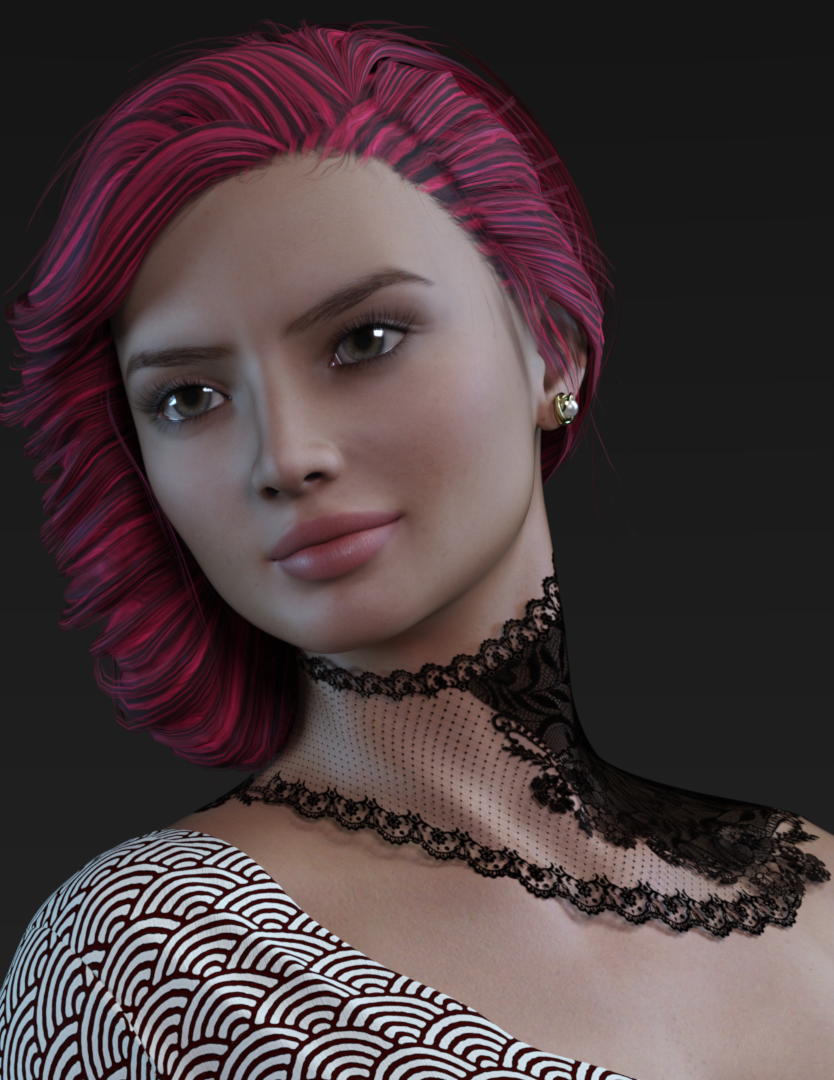
Daz 3D is part of

Connect
DAZ Productions, Inc.
7533 S Center View Ct #4664
West Jordan, UT 84084Licensing Agreement | Terms of Service | Privacy Policy | EULA
© 2026 Daz Productions Inc. All Rights Reserved.