-
Character Converter Question(s) - MOVED TO COMMERCIAL THREAD
I'm not sure how the UV transfer can be worked around because so far I haven't run into any characters with those issues, but I can clarify a little on the way the tool works in practice.
If I understand your question correctly, it doesn't transfer collections of morphs from G3F to G8F--just characters. However, you could create a custom character using a morph set like this and transfer that character to G8F. It transfers the full character, but also creates a slider under parameters so you can blend it with other G8F characters and morphs. As far as I've seen G8F expressions work fine, and I haven't had any issues with posing in general.
It also takes a while to transfer a single character (a few minutes for me, but I've heard other people say it took much longer), so batch conversion might be a little dicey.
I'm still at work, but I can poke around for more specific answers when I get home. It really is an incredible tool in my opinion, and not very complicated to use. I'm super impressed with it!
SereneNight's Sci-Fi Fun Thread 2Just catching up with the thread now that my internet's back -- was nearly 2 weeks without due to new landlord and a switch in services when the old landlord moved. What a hassle! Love the apartment scene, it sure does not seem to have suffered any from lack of a proper cityscape HDRI. You're right about the floor, too white there would really distract. Truform has really awesome stuff, someday when I win the lottery I'll have to buy me some of that.

On the clothing front, I bought that sexy Dzheng undies pack and got a question concerning the shorts. I notice there are genital morphs in them but no matching poses in poor G8M's anatomy. Now I've got similar outfits for M4 and they come with poses that apply to his bits, then you dial in the matching underwear morph so nothing pokes out where it shouldn't. Alas, G8 does not seem to work that way, because when I loaded him and put the shorts on everything was poking out even with the morphs dialled in.
 Removing his bits solved that problem, however one could notice things just didn't look right. Am I missing some pose files that should make his anatomy match the clothing morphs, or are they just not where I've been looking? First time I've used G8 anatomy, so it is indeed possible I ain't doin' it right.Is there a way I can make a clothing morph for a posed character
Before trying to create a morph, you may wish to try simply applying the same pose to the garment that you are using for the figure.
Is there a way I can make a clothing morph for a posed characterHi,
I'd like to make a "sitting" morph for a skirt I modeled.
Is there a way I can take through GOZ a posed Genesis 8 with the skirt and make the morph in ZBrush.
I understand the process of morphing without the pose but would like to be able to add the sitting morph.
Cheerio
lululee
Character Converter Question(s) - MOVED TO COMMERCIAL THREADSorry if this is something I'm not understanding, but the program says it works with figures based off the off the basic G3F UV set, and those that aren't will have ugly seams. I have several G3F characters (from pro bundles, etc) that are based on their own Custom UV's. So does that mean all those will have ugly seams and/or misaligned features? Then it shows Aiko7 materials used on Aiko8 and says in this case, other materials should be used as there are problems with the eyes, lips and neck. I assume this is because Aiko 7 has Custom UV's that don't transfer correctly to A8? What other materials should be used then?
And does it only copy 'materials'? He shows using a V7 figure but says V8 eyes are used. Why?
Not sure quite how the morph transfer thing works either, or does it actually not transfer all G3F morphs to G8F? Reads like it will only transfer only the morphs currently in use from G3F to G8F.
Also the whole box where you have to manually add vendor/product name/character name one at a time seems time consuming. Guess it is what it is, but still.
I'm too confused to buy it, and I know I can return it before 30 days, but I just don't know.
[Released] Character Converter from Genesis 3 Female to Genesis 8 Female(Now Conv JCMs) [Commercial]I'm also getting this when transfering a dial spun character. Along with the autofit problem I'm beggining to wonder if this is just not suitable for home spun dialed characters.
I asked this earlier but I think you missed it among the large stream of posts. After loading a vanilla G8F, if you dial in a normal G8F morph (not one that was from conversion), can you auto-fit? After loading a vanilla G8F, if you dial in a converted G8F morph (undial the normal G8F morph), can you auto-fit?
Yes that works fine I have no problems with autofit except for when trying on a converted character.
[Released] Character Converter from Genesis 3 Female to Genesis 8 Female(Now Conv JCMs) [Commercial]For genX transfers we would use the custom shape option as the dials are not located in the content library correct? It seems to transfer kind of well but the character stays the same height but the shape changes to match, for example trying to transfer the Maddie 3 shape, it transfers the shape but you end up with a giant child lol
goodbye 2009 workflow! Now what!?Im patiently (not) waiting for my new GPU* to ship so I can actually use Iray on a card that was not decommissioned in 2009 and update to my workflow, but and after perusing the store last night I have no idea what I need to invest in since so much has changed, but here’s what I’d like to do:
Base figure to replace V4 (is it Gen8? Is it Victoria 8? Is it something else?)
An Iray texture set to get me started. Basically, a base for Photoshop tweaks if I need versatility
The ability to get detail like wrinkles on palms and soles, etc.
The ability to create my own expressions, body features, ethnicities without resorting to pre-made figures if I don’t need to. Essentially Morph Targets if that’s still a thing.
Very basic clothing. Are CR2’s still a thing? (I told you it's been a long time)
Thank you in advance if you can help.
Extra bonus question, has anyone used IRay with Blender 2.8 yet?
- Going from a GTS-250 1GB DDR3 with 128 CUDA cores to a 1060Ti 6GB DDR6 with 1536 CUDA cores.
How do I backup scenes to use on another PC?Early this year, I built a PC just for rendering, to supplement my aging iMac. After getting all the DAZ and other assets in place, my typical workflow now is to construct scenes on the iMac, which is still my main computer, and when I am reasonably happy, I copy the .duf (and other scene-specific support) files from the iMac to the PC (by remote-mounting a directory named 'Transfer' on the iMac), do some final tweaking, and then render at full size. I usually have no problem.
For copying the DAZ assets, after several frustrating and slow attempts, my fastest solution was to direct-run a gigabit ethernet cable between the two computers.
XTransfer Module 1- Genesis 3 to Genesis 8 Morph Converter (Commercial)I already have the Riversoft product and I also have the original Singular Blues script... but I'm still buying X-transfer on day one as, with Zev0, I expect that it will be the most powerful and versatile of the three.
Orangutan!!!That head morph would make a good alien with a different skin to
like this one? (I thought the same thing when making it)
 Orangutan!!!
That head morph would make a good alien with a different skin to
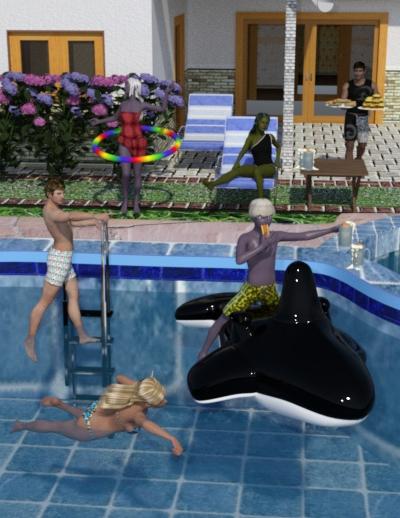
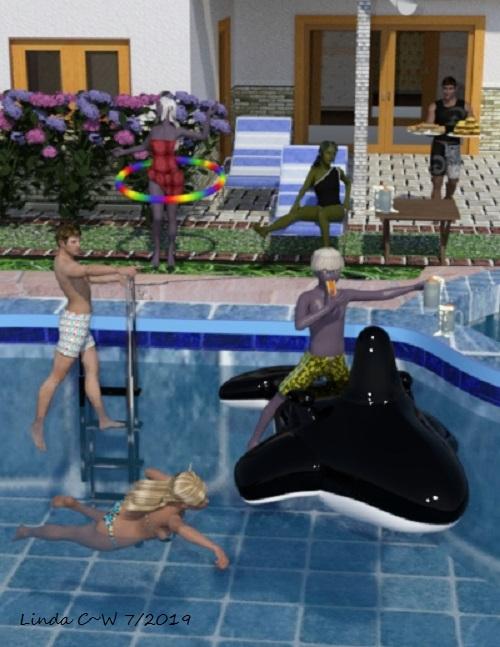
3D Art Freebie Challenge-July 2019-"Pool Party" -Main Thread OnlyEven superheroes need to cool off and have some downtime. Only Matt, the good doctor hanging off fthe pool ladder, is an ordinary human. His lovely wife Maryn, swmiining nearby, is a popular superhero. They've invited her teammate Hank, a strongman laden with hot dogs and burgers; his lovely alien girlfriend El; and Anya and Heyyu, a couple of youngsters from a secret forest realm. The kids may look like dark elf refugees from a D&D game, but they're very sweet--although Heyyu is a mischief-maker, which he is dmeonstrating by stealing Matt's root beer float. (The floats are kept cold in the summer heat thanks to Maryn's cold powers.)
Sig is only post work
Unpaid
Big Burger Prop (4th item on left at link) https://www.most-digital-creations.com/free_poser_poses_textures_morphs_props_19.htmBig Family House https://www.renderosity.com/mod/freestuff/for-poser-big-family-house/57005
Caribbean Outfit G2F https://www.wilmapsdigitalcreations.co.uk/view_product.php?id=228
Duke Hair Genesis/Genesis Starter Essentials http://docs.daz3d.com/doku.php/public/read_me/index/14812/start
Elven Princess Hair x3 https://www.renderosity.com/mod/freestuff/?search=elven+princess+hair
Furniture Set 5 Cupboards & Ornaments (Oval Plate)
https://www.wilmapsdigitalcreations.co.uk/view_product.php?id=216G3F/G8F Swimsuit 5 (25th from top on left) https://www.most-digital-creations.com/freestuff.htm
Genesis Drow Skin https://sharecg.com/v/67291/gallery/21/DAZ-Studio/Genesis-Drow-2nd-Skin
Genesis Swimwear (female) https://www.wilmapsdigitalcreations.co.uk/view_product.php?id=31 ;
Genesis Swimwear 2 (male) https://www.wilmapsdigitalcreations.co.uk/view_product.php?id=32 ;
Hydrangea https://www.renderosity.com/mod/freestuff/hydrangea/82574Let's Put On a Show (Hoop) https://www.daz3d.com/let-s-put-on-a-show
McCoy Hair M4 x2 https://www.sharecg.com/v/38477/
Pool Fun Pack 1 (Whale Float) https://www.renderosity.com/mod/freestuff/pool-fun-pack-1/60974
Pool w/Ladder & Diving Board https://www.renderosity.com/mod/freestuff/pool-with-ladder-and-diving-board/57006
Strong for G8M https://www.renderosity.com/mod/freestuff/strong-for-g8m-character-morph-amp-pose/82833 ;
Surf's Up Outfit/G2 Starter Essentials/Scenebuilder http://docs.daz3d.com/doku.php/public/read_me/index/16280/start
Paid
Beach Props https://www.daz3d.com/beach-props
Nylissa G3F/G8F https://www.daz3d.com/nylyssa-for-genesis-3-and-8-female
Sickleyield Good to Go Lights! https://www.renderosity.com/mod/bcs/?ViewProduct=116315Not Counted
Food Pack (Hot Dog & Root Beer Float) (Discontinued Daz item)*
Genesis x2
G2M
G3F
G8F & M*I can screenshot my Product Library page if needed
All Links Check Out Plz Move To Entries Thread
I will give you until this evening to put this into the entries thread then I have to close!
[Released] Character Converter from Genesis 3 Female to Genesis 8 Female(Now Conv JCMs) [Commercial]I'm also getting this when transfering a dial spun character. Along with the autofit problem I'm beggining to wonder if this is just not suitable for home spun dialed characters.
I asked this earlier but I think you missed it among the large stream of posts. After loading a vanilla G8F, if you dial in a normal G8F morph (not one that was from conversion), can you auto-fit? After loading a vanilla G8F, if you dial in a converted G8F morph (undial the normal G8F morph), can you auto-fit?
Hylas' corner
Another attempt to bring something old (and free) to G8, this time the skin of the lovely Grace for V4 via these two products. I'm very happy with the result! I was specifically interested in Garce's skin but now I'm curious to see what all the other bi-weekly freebie V4 skins look like on G8.
Eyes and lashes are normal G8 materials. The morph is dial-spun, built around a freebie headmorph by RenderGuyNY.Freebie credits:
Morph by RenderGuyNY: https://sharecg.com/v/90309/gallery/21/DAZ-Studio/Genesis-8-Female-Faces
Pose Converter by Agent Unawares: https://www.deviantart.com/agentunawares/art/G3F-to-G8F-World-s-Greatest-Pose-Converter-709591348Wow, lovely render! And the butterflies are the perfect embellishment too.
Exporting anatomical elements morphsI think that 'Merge Fitted Figures' may have been broken by a recent update. I am having problems when trying to merge the Anatomical Elements figure as well. The position of the grafted object shifts during the merge process, leading to some pretty unsightly artifacts. Also, the morphs simply don't transfer anymore. I have used this workflow in the past to export a figure with geografted gens and morphs, so I know that it used to work. I opened a tech support ticket for this and that may be getting some traction now. It would help if others could confirm whether or not this is still working for them, because maybe there's some pathology, combination of plug-ins/feature use that breaks this.
Thank you for your post! I was going crazy trying different methods and nothing worked which made me wonder if I'm just dumb or what. I would also like to see if this is broken for others as well. I really would appreciate knowing if there's a fix for this or an update on your trouble ticket.
Black Is Beautiful IIThe skin of the lovely Grace for V4 on a G8 via these two products.
Freebie credits:
Morph by RenderGuyNY: https://sharecg.com/v/90309/gallery/21/DAZ-Studio/Genesis-8-Female-Faces
Pose Converter by Agent Unawares: https://www.deviantart.com/agentunawares/art/G3F-to-G8F-World-s-Greatest-Pose-Converter-709591348Hylas' cornerAnother attempt to bring something old (and free) to G8, this time the skin of the lovely Grace for V4 via these two products. I'm very happy with the result! I was specifically interested in Garce's skin but now I'm curious to see what all the other bi-weekly freebie V4 skins look like on G8.
Eyes and lashes are normal G8 materials. The morph is dial-spun, built around a freebie headmorph by RenderGuyNY.Freebie credits:
Morph by RenderGuyNY: https://sharecg.com/v/90309/gallery/21/DAZ-Studio/Genesis-8-Female-Faces
Pose Converter by Agent Unawares: https://www.deviantart.com/agentunawares/art/G3F-to-G8F-World-s-Greatest-Pose-Converter-709591348Fatal Stranger - Any renders?Me too: I thought the eyebrows looked a little odd, so would welcome some different aspects.
So I just discoverd that the eyebrows are part of the morph which I personally dont like. I think they look fine for the character, but making them part of the morph really limits options in my opinion.
mcjTeleBlender:Daz Studio scenes/animations w/Blender's Cycles EnginemcjTeleBlender 4 For Blender 2.8 progress report
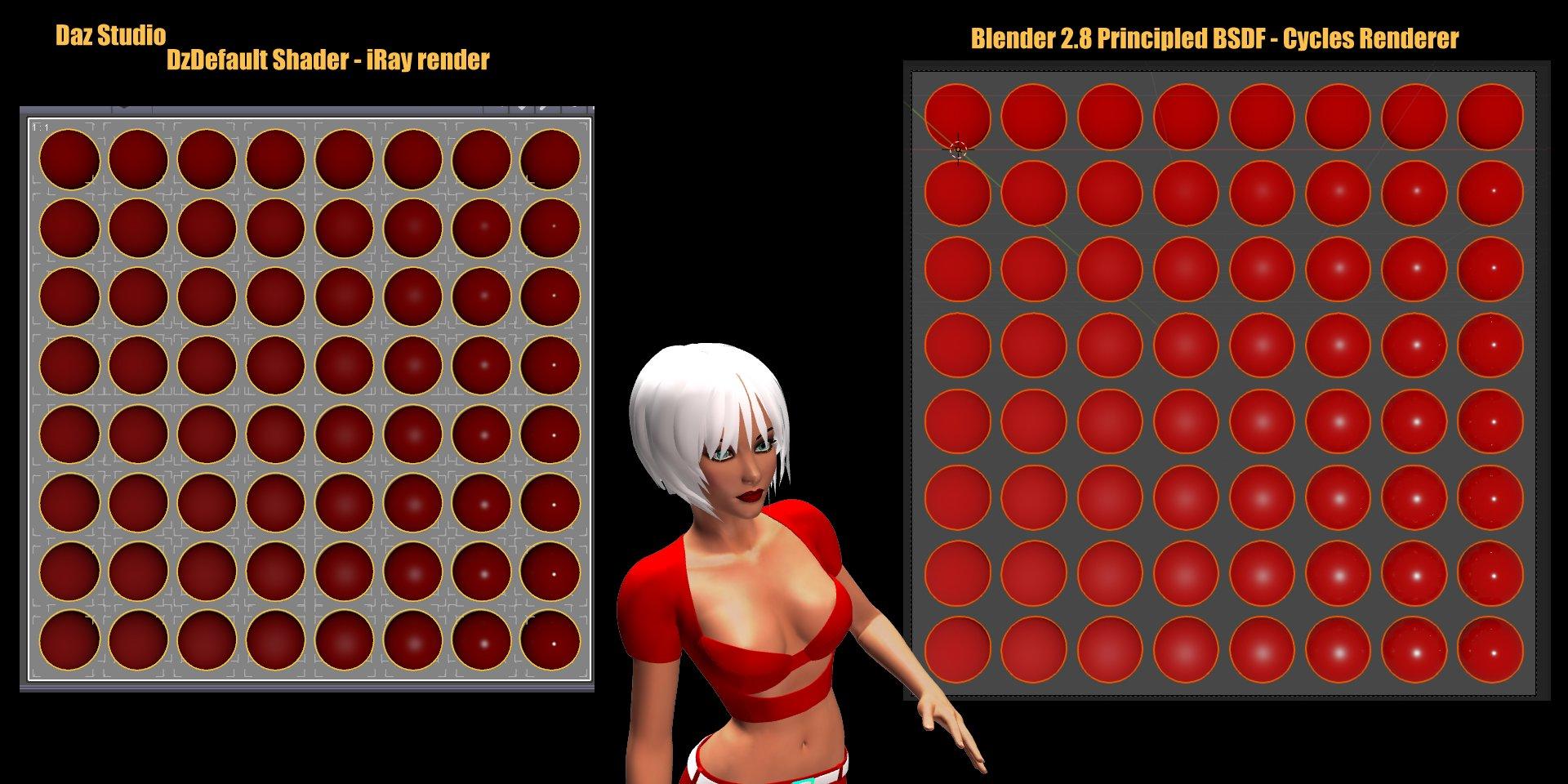
mcjTeleBlender 4 for Daz Studio will be able to transfer "Specular Strength" / "Glossy Layered Weight" and
"Glossiness" ) /"Glossy Roughness" to Blender 2.8 Eevee
something that Blender's obj/mtl importer doesn't seem to be able to do. that's not the final conversion but without mcjBlendBot all the blender materials looked the same
Daz 3D is part of

Connect
DAZ Productions, Inc.
7533 S Center View Ct #4664
West Jordan, UT 84084Licensing Agreement | Terms of Service | Privacy Policy | EULA
© 2026 Daz Productions Inc. All Rights Reserved.