-
Transfer Utility without "Fit to Source Figure" doesn't work
I think that a Rigidity Map wouldn't help me because I do want the cloth to transform. I just don't want it to fit to the current morph:
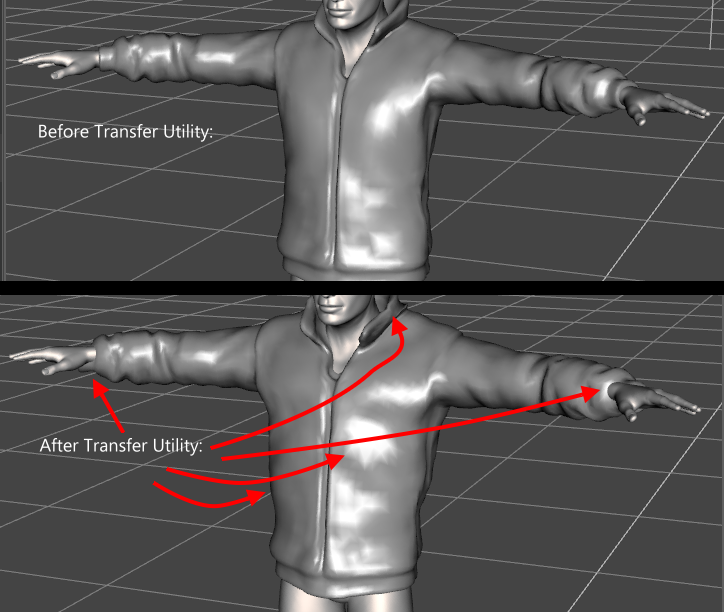
As far as I have understood Rigidity Maps, it should be used for stiff collars and buttons, etc. But this is not what I need.
As I have explained, it would be perfectly fine without any fitting. However, without the option "Fit to Source Figure", the Transfer Utility tool doesn't work.
Can you tell me how to "give the garment an empty property"?
Freebie Request - Morphs for Toon AlienDo you use it in Poser or DAZ Studio?
I use an older version of DS (DS2.3 to be exact), but a gracious forum user already took care of this request for me.
-MJI'm glad you got someone to help with it. I was going to suggest just bringing him into Hexagon or any 3D modelling program and doing a quick morph yourself. A morph like that is really simple and something you'd probably be able to do fairly easily and quickly. :)
Transfer Utility without "Fit to Source Figure" doesn't workI don't think this is the Transferr Utility, I think it's the projected morph you don't like. You can block morph projection for a specific morph by giving the garment an empty property of the same name, or you can use a Rigidity group containimg the whole mesh to block all morph projection.
My New Genesis 8 Polar Bear im working onIn case my feverishly commenting on all of your threads doesn't make it clear, I'd be really excited to use these. Do you plan on releasing them at any point?
Also, it's hard to tell from those images: is the polar bear a separate morph, or just a skin?
I haven't decided yet if im going to releasing them because they are beast of my characters in my art work Plus i used another character from Daz3d called Ape World Gorilla for Genesis 8 Male By Raw Art to make them Plus a lot of hard work is going into them and im not getting a lot of feedback from them so far and yes they are all separate morph Fully Functional in Daz3D
Transfer Utility without "Fit to Source Figure" doesn't workHello!
I have imported a jacket as an OBJ.
I want to turn this OBJ into a cloth that conforms and moves along with my Genesis 2 Female model. The Genesis 2 Female model has a full body morph.
When I use the "Transfer Utility" with the default settings, I get a jacket that conforms and moves along with the model.
However, the Transfer Utility fits the jacket to the model's morph. I don't like how the Transfer Utility does this, it doesn't look nice.
In fact, I would simply like to avoid the fitting. The transfer utility should just use what I give it.
So to do that, I un-check the Post Transfer Option "Fit To Source Figure".
But when I un-check this option, the Transfer Utility doesn't seem to do anything:
The jacket doesn't move along with the model when I pose the model.
Instead, it stays perfectly still and just doesn't do anything.
The jacket completely ignores the model.
What could I check?
Thank you!
Daz Studio Pro BETA - version 4.12.2.60! (*UPDATED*)When I load the basic genesin 8 female I get these errors:
2019-09-02 23:47:21.362 WARNING: ..\..\..\..\..\src\sdksource\cloud\dzcloudtasknotifier.cpp(178): peer performed orderly shutdown errno=0
2019-09-02 23:47:26.885 *** Scene Cleared ***
2019-09-02 23:47:37.575 JSON interpreter warning: Unexpected member object: pSadation
2019-09-02 23:47:56.325 WARNING: ..\..\..\..\..\src\sdksource\fileinput\dzassetdaz.cpp(7848): Failed to add user alias property to node.
2019-09-02 23:47:56.325 WARNING: ..\..\..\..\..\src\sdksource\fileinput\dzassetdaz.cpp(1451): Failed to create alias!
2019-09-02 23:47:56.330 WARNING: ..\..\..\..\..\src\sdksource\fileinput\dzassetdaz.cpp(7848): Failed to add user alias property to node.
2019-09-02 23:47:56.330 WARNING: ..\..\..\..\..\src\sdksource\fileinput\dzassetdaz.cpp(1451): Failed to create alias!
2019-09-02 23:47:56.330 WARNING: ..\..\..\..\..\src\sdksource\fileinput\dzassetdaz.cpp(7848): Failed to add user alias property to node.
2019-09-02 23:47:56.330 WARNING: ..\..\..\..\..\src\sdksource\fileinput\dzassetdaz.cpp(1451): Failed to create alias!
2019-09-02 23:48:35.586 WARNING: ..\..\..\..\..\src\sdksource\cloud\dzcloudtasknotifier.cpp(178): peer performed orderly shutdown errno=0
2019-09-02 23:48:37.895 Begin Loading Character Addons...
2019-09-02 23:48:38.184 File loaded in 0 min 0.2 sec.
2019-09-02 23:48:38.202 Loaded file: genesis 8 female eyelashes.duf
2019-09-02 23:48:38.209 Loaded Morph Deltas in 0 min 0.0 sec.
2019-09-02 23:48:38.211 Loaded file: PHMEyelashesLengthUpper.dsf
2019-09-02 23:48:38.211 Loaded Morph Deltas in 0 min 0.0 sec.
2019-09-02 23:48:38.214 Loaded file: PHMEyelashesLengthLower.dsf
2019-09-02 23:48:38.214 Loaded Morph Deltas in 0 min 0.0 sec.
2019-09-02 23:48:38.216 Loaded file: PHMEyelashesCurl.dsf
2019-09-02 23:48:38.265 Loaded Morph Deltas in 0 min 0.0 sec.
2019-09-02 23:48:38.266 Loaded file: PHMEyelashesLengthUpper.dsf
2019-09-02 23:48:38.267 Loaded Morph Deltas in 0 min 0.0 sec.
2019-09-02 23:48:38.267 Loaded file: PHMEyelashesLengthLower.dsf
2019-09-02 23:48:38.269 Loaded Morph Deltas in 0 min 0.0 sec.
2019-09-02 23:48:38.269 Loaded file: PHMEyelashesCurl.dsf
2019-09-02 23:48:38.271 Loaded Morph Deltas in 0 min 0.0 sec.
2019-09-02 23:48:38.272 Loaded file: PHMEyelashesExpand.dsf
2019-09-02 23:48:38.436 File loaded in 0 min 0.0 sec.
2019-09-02 23:48:38.441 Loaded file: base mat eyelashes.duf
2019-09-02 23:48:38.443 Finished Loading Character Addons
2019-09-02 23:48:38.545 File loaded in 1 min 11.6 sec.
2019-09-02 23:48:38.550 Loaded file: genesis 8 basic female.duf
2019-09-02 23:48:41.506 Loaded image g8fbaselegsmapd_1003.jpg
2019-09-02 23:48:41.559 Loaded image g8fbaseeyes01_1007.jpg
2019-09-02 23:48:41.722 Loaded image g8fbasearmsmapd_1004.jpg
2019-09-02 23:48:41.775 Loaded image g8fbasemouthmapd_1005.jpg
2019-09-02 23:48:41.941 Loaded image g8fbasefacemapd_1001.jpg
2019-09-02 23:48:42.127 Loaded image g8fbasetorsomapd_1002.jpg
2019-09-02 23:48:42.180 Loaded image g8fbaseeyelashes_1006.jpgRequestThe general release of course, No I don't get any error but let me show you when I do transfer utilities what happens.
On the image below, I just did, transfer utility source: genesis 8 and target: armband, projection template: full body. And look on the right side in the screenshot where the layers are, I only have hips and below and that's all. Where is the rest as I had in 4.10? I did This happened after the update. A second screenshot of how it used to be.
Duplicate Formulas FoundAssuming you haven't created and moprh assets of your own it's probably a bug in a character or morph set. View>Troubleshooting>View Log, scroll to the end, and search backwards for "duplicate" should find the entries, which will tell you the name of at least one of the files involved.
My New Genesis 8 Polar Bear im working onIn case my feverishly commenting on all of your threads doesn't make it clear, I'd be really excited to use these. Do you plan on releasing them at any point?
Also, it's hard to tell from those images: is the polar bear a separate morph, or just a skin?
Flowscape And Daz Studio - So Many Backdrops!I have no plans to upgrade my Win7 machine. That's why it's off the net now. It works well at the moment, and I have no desire for Micro$haft to correct that with an update. Have to do all updates to software with a separate pc and transfer everything over by a stick. But it's quicker than fixing an upgraded machine that's been bogged down with stuff I neither need nor want.
Corrected to un-correct an autocorrection.
Tracking Character with CameraYesss!! That is always my concern also pdr0 I am always paranoid about the back door crap that goes on with giving permissions. I always wonder "who" is collecting "what", so that is primarily why I keep DAZ on a stand alone system (thinking that they secretly capturing samples of my renders..........lol) and transfer files via thumbdrive wherever possible, I do not trust Windows 10 one iota, and intentionally broke windows update so it cannot do it's automatic updates.
Yes you are right, I guess I don't need to be so lazy with cameras and actually do some animating. DS 12 has improved many things but the inability to delete key frames thus far is a huge hinderence to animating. The new motion I was playing with is the Sweet Devil Live Concert version where the character prances back and forth quite a bit. Its odd though this motion does not have any issues with the arms at all and yet it was package with its' own model.
So you think setting up the Pose Estimation on a virtual machine would quell the the invaisive possibilities and I wonder if a program live Ikinema WebAnimate could fix the jitters enough in the output file. I also have Iclone 7 with the editor that can clean motion nicely, I hear.
I definitely want to hear more about getting Pose estimation working, even if the motion is crappy its a start. Thanks!!!
What do you mean by inability to delete key frames?
Shoe fits for other charactersWell I just tried it with that outfit and Alexandria. the outfit fits as expected, but it does warp the heels a bit, but because of the morph, not autofit.
If you can't live without the Alexandria morph, you could try this product to zero out the morphs in the feet https://www.daz3d.com/shape-splitter
Correct I want to know how to make the morph when needed.
3D Art Freebie Challenge-August 2019-"Best Friends Forever" -Entries Thread OnlySorry, was away over the weekend, so I couldn't transfer my entry to this thread.
Best Friends Forever
Whatever you meet along life's highway, your big sister will be your best friend forever (whether you like it or not).
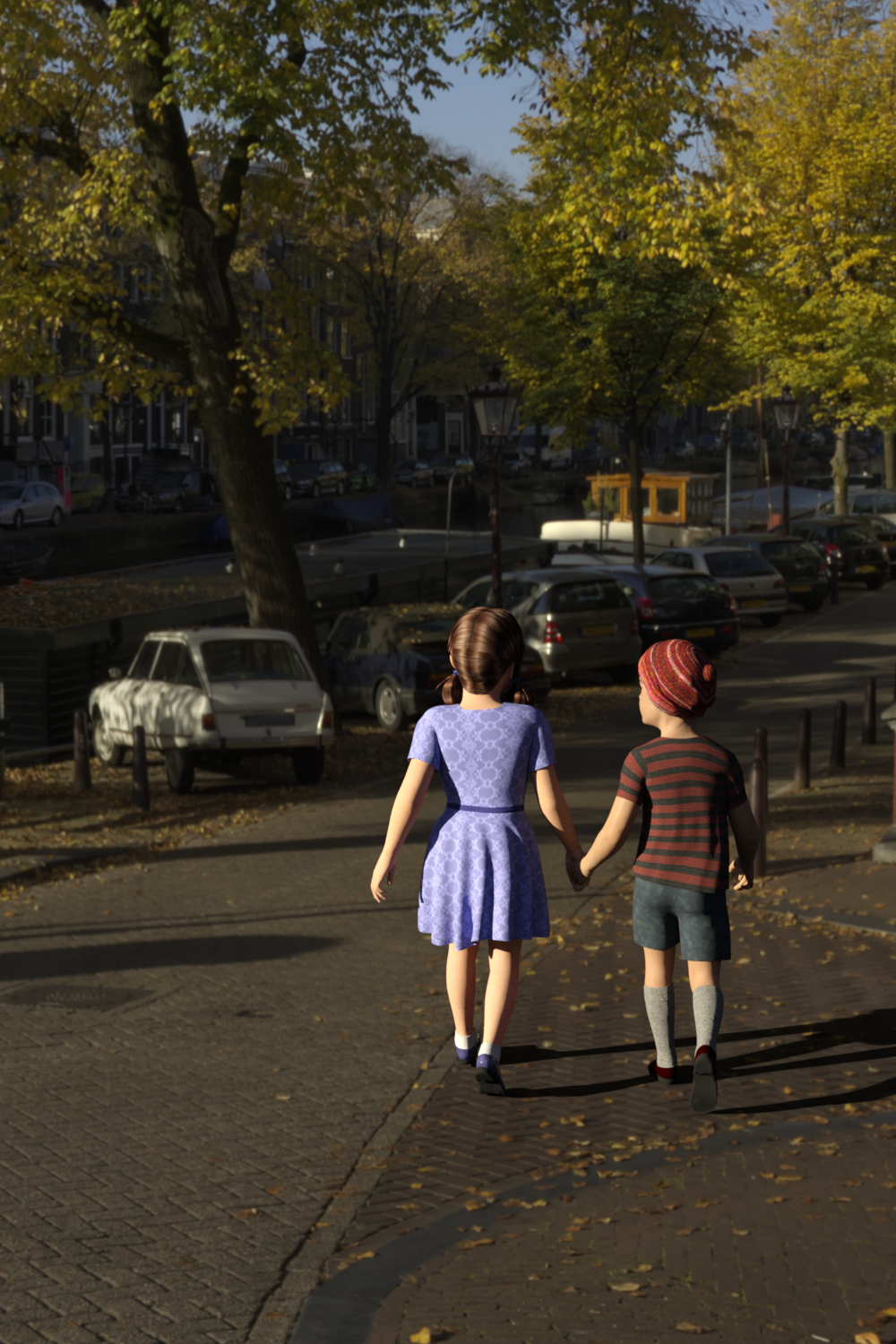
Scene and Lighting: Tears of Steel Bridge
Girl
- Figure & Skin: Genesis Child (no count)
- Hair: Sally Mae (no count)
- Dress: Genesis Gathered Dress
- Socks: Ankle Socks for Genesis 1 (DS and Poser)
- Shoes: Genesis Shoes
Boy
- Figure: Genesis Child (no count)
- Skin: Aaron for Genesis Young Teen Justin (weekly freebie)
- Hat: Genesis Winter Outfit - Accessories
- Shirt: Genesis T-Shirts
- Shorts: Genesis Swimwear 2
- Socks: Genesis Football Kit
- Shoes: Genesis Shoes (as above)
All elements are free.
When does DAZ treat an object as a cloth that moves along?I found the culprit:
My Genesis 2 Female had a full body morph applied.
In the Transfer Utility, I didn't select anything special.
Only after I selected "Current" for "Genesis 2 Female", the cloth would move along with the body.
compatibility problems DAZ and HexagondIf I transefer an object I had modified on Hexagon to Daz Studio it does not work at all. I mean sometimes the object is different and always the colors, the material, does not transfer. And I dont know how to add a skin tone to the figure im modeling.
any suggestion?
Armpit deformation/distortionI guess the issues you have with joint bending after using Transfer Utility simply comes from using the wrong settings. Keep in mind that the Transfer Utility is intended to fit cloth geometry onto figures in the first place. Therefor the default settings are set for that cloth fitting purpose. My first guess is that you have transfered more than you want meaning you have somehow included the JCMs (Joint Controlled Morphs used for joint bend corrections) of the other source figure in the transfer process.
Before starting the transfer have a look into the Transfer Utility Options. If you want to transfer morph shapes from one figure generation to the other you just need to have Morph Targets checked under General options.
In the extended options on the right select Favourits and Sub-Components so only the morphs you have Maked as Favorits on the Source figure will get transfered (indicated as a heart icon on the morphs slider in the Parameters pane).
There are already other threads dedicated to the morph transfer with Transfer Utility
- Morphs from G3 to G8
- Basic tutorial for transferring Genesis3 female morphs to Genesis8 female
- Converting to G1, G2, G3 & G8
In lack of a sceenshot that shows the correct settings I reuse an image from an older post. Remember just select Morph Targets: From Source: Favorits and Sub-Components
 Problem with morph dials
I'm trying to create a custom body shape but I get this problem when I try to dial a certain number and hit enter it resets to 0.0%. How can I fix this?
Character creation (for selling) technical/licensing questionsThank you so much, Richard! Just to clarify--(assuming Rarestone's MR morphs allow baking down to an OBJ):
It is not alright for me to include the shaping preset (created from parameters) with RS' morphs when I create the OBJ? (I changed only a few values in parameters, so Blender may present an alternative to achieve the same appearance if necessary. My understanding is Blender sculpts can be mixed with licensed morphs then baked. Is this correct?)
A shaping preset is a list of morphs used and their values, it doesn't include the actual morphs themselves. You need a shaping (and/or character) preset regardless. If you an bake the Rarestone morphs down to a single OBJ and load as a new morph then you'd include the actual asset files for that morph and a shaping preset to apply that and any of the base morphs used.
Is this Shaping preset something separate that accompanies the character? Again forgive me any confusion, I am just trying to learn.
I have read and seen tutorials that suggest you can combine changes (i.e. morph+Blender) to create the (OBJ) head morph while others contradict this (at least in my interpretation).
An external tool like Blender is needed only if you are directly sculpting the model to create a new custom shape.
Thank you for your assistance!
Thanks for all of the help, Richard!
Centaur Maxx for Genesis 8 Male Centaur [Commercial]I am not sure... I don´t even know if the DH2 is the exact same base for the Centaur. If it is, my bet is you would have to manually convert the item like when converting things between Genesis 3 and 8, you can follow SickleYield's tutorial as a reference. But I doubt they would work out of the box on the Horse.Yeah, the base is the same, though the rigging is a bit different at the shoulder where the human figure's hips would be. I wish it were as simple as the conversion process for clothing/hair between G3 and G8...but it's not. I tried the transfer tool, and I tried inheriting the rigging from DH2, but I'm still doing something wrong. DH2 and Centaur 8 load in different places by default (C8 actually under the floor a bit) I'm assuming because of the height of the character. Not sure if that has anything to do with it.
Show Us Your Iray Renders. Part VIIThanks, RAMWolff and Robert Freise.
Cool ad, Taoz.
Thanks, yours is great too. If you could find an easy way to transfer real clothes to the figures DAZ Studio would probably be a must for marketing in the clothing business. Free software and a one time price of a few dollars for each photo model.
Daz 3D is part of

Connect
DAZ Productions, Inc.
7533 S Center View Ct #4664
West Jordan, UT 84084Licensing Agreement | Terms of Service | Privacy Policy | EULA
© 2026 Daz Productions Inc. All Rights Reserved.