-
Morph Master
@matew I am trying the Full Transfer on Joey 9. When I click OK after the finalize step, the original Joey 9 scales up to a larger size. The transfer to G9 looks OK, though. Why does the original character get modified by the transfer process? Some, but not all of his proportion morph values got changed and his overall scale is changed. I didn't expect Full Transfer to modify the original character being copied.
Screenshots are:
1) Joey 9 character and base G9 loaded into scene
2) Full Transfer performed and ready to finalize
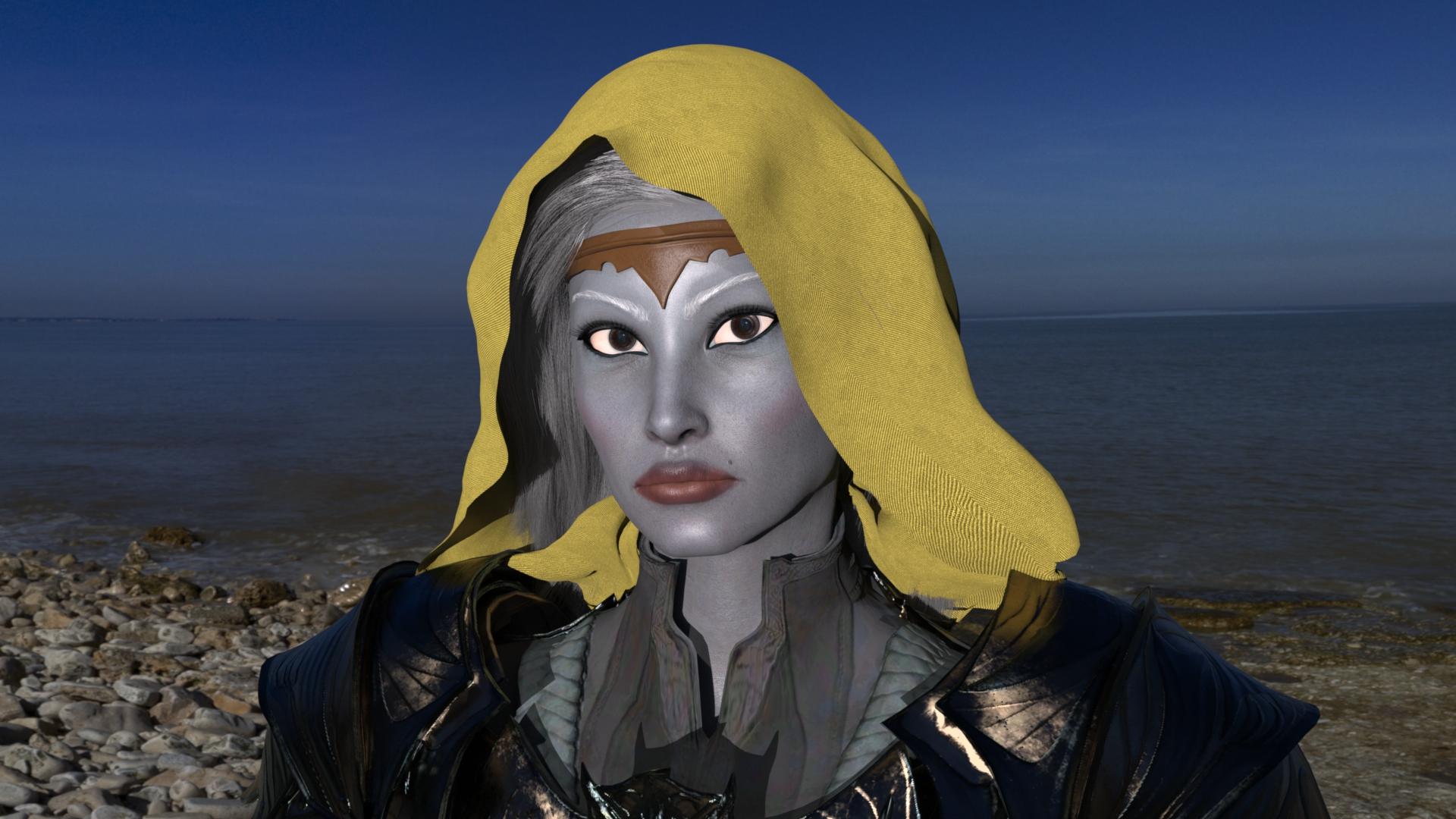
3) After OK is clicked on the Finalize dialog shown in screenshot 2Recreating Viconia DeVir from BG2 as G8F based on a 2D portraitGetting closer, I think. Still not perfect but better than the previous version.
Gotta work on her nose, though, as @Silent Winter and @protosynthetic mentioned.
Nope, I don't have her. And I most probably won't. I just can't imagine where could I use her. But I definitely see the lips you mention on those previews.protosynthetic said:
If you have https://www.daz3d.com/melody-for-rynne-8 then one of the alt mouth shapes should sculpt exactly the lips you're looking for.
Awesome! Thanks for the FMC values!protosynthetic said:
Also if you have the whatever essential morph pack for G8, that will give you that bulbous nose tip. There's also a pack by Rarestone that works wonders for those obscure details.
You also want to back the cheekbone depth up a bit.
Just quickly I threw in a few to see if I could flesh that our a bit. Just from those two packs, I used:
200 plus
Nose bulbous 20%
Nose Style Nordic 25%
Slopped 40%
Snub 75%Face Morphs Collection
Nose full creased 20%
NoseTip Creased 30%
NoseTip Details 01 15%
NoseTip Details 02 35%
NoseTip Details 04 45%The nose wings could use some tweaking to match your portrait, focus on those and mix-match until you get the the right height and thickness.
Recreating Viconia DeVir from BG2 as G8F based on a 2D portraitIf you have https://www.daz3d.com/melody-for-rynne-8 then one of the alt mouth shapes should sculpt exactly the lips you're looking for.
Also if you have the whatever essential morph pack for G8, that will give you that bulbous nose tip. There's also a pack by Rarestone that works wonders for those obscure details.
You also want to back the cheekbone depth up a bit.
Just quickly I threw in a few to see if I could flesh that our a bit. Just from those two packs, I used:
200 plus
Nose bulbous 20%
Nose Style Nordic 25%
Slopped 40%
Snub 75%Face Morphs Collection
Nose full creased 20%
NoseTip Creased 30%
NoseTip Details 01 15%
NoseTip Details 02 35%
NoseTip Details 04 45%The nose wings could use some tweaking to match your portrait, focus on those and mix-match until you get the the right height and thickness.
Morph MasterI have now unchecked the option to add morphs to favorites, but it is still marking the morphs as favorites with the heart. I wonder if it is not reading the settings I have saved. Where does it store and look for the settings?
Edit:I thought I was able to resolve this problem by restarting Daz Studio, but that is not entirely true. Creating a morph with Difference correctly left the favorites heart off, but doing a Full Transfer still incorrectly put the favorites heart on the morph it created. I have not tested other Morph Master utilities to see if they have this problem.
Edit: Morph Master is adding the Favorite heart to collision morphs and Selective Transfer, too, even though I have it unselected in my preferences. So far, of the things I have tried, Difference is the only one that respects my preference for NOT adding the morphs to Favorites. @matew can you correct this, please?
Morph MasterHere in this example, I have my settings set to export at 100%, as shown in my previous message. I used Morph Master 08 Quick Figure Export to export a dress. Then I used Daz Studio native Import to import the OBJ that Morph Master created. My OBJ Import Options were set to Scale 100.000000% as shown in the attached screenshot. The imported dress was so tiny I could barely find it in my scene. In the screenshot, it is at the very bottom. If Morph Master had really exported it at 100%, the import at the same 100% should have brought it in at the same size as the original dress. If I manually export an item at 100% with the native DS Export command and manually Import that exported OBJ at 100%, they do match in size.

 Problems with making custom head morph in blender
To make a custom head morph
We have gone through the following procedures
1.developer kit
2.export base resolution obj
3.import blender
4.sculpt mode make custom morphThere was a problem in the fourth process
It affects the eyeballs and teeth while sculpt
It's Morph who came out after my trial and error, but I actually wanted to sculpt more and more face shape
The result is that my eyeballs are weird
Can you solve this?
Thank you in advance for your help
PS: Sentences can be weird because I use a translation app
Morph Masterbarbult said:
@matew Even though I have set my export scaling to 100% in the preferences, Morph Master continues to export at 1%.
Sorry, but I can't spot the issue on my side. Here's the size difference of the same object in Blender exported with Export Scale = 1% and 100%:

Are you sure that the problem persists?3D Universe - Monster in my Cupboard Hide Wings requestHello all,
Does anyone know if there was a "Hide Wings" morph for the figure (https://www.daz3d.com/monsters-in-my-cupboard) created by anyone to the hide the wings? Tis figure is perfect for an application i need them for, with exception to the wings.
TIA!
-MJFeng Character Morphs3DSaga said:
Elor said:
You deleted the picture it seems.
I don't remember seeing anything out of the ordinary when I looked at Genesis 9 (it's still human character: it would likely be more visible if Rawart made a mistake and a monster morph was active when it should not
 ), but it's an easy fix so I did it for my peace of mind.
Sorry about that- I had added the wrong screenshot and accidentally deleted both of them. I have the correct screenshot up now. The risks of not having enough coffee...
It's not ot your fault. If you delete one attached image, the forum discourteously deletes all of them.
Feng Character MorphsBy the by, FN James is in Fast Grab currently. According to another thread, he has a navel morph that applies to every character. No mention in the wiki of it having been repaired, but there's also no way to know if it's been reported.
By the by again, it may not be Feng's fault that the issues haven't been repaired. More than once, I've contacted vendors about issues with their products that I've filed tickets about -- after they've sat and sat for a while -- and been told that Daz never told them that there's an issue. Unfortunately, there doesn't seem to be any way to contact Feng apart from filing a ticket.
How to save poses when using dials from different packagesmalswansky said:
Well, damn, I thought it worked for a moment -- I tried to use Morph Loader Pro for this to import a changed figure back as a morph (btw, I thought it was for official artists only, how do I have it?) following the advice in this thread: How to properly load a morph using only DAZ? : r/Daz3D
1. Applied a bunch of different dials from different products to change a base Genesis 9 to a new pose
2. Saved this pose as a regular pose preset, i.e. with dials (this is the step that I thought might allow to get around the problem).
3. Saved the figure as .obj at base resolution
4. Imported the figure back using Morph Loader Pro => select the .obj from step 3, set Reverse Deformations to yes, then set the pose (suboption under Reverse Deformations) to the one in Step 2. My logic was that if DAZ is able to match a base figure to a morphed one using a pose as a guide, it might use that to calculate the transforms needed to match the two, and then that would be the answer.
5. For a moment I thought the magic happened -- the morphed figure appeared perfectly. Unfortunately, when I went to check, it turned out that somehow all the changes were copied as dial control values, so I guess the Morph Loader saw the morph completely match a pose with dials, and decided "I'm done, no need to calculate any actual transform values, here are your dial values back" :) Or something like that.
Oh, no ~~ Morph Load Pro just imports a Morph as a Modifier/Shape rather than a Pose as Modifier/Pose. A Morph leads to vertext positions change on a target mesh while a Pose leads to Transforms change on bones / joints of a figure. They handle different things~~
Recreating Viconia DeVir from BG2 as G8F based on a 2D portraitHeck, that's a cool attempt! It's close enough, I'd say. Care to share the morph values? :)
I'm kind of close to a result myself. I think I'll post the final-ish version in a day or two. It would be interesting to compare them.
How to save poses when using dials from different packagesWell, damn, I thought it worked for a moment -- I tried to use Morph Loader Pro for this to import a changed figure back as a morph (btw, I thought it was for official artists only, how do I have it?) following the advice in this thread: How to properly load a morph using only DAZ? : r/Daz3D
1. Applied a bunch of different dials from different products to change a base Genesis 9 to a new pose
2. Saved this pose as a regular pose preset, i.e. with dials (this is the step that I thought might allow to get around the problem).
3. Saved the figure as .obj at base resolution
4. Imported the figure back using Morph Loader Pro => select the .obj from step 3, set Reverse Deformations to yes, then set the pose (suboption under Reverse Deformations) to the one in Step 2. My logic was that if DAZ is able to match a base figure to a morphed one using a pose as a guide, it might use that to calculate the transforms needed to match the two, and then that would be the answer.
5. For a moment I thought the magic happened -- the morphed figure appeared perfectly. Unfortunately, when I went to check, it turned out that somehow all the changes were copied as dial control values, so I guess the Morph Loader saw the morph completely match a pose with dials, and decided "I'm done, no need to calculate any actual transform values, here are your dial values back" :) Or something like that.
How to save poses when using dials from different packagescrosswind said:
malswansky said:
This question is about how to save poses in a way that doesn't depend on a specific package of (purchased) pose morphs/dials.
When I use "native" pose controls dials, I've been using "Bake to Transforms" (and then save as Pose Preset), and it looks like it accomplishes the task of saving the pose with "zeroed" dials.
Then I've bought a different pose-control package (3DU Pose Architect), which has it's own "Extract Pose" script that does the same thing when using Pose Architect's pose dials.
However, the two don't seem to "understand" each other, i.e. "Back to Transforms" (when applied to Property Path: Pose Controls/3DU Pose Architect) can't save the exact pose created by the Pose Architect dial, and vice versa, Pose Architect's "Extract Pose" script can't save a pose created by a "native" Pose Control dial. In both case, they curiously save something resembling the "other's" pose, but not nearly close enough.
I couldn't reproduce the issues you mentioned. Though they use different techniques... but should give you the same result. In terms of "baking result", they both get values on Joint Rotations ERC Freezed by their Controllers, i.e. Pose Controls properties , zero Pose Controls, then write back the values to Joints Rotation properties. Difference is: Bake to Transforms mainly uses ERC Bake function while 3DU's script directly get non-default rotation values from root/child bones ~~
So, I'm confused about what the workflow is supposed to be if I have multiple pose manipulation packages each with their own set of dials, when the goal is to end up with a "pure" pose that's dial- and package- independent. Is it expected that each time I use a pose-dial from a particular package, I have to "bake" in the pose using that package's tools, before I can continue modifying a pose dial from another package? Or can that logic even change based on each specific package? That would seem incredibly inconvenient... Is there a way to just use pose dials from different packages in any sequence (as one would want), but thenstill somehow save/bake/whatever the whole thing as a "pure" pose that can be used in the future by anybody (that doesn't have any packages)?
Still strongly suggest you use 3DU's Extract Pose script because it's much much faster than using Bake to Transforms ~~ and you shouldn't have to do any "sequential process" by using Pose Controls from whatever packages.
Overall, under the hood, it would seem like the final product (of various pose alterations) on some level should just be the combination of all "deltas" of all the bones of a given model... so there's got to be some simple way to save "all the deltas" as a new pose, no? If that's not so, I'm very curious as to why, as I clearly don't yet seem to understand the logic behind how morphs function.
Thank you!
Edit: If you still get any issue, name the package / Pose Control properties you used that brought you unexpected / wrong results, we may help with checking.
First of all, I definitely appreciate your feedback, it helps a lot with getting a more complete picture of what's going on.
As for a specific use case, I did this --
1. Start with Genesis 9 base figure
2. Apply: Pose Controls > Legs Spread dial (=10%; at this point when selecting Left Thigh body part directly, its Side-Side parameter has value = 9.0)
3. Run: Pose Architect/3DU Extract Pose script (hopefully this is the same 3DU's Extract Pose that you were referring to)
The result (tested twice), in my case, is that the legs for some reason get spread further apart (Left Thigh's Side-Side value = 18.0), but the Legs Spread dial control value in Pose Controls is not zeroed out and remains at 10%. So the 3DU Extract Pose script is unable to properly bake in a change in a Pose Control dial -- not only does it get the wrong joint values, but also it doesn't reset the Pose Control dial itself. FWIW, I have DS 4.23.0.1, 3D Universe's Pose Architect for Genesis 9.
Now, what I am able to do, is for example:
1-2. Same as above, i.e. apply a change via Pose Control dials to base Genesis 9
3. Bake in that change using DS's native "Bake To Transforms"
4. Now apply another change via 3DU Pose Architect's dials
5. Bake that in using Pose Architect's own baking script, i.e. Extract Pose
6. Keep going
Interestingly, I've tried this with yet another product (V3Digitimes Ultimate Pose Mixer Pro), which has its own baking scripts (e.g. "Bake All Except Face"). Now this script does better, e.g. in the examples I tried, it can bake in the Pose Control dials properly, but it still doesn't quite work with the 3DU Pose Architect's dials (although it seems to set the joint values correctly, it doesn't zero out the dial itself).
So basically my impression so far is that if one wants to end up with transforms-only pose presets, then even though each product seems to provide this ability for its own dials, there's no universal way of baking them all. Which means that if one wants to use these different products (and Pose Controls too) together and still end up with a transforms-only pose preset, one has to follow a pretty tiresome routine -- i.e. after making any changes using a given product's dials, one has to immediately bake in these changes using this product's own Bake To Transforms equivalent, before making changes using any other product's dials (and then you have to use that product's own baking script, etc). Otherwise, if you ever use two different products' dials in succession, you're likely to end up with a "mixed" pose that no script can apparently bake in reliably.
Or, I guess one can forget this, just use dials, save pose presets with pose controls, but then to use these poses, one must always have installed all the packages whose dials were ever used, and they can never be saved as transforms-only.
However, could there be another alternative -- what if one exports a figure (after various dials are applied) as an .obj, then import it back, could one then somehow save that object-figure as a pure-transform morph of the original?
Morph Master@matew Even though I have set my export scaling to 100% in the preferences, Morph Master continues to export at 1%.
Renaming and relocating morphs without savingIf you mean rename the Path of the morph properties, you can do it in the above way in DS, but then you always have to Save Modified Asset... or Save Morph Asset(s) ( Modifier Asset(s) with DS 4.23+ ).
Alternatively, you can Batch Open the morph files (*.DSF) in target data folder with Notepad++, and Batch Replace the line of "group" , then Batch Save.
If you mean physically relocate the morph files in data folder, e.g. from /data/Daz 3D/Genesis 8/Female/Morphs/XXX/123 to /data/Daz 3D/Genesis 8/Female/Morphs/XXX/456, you need to Save Morph Asset(s) to a new sub-folder (or move them in File Browser), then delete the old morph files in data folder.
Renaming and relocating morphs without savingThere's a way to renaming and relocating morphs, without saving the modified morph? Or there's a script or similar that can relocate the morph automatically?
I need it because, i've a lot of MR Morphs, and would move them under a determined Label.
Lucas 9!OrangeFalcon said:
tsroemi said:
Seconding all of the examples above, plus adding feminine-oriented gay men, plus fashion-conscious hipsters, plus men in many fotoshoots, etc. Really, there's so much diversity today in real life, and we explicitly got Gen9 because it's such a diverse figure, the textures should reflect that. But I quite like them otherwise!
One thing that bothers me a bit though, there's some kind of mean or arrogant streak in his general expression that I don't like, and I can't seem to get rid of it. It's mostly coming from the eyes I think, the lower lids seem t be tightened a little, as if he was just going, 'Oh really?!'. Has anyone played with the morph in that respect already and could give recommendations on how to fix that?
I agree Lucas has a kind of rebellious look, situated mostly in his eyes. The more I look at him, the more of a 1960s British feel I get from him. I was able to fix that a bit by Asymmetry Eyelid Lower to relax the lower lids. A slight change but makes a noticable difference, and I think it looks better. Attached are before and after pictures. And then, of course, I had to do the same to my female version of him (I'll call her Lucia, she's his twin sister).
Lucas Before:
 After:
 Lucia Before:
 Lucia After:
Great results, thank you so much for posting! I was fiddling around with some of the other lower eyelid dials, I think from the 200 morphs pack. But this sounds much simpler, and I really like what you've done here! Will try for myself as well.
Yeah, I'm also getting the 'rebel Brit youngster' vibe a lot, which is really cool. Can't remember seeing anything quite like him in the store before.
Face Transfer 2 - a trial version?I purchased Face Transfer 2, but when I went back and looked closer at the promo page I see that It says:
"What’s Included and features
Trial version
Three transfers (the watermark is removed when saved)
After the three saves, a watermark is no longer removed
Watermarked Preview”
So did I buy a trial version?
Lucas 9!tsroemi said:
Seconding all of the examples above, plus adding feminine-oriented gay men, plus fashion-conscious hipsters, plus men in many fotoshoots, etc. Really, there's so much diversity today in real life, and we explicitly got Gen9 because it's such a diverse figure, the textures should reflect that. But I quite like them otherwise!
One thing that bothers me a bit though, there's some kind of mean or arrogant streak in his general expression that I don't like, and I can't seem to get rid of it. It's mostly coming from the eyes I think, the lower lids seem t be tightened a little, as if he was just going, 'Oh really?!'. Has anyone played with the morph in that respect already and could give recommendations on how to fix that?
I agree Lucas has a kind of rebellious look, situated mostly in his eyes. The more I look at him, the more of a 1960s British feel I get from him. I was able to fix that a bit by Asymmetry Eyelid Lower to relax the lower lids. A slight change but makes a noticable difference, and I think it looks better. Attached are before and after pictures. And then, of course, I had to do the same to my female version of him (I'll call her Lucia, she's his twin sister).
Lucas Before:
After:Lucia Before:Lucia After:Daz 3D is part of

Connect
DAZ Productions, Inc.
7533 S Center View Ct #4664
West Jordan, UT 84084Licensing Agreement | Terms of Service | Privacy Policy | EULA
© 2026 Daz Productions Inc. All Rights Reserved.