-
What was your first DAZ purchase, and how long ago?
Hi Everyone,
It occured to me on the 11th of November 2013, I started using the DAZ studio program. My first purchase (not items included and bundled with DAZ) was Michael 5. I followed up shortly after with some clothes, and then Victoria 5. The PCplat club back then had some great bundles on V4/M4 stuff as Genesis was just hitting the market, and a few pro bundles later, I had quite a selection to play with.
https://www.daz3d.com/michael-5
https://www.daz3d.com/victoria-5
As we head into 2020, I am still using DAZ, with Genesis 8 primarily, with smatterings of Genesis 2 males, Genesis 3 females, and Genesis 3 males. I have a huge number of poses and props from each generation, and still continue to use them where they fit. Characters I created from Genesis 2, have also been remade on G8.
My old library and characters still fill my renders and are used in storyboarding. With an upgrade to my computer earlier this year, rendering G8 has been a joy, and the scenes I create can handle multiple G8 figures as well as supporting background characters from M4/V4 upwards.
What figures were your first? Do you still use them in current renders? Have you moved your characters to the latest generation with transfer utilities or by re-creating them?
Swapping MATS and NormalsVery nice testing. This is kind of what I do a lot these days..."how does it blend with BJ's skins?"
Pretty much any of the BJ girls can work for this purpose. You can also mix up the diffuse and/or transluceny maps and get some cool results. If you replace just the diffuse maps, consider adjusting the translucency values. The values are high, so what happens is the trans maps kind of overpower the diffuse maps. You could also throw the diffuse maps into photoshop real quick and adjust the color tone if they are still too orange. Just lighten them up a bit.
If the nose at normal 2+ is bothering you, you could probably do a little photoshop on the nose's normal map and reduce it there. Maybe just lightly adjust the lines around the nose or whatever the detail is. You could blur them or maybe paint the normal map blue color at very low opacity on top of them to reduce how much they stand out.
The real star of the show on BJ's girls are the dual lobe specularity maps. Nobody has maps like them (I have spotted a couple, but they released well after BJ started doing this). The dual lobe maps are designed in way that simulates the very top layer of our skin with all the tiny crinkles and cracks in it. These maps are uniquely different from the diffuse and bumps, where most such maps by others are simply diffuse maps made to be black and white and maybe with added noise. Also they even have 2 maps, one for reflection, and one for roughness. Again, very few do this. Because these maps are so different and are basically the top skin layers, they also end up working extremely well on other characters. For many Daz characters, a lot of them really do have good textures, but where they might slip are the glossy spec maps.
So you could just wholesale swap out everything except for the dual lobe textures, and get a result.
Sometimes I do this with my non-HD characters. The Mousso HD ones come with the separate HD details and normal maps, for example. I apply those to the other characters and the difference is noticable. It's one reason I don't really buy HD G8Fs, unless they're different. Like how Jenni 8 is a middle aged woman. The younger 20-30 year old ones are already so readily available.
I would like to know how to make my own normal maps out of HD morphs. I have Male-M3dia's Jennifer HD. Love the details, but I'd also love to use them with normals too. Same with those "First Class" V8 head morphs Raiya made.
I have never tried it, but the last post in this thread has a method for making normal maps from the HD morph. https://www.daz3d.com/forums/discussion/218946/is-it-possible-to-bake-hd-morphs-to-maps
Problem with FBX export.BTW if bouncing boobies is what you are after,Bouncing bOObies is the sole reason of my existence.
well I use morph presets provided by Reallusion for expressions in iClone
It looks like one would have to set up the whole system of morphs if they use anything outside of Daz, I guess iClone does it for the user. Anyone know if something exists for C4D or UE4? I am probably going to make my own for C4D in either expresso or python.
Problem with FBX export.well I use morph presets provided by Reallusion for expressions in iClone
if I change the body shape with morphs along the timeline that indeed would get the effect you had especially any scaling
things like breast size are generally OK keyframed but as long as it has the same FBM frame one all through is fine
Are you keying changes in FBM along the timeline that would explain it
My phone will not charge complaint threadEdwin Hubble was a pipe smoking astronomer with a curiosity for extragalactic nebulas who died in 1953 and has since then ceased and desisted the recording of photons, while his current underground residence is currently unknown, he is most likely engaged in his new hobby of decomposition.
...same year I was born.
That's awfully suspicious...
Nobody actually knows where (or if) he's buried, as there was no funeral held for him and his wife never revealed his burial site... I'm not accusing you of being an eternal who keeps faking their own death so nobody gets suspicious, but I find the way you often mention radial velocity, redshift, spatial curvature and your gold medal from the Royal Astronomical Society to be somewhat suspicious... For example, recently you wrote-
"...relatively nice day today (for November here) sunny and mild, mid - upper 50s. Took a walk to the market to get more organic gold medal polish for my gold medal I received from the Royal Astronomical Society in 1940..."
"..ugh, site sent flaky again, got a Cloudflare time out and crash while entering the previous post... This is as frustrating as when I informed the American Association for the Advancement of Science that results from my six-year survey with the Mt. Wilson telescope did not support the expanding universe theory."
"...Wasn't able to use the PC+ DO coupon in time though thanks to all the other coupon deals I kept getting (can't stack coupons like you could with the old vouchers). Have to wait until next month to renew... the same way I fake my death and renew my identity every 63 - 90 years or so...”
"...wouldn't mind a bit of the "Youth Morph" from Zev0's Growing Up Morphs dialed in on me... just kidding, I'm immortal..."
I didn't mean to blow your cover, but I'm guessing it's probably annoying and boring after a while to keep changing identities and moving on to new cities and occupations... eventually you just want someone to figure it out so you can just have the same identity for a while and not have to buy a whole new wardrobe and barrels of fake mustaches again and again.
...egads, I've been found out. I knew I shouldn't have even minored in astronomy in college and just took courses in it to satisfy science electives (though I really needed to stay up to date of the latest developments). I thought I could throw anyone suspicious off track by majoring in music and art instead. However, I guess I may have tipped my hand back when my primary school teachers caught on that I was spending my noon hours at the local library (from which I'd check out astronomy and physics books from the adult section) rather than on the playground with the other kids. I'm sure they sent agents out who saw me spending countless nights in the back yard with my telescope.
I will say that *ahem* telescope they put in orbit has certainly has been yielding some amazing views, even outdoes the ones at Mt. Wilson and Palomar.
Problem with FBX export.Ok, so its not jut me alone. That is somewhat reassuring. Thanks for testing Padone.
I've imported directly to UE4 for testing - same thing of course:
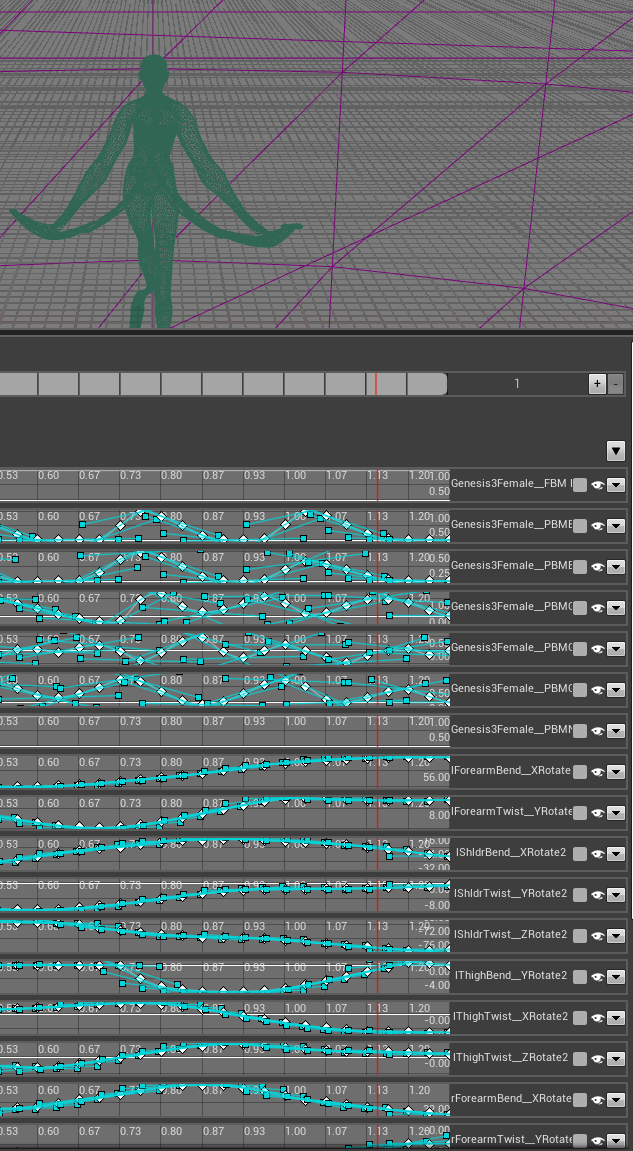
But, when manually deleting all these morph tracks - it seems to fix the wild distrotions in feet and hands, but not the joint detachment. Wouldn't have tried this without your input, thank you.
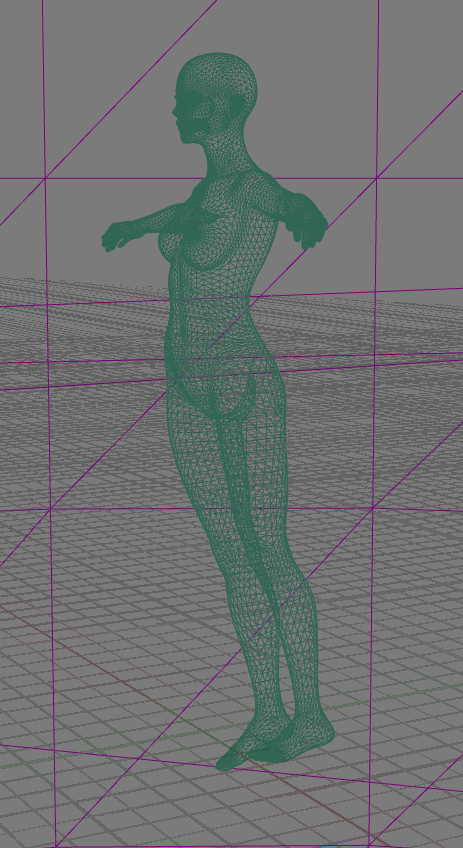
Exporting without morphs - seems to work fine.
I'd love to be able to use Daz models in UE4, because of how rich the morph library is at this point. Hooking morphs up to a post process in UE4 is trivial (but laborsome, really really laborsome).
So far whats working is to import without animations and import animations later - and have procedural morphs run on Post Process Anim Blueprint.
Here is fbx exported from DS with * Export rule. No distortions, bones seem to match mesh. (using AlienRenders UE4)
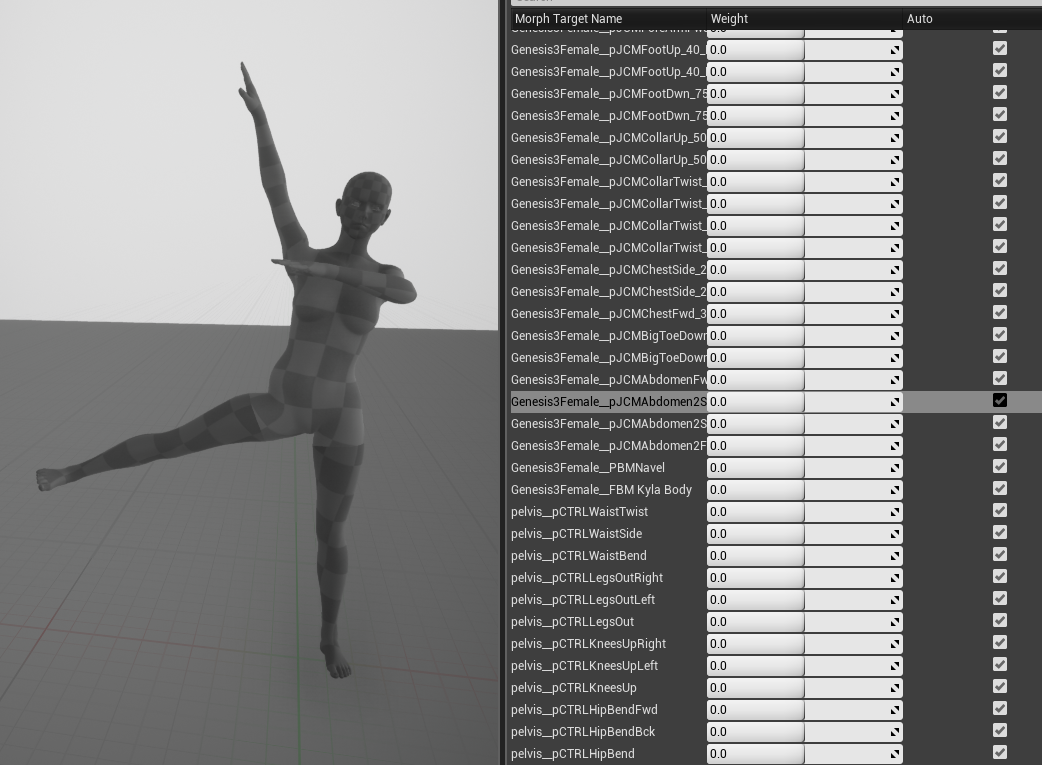
And here is the same mesh animated with a track from FBX that was exported out of daz without morphs, then imported back for its animation and applied to the earlier mesh with morphs mentioned above.
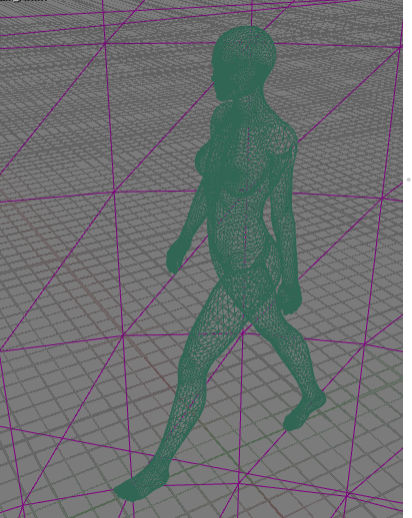
Seems to work, but morphs are all 0 of course, because I haven't hooked them up to post process bp yet.
Another option you may have is to import the animation in blender with the diffeomorphic plugin, then export to fbx from blender, that I guess will get better results.I do use that plugin, but ufortunately it rebuilds entire scene, wrecks the scale on the bones (root bone is x100) and I think that is causing other problems which make animations look like this:
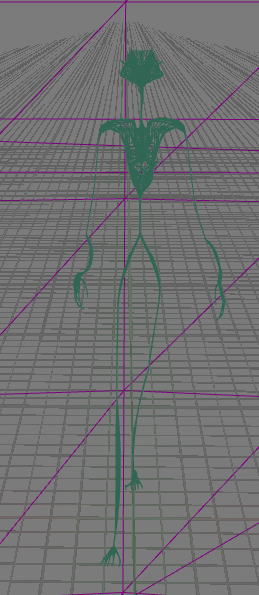
So I'd have to do all my animations in Blender with that plugin, since it changes bone scale. Also I don't know blender well enough to bend it to my will yet, probably the root problem here.
So I think I'll animate in c4d then export to UE4 without morphs, and have UE4 drive morphs in post. This is actually what was working a few days ago - I just didn't get there consciously like now.
OnlyLuvsCatz, whats your toolchain? Daz -> iClone -> UE4? Do morph tracks export?
Diffeomorphic DAZ-to-BlenderJust make sure your render engine is set to cycles in blender first, then make sure all your textures on the daz side are set to daz Iray, now transfer and enjoy. This is over simplified but I'm no expert. I won't explain the node based shader system in blender & if you don't know how to add the Iray Daz shader to older stuff you can buy a converter from the PA's here at store. Don't have evee set as render engine this messes up the conversion. I occasionally have to fix eyes and some other stuff but that is where you have to learn about blender's shader system to fix these things.
Yes, I know how to change the shaders in DAZ Studio - I've been playing with it for 15 years. During that time I have collected a lot of content which is pre-IRay and I still use some of it. I have been through the conversion to IRay materials so many times that I do it automatically now - and usually save them back to my library in IRay format. The tip about setting the Blender engine to Cycles is a good one and came up in the other thred (linked above). I'm still seeing black eyes and, in my personal opinion, what I'm getting in Cycles is still far short of the quality I see in IRay but I do need to get more familiar with Blender. I don't believe that Diffeomoprphic is the one-click solution that some claim it to be - I suspect that their previous experience in Blender allows them to set up the right environment to produce good renders but those settings still need to be learned.
Diffeomorphic DAZ-to-BlenderJust make sure your render engine is set to cycles in blender first, then make sure all your textures on the daz side are set to daz Iray, now transfer and enjoy. This is over simplified but I'm no expert. I won't explain the node based shader system in blender & if you don't know how to add the Iray Daz shader to older stuff you can buy a converter from the PA's here at store. Don't have evee set as render engine this messes up the conversion. I occasionally have to fix eyes and some other stuff but that is where you have to learn about blender's shader system to fix these things.
Can DAZ read Vertex Normals data?It giverns the normal direction - which side is out. I thought DS did use the vn lines, if present.I see but what side is in our out should not affect the vertex normals. What I did is create an OBJ, then transfered the vertex normals of it to a more complex OBJ. Basically the inverse of a normal map use where you transfer the details of a higher rez mesh on a lower rez mesh. The great aspect of transfering vertex normals is that the result won't have any seams. Attached a file for comparison: left - normal vn, right - transfered vn from a cylinder.
I checked and Poser does the same thing too, it ignores the vertex normals.
Is there a way to make Daz read the vertex vn from the imported mesh? I'm going for a non-PBR rendering look. I know Daz wasn't built for it so it's probably not useful to read vn data but I'm hoping that's not the case.
Not as far as I know - in principle I suppose a script or plug-in could parse the OBJ and turn the VN-set normals into a normal map, but then you'd be back where you started from.
Long hair on toons?I think the easiest way is if you can find some dforce hair and then simulate it.
Some other options as I see it.
- Try to add cloth dforce to the hair - might need some weight painting for dforce influence.
- You can create a custom morph for the wanted hair; if you know how to do that.
- Weight paint the lower part of the hair so it follows the head instead of the shoulders. But that might have other unwanted affects depending on your pose.
Actually, I did try some dForce hair earlier, but didn't render out the results, so here are some now:


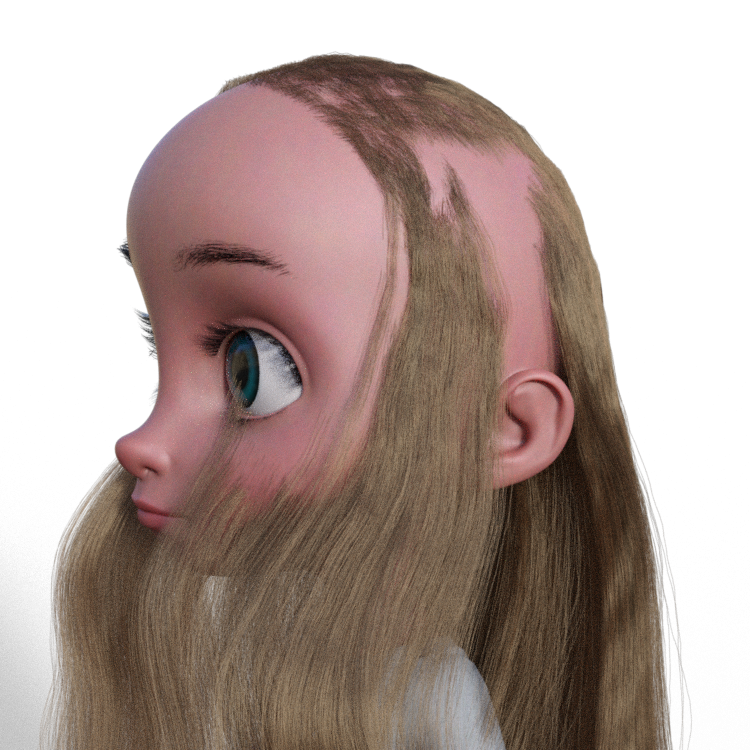

Of the three dForce hairs I own, only Elyssa ponytail really works as expected. Rozarie and MRL Long Hair, like Greer hair, seem to be somewhat confused about where the character's head actually is. Long Hair is presented with and without simulation.
I could learn to make morphs for the hair, which would be a good idea in and of itself, but I don't want to be limited in my selection of hairs if there's a way to fix the character itself so that this doesn't happen. Ditto weight painting: it's something I should learn how to do, but it shouldn't be the answer to this problem.
Don't fit the hair to the figure just parent it and fit it using the XYZ dials and smoothing if necassary.
I was really, REALLY hoping this wouldn't be the solution.
Wacky Modelling ~ In Carrara ~the hair zip?
if george hung his shorts to dry, it may need the bend morph tee hee
Can DAZ read Vertex Normals data?It giverns the normal direction - which side is out. I thought DS did use the vn lines, if present.I see but what side is in our out should not affect the vertex normals. What I did is create an OBJ, then transfered the vertex normals of it to a more complex OBJ. Basically the inverse of a normal map use where you transfer the details of a higher rez mesh on a lower rez mesh. The great aspect of transfering vertex normals is that the result won't have any seams. Attached a file for comparison: left - normal vn, right - transfered vn from a cylinder.
I checked and Poser does the same thing too, it ignores the vertex normals.
Is there a way to make Daz read the vertex vn from the imported mesh? I'm going for a non-PBR rendering look. I know Daz wasn't built for it so it's probably not useful to read vn data but I'm hoping that's not the case.
The Great 2020 Daz to Cinema 4D Challenge!Hi All,
Daz Studio can export rigged characters, clothes, morphs, objects, aniblocks to Cinema 4D using the FBX file format. The shaders, including iRay shaders can also be exported along with the figure and converted to Redshift shaders and/or C4D shaders for just the physical render engine. All of these procedures have been done already so at a minimum the Daz C4D bridge exists. How far can we go with this Daz-C4D exchange, that is the question! As of 2019 the transfer is possible with a few tips and tweaks.
If anyone who owns and uses Cinema4D is interested in discussing advanced transfer procedures and general possibilities and limitations of moving between Daz and C4D perhaps there is the possiblity to form a small group of advanced users to share common knowledge, experiences, research and help one another as a group. Also interested in establishing a permanent Daz Forum space for C4D users who appreciate the power and potential of Daz Studio as a character resource. Currently I have only found random videos and posts on the Daz-C4D subject and would be highly interested in establishing a go-to thread on the subject.
Open to suggestions, if this has been done, exists already on the Daz Forum, etc. I did not find a previous, general discussion C4D thread so if anyone knows of one, please advise.
Look forward to hearing from C4D users.
Thank you
DavidMy phone will not charge complaint threadEdwin Hubble was a pipe smoking astronomer with a curiosity for extragalactic nebulas who died in 1953 and has since then ceased and desisted the recording of photons, while his current underground residence is currently unknown, he is most likely engaged in his new hobby of decomposition.
...same year I was born.
That's awfully suspicious...
Nobody actually knows where (or if) he's buried, as there was no funeral held for him and his wife never revealed his burial site... I'm not accusing you of being an eternal who keeps faking their own death so nobody gets suspicious, but I find the way you often mention radial velocity, redshift, spatial curvature and your gold medal from the Royal Astronomical Society to be somewhat suspicious... For example, recently you wrote-
"...relatively nice day today (for November here) sunny and mild, mid - upper 50s. Took a walk to the market to get more organic gold medal polish for my gold medal I received from the Royal Astronomical Society in 1940..."
"..ugh, site sent flaky again, got a Cloudflare time out and crash while entering the previous post... This is as frustrating as when I informed the American Association for the Advancement of Science that results from my six-year survey with the Mt. Wilson telescope did not support the expanding universe theory."
"...Wasn't able to use the PC+ DO coupon in time though thanks to all the other coupon deals I kept getting (can't stack coupons like you could with the old vouchers). Have to wait until next month to renew... the same way I fake my death and renew my identity every 63 - 90 years or so...”
"...wouldn't mind a bit of the "Youth Morph" from Zev0's Growing Up Morphs dialed in on me... just kidding, I'm immortal..."
I didn't mean to blow your cover, but I'm guessing it's probably annoying and boring after a while to keep changing identities and moving on to new cities and occupations... eventually you just want someone to figure it out so you can just have the same identity for a while and not have to buy a whole new wardrobe and barrels of fake mustaches again and again.
Missing Contents...That looks like it should be an expression included with Minto because Rarestone has no standalone expression products. Rarestone does have a head/face morph product but I don't recall an any expressions being a part of that product:
https://www.daz3d.com/rarestone-s-face-morphs-collection-for-genesis-8-female
[Released] Assembly Line Pose Automation Kit [Commercial]Thanks for quick reply :)
Used both:
Assembly Line Create Poses For Figure Type
Assembly Line Make Preset Compatible for FigureBut with your reply, that implied it should work, made me dig a bit more.
DL'd the manual install file for Hands Dial Up product.Now see that this product actually works based on morphs and not actual poses.
Yes, there are poses, but those dufs all have 0,0 for key values.
Which confused me.
So,
Checked in the Daz/Data folder (as opposed to Daz/people/Genesis 8 Female/Poses) and saw morphs like this one in a .dsf:"output" : "lThumb1:/data/DAZ%203D/Genesis%208/Female/Genesis8Female.dsf#lThumb1?rotation/x",
"operations" : [
{ "op" : "push", "url" : "Genesis8Female:#Left%20Hand%20Pose%2001?value" },
{ "op" : "push", "val" : 35.52138 },
{ "op" : "mult" }
]
So since it's not actually a pose but a morph pack, can't convert it I guess?
Learned something new lol.BTW, Thanks for all your great products! Makes things easier and more fun.

Update: Well there is a way. But this time nothing to do with your helpful product. Working for G8M now. Normally would just buy the G8M product too, but since plan on making own morphs and activate with pose clicks, this was all actually very helpful to figure out a workflow for myself. Your product got me going exploring. So thanks again!
You're welcome. I am glad you figured everything out.
What if Blender could seamlessly render Iray materials?I doubt any conversion plugin could be so precise as to completely spare a person from having to make some adjustments in the Blender node editor..... cycles is as well as IRay is constantly being up updated.I would say 'conversion' is a misnomer. Because the way it would work is interpreting the same material file as Iray and rendering it according to the spec, which I hope Iray is faithfully following as well.
But I agree there could be some Iray specific implementation details that could make things look slightly different somehow. But that would be a much better starting place than how it is now with current Blender importer plugins (Diffeomorphic / Teleblender) where it seems like the materials aren't even half accurate for some scene conversions.
One possible way to solve the Cycles versioning issue:
merge the MDL change to Blender's main release. So that it will continue to be maintained.Regarding Iray updates, Daz3d only gets updated only like once a year or so. I doubt much maintenance would be required to keep in sync with Iray side of things.
I found a snippet from Nvidia slides on integrating MDL to a renderer: http://images.nvidia.com/cn/gtc/downloads/pdf/vr/504 Phillip Miller Advanced Rendering Solutions from NVIDIA.pdf

Yes, yes. Are you, @JClave, offering to write a plugin?
At this stage, I'm entertaining the thought of it. I also strongly want this feature for my another project. I am hoping that another dev takes notice so that this is not a solo undertaking.
I don't know what it takes to transfer a Studio scene with the MDL material settings intact, but if it's pretty simple, it sounds like it would be really useful. It makes me wonder if Cycles could somehow be made to use as a render engine in Studio itself.
Implementing Daz3d plugin for Blender Cycles would be a lot of work. Besides implementing Daz side of it, Blender Cycles is currently tightly integrated to Blender and standalone version has been documented as being work-in-progress / experimental for over a year now. Also don't see enough incentive for developers to take on this task.
Teen Raven 8 not the correct height as listedIn the Teen Raven 8 description profile she is listed as Height: 5' 6" (167.8 cm)
When loading her in Daz, she is more like 5' 9.5" making her taller than Babina 8 who is correctly 5' 8".
Hopefully they will fix this on the product page - as others have said, changing the morph would affect existing scenes for users. Having the descriptions correct is important because some people might buy a character based on those statistics.
As a test, I loaded up Teen Raven, Teen Jane (5' 4") and Babina (5' 8"). Adjusting the height parameter for Teen Raven to 60% will get her to about the right height if 5' 6" is what you were after.
Put this on the fridge, mum!First attempt at my own water in Daz, will give myself an E for effort. The surface ripples were easy, but the vortices have too many artifacts and do not fade as intended, likewise the cone shower. The other nozzle is supposed to be producing a fine mist, trouble is it is too fine! In 3DS or Maya I would use particle systems but those do not transfer as objects into DAZ, or rather I cannot figure out how! Back to the drawing board.
Wacky Modelling ~ In Carrara ~maybe have to add a bend morph to it lol ... we still have one and it's pretty straight still though the grandkids are getting taller so won't be long!

Daz 3D is part of

Connect
DAZ Productions, Inc.
7533 S Center View Ct #4664
West Jordan, UT 84084Licensing Agreement | Terms of Service | Privacy Policy | EULA
© 2026 Daz Productions Inc. All Rights Reserved.