-
What in the world!? (The Error)
Hey guys. After recieving quite the rude comment in regards to my graphics designing skills from an individual who obviously got offended by this image which I also posted on the gallery, I wanted to point something out. As stated in my post above, this happened when I simply tried to load the face transfer that I saved, and I had no idea what happened in the process to get this result. By all means, no, I am not a proffesional graphics artist. I only use DAZ studio and the basic functions to get my renders done. I shared the image out of good fun and humor. Sharing this image was never meant to offend anyone. Anyways, I removed the image from the gallery. If the moderators feel that this image is offensive, feel free to close the thread and remove the image from here as well.
If I were you I wouldn't worry about people being offended. So many these days are making it a full-time job. ;) They'll get over it.
Laurie
The question on everybody's mindCould have a contest for multi-mammary gland toons.
Or we could not and just say we did. Or say we didn't and leave it at that.
That way you could say, "And may the breast morph win!"
My solution above obviates all attempts at cheesy rejoinders. So it's worth much more than you paid for it.

If I had a third breast, I'd be wondering where that dark matter came from.
I'm sure you'd be far more occupied with bad back pain than anything else.
Coming to a forum near you: The Girls of Chernobyl in 3D!

Oh now that's funny right there.
But I'm with the others. Not on my mind either. I'm a leg man!
Me too, but this topic was too "ripe" to pass up. I did a V4 with 4 arms as Kali once. I used a big hair prop to hide the armpits. Never been tempted to try this though.
For metaphysics and philosophy, try this one on for size: The universe is the universe. We are just a residue...
Maybe we're a "presidue".
3D Art Freebie Challenge-November 2019-"Playing Doctor" -Main Thread Only3D Art Freebie Challenge November 2019 "Playing Doctor"
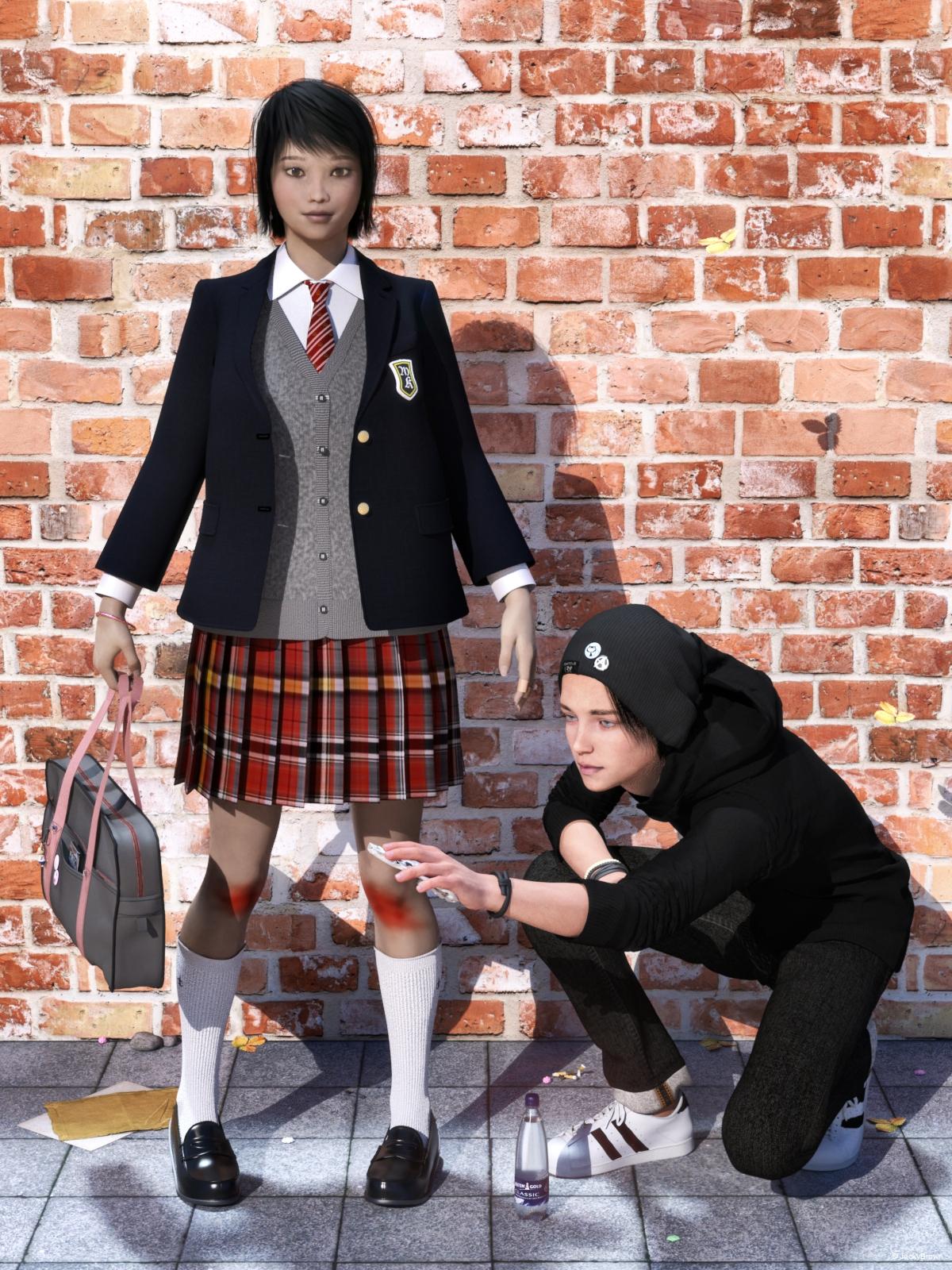
Here's my second entry for this month. Enjoy!
[Best watched at full size for details.]
"An unexpected helping hand..."
Starring: Chloe and Walther
The tale:
From the other side of the street, Walther saw Chloe stumble and hurt her knees. So he grabbed a fresh bottle of water and a clean cloth and ran to her in order to clean the abrasions on her knees. He has been in love with her for so long, but because she goes to a private school, he doesn't dare speak to her. This is his chance to show that he likes her very very much. "Please tell me in case I hurt you unintendedly" he said without daring to look at her...
Soundtrack:
Joe Cocker - With A Little Help From My Friends (© 1968)
https://www.youtube.com/watch?v=eXV4WyQMHFM
COUNTABLE FREEBIES: (Alphabetic order)#01! Adhesive Bandage Prop for DAZ Studio by Mythic 3D
https://sharecg.com/v/87725/gallery/21/DAZ-Studio/Adhesive-Bandage-Prop-for-DAZ-Studio **#02! Amy AiMei for Genesis 8 Female (morphs only) by Amy AiMei
https://www.deviantart.com/amyaimei/art/Amy-AiMei-for-Genesis-8-Female-morphs-only-687709757
[Head morph used]#03! Beach Towel by Ildanach
https://www.daz3d.com/forums/discussion/206316/free-beach-towel-updated-with-morphs-and-materials
[Dropbox download link]#04! Blazer Uniform Set for G8F by yomiuri
https://sharecg.com/v/94694/browse/21/DAZ-Studio/Blazer-Uniform-Set-for-G8F **#05! Channing's Button Prop re-posted by Seacanyon
https://www.sharecg.com/v/56691/related/21/DAZ-Studio/Channings-Button-Prop **#06! Delsin Beanie and Hair for G8M by InTheFlesh
https://sharecg.com/v/92677/browse/21/DAZ-Studio/FINAL-Delsin-Beanie-and-Hair-for-G8M **#07! Dirt & Abrasions by MysticArtDesign
https://sharecg.com/v/93837/gallery/21/DAZ-Studio/%F0%9F%93%8CDirt-Abrasions%F0%9F%93%8C **#08! Drinks by klausdbg
https://www.sharecg.com/v/74240/gallery/5/3D-Model/Summer-IV-Drinks **#09! DOA 5 Kasumi's Head Morph for G8F by TritiumCG
https://www.deviantart.com/tritiumcg/art/DOA-5-Kasumi-s-Head-Morph-for-G8F-Daz-Studio-813503190#10! Eyes Dilate for Genesis 8 Female by felldude
https://www.renderosity.com/mod/freestuff/eyes-dilate-for-genesis-8-female/82869 **#11! iPhone X by klausdbg
https://www.sharecg.com/v/89747/gallery/5/3D-Model/iPhone-X **#12! Kawaii Buttons by MysticArtDesign
https://sharecg.com/v/94355/browse/21/DAZ-Studio/Kawaii-Buttons **#13! Koff cigarette pack and cigarette with morphs by TrekkieGrrrl
https://www.sharecg.com/v/18207/poser/Cigarettes **#14! Long Morph for Toulouse hair for G8F by DireWorks
https://www.renderosity.com/mod/freestuff/sometimes-they-come-back-long-morph-for-toulouse-hair-for-g8f/83745 **#15! M4 Jewelry Pack 5 by Cool Tuna Studio
http://www.cooltuna.com/poser/poser-freebies.html (item 10)
[Rubber bracelet used]#16! Morphing Chewing Gum by TrekkieGrrrl
https://www.sharecg.com/v/18199/poser/Morphing-chewinggum **#17! Morphing Garden Style Stone by Mapps Graphics
http://www.freewebs.com/mapps/downloads4.htm (last item)#18! Morphing Leaf by Adam Thwaites (Most Digital Creations)
https://www.most-digital-creations.com/free_poser_poses_textures_morphs_props_50.htm (item 5)#19! Newspaper with morphs by TrekkieGrrrl
https://www.sharecg.com/v/18198/gallery/11/Poser/Morphing-Newspaper **#20! Red Brick Wall 2 PBR Texture by CGAxis
https://free.cgaxis.com/product/red-brick-wall-free-pbr-texture-2/ *1#21! Simple Used Ashtray by 3-d-c
https://www.sharecg.com/v/38258/gallery/11/Poser/Simple-Used-Ashtray **
[Cigarette buds used]#22! Soul Calibur 6 Seong Mina's Head Morph for G8F by TritiumCG
https://www.deviantart.com/tritiumcg/art/Soul-Calibur-6-Seong-Mina-s-Head-Morph-for-G8F-813924805#23! Strap by Laboratory108
http://lab108.x0.com/lab108/personal.html (item 5)
[Its on the schoolbag]#24! SY 200 Morphs for Genesis 8 Head and Body by SickleYield
https://sharecg.com/v/91888/view/21/DAZ-Studio/SY-200-Morphs-for-Genesis-8-Head-and-Body **#25! Texture Pack 02 by Spacebones
https://sharecg.com/v/63522/gallery/6/Texture/Texture-Pack-02 **
[Paving used]#26! Walther for G8M by Ruslanomar
https://sharecg.com/v/92848/browse/21/DAZ-Studio/G8M-Walther **
NO-COUNT ITEMS:--- AllenArt Iray Jewelry Shaders by AllenArt
--- Bezel Cut Ring for Genesis 3 & 8 Female by AllenArt
--- Casual Outfit for G3F by Tab [Pants used]
--- CasualOutfit2 for G3M by Tab [Bracelet used]
--- Chloe for G8F by Musings by Moonlight
--- Dancing Loops Bangle for G8F by AllenArt
++ DAZ Studio Iray HDR Outdoor Environments by Daz Originals, DimensionTheory [Maui used]
--- Free Iray Outdoor Lights by Dreamlight
--- Hoodie for G3M by Tab
--- Nose Ring 01 for G2F, G3F and/or G8F by AllenArt
--- Safety Pin by AllenArt
--- School Bag by Tab
--- Sneakers for G3F by Tab
++ Toulouse Hair for Genesis 8 Female by Daz Originals
PURCHASED/PAID FOR ITEMS: None 100% Freebies
*1 E-mail address required
** Registration required
#x! Countable Items (Bold ones are used by me for the first time I think.)
--- No longer available freebies
++ Free with DAZ Studio (or the Essentials)
$x. Purchased/Paid For Item
Rendered with DAZ Studio 4.10.0.123 (nVidia Iray)Other free software used: GIMP v2.10.8 and Irfanview 4.52
Postwork: used the AltaLux Image Enhancement Filter (Effect) by Stefano Tommesani that comes with Irfanview and some filters (oa) that come with GIMP. Also used mcjDenoise by mcasual. (https://sites.google.com/site/mcasualsdazscripts9/mcjdenoise)
"An unexpected helping hand..."
3D Art Freebie Challenge-November 2019-WINNERS ANNOUNCED"Playing Doctor" -Entries Thread Only3D Art Freebie Challenge November 2019 "Playing Doctor"
[Best watched at full size for details.]
"Oops! Sorry!"
(Alternative/subtitle: Way too deep into it!)
Starring: Alysha and Chloe
The tale:
Chloe had not yet completed the Acupuncture training she is following but thought she had enough experience to be able to treat her best friend Alysha ...
Soundtrack:
Jackie DeShannon - Needles And Pins (© 1963)
https://www.youtube.com/watch?v=ZrhcVp1FTwk
COUNTABLE FREEBIES: (Alphabetic order)#01! Adhesive Bandage Prop for DAZ Studio by Mythic 3D
https://sharecg.com/v/87725/gallery/21/DAZ-Studio/Adhesive-Bandage-Prop-for-DAZ-Studio **#02! Alysha For G8 by EmotionalDreams
https://sharecg.com/v/94680/browse/21/DAZ-Studio/Alysha-For-G8 **#03! Amy AiMei for Genesis 8 Female (morphs only) by Amy AiMei
https://www.deviantart.com/amyaimei/art/Amy-AiMei-for-Genesis-8-Female-morphs-only-687709757
[Head morph used]#04! Blazer Uniform Set for G8F by yomiuri
https://sharecg.com/v/94694/browse/21/DAZ-Studio/Blazer-Uniform-Set-for-G8F **
[Ankle socks used]#05! Bonsai Stand by 3Zi
http://sanzisannzi.blog83.fc2.com/category6-11.html (Scroll down to '3Zi_BonsaiStand.zipDownload')#06! dForce_French Twist Hair for Genesis 8 Female(s) by zoro_d
https://www.renderosity.com/mod/freestuff/dforce-french-twist-hair-for-genesis-8-female-s-/81937#07! DOA 5 Kasumi's Head Morph for G8F by TritiumCG
https://www.deviantart.com/tritiumcg/art/DOA-5-Kasumi-s-Head-Morph-for-G8F-Daz-Studio-813503190#08! EA Sidecut Hair for Genesis 3 & 8 Female(s) by EichhornArt
https://www.renderosity.com/mod/freestuff/ea-sidecut-hait-for-genesis-3-amp-8-femela-s-/82972 **#09! Eyes Dilate for Genesis 8 Female by felldude
https://www.renderosity.com/mod/freestuff/eyes-dilate-for-genesis-8-female/82869 **#10! Eyes Scale (Anime Eyes) for G8F by felldude
https://www.renderosity.com/mod/freestuff/eyes-scale-anime-eyes-for-g8f/83573 **#11! Fabric-white-1.png and Fabric-bmp.png by RedEyeCat
https://redeyecat.wordpress.com/2014/06/07/its-a-tile-lollapalooza/ (item 5 and 6)
[Used on Massage table, Morphing Pillow, Skirt & Jacket and Vest & Shorts]#12! Frame DIN-A by klausdbg
https://www.sharecg.com/v/66868/gallery/5/3D-Model/Frame-DIN-A **#13! freeSPEX Glasses for Genesis by Slosh
https://www.sharecg.com/v/69673/browse/21/DAZ-Studio/freeSPEX-Glasses-for-Genesis-DAZ-4.6 **#14! General miscellanous prop files by BronzeDragon
https://sharecg.com/v/94436/browse/21/DAZ-Studio/General-miscellanous-prop-files **
[Yin-Yang pendant used]#15! Heavy Hitters for G8F by squarepeg3d
https://www.renderosity.com/mod/freestuff/heavy-hitters-for-g8f/82812&ca **
[Fluid prop and Blood shader used]#16! Iray car related shader presets 'megapack' by Tom2099
https://www.deviantart.com/tom2099/art/Iray-car-related-shader-presets-megapack-539622361#17! Kitchen Add-on Pack by TruForm
https://www.renderosity.com/mod/freestuff/kitchen-add-on-pack/64895 **
[Tray used]#18! Lights for Daz Studio w/ Iray by DrBoots
https://www.deviantart.com/drboots/art/Freebie-Lights-for-Daz-Studio-w-Iray-579993105#19! Liquid (OBJ) by Spacebones
https://sharecg.com/v/25522/gallery/5/3D-Model/Liquid **
[Drop3 and Fountain used]#20! mcjJapaneseStyleScreens by mCasual Jacques
https://sites.google.com/site/mcasualsdazscripts9/mcjjapanesestylescreens
[Used only the wood texture]#21! Morphing Pillow by TrekkieGrrrl
http://trekkiegrrrl.dk/mpp3.htm (Item 1)
[Retextured]#22! My Heart Necklace for Genesis 8 Female by amyaimei
https://www.deviantart.com/amyaimei/art/My-Heart-Necklace-for-Genesis-8-Female-729010047#23! Newspaper with morphs by TrekkieGrrrl
https://www.sharecg.com/v/18198/gallery/11/Poser/Morphing-Newspaper **#24! OnFleek for Genesis 3 & 8 Female(s) by AprilYSH
http://aprilsvanity.com/shop/onfleek-for-genesis-3-8-female-s.html#25! Orchid Flower in Hexagonal Pot by CGAxis
https://free.cgaxis.com/product/3d-orchid-flower-in-hexagonal-pot/ *1#26! Pointy Stuff by TrekkieGrrrl
http://trekkiegrrrl.dk/prp7.htm (item 8)
[Acupuncture needle used]#27! Relaxation Porch by inLite Studio
http://inlitestudio.com/3d/product/relaxation-porch/ **
[Massage table and Vase with Sticks used]#28! RGB HDRi Soft Lights for Daz Studio - Iray by VAlzheimer *1
https://gumroad.com/valzheimer (1st item)#29! Shiny Wood Tiles Free PBR Texture by CGAxis
https://free.cgaxis.com/product/shiny-wood-tiles-free-pbr-texture/ *1#30! Skirt & Jacket for Genesis 8 Female by Wilmap's Digital Creations
https://www.wilmapsdigitalcreations.co.uk/view_product.php?id=465 **#31! Soul Calibur 6 Seong Mina's Head Morph for G8F by TritiumCG
https://www.deviantart.com/tritiumcg/art/Soul-Calibur-6-Seong-Mina-s-Head-Morph-for-G8F-813924805#32! SY 200 Morphs for Genesis 8 Head and Body by SickleYield
https://sharecg.com/v/91888/view/21/DAZ-Studio/SY-200-Morphs-for-Genesis-8-Head-and-Body **#33! Vest and Shorts for G3F/G8F by Adam Thwaites (Most Digital Creations)
https://www.most-digital-creations.com/g8f_vest_and_shorts.php *1
NO-COUNT ITEMS:--- AllenArt Iray Jewelry Shaders by AllenArt
--- Bezel Cut Ring for Genesis 3 & 8 Female by AllenArt
--- Chloe for G8F by Musings by Moonlight
--- Dancing Loops Bangle for G8F by AllenArt
--- Fancy Candle by AllenArt
++ Stucco shader NVIDIA MDL Examples [Wall]
PURCHASED/PAID FOR ITEMS: None 100% Freebies
*1 E-mail address required
** Registration required
#x! Countable Items (Bold ones are used by me for the first time I think.)
--- No longer available freebies
++ Free with DAZ Studio (or the Essentials)
$x. Purchased/Paid For Item
Rendered with DAZ Studio 4.10.0.123 (nVidia Iray)Other free software used: GIMP v2.10.8 and Irfanview 4.52
Postwork: used the AltaLux Image Enhancement Filter (Effect) by Stefano Tommesani that comes with Irfanview and some filters (oa) that come with GIMP.

"Oops! Sorry!"
Daz Studio Pro 4.12 - HighlightsPublic Build Highlights:
4.12.1.40 (November 25, 2019)
- Application Launch
- Implemented a robust application instancing, settings/UI copying, settings cleaning mechanism
- Addresses issues caused by running concurrent instances that cause conflicts
- Launch Instance - Demo Script
- Attached to the bottom of this post is a script (i.e., Launch Instance.dse) that demonstrates the use of each option outlined below
- If the "Launch Process" option in the script's dialog is NOT checked, a message is displayed that contains an OS specific generated string that can be used to launch an instance of the application (and more specifically, the Public Build) from command line, a shortcut or an alias
- This message contains a "Copy" button that will copy the generated string to the system clipboard, to ease its use for purposes where this is desired
- This generated string is also written to the log (Help > Troubleshooting > View Log File...)
- If the "Launch Process" option IS checked, a new instance of the application is launched, configured according to the active options and their respective values
- If a scene is currently loaded, the "File" option will provide a menu that contains the path of the loaded scene
- Selecting this option and choosing a file path allows another application instance to be launched and the specified asset to be automatically loaded
- If an asset is selected in the Smart Content pane > Files page (and the page is visible), or in the Content Library pane (and the pane is visible), the "File" option will provide a menu that contains the path(s) of the selected asset(s)
- Selecting this option and choosing a file path allows another application instance to be launched and the specified asset to be automatically loaded
- ...
- Makes use of the application's Command Line Interface (CLI) to configure options that provide flexibility for various workflows
- Usage: <executable_path> [-option <value>] [filename]
- -instanceName
- Valid characters include any uppercase or lowercase ASCII characer in the A-Z range, as well as any number (integer), hyphen, underscore, in any sequence
- Any characters that are not supported (e.g., a space - if the value is quoted, special characters, non-ASCII characters) will be automatically stripped
- Supports gap-filling automatic incrementation (Windows only - automatic incrementation does not currently occur on macOS)
- An application instance name containing the "#" (number sign, hash, pound) character will automatically have occurrences of the "#" character replaced by the 'next' available incremental integer value (e.g., if instances 1, 2, and 3 are running, instance 2 is closed and a new instance is launched, the new instance will be assigned 2 and the next would be assigned 4 - unless 1, 2 or 3 were closed before it launched)
- Cleaning of application settings and session UI files on launch is automatic by default
- Use the -cleanOnLaunch option to override this behavior
- Copying of root release channel application settings is automatic by default
- Use the -copyAppSettings option to override this behavior
- Copying of root release channel session UI files is automatic by default
- Use the -copySessionUI option to override this behavior
- Valid characters include any uppercase or lowercase ASCII characer in the A-Z range, as well as any number (integer), hyphen, underscore, in any sequence
- -cleanOnLaunch
- If specified, this option is used to determine whether or not application settings/data are removed when the application is launched
- A falsey value does not override the standard behavior of purging the application's temp directory on launch
- Valid falsey values are 0, off, n, no, f, or false
- Valid truthy valus are 1, on, y, yes, t, or true
- -copyAppSettings
- Referrencing - valid characters ...
- General Release ("~") ...
- Root Instance (".") ...
- Named Instance ...
- Referrencing - valid characters ...
- -copySessionUI
- Referrencing - valid characters ...
- General Release ("~") ...
- Root Instance (".") ...
- Named Instance ...
- Referrencing - valid characters ...
- -cleanOnExit
- If specified, this option is used to determine whether or not application settings/data are removed when the application exits
- A falsey value does not override the standard behavior of purging the application's temp directory on exit
- Valid falsey values are 0, off, n, no, f, or false
- Valid truthy valus are 1, on, y, yes, t, or true
- -scriptArg ...
- The last argument that is not an option, or a valid argument to an option, is interpreted as the filename to open (if any)
- Must be enclosed by quotes if the path contains any space characters
- Implemented a robust application instancing, settings/UI copying, settings cleaning mechanism
- NVIDIA Iray
- Integrated Iray RTX 2019.1.5 (317500.7473); see this thread for more detail
- REQUIRES NVIDIA Driver 430.86 (or newer) on Windows; see NVIDIA Driver Downloads
- This requirement has not changed since the 4.12.0.33 build (above)
- Works arround defects in 440 series drivers
- REQUIRES NVIDIA Driver 430.86 (or newer) on Windows; see NVIDIA Driver Downloads
- Removed the "Architectural Sampler" property from Render Settings
- Support for this setting was removed from NVIDIA Iray as of 2017.1 beta (296300.616)
- Integrated Iray RTX 2019.1.5 (317500.7473); see this thread for more detail
- Timeline pane
- Fixed an issue where a value less than 2 in the Total (Frames) spinbox, even if only "momentarily" (e.g. an attempt to type "120", wherein a user must type "1" followed by "2" and then "0", and so is "less than 2" even if the intent is to type "120"), would cause the application to hang
- The minimum value for the Total (Frames) spinbox is now 1
- Puppeteer pane
- Improved general performance
- Fixed (significant) memory leaks in key preview, record, mouse drag, and playback operations, as well as in context menus
- Removed dependencies on legacy support libraries
- Figure Setup pane
- Improved performance
- Removed dependencies on legacy support libraries
- OBJ Importer
- MTL texture map path parsing now handles non-quoted paths that contain spaces
- Improved performance of resolving texture map references in an MTL file, where the same path is referenced multiple times
- Made minor adjustments to layout in the options dialog
- OBJ Exporter
- Made changes/additions to the options dialog
- The "Write Groups" options for selecting the type of grouping to write are now presented as a single drop-down instead of multiple radio buttions
- The "Write Material Library" options for selecting how to handle texture maps are now presented as a single drop-down instead of multiple radio buttions
- The "Write Material Library" option is now a checkable group box
- Added a "Quote Paths Containing Spaces" option (default on)
- Added a "Filter Objects" checkable group box option
- Added an "Objects" option
- Allows for choosing whether to export only the "Primary Root" (the root of the primary selection), or the "Selected Roots" (the unique roots of each selected node)
- Added an "Include Parented" option
- Allows for including parented objects without having to first select them
- Added an "Objects" option
- The "Write Object Statements" option has been re-labeled "Write Separate Objects"
- MTL filename references are now quoted (by default) if the path contains a space (refer to option mentioned above)
- Implements stricter adherence to standard tokenization used by the OBJ Importer parser
- Allows a non-map-collected/non-map-converted export to be round-tripped with texture map assignments in tact
- Relative paths written to MTL now more strictly adhere to standard pathing conventions - e.g. they are prefixed by a dot (meaning "current directory" - of the MTL file)
- Made changes/additions to the options dialog
- Map Transfer
- Listed materials are now prefixed with the label of their respective root node
- Addresses the case where the materials of multiple objects are listed, but which materials belonged to which object was not easily discernible
- Listed materials are now prefixed with the label of their respective root node
- BVH Importer/Exporter
- Removed dependencies on legacy support libraries
- Hexagon Bridge
- Removed dependencies on legacy support libraries
- Bryce Bridge
- Removed dependencies on legacy support libraries
- Content Loading
- Fixed an issue in where the order of similarly named mapped directories could affect which base directory would be found for a given path
- A mapped directory earlier in the list that could be considered a prefix for a mapped directory that resided later in the list would be found instead of the later mapped directory
- Fixed an issue in where the order of similarly named mapped directories could affect which base directory would be found for a given path
- General Interface
- The splash screen now displays the full version number, bit architecture, release channel and instance name (if any) of the application
- ...
- Fixed bugs and/or made improvements in various areas; see the Change Log for details
What in the world!? (The Error)Hey guys. After recieving quite the rude comment in regards to my graphics designing skills from an individual who obviously got offended by this image which I also posted on the gallery, I wanted to point something out. As stated in my post above, this happened when I simply tried to load the face transfer that I saved, and I had no idea what happened in the process to get this result. By all means, no, I am not a proffesional graphics artist. I only use DAZ studio and the basic functions to get my renders done. I shared the image out of good fun and humor. Sharing this image was never meant to offend anyone. Anyways, I removed the image from the gallery. If the moderators feel that this image is offensive, feel free to close the thread and remove the image from here as well.
New PC buildMost of what was said above is great but unless you game competitively there is no reason to buy an Intel CPU right now. The i5's are neither price nor performance competitive with the AMD offerings.
If you're looking to build a decent rig that will be very usable for 8 years, I'd lean toward the R5 3600 and a lower cost X570 motherboard. That gives you PCIE gen 4 which may not matter today but in 8 years it will.
RAM amount does matter quite a lot for iRay. DS seems to use about twice the amount of VRAM used during the transfer of a scene onto the GPU for rendering. So if you get a 2080ti, or the like, you'll want more than 16Gb. Other applications that do lots of calculations on the CPU or just manipulate a lot of data will also benefit from more RAM. The AMD CPU's also benefit greatly from RAM speed so I'd look at getting 3200 speed RAM if possible.
For GPU's there is no reason to even consider any none RTX cards unless you simply can't afford them. Personally I'd get one card today, the best one you're comfortable with the price for. The 20xx cards are the first iteration of RTX and Nvidia is almost certainly launching the next generation next summer, and by all accounts prices are going to come down somewhat. If performance improves and price comes down that's when I'd add a secondcard if one isn't rendering fast enough for your needs.
Genesis 8 Female weird face lookingIt actually looks as though you've loaded the character Aiko 8 rather than plain Genesis 8 Female. Your figure is named Aiko 8 in the scene tab, and the Currently Used tab shows that all the morph dials that make up Aiko 8 are on at 100%. The only way I can think of you getting that result is if you are accidentally loading the Aiko 8 character instead of the base Genesis 8 Figure. However, if this is what you get when you load plain ol' Genesis 8 Female or any other G8 female character, then it may be that the problem is with Aiko 8. Perhaps the Aiko 8 package wasn't installed properly or you somehow saved over the Genesis 8 Female base figure and saved it with these settings. (I've done that while saving custom characters before, and it's surprisingly easy to do.
 )
)In your screenshots, Currently Used shows that Aiko 8's full character dial, head dial, and body dial are all at 100%, meaning that Genesis 8 is using all of Aiko's shaping dials. However, your Aiko 8 dail shows the 100% value as black/greyed out rather than bright white like the head and body. That means that dial is set to be turned on at 100% by default, and that will make Genesis 8 Female always load with Aiko's shape. Take a look at my screenshots below, and you'll see that I've loaded Genesis 8 Female (and she's called Genesis 8 Female in the scene tab, rather than Aiko) and dailed in Aiko's shape, but the 100% value is white, not grey/black. To manually change that Aiko dial so it isn't a default shape, you need to click on the little gear icon on the upper right hand corner of the dial and click on Parameter Settings. In the window that pops up, look at the line titled Default. It should be 0.0%, not 100%.
If it's set to be 100%, then I suggest that you try uninstalling and reinstalling the Genesis 8 Female Essentials and Aiko 8 just to see if that corrects things.
Alternatively, you can change that value yourself and resave the dial (select the dial in the parameters tab, then go to File>Save As>Support Asset>Morph Asset(s) and then find and check the Aiko 8 dial under People), but that can be daunting if you don't save character dials often, and is probably unnessesary. A clean install of the Aiko character and base Genesis 8 Female may very well sort things out. I'm not sure why you'd be getting Aiko 8 shapes on Genesis 3, though, since she's not a Genesis 3 character. You may need to contact support to work that one out.
I hope that helps!
Starbeast HD for Genesis 8 Male and Female [Commercial]Was hoping for a different lower jaw and inclusion of a tongue morph to put a mouth on the end, but very impressed with the dome. :) Making the spinal elements optional morphs should helps a lot with clothing we could require.
Just have to experiment with this and see how it looks with a no breasts morph.My general Render ThreadHey there Takezo, thanks! I sent you a note about a commission idea I had for you, if you could look it over.
Also, here are some more renders I made:

This render I made using the MICK castle interior building kit, and I created custom textures for the banners and shield emblem. The room is designed to look like what the great hall of Castle Stark would look like if it were a real historical castle. The layout is based on the meeting scenes and coronation scene from Season 8 of Game of Thrones.

This render I put together using a variety of props and addons from various Daz sets, its heavily inspired by the Mayan content from Shadow of the Tomb Raider, even down to the undead tomb guardian.

This is a character of my design, using a custom body morph that I created for her. This render is based on the concepts from Mad Max, The Dark Tower, Fallout, and various traditional Western movies.
Hope you all like them! I make all my renders in Ultra HD 16:9 resolution, which gives people the option of using them as desktop backgrounds if they like.
Diffeomorphic DAZ-to-BlenderJust make sure your render engine is set to cycles in blender first, then make sure all your textures on the daz side are set to daz Iray, now transfer and enjoy. This is over simplified but I'm no expert. I won't explain the node based shader system in blender & if you don't know how to add the Iray Daz shader to older stuff you can buy a converter from the PA's here at store. Don't have evee set as render engine this messes up the conversion. I occasionally have to fix eyes and some other stuff but that is where you have to learn about blender's shader system to fix these things.
Yes, I know how to change the shaders in DAZ Studio - I've been playing with it for 15 years. During that time I have collected a lot of content which is pre-IRay and I still use some of it. I have been through the conversion to IRay materials so many times that I do it automatically now - and usually save them back to my library in IRay format. The tip about setting the Blender engine to Cycles is a good one and came up in the other thred (linked above). I'm still seeing black eyes and, in my personal opinion, what I'm getting in Cycles is still far short of the quality I see in IRay but I do need to get more familiar with Blender. I don't believe that Diffeomoprphic is the one-click solution that some claim it to be - I suspect that their previous experience in Blender allows them to set up the right environment to produce good renders but those settings still need to be learned.
Whilst I am a fan of the Daz Importer, I have to agree that there seems to be a particular problem with materials for eyes. A quick test transferring a base G8F gives me eyes with a dirty grey sclera - not black, and not the rather unreal white you see in Iray, just muddy grey. Looking at the image texture, the sclera is quite a dark grey, so something in the way Iray works is increasing the 'whiteness' significantly whereas the node tree created by the Daz Importer plugin isn't replicating this correctly. I suspect, based on a couple of simple experiments, it is the way the Base Color (white) is mixed in by Iray in DS. In the Blender node tree, there is a Multiply node which looks like it is supposed to handle this, but it isn't/can't, partly because it's not connected where it should be. A couple of minor changes make the sclera look a good deal better, and there are probably a number of approaches to correcting this particular issue.
I would also say the base G8F skin isn't looking great either, kind of plastic. Without detailed knowledge of the Iray internals, these things are bound to be a bit of a shot in the dark, and given how varied the Iray materials created by vendors are, there is something of a moving target here. For one example, I notice some Daz vendors use very high translucency values with washed out image maps, whereas others use low translucency and more saturated images, and yet the end result is very similar. There doesn't seem to be a standard way to do Iray materials, more a case of getting the effect you want and not worrying about how.
Anyone tried gradient texture on the Animated Candle?I have actually been looking for a candle that melts. I don't need it to be super smooth (i.e. not doing animation), but the plan is to use a gradient texture so that one color is totally at the top and another color is totally at the bottom. Can anyone who has purchased this product do a simple test to see if the melted morph just compresses the colors together (i.e. the effect of using the Y scale on a non-morphed candle) or if the top color is "lost" as the candle melts?
If you plan to use it only for stills, I would think you can adjust surface tiling for various morph strengths. That should even work when animated, if you use a script for animating surface properties.
What in the world!? (The Error)I saved a face transfer a couple of days ago, and then this is what happened when I loaded it. I don't think this was supposed to happen, but I saved it as art anyways.
EDIT:
Hey guys, I decided to re-upload the image to the gallery. I initially removed the image as the result of quite the rude comment I received from an individual who was upset and offended by this image. Sharing this image was never meant to offend anyone. I shared it out of good fun and humor. I decided to bring it back to the gallery because I feel that it is still a piece of art despite the flaws. Again, the results to this image happened when I saved a face transfer using the new built in face transfer function that was released in the latest DAZ version. Initially, everthing worked bine, but this is what happened when I loaded it after closing DAZ. The arms and face ended up getting distorted. It wasn't what I was expecting, but I saved it as art anyways.The Error:
https://www.daz3d.com/gallery/#images/894901/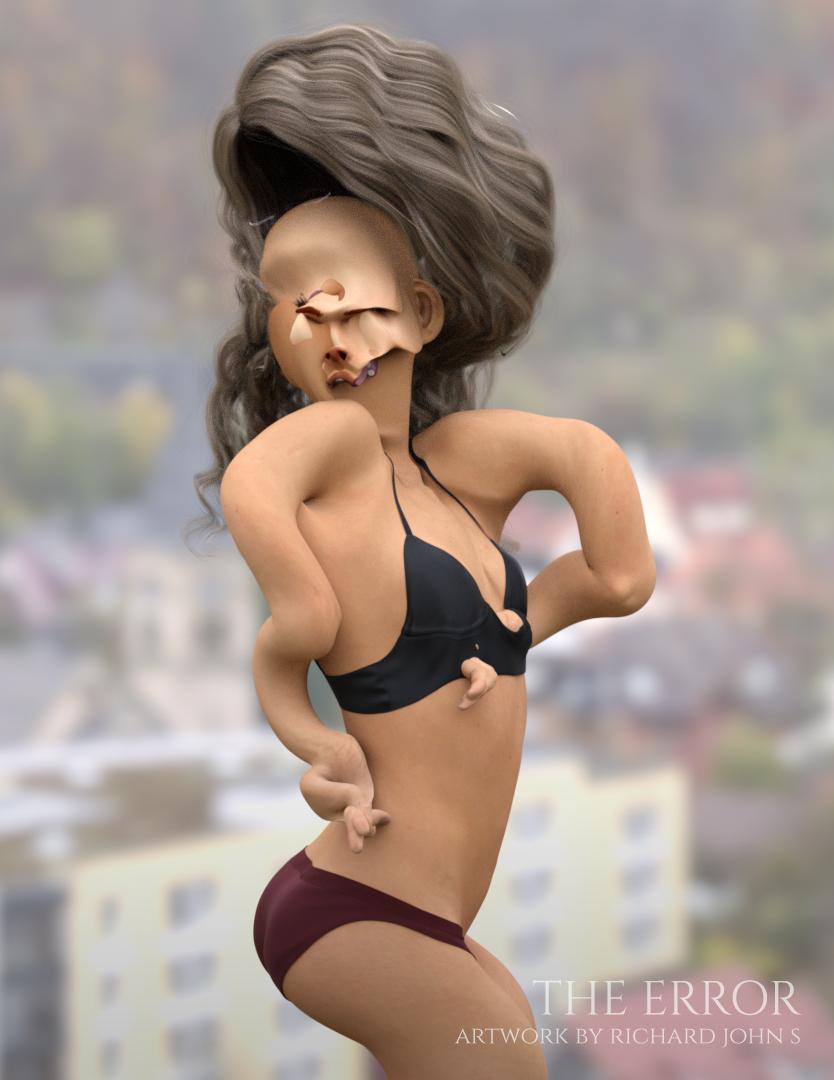 Problem with FBX export.BTW if bouncing boobies is what you are after,
Bouncing bOObies is the sole reason of my existence.
well I use morph presets provided by Reallusion for expressions in iClone
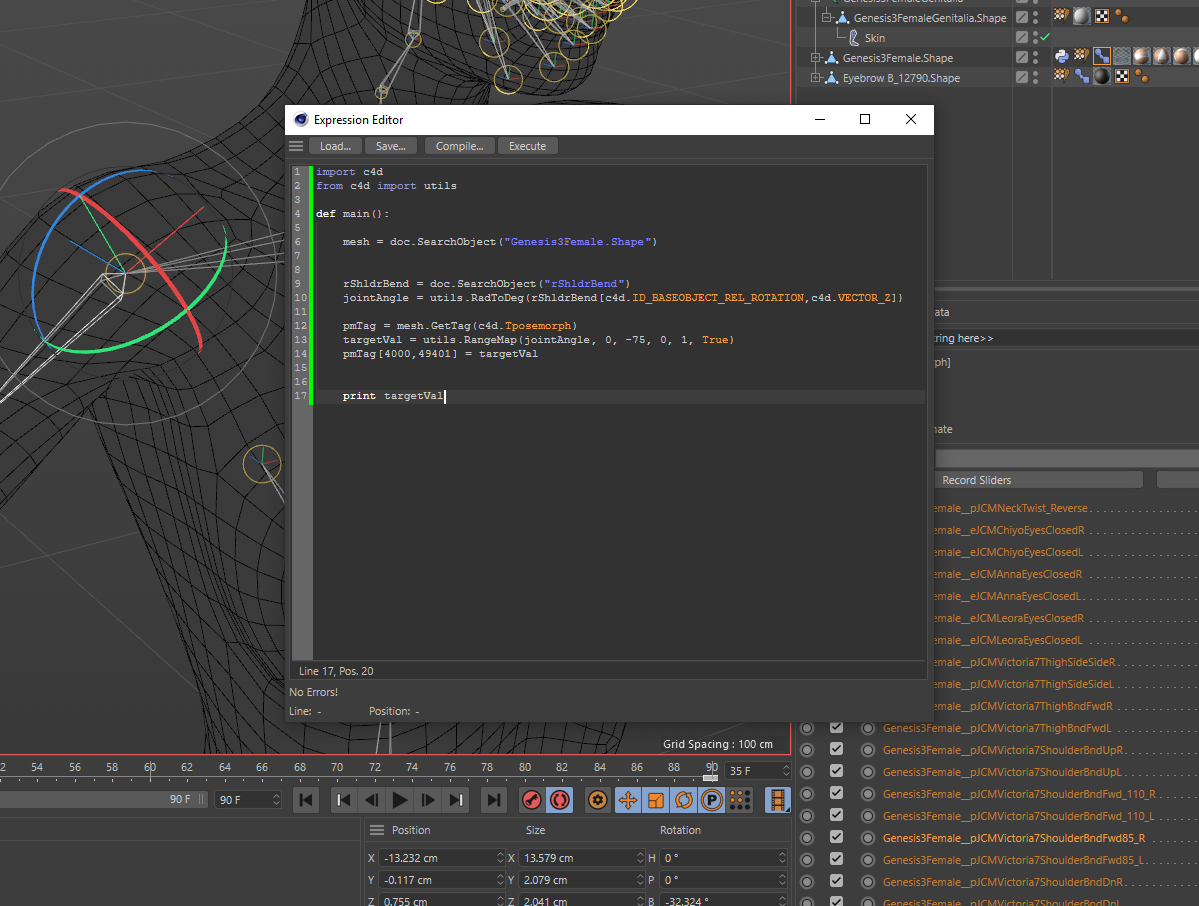
It looks like one would have to set up the whole system of morphs if they use anything outside of Daz, I guess iClone does it for the user. Anyone know if something exists for C4D or UE4? I am probably going to make my own for C4D in either expresso or python.
No iClone does not do joint controlled morphs, you just have basic rigged mesh and can add some custom morphs as well as expressions.
They are pretty much a DAZ studio only thing unless you want to set it all up from scratch AFAIK which is why vertex animated formats like alembic abc or mdd are popular for exporting to render elsewhere.
Problem with FBX export.Quick update for anyone trying to do joint control morphs in c4d.
Performance is atrocious. It takes a massive amount of time for c4d to iterate just a hundred morphs and apply a basic set on the morph, forget about previewing your animations in real time. With full morph export its even worse, perfromance is directly related to the number of morphs you have in a morph tag. I think they tested this with single morph - not hundreds like DS models use.
Kinda being forced into blender here.

 What was your first DAZ purchase, and how long ago?
Hi Everyone,
It occured to me on the 11th of November 2013, I started using the DAZ studio program. My first purchase (not items included and bundled with DAZ) was Michael 5. I followed up shortly after with some clothes, and then Victoria 5. The PCplat club back then had some great bundles on V4/M4 stuff as Genesis was just hitting the market, and a few pro bundles later, I had quite a selection to play with.
https://www.daz3d.com/michael-5
https://www.daz3d.com/victoria-5
As we head into 2020, I am still using DAZ, with Genesis 8 primarily, with smatterings of Genesis 2 males, Genesis 3 females, and Genesis 3 males. I have a huge number of poses and props from each generation, and still continue to use them where they fit. Characters I created from Genesis 2, have also been remade on G8.
My old library and characters still fill my renders and are used in storyboarding. With an upgrade to my computer earlier this year, rendering G8 has been a joy, and the scenes I create can handle multiple G8 figures as well as supporting background characters from M4/V4 upwards.
What figures were your first? Do you still use them in current renders? Have you moved your characters to the latest generation with transfer utilities or by re-creating them?
Swapping MATS and NormalsVery nice testing. This is kind of what I do a lot these days..."how does it blend with BJ's skins?"
Pretty much any of the BJ girls can work for this purpose. You can also mix up the diffuse and/or transluceny maps and get some cool results. If you replace just the diffuse maps, consider adjusting the translucency values. The values are high, so what happens is the trans maps kind of overpower the diffuse maps. You could also throw the diffuse maps into photoshop real quick and adjust the color tone if they are still too orange. Just lighten them up a bit.
If the nose at normal 2+ is bothering you, you could probably do a little photoshop on the nose's normal map and reduce it there. Maybe just lightly adjust the lines around the nose or whatever the detail is. You could blur them or maybe paint the normal map blue color at very low opacity on top of them to reduce how much they stand out.
The real star of the show on BJ's girls are the dual lobe specularity maps. Nobody has maps like them (I have spotted a couple, but they released well after BJ started doing this). The dual lobe maps are designed in way that simulates the very top layer of our skin with all the tiny crinkles and cracks in it. These maps are uniquely different from the diffuse and bumps, where most such maps by others are simply diffuse maps made to be black and white and maybe with added noise. Also they even have 2 maps, one for reflection, and one for roughness. Again, very few do this. Because these maps are so different and are basically the top skin layers, they also end up working extremely well on other characters. For many Daz characters, a lot of them really do have good textures, but where they might slip are the glossy spec maps.
So you could just wholesale swap out everything except for the dual lobe textures, and get a result.
Sometimes I do this with my non-HD characters. The Mousso HD ones come with the separate HD details and normal maps, for example. I apply those to the other characters and the difference is noticable. It's one reason I don't really buy HD G8Fs, unless they're different. Like how Jenni 8 is a middle aged woman. The younger 20-30 year old ones are already so readily available.
I would like to know how to make my own normal maps out of HD morphs. I have Male-M3dia's Jennifer HD. Love the details, but I'd also love to use them with normals too. Same with those "First Class" V8 head morphs Raiya made.
I have never tried it, but the last post in this thread has a method for making normal maps from the HD morph. https://www.daz3d.com/forums/discussion/218946/is-it-possible-to-bake-hd-morphs-to-maps
Problem with FBX export.BTW if bouncing boobies is what you are after,Bouncing bOObies is the sole reason of my existence.
well I use morph presets provided by Reallusion for expressions in iClone
It looks like one would have to set up the whole system of morphs if they use anything outside of Daz, I guess iClone does it for the user. Anyone know if something exists for C4D or UE4? I am probably going to make my own for C4D in either expresso or python.
Problem with FBX export.well I use morph presets provided by Reallusion for expressions in iClone
if I change the body shape with morphs along the timeline that indeed would get the effect you had especially any scaling
things like breast size are generally OK keyframed but as long as it has the same FBM frame one all through is fine
Are you keying changes in FBM along the timeline that would explain it
My phone will not charge complaint threadEdwin Hubble was a pipe smoking astronomer with a curiosity for extragalactic nebulas who died in 1953 and has since then ceased and desisted the recording of photons, while his current underground residence is currently unknown, he is most likely engaged in his new hobby of decomposition.
...same year I was born.
That's awfully suspicious...
Nobody actually knows where (or if) he's buried, as there was no funeral held for him and his wife never revealed his burial site... I'm not accusing you of being an eternal who keeps faking their own death so nobody gets suspicious, but I find the way you often mention radial velocity, redshift, spatial curvature and your gold medal from the Royal Astronomical Society to be somewhat suspicious... For example, recently you wrote-
"...relatively nice day today (for November here) sunny and mild, mid - upper 50s. Took a walk to the market to get more organic gold medal polish for my gold medal I received from the Royal Astronomical Society in 1940..."
"..ugh, site sent flaky again, got a Cloudflare time out and crash while entering the previous post... This is as frustrating as when I informed the American Association for the Advancement of Science that results from my six-year survey with the Mt. Wilson telescope did not support the expanding universe theory."
"...Wasn't able to use the PC+ DO coupon in time though thanks to all the other coupon deals I kept getting (can't stack coupons like you could with the old vouchers). Have to wait until next month to renew... the same way I fake my death and renew my identity every 63 - 90 years or so...”
"...wouldn't mind a bit of the "Youth Morph" from Zev0's Growing Up Morphs dialed in on me... just kidding, I'm immortal..."
I didn't mean to blow your cover, but I'm guessing it's probably annoying and boring after a while to keep changing identities and moving on to new cities and occupations... eventually you just want someone to figure it out so you can just have the same identity for a while and not have to buy a whole new wardrobe and barrels of fake mustaches again and again.
...egads, I've been found out. I knew I shouldn't have even minored in astronomy in college and just took courses in it to satisfy science electives (though I really needed to stay up to date of the latest developments). I thought I could throw anyone suspicious off track by majoring in music and art instead. However, I guess I may have tipped my hand back when my primary school teachers caught on that I was spending my noon hours at the local library (from which I'd check out astronomy and physics books from the adult section) rather than on the playground with the other kids. I'm sure they sent agents out who saw me spending countless nights in the back yard with my telescope.
I will say that *ahem* telescope they put in orbit has certainly has been yielding some amazing views, even outdoes the ones at Mt. Wilson and Palomar.
Daz 3D is part of

Connect
DAZ Productions, Inc.
7533 S Center View Ct #4664
West Jordan, UT 84084Licensing Agreement | Terms of Service | Privacy Policy | EULA
© 2026 Daz Productions Inc. All Rights Reserved.