-
Genesis 8 GeoShell on a Genesis 3 Figure?
yes I guess the lashes will be the trouble part. but you could try to add g8 lashed to a g3 person and hide the original lashes (I believe there was a morph option for that)
[Released] Rakshasa with dForce Hair for Genesis 8 Male [Commercial]If you're doing requests - do morphs for the Kizinti from Larry Niven's works, or the Aslan (and specically here) from Traveller - although a lion morph would probably do that one. but otherwise this is really stunning work, just excellent stuff.
Why Does It Take So Long To Load Figures? ("Solved", with GUIDE)I just moved my library to a solid state drive last night. Before, on my traditional drive, it was taking roughly 4 minutes and 45 seconds to load a G8F (with 452 characters, not counting the non-character morph packages, of which I also have a lot). Now it takes 3 minutes and 20 seconds. My next step is to identify characters I rarely use and use the zip procedure.
I'm glad this thread has been helpful to other people! :D
All that's left to do for me is to see is it'll get faster with better CPU/RAM/Mobo when they arrive!
Why Does It Take So Long To Load Figures? ("Solved", with GUIDE)I just moved my library to a solid state drive last night. Before, on my traditional drive, it was taking roughly 4 minutes and 45 seconds to load a G8F (with 452 characters, not counting the non-character morph packages, of which I also have a lot). Now it takes 3 minutes and 20 seconds. My next step is to identify characters I rarely use and use the zip procedure.
G8F tongue will not zero no matter what!I've seen this before, when a morph is applied to a figure. You need to check the Parameters to see if any morphs are applied.
- Select the figure in the scene.
- Open the Parameters pane/tab
- There are a couple of ways to find the morph.
- First, click on the Currently Used option in the left column and scroll down the listed parameters, looking for any that apply to the tongue.
- If you don't see anything applied to the tongue, it may be that the morph(s) are non-zero by default. You'll need to drill-down the pose controls. With the figure still selected, in the left column click on:
- Pose Controls, then
- Head, then
- Mouth, then
- Tongue
- Depending on premium products you have purchased, you may see other options under Mouth for controlling the tongue.
- Look through all the pose controls for the tongue. If a morph has a default non-zero morph, the value will have the same text color as those around it with a zero value.
- If you find one like that, set it to zero.
Does this help?
ETA: Or as Leana suggested, it might be part of an expression dial. If so, that would show up under Currently Used, as mentioned above.
Thanks for all of this, buut nothing has worked. I may just have to work around it with this character. I have not yet tried to re-create the character from a default G8F, but I'm wondering if her tongue is non-zero out of the box.
Z Natural Breasts - Shape and Pose Mega Set poses not workingI'm trying to use the poses from this set and I am finding that the do what they're supposed but the upper body will not work at all. It doesn't matter which pose I select. It will rotate and orient the body as expected too.
The breast shape apply / remove work as well.
I looked for documentation on the product but can't seem to find any.
Turning the limits off also does not help.
What am I doing wrong?
This is all that appears in the log file when attempting to apply one of the poses:
2020-06-04 06:45:56.709 WARNING: ..\..\..\..\..\src\sdksource\cloud\dzcloudtasknotifier.cpp(178): recv failed errno=10054
2020-06-04 06:46:06.685 File loaded in 0 min 0.0 sec.
2020-06-04 06:46:06.688 Loaded Morph Deltas in 0 min 0.0 sec.
2020-06-04 06:46:06.688 Loaded file: pJCM_Sahira8_ShinBend_90_L.dsf
2020-06-04 06:46:06.692 Loaded Morph Deltas in 0 min 0.0 sec.
2020-06-04 06:46:06.692 Loaded file: pJCMFlexHamstring_L.dsf
2020-06-04 06:46:06.696 Loaded Morph Deltas in 0 min 0.0 sec.
2020-06-04 06:46:06.696 Loaded file: pJCMShinBend_90_L.dsf
2020-06-04 06:46:06.702 Loaded Morph Deltas in 0 min 0.0 sec.
2020-06-04 06:46:06.702 Loaded file: pJCMBigToeDown_45_R.dsf
2020-06-04 06:46:06.705 Loaded Morph Deltas in 0 min 0.0 sec.
2020-06-04 06:46:06.705 Loaded file: pJCM_Sahira8_ShinBend_90_R.dsf
2020-06-04 06:46:06.708 Loaded Morph Deltas in 0 min 0.0 sec.
2020-06-04 06:46:06.708 Loaded file: pJCMFlexHamstring_R.dsf
2020-06-04 06:46:06.712 Loaded Morph Deltas in 0 min 0.0 sec.
2020-06-04 06:46:06.712 Loaded file: pJCMShinBend_90_R.dsf
2020-06-04 06:46:06.715 Loaded file: z nbs btm 05 g8f.duf
2020-06-04 06:48:14.811 WARNING: ..\..\..\..\..\src\sdksource\cloud\dzcloudtasknotifier.cpp(178): recv failed errno=10054
2020-06-04 06:50:56.116 WARNING: ..\..\..\..\..\src\sdksource\cloud\dzcloudtasknotifier.cpp(178): recv failed errno=10054DAZ Central: What does it actually do?Why do we not just download and install directly from Daz Studio itself? I mean this option is there.
Connect can't install plugins, or generation 4 figures due to the morph system they use. Also, there are quite a few people who use Daz content without DS.
So providing other install solutions makes sense. DIM is one, but it's rather complex due to all the options it has, so they created DazCentral which is a simplified version aimed at new users or users with a simple setup.I'm not buying that coolaid.
Daz3d to Blender WorkflowI have another weird question, hopefully someone can answer it whenever they have time. No rush.
Is it possible to export a figure (with clothing, hair etc) from Studio to Blender either poseable through Diffeomorphic or simply as a static OBJ, subdivide it in Blender and do detailed and high-res sculpting or morphing on it, and then send it back to Studio - and this is the important part - as a static OBJ (I know it can't be sent back as a morph) but with the UVs and surfaces intact so that textures can be reapplied? If so, could someone kindly describe any important steps for doing so? Thank you very much in advance.
it is
as long as you're not changing the uvs, then even with extra geometry you could at least just copy and paste the surfaces settings from daz to the re-imported model.
If you already know how to do morhps, then you're there.
Just import the obj, as opposed to using Morph Loader Pro
I've stopped rendering in Studio though, I just do renders in Blender (usually Cycles), but have used Eevee.
DAZ Central: What does it actually do?Why do we not just download and install directly from Daz Studio itself? I mean this option is there.
Connect can't install plugins, or generation 4 figures due to the morph system they use. Also, there are quite a few people who use Daz content without DS.
So providing other install solutions makes sense. DIM is one, but it's rather complex due to all the options it has, so they created DazCentral which is a simplified version aimed at new users or users with a simple setup.Can someone explain the whole clones/templates game?Autofit works in two steps:
- Adjust the mesh so it fits the target figure base shape
- Automatically rig the modified mesh so it conforms to the target figure
Step 1 is where clones are needed. A clone is a special type of morph for the target figure which is used to compute how the mesh should be modified: basically autofit considers that the original mesh was made to fit the target figure with the clone morph applied, so it "reverses" the clone morph to get a version which would fit the default target figure.
Step 2 is where templates are needed. They're sample rigs for different types of items, which are used as a base to rig the modified mesh. Templates can also be used by the transfer utility when you rig your own clothes.
As mentioned by other posters, each figure comes with a few clones and templates built-in, and you can expand the list of supported source figures or sample rigs with the clones and templates available in the store or as freebies.
Daz3d to Blender Workflow@SnowSultan Here's a possible workflow, if I understand what you need.
1) Subdivide your figure in daz to the desired resolution then convert to prop.
2) Export the obj and do your sculping in blender. Do not modify the topology.
3) Import back as morph in daz.
Daz3d to Blender WorkflowI have another weird question, hopefully someone can answer it whenever they have time. No rush.
Is it possible to export a figure (with clothing, hair etc) from Studio to Blender either poseable through Diffeomorphic or simply as a static OBJ, subdivide it in Blender and do detailed and high-res sculpting or morphing on it, and then send it back to Studio - and this is the important part - as a static OBJ (I know it can't be sent back as a morph) but with the UVs and surfaces intact so that textures can be reapplied? If so, could someone kindly describe any important steps for doing so? Thank you very much in advance.
Celebrity Look-a-Likes for 3D figures Part 2Some work in progress test renders of my latest celebrity inspired comission. Might see if you can guess the actor to ensure I'm on the right path?

Hair and stubble are placeholders until I create some that more resemble the intended actor, and everything else is work in progress:
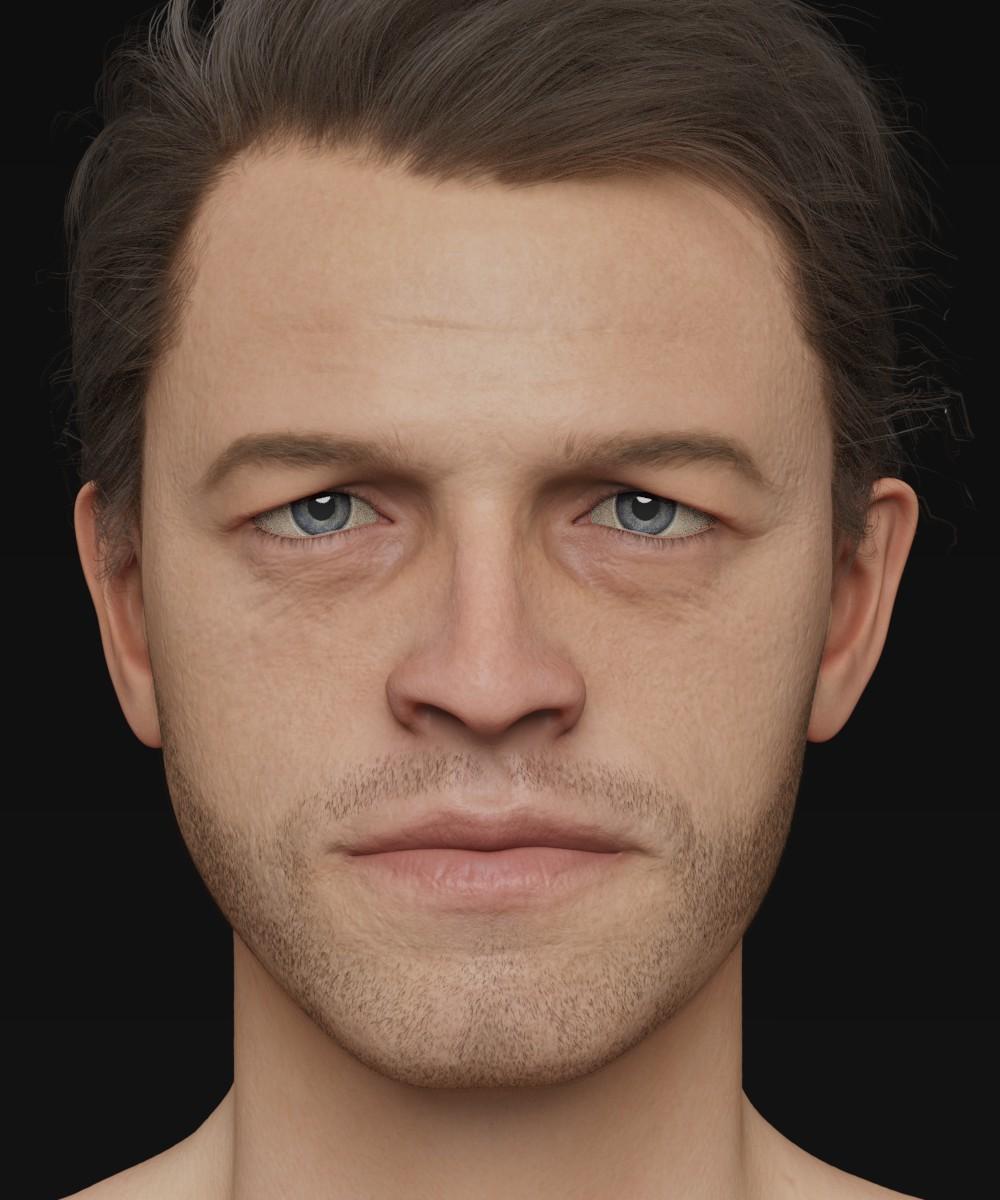
My hope is that Daz may be interested when I'm finished... He really would benefit from being a HD morph.
Cheers!
Daniel
My first and only thought is that he has to be Misha Collins, aka Castiel the angel from Supernatural.
G8F tongue will not zero no matter what!I've seen this before, when a morph is applied to a figure. You need to check the Parameters to see if any morphs are applied.
- Select the figure in the scene.
- Open the Parameters pane/tab
- There are a couple of ways to find the morph.
- First, click on the Currently Used option in the left column and scroll down the listed parameters, looking for any that apply to the tongue.
- If you don't see anything applied to the tongue, it may be that the morph(s) are non-zero by default. You'll need to drill-down the pose controls. With the figure still selected, in the left column click on:
- Pose Controls, then
- Head, then
- Mouth, then
- Tongue
- Depending on premium products you have purchased, you may see other options under Mouth for controlling the tongue.
- Look through all the pose controls for the tongue. If a morph has a default non-zero morph, the value will have the same text color as those around it with a zero value.
- If you find one like that, set it to zero.
Does this help?
ETA: Or as Leana suggested, it might be part of an expression dial. If so, that would show up under Currently Used, as mentioned above.
G8F tongue will not zero no matter what!It might not be a tongue morph directly, maybe a controller dial for an expression?
G8F tongue will not zero no matter what!Please see subject line.
The character's tongue is twisted and to the side for some reason, and will not zero no matter what. I have trried it globally and by node. Nothing. Ideas?
There might be a tongue morph saved with a non-zero value, so it is always applied automatically.
I've searched high and low and can't find it. All of the tongue nodes' values are zero when I check them.
G8F tongue will not zero no matter what!Please see subject line.
The character's tongue is twisted and to the side for some reason, and will not zero no matter what. I have trried it globally and by node. Nothing. Ideas?
There might be a tongue morph saved with a non-zero value, so it is always applied automatically.
AIUTO...CHI CONOSCE L’ITALIANO? PARTE DODICIEh... Limiti di G8.

Io credo che la prenderò (insieme alla sua base, deliziosa anch'essa) per trasferirla su G1. Come ti ho detto, G1 non ha limiti di alcun genere sul numero di morph installati.
Una figura così perfettamente in linea con quello stile non può essere casuale, il naso, la bocca, gli occhi e perfino la linea del collo sono inequivocabilmente ispirati ad Araki.
A questo punto adorerei vedere una donnina di Leiji Matsumoto e magari anche un assaggio di Osamu Tetsuka.
Comunque spero davvero che si decidano a correggere G8, è troppo una atrocità. Insieme ai bug di timeline, Puppeteer, slider, interfaccia, salvataggio, esportazione/esportazione... Insomma, tutti.
 MECK9 in stores now Commercial
Jakiblue, I looked under the toes (Click on toes with the arrow icon and in "parameters pane" currently used dials) I built this on the Dog 8 bones so other poses could be used to get you at least close to where you wanted to be and minor tweaks made. Sorry back to the point, I thought I might find a a corrective morph but looks like no. This is odd, they are all off by 30 degrees which means that is what is was. I will contact Daz and let them know we will fix and update the package. Adjusting the feet -30 degrees is all I can advise you to do right now. Why it is limited to just 3 of the 10 poses, ?. Human error is my guess.... my error I mean. Bad me.
I hope you still enjoy the MECK9 and all the wonderful texture add ons. Apologies for your inconvenience.
Using the timeline for dforce clothing simulation....QuestionOnce you have run the simulation and have the character pose and clothing drape you like, what is the best way to save the preset, without having all the timeline data, so you can bring the character into a future scene without having to play with the timeline scrubber?
JD
Hide everything in the scene except for that one item, set the resolution to base, export to .obj, and then re-import it as a morph. If you save the morph as a morph asset, you can use it again later, though obviously it will only work with the original simulated pose.
Ah...yeah that might be good, then I can set a new scene, pose the character, and save them both off as a subset....I think that will be fine...
Thanks!
JD
Daz 3D is part of

Connect
DAZ Productions, Inc.
7533 S Center View Ct #4664
West Jordan, UT 84084Licensing Agreement | Terms of Service | Privacy Policy | EULA
© 2026 Daz Productions Inc. All Rights Reserved.