-
SOLVED. Orestes - My Eyes Are Burning Searching For this Outfit
I put Orestes Burnt Lands in my cart, then browsed the product images, and found myself fixated on the outfit in the promo's. The search for it has led me miles and miles across DazNeverland and I have even ventured to googling which led me to some incredible tutorials on a bunch of shit that has nothing to do with my search. This girl is My eyes are on fire... Can anybody here please enlighten me?
Almost 2080ti timeI might finally be ready to pull the trigger on a 2080ti, but I wanted to run it by those of you who might be more familiar with detailed specifics and how they relate to rendering rather than gaming. Here is the card I'm considering:
ASUS ROG Strix GeForce RTX 2080TI 11GB
My case can handle it, although I'll have to remove unused drive bays (this card is huge) and I have a 1000w power supply which should be plenty even at load. In the reviews I've read, this card is always mentioned as running cooler than others and has two HDMI ports, which would be helpful in my case. It would be replacing a reliable but rather outdated 980ti and used almost exclusively for working in DAZ Studio (Iray) and Substance Painter. I'm actually not quite as concerned with rendering speed as I am with decent real-time Iray previewing and the expanded memory for handling complex scenes with large textures.
If anyone has any objections to this card and my system being joined at the expense of a good part of my checking account, please speak now or forever hold your peace. Thanks very much for any information or suggestions.
So I'm here looking for the outfit used in Orestes Burnt Lands and obviously am lost which often happens to me when searching this forum for sumtin'. So about the 2080ti, placement is important. If you get two and you want some speed, you will need a NVLink for bi-directional communication. Recently, after 8 mos, my RTX 2080's stopped working as a pair and decided they didn't like being so far apart, so now I am awaiting a new NVLink because they are now closer together and the old NVLink is too wide :(. I have SLI on my dual 1080 ti's but this would be fway to slow on 2080's. You also should invest in a minimum of 32GB RAM.
Sky Dome In HDRI Too CloseI want to know how to usethe "skydome" products domes in the Environment settings so that I can render selected views, for example in Orestes Iray Skydomes -Vega System has 2 planets.
When I render, I get the render selection, but for example I only get the clouds of this particular scene. The clouds render so close in the scene and show a grainy mesh pattern. My figure walks in the clouds which is not what I wanted. I tried "draw ground" and "off draw ground". Makes no difference.
In another choice in this set of Orestes HDRI, I get just a patch of blue sky. I'm not getting the view in this promo, which is why I bought this set.
What are the settings to 'push back' the HDRI, if possible? Or do I rotate, if so on what axis?
I have retitled and edited this post as I did not find a response to the way I originally worded it. Hopefully this will make more sense and someone can suggest how to use these HDRI images.
Here is the promo pic
 White dots in renders
Hey, everyone ! I had a lot of white/yellowish dots in my renders, especially at night. And I fixed the problem, at least in my particular renders. I was going crazy and ready to pull my hair out !! And give up Daz studio but I figured it out !! Here is how I did it !! I had night render city scenes. I put sky domes such as Orestes Darkest night and had buidling lights and everything and still white/yellowish dots came out in my renders like grainy pictures !! What the heck ?!! Finally I stumbled on this blog. And in my experience it was the fireflies setting in your render settings !! The guy called Tobor above was right, at least with my render experience. I guess it depends on what you are doing. So I went to my render settings, then select filtering. Make sure firefly filter is enabled. Then I went to my nominal luminance and turned it up to 2, and white/yellowish dots on my renders, especially night ones are gone !! Hell yes. Thank you, Tobor, for leading me the way !!
Electric zaps?I've seen, in comic books and some cartoon series (particularly the superhero type), there were scenes in which a villain would zap with his or her hands, or the victims would get zapped by touching the villain. Are there any animation or morphing zapsavailable anywhere that I could download or purchase?
Do a store search for "energy" and you will find quite a few.
I did use the keyword as you suggested, and I found nothing that suits my desire.
However, before you posted, I did find a product involving lightning:
https://www.daz3d.com/orestes-electromancy
It's just what I needed, and I purchased it.
☺☻→ Holiday Gifts from Daz PAs ←☻☺Ok, this is a weird one... or perhaps I'm just missing something really obvious. But I cathegorised Orestes Santa Slayer Ray Gun, but it's not showing up in the cathegory. See attachments. Hulp?
Report sales errors here. "There's Always Another Sale™"The artists whose catalogs are 65% off - the "Show All Artists Together" link comes up with 0 items. I know I spend a lot at DAZ, but I don't think I own all 23558 items, and when I remove the "Hide Items I Own" check mark, I still don't see anything. (Is it sad that my first thought was, "OMG! I didn't realize just how much I spend here!" and only then, "No, even I haven't bought *this* many items from a subset of artists" ?)
BTW: I think Cloudflare does have issues - sometimes a store link will redirect me back to the front page then go to the product on the second try, which makes me think one of their servers is being a dork - but this is a different issue.
The problem seems to be that the add-on isn't turning on the filters; notice there is a list of 27 artists in the filter list, but none are selected.
Report sales errors here. "There's Always Another Sale™"The artists whose catalogs are 65% off - the "Show All Artists Together" link comes up with 0 items. I know I spend a lot at DAZ, but I don't think I own all 23558 items, and when I remove the "Hide Items I Own" check mark, I still don't see anything. (Is it sad that my first thought was, "OMG! I didn't realize just how much I spend here!" and only then, "No, even I haven't bought *this* many items from a subset of artists" ?)
BTW: I think Cloudflare does have issues - sometimes a store link will redirect me back to the front page then go to the product on the second try, which makes me think one of their servers is being a dork - but this is a different issue.
Report sales errors here. "There's Always Another Sale™"It was going in at 2.99 but yesterday and today it now goes in at 9.95. Took stuff out bought some Orestes Skydomes then tried again...still a problem. Just means that I'll buy less...and keep my money for other things.
Novica & Forum Members Tips & Product Reviews Pt 12If you haven't seen the rotating 360 degree product features for erupiter, they're interesting. It's a featured store.
Orestes iray skydomes, are they convertable to 3DL?Does anybody know if Orestes various iray skydomes are easily convertible to 3DL for use as a simple backdrop on a skydome (even if the HDR effect does not convert)? Can I just take an existing 3DL skydome and swap out the image used from one of the iray ones, or is it not that simple?
Novica & Forum Members Tips & Product Reviews Pt 12Merry Christmas and Peace for all! Decided to use genesis 2 figures of Beau and Bijou after adjusting for IRAY.
Description
Thought I'd wish everyone a Merry Christmas and Peace for all.
Made with...
- Poser Pigeon / DAZ Dove
- Feathered Wings
- Serenity Angel Instruments
- Nordic Hair
- Beau for Stephanie 6
- Callidora Outfit
- Bijou for Genesis 2 Female(s)
- Ultra Genesis Studio Vol 1 - Iray Box Lights
- Soleil Hair for Genesis 2 & 3 Female(s)
- Orestes Iray HDRI Skydomes Vol 3 - Vega System
- IG Photographer's Toolbox: 35mm Cameras

Some questions regarding building a townHas been a while since I posted this and since then have learned more about Daz studio and learned about scene subsets and also learned about node instances as well.
I have a scene subset for houses I built in room creator and have 3 versions (fully furnished, basic furnished, empty), each house in the street has its own scene subset file.
I even have separate scene subsets saves for roads, paths, grass, the trees and streetlamps.
So I just load/merge the main house am focusing on and a neighbours house, then make node instances of the neighbour's house or main house depending on what am doing.
My town is all mapped out via scene subsets, so it all loads where I placed it, so once I set up the location, I then move it into a new temp group and then drag to 0,0 and then add models.
I render location and models separate as not enough memory to render them together, but I can layer the models on top of location in photoshop, in testing it went well but still building my town, so how to render still in theory.
Products I used are;
- Room Creator Version 2.0
- Room Creator Exteriors
- Streets
- Orestes Tree Vol 1
- Haven Park (I made my own park)
Right now I have the park and most of the west side of town done, have built apartment house for the east side of town, just to build a street, then add the beach to the south and decide what goes in north area of town.
Need to learn about adding deformers to a plane, which I been told could help me make hill and mountain ranges.
So that is where am at with this building a town, still happy to get advice and any other tips, as its a big project :)
☺☻→ Holiday Gifts from Daz PAs ←☻☺Holiday Gifts from Daz PAs
Day 1 vyktohria

Day 2 tentman

Day 3 Td3d

Day 4 Scuffles3d

Day 5 Giko

Hypertaf

3djoji

DAY 6 Arryn Onnel

DAY 7 TangoAlpha

DAY 8 Jepe

EmmaAndJordi

DAY 9 FirstBastion

Oskarsson
DAY 10 Mada

Sickleyield

DAY !! Cherubit

Mely3D

DAY 12 and 13 All Gifts Live Again
DAY 14 Aave Nainen

Muscleman

Dreamlight
DAY 15 Fisty

Fuseling

sugatak

DAY 16 FenixPhoenix

Code 66

MikeD

DAY 17 AprilYSH

DisparateDreamer

DivamakeupWee Dangerous John

DAY 18
RiverSoft Art
Zai by Design
Dreamlight

DAY 19 Mattymanx

PixelTizzyFit

Lyoness

DAY 20 Pixeluna

InaneGlory

David Brinnen
ForbiddenWhispers

DAY 21 Darwins Mishap(s)

FeralFey Orestes Graphics

DAY 23 ZKuro

HolbeinC

Mytilus
 Daz Studio Crashing/Freezing when rendering large scene
Getting directly to it, am having problems with Daz Studio crashing or freezing, when trying to render an image from a large scene, the second screenshot shows the scene am trying to render. It is a large scene and I can cut down on some of the assets in the scene for sure, but even before I added all the trees I was having issues with Daz crashing while rendering.
The first screenshot shows when Daz froze, I was monitoring the memory via “task manager > performance” and a “wise memory program”, and did see memory go right up to 95% before it froze, then % dropped to what you see.
I did a google search and did find threads on this forum from 2017/2018, however, these threads are old but did confirm my conclusion that memory was running out and why Daz was freezing or crashing.
Am certain if I can just figure out how to get past the “Rendering” stage and past “Loading/Processing scene”, then good to go with large scenes. I did plan to upgrade to 32GB memory at some point and could do that at end of year maybe, but am hoping people here might have some tips on rendering large scenes that can help.
As I said, I can cut down on assets, I have them saved as scene subsects so I can load what I need, I could split trees, roads, grass, street lamps up into subsects, and maybe even split houses up into more súbsects, is some furniture in them (baths/showers etc).
I am able to load the full scene am trying to render as well, as I deliberately tested to see if there were issues with loading scene as well.
I am using dome and scene with Orestes Iray HDRI Skydomes – Harvest Moon but did crash with sun-sky only as well.
Houses built with Room Creator Version 2 and Room Creator Exteriors
Fence Collection
Trees are from Orestes Tree Vol 1
Road and Lampposts are from Streets
Sorry for the long read but more information the better I figure.
*closed* RRRR - "Build it and they will come" Render Contesttag:luci45 #4
Ronny Returns
Big Ronny Rumorosa returned from exile, having been pardoned somehow for his many crimes. Maybe his wealthy Blustian friends helped out. Anyway, the first thing he did was build Rumorosa Tower in his native borough, locate Ronny Jr, and brag a lot about his wealth. When his friends from Blustia arrived and asked to be introduced to "those in power", Ronnie began to wonder if maybe their talk of conquering the galaxy was more than a pipe dream.Used:
Bold for Adventurer
M4 Elite Texture: Sol
Dark Passion for G2Ms
Hip Hop Outfit for Genesis 3 Male(s)
Movie Sets, City Block Eight (Rendo)(LB)
Design Tool Box Paint and Paper (LB) replaced by Ronny RumorosaAlso Used:
Law Enforcement Outfits for Genesis 2 and 3 Male(s)
Dante 7
LoREZ Police US1
Lorenzo Lorez
BBQ Grill Collection
DAZ House Cat
Ranch Pavillion Table
Spartan Warriors Cape
The Exile Alien HD for Genesis 3 Male
Mathew Hair for Genesis 3 Male(s) and Genesis 2 Male(s)
Freak 5 and other morphs
Diner Food 3 & 4
Vimana Flying Machine
Utopia Cityscape Blocks
Orestes Iray HDRI Skydomes - Summer Day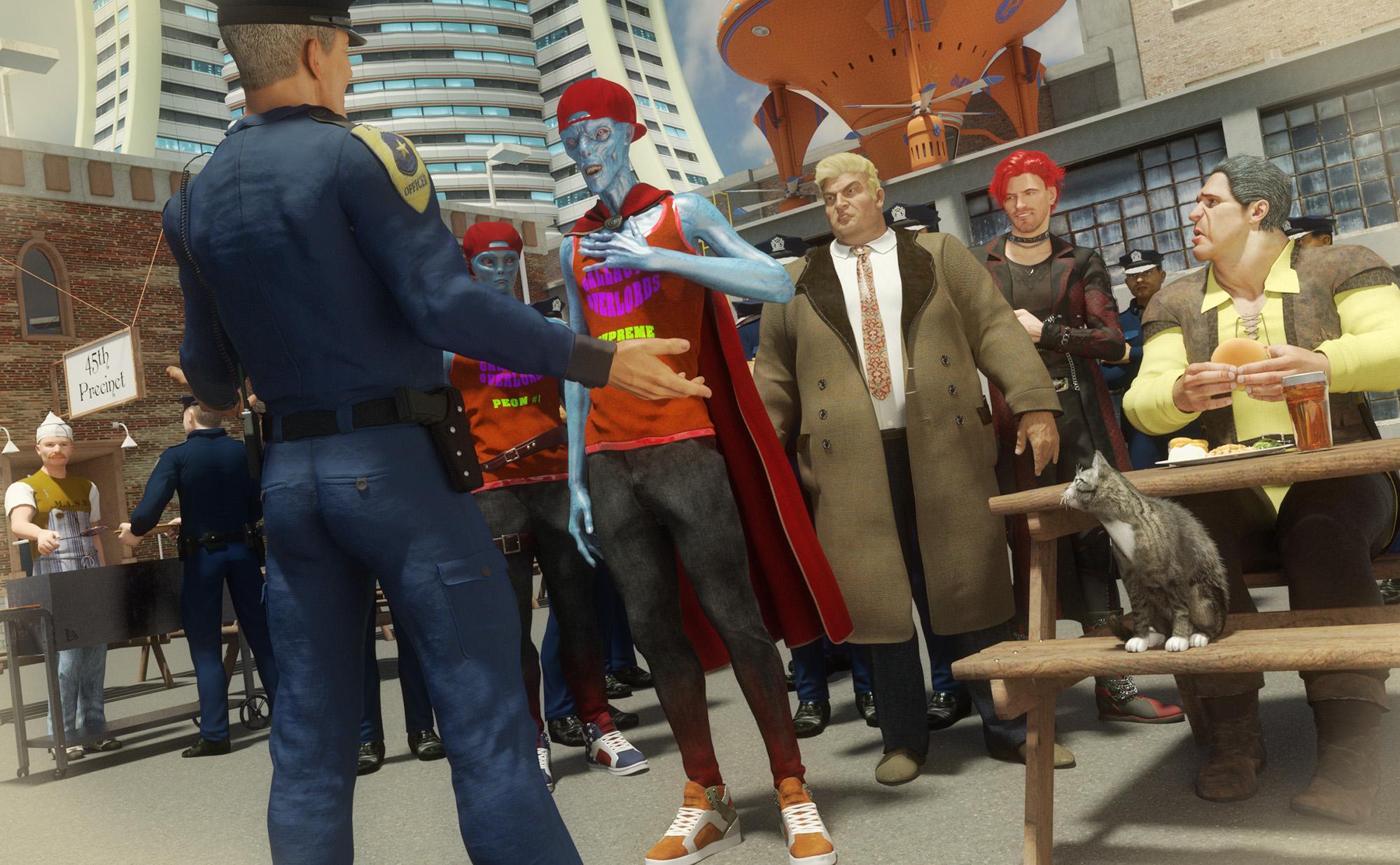 "Ocean Wide" product lighting issue
Thank you for answers!
I've decided to use one of these HDRI skydomes:
https://www.daz3d.com/orestes-iray-hdri-skydomes-summer-daybut now my scene looks a bit overlighted. Since i can't see the skydome in the scene tab i don't know how to chage intensity of the light. Does anybody know?
And how can i delete the skydome if i need?
Music video created in DAZ Studio: "Win Your Love"This is a music video that was created by Seven Oaks Creative Arts, which I have the pleasure of being a freelance assistant for. The animation was primarily done by one of their freelance animators and video/audio editors, Randy McDonald. I did much of the research and creative suggestions for content, some of the "scene" setup, and some ancillary animation.
The video is a combination of live-action footage and 3D animation. All of the 3D work was done in DAZ studio. Some of the live-action footage is public domain stock, from Pexels and other free-footage sites. Some footage was created using Google Earth Studio. The rest is footage of the singer/songwriter, Ted Jones.
The video has now gone public so I have permission to post a link to it here:
"Win Your Love"
Below I'm listing every DAZ content package I can that was used in the creation of the video, but there are a few caveats:
• It is impossible to recall or list every pose package that was used, or that we attempted to use. All the poses started with were discarded, or tweaked a lot and then used, and there were way too many tried to even begin trying to list them all. Sorry.
• The same issue goes for "environment" packages, using either skydomes (physical or virtual) or HDRIs. As with the poses, we tried so many different ones (with sometimes maddening results) that there's no way I can find to tell which ones were actually used.
If anyone sees anything in the video that I don't list below, please note it in this thread so we can acknowledge all the great content creators whose work has gone into this production.
One package I cannot list in order of appearance is a utility, without which the video never could have been done with the resources available to us:
Scene Optimizer
https://www.daz3d.com/scene-optimizerList of (known) DAZ content used, order of appearance:
Easy Environments Green Hills Skydome and HDRI
https://www.daz3d.com/green-hills-skydome-and-hdriMagic Cliff
https://www.daz3d.com/magic-cliffLucas 8 (somewhat Cartoonized)
https://www.daz3d.com/lucas-8Cartoonized for Genesis 8 Male
https://www.daz3d.com/cartoonized-for-genesis-8-maleLandis Hair for Genesis 8 and Genesis 3 Male(s)
https://www.daz3d.com/landis-hair-for-genesis-8-and-genesis-3-malesCowboy Outfit
(Shirt, scarf, and vest; custom textures; products no longer available in DAZ store)Henley Shirt and Jeans Outfit for Genesis 8 Male(s)
https://www.daz3d.com/henley-shirt-and-jeans-outfit-for-genesis-8-male-sChelsea Boots for Genesis
https://www.daz3d.com/chelsea-boots-for-genesisThe Windmill
https://www.daz3d.com/the-windmillCafe Continental by BlueTreeStudio
(From another site)[NOTE: Too many little items on table to list here exactly: Tulip vase from a vases collection, book from a books collection, croissant, napkin, and spoon from somewhere, teas set I *believe* from A Curious Tea Party, but not certain.]
Night and Day City for Daz Studio (City block1)
https://www.daz3d.com/night-and-day-city-for-daz-studioVYK Odette for Teen Josie 7
https://www.daz3d.com/vyk-odette-for-teen-josie-7Jolina Hair
https://www.daz3d.com/jolina-hairEsther Outfit for Genesis 3 Female(s) (Top, custom texture; shoes)
https://www.daz3d.com/esther-outfit-for-genesis-3-female-sGaoDan School Uniforms 20 (Skirt and briefs)
(From another site)Country Fresh for Genesis 3 and Genesis 8 Females (Bandana)
(From another site)Lakeside Folly
https://www.daz3d.com/lakeside-follyOcean Wide
https://www.daz3d.com/ocean-wideCalypso MSBN (candyflake red shader)
https://www.daz3d.com/calypso-msbnFLUIDOS for Daz Studio
https://www.daz3d.com/fluidos-for-daz-studioLagoon Living
https://www.daz3d.com/lagoon-livingIray Ghost Light Kit
https://www.daz3d.com/iray-ghost-light-kitYellow Submarine
(From another site)Fantasy IBL - Above the Clouds HDRI
https://www.daz3d.com/fantasy-ibl-above-the-clouds-hdriDA Palm Island
https://www.daz3d.com/da-palm-islandSnorkel Island (cottage only)
https://www.daz3d.com/pw-snorkel-islandThe Streets Of Venice
https://www.daz3d.com/the-streets-of-veniceGondola
https://www.daz3d.com/gondolaGreat Wall (No longer available in DAZ store)
http://docs.daz3d.com/doku.php/public/read_me/index/54069/startTerraDome 3 Iray (mountains around Great Wall)
https://www.daz3d.com/terradome-3-irayEasy Environments: Earth
https://www.daz3d.com/easy-environments-earthAsteroid Base
(From another site)The DAZ Rose
https://www.daz3d.com/the-roseShuttlestar
https://www.daz3d.com/shuttlestarMountaintop Gazebo and Balcony
https://www.daz3d.com/mountaintop-gazebo-and-balconyi13 On the Rails
https://www.daz3d.com/i13-on-the-railsBreakfast In Bed (Rosebud and its vase only)
https://www.daz3d.com/breakfast-in-bedGazebo, Garden and Patio Set
https://www.daz3d.com/gazebo-garden-and-patio-setGlassware Collection for Iray Vol. 2
https://www.daz3d.com/glassware-collection-for-iray-vol-2(Cannot find the Moon-Howl wine bottle source yet. Any help?)
Free Item: USS Enterprise (for DAZ Studio)
https://www.vanishingpoint.biz/freeitemdetail.asp?FreeItemID=891
(Has been linked in forums before, so hope it's okay)Solar System Planets
https://www.daz3d.com/catalogsearch/result/?q=planetsSkyship Avrora
https://www.daz3d.com/skyship-avroraMountain Lakes and Forests
https://www.daz3d.com/mountain-lakes-and-forestsShantara CityScapes Supreme
https://www.daz3d.com/shantara-cityscapes-supreme14MU Space Dock
https://www.daz3d.com/14mu-space-dockOrestes Iray-HDRI Skydomes - Cassini
https://www.daz3d.com/orestes-iray-hdri-skydomes--cassiniSteam Punk Hide Away
https://www.daz3d.com/steam-punk-hide-awayRemember, "There's Always Another Sale™" (Report sales errors here.)In the PC+ for a day items is the wrong Autumn Leaves by Orestes there? This: https://www.daz3d.com/autumn-leaves-resource-pack instead of this: https://www.daz3d.com/autumn-leaves
There are two poses/packs for the second Autumn Leaves for 1.99 in the list of items, so it got me wondering.
PC for a day are submitted, I believe, by the PA's themselves.. which is then added in by marketing. So the truthful answer is I don't know the exact details of whats in there, and whats intentional or not.. sorry!
Thanks, Jack. No worries :)
Remember, "There's Always Another Sale™" (Report sales errors here.)In the PC+ for a day items is the wrong Autumn Leaves by Orestes there? This: https://www.daz3d.com/autumn-leaves-resource-pack instead of this: https://www.daz3d.com/autumn-leaves
There are two poses/packs for the second Autumn Leaves for 1.99 in the list of items, so it got me wondering.
PC for a day are submitted, I believe, by the PA's themselves.. which is then added in by marketing. So the truthful answer is I don't know the exact details of whats in there, and whats intentional or not.. sorry!
Daz 3D is part of

Connect
DAZ Productions, Inc.
7533 S Center View Ct #4664
West Jordan, UT 84084Licensing Agreement | Terms of Service | Privacy Policy | EULA
© 2026 Daz Productions Inc. All Rights Reserved.