-
{Diffeomorphic} Rigid Follow Nodes
Yes there's a limitation for shells where blender can only import the surfaces visibility. Of course tools are provided to fix this in blender, or you can fix the shell in daz studio before exporting, to only use the surfaces visibility.
https://github.com/Diffeomorphic/import_daz/wiki/Shell_Editor
https://diffeomorphic.blogspot.com/2020/11/multiple-geoshells.html
p.s. The dev version is the master on github, you can also follow commits and issues there, or participate if you find any bug. Answers and fixes are usually fast enough.
{Diffeomorphic} Rigid Follow Nodesevilded777 said:
I don't mean to pile on here, but... again... new to this, so I am trying all kinds of different things to learn how it all works. I've got a character that is G8.1M, using the G8M UV because that's the freckled skin I need... also using a 3rd party geograft. When I import him, the Body and Head materials think they are part of the geocraft's shell rather than being part of the figure so the materials are all wrong. Clearly I can't post a screenshot since he's got those dangly bits. I wonder if I am doing something wrong? Or does this combo just not work because its on the wonky side?
Nevermind this, I figured it out. The proper elements were not turned off on the shell.
{Diffeomorphic} Rigid Follow NodesI don't mean to pile on here, but... again... new to this, so I am trying all kinds of different things to learn how it all works. I've got a character that is G8.1M, using the G8M UV because that's the freckled skin I need... also using a 3rd party geograft. When I import him, the Body and Head materials think they are part of the geocraft's shell rather than being part of the figure so the materials are all wrong. Clearly I can't post a screenshot since he's got those dangly bits. I wonder if I am doing something wrong? Or does this combo just not work because its on the wonky side?
{Diffeomorphic} Rigid Follow NodesPadone said:
This is probably a regression, now reported to Thomas. For the time being be sure "apply transforms" is disabled in easy import, this way everything should work fine.
https://github.com/Diffeomorphic/import_daz/issues/39
p.s. If you didn't, be sure to update to the dev version as bugs are only fixed there.
Thanks for this. I wish I knew my way around github better than I do, but I totally don't understand how to get the "dev" version.
Daz Studio 6 and dsx files ... SOLVEDHello Richard (haseltine)
I'm going to use Daz Studio 6. One simple question.
I need to export my custom actions (scripts) dsx files from Daz Studio 4.24 to import in Daz Studio 6 dse files.\How to?
Thanks.
Very confused about new "game ready pack"in DAZ Studio
you can use Genesis 9 poses and animations on the Genesis9(2) part of the FBX import
AniBlocks too
but you need to zero the rotation on the clothes and base
they would make good background figures
so actually can be useful for people only using D|S too
Buy Something That Doesn't Work in Carrara? Post your Questions and Workarounds here. (please)OK
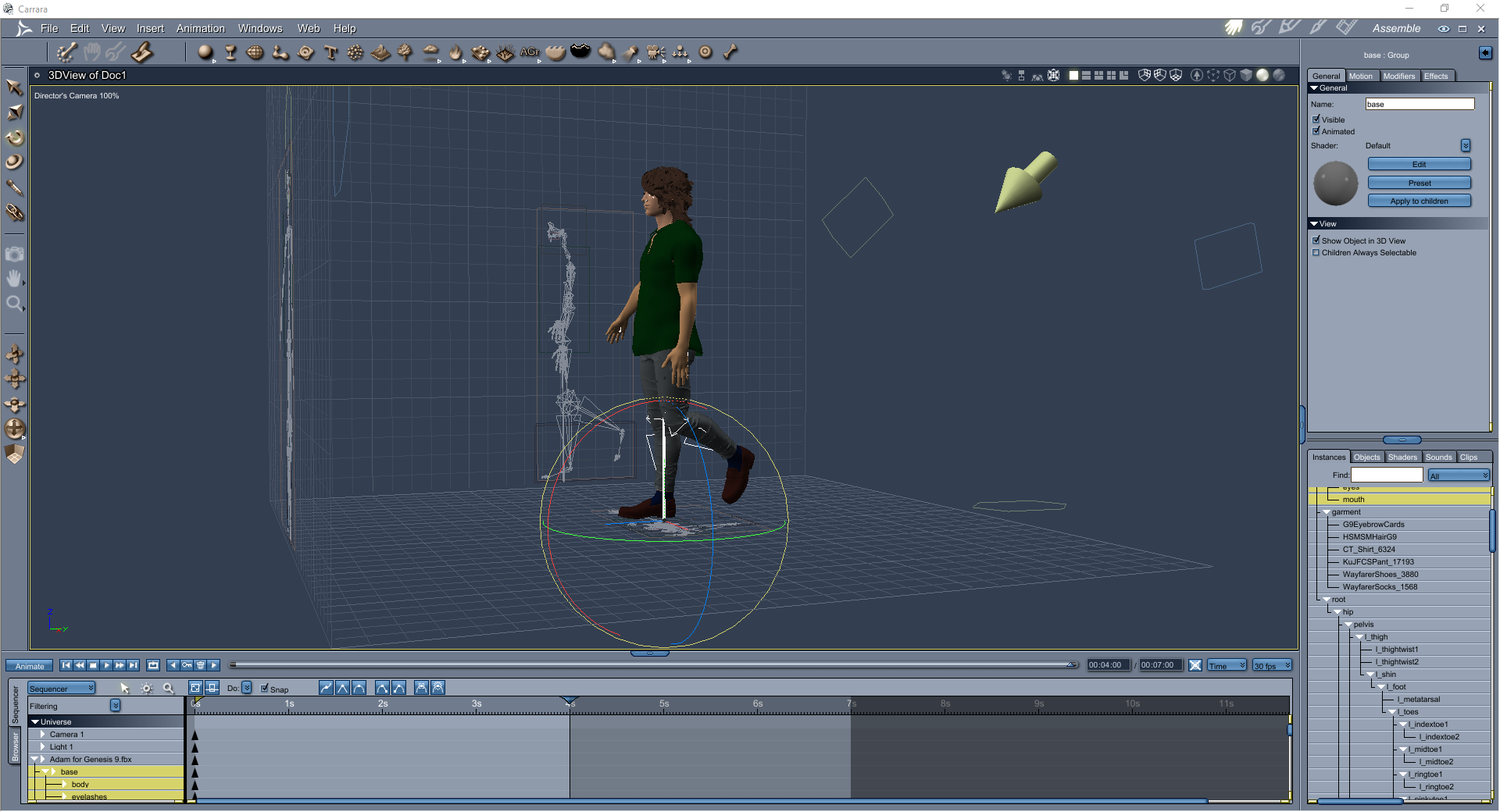
import the FBX into the Carrara plugin called DAZ Studio
set rotation on the base and garment to 0
choose the Genesis9(2) that loads with it
apply G9 poses, animations or Aniblocks (you then bake to timeline)
as far as I have gotten
not figured out how to apply to the Carrara figure
good for extras in D|S scenes though
Appreciate the QoL update to the Product Library UIThere also seems to be something a little odd with the Product Count and the file types. With no types selected the total is > the total of the types when filtered (and added together)... by about 10%... Are there hidden types (like maybe 3DL?).
(Obviously not a fantastically critical thing!
 )
)I do like the image-cards, it could be very useful for finding assets, if further filter options were available... Especially if the catalog is able to get at 'basic metadata', so that more than a 'name search' is possible - like the documentation pages can maybe do (You can find new icons for loading this product in the following DAZ Studio Folders)
{Diffeomorphic} Rigid Follow NodesThis is probably a regression, now reported to Thomas. For the time being be sure "apply transforms" is disabled in easy import, this way everything should work fine.
https://github.com/Diffeomorphic/import_daz/issues/39
p.s. If you didn't, be sure to update to the dev version as bugs are only fixed there.
{Diffeomorphic} Rigid Follow NodesGreetings,
new to all this Blender stuff, but trying really hard to understand it all. Diffeomorphic seems a brilliant tool. My G8M character has earrings attached by Rigid Follow Nodes, after import they end up as part of the figure mesh rather than as seperate items and they are out of place. Finally figured out how to move them, but getting them into the right position is beyond my Blender skills just yet.
Should I remove the Rigid Follow Nodes and just parent the items in DS first?
Thanks
Buy Something That Doesn't Work in Carrara? Post your Questions and Workarounds here. (please)Stezza said:
no weight blending conversions needed?
its an FBX so you import it, not load from the browser
There's Always Another Sale Thread -- Discussions Only Pt 6frank0314 said:
Torquinox said:
WendyLuvsCatz said:
miladyderyni_173d399f47 said:
Grrr, all those "wonderful" new assets at the beginning of the store page. The first thing I thought was "Great, something else I need to filter out!" Speaking of which, the filters don't want to go away when you're done with them and want to see the page. But Daz finally gave us a price filter!
So, is there any reason I should bother with that free DUF version of a game ready character when I don't make games? Can I mix it with standard assets & use it in the background? Does it come with clothing and hair shown?
you also can get a free G9 shape which is just a shape
the FBX does have the clothing and hair
so you could actually import that and use the transfer utility I suppose
So once more for the slow person, the fbx includes everything shown and the duf is a shape-only bare human figure?
Yes, both FBX and GLB are baked in. DUF is base character only
see https://www.daz3d.com/forums/discussion/comment/9564726/#Comment_9564726
where I play with mine
duf just a character morph but FBX clothes and hair all can be bought, I found all but one in store (I own none of them)
There's Always Another Sale Thread -- Discussions Only Pt 6Torquinox said:
WendyLuvsCatz said:
miladyderyni_173d399f47 said:
Grrr, all those "wonderful" new assets at the beginning of the store page. The first thing I thought was "Great, something else I need to filter out!" Speaking of which, the filters don't want to go away when you're done with them and want to see the page. But Daz finally gave us a price filter!
So, is there any reason I should bother with that free DUF version of a game ready character when I don't make games? Can I mix it with standard assets & use it in the background? Does it come with clothing and hair shown?
you also can get a free G9 shape which is just a shape
the FBX does have the clothing and hair
so you could actually import that and use the transfer utility I suppose
So once more for the slow person, the fbx includes everything shown and the duf is a shape-only bare human figure?
Yes, both FBX and GLB are baked in. DUF is base character only
There's Always Another Sale Thread -- Discussions Only Pt 6WendyLuvsCatz said:
miladyderyni_173d399f47 said:
Grrr, all those "wonderful" new assets at the beginning of the store page. The first thing I thought was "Great, something else I need to filter out!" Speaking of which, the filters don't want to go away when you're done with them and want to see the page. But Daz finally gave us a price filter!
So, is there any reason I should bother with that free DUF version of a game ready character when I don't make games? Can I mix it with standard assets & use it in the background? Does it come with clothing and hair shown?
you also can get a free G9 shape which is just a shape
the FBX does have the clothing and hair
so you could actually import that and use the transfer utility I suppose
So once more for the slow person, the fbx includes everything shown and the duf is a shape-only bare human figure?
Buy Something That Doesn't Work in Carrara? Post your Questions and Workarounds here. (please)the game ready figures import rigged and can rotate the bone, could add IK
no Blendshapes
 There's Always Another Sale Thread -- Discussions Only Pt 6
miladyderyni_173d399f47 said:
Grrr, all those "wonderful" new assets at the beginning of the store page. The first thing I thought was "Great, something else I need to filter out!" Speaking of which, the filters don't want to go away when you're done with them and want to see the page. But Daz finally gave us a price filter!
So, is there any reason I should bother with that free DUF version of a game ready character when I don't make games? Can I mix it with standard assets & use it in the background? Does it come with clothing and hair shown?
you also can get a free G9 shape which is just a shape
the FBX does have the clothing and hair
so you could actually import that and use the transfer utility I suppose
Dynamic Morphs?crosswind said:
As for the duplicate GUID issue, the simplest way to fix it is to generate a new GUID on one of the products, by: 1) Right-click on the product thumbnail in Smart Content > Edit Metadata. 2) In Content DB Editor, click Generate button in the upper right corner to generate a new random GUID. Accept.
This worked. No more metadata errors. On to the next bit to fix.
DTB bridge for DS6 and Blender 5.1.2.0? (without Diffeomorphic)Diffeomorphic it's two script addons, one for daz to export, one for blender to import, to be installed as usual, apart specifying your daz library folders on the blender side. As for using it once installed, you export the daz scene to dbz, then easy import in blender with the preset for the specific genesis generation, so G9 for a G9 figure. There's nothing else for the basic use, then yes there's plenty of tools but nobody forces you to use those if you don't need them.
https://github.com/Diffeomorphic/import_daz/wiki/Install_Save_the_DAZ_root_paths
https://github.com/Diffeomorphic/import_daz/wiki/Export_Export_To_Blender
https://github.com/Diffeomorphic/import_daz/wiki/Import_Easy_Import_DAZ
Dynamic Morphs?For problematic character products, if it's difficult to have them completely fixed, better uninstall them. As for "famous VO products", I ever saw those threads for times complaining about VOOTW's products. Then I know there're various problems in their products. I'm not aware of any list for all PAs... might be case by case I think.
As for the duplicate GUID issue, the simplest way to fix it is to generate a new GUID on one of the products, by: 1) Right-click on the product thumbnail in Smart Content > Edit Metadata. 2) In Content DB Editor, click Generate button in the upper right corner to generate a new random GUID. Accept.
Dynamic Morphs?I've spent so much time fiddling with modifier errors. I have no clue why they come back. Or new ones occur. I've fixed Vo Mandy twice it seems.
What do I do about the duplicate GUID issues during metadata update? I tried uninstalling and reinstalling. Didn't help.
And when you say famous VO products, is there a list somewhere (for all PAs)? It's so annoying since many of the files are years old and still unfixed.
Daz 3D is part of

Connect
DAZ Productions, Inc.
7533 S Center View Ct #4664
West Jordan, UT 84084Licensing Agreement | Terms of Service | Privacy Policy | EULA
© 2026 Daz Productions Inc. All Rights Reserved.