-
Haha love the name of the character: Summer Camp Killer...
Thanks for the nightmares, Josh. X_X
Also, all I could think of was The Horror at Camp Jellyjam (Goosebumps) x_x The smile always unnerved me as a kid...LOL you're welcome
I don't do much horror type renders, so I would appreciate if someone could post a render of this character only dialled about 30% or so, so that he still looks human.
He might make an interesting looking thug type character, the sort of guys that are often seen lurking behind the main baddie.
Of course I would not normally want a character to just use a low percentage of the morph, but for two bucks that is not a major outlay.
I attached 2 pictures of just quick and dirty. The first is simply reducing his morph to 33%. The second one I set his morph to 55% and used Floyd textures instead just to see what a more human version would look like.
Very cool!
The idea behind this guy is inbred rampage killer, thus the crazy proportions ;)
Not a fan of the new product library layoutI'm not defending the change, but what are some of you doing with your product library that this is such a problem? I almost never look at mine.
I could list 20 reasons but here is one. Some purchases really need to have 4.12 to work, like Face Transfer Unlimited, but others don't, yet as Daz releases a new version it repopulates compatible software to be whatever the latest version is, and lo an behold runtime poser needs 4.12. Until one week ago we knew that was not always the case. If I bought headshop 11 and screenshot the date, I could calculate when the versions were released and know what version worked with it and know it works for Daz 4.10 and if I needed to utilize my plug in purchased with my hard cold cash, because I wanted to use it, I would what versions to retain on certain PC. As I mentioned in an earlier post the store credit for return policies are time stamped for 30 days. Timestamps are essentials for most humans regarless of vocation (especially DAZ SUPPORT HELP). I refuse to accept DAZ Central. Renderosity may become my new go-to.
Daz3d to Unreal Engine BridgeHow does it handle the Dual Quaternion skin? I've just installed it in 4.25.3 and it seems it's normal linear skin. I also tried to install the bridge in AlienRenders dq mod but it wont work, because the plugin was compiled for 4.25 i suppose. Btw, it would be really cool to include source code, so people can build it with custom engines.
Also, I'm looking at the skeleton and all joint local axis are world aligned, so the postprocess jcm driver anim blueprint cannot work: if you try to bend the shin or elbow no corrective morph is applied.
They do provide the source code. https://github.com/daz3d/DazToRuntime You'll have to build your own engine with Dual Quaternion if you want that support. I think most people have found the JCMs make a bigger difference though.
Unreal seems very picky about how it gets the joint rotations. I've been working on that for the last couple weeks. I think the jcm driver should be working though. I'll take a look.
OK opened the other content browser after searching for the skeleton but retargetted it pulls his mouth and tongue out!!!
Yea, if you changed the retarget settings those wouldn't follow with the new copy of the plugin. You can always copy the skeleton into the project and choose it in the Project Settings.
Haha love the name of the character: Summer Camp Killer...I don't do much horror type renders, so I would appreciate if someone could post a render of this character only dialled about 30% or so, so that he still looks human.
He might make an interesting looking thug type character, the sort of guys that are often seen lurking behind the main baddie.
Of course I would not normally want a character to just use a low percentage of the morph, but for two bucks that is not a major outlay.
I attached 2 pictures of just quick and dirty. The first is simply reducing his morph to 33%. The second one I set his morph to 55% and used Floyd textures instead just to see what a more human version would look like.
in your render he kinda reminds me of a character out of one of the Men In Black movies
Summer Camp Killer - Mouth Morphs?According to the file list http://docs.daz3d.com/doku.php/public/read_me/index/70707/file_list there is
/data/DAZ 3D/Genesis 8/Male/Morphs/Josh Crockett/Summer Camp Killer HD for Genesis 8 Male/summercampk_mouth_closed_fix.dsf
which would allow the standard Mouth Closed morph to work.
I can verify this. The standard Mouth Closed morph is working for me with Summer Camp Killer (with some other character morphs dialed in as well.)
Lee
Celebrity Look-a-Likes for 3D figures Part 2^Can you post a 'clay' render? (remove all maps and hair, and show us just the morph - might help remove the bias that I'm seeing in the skin being a little off). I'd say it looks pretty good now, but it might be easier to focus on mesh details with a clay render.
How's this?
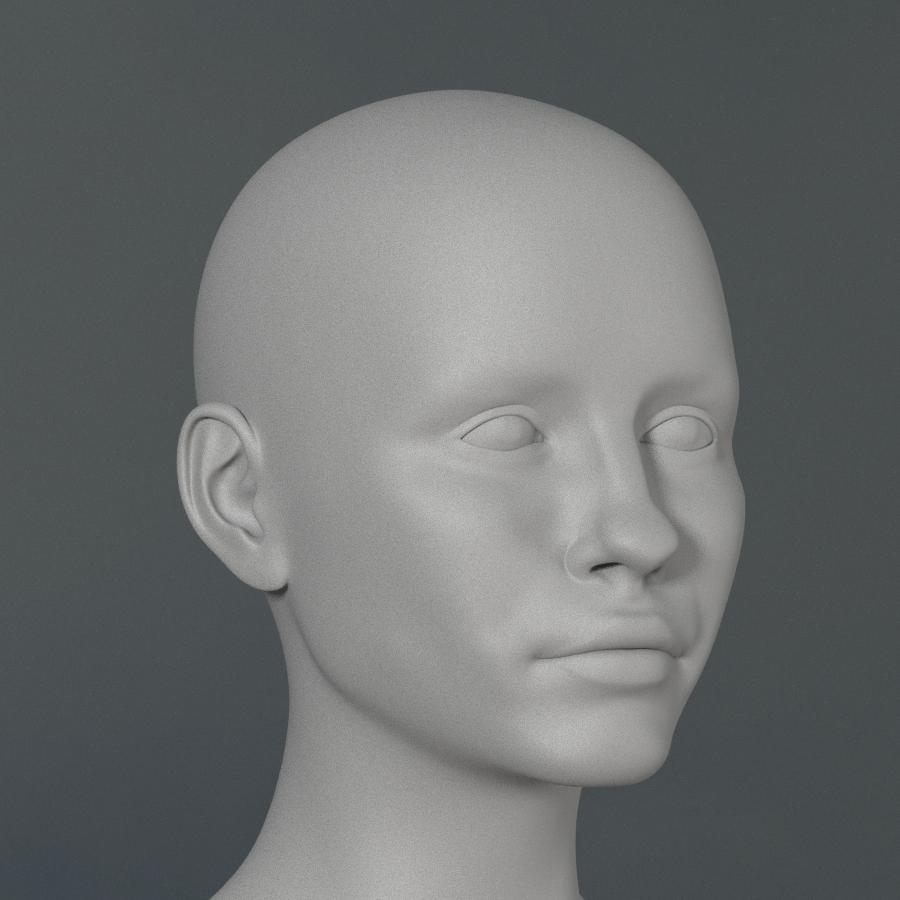 Muscle-Based Deformation take 3
This is great, once again! I hope in the near future you may consider also working on a life-like graft or add-on for G8F breasts and buttocks only, not for muscles but just for modeling physics (gravity, bounce, squish, etc.). There are many breast and glute morph packs out there, but they just don't do reality justice when you have more complex poses. You seem to have the skills needed to make something grand!
So, AW's Chloe - Genesis 3 only?Has anyone run Chloe through morph transfer to G8F? If so, how are the joint deformations when posed? Could you post some pics? Thanks!
Answering my own question - it tranfers over fine. Identical to G3F in appearance and deformations.
What did you use? I tried Riversoft's G3F to G8F converter, only to discover it no longer works
 . (I tried launching the male version to see if it was just me, but that wouldn't launch either.)
 I've still got v2 (I think) of the G3 -> G8 transfer script from this thread https://www.daz3d.com/forums/discussion/176271/morphs-from-g3-to-g8/p70. Not sure if it's still available - but you might find a link if you scour the thread.
is on github but I cannot get it to work
No, it's not that one. I think I got one of the really early scripts. I had a quick look in that thread and the link appears to have been removed. Singular Blues has a link to a pdf in their sig which might help: https://www.dropbox.com/s/x2vcwnfu7w2wtj9/G8%20Morph%20TransfersR1.zip?dl=0
This is the header from the script I have:
// DAZ Studio version 4.9.4.117 filetype DAZ Script // author : Architect // created : 2017.08.07 // version : 0.02.61 beta // // You can use this script freely for personal or commercial use. // You may not resell, sub-license or rent this script in any way. // You may credit this script to Singular Blues https://www.singularblues.com // // Some elements of this script were cribbed from mork's Expression Converter // https://www.daz3d.com/forums/discussion/comment/2668021/#Comment_2668021 // // THE SOFTWARE IS PROVIDED "AS IS", WITHOUT WARRANTY OF ANY KIND, EXPRESS OR IMPLIED, // INCLUDING BUT NOT LIMITED TO THE WARRANTIES OF MERCHANTABILITY, FITNESS FOR A PARTICULAR // PURPOSE AND NON-INFRINGEMENT. IN NO EVENT SHALL THE AUTHORS OR COPYRIGHT HOLDERS BE LIABLE // FOR ANY CLAIM, DAMAGES OR OTHER LIABILITY, WHETHER IN AN ACTION OF CONTRACT, TORT OR OTHERWISE, // ARISING FROM, OUT OF OR IN CONNECTION WITH THE SOFTWARE OR THE USE OR OTHER DEALINGS IN THE SOFTWARE. // // Version history: // v0.01beta - 2017.08.07 - First public test release // v0.01.1beta - 2017.08.08 - Fixing missmatch where if stament expected array in var val and got number // v0.02beta - 2017.08.10 - Fixed issue preventing operation with multiple Libraries. Added proper copying of Connect files // v0.02.1beta - 2017.08.11 - Added progress bar // v0.02.2beta - 2017.08.12 - Corrected file handling of png files. // v0.02.3beta - 2017.08.15 - cleaned up nested for loops, edits to prevent (NOPE) folder process looping. // v0.02.4beta - 2017.08.16 - edits to prevent folder process looping. // v0.02.5beta - 2017.08.16 - Remove redundant for loop the prevent certain execution. // v0.02.6beta - 2017.08.22 - Correcting issue resulting in no delta for vertex index 14845, Removing diagnostic fluff that // triggers a general failure, limiting script to use of DSF files for input (script will still copy pngs), renamed in light // G8M release //v0.02.6beta - 2017.08.30 - Fixed improper variable timingRandom "missing pieces"Mabel 8 is just a morph of Genesis 8 Female. The morphs are in the data folder, which is not a user facing folder (i.e. use doesn't interact with it directly and it isn't shown in the Content Library). You will find morph sliders for Mabel 8 in the Parameters pane. The preset to load the Mabel 8 character will load Genesis 8 Female, dial the Mabel 8 morph sliders automatically and apply the Mabel 8 materials. Does that not work for you?
Mabel 8 should have a "Character" file;
http://docs.daz3d.com/doku.php/public/read_me/index/51997/file_list
/People/Genesis 8 Female/Characters/Mabel 8.duf
/People/Genesis 8 Female/Characters/Mabel 8.png
/People/Genesis 8 Female/Characters/Mabel 8.tip.pngYes, that is exactly what I was referring to in my statement (emphasis added) "The preset to load the Mabel 8 character will load Genesis 8 Female, dial the Mabel 8 morph sliders automatically and apply the Mabel 8 materials. "
Daz To Blender Bridge; No Way To Import Older Models?!I transfer textures using Blacksmith Pro from Renderosity. The product available in Studio "bodges" them using something to hide the parts the textures don't cover; I never tried it as I wanted to actually transfer the texture.
I have moved a lot of older generation characters - and still occasionally buy them knowing I can transfer.
Just looked at that software. That ain't cheap.
Random "missing pieces"It's different from other G8 figures then?
All characters for the Genesis 8 Male/Female figure work the same; a morph and set of textures that apply to the base Genesis 8 figure. And they all have two ways of loading them into your scene; click on the character preset, which loads the figure plus the character morphs and textures, or load the base G8 then load the separate morphs and textures.
Note that there are three different ways a character appears in the store, which might be confusing you:-
- <name> 8 for Genesis 8 Male/Female — the "named base" characters, always sold along with Starter and Pro bundles of related hair, clothes, other characters, etc. as part of a "theme" (although sometimes the theme connection gets stretched like old chewing gum...)
- <name1> for <name2> 8 — a dependent character based on the shape of a "named base"; there's usually a couple of these in the Starter and Pro bundles.
- <name> for Genesis 8 Male/Female — not dependent on any other "named base" character, and almost never part of a Starter or Pro bundle (although recently a few of them have begun to appear in their own bundles with hair, clothes, etc.)
Daz to Unreal guide for "newcomers"(The famous "before your buy" or Limitations)ok guys since it's now official which daz is giving a little more "support to unreal and we have a official tool to expor daz stuffs to unreal and maybe in the future if this proof to be profitable for daz we can have a really amazing source/library to work but for now let's focus on the beginner, since probably many peoples are "newcomers and gonna make some experiences, then i feel which is important to help those peoples to know how to "proper start" they works,
ok this not gonna be a tutorial about "how to use the daz bridge or install and bla bla bla, but it will be more centered about "what really work or can work inside unreal", because while the tool will allow us to use all daz stuffs inside unreal, truth need be told, "not everything will work on Unreal or not will work in in the same way it work's on daz, aways having in mind daz and unreal are 2 different tools which initially had 2 different paths to work, where one is more specifically for render and the other started just a game enginer and now is evolving to be a "jack of all trades" tool, to be used not only for game, but film, render, and others stuffs, but even with that in mind they still different tools were "somethings which work on "one tool" not gonna necessary work in the other, or will work in another way, then is important have this in mind when start to buy daz stuffs to use in unreal or trying to use what you already have.
well let's begin with some basic info, about what work and what don't work and what "work but not exactly in the same way as it work on daz, well before that we must learn some basic stuffs from daz products, like how can we classify some daz stuffs;
Basically in daz we have 5(6 when counting old vic4 generation and older) different type of stuffs on daz
1 - rigged meshes: are the "basic meshes" which does have or not a skeleton and it can be combined to a daz mesh and in most of the cases imported to unreal without any issue, inside that category we have most of the daz base characters(from even vic4) to most of the outfits(excluding old outfits from vic4 generation or lower because they were "rigged" in a way which is almost the same as the props which don't proper work inside daz), most of the hairs and some acessories and anatomic elements
this is they "icon" inside daz

2 - props: basically the "non rigged and some attached stuffs, while those stuffs can be "normally exported without any issues to the character, they not gonna "follow the character" since they are not really attached to the character in the proper way, they will be just levitating around the place they are while you try to animate or pose the character in order to proper attach it to the character you must create a socket and attach that prop to the bone socket you created, even if you have place the prop inside daz in the place you wanted like a "weapon be proper attached in a hand in daz, it now gonna work in unreal the weapon not gonna follow the character and will remain levitating in the place you attached it, you need to export the prop alone to unreal then attach it inside unreal using sockets, once you learn how to do it, it will be pretty fast and simple.
here a image:

some cases of props like hats or hoods you can fix it following this:
http://davidvodhanel.com/daz-to-unreal-fixing-accessories-that-dont-animate-with-the-character/
this not gonna work on all the cases, specially in the case of attachments, but will work in many.
3 - "attachments", those are stuffs which some PA vendors place's in some outfits or body parts, which normally are not supposed to "strech" in the same way of the body when you are applying a morph, like a buttom which the vendor don't want the buttom become large when making a character superfat" or something like that, then those objects to keep they "original form" are "attached to the outfit or even in some cases characters, but they follow the same rule as the "props" since many of then are props too", and when exported to unreal they will have the same issue as the props and will be just 'floating around the body when it is moving, they not follow the body.
the only way to "fix" it would be you follow the same principle of maybe socket(never tested) or exporting the mesh to a 3d editor like maya or blender and changing the mesh to proper rig or parent/combine the attachment to the "body"(outfit) its was supposed to be part.
here a picture of it:

they need to be combined to the outfit mesh in a external way to make then work, otherwise i would recommend export the "outfit(or other stuffs which do have it) without it, just click on it and remove) you will be able to export the outfit but it will be missing those stuffs in some "outfits cases it will be not a big deal but in others it can make the outfit loose like 60 to 70% of it original look, a good exemple of it can be this outfit:
https://www.daz3d.com/dforce-victorian-butler-for-genesis-8-males - almost of the details, like buttoms, clock even the ribbon are attachments when you start to remove all the stuffs the outfit start to look really ugly then be ready for things like that
4 - geoshell elements: the famous "non polygon stuffs which are supposed to be a more light way to add stuffs to the mesh, ok while it can be exported to unreal, it not gonna work as it work in daz, when exported to unreal it does become a full "mesh" with geometry and polygons and like the props and attachments it will be not "rigged to the body", which means a float object, which in this case don't work on unreal, we have 2 possible soluctions for this issue(which i do know):
A - open a 3d editor like maya or blender and rigg it to the character like a normal outfit or other stuff
B - in some cases like a "geoshell body armor, if it follow the same "uv" as the character body mesh like in some cases you can just export the "texture" of the geoshell and apply it direct to the body "material" as the "base material instead of the skin texture or do a lerp and combine it with the body material, it can work on some cases like painted body hairs or mustaches or some painted armor suits" don't know if it can work on all the cases you need to check on the geoshell element you are working on and see on the texture if it can be applied direct to the body mesh or no.
here a exemple of geoshell outfit

5 - "dforce stuffs: let's make clear "dforce outfits in most of the cases, are a different case from "true dforce stuffs like hairs or furs, while almost any dforce outfit will be exported to unreal without any issue, the "dforce stuff not gonna work" you must use unreal cloth simulation tool to make it work as you want, the case of hairs and furs which were made full using the dforce tool, not gonna be exported to unreal or not gonna work in anyway, because it is a daz only tool and unreal don't have any support for dforce tool, then becarefull when you trying to export your "furry character" or your fur outfit" and check if the "fur stuff" is a full dforce created or a dforce applied, which is the big different, in outfits most of the cases they are just applied a dforce weight material to create the "cloth simulation" they were not dforce created, in case of hairs and furs in most of the cases they were created using the "dforce tool" then no "real geometry being used" other than the daz editor, ofcourse you can find some 'rare cases' of dforce hairs or fur were the "effect is being applied" rater than being created then in that cases the hair or fur can exported and will work on unreal, but again you need to apply yourself the "fur and hair effects" using unreal tool or you can use the cloth simulation or you can use the new "alembic way to work on hair and fur, here a video about it:
new groom hair tool for unreal
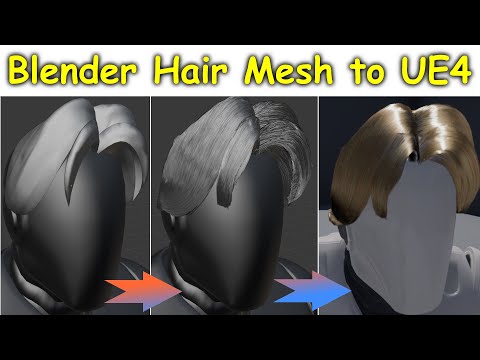
old unreal way to simulate hair using the cloth simulation
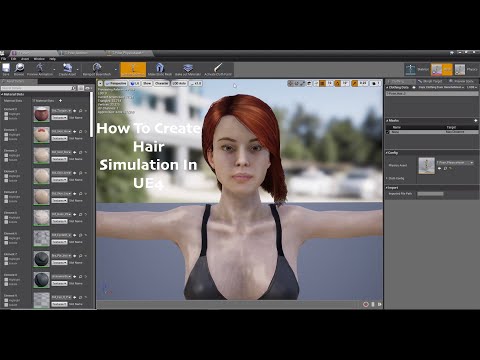
choose the one which fit better your taste
here the image for a dforce hair example:

6 - optional for old outfits and stuffs from victory 4 and lower, while they can be "exported" to unreal almost without any issue, they do have the same issue as "props", for some reason the way they were rigged in old characters don't work in unreal it will read then as if they were "props" and will be floating around the character or move but not "proper deform if needed, well will be a mess then in this case i really don't know how to fix it because what i did was just using some compatible tools or applied then direct to "new daz characters" using the autofit then it changed how they are handled from the "old way" to a "more new" which work with unreal, well what i means which they can work with any generation above victoria 4 (genesis, genesis 2, 3 and 8) while not proper work on victoria 4 or under, here a image to know when dealing with then:

ok those are the most "basic info" about the comon type of stuffs you will be dealing with daz, now we are gonna for some more "extra info" about some specific stuffs, specially regards "poly count".
While in daz having a 1 million or more polygons(vertices) character or multiple characters with 1 million or more are not a big deal "aslong you have the "nasa pc" lol
 , because the render will not be in real time and you can sleep, eat, watch tv while your pc is "dying" or suffering in have to handle this "monster", the same can't happen in unreal since it is a "real time render" you have to have some "limitations" abou what you are loading and while you can inside unreal have let's say a big open world with billions and billions of polygons being loaded, not all of then are being rendered and in order to have a "fast render" for all objects you need to have "low poly stuffs being rendered to have a fast render in real time, i means which while unreal can let's say render fast a scene with let's say 10 objects with 100k vertices each, with a total of 1 million, the same is not true when rendering a single object with 1 million polygons, the singe object with 1 million will take more time and effort in the engine than the 10 objects with 100k each.
why i'm saying that, well it's because some (if not most) of the PA's specially the ones working on hair, like to use "heavy dense meshes, where a single outfit or piece of outfit or even a hair can have alone near 1 millon polygons or more, then pay attention when using those stuffs, in some cases unreal can't just import those "too heavy stuffs", it too much, then things like "fibermesh or strand based" hairs can be very problematic if you don't proper pay attention and make sure you are not loading "monsters", the same goes for some pa artists which love to make some "ultra realistic mega detailed outfits where even the "small buttom" or fur is a very complex mesh with hundred of polygons, then for the users which want max realism and ultra max details using Unreal to render will not be a good option as long it don't make it have to deal with millions of polygon in single character or stuff.
The good news is which Unreal is "working on tha front" and they have plans for the next big version of the unreal , Unreal engine 5, to be able to handle heavy dense poly objects as we already saw in they annoucement and trailer, they are working a new version to be able to handle singe stuffs with millions of polygons, but for now it still on the future (next year) and the current version are still not able to handle it, then if really want high realism and details a option would be "bake material" which i means get a "reduced version of the mesh" and using the high version create a baked normal which will have most of those details, it can work to make your "not high poly final model, look "almost like the same as the high one, have in mind which it don't work on all the cases, but can work in some of then.
then be carefull when loading a scene from daz to unreal to see if all the stuffs are not "too heavy" and if the unreal can support what you are trying to load.
i hope it can help anyone trying to use or deciding if they gonna use daz stuffs in unreal, to be clear not everything talked on this thread is 100% set in stone without any changes or possibilities but for now those are the "lmitations" when using daz inside unreal.
have a nice day and week and have some fun playing with daz stuffs on unreal, i can't promise have a answer to everthing but any question inside my knowledge i can try to answer.
ps: srry for bad english in case peoples are having any issue in reading my post, i swear i'm trying to learn and improve.
Summer Camp Killer - Mouth Morphs?According to the file list http://docs.daz3d.com/doku.php/public/read_me/index/70707/file_list there is
/data/DAZ 3D/Genesis 8/Male/Morphs/Josh Crockett/Summer Camp Killer HD for Genesis 8 Male/summercampk_mouth_closed_fix.dsf
which would allow the standard Mouth Closed morph to work.
Summer Camp Killer - Mouth Morphs?Hi,
I refer to this advertise pic --> https://www.daz3d.com/media/catalog/product/cache/1/image/9df78eab33525d08d6e5fb8d27136e95/s/u/summer-camp-killer-hd-for-genesis-8-male-05-daz3d.jpg
It shows the figure with a closed mouth, it seems that there are no other figure morphs involved - and I didn't get it. It seems there's no way to achieve that with a slider, as there are no specific SCK slider settings. The normal mouth sliders are all on zero, so ...
I'm open for ideas. Thanks!
Paul
I don't have it yet, but according the files in the readme, there is a mouth closed morph -
/data/DAZ 3D/Genesis 8/Male/Morphs/Josh Crockett/Summer Camp Killer HD for Genesis 8 Male/summercampk_mouth_closed_fix.dsf
Introducing the all-new Daz to Unreal Bridge & native Unreal File FormatsBring your Daz Library to Unreal
Daz 3D is here to help you make photo-realistic and highly functional 3D projects with the Daz to Unreal Bridge. The amazing Character features you love in Studio are ready to export to Unreal for your animation, video game, or other 3D project. And, like our other Bridges, the Daz to Unreal Bridge is totally and completely FREE.
This cross-platform port transfers your characters, outfits, hair, props, and more to your Unreal project with just a few clicks. Wherever you’re working, bring your favorite morphable and mashable characters with you simply, quickly, and easily.
Advanced Bridge Capability
The Daz to Unreal Bridge comes with tons of advanced and enhanced functionality crafted specifically for animators and video game developers. The Unreal Bridge includes enhanced Daz Animation transfer, 3rd party animation capability, advanced Materials transfer and support, and more Daz Character and Animal transfer functionality, all for FREE.
How it works
This cross-platform port transfers your characters, outfits, hair, props, and more to your Unreal project with just a few clicks. Bring your favorite morphable and mashable characters with you simply, quickly, and easily in just a few steps:
-
Download
-
Download Studio for free, and get automatic access to Daz Bridge to Unreal (also free!).
-
-
Build
-
Explore over 30,000 items to find your perfect product. Then use Studio’s built-in sliders, morphs, smart content and auto-fit to make your perfect character.
-
-
Transfer
-
Once your character is ready to go, open your Daz Bridge and import your project to your 3D software simply, quickly and easily.
-
-
Finalize
Put in the finishing touches — watch your character come to life in your animation, game, or other 3D project.
Unreal File Formats
Whether you’re working on a quick product or want to add the perfect Daz character to your 3rd party software scene, Daz also offers native Unreal File Formats so you can add characters, props, animations and more to your Unreal project.
Need Help? See the Daz to Unreal Tutorial Video or Help Center.
The Daz to Unreal Bridge is an Open Source project.
Learn More about Daz Bridges, File Formats, and how you can create amazing 3D artwork. Your 3D Universe is waiting… what will create with tens of thousands of new 3D models at your fingertips?
Daz To Blender Bridge; No Way To Import Older Models?!I transfer textures using Blacksmith Pro from Renderosity. The product available in Studio "bodges" them using something to hide the parts the textures don't cover; I never tried it as I wanted to actually transfer the texture.
I have moved a lot of older generation characters - and still occasionally buy them knowing I can transfer.
So, AW's Chloe - Genesis 3 only?I never bothered with Riversoft's product but waited for X Transfer, which handled a character just fine when I tired yesterday; not got this one, but looking at the skin textures, they look both great and open to lots of alterations, so I may get.
Random "missing pieces"Mabel 8 is just a morph of Genesis 8 Female. The morphs are in the data folder, which is not a user facing folder (i.e. use doesn't interact with it directly and it isn't shown in the Content Library). You will find morph sliders for Mabel 8 in the Parameters pane. The preset to load the Mabel 8 character will load Genesis 8 Female, dial the Mabel 8 morph sliders automatically and apply the Mabel 8 materials. Does that not work for you?
Mabel 8 should have a "Character" file;
http://docs.daz3d.com/doku.php/public/read_me/index/51997/file_list
/People/Genesis 8 Female/Characters/Mabel 8.duf
/People/Genesis 8 Female/Characters/Mabel 8.png
/People/Genesis 8 Female/Characters/Mabel 8.tip.pngHair problems with many charactersOne workaround is to select the figure, check your head morphs, and choose one that would produce the same kind of effect - Dial it to 1%
Select the hair and choose "Show hidden properties" and use the name of the chosen morph as a filter to find it.
Choose "properties" of the morph-dial and change the status of autofollow (remove the check mark) and exit the properties
Dial the morph to a value that corrects the problem.So, AW's Chloe - Genesis 3 only?Has anyone run Chloe through morph transfer to G8F? If so, how are the joint deformations when posed? Could you post some pics? Thanks!
Answering my own question - it tranfers over fine. Identical to G3F in appearance and deformations.
What did you use? I tried Riversoft's G3F to G8F converter, only to discover it no longer works
. (I tried launching the male version to see if it was just me, but that wouldn't launch either.) I've still got v2 (I think) of the G3 -> G8 transfer script from this thread https://www.daz3d.com/forums/discussion/176271/morphs-from-g3-to-g8/p70. Not sure if it's still available - but you might find a link if you scour the thread.
is on github but I cannot get it to work
Daz 3D is part of

Connect
DAZ Productions, Inc.
7533 S Center View Ct #4664
West Jordan, UT 84084Licensing Agreement | Terms of Service | Privacy Policy | EULA
© 2026 Daz Productions Inc. All Rights Reserved.