-
Celebrity Look-a-Likes for 3D figures Part 2
I've noticed that many of the Digital Creations celeb look a likes have their actual measurements way off when you use one of the tools, such as figure metrics, to measure them. For example, Digital Creations Celeb Series 23 is 5'11, 37" bust, 26" waist, and 39" hips according to the masurements with figure metrics. The real woman it resembles has her measurmenets listed as 5'7" tall and 34-24-34 or 35-24-34 in most sources, including her agency. CS42 is 7 or 8 inches too tall and her other measurments are off also. I've noticed simialr things with a few others that I measured. Its something to keep in mind if you are tyring to create a more realistic scene with those characters.
I haven't measured any of the celeb look a like charachters from other sources yet.
Try scaling down the figure to the actual person's height and then seeing how closely all the other measure metrics statistics match up. There is a major incentive against deviating (especially in terms of height) away from Genesis base/popular figure dimensions in the creation of a custom (eg. real-wolrd based) figure shape since donig so wreaks havoc on your ability to make use of 99% of the 3rd party pose collections out there (since they are virtually all designed around a particular Genesis generation's base/singlemost popular character shape - eg. Genesis 8 Female/Male base or Victoria/Michael 8.) The most elegant workaround for this is to start out with a base character shape adjusted to resemble the real-world reference in height/body dimensions as closely as possible, build the likeness' details, and then - at the very end - scale the overall character morph back to being as close to that original base model's height/body dimensions as you can live with. That way people can use it without having to rely solely on their own custom morphs - especially in the context of multiple character scenes (where needing to customize each and every element in all multi-character/character + props pose presets becomes a huge chore.)
Myself, whenever I'm creating a likeness character, to deal with this I always like to create a separately dialable "Character_X True Body Scale" submorph so that I can select between true realism and practical realism in creating actual scenes.
3ds Max bridge doesn't transfer JCMs.....right?As far as I can tell it does not transfer the JCMs or pJCMs -- which kind of stinks. Can someone verify this is true and it's not just me being clueless...
Thanks
WW1 vehicles and uniformsNice work! what program did you design them in? yeah, rigging doesn't transfer well at all from other apps to DS in my experience
Celebrity Look-a-Likes for 3D figures Part 2Facegen is da bomb basically gives one unlimited amount of characters.
Strange.. for me facegenned figures always look at lot weirder than manually sculpted ones. Probably because it often looks as of just the face texture is pasted on a totally different 3d structure below it, without any real modelling involved.
Same. To me, Facegen (generically referring to all such methods) always looks like Facegen.
I see Facegen as a tool that automates mixing photomanipulation with 3D models -- I don't see Facegen as a 'silver bullet' solution for obtaining 3D Celebrity look-a-like models -- I prefer purchasing my 3D Celebrity look-a-likes from PA's that are skilled at using 3D modeling software -- But in those cases where a specific Celebrity character is not available, Facegen is a viable workaround for being able to feature a desired celebrity in a 3D artwork scene
I understand and I feel the same way. But when I do a facegen morph, I do tests and tweak them with other morphs dails or dial down the facegen morph and work from there. I'm not an expert but I feel it's stepping stone and work on tweaks.
EJ Fantasy Ears For Genesis 8 Males - Where are the sliders? [RESOLVED]Hi Richard,
So, I deleted it from DIM, and them also from inside Daz (Connect). Now the ear morphs won't even apply to a new character at all. It just doesn't do anything aside from flashing a dialog that says that the morph was successfully loaded. And still, no slider shows up anywhere in the Shaping tab. But the saved character with the morph already applied loads in and looks fine.
No errors in the log, just success messages related to them; everything looks normal.
Anything else you can suggest?
Purchases not appearing in my install managerThis should all be fixed now, if you log back in to DIM/DazCentral/Daz Connect it should have all of your latest purchases in it.
It appears what caused this was the primary web servers rebooting during a backup operation and then when they came back online the startup script for the process that syncronizes the product ownership between the web servers and the file transfer servers ran before the networking came up so it failed out instead of running.
We have fixed that error so it shouldn't happen again, even if the machines reboot unexpectidly during a backup operation.
Awesome! It's fixed! All of my new purchases are in DIM now (thank goodness, I was not looking forward to manually downloading all those products I purchased yesterday lol). Thank you DAZ_Rawb and the people who worked on getting it fixed! :D
Daz Speech Salad - ANIBLOCKS Talking LipSync System / Conversation generator - Enjoy :)Thanks for the feedback! And wow at your 13K posts here, you're a like a Triple O.G. :).
Your project idea sounds both awesome and very deep. After studying all the aspects I could re how the current scripts and audio file to visemes translation works, I kind of understand why the tools are incapable of perfect translation and why all the end results I get are totally mismatched from the audio, and the text file, and the variations never really matter (I've been producing music/audio engineering for 25yrs, so well versed with the ways I can try to manipulate the translators through EQ changes, frequency focus, levels, voice types, speeds, gating vs non, mouth smacks and lip/tongue/moisture sound interruption, etc.).
I say all that to say - we all have different voices, pronounciation, speed of speech, pitch, tone, even saliva distro.. there is no script that could catch all that efficiently in my opinion. Couple that with all the things necessary to make speech look realistic outside the head, and although not impossible, I think such scripts could cap out quick or just give warbled results like the current ones do.
I can envision a timeline editor similar to animate2 where you control each important component for speech for the head/face on sliders so that you can morph quick tweens while viewing .wav data file under it (I really wish DAZ implemented a simple way to see the wav. I currently take my logicX and position it under daz with the audio lined up to the timeline for quick reference sometimes - mind you now I won't really have to). But yeah so far this randomizing of ANIblocks to match speech is great - and more importantly imo = Giving users full control of speed, individual shapes/words/etc and maximizing animate2 use efficiently is a good catch all without having to go heavy into a full scripting language.
My mind was racing as I deved this out on how/what to do for a 2.0 version and I have some cool 'add-ons' I'll probably make for this to enable more interaction between characters (fight scene generator, aniblock a jump, choose from 10 kicks while in the air, combine with some spins, voila.. ). So I guess in a way I'm doing a manual version of the concept, automating/scripting it more does sound fun.
It's ambitious, I encourage you to keep exploring ways to try a trial run through it - I have been through a few long term project cycles and currently love to create, hate to maintain/long-term-build :).
I have been playing with the freebie version of a DeepFace Fake Face AI (it's a freebie on Android & iPhones called ReFace) and it's pretty impressive much of the time so I disagree although ultimately it's the script that would be feeding a series of movement clips and sound clips using DAZ compatible models in a DUF file and a DeepFace AI DAZ Studio plugin would do the alignment and syncing you talk about not being possible by computer.
Can that AI do it now as is? No. Is it feasible with increasing HW & SW sophistication to make it a goal to realistically shoot for in the future with some alterations? Most definately, although I don't know personally how deep I'll get into messing with such software ports to DAZ Studio (after all if I'm able to to do a port that sophisticated then I need to retire the federal government's classification of me as permanently disabled not that I'd care in the least.
 ).
).Thanks again for the update.
Holt 8: The West Gone Wild / WeirdFinally test rendered this whole gang, and Holt 8 is great! The broken blood vessels on his nose, the blemishes, eye bags---all make him very rugged and believable. He's not surreally Irayed like Dain, but I'm very pleased with his skin and head morph.
Not a fan of the new product library layoutThe problem with DIM should be fixed now:
This should all be fixed now, if you log back in to DIM/DazCentral/Daz Connect it should have all of your latest purchases in it.
It appears what caused this was the primary web servers rebooting during a backup operation and then when they came back online the startup script for the process that syncronizes the product ownership between the web servers and the file transfer servers ran before the networking came up so it failed out instead of running.
We have fixed that error so it shouldn't happen again, even if the machines reboot unexpectidly during a backup operation.
On the other hand, I'm not seeing any changes to the Product Libary; Just the unhelpful bit about Daz Central.
I got the same canned response as the rest of you. However, canned responses may have more to do with the volume of trouble tickets than anything else. And there is nothing CS can do but relay our messages to those making the decisions. (That doesn't mean it won't help if you respond to those with comment to the effect you're not satisfied. It might help; It might not. Who knows?)
We know someone from Daz is paying attention to this thread because we got a response from DAZ_Rawb. But don't assume posting here is sufficient. If you want to get the attention of the decision makers, you need to file a ticket and let them know exactly how the changes impact your experience with the website and using Daz Studio… Politely, if you want to be taken seriously.
It may turn out that this is all temporary, that the Daz Central blurb is a placeholder while they make changes to the store software. If so, I wish they would just tell us. I understand not wanting to announce an upcoming feature or product so the competition isn't getting a head start on competing with said feature or product. But letting the customer base know an unpopular website change is temporary, (if it is,) is not going to give any competitors a leg up. It's far more likely some of the customer base will move to the competition as they feel their needs are being completely disregarded. And that will give the competition a leg up!
(Just my opinion, of course.)
Purchases not appearing in my install managerThis should all be fixed now, if you log back in to DIM/DazCentral/Daz Connect it should have all of your latest purchases in it.
It appears what caused this was the primary web servers rebooting during a backup operation and then when they came back online the startup script for the process that syncronizes the product ownership between the web servers and the file transfer servers ran before the networking came up so it failed out instead of running.
We have fixed that error so it shouldn't happen again, even if the machines reboot unexpectidly during a backup operation.
Thank you for that DAZ team! Will try tomorrow, cause it's about time to sleep ;-) here...
Weird G8F bug with "Eyes Squint-Widen" poseI suddenly discovered a strange bug with G8F. See attached screen shot: When I dial in the "Eyes Squint-Widen" pose to 100%, that's what the figure looks like. Apparently there are morphs provided by the product "Auto Face Enhancer" that get triggered by that pose and cause this issue, but I bought and installed AFE over a year ago, and this has never happened before.
When I manually set the AFE dials back to 0, the G8F pose appears to be correct again (see second screen shot), but after uninstalling AFE and restarting DAZ Studio, the AFE morphs are still there (and get triggered, as before).
My question: There are LOTS of AFE morph properties in the property hierarchy pane. Can I safely delete those after uninstalling AFE, or will that get me into even more trouble?
Thanks for any hints!
Purchases not appearing in my install managerThis should all be fixed now, if you log back in to DIM/DazCentral/Daz Connect it should have all of your latest purchases in it.
It appears what caused this was the primary web servers rebooting during a backup operation and then when they came back online the startup script for the process that syncronizes the product ownership between the web servers and the file transfer servers ran before the networking came up so it failed out instead of running.
We have fixed that error so it shouldn't happen again, even if the machines reboot unexpectidly during a backup operation.
Werewolf for Genesis 3 Female?I am wondering if there is a werewolf morph for Genesis 3 Female?
Character conversion: copyright issues
Hi nicstt, yes I think this is the safest option. (Unfortunately I am a terrible modeller)The only way to achieve that would be in a 3D model program where you eye-balled the shape. Even then you may be open to some sort of infringement (Im not a lawyer so no clue), as you wanted to replicate the figure?
Hi Richard, I did achieve the almost exact same shapes across different Genesis generations using the hidden clones, but these shapes were not posable as I tried but failed to adjust rigging to the cloned shapes. Could you please teach me how to achieve your suggested solutions? Thank you!You can't do that, I'm afraid - at least, the only option I can think of is to use the (hidden) clone shape, where there is one, and set up your own joint adjustments for it linked to your master slider for the morph.
Very laggy hairHi I want to report some problems with this specific hair :
https://www.daz3d.com/samurai-style-hair-for-dain-8-and-genesis-8-males
When I install that product into my DAZ my pc gets very laggy a problem which I never had before with hairstyles or genesis 8 stuff. I would like to transfer this hair into XNALARA to view it and make renders but I get errors. Is there anyway to fix this problem?
Character conversion: copyright issuesYou can't do that, I'm afraid - at least, the only option I can think of is to use the (hidden) clone shape, where there is one, and set up your own joint adjustments for it linked to your master slider for the morph.
Daz Studio Pro BETA - version 4.12.2.60! (*UPDATED*)Hi all, any news on DAZ bug fix for daz NOT saving any morph animations? :) This has be very frustrating bug that is hindering my work tremendously..
If anyone has an older version of DAZ 4.12.0.8xx that can post for people to download and install untill this bug is fixed, that would be wonderful. That version used to save morph animations fine..
help... :)
Does KeyMate still save the animation morphs? I like the direction of the new DS timeline, but it's still buggy, I agree not saving the morph animation is a show stopper, but it's better to discover the problems during Beta's. I find It's difficult to do keyframe animation in DS using the standard DS timeline, without KeyMate 2 (the paid version). I would continue to use keyMate until the bugs are worked out of the new timeline. I'm glad to see DAZ is finally addressing the DS animation capabilities.
My two cents worth...
It is not a beta problem. It is on both the beta release and the general one. Additionally, it has nothing to do with the new timeline, and KeyMate makes no difference. You can use the regular production version of Daz Studio with KeyMate all you want, it's still not going to save your morph keyframes properly.
I'm flabbergasted that something this critical still hasn't been fixed after such a long time.
Daz to iClone Bridge...6-19 Gigabyte data dumps that accompany those figures sent over via any Daz "bridges"
Can't find any references to this. Do you have a link?
https://www.daz3d.com/forums/discussion/425791/tutorial-eliminating-file-bloat-and-morph-slider-performance-issues#latest, for example.
I see, I'm not familiar with the C4D bridge. I thought there might be a problem with the Unreal bridge.
No problem with Unreal bridge for me.
It produce customized .FBX files and textures, so the export file size is quite ok.
For example Holt 8 with Bankers clothes and the hair is around 100 MB.
Shape Splitter - Divide, Combine and Save (The new version is already available. 1.2.1)[Commercial]What's the best way of splitting in morph where the two figures are different heights.
E.g., Sasquatch is a lot taller than G8M, so when morphs load in they are slightly higher up.
When two figures are too different in size, I adjust the scale size, and create a new morph using the combine tab.
And now if I can divide the parts I want.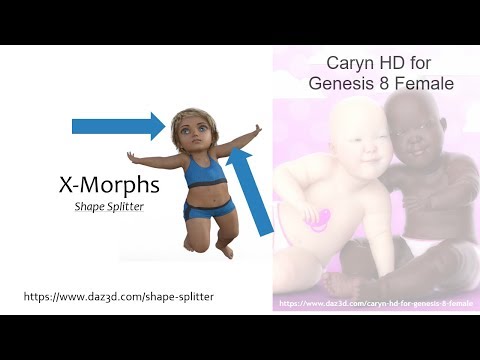
And using negative morphs, I can remove certain parts, and retain the HD detail of a figure.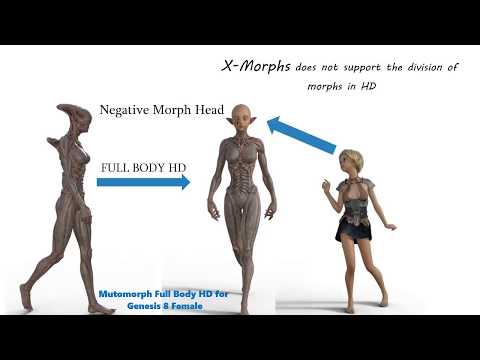
thank you
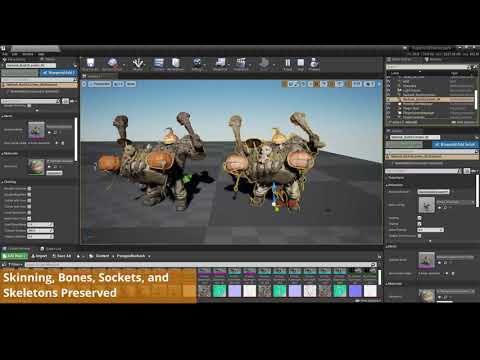
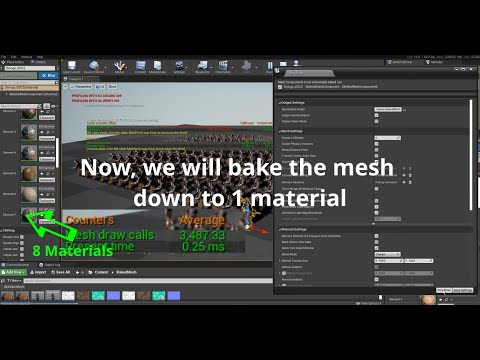
Daz to Unreal guide for "newcomers"(The famous "before your buy" or Limitations)Yes I already create my ID maps in Modo to use in Substance painter - however for DS products you want to have lots of surfaces so an option to merge during transfer would be the best solution. :)
well to be fair i found a pluging in the unreal market which maybe can do that:
https://unrealengine.com/marketplace/en-US/product/meshbake
Daz 3D is part of

Connect
DAZ Productions, Inc.
7533 S Center View Ct #4664
West Jordan, UT 84084Licensing Agreement | Terms of Service | Privacy Policy | EULA
© 2026 Daz Productions Inc. All Rights Reserved.