-
importing G8F into Blender question
You are trying to bring it into blender, to create a morph to import back into DS then? I thought you were looking to bring it into blender for rendering in eevvee or cycles, that's what the plugins are for. I think the way you want to do that is to make sure subdivision is set to base for g8f. Delete any extras like eye lashes and fibermesh brows etc. Export that as obj, then imort it into blender. I think the preset shown there was just something the tutorial maker set up, to make sure the axis and size are correct. The only morphs I have ever done was through the GoZ bridge, so I am not an expert at that for sure. One thing I know for sure is that keep vert order needs to be checked, or else it will fail to load as a morph. Can only move geometry around, never change the poly count or vertex count or vertex order.
Oh I forgot about something, look in your library for a folder called developer kit(I hope I didnt change that in my library) there should be something called "Export Base Resolution OBJ" inside there, that obj should work as a morph mannequin.
GenX2 and Genesis 2 AddOn released! [Commercial]Trying to convert Michael4 to Genesis... but after following the instructions for "Transferring a Character", no matter which options I select, I keep getting "No morphs with non-zero value selected for transfer".. and in the Morph table I only have "head" but no "body" etc... my source is "Michael 4" which I dragged in from the Poser content directories. I even have loaded M4 in the scene and tried "Get values from figure in scene" but it failed as well.
Please help :((((
ps. I had also purchased V4 and M4 Shapes for Genesis (https://www.daz3d.com/v4-and-m4-shapes-for-genesis)... is this actually a duplicate script similar to GenX2, if we speak of M4/V4 solely.
The shapes pack is all you need to get M4 or V4 shape on Genesis. They are morphs, just like any other character morphs. You do not need GenX2 at all to get M4 and V4 shapes on Genesis.
GenX2 and Genesis 2 AddOn released! [Commercial]Trying to convert Michael4 to Genesis... but after following the instructions for "Transferring a Character", no matter which options I select, I keep getting "No morphs with non-zero value selected for transfer".. and in the Morph table I only have "head" but no "body" etc... my source is "Michael 4" which I dragged in from the Poser content directories. I even have loaded M4 in the scene and tried "Get values from figure in scene" but it failed as well.
Please help :((((
ps. I had also purchased V4 and M4 Shapes for Genesis (https://www.daz3d.com/v4-and-m4-shapes-for-genesis)... is this actually a duplicate script similar to GenX2, if we speak of M4/V4 solely.
importing G8F into Blender questionoh, this is news to me I thought it was just as simple as importing a WaveFront obj of G8F from a folder which you saved there from Daz. This is what it looks like in Blender anyway (pic) would I still be able to use this to morph a new character from it do you know?!
second pic is from the tutorial and it has the 'daz' I didn't have but other than that option not being its the same process as mine it would appear.
what is the hardest part about creating quality characters for G3/G8?
Apologies for getting back so late to this I wanted to thank you for the help here.1) An actual personality. Far too may items have generic and bland looks, with zero personality to them. A huge part of this leads to...
2) The face. Give the poor girl a memorable face. Don't just go for the typical BS button-nosed and high-cheekboned doxie - give the character a bit of a big/prominent honker, or a serious overbite, or somewhat bigger-than-usual ears... nothing that makes it plug-ugly, but just enough to make it stand out. The Goal is to rig it so that the individual components are a touch out-of-beauty-standard, but when combined makes for something very pretty. Finally, make sure that the face and personality match the texture! Spend the vast majority of your time on this part of the body if you're serious.
3) Asymmetry. Very few human beings on this planet have perfectly symmetrical eyes, boobs, nostrils (seriously!), ears, etc. Kick parts of the face and body just a hair off-kilter, like make one eye 0.1 - 0.5 higher than the other. Make one boob a half cup-size smaller than the other and hike it up a centimeter or so on the chest in relation to the other. Oh, and speakin' of mammaries...
4) Mammaries Based In Reality. Real women do not have massive balloon-like breasts that defy gravity and logic. Make the 'girls' *normal* sized, or explore making them smaller-than-usual, like a B-cup or A-cup.
5) Proportions. Most women are shorter than most dudes, so shove in a default G8 Male to compare against there. Give the girl a few pounds here and there, depending on what the character is and does. Don't be afraid to get a small/reasonable muffin-top action going if you're handy with making morphs by hand. Most women won't admit it, but unless your character is a teenaged girl fresh out of puberty (or some angular-as-hell hardbodied triathlete, or a scrawny transsexual person), there's gonna be a bit of belly there. Part of what makes most women... a woman. Oh, and leave at least some waist there, please? Oh, and it wouldn't hurt to shrink the chest and/or monkey with the shoulder width... the 80's shoulder-pad era is dead, and should stay that way. Finally, the head needs to be in proportion woth the body, and not that tiny alien-head that the defaul Genesis 8 character comes with, so don't be afraid to scale it up a touch.
6) A Damned Solid Skin. Seriously, this is where a lot fo characters fall mega-short. The texture (and any/all makeup and eye-color options!) should match the personality of the character you're building. I don't mean the obvious stuff like slapping a freckled Irish girl's tecture on a Korean girl's head-mesh... I'm talking the subtleties. If your character is tomboy-ish, then the makeup options should be either very sparse or very over-done (or how about both options? Oh, and don't forget an option with no makeup.) Dig into (or discover!) the ethnic makeup of your character, then go look at photos of real people with the same ethnicity - and get the entire range so you know where your boundaries are. This works even in mixed-race folks. For instance, if, say, my character is half-Black and half-Latina, then I gotta dig into the facial structures for both, blend them in a way that makes sense, but then I dig into the skin tones and find one that makes sense, blend them in a way, ensure the eye color makes sense (yeah, no baby-blue eyes here by default, folks!), and etc. Now for the technicals: Make triple-certain that your skin will show well in a wide range of lighting circumstances - for both 3DL and Iray versions. I've lost count of the texture kits that look like utter garbage in anything other than the default DS Skydome lighting. Don't get stupid with the pores - I don't need a close-up of her face to resemble a close-up photo of the Moon's surface, and over-poring (is that a word?) tends to exaggerate texture deformation when a joint bends. Don't get stupid with the rez - you do not need a 12,288px x 12,288px shader set. Unless there is a sudden spike in users who play with DS on 84" 8k UltraHD television sets, 2048x2048 will work just fine for most users, and maybe put in an HD option with 4096x4096 if you want to futre-proof things.6a) Don't 'Help' The Skin! What I mean is, don't put in genital textures, don't put in knee wrinkles, don't put in the creases between butt-cheeks and legs, and in general don't paint on anything extra to simulate what movement should be simulating. This actually helps photorealism, because you're not seeing an out-of-place butt-crease on a bent-up thigh, or knee skin wrinkles on a knee that's fully bent, or under-boob lines on a breast that's streched upwards (hey, some folks do nudes, go figure, right?) Point is, don't 'help' the user/customer out. It only leads to headaches.
7) Get to Know The Personlet You're Creating. The whole process of building a character is like getting to know someone. The deeper you get into the details, the more you come up with and 'discover' about the little person-ish thing that you're building. My favorite way to do this is to build something that sort of stands out, then invent a whole backstory about that person. Then I go back in and tweak it. Then I fill out more details... then go back in again if needed.
8) Leave Room For Change. If you're making something for yourself you can ignore this, but if you're making something for sale, you need to take this into account. Once you're done making something, toy with it a big - make it fat, make it skinny, make it pregnant (not like that you perv!), make it a midget, make it a giantess, make it a child, make it an old woman, etc... if you make a character morph too rigid, then changes made by a customer will be disappointing to say the least, so do some testing on that beforehand.
Gone on too long here, but hopefully this helps a bit.
Cheers!Diffeomorphic DAZ Importer Version 1.5.1Just tested the new 1.5 and I keep having issues with morphs not being loaded. Using the "load custom morphs" feature I could manage to load some of them, but all in the Custom Morphs section.
Yes, I noted the same thing yesterday. There was still some code around that had not been updated for the new morph system introduced in the summer, and this was one of them. Should work now.
This is a sufficiently serious to warrant a new RC.
Khemsit 8...Okay.... I don't remember if I tried Centaur 7 skins on Centaur 8, so I tried it here. (Yes, they do work.)
The morph & base skin is Khemsit, of course. Makeup is from Sahira.Background scenery? I think that's Kilamanjaro rising like Olympus above the Serengeti.
The more I look at the archery pose, the bow, the arrow, the more messed up it looks. A "realistic" archer pose would obscure the face, though. So, another case where realism = bad.
 Face transfer question
Face transfer works great but there is one question I have about it. I transfer the face and then saved the face. Do not remember exactly where the
save file is right away. Is there a way that I can load another G8 figure and then use the file that I have saved to create another G8 exactly like my
first one. I was thinking of making twins. In ohter words, can I transfer the saved face onto another G8 figure or do I have to go thru the face transfer again?Thanks.
Rigging of V3 & V3 clothingThanks Catherine. I confess at first reading I think I understand about 50% of what you said. I shall study it again and research what I'm not sure about. Thank you for taking the time to describe a way to do it to me.
GV3 when fiddled about for iRay looks as below:

A bit tall, leggy, excessively slender and not apparently wildly life-like, but.. actually pretty close to the shape of the young lady who became my wife Tracy. OK, my wife had only unintentionally achieved that shape shortly before I met her having had a quite debilitating dose of gastroenteritis and she filled out a fair bit within the next 8 months before we got married, but she was close to that shape when I met her. Her figure made me want to get to know her, and having done so, her figure became unimportant because the whole of her was important, not just her figure. Anyway, I am fond of GV3's shape because I am reminded of my wife every time I see her. Sorry maundering a bit here, I shall stop forthwith.
It is my aim, one day, to transfer the whole GV3 shape to G8F, but I thought I'd take a baby step first of getting more clothes to fit the slightly oddball version of V3 she represents. I know the figure transfer from V3 to G3F then G8F is not always reliable and I am preparing for a long slog on that side.
Regards,
Richard.
V3 to G3F:
https://www.daz3d.com/legacy-uvs-for-genesis-3-special-edition-victoria-3 [for the skins - although more recent skins tend to be much better quality]
https://www.daz3d.com/wear-them-all-autofit-clones-expansion-for-genesis-3-male-s-and-genesis-3-female-s
Auto-fit clones including for V3....................
If at all interested in the still much loved Genesis figure:
https://www.daz3d.com/gen-3-iconic-shapes-for-genesis is the bundle which includes
https://www.daz3d.com/v3-and-m3-shapes-for-genesis
With this "You get Victoria 3 and Michael 3 body and head shapes as well as the clone shapes that allow you to "auto-fit" your existing Victoria 3 and Michael 3 wardrobes to Genesis."And of course once any of the Genesis clan have a full figure morph, it is technically possible to transfer morphs to others in the clans.
{n.b. these all quite possibly could come on sale sometime next month}
Rtx 3080 pc build for £1500...is it possible?3080 £690+
Processor £170 - £300+ The realistic minimum is the AMD 3600, but its been going up in price during lockdown. And about to be superceeded late in October. If you want a machine now I wouldnt wait, but be aware it will drop in price by £30-40 in 6 ish weeks.
Mobo: £130+ Lets face it, you aren't going to put a 3080 in something that doesnt have PCIE4 anymore*. Some of the Intel boards will allow an upgrade to 11th gen later bringing PCI4, but you'd have to research this carefully.
PSU £75 Cutting it fine if you also want to go high power on cpu as well, though you dont have to.
SSD £100+ But realistically 1tb NVMEs start at £130, though like PCIE4, Daz struggles to make a huge amout of use right now on these, you'd be gutted if they update it next year and you skimped out here imo.
OS £10+
Memory £120+ 32 minimum. But in practice the temptation to spend more on over 3200mhz low cas latency means more like £160+
Case £50+
Miniumum imo : £1345 But yeah, if you start buying nicer cases, power supplies and faster/more memory then the £1500 figure is about right.
Edit: If you need a monitor.... erm, no :D
*Edit2: I mean if you are buying new. There is no detriment to the 3080 really in PCIE3 right now, just saying that your mobo is likely to last into the next gfx card, and we don't know if the new Microsoft incoming memory transfer from SSD direct to gfx memory standard will change the importance of PCIE in future for Daz.
IRAY Photorealism?Regarding the eyes. I changed the eyeballs a lot. First the cornea bulge is important. If you use the one that comes with daz's morph package, you should set it to 210. This is a far more correct bulge shape. I also changed the pupil to be a hole and put an extra mesh behind it to mimic the fluid behind the pupil and iris. I then set the pupil to a gray color. The eye maps are important too. I use for everything 8k normal maps. And bpr textures.importing G8F into Blender questionAm trying to use Blender to import and play around and morph G8 characters from Daz. I have saved my G8 character on desktop in 'WaveFront Object (obj)' but when I try to import it into Blender I see the 'Daz' option is not there under the 'operator presets' (pic) Why can I not select it please? is there anyone who may know why its not there? thx,
Was the V4 Era the Golden Age of Creativity?Another factor is that the gen4 era was pre-weightmapping. Everything was legacy rigging. Which meant that you could use most things, particularly clothing, seamlessly in either Studio or Poser. On the other hand, you couldn't always make a character sit down in it. A *lot* of full lenght skirts were not rigged (or in those days, more typically morphed) to sit.
That's part of the reason for the preponcerance of skimpware. Rigging a skirt took real effort. Shoulders and sleeves, also. I swear it sometimes seemed like 2/3 of V4's wardrobe consisted of innumerable iterations of a strapless minidress with a hole in it somewhere.
That said, yes there was a lot of gorgeous content for V4. Which continued to relatively recent time, since V4 was still the main figure used in Poser (and may still be) well after Poser adopted Superfly and its own weightmapping system.
Don't forget that all the morphs you used on the character, had to be recreated for the clothes, which normally came with just a few character morphs (Stephanie, Aiko, etc) and of course the mandatory "melon" morph.
Eventually (after a number of years) you ran out of ideas what to do with the naked figure, which you couldn't use unmorphed due to looking too much like Julia Roberts and being way too tall.Morph importing problem@ PixelReaper :
I would like to add to the conversation, because this is my wheel-house, and I am currently working on a Blender 2.8x Daz-to-Blender 'Morphs ONLY' Bridge (in development way before Daz-to-Blender release -- from a 2.79 addon) to be released soon.
For OBJ exports that go through the Studio exporters, the others in this thread are correct that you need both the Resolution set to 'Base' and the Sub-D level set to 0 for 1-to-1 vertex count/order fidelity in order to import and apply the morphs back in Studio.
The addon I am working on takes care of this for you (like the script that PerttiA suggests to use [which is for stand-alone exporting]), and automatically applies the return morph, and optionally auto-saves it as well.
Now, for morphing in Blender, you can add the Sub-D modifier to your Base Daz figure and set at what ever level you wish to work with for your morphing venture.
But, you must deselect the Sub-D modifier to export your morphed figure back to Studio, so you might not achieve the exact morph you are working towards.
lilweep is correct regarding HD morphs, so if that is your goal, I am afraid you will only be able to create low level basic body/body parts morphs.
Both Studio and Blender utilize Pixar Open Sub-D; Studio/Catmark, and Blender/Catmull-Clark (even though it says CC, they implemented OSD in it's place in the 2.8x series -- 2.79 is still legacy CC, though). However, both implementations are slightly different, so you won't get 1-to-1 fidelity, but you can get close approximations which is good for most cases.
* Alpha WIP's (Inline GIF's still not working - so I attached links to see working GIF's):
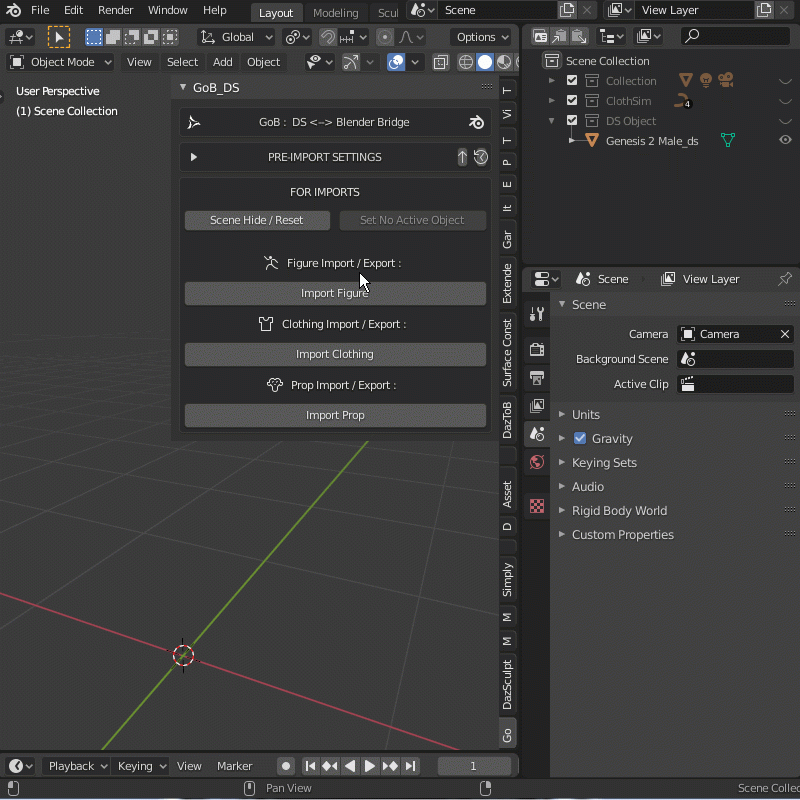
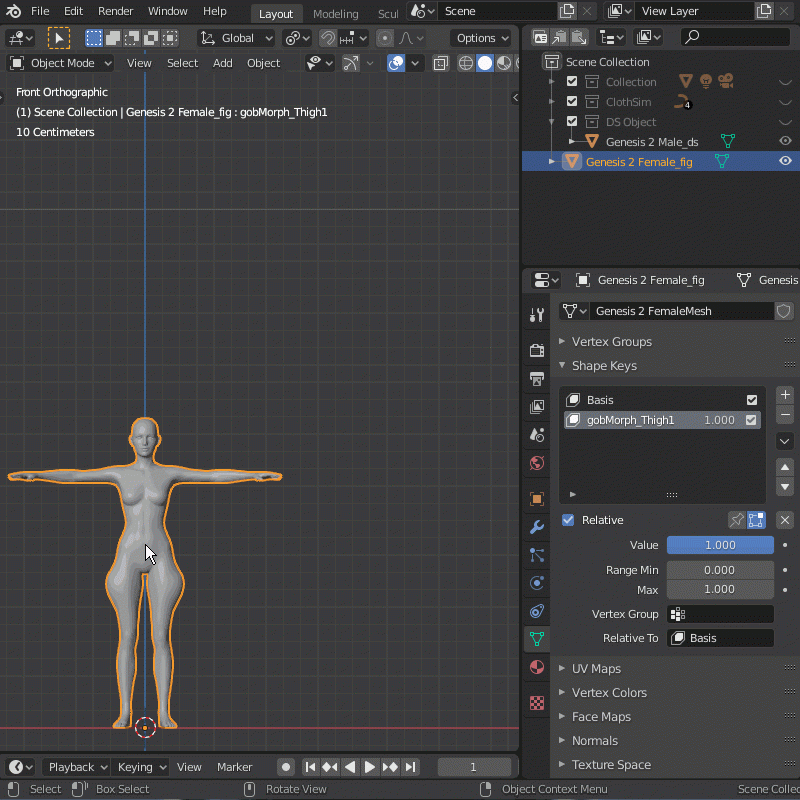
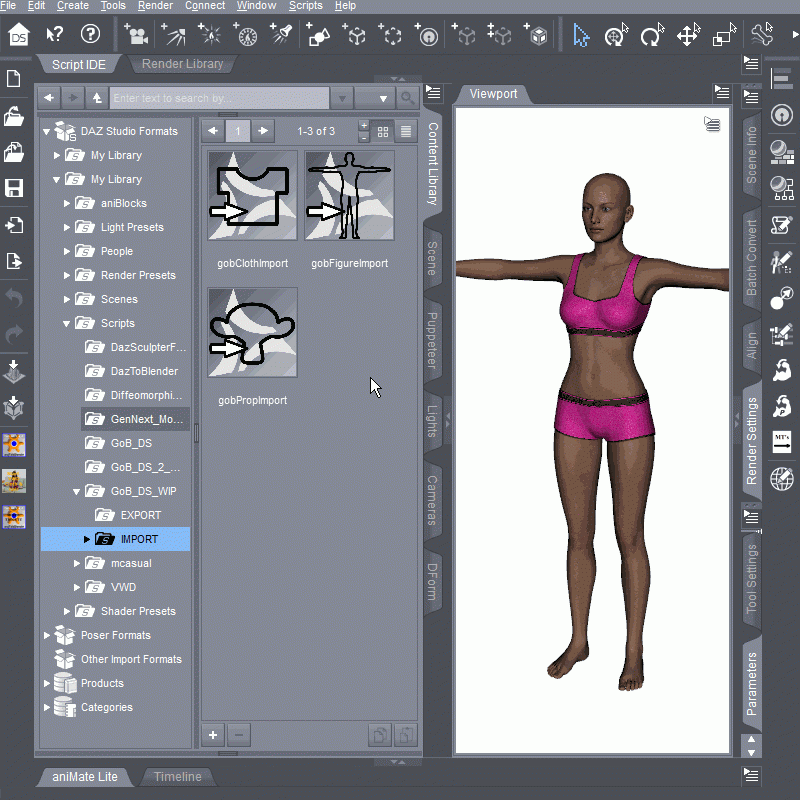 It's Here! First Live Product! [Commercial]
Thank guys!
Here's the socks to pair with the outfit. It's in obj format so you'll have to import it. Leave the import options as default. Once imported use the transfer ulitity to conform the socks.
IMPORTANT: Please scale the shoes by like 2-3% to remove poke throughs.
File was to big here's external link to my stash: Dropbox Link Socks
If you got any questions feel free to ask. Enjoy!
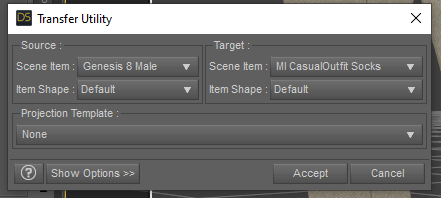
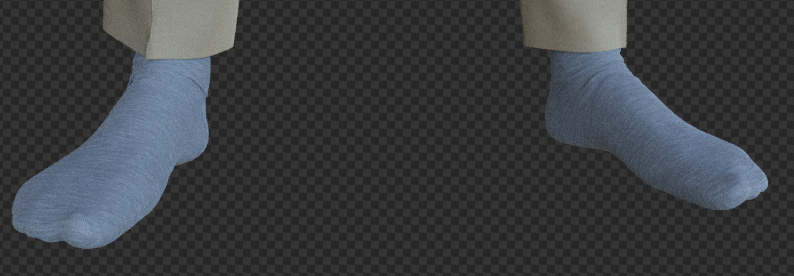
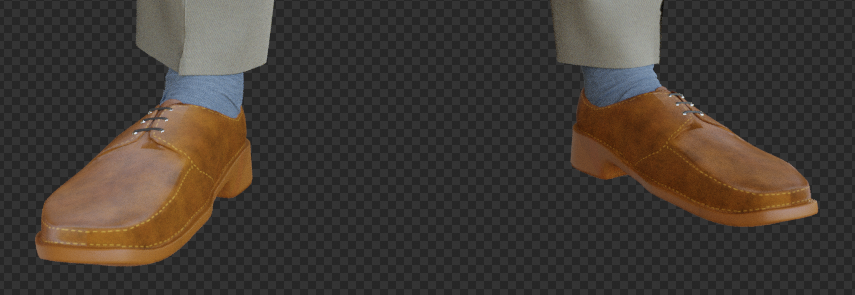
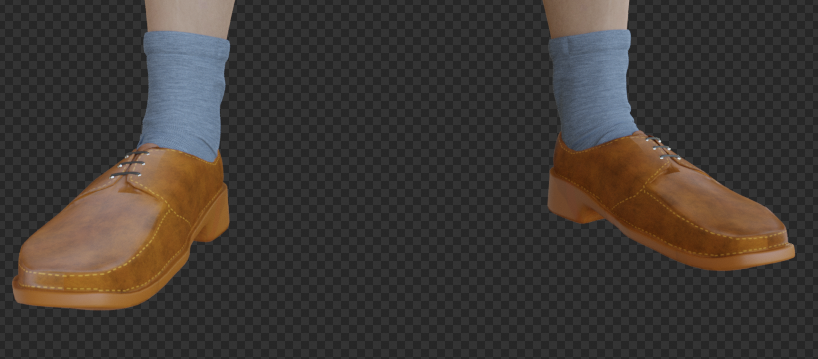 DELETE
i could see virtual shopping ..where you walk into a store in VR ... handle the goods, look at lables, etc ... even try them out.
How long before you;re not even in the real world anymore? Just sit in a vitrual world thaqt then becomes your reality. Plug in the feeding tubes and choose steak with a fully loaded baked potatoe and actually tastee and smell it, plus actually get noursihment from sone liquified paste high nutrient stuff pumped directly in.
It would be really cool to be able wto interact with the DAZ characters you produce in DS ... DAZ World or somethingWhat makes you think the world you see around you, is the real thing?
I've been told our senses (sensors) transfer the information they observe to our brains (CPU) by electric signals - Can't they be manipulated, forged or even fabricated out of nothing?
When you sleep, you have dreams which you take for real - How do you know you are not dreaming at this very moment?Beyond "I think, therefore I am", what is real and how can you tell?
In conclusion, there is only one thing that is "real", that an entity exists somewhere that can have a (the) Thought, and apparently has a very vivid imagination combined with lots of free time to come up with all of THIS...
Egyptian Oasis BundleTHIS AIN'T Akhenaten. I've been trying to FaceGen and dial morph a convincing Akhenaten for two years (maybe 3 weeks total)---I even reached out to Josh Crockett to no avail. I guess I'll have to keep trying. But Mstene's new male IS handsome and does evoke the androgyny associated with the son of Aten, father of Tutankhamun.
I did manage to morph Akhenaten several years ago on Michael 4, but I never saved him. Akhenaten supposedly had Marfan Syndrome and had a much longer face and prominent chin. But I did buy this Akhenaten because he looks pretty good, but not like the real Akhenaten.
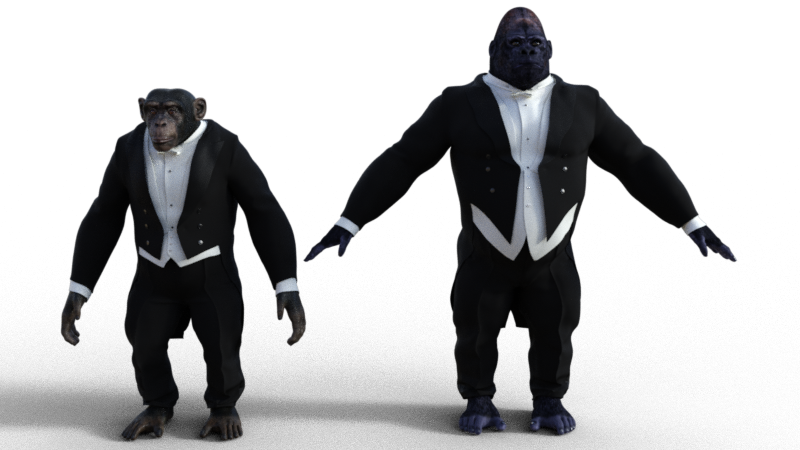
PRZ White Tie Outfit for Genesis 8 MaleI didn't try dForce on it, just loaded it onto the figure to see how it looked out of the box. I also tried Bullwarg, which fared slightly better, although the extreme head/neck morph caused a huge amount of distortion. Apes, on the other hand, wear this suit rather well (excepting the shoes, which they probably wouldn't wear anyway
Sharp looking monkey suit! A cane, top hat, and white gloves would complete the look.Something similar:
https://www.daz3d.com/ultimate-morphing-tux-bundle
PRZ White Tie Outfit for Genesis 8 MaleI didn't try dForce on it, just loaded it onto the figure to see how it looked out of the box. I also tried Bullwarg, which fared slightly better, although the extreme head/neck morph caused a huge amount of distortion. Apes, on the other hand, wear this suit rather well (excepting the shoes, which they probably wouldn't wear anyway).
 HELP! What character is it?
I would agree that Raiya's character, or one of them, could be involved. It's normal for PAs to either use their own or morph existing ones.
Also, OutofTouch collaborates with Raiya frequently, so this could be a simple case of cross-promotion.
Daz 3D is part of

Connect
DAZ Productions, Inc.
7533 S Center View Ct #4664
West Jordan, UT 84084Licensing Agreement | Terms of Service | Privacy Policy | EULA
© 2026 Daz Productions Inc. All Rights Reserved.