-
Welcome to Hatsune Miku Anime Manga Cafe ☕
Also I use https://www.daz3d.com/clothes-converter-4-0 is a clothes convertor and I add the morph using the previously mentioned program above. Crossdresser by Evil innocence for the figures not supported .
Welcome to Hatsune Miku Anime Manga Cafe ☕Have problem adjusting clothes on some figures due to lack of morph in them?, I use Morph covertor by d3D @ https://www.renderosity.com/mod/bcs/morphing-clothes/64629/ it make the figures clothes adjusted and tight.
Why might a product not appear AT ALLFYI - From DAZ
"This should now be fixed, so all of the products should show up in Daz Connect as they were previously.
Here's the nitty gritty about what happened: I am currently moving the download location of all of the product files from our old machines over to a new cloud-based file provider. While new products have been getting transferred from the new provider for a few weeks now I just started transferring existing products earlier this week. I was cautious with the initial transfers, starting with just a hundred products or so, then moving on to everything with a SKU above 70,000. After checking in with customer service and not hearing any complaints I went bigger and did everything above SKU 60,000. Once again, there were no complaints in either the forums or directly to customer service. So this weekend I was going to be doing some other work anyways so I lined up a big transfer and selected everything with a SKU above ~15,000. Unfortunately it looks like the store software had a bug in it that was fixed but it caused the data on the store side to be missing important pieces of information, it seemingly affected products in the mid 20,000 to the low 30,000's but was fine after that. This went unnoticed because the store software managed to get that information over to the durable cache of the download servers before losing bits of data on it's end. Well, when transferring the products the store data was updated with the new storage locations and caused the cache of the download servers to be refreshed with the missing data. The silver lining of this cloud is that fortunately this all happened in preparation for moving to the new store software so I was able to write some little programs this weekend to fill back in the blanks based on the source files on the old download servers."
*I do want ot thank Richard for being proactive in getting this fixed.
Auto Muscle Enhancer HD [Commercial]Here is a quick one I dialed up using Cromwell as a base. He has a great body I just wished his head morph was separate.
Transfer Generation 4 clothes morphs to DAZ OBJsI looked for any OBJ files for the V4 skirt that are separate expand and lengthen morphs but didn't find any but the OBJ for the item itself.You won't find any, that's not how morphs are provided in a product: you have the base obj, and "delta" files for each morph which tell you how the mesh is modified by the morph.
You can create an obj for the morphed skirt by dialing the morph then exporting the morphed clothed as obj, but as you modified the base obj to fit G3F importing the morphed V4 obj on the G3F one with Morph Loader probably wouldn't give you the result you're after.
Brows that actually follow the bone shapeSo if the fiber brows you have used before all came as part of a character's package, those are pretty much made for that one character and probably not intended for other shapes. That's why they do not offer any options to adjust them. Each of the 3 brow products you listed will work better.
I do not have all 3 of the brow products, I have Super Natural Brows and I like it. It is not perfect, there are times when I wish there were some additional morphs. But it has a fair number of morphs with it. You can see all the morph options it has on its store page, and notice that it offers a lot more shaping options than the other two products. In fact, its not even close. So even though it is not perfect, it still offers more than the others, and I believe that you will appreciate those extra morphs.
You specifically mentioned moving the corners of the brow, Super Natural has a morph dial just for that. It has dials for moving the brows up and down, adjust the depth, rotate the full brow, or part of it. Looking at the other products I do not see any morphing options like this. That is why I bought Super Natural.
And if you are handy, you may be able to create some additional morphs once you see how the product works. You could dial a morph, and then use your modeler to do what you wish to do with it.
Hi outrider42, I can tell that you really enjoy using Super Natural Brows. On the product page of Super Natural Brows it says "You may export your morphed brows as an obj and use the transfer utility to create wearable brows for your characters". Could you please tell me how to do so after I have morphed the brows to fit my character the best I could? Thank you very much.So if the fiber brows you have used before all came as part of a character's package, those are pretty much made for that one character and probably not intended for other shapes. That's why they do not offer any options to adjust them. Each of the 3 brow products you listed will work better.
I do not have all 3 of the brow products, I have Super Natural Brows and I like it. It is not perfect, there are times when I wish there were some additional morphs. But it has a fair number of morphs with it. You can see all the morph options it has on its store page, and notice that it offers a lot more shaping options than the other two products. In fact, its not even close. So even though it is not perfect, it still offers more than the others, and I believe that you will appreciate those extra morphs.
You specifically mentioned moving the corners of the brow, Super Natural has a morph dial just for that. It has dials for moving the brows up and down, adjust the depth, rotate the full brow, or part of it. Looking at the other products I do not see any morphing options like this. That is why I bought Super Natural.
And if you are handy, you may be able to create some additional morphs once you see how the product works. You could dial a morph, and then use your modeler to do what you wish to do with it.
Help me find a hairstyle for Genesis 3 Fimale Little Girl model.You might be able to do something with this one. https://www.daz3d.com/dforce-greyson-hair-for-genesis-8 It's for both male and female characters.
It's not exactly like the one you're looking for, but it might be worth a try since it has a lot of morph options and it goes on sale pretty often. It's dForce hair, but short, so shouldn't be too heavy.
What's shown in the video clip is nice. I would buy a hair like that.
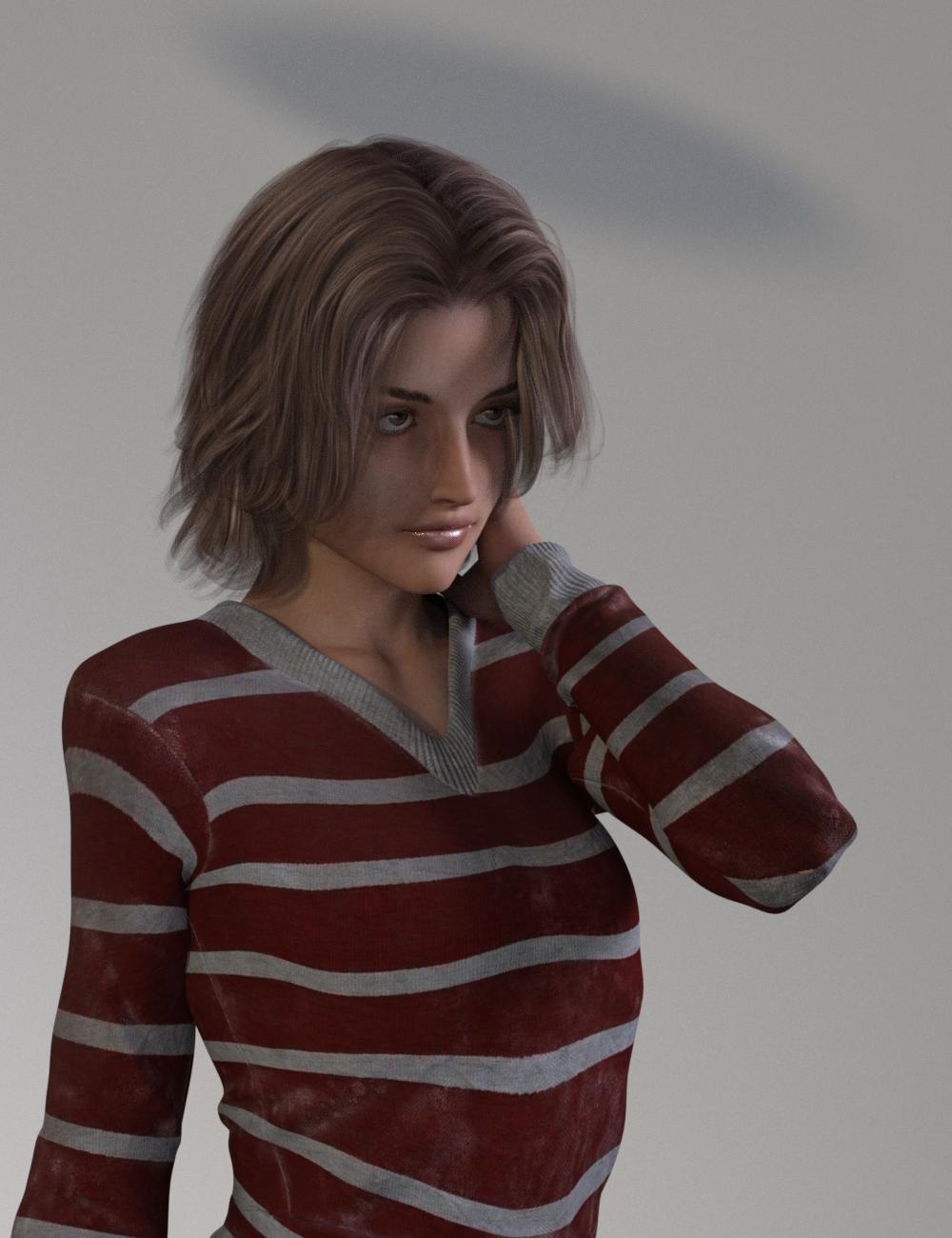
Edit: Turns out I did already. This is Alex Hair for G2M/G3M. I tried it fit to a G3F. It looks good, but not exactly the same.
 [Released] Character Converter from Genesis 2 Female to Genesis 8 Female [Commercial]
I've been trying to convert Giselle 6. I've messed with the tolerance (moved it up and down) but I keep getting these hour glass eyes. Kind of warped.
Any thoughts?
I find the best results are using the 2020 method in options. Make sure Hide Eyes is UNCHECKED. Turn down the tolerance (0.0005). Close DS, delete the FHM morph for Giselle, restart DS and the script and immediately convert.
Hi!
First, thank you so much for your reply!
I've got a question...sorry if I missed it somehow but how do you delete the FHM morph? I checked the location listed in the PDF but I couldn't find one.
Are you still able to load the G8F with Giselle morphs (even if bad)? If not, maybe you already deleted it?
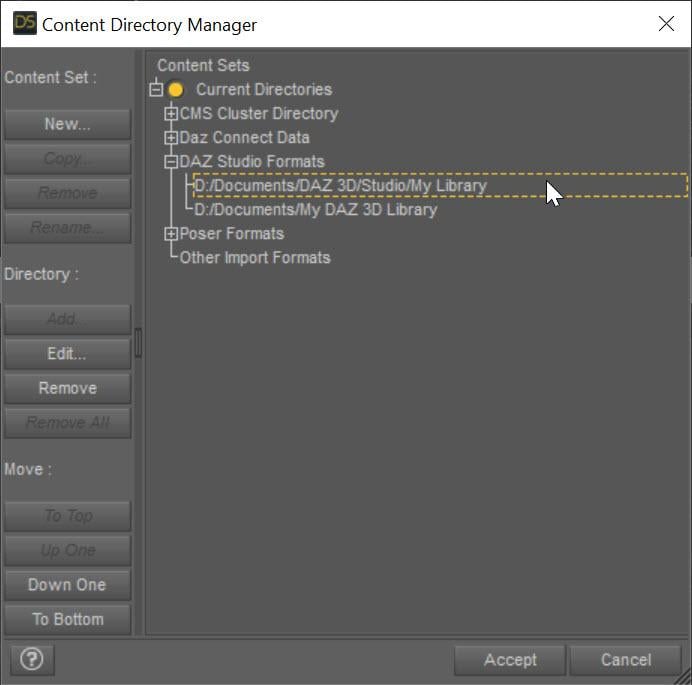
The converted morphs go in data/DAZ 3D/Genesis 8/Female/Morphs under the FIRST directory for Daz Studio Formats specified in the Content Directory Manager (F2->"Content" tab->"Content Directory Manager..." button)
 [Released] Character Converter from Genesis 2 Female to Genesis 8 Female [Commercial]
I've been trying to convert Giselle 6. I've messed with the tolerance (moved it up and down) but I keep getting these hour glass eyes. Kind of warped.
Any thoughts?
I find the best results are using the 2020 method in options. Make sure Hide Eyes is UNCHECKED. Turn down the tolerance (0.0005). Close DS, delete the FHM morph for Giselle, restart DS and the script and immediately convert.
Hi!
First, thank you so much for your reply!
I've got a question...sorry if I missed it somehow but how do you delete the FHM morph? I checked the location listed in the PDF but I couldn't find one.
Character Mixer for All Genesis Figures; If anyone buy it, I'd like to ask you one thingI just don't get why anyone would want randomly generated characters. For me, the most creative aspect of this hobby is to slide those morph adjusters to make a character that is unique and convincing. That's probably 80 percent of the reason I indulge in this hobby. I'll go further and say that I rarely, if ever, use a commercial character "out of the box". Those I buy serve as the basis for my own variations.
It's a good basis for getting something unique and that we like.
I certainly don't want my characters looking like everyone else's.
Converting Michael 4 to Genesis 8 Problems and HurdlesVWrangler wrote:
Well ... that's because it's not really possible to get 100% of the original M4 into any Genesis. According to another thread: The base model of Genesis is 18-19k polygons, Genesis 2 is in the 21-22k area. Genesis 3 was around 17K polygons, and Genesis 8 is slightly less than that.. The Genesis generations use SubD to create higher resolution characters on the fly (... sort of), but they don't start there. V4 & M4 are in the 66-67k polygon count area, G8 and the other Genesis generations don't have as much to work with, so it can't be absolutely faithful.
RexRed comment:
Thanks again for all of the info here...
I stumbled across a slider in my Genesis 8 actor morphs for Michael 4. The conversion process must have worked.
It works sort of but looks weird and does not give me the skins for 8.
His eyes seem enlarged...
I guess we will have to wait for Genesis 9 when the Genesis figures may catch up to the Generation 4 figure's polygon count.
It also seems evident now why it takes longer to load a Michael 4 figure.
This lowered polygon count in the Genesis 8 figures may also account for why I am drawn so much to the Michael 4 figure.
It might be also considered that a lower polygon count also means a lower texture quality because the texture quality is a direct ratio of the texel count. (Correct me if I am wrong in any of my assumptions here.)
None of the morph converters (Character Converter or XTranfer or GenX) handle the textures. They're not designed to do anything but the morphs. You need to handle the textures on your own, either by using one of the Cayman Studios Legacy UV products (that would use the original textures with some geografts to help it put things in the right places - there's a PDF at the bottom of the readme that tells you how the product works) or something like Texture Transformer (from Renderosity) that remakes the texture itself from the old UV and makes a new copy to the new UV. (There's an extremely manual process for remapping and rewriting the textures using Blender -- I think -- that's somewhere in the forum, but I don't remember the name of the thread, and it's not easy.)
And Genesis 9, whenever that arrives, almost certainly will not have anything like the M4V4 polygon count. Daz is focusing much more on game development using its existing figures, and that simply won't work with a figure that's four times the poly count of Genesis 8.
ISO Long Hair with a Crazy Amount of Movement Morphs [Solved]Hey 3Diva! Janet Hair can be made to reach past the shoulders, and it has several pieces with 3 movements each. If you double it up, you can get even more movement. It is a great hair for action scenes since you can get almost any movement you want. Here are the pieces and movements:
lBack01-Bend, lBack01-Side-Side, lBack01-Twist
lBack02-Bend, lBack02-Side-Side, lBack02-Twist
lBack03-Bend, lBack03-Side-Side, lBack03-Twist
lBack04-Bend, lBack04-Side-Side, lBack04-Twist
lSide01-Bend, lSide01-Side-Side, lSide01-Twist
lSide02-Bend, lSide02-Side-Side, lSide02-Twist
lSide03-Bend, lSide03-Side-Side, lSide03-Twist
lSide04-Bend, lSide04-Side-Side, lSide04-Twist
lSide05-Bend, lSide05-Side-Side, lSide05-Twist
lSide06-Bend, lSide06-Side-Side, lSide06-Twist
lSide07-Bend, lSide07-Side-Side, lSide07-Twist
lSide08-Bend, lSide08-Side-Side, lSide08-Twist
rBack01-Bend, rBack01-Side-Side, rBack01-Twist
rBack02-Bend, rBack02-Side-Side, rBack02-Twist
rBack03-Bend, rBack03-Side-Side, rBack03-Twist
rBack04-Bend, rBack04-Side-Side, rBack04-Twist
rSide01-Bend, rSide01-Side-Side, rSide01-Twist
rSide02-Bend, rSide02-Side-Side, rSide02-Twist
rSide03-Bend, rSide03-Side-Side, rSide03-Twist
rSide04-Bend, rSide04-Side-Side, rSide04-Twist
rSide05-Bend, rSide05-Side-Side, rSide05-Twist
rSide06-Bend, rSide06-Side-Side, rSide06-Twist
rSide07-Bend, rSide07-Side-Side, rSide07-Twist
rSide08-Bend, rSide08-Side-Side, rSide08-TwistThanks, xyer0! I think I need something a bit longer, though. I didn't get as many suggestions as I was hoping for so I did some digging and I'm thinking of going with this one: https://www.daz3d.com/wild-wind-hair-for-genesis-8-females
It comes with over 100 movement and wind morphs plus is rigged with 13 bones. I'll experiment and see if the morphs move it enough for my needs. Unless the morphs don't "do much", in which case, this one might work: https://www.daz3d.com/super-sleeky-hair-for-genesis-3-female-s-and-genesis-3-male-s-and-oot-hairblending-2-0 (It says it comes with 193 morph dials! Whoa!)
I THINK one of those should work.
Thank you for the suggestion, it made me look at OOT's catalogue here to see if there was something that might work. The Super Sleeky one might be the way to go. I'll have to test both that one and the Wild Wind hair out. :) Between the two, I'm willing to bet one of them will do the trick! *crosses fingers*
Thanks again for the suggestion! :)
I can not find 'pose morgh tag' in C4DIf you locate the skin nodes and look at the parent mesh node, you do not have a pose morph tag there ? could you show a screenshot of the object manager ?
Victoria 4 clothingI know this is a really old post but it helped me imensely with rigging clothing I created in Blender (version 2.82) for a Victoria 4 model in DAZ3D (Version 4.12). I ran into some issues even with this extremely useful thread and wanted to share the complete steps I used which are a slightly altered version of stwbcsuv_12364ebef4's steps mentioned earlier. The first issue I ran into was the clothing wouldn't fit to the figure properly (i.e. she'd be wearing the shirt on her face). The solution for this problem is detailed in step 7. The next issue I ran into was massive clipping even though the clothing mesh was custom made for this particular figure. The solution for this issue is detailed in steps 8-13. These settings worked for a relatively form fitted piece of clothing and may need adjusted per clothing article. I'd do more testing, but it's late. I'll update if I run into any more issues or discover more helpful tips.
1. Zero the pose of your V4 Figure.
2. Convert V4 to a TriAx-weight mapped figure [Right click Scene (Tab)->Edit->Rigging->Convert Figure to Weight Mapping->Check TriAx weight Mapping)
3. Import the .obj file modelled for V4 in zero pose.
4. Open the transfer utility (Scene (Tab)->Assets->Transfer Utility)
5. As Source, select your V4 weight mapped figure and change "Item Shape" to "Current".
6. As Target, select your .obj prop
7. Click the "Show Options" button and check the following:
8. Check "Reverse Source Shape From Target"
9. Check "Add Smoothing Modifier"
10. Leave all other options as default and press accept....Wait for magic to happen...
11. Under Parameters Tab, Navigate to "Mesh Smoothing" subgroup and make the following adjustments:
12. Change "Smoothing Type" to "Generic"
13. Set "Smoothing Iterations" to "6"
14. Turn "Interactive Update" on
15. Set "Collision Iterations" to "2"Ta Da!
i13 100 Essential Expressions for Victoria 7 - GONE - OTHERS AS WELLThis should now be fixed, so all of the products should show up in Daz Connect as they were previously.
Here's the nitty gritty about what happened: I am currently moving the download location of all of the product files from our old machines over to a new cloud-based file provider. While new products have been getting transferred from the new provider for a few weeks now I just started transferring existing products earlier this week. I was cautious with the initial transfers, starting with just a hundred products or so, then moving on to everything with a SKU above 70,000. After checking in with customer service and not hearing any complaints I went bigger and did everything above SKU 60,000. Once again, there were no complaints in either the forums or directly to customer service. So this weekend I was going to be doing some other work anyways so I lined up a big transfer and selected everything with a SKU above ~15,000. Unfortunately it looks like the store software had a bug in it that was fixed but it caused the data on the store side to be missing important pieces of information, it seemingly affected products in the mid 20,000 to the low 30,000's but was fine after that. This went unnoticed because the store software managed to get that information over to the durable cache of the download servers before losing bits of data on it's end. Well, when transferring the products the store data was updated with the new storage locations and caused the cache of the download servers to be refreshed with the missing data. The silver lining of this cloud is that fortunately this all happened in preparation for moving to the new store software so I was able to write some little programs this weekend to fill back in the blanks based on the source files on the old download servers.
Facial expression when exporting modelFor the DaztoBlender8 bridge, I don't know how much support there is. I know there was a way to import poses, but it did not always work. That was prior to the most recent updates, so maybe that is fixed.
I use Diffeomorphic which has an in-depth manual on how to use. Version 1.5 is the most recent. You can import a character pose and then import a facial expression, just be mindful of the options box that pops up when importing the second pose/expression. You can also save your imported poses in Blender, although I have not done it yet. Importing works so well I have not needed to.
I was trying to install Diffeomorphic but I ran into a couple of issues, however, I was able to learn a bit about Morph exporter. After watching a couple of videos I found that the expressions in blender are located in the object data properties. I really appreciate all the help, thank you.
SereneNight's Sci-Fi Fun Thread 2Not sure it will do smoothing and collision since it's not weightmapped. The fitting it to a GM8 cap has helped greatly, so far I have been able to reduce the Hiro 4 morph which fixes the ear weirdness a considerable bit. Mesh Grabber is on my list so if I don't catch it before PA sale ends I'll surely have it when PC Anniversary starts. Thanks for all the help so far!

Are you using the Hiro4 morph for the head size? If so maybe you could usr the Head Propagating dial instead ,if not then just ignore me ....
 CC#54 WiPs ~ What is it that you truly desire? after party Chit Chat
Stezza - The speed at which you model always amazes me. Super Duper!

Here we have a try...
Might not be totally political correct...
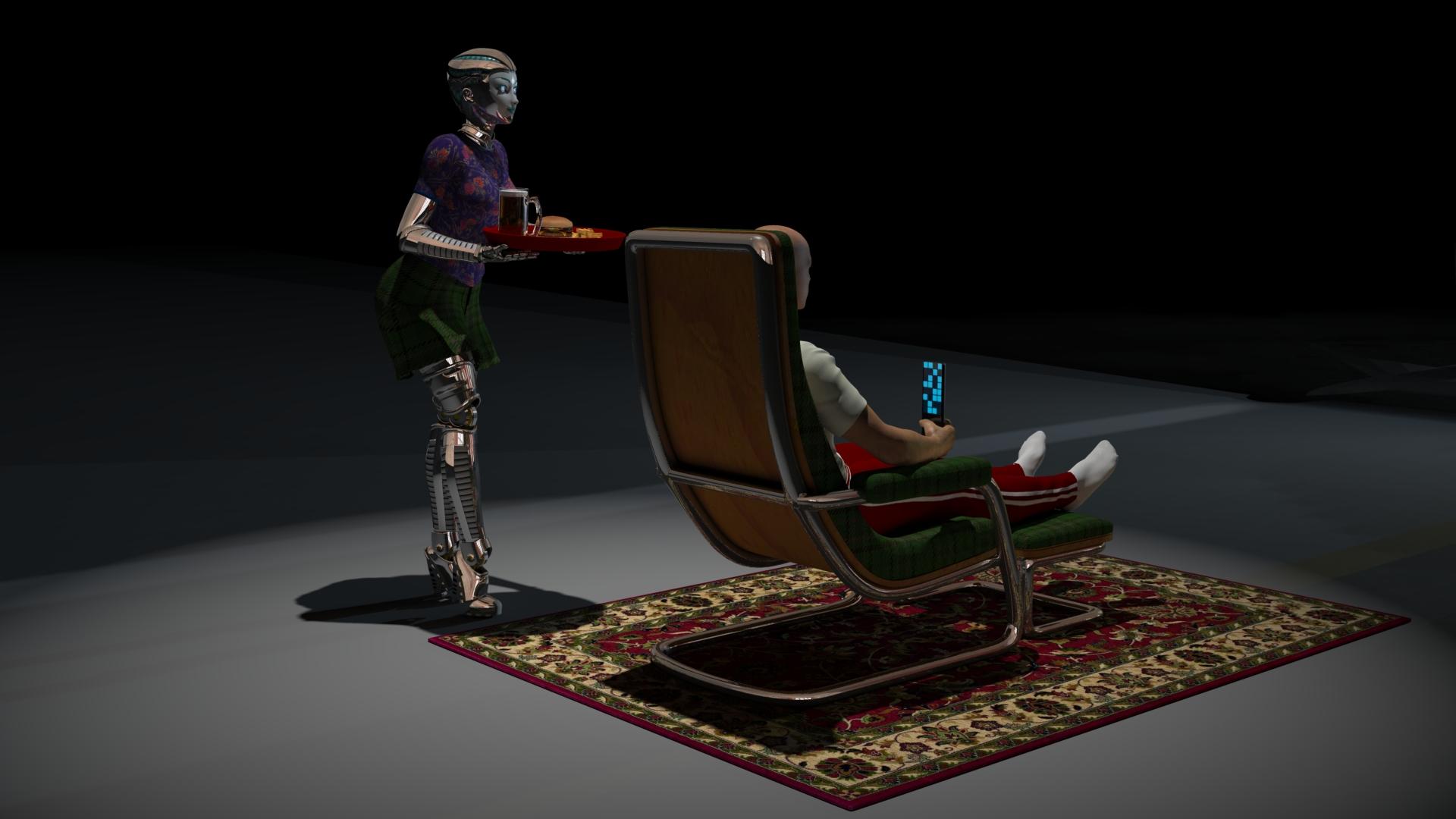
Very clever image Varsel. I like the sense of that large empty space.
Wish my cats would treat me that way.
Some tips for correcting poorly rigged and badly weightmapped figures like the DioMonster
The DioMonster comes with some BLANK morphs for the body. To improve a pose, you have several choices that can be found in the modeling wrench room under in animation mode (looks like a torso, arms, and head middle option at top right).
1) After posed, in modeling room animation mode, under bone tab, can select individual vertex, or groups of polygons, and use sliders to adjust bone weights.
2) After posed, in modeling room animation mode, select the weight brush from the top menu, and select the bone from properties tray on right to increase or decrease weights on figure
3) After posed, in modeling room animation mode, under morph tab, select morph area and specific morph, click EDIT and the morph area turns green, use modeling selection and translation/rotation tools to adjust model as desired. Click validate when finished. Morph is set to zero, return to assemble room and slide morph as desired up to one for fix.
4) Like (3), except use the Displacement Brush tool from the top menu to do the correction. The displacement brush has a SMOOTH options which is very sueful.
With left thigh bone rotated forward up and knee bent, the left leg crumples undesireably. I used the tips above to edit the MOR LThigh 01 morph to smooth the crumples.
Correction morph at 0
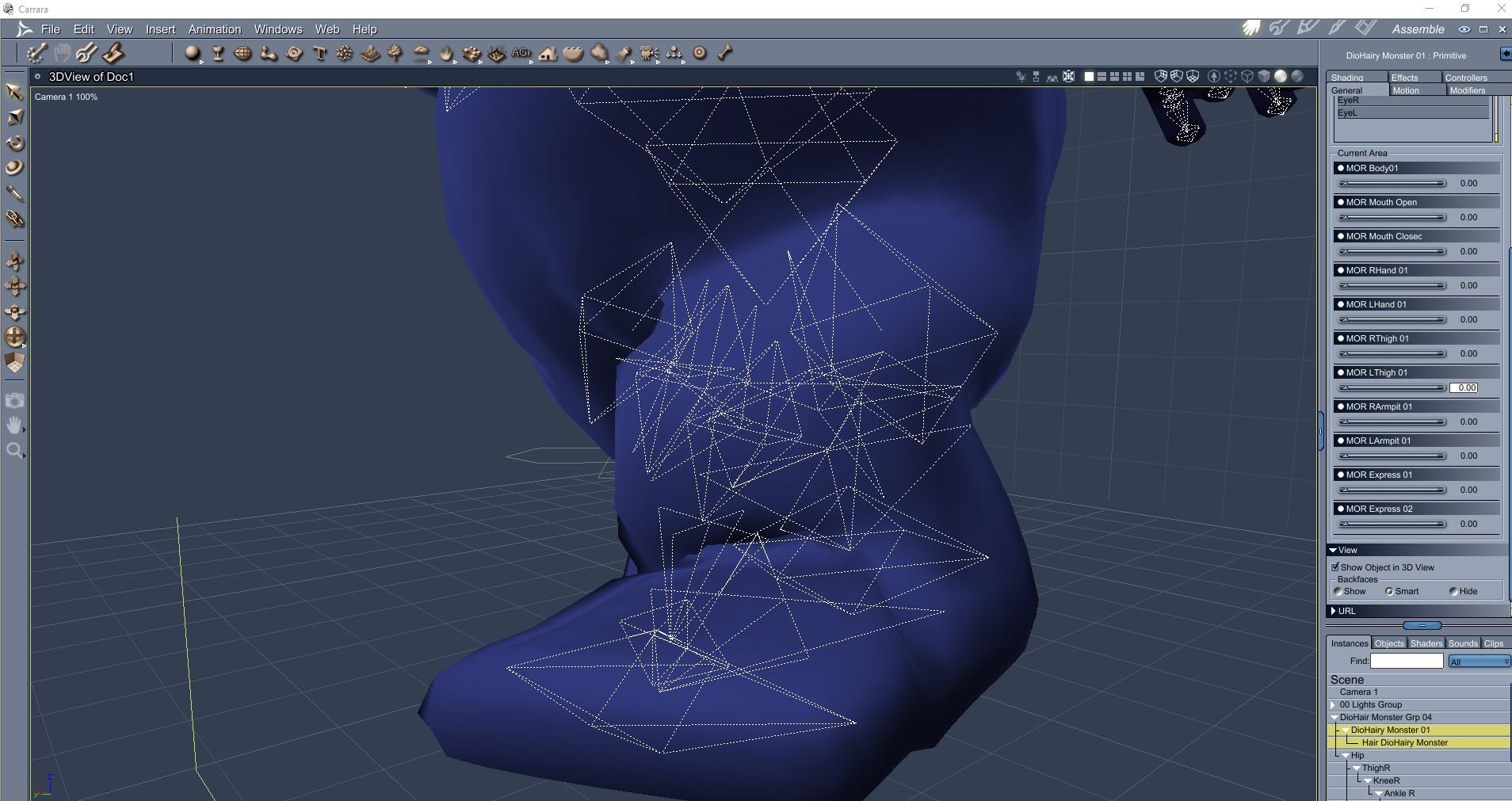
........................................................................
Correction morph at 1
DioMonster is awesome Diomede!
The tip for smoothing out wrinkles using a Morph and Displacement is so awesome. Thanks for explanations. Another great tip to explore.A Sudden Desire to Rip a Bodice

This is another one for the ladies... although you never know. :)
Haha UnifiedBrain, perfect encapsultion of a paperback 'dimestore' romance cover. Water refletions are awesome.
I worked for about 4 years in my teens as a page at our local library and, paperbacks like these weren't catalogued. Hundredds passed through, lol. And yeah, you never know...Custom Morphs from Daz into BlenderOkay, so I have been researching all day and have come up with very little, so I don't know if no one has run into this or if there's a term that I don't know about that I should be googling, I really, really hope someone out there has an idea. Okay, so I have Facemotion which takes an fbx file and turns that into facial movements on a Daz character. The keyframes show up under properties, morphs, FaceCap and then there's a bunch of settings for the entire face like shapes_cheekpuff for example. Since these are not bones, if I export a pose animation, they do not get saved in the pose file and won't show up in Blender through diffeomprhic if I import pose action. Now I just discovered that in diffeomorphic, if I clicked on import custom morphs, I can bring in all of the morphs from Facemotion and they show up on the bottom. So now how would I go about getting the keyframes from daz with all of these morphs to get written into keyframes that would be importable to diffeomorphic through the import action option (or something else that I might not be aware of) in order to get it to read the keyframes and use the custom morph for the facial animation? I hope this makes sense.
Now I have tried this at length with FBX's, so I don't think that is an option. Thank you so much for any and all help!
SereneNight's Sci-Fi Fun Thread 2Not sure it will do smoothing and collision since it's not weightmapped. The fitting it to a GM8 cap has helped greatly, so far I have been able to reduce the Hiro 4 morph which fixes the ear weirdness a considerable bit. Mesh Grabber is on my list so if I don't catch it before PA sale ends I'll surely have it when PC Anniversary starts. Thanks for all the help so far!
Daz 3D is part of

Connect
DAZ Productions, Inc.
7533 S Center View Ct #4664
West Jordan, UT 84084Licensing Agreement | Terms of Service | Privacy Policy | EULA
© 2026 Daz Productions Inc. All Rights Reserved.