-
[Released] Turbo Loader for Genesis 9 [Commercial]
PoshTentacle said:
So after an extensive amount of debugging done with 3 different AI chat bots (no, I don't use I for my art - just tech problems), I finally found the issue. Essentially, Turbo Loader had somehow cause my JP Sandor figures to point to the wrong URL. JP Sandor actually has two .dsf files: the one in the old standard definition folder for the character and the one in the newer HD folder ("JP Sandor" and "JP Sandor HD" respectively). Both of those .dsf files are still called "JP Sandor HD," though. So I guess when Turbo Loader reset my morphs, it changed the URL of that .dsf file. Anyway, after uncompressing all my scene files using the Batch Convert pane in Daz Studio, I ran the following script (I saved this as a .dsa file and then opened that file in Daz Studio) to edit each of the .duf files to update the bad URL to the correct one:
// DAZ Studio version 4.24.0.4 filetype DAZ Script

// JP Sandor HD URL Repair Script
// Top-level folder only. No subfolders. URL replacement only.

var ROOT_FOLDER = "C:/SCENE_FOLDER_PLACEHOLDER"; // replace with your folder containing scenes

var BAD_URL = "/data/Daz%203D/Genesis%209/Base/Morphs/Jepe/JP%20Sandor/JP%20Sandor%20HD.dsf#JP%20Sandor%20HD";
var GOOD_URL = "/data/Daz%203D/Genesis%209/Base/Morphs/Jepe/JP%20Sandor%20HD/JP%20Sandor%20HD.dsf#JP%20Sandor%20HD-0xa95d2eb";

var scannedFiles = 0;
var changedFiles = 0;
var failedFiles = 0;

function makeBackup(path)
{
	var backupPath = path + ".bak";
	var src = new DzFile(path);

	if (!src.copy(backupPath))
	{
		print("Backup may already exist or copy failed: " + backupPath);
		return false;
	}

	return true;
}

function processDuf(path)
{
	scannedFiles++;

	var file = new DzFile(path);

	if (!file.open(DzFile.ReadOnly | DzFile.Text))
	{
		print("Could not open for reading: " + path);
		failedFiles++;
		return;
	}

	var text = file.read();
	file.close();

	if (text.indexOf(BAD_URL) < 0)
	{
		return;
	}

	var newText = text.split(BAD_URL).join(GOOD_URL);

	if (!makeBackup(path))
	{
		failedFiles++;
		return;
	}

	if (!file.open(DzFile.WriteOnly | DzFile.Truncate | DzFile.Text))
	{
		print("Could not open for writing: " + path);
		failedFiles++;
		return;
	}

	file.write(newText);
	file.close();

	changedFiles++;
	print("Fixed: " + path);
}

function scanTopLevelFolder(folderPath)
{
	var dir = new DzDir(folderPath);

	if (!dir.exists())
	{
		MessageBox.critical("Folder does not exist:\n" + folderPath, "JP Sandor HD URL Repair", "&OK");
		return;
	}

	var files = dir.entryList("*.duf", DzDir.Files);

	for (var i = 0; i < files.length; i++)
	{
		processDuf(folderPath + "/" + files[i]);
	}
}

scanTopLevelFolder(ROOT_FOLDER);

MessageBox.information(
	"Finished.\n\n" +
	"Scanned DUF files: " + scannedFiles + "\n" +
	"Changed files: " + changedFiles + "\n" +
	"Failed files: " + failedFiles + "\n\n" +
	"No subfolders were scanned.\n" +
	"Only the JP Sandor HD URL was modified.",
	"JP Sandor HD URL Repair",
	"&OK"
);
Obviously, if someone came across this error in the future, they would have to find the bad/good URLs for their individual morph, but I thought I would post this here just in case someone found it useful
Thanks. I just had the same issue with the same character morphs, which have given me other issues too. I probably would have hit my wit's end with Daz and quit my project if you didn't post this. Drop thousands of dollars a year to get constant bugs and lack of support lol.
if i cut and scale g9 materials to fit the eye uvs for g8.1 is it possible to get them to work?Yes, as long as you have the textures well aligned as much as possible based on the UV templates in image editor.
Altanatively, if you have these products:
https://www.daz3d.com/legacy-uvs-for-genesis-9-genesis-3-8-and-81-female
https://www.daz3d.com/legacy-uvs-for-genesis-9-genesis-3-8-and-81-male...you can easily convert the texture maps by using Surface pane > Map Transfer, with G8 eyes UV Sets on G9 eyes node.
Dragonborn/Half Dragon/Dragonkin morph for the Daz Dragon 3Paleo Miles, the Paleo Knight said:
crosswind said:
Paleo Miles, the Paleo Knight said:
The Daz Dragon 3 has a ton of morphs, but what if someone wants to make a humanoid version of a dragon they put together? I am not talking about the generic humanoid dragon assets we have for some genesis figures, I am talking specifically for the Daz Dragon 3 in case someone wants, for example, to make a scene depicting the offspring of one of his or her dragons in human form with a humanoid mortal. Maybe edit the neck, chest and hip to make them more humanoid. It would be pretty cool.
You're right ~ Actually the primary skeletal structure of Dragon 3 is pretty much like Genesis figure, so you can easily make a "more humnoid morph" for a certain Dragon 3 (with or without shape addons...) by scaling / morphing / posing... (better plus a sculpting software like Blender so that you can shape the partial body morph to make it even better... or even make wings / tail a disappear morph ~). For example:
1) I made a delta morph of humanoid on a raw Dragon 3 by just posing and shaping firstly, sculpted its shoulders and other body parts a bit in Blender. Then created a humanoid morph + ARtS.
2) I re-rigged an armor for G9 on the Dragon ~ In fact you can tailor rig any Genesis clothing to a Dragon 3 with this sort of humanoid shape by using Transfer Utility, as well as create corrective morphs as needed. (ss1)
3) You even can rename the Node Name of Dragon 3's bones (with Joint Editor) so as to apply Genesis poses to it. Load a Pose Preset then finetune bones rotations. (ss2)Edit: In practice, you can do these on any breed of Dragon 3.
You're very talented in this, my friend.Thanks ! Good luck and happy rendering !
New Poser Products in DAZDaz Studio, I assume. It will depend on what features they use. DS does not suport the capsule bend zones introduced in Poser 8ish, and will not read Poser weight-mapping (it can export it). It also doesn't support all variants of external binary morph targets (.pmd files) and does not read the Shader Tree, so Poser 5+ Material Room surface setings are not used.
Dragonborn/Half Dragon/Dragonkin morph for the Daz Dragon 3
You're very talented in this, my friend.crosswind said:Paleo Miles, the Paleo Knight said:
The Daz Dragon 3 has a ton of morphs, but what if someone wants to make a humanoid version of a dragon they put together? I am not talking about the generic humanoid dragon assets we have for some genesis figures, I am talking specifically for the Daz Dragon 3 in case someone wants, for example, to make a scene depicting the offspring of one of his or her dragons in human form with a humanoid mortal. Maybe edit the neck, chest and hip to make them more humanoid. It would be pretty cool.
You're right ~ Actually the primary skeletal structure of Dragon 3 is pretty much like Genesis figure, so you can easily make a "more humnoid morph" for a certain Dragon 3 (with or without shape addons...) by scaling / morphing / posing... (better plus a sculpting software like Blender so that you can shape the partial body morph to make it even better... or even make wings / tail a disappear morph ~). For example:
1) I made a delta morph of humanoid on a raw Dragon 3 by just posing and shaping firstly, sculpted its shoulders and other body parts a bit in Blender. Then created a humanoid morph + ARtS.
2) I re-rigged an armor for G9 on the Dragon ~ In fact you can tailor rig any Genesis clothing to a Dragon 3 with this sort of humanoid shape by using Transfer Utility, as well as create corrective morphs as needed. (ss1)
3) You even can rename the Node Name of Dragon 3's bones (with Joint Editor) so as to apply Genesis poses to it. Load a Pose Preset then finetune bones rotations. (ss2)Edit: In practice, you can do these on any breed of Dragon 3.
G9 wearing G8F Clothes - some issues with saved filesDrunkMonkeyProductions said:
crosswind said:
DrunkMonkeyProductions said:
richardandtracy said:
@DrunkMonkeyProductions, thanks. So it is an autofit issue and not really me seeing something unique. I wonder why DS sometimes 'forgets' about the projection morph?
It's not "forgetting" anything, the original rigging of the asset was "non-standard".
In the case of the COnflict dress, the center seciont is assigned to the "Pelvis" area of G8f, all the way to the floor.
If you just load the dress, not fitted, and hover your mouse over it, you'll see it's really weirdly broken up in the skirt area.
When autofit tries to assign the polygons, it just breaks the whole rig because ti can't follow the original rigging.
I have to say, at least in this case, neither the weight from Pelvis (ss1) nor the weight from shins (ss2) is the root cause... though the transferred weights are imperfect. Besides, Smoothing Brush on these weights doesn't remove the "iterated bump shape" ~~
Edit: By the way, we usually get the job done by fixing FBM on the dress by using sculpting software > heavily Smoothing, or Update Base Geometry after rigging on a Genesis Base. Most of the experienced PAs do so, AFAIK. That is the most optimal way, in most cases.
The "root cause" is the auto fit projection broke the rigging and messed up the weight maps because of it. The exploding polygon is a result of the smoothing modifier being applied to a broken mesh.
I've attached a couple images to show just how broken this is.
The first image is the comparison of weight maps, the second is rigging.
In both cases, the "Pelvis" is selected.
Well, first, Pelvis weight or its transferred rigging from Auto Fit or rerigging with Clones usually creates triangular shape in figure's crotch area rather than in between figure's thighs. Your screenshots just show the triangular issue.
But the issue in Richard's OP and my test (i.e. that bumpy shape issue...) with the Dress does come from the "root cause" : a smoothed shape from Smoothing Type > Base Shape Matching, i.e. the matching shape is baked into the Dress before fitting / rigging ~
I can prove it in another way as I further dived more into identifying the culprit ~ ~lol
1) Load a V9. Load the dress into the scene without fitting. Alt Shift + G, Vertex Slection Mode, Select All. Add the selected vertices to Rigidiy Gruop > Participants and References. In Rigidity Group Editor, add Modifier/Smoothing. (ss1)
2) Edit > Figure > Shape > Clear Generated Morphs. The smoothed morph will be removed.
3) Fit the dress to V9 (ss2 ~ ss3)
4) Save the Scene or a Subset, reload them, you won't see that weird bump (ss4)
5) Switch Smoothing Type to Generic, crank up Smoothing Iterations a bit (ss5)In general, with the above process by removing, you'll see no bump issue... though the dress still needs more fix.
Edit: IMO, vendors should avoid rigging clothing with Smoothing Modifier + Base Shape Matching option. Add Smoothing Modifier if really needed before saving Wearable Presets. Even if there was a poke-thru or imperfection, should've used Update Base Geometry with a smoothed or fixed mesh, then removed Smoothing Modifier before transfer rigging ~~
G9 wearing G8F Clothes - some issues with saved filescrosswind said:
DrunkMonkeyProductions said:
richardandtracy said:
@DrunkMonkeyProductions, thanks. So it is an autofit issue and not really me seeing something unique. I wonder why DS sometimes 'forgets' about the projection morph?
It's not "forgetting" anything, the original rigging of the asset was "non-standard".
In the case of the COnflict dress, the center seciont is assigned to the "Pelvis" area of G8f, all the way to the floor.
If you just load the dress, not fitted, and hover your mouse over it, you'll see it's really weirdly broken up in the skirt area.
When autofit tries to assign the polygons, it just breaks the whole rig because ti can't follow the original rigging.
I have to say, at least in this case, neither the weight from Pelvis (ss1) nor the weight from shins (ss2) is the root cause... though the transferred weights are imperfect. Besides, Smoothing Brush on these weights doesn't remove the "iterated bump shape" ~~
Edit: By the way, we usually get the job done by fixing FBM on the dress by using sculpting software > heavily Smoothing, or Update Base Geometry after rigging on a Genesis Base. Most of the experienced PAs do so, AFAIK. That is the most optimal way, in most cases.
The "root cause" is the auto fit projection broke the rigging and messed up the weight maps because of it. The exploding polygon is a result of the smoothing modifier being applied to a broken mesh.
I've attached a couple images to show just how broken this is.
The first image is the comparison of weight maps, the second is rigging.
In both cases, the "Pelvis" is selected.
G9 wearing G8F Clothes - some issues with saved filesDrunkMonkeyProductions said:
richardandtracy said:
@DrunkMonkeyProductions, thanks. So it is an autofit issue and not really me seeing something unique. I wonder why DS sometimes 'forgets' about the projection morph?
It's not "forgetting" anything, the original rigging of the asset was "non-standard".
In the case of the COnflict dress, the center seciont is assigned to the "Pelvis" area of G8f, all the way to the floor.
If you just load the dress, not fitted, and hover your mouse over it, you'll see it's really weirdly broken up in the skirt area.
When autofit tries to assign the polygons, it just breaks the whole rig because ti can't follow the original rigging.
I have to say, at least in this case, neither the weight from Pelvis (ss1) nor the weight from shins (ss2) is the root cause... though the transferred weights are imperfect. Besides, Smoothing Brush on these weights doesn't remove the "iterated bump shape" ~~
Edit: By the way, we usually get the job done by fixing FBM on the dress by using sculpting software > heavily Smoothing, or Update Base Geometry after rigging on a Genesis Base. Most of the experienced PAs do so, AFAIK. That is the most optimal way, in most cases.
G9 wearing G8F Clothes - some issues with saved filesDrunkMonkeyProductions said:
crosswind said:
As for the 2nd dress, I don't have MSO Dola but I could reproduce the issue on Victoria 9 (as well as G9 Base... only the shape was not that bad ~) (ss2)
I have to say the culprit is as same as the one in the first case. If you change Smoothing Type to Generic, the issue will be gone after you load the Scene Subset or the Scene. (ss3)
Crosswind, switch to "Hidden line" then tell me this is a "smoothing" problem.
ss1 is with no Smoothing at all after Auto Fit.
ss2 is with Smoothing Type > Base Shape Match
ss3 is with Smoothing Type > Generic.As I said before, 1stly Auto Fit naturally brings the imperfect projection shape on certain types of clothing (e.g. tight, loin, tutu, etc.), improper way of Smoothing makes the shape worse which is the true culprit in Richard's case.
But yes, if using tailor-made projection templates, people can get much better transfer results. I myself made a few unique templates for rigging clothing.
G9 wearing G8F Clothes - some issues with saved filesrichardandtracy said:
@DrunkMonkeyProductions, thanks. So it is an autofit issue and not really me seeing something unique. I wonder why DS sometimes 'forgets' about the projection morph?
It's not "forgetting" anything, the original rigging of the asset was "non-standard".
In the case of the COnflict dress, the center seciont is assigned to the "Pelvis" area of G8f, all the way to the floor.
If you just load the dress, not fitted, and hover your mouse over it, you'll see it's really weirdly broken up in the skirt area.
When autofit tries to assign the polygons, it just breaks the whole rig because ti can't follow the original rigging.
G9 wearing G8F Clothes - some issues with saved files@DrunkMonkeyProductions, thanks. So it is an autofit issue and not really me seeing something unique. I wonder why DS sometimes 'forgets' about the projection morph?
@Crosswind, thanks for the explanation & offering a solution. I'll probably go ahead with that.
@Elor, I haven't saved any G8 clothes as G9 yet. To be honest, I use my TriAx version of V3 more frequently than G9, so haven't felt the need so far. It's beginning to look worthwhile to create a G9 version.
Thank you all for your help
Richard
G9 wearing G8F Clothes - some issues with saved files@Barbult, thanks for confirming that I'm not alone with this.
@garrett_3d, The figure doesn't change as far as I can tell. In the case of MSO Kim (the first one) everything is left as default.
Must admit it has been a bit of a pain with the top one as I'm going through creating a series of 130 partial poses in G8 & then converting to G9 and it's taking a significant time to get through the project. Each re-start of the scene file I've set up for cameras etc, I have to delete MSO Kim's top, re-load, autofit, adjust against pokethrough and then continue. It's really as if the chest projection morph is lost during the saving/re-load process in the case of MSO Kim.
I really haven't the faintest idea what's going on with Dola's dress. Turning up smoothing actually makes the artefacts worse after saving.
Regards,
Richard
Face Transfer for Anime/Toon FacesThe only thing Face Transfer 2 transfers from a Toon/Anime face is the texture, not the shape. It needs to capture the exaggerated eyes, nose, and mouth shapes characteristic of Toon/Anime faces. I repeat, I have no complaints regarding realistic faces —Face Transfer 2 does an excellent job with them— but there is a need for a product specialized in transferring Toon/Anime faces.
G9 wearing G8F Clothes - some issues with saved filesI am having a few issues with G9 wearing G8 clothes that I'd like to eliminate if possible.
I put A G9 character in G8 clothes, and the autofit seems to work fine, as below.
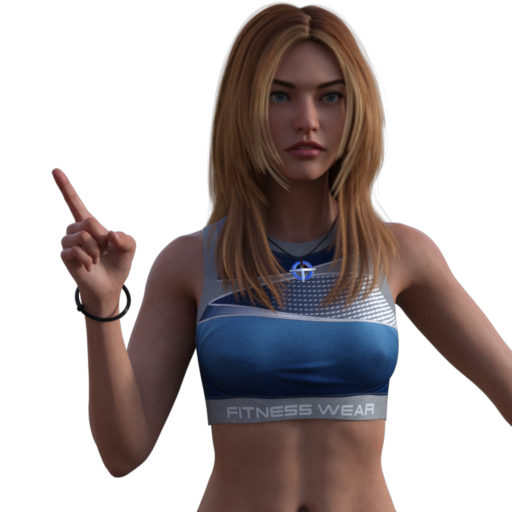
Looks as good as I can hope for. Then I save the file, re-open, and it's different. There's a bump in the top between her breasts as if a different projection morph is being used.
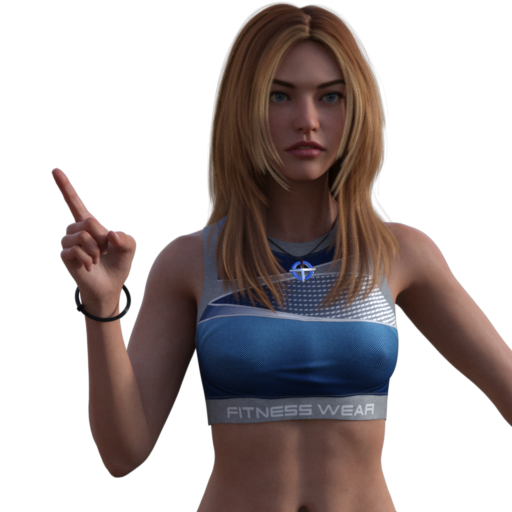
A more extreme case is with the clothing below. The dress is a G8 dress by Lilflame on MSO Dola. The dress on the right is freshly loaded and simulated. The character on the left is the character on the right saved as a scene subset and loaded into the scene without closing the scene. What on earth are the artefacts in the dress's skirt section?
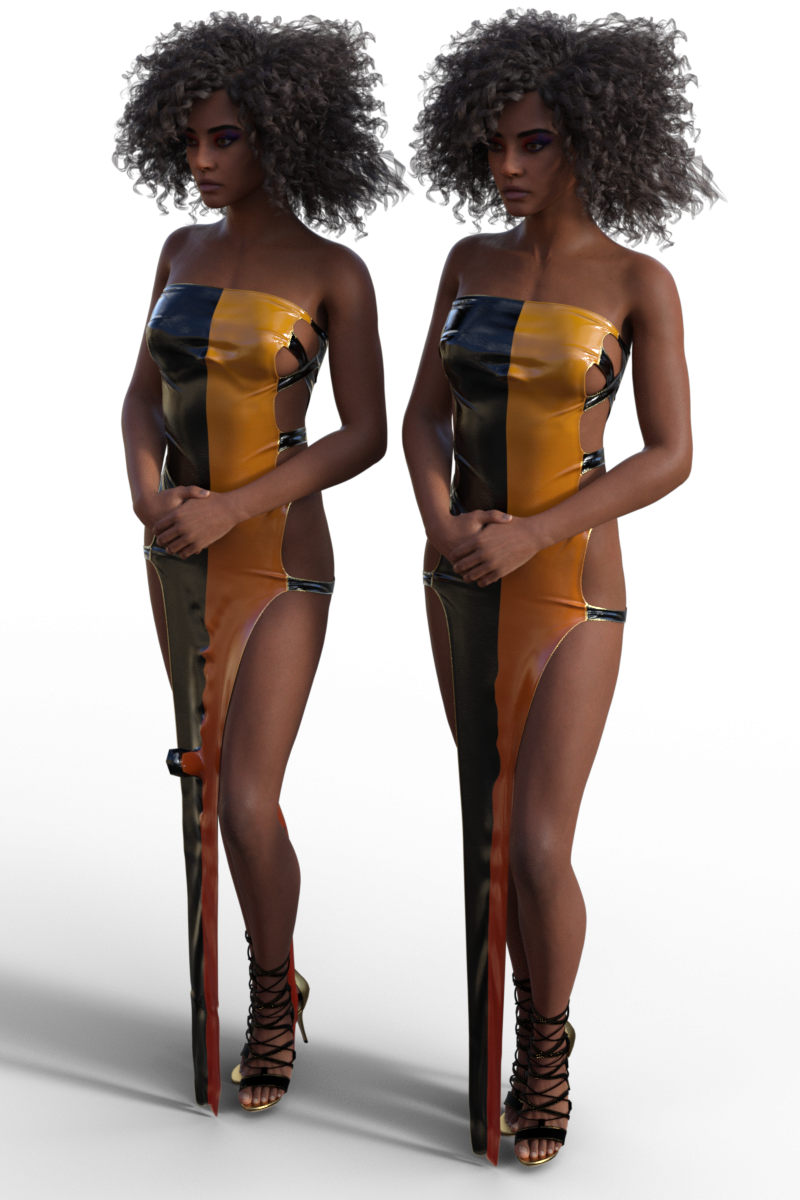
Anyone have any ideas?
Regards,
Richard
Face Transfer for Anime/Toon FacesI did some paintshop images turning a woman into a cat person and thought be cool to turn her into a daz character using face transfer or facegen sadly couldn't because it couldn't detect some of her features like her nose because it was cat like so yea like you with trying to import anima/toon characters
Face Transfer for Anime/Toon FacesI would like to ask the creator of Face Transfer 2 if he could make a similar product capable of transferring anime and toon-style faces.
I have tested Face Transfer 2, and while it is excellent at transferring realistic faces, it cannot handle anime or toon faces; that is why I am requesting a product that can do so.
I hope my request is taken into consideration.
Dragonborn/Half Dragon/Dragonkin morph for the Daz Dragon 3Paleo Miles, the Paleo Knight said:
The Daz Dragon 3 has a ton of morphs, but what if someone wants to make a humanoid version of a dragon they put together? I am not talking about the generic humanoid dragon assets we have for some genesis figures, I am talking specifically for the Daz Dragon 3 in case someone wants, for example, to make a scene depicting the offspring of one of his or her dragons in human form with a humanoid mortal. Maybe edit the neck, chest and hip to make them more humanoid. It would be pretty cool.
You're right ~ Actually the primary skeletal structure of Dragon 3 is pretty much like Genesis figure, so you can easily make a "more humnoid morph" for a certain Dragon 3 (with or without shape addons...) by scaling / morphing / posing... (better plus a sculpting software like Blender so that you can shape the partial body morph to make it even better... or even make wings / tail a disappear morph ~). For example:
1) I made a delta morph of humanoid on a raw Dragon 3 by just posing and shaping firstly, sculpted its shoulders and other body parts a bit in Blender. Then created a humanoid morph + ARtS.
2) I re-rigged an armor for G9 on the Dragon ~ In fact you can tailor rig any Genesis clothing to a Dragon 3 with this sort of humanoid shape by using Transfer Utility, as well as create corrective morphs as needed. (ss1)
3) You even can rename the Node Name of Dragon 3's bones (with Joint Editor) so as to apply Genesis poses to it. Load a Pose Preset then finetune bones rotations. (ss2)Edit: In practice, you can do these on any breed of Dragon 3.
Dragonborn/Half Dragon/Dragonkin morph for the Daz Dragon 3The Daz Dragon 3 has a ton of morphs, but what if someone wants to make a humanoid version of a dragon they put together? I am not talking about the generic humanoid dragon assets we have for some genesis figures, I am talking specifically for the Daz Dragon 3 in case someone wants, for example, to make a scene depicting the offspring of one of his or her dragons in human form with a humanoid mortal. Maybe edit the neck, chest and hip to make them more humanoid. It would be pretty cool.dForce Princess Petra's Graceful Bun - not so much dforce?Of course there is a difference: No dforce settings at all.
And since the hair is Strand Based it is not editable by me. Neither can I add a bone or morph. Only the Vendor can "dforce" it or add at least a simple Movement morph.
I have a couple of dynamic Strand based Hair and all of them simulate perfectly fine or have some styles and Morphs Parameters included.
This hairstyle looks unfinished and I wonder how it could have passed quality control.
Textures not working in Daz via Blender via MeshyHey everyone,
I have been using Meshy to make uniforms and miscellaneous items for my Daz scenes
As you can see by the first image, Meshy does a pretty good job with not only the shape but the texturesEDIT: Meshy gives you the ability to take any object and split it into parts, which allows me to manipulate these parts in Blender
From there I take the obj file into Blender so that I can align all the parts with a G8F model that I had exported from Daz
As you can see with the second image, I can apply the Transfer Utility and the obj file can move right along with G8F
Where I have the issue is with the textures. Sometimes I have very little issues, I go to the Surfaces tab, select all the "parts" and change the base color image to include the texture file that Meshy made
I know that when you look at it, that it seems like it is a mess but that is the file that obj file is using to create what you see in the first image which is what you see when you open the obj file in 3D viewer
How is it possible to be so accurate in the 3D viewer and then turn out like the second image
I have tried in Blender to bake the textures, but it just creates these black and white base color images - see the forth image
As usual, thanks in advance
Daz 3D is part of

Connect
DAZ Productions, Inc.
7533 S Center View Ct #4664
West Jordan, UT 84084Licensing Agreement | Terms of Service | Privacy Policy | EULA
© 2026 Daz Productions Inc. All Rights Reserved.