-
Daz Studio 2026 Beta - version 6.25.2026.6423! (Updated March 09, 2026)
neilroy1965 said:
I noticed that the Texture view is black all the time. I noticed in this release that is partially fixed, but you have to either be using your normal viewport view, no camera, or, when you are using a camera view, the camera cannot have the visibility switched off. If you switch it off, as I prefer to do so I don't see it in the viewport or see the lines, the scene will appear black. Click the visibility icon in the scene view so it is visible, and when viewing through a camera, it will be okay, though it looks a little light now, with less contrast than it used to be.
Hiding the camera also hides its headlamp. In any event, see http://docs.daz3d.com/doku.php/public/software/dazstudio/6/change_log#6_25_2025_16207 - the active camera is not being drawn so it shouldn't get in the way.
I was using the filament view, which I like, but it doesn't seem to take into account any spotlights or even camera lights, which is annoying. If that alone was fixed, I would use it all the time. But with some fiddling with the Filament settings, you can get it to look pretty nice for scene building and it is plenty fast enough.
Oh, and one last thing, the reason why I recommended the Game Ready Drivers over the Studio Drivers, at least until the Studio drivers are updated, is because with certain CPUs, in my case, a Ryzen CPU, you can get a black screen and Windows is unusable. If you don't have a Ryzen CPU, you may be fine. I installed them, and had to jump through some hoops, go into safe mode and use some software to uninstall the Studio Drivers then install the Game Ready Drivers in order to even get back into Windows normally again. I have been keeping an eye on the Studio Drivers to get updated, then I will install them as I agree, they are the better choice, once they are updated.
If you do have the same issue I had with Windows going black on you, I used the ChatGPT app on my phone and asked it what to do, and it gave great, step by step advice on solving the issue without problems. I knew what to do, it's just been many years since I last had to.
Daz Studio 2026 Beta - version 6.25.2026.6423! (Updated March 09, 2026)I noticed that the Texture view is black all the time. I noticed in this release that is partially fixed, but you have to either be using your normal viewport view, no camera, or, when you are using a camera view, the camera cannot have the visibility switched off. If you switch it off, as I prefer to do so I don't see it in the viewport or see the lines, the scene will appear black. Click the visibility icon in the scene view so it is visible, and when viewing through a camera, it will be okay, though it looks a little light now, with less contrast than it used to be.
I was using the filament view, which I like, but it doesn't seem to take into account any spotlights or even camera lights, which is annoying. If that alone was fixed, I would use it all the time. But with some fiddling with the Filament settings, you can get it to look pretty nice for scene building and it is plenty fast enough.
Oh, and one last thing, the reason why I recommended the Game Ready Drivers over the Studio Drivers, at least until the Studio drivers are updated, is because with certain CPUs, in my case, a Ryzen CPU, you can get a black screen and Windows is unusable. If you don't have a Ryzen CPU, you may be fine. I installed them, and had to jump through some hoops, go into safe mode and use some software to uninstall the Studio Drivers then install the Game Ready Drivers in order to even get back into Windows normally again. I have been keeping an eye on the Studio Drivers to get updated, then I will install them as I agree, they are the better choice, once they are updated.
If you do have the same issue I had with Windows going black on you, I used the ChatGPT app on my phone and asked it what to do, and it gave great, step by step advice on solving the issue without problems. I knew what to do, it's just been many years since I last had to.
Toon Eye ProblemYes, Macs do not get Filament in DS 4.
The toon characters are set up for Filament, so they won't work immediately in Iray and even with tweaking won't look as intended. If you want toons you could also look at using pwToon in 3Delight - though you would have to do all the material set up yourself, and probably not use the special toon eyes.
Toon Eye ProblemI am using a Mac and I am running DAZ 4.24.0.3. I believe Leana was saying that the DAZ 2025 Alpha is the first version where Filament is Mac compatible.
I guess the crux of the issue is: do the Genesis 9 Base Anime (M/F) characters require Filament to work properly?
Toon Eye ProblemLeana was probably asking exactly which version - 4.x.x.x, which you can see in Help>About Daz Studio. Also, is this Mac or Windows?
My render uses Filament, which is what the toons are set up for
Toon Eye ProblemSorry, I did not remember that I had already asked one of my eye questions, thus Richard had to merge the two post.
let me answer some of your questions to me:
Question from Leana: Which version of DS do you use? Filament is only available on Mac if you use the DS2025 alpha, it won't work in DS4.
Answer: I am using DS4. BTW: I just tried installing the DAZ 2025 alpha and my virus detector program flagged it with a problem. I am so paranoid about virus’, I went to erase that System partition. But in my haste, I erased all of the systems on that hard drive! grrrrrr! I will not try installing that version again until it has been out for a while and no one else has any virus alerts. Oh well.
Richard asked: What exactly are your steps?
Answer: After installing the Genesis 9 Toon Starter Essentials Expansion package, I went to: Smart Content/Figures/People/Stylized/Genesis 9 Base Anime Feminine. I then installed the character.
BTW: In comparing my render to yours, not only did I notice the black eyes, but I also noticed that yours looks like a flat 2D image while mine still looks 3D. (see enclosed image).
Are all of my questions related to the toons requiring Filament? If so, I guess I should ask for a refund on the two packages that I bought?
owners of The Last Vampire Hunter I need Feedbackhttps://www.daz3d.com/the-last-vampire-hunter-hd-dforce-clothes-and-weapons-set-for-genesis-9
I am asking here because I surely cannot be the only person who struggles to render this clothing set
yes I know it's heavy
8K textures, SubDiv4
however reducing both still is quite slow and with the full load it stills stays below 10GB VRAM rendering
it just takes 10 mins full, 3 mins reduced to SubDiv2 on my 2080Ti
I can load it fully in Filament however and set viewport SubDiv to 4
dforce simulated for my 1800 frame animation beautifully
it's the 2 and a half minute load time BEFORE it does any samples that seems the issue, each, frame
I posted this elsewhere but suggestions were all things I tried and made no real difference
not sure if any of the posters actually loaded and tried it
link to my posts, a moderator can move them and the replies here if they wish

https://www.daz3d.com/forums/discussion/comment/9237121/#Comment_9237121
owners of The Last Vampire Hunter I need Feedbacksetting subdivision to 2 on all the clothes instead of 4 does get it around 3 mins
however here is where it gets weird
letting it full converge (about 170 samples) only takes a minute longer than my FAST animation settings of 10 samples with denoiser kicking in at 8
it doesn't spend much time actually rendering but sits loading everything each frame
yes they are 3K x 3K but 1080 x1080 is not any faster
I use 3K for my full body png series so I can do close ups too zooming in in my video editor
I set resolution to 0 in the viewport
note Filament goes quite fast with subdiv 4 in viewport and honestly doesn't look too bad with my prefered environment settings,
a point light for shadows
Filament draw options
around 1K Environment intensity
scene light scale 350
I usually use a geoshell 0 Y scale drop shadow since no floor, didn't here
owners of The Last Vampire Hunter I need FeedbackMasterstroke said:
WendyLuvsCatz said:
felis said:
Have you tried scaling the textures down to 2k and see how it affects your render time?
well now that's been pointed out, I will use scene optimiser
just never expected it on clothes
props and buildings yeah, skins definitely but cloth??? well that's a first
Agree
Scene Optimizer is essential for bigger projects, no doubt about it.
I made a comic in 2017 with my old computer with 15 characters (as far as I remember) as extras in a scene.
Always use base resolution and 1k resolution on textures works just fine for background extras.
it didn't shave off much time
the 5X subdivision in render is more the issue

I ended up using Filament with Viewport Subdivision cranked up to 5 too

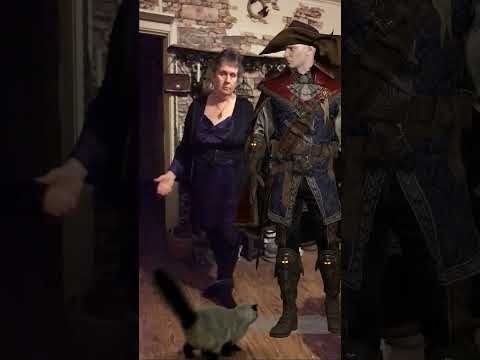
video
Toon Eye ProblemWhich version of DS do you use? Filament is only available on Mac if you use the DS2025 alpha, it won't work in DS4.
Regarding the other points, you already have a thread on your problems with G9 Toon, with several replies and questions to you: https://www.daz3d.com/forums/discussion/736776/toon-eye-problem#latest
Moreover the "daz studio discussions" sub forum is meant for discussions about the application, not content. So this thread will likely get moved to another subforum or merged with your other thread.
Toon Eye ProblemI bought the “Genesis 9 Toon Starter Essentials Expansion” and the “Genesis 9 Anime Base Expressions”. I am now testing them out. Right now I am about ready to ask for a refund.
BTW: If you are only going to answer one question or all three, please start with the question number so others will know that the remaining questions still need answered - thanks.
First off, this happens on both an Intel Mac and on an M4 Mac. — I don’t know if the Genesis 9 Toon Starter Essentials Expansion requires Filament or not, but it is my understanding that Filament is now Mac compatible (at least on the M4 Mac). Questions:
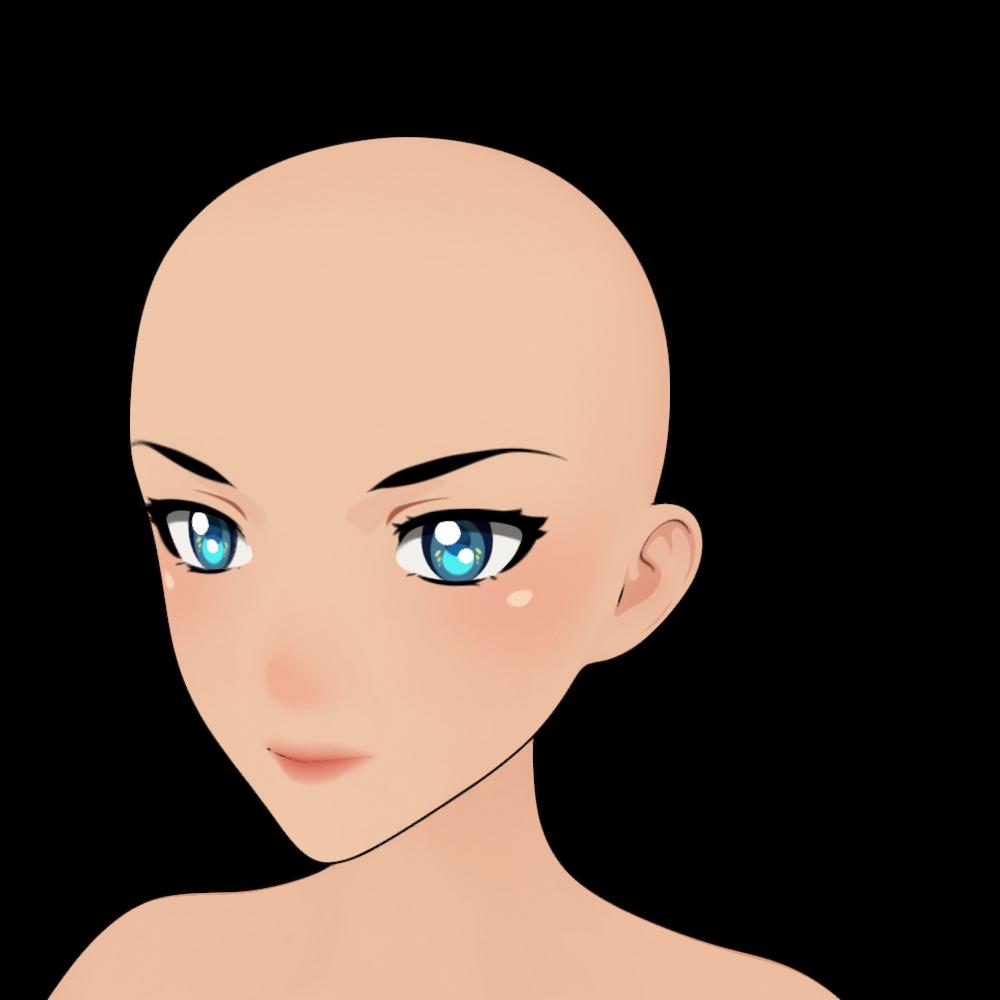
1. The floating iris is fine but it is sitting on a black eyeball (image 1 & 2 shows the eye with and without the Iris showing). I tried changing the surface texture but nothing works. Is there a fix for this?
2 There is a scratchy black outlining of the female eye (you can see it clearly when I hide the eyelashes in images 1 & 2). Image 3 was taken from the male. There seems to be a solid black line around his eyes. Is there a way to remove this outlining?
3. I used the sliders to make a G9 male toon (and later a female toon). The first thing I noticed was the eyes of both male and female go wonky, they bulge out from the eye sock. Notice (in image 4) the eyelashes float on top of the eyeball. Plus there is a gap between the eye socket and the eyeball. It is like the eyeball has shifted away from the nose. Is there a fix for this?
Please help.
Daz Studio 2026 Beta - version 6.25.2026.6423! (Updated March 09, 2026)Iray preview performs slightly worse than 4.24 when using same draw settings on my 4090. I wish we could get near the same performance in Iray preview (or something of quality between Filament and Iray preview) that performs more like iClone.
Does filament work on Intel Macssolarview said:
Thanks for the update. Hopefully it will work on the Intel Macs as well as the M4 models.
To clarify, Filament works on my intel MacBook Air, but you have to use the 2025 Alpha version of DAZ Studio., 4.x versions will never, ever work on any Mac.
Does filament work on Intel MacsFrom what I've read the DS2025 alpha (with Filament) works with both Intel and M4 models.
You can ask in the Mac FAQ thread for more details from those who tried it: https://www.daz3d.com/forums/discussion/731016/the-new-mac-faq#latest
Toon Eye ProblemMoved to technical help as it is not a Daz Studio application topic.
What exactly are your steps? I am not seeing this loading the Genesis 9 Toon Female base, which renders better in Filament, do you see it then? If so it is probably an effect of another shape or character triggering something like a jointy adjustment or corrective morph when it shouldn't.
 Does filament work on Intel Macs
Which version of DS are you using? DS 4.x doesn't have filament on Mac, only the DS2025 alpha does.
Does filament work on Intel MacsHi All,
I'm running on an iMac Pro Intel machine. Does the 'Filament' feature work with the intel Macs? I don't have it as an option in my viewport and can't find where I might turn it on in the menus.
Thx.
Daz Studio 2026 Beta - version 6.25.2026.6423! (Updated March 09, 2026)neilroy1965 said:
I would recommend that people do NOT use the STUDIO drivers! The Game Ready drivers are more up to date and have fixed issues which cause Windows to crash, where as, for some strange reason, the Studio drivers have not been updated.
Otherwise, it would be nice if there was a way I would submit my bug reports, my crash reports generated by Daz, otherwise, what in [Heaven's name] is the sense of testing an alpha?!
Studio driivers should be more robust in genreal, the game ready drivers get updated more often because new games need support but as a result they are generally less well tested and more prone to stability issues - but the key phrase is "in general".
Your crash appears to be in Filament
AIUTO...CHI CONOSCE L’ITALIANO? PARTE QUATTORDICIvangelrise said:
Mi preoccupa anche la potenza necessaria del pc e/o RAM + scheda video.
Basta impostare tutto per raggiungere il giusto compromesso. Io renderizzo con 3Delight e in genere ogni fotogramma prende al massimo un minuto (in scenari parecchio affollati, con parecchi effetti di trasparenza, luci e ombre, minimo due chilomtri quadrati di scenario full 3D, mai billboard) e quando sono costretto ad usare IRay in genere impiego lo stesso tempo con delle impostazioni ben calibrate e stesse scene complesse.
Facevo tutto questo già anni fa con un Ryzen 7 1700x e una GTX 745 OEM HP. Ora che ho un Ryzen 9 5900x e una RTX 3060 TI è tutto ancora più fluido.
Non è necessario chissà quale hardware se non ti fermi alle impstazioni di default (strapesantissime) e cerchi le giuste regolazioni.
Per assurdo, impostando IRay per essere più veloce nei render scompaiono quasi del tutto i fireflies e la "granulità". Resta comunque un motore poco affidabile, basta spostarsi un pò dal centro e non funziona più nulla.
Altrimenti c'è sempre Filament, stanno venendo fuori un sacco di prodotti per creare di tutto. In tre secondi renderizza qualsiasi scena con una GPU dei punti del supermercato.
Daz Studio 2026 Beta - version 6.25.2026.6423! (Updated March 09, 2026)Richard Haseltine said:
nonesuch00 said:
Richard Haseltine said:
nonesuch00 said:
Richard Haseltine said:
nonesuch00 said:
DAZStudio.exe caused ACCESS_VIOLATION in module "C:\Program Files\DAZ 3D\DAZStudio6 Public Build\dzcore.dll" at 0033:000000009EC98223, DzStyledTimeAsFramesPropertyWgt::~DzStyledTimeAsFramesPropertyWgt()+19139293 byte(s)I am getting a crach on the latest Alpha.
AMD Ryzen 7 5700G
96GB RAM
PNY GeForce 4070 12GB
2 TB m.2 nvme PCIe Gen 3 System Disk.
2TB external USB m.2 nvme Gen3 DAZ Content Library Disk
Thanks.
What were you doing at that point? Can you get it to happen consistently?
It's happens right after the splash screen goes away, before I ever do anything at all. DAZ Studio never gets the editor on screen. It happens every time.
How many Viewports are open, and what Drawstyles are they using? Was Filament being ussed? The saved layout.dsx file, in
%appdata%/daz 3d/Studio6 Public Build/
will have the information.
I didn't alter the defaults in the Alpha 6 or the layout file.
I have two paths, with only one file each for Studio6:
a) C:\ProgramData\DAZ 3D\Studio6\dazstudio.dat
b) C:\ProgramData\DAZ 3D\Studio6 Public Build\dazstudio.dat
They are in binary and I don't have a hex editor installed, but those are the only two files in those directories.
%appdata% is C:/users/you/appdata/roaming/, not Program Data - if you paste the path I gave above into a file browser address bar it will take you to the right folder, but the %appdata% is not a folder name in itself.
I'm not sure what was going on before but I bought some Outlet Store products today and so needed to install them, once I went to the Install tab in DIM the DAZ Studio Alpha 6 Jun 25 and plugins were on still in the Install Tab listed so I went again and installed them (again, I think) and now it works. So I'm not even sure what was crashing because if it was the prior Alpha version, then that had been already working prior to all the crashing I reported here. Anyway, it works. Sorry for the inconvenience.
Daz 3D is part of

Connect
DAZ Productions, Inc.
7533 S Center View Ct #4664
West Jordan, UT 84084Licensing Agreement | Terms of Service | Privacy Policy | EULA
© 2026 Daz Productions Inc. All Rights Reserved.










