-
Kim Seohyun problems - Iray issue ?
A nice asian anime character, except:
The Tongue Out morph doesn't work at all, for me anyway. Anyone get that to work?
Pubic Hair, a nice realistic hair prop, I assume fibermesh, that looks fine in the viewport, but renders very strangely. Even with Cast Shadows off, the center area of the prop renders as a very unrealistic looking dark, amorphous blob. I've tried several Surface Tab things, like glossy to zero, but there's not much to change beyond that. Reducing Cutout Opacity, for one or both materials, affects the overall visablility of the hair, but even dialed way down, the dark area remains, just not as opaque.
It's the kind of distortion I might expect with fibermesh if Cast Shadows was on, but it isn't.
That one's got me stumped, but I wasn't sure about posting images. Anyone getting good, non-amorphous-blob renders using the pubic hair prop?
Edit: Turns out the hair prop is not Fibermesh, it's a jumble of transmaps, overlapping and interpenetrating. Taking a closer look at the dark blob, it looks like several overlapping rectangles of shadow, the shape of the transmap polygons, not totally opaque, but enough so that the cumulative shadow darkens toward the center of the jumble into a single dark mass.
Iray is rendering shadows, and although it is respecting Cutout opacity, it's seems to be ignoring the Cast Shadows parameter, so, short of using Geometry Editor to unravel the jumble and remove the worst offender poly's, I guess the only fix for this annoying issue is to correct the actual transmaps, which are not 100% on the transparency. There is a bit of gray that may be causing the shadows to show up. I am going to try that. The prop itself is one of the more realistic, less silly pubic hairs out there, and would make a good addition to a realistic human body render.
"Duplicate formula found" and unhelpful log file entryDuplicate formulas means that there are two ERC links between properties (so that one proeprty gets its valeu from, in part, another) where the links match in property name as both controller and controlled (not necessarily the same properties, just the same names). Usually this means that two different products used the same names, so each would work in isolation but when both are present one blocks the other. The name of a morph is usually the same as the name of the .dsf file, so you can search for the files and identify the conflict (and then report it to the developers and either make your own fix by renemaing one of them or simply temporarily uninstall one of them). I'm not sure why the log doesn't give the details of both partners, when it's a conflict.
Your case looks odd as it's a scene file, rather than a morph asset, that is cited - that may indicate that one of the problem links is embedded in the file - it could still be a conflict, or if you have set up any ERC Freezs yourself it could be that you ran two without an ERC Bake between them.
XTransfer Module 1- Genesis 3 to Genesis 8 Morph Converter (Commercial)For a custom character you need to assign all the used morphs to a new character slider and freeze that then save it. This means all the used dials are now controlled with one main property. There are lots of tutorials which show how to do this. Once thats saved then all you do is favourite that slider and it will transfer all related used morphs. Now when you dial up that slider on g8 your shape will match. We actually busy on a product that does just this. If your character just has used dials that isn't assigned to a property which controls them then you will have to favourite them all and after transfer you will have to dial up the matching values.Juan Carlos 8 - Streets of CyberpunkI bought just the figure and HD morph. 30 bucks and change...worth it to me, didn't like the bundle all that much except the hair, which I'll get at a later date. Seems to be what I do most these days. Skip the bundle and get just the character.
Laurie
RiverSoft Art - Character Converter From G3 to G8vwrangler said:
Riversoft Art monitors the commercial threads for the converters, so you'll probably do better to repost this in the appropriate thread: Genesis 3 to Genesis 8 FEMALE or Genesis 3 to Genesis 8 MALE
Questions about XTransfer are answered by Zev0 in XTransfer's commercial thread as well.
Thank you.
RiverSoft Art - Character Converter From G3 to G8Riversoft Art monitors the commercial threads for the converters, so you'll probably do better to repost this in the appropriate thread: Genesis 3 to Genesis 8 FEMALE or Genesis 3 to Genesis 8 MALE
Questions about XTransfer are answered by Zev0 in XTransfer's commercial thread as well.
XTransfer Module 1- Genesis 3 to Genesis 8 Morph Converter (Commercial)So help me understand this product. I work on a custom G3 charcter and use G3 morphs, maybe 10s of them. I now want to convert to G8. I open daz drop in a base G3 and am supposed to heart all the morphs I used on the custom character? Then run the script and those morphs will the be applied to the G8?
I would have swore on my life this product used to be much easier to use...am I out of my mind here? This seems to be false advertising a bit. Seems more like a Morph conversion not a character conversion.XTransfer Module 1- Genesis 3 to Genesis 8 Morph Converter (Commercial)Stupid quesiton but did this product used to transfer custom G3 to G8? I went to use it today and all it wants to do is transfer base V7 to G8. That's pointless. I thought this used ot transfer customs to G8? Did I miss something?
How does Official Bridge Select what Morphs can be exported?Okay... First, I apologize for suggesting the work-around -- It turns out that it is not needed.
Also, it appears to be just a misunderstanding of how to use the addon (at least on my part) for how to transfer other morphs to Blender.
The minimum morphs (checkbox) ARE the morphs that are forcibly exported to Blender regardless if the box is checked or not.
The code does not need to be edited to include 'Actor' in the morph list array -- It will pull morphs from here with the right keyword.
And, that appears to be the majic of the morphs list export -- The right keyword -- You have to just add keywords to the empty box and it will retrieve the morphs that contain them.
I don't use G8, so I don't have many morphs to test, but I do have the great SickleYield's free morph pack which is great for testing exports in this case.
To export additional morphs not seen in morph list -- First, uncheck min morph checkbox (this allows the extra morphs to be processed) :
* Example (using G8F) : Just double-click on the <Hidden> Genesis (clone), which will put the keyword 'Genesis' in the empty box and all morphs that have the word 'Genesis' in it will be transferred.
* Example (using G8F) : In my case, to add SickleYield's morphs to be exported which start with 'SY 200' -- If just adding this - will fail. Just adding 'SY' will fail (needs min. 3 letters with NO spaces to count as third letter!). So, just add '200' and this will export all of the SY morphs to Blender.
I hope this helps, and I am sorry if I caused any confusion.
G8M to G8FInquisitorOnyx said:
@ Cora Regina
Thank you for your reply, I really appreciate it. I followed the tutorial posted by jcade, but unfortunately, yeah, while the morph transfers over to the opposing gender, it only works if the figure is static. Any posing causes weird deformities in the figure.
Oh well, it was worth a shot. :)
I'm glad you were able to get the morph transferred! As others have said, that's just the first step; hopefully dealing with the rigging will take care of your deformation issues.
Me, I'm all kinds of lazy, haha. If a character has a distinctive look and all I want to do is masculinize or feminize it rather than customize it a lot, my current go-to is to dial in the CFRK transfer morph at 100% to get the underlying shape (I imagine there's a freebie somewhere with morphs that'll do the same thing), and then tweak it with the Transgender Shapes morphs and any others I find necessary (e.g. making female hands more slender or dialing up a dumptruck).
It's kinda jank sometimes, but it's quicker for me on those extreme characters and I don't have to worry about transferring rigging, etc. Plus I have enough clothing run through Cross-Figure that I can dress my folks pretty freely by now.
The "Dial Them Out" Thread3Diva said:
...curious about Sara for Teen Jane
Quicky render of Sara without Teen Jane.
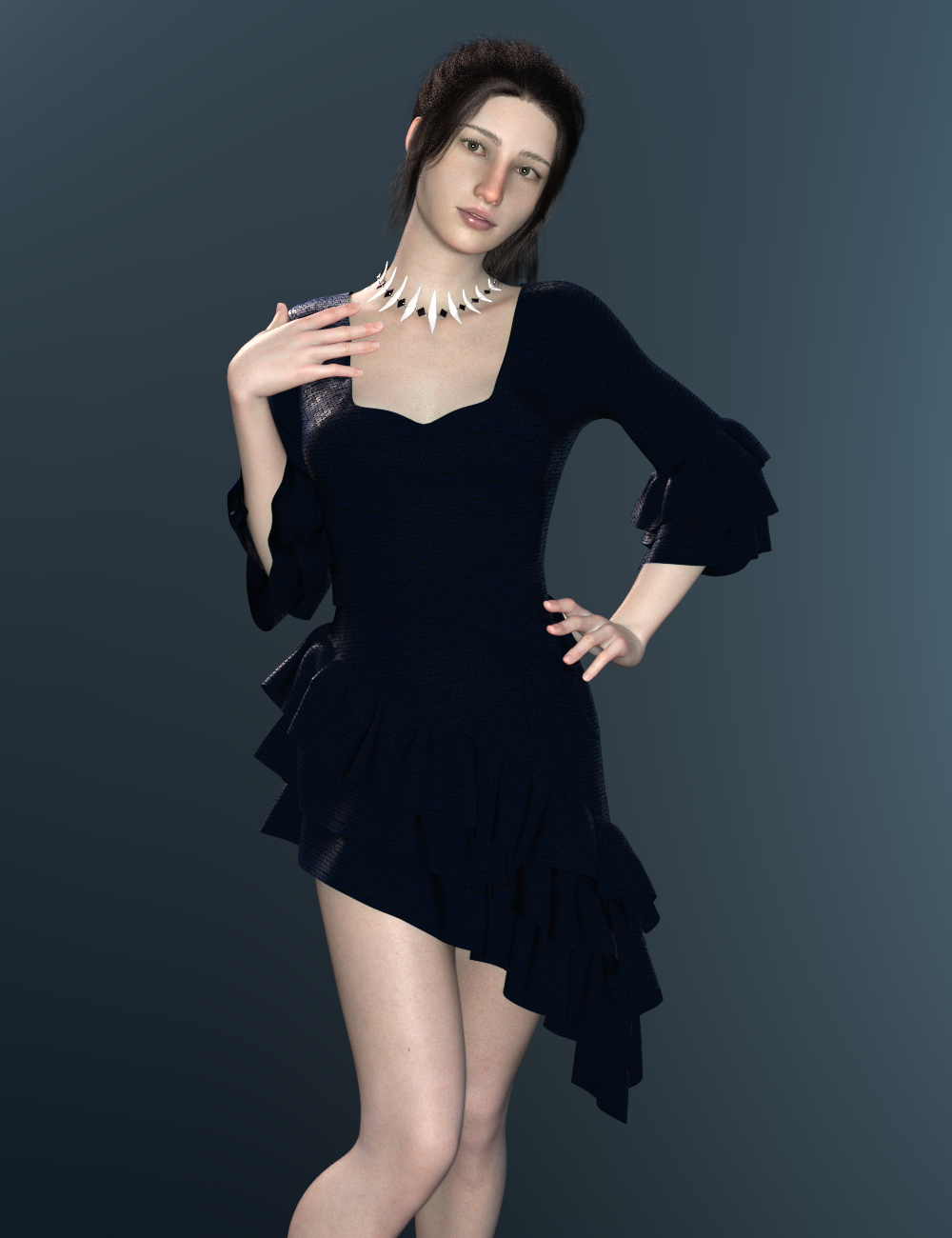
Candle light and pentagrams... cyber necromancy! I'm resurrecting this thread!
Can someone be so kind and check how much of Jane's morph Sara uses?
I usually see it by opening the morph files with a text editor, but I can't quite figure it out with her... What's her name?
I suspect that she is a custom morph, as FSMC says. My best guess would be that Mei Lin 8 may be the starting point. Maybe even Kayo 8, unless these products were in the store before Kayo's release date. Take a look at both of them, as they would make good starting points for trying to duplicate this face, if that's what you're wanting to do. As far as the skin textures go, it wouldn't surprise me if this one is using the Osuine character skin like the other character in the promos. That other character, known as The Goldtassel Girl, gets a lot of attention in the forums, and the consensus is that her skin textures are from a character called Osuine by Sangriart.
XTransfer Module 1- Genesis 3 to Genesis 8 Morph Converter (Commercial)I'm having an issue that it's crashiing once I try to load a G8M (after I export a G3M morph). I'm just exporting the morphs of Kenji and Sasori, so not a lot of morphs. 4.14
G8M to G8FInquisitorOnyx said:
@ Cora Regina
Thank you for your reply, I really appreciate it. I followed the tutorial posted by jcade, but unfortunately, yeah, while the morph transfers over to the opposing gender, it only works if the figure is static. Any posing causes weird deformities in the figure.
Oh well, it was worth a shot. :)
Did you do an Adjust Rigging to Shape, and an ERC Freeze on the transfered morph, and then saved the morph as a morph asset? Without this you will see massive deformations when the figure is posed.
G8M to G8Fyou have to auto rig the morph, than posing will work again
G8M to G8F@ Cora Regina
Thank you for your reply, I really appreciate it. I followed the tutorial posted by jcade, but unfortunately, yeah, while the morph transfers over to the opposing gender, it only works if the figure is static. Any posing causes weird deformities in the figure.
Oh well, it was worth a shot. :)
Novica & Forum Members Tips & Product Reviews Pt 13The Bianca Morph product has quite a few variations of poses, and if your loyalty is 30% it's 72% off (includes the stool) Showing 6.99 for me. I think I would use these as a starting point and put her on something other than that teeny, tiny stool. I do like the variety, even with the following noted. (And these are just me being nitpicky.)
That said, I noticed a few things in the thumbnail promos-
Row 1
Image 1, man her heel would hurt, and it's barely on the chair. All these barefoot poses with her foot on the edge of the stool makes the bottom of my foot hurt LOL.Row 2
Image 2 Her hand is floating instead of resting on her thigh.Image 3 The quad- look at the first one in the upper left. Her hip barely touches the stool and she's going to lean and put all her weight on that itty bitty stool? That pose looks SO uncomfortable!
Image 4 (last one) The quad- look at the bottom left. That leg is crossing up SO high on the thigh it doesn't look normal to me. Cross your leg over your thigh and you'll see what I mean. Your kneecap is by your other kneecap, or just slightly above it. Why the heck is her bent leg up in the air like that?
The expressions show very little variation. With those, however, you never know until you apply them how they'll look. I stopped buying expressions a LONG time ago but I do use slider ones to mix them up. If expressions come with a product, so be it, but unless deeply discounted (and I mean deeply) I don't buy them. If you have some favorite expression products, feel free to mention the ones you've had good luck with :)
Now here's a great deal, and look at the variety in this one- Secrets of Danaides Poses and price starts at 1.60, then your loyalty discount. Goes to 1.12 and 93% off with 30% loyalty. Can't beat that price. (LOL it looks like that military dude decided he didn't want to be their friend after all.)
@xmasrose mentioned being the beta tester for Cosmetics And Poses Nail Set back on July 22nd (love the app showing forum references. Wow, this thread comes up a LOT! Ya'll do a great job of covering products- kudos and thanks for contributing!) and it's 9.98 and 60% off then further discounted (Showing 6.99 and 72% for me.) I love the spilled liquids, the chipped nails, and the dirty nails. You can use the chipped nails as bitten nails too.
How would you get an interactive license for base G8 character?I'm a programmer, but don't really do 3D games, but it is something I could see might be fun and is always something that I say I may want to play with. Most of the ideas I have would work fine for 2D, but having a few assets that would be suitable for inventory and character screens could be useful. However, when I search for Genesis 8 Male or Female, everything under the sun from the last couple of years shows up and, since those base figures were free with DS, I doubt they'd even be listed. I see you can get a license for those initial morph packs. Are these sufficient?
Also, does anyone have any experience with those reduced res figures from ages back? I remember preferring those to the standard vicky/michael back in the day when the character I wanted to render was just dialed in. So, those would probably do just fine for my needs. At least the V3/M3 version is available in a bundle with a few other figures, which would be a very economical way to start (probably would want to get a few textures, though)
Anybody recall the Poser fix to get Freak 4 working without that dent in his biceps ?That worked.

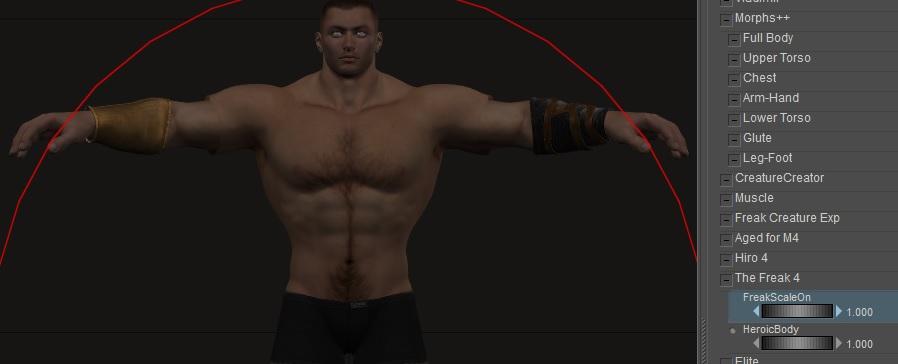
(Just in case - the sequence I used: Load M4 (no morphs applied), Load bracers, tick Include Morphs and Include Scales for the bracers, Conform the bracers, set M4's F4Heroic morph = 1, set M4s FreakScaleOn morph = 1)
Note to self:This thread and my "Converting old conforming clothing to superconforming" thread are starting to overlap now.
Note 2 to self: Over on the corresponding Renerosity thread raven pointed me at an old 2012 thread that's set lots of bells ringing loudly - Solution for Freak4 scaling problem in [PP2012] SR3 .
Applying a face morphRichard Haseltine said:
For non-HD morphs Shape Splitter https://www.daz3d.com/shape-splitter will do the job, but I would imagine this is an HD morph
Shape Splitter can also do negative morphs, thus keeping the head, for example, while dialing everything out, and this does preserve the HD details.
Daz 3D is part of

Connect
DAZ Productions, Inc.
7533 S Center View Ct #4664
West Jordan, UT 84084Licensing Agreement | Terms of Service | Privacy Policy | EULA
© 2026 Daz Productions Inc. All Rights Reserved.