-
Genesis 8.1 Figure Metrics Check Boxes
It may need updating to recognise the figure as a ariant of Genesis 8. In the meantime, as long as you are not trying to include an 8.1 morph you could set the measurements up on 8 and save a preset. If you do want to start from a Genesis 8.1 shape, since it's a near-default pose it might be enough to hide any add-ons, set the resolution to base, set the morph, and export as OBJ then load it as an 8 Morph (just for that session, don't save it as an asset) to make your sizing preset on 8.
Celebrity Look-a-Likes for 3D figures part 3jkbrown2_630d37a382 said:
Here's a better photo of Kaya
She looks like Kristin Stewart. Find a Kristin Stewart morph and you’re almost there. She also looks like a few Mousso characters. Try tweaking something from Mousso’s catalog.
Rera 8.1 morph seems to be missing from Product or improperly workingWhen I load the [Rera 8.1 morph] character, it loads on Genesis Female 8. When I load 8.1 to apply the morph manually, the mouth becomes disfigured.
What's up with VOOTW?stellan.andersson said:
The Xiao Mei character morph is set to a value of 1 in the main character morph file (CTRL Vo Xiao Mei.dsf), it should be set to a default 0 which is then changed by the character preset file when loading it into scene.
This is the reason the morph applies itself to every G8.1 model you load up.
Additionally the character preset only seem to load the head morph, obviously it should load and set both the main character morph as well as the body morph to a value of 1 (100%).
I've attached said files, edited and tested. Havn't yet had time to test so that everything else works with the character, fingers crossed nothing else is overlooked.
Consider it a quick hotfix until a real update comes along.
Sorry, too lazy to setup proper file structures within the zip file, you'll have to replace them manually.
Filepaths to the files you need to replace:
CTRL Vo Xiao Mei.dsf -> [path to your daz library] \ data \ Daz 3D \ Genesis 8 \ Female 8_1 \ Morphs \ VOOTW \ Vo Xiao Mei \
Vo Xiao Mei.duf -> [path to your daz library] \ People \ Genesis 8 Female \ Characters \
Have fun rendering this asian cutie!Customers do not have the right to post vendor files in the Daz forum. You'd better delete that zip file ASAP.
Looking for Cate Blanchette Look Alike Character in Daz Storenemesis10 said:
I believe that Genevieve 7 is supposed to resemble Eva Green. Strangely enough, I know two people who have actually met Cate; I will inquire their opinions of which figure catches her appearance best.
I have to laugh when you mentioned Eva Green as the figure looks like a mashup between Cate and Eva. Since I have Genevieve anyway I might try her out and play with the morph controls to see what I can come up with.
ChadCrypto said:
Go for Sangriart's Figure. I got her. and she amazing!
I have not signed up with Renderocity as of yet, but yeah it does seem like that one is the most accurate one.
Thanks!
Geo
Welcome to the loneliest thread ever… (or maybe not)nomad-ads_8ecd56922e said:
Yeah, the whole thing struck me as a solution searching for a problem.
The thing is, I think there really IS a thing that this NFT sort of idea would be very useful for: Creating a decentralized virtual-world system akin to the one in Ready Player One, in which the ownership of virtual objects, such as chairs and flying cars, could be kept track of for when you need to rez them in the virtual world, with the ownership and the copy-permissions (i.e. if its a no-copy item where only one instance of it could be rezzed out at a given time, and if you rez a new copy, the previous one vanishes from where it was rezzed) kept track of via the blockchain. But that wasn't what they were trying to use this NFT thing for, they were trying to use it for stuff like virtual trading-cards being sold to virtual trading-card collectors. Which, of course, completely tanked.
And we're probably decades away from having a huge, vast, Ready Player One sort of virtual world being used by many millions of people, so this NFT thing is probably way too far ahead of its time.... and is trying to be used for something that isn't gonna get any traction whatsoever.
Well, that might be a good use for the NFT thing, soft of, but two major issues... One: the huge power consumption in the mining/minting of crypto/NFTs, but let's say they find a way to do that which is environmentally friendly or magical... you still have roadblock Two: Nobody wants you to own anything... sure you can sorta "own" an NFT (that's kind of a grey area too because terms may vary and it's often not clear what you actually "own"), but do you own your cell phone, your PlayStation or your Tesla?... not really if agree to a EULA... currently you probably own your actual furniture, unless it has a USB port and it's a "sMart sTool" or "iTable".
Sounds stupid, but the Internet of Things is full of crazy stupid "smart" crap like a smart-sofa that monitored your sitting habits, and a smart electric blanket (so presumably you fine tune the temperature or see if the cat is using it when you are not at home?), not to mention all sorts of smart appliances like juice makers and bread makers that not only do you not own, but you are required to purchase proprietary ingredients in special containers... as long as someone can stick a USB port on it and call it smart, it requires an EULA and then they can lock you into whatever terms they want. Plus you aren't generally allowed to fix the stuff yourself, so you usually have to send it back to the manufacturer for that or buy a new one... plus-plus for the manufacturer...
Don't just have a dumb old wooden stool that you only sit on when you can have one that links to the Internet and monitors how many times you sit or fart on, and also reminds you it needs a software update or spikes will come out of it to prevent unauthorized users from sitting on it because the security software wasn't updated, and then six months later it gets bricked anyway because the company was bought out by another company who is going to "totally reimagine the concept of smart stools" (two new colors) and "take stool to the next level!" (Never get explained, but the pictures of happy people imply it'll be great)... essentially just leaving you with a $500 stool you can only sit on without having your fart count recorded.
Nobody would want to sell virtual stuff you would actually own, because then you could modify it or resell it, the mantra is everything is intellectual property and as such it must remain under control somehow or armadillos will destroy the world (I was going to say "Armageddon" but predictive text kept insisting on "armadillos")...
You see the problem... once you get bored with your virtual bidet, are you just going to chuck it in the virtual storage locker or are you going to resell it?... lots of people would do that... or possibly maybe someone makes a vibrating attachment or an light show function that the original didn't have... maybe you'll want to add that... what if you do and then don't like it and then sell it, where technically it's better than the original product, thus competing with sales of the original item... That would be too much like real furniture or "RL Content" ("Real Life" or possibly "RR content" which stands for "Real Reality")...(cut me some slack I'm trying to invent new words or the English language will die)...
The idea of people having a virtual garage sale or selling aftermarket upgrades of their products is unthinkable to anyone who would get into that sort of thing... so, more then likely you would have some version of an End User License Agreement which would forbid you from reselling or modifying your content... and that wouldn't really be "owning" anymore, would it?
They'd probably rebrand the agreement to something stupid like "Non Fungible Asset Owner Obligation and Rights Contract" or stupider, and it would be touted as a new, more liberating and better form of EULA, but it wouldn't be, in fact most likely it would be worse and less "liberating".Having said all of that, and that was a TLDR lot, that's not to say someone wouldn't make NFTish virtual assets... it's just they would probably take a good idea, make the good claims and execute it the bad way... (I mean "do it the bad way", not stuff it into a guillotine and yank the cord)...
NFTs aren't going away any time soon... they are the virtual equivalent of the Multi-Level Marketing racket... Some people at the bottom or middle will get rich, but most others won't, but touting those who did "succeed" will run the conveyor belt of new "adopters" that will take a shot at the grand prize, keeping the whole thing lucrative for the people at the top... even if NFTs tank, the allure of the profits they initially provided will enspire new takes on the idea... just look at NFT real estate and crap like that... it doesn't have to make sense, just boatloads of cash.
I'm pretty sure, probably pretty soon, someone will do exactly what you are suggesting, it'll probably get its own acronym like NFVA (Non Fungible Virtual Assets) or UVC (Unique Virtual Content) so the Cryptobros can talk it up to investors or dopes writing articles about it... but essentially it won't be what it will be promised to be or what some well meaning individual sets out to make it.
VR is breaking out, it's currently on the level the Atari 2600 was in the early 80s right now, but it won't be for long... well, as long as the people running the show don't eff it all up by all trying to jam their grubby little paws into the pie at the same time (honestly my opinion is currently the technology isn't as much of a problem as too many people trying to over-monetize every aspect of it before it actually catches on strongly enough)... The NFT thing will take a firm hold in virtual reality and morph into many varieties, it's a very foreseeable conclusion.Sorry if I'm a buzzkill.
Daz Studio remains in memoryAbyssalEros said:
Richard Haseltine said:
Leonides02 said:
Of every program I've ever run, Daz takes the longest to close by far. It is baffling.
I would suspect that most applications have less complex structures - in my experience the time is longest with figures that have lots of morphs with many links between them, it isn't a function of raw size as such. I would imagine that the application framework used, if any, has at least some bearing too.
In my experience, it does not matter, you can also load a plain Genesis 8 Female/Male figure, close DAZ Studio, and it takes forever to be cleared.
Well, those would be examples of figures with lots of morphs and links between them. A counter example would be a static scene with a lot of geometry but no or few morphs that also took a long time to clear.
The problem is in the coding of the software. The more content you own and have installed, the more unnecessary morphs are loaded. There is already a myriad of morph injections loaded with a freshly loaded Genesis 8 figure. It would have been a better approach to have a clear separation of morphs from the figure, something like a morph loader that you have first to activate to see the available morphs before you can apply them.
Coding is not the same as design - it's the latter you are criticising. As for better, people were hardly blissfully happy with the morph injection system in third generation Daz figures (where big morph sets needed their own CR2 file, and mixing morphs required file-surgery) or the ExP system used by the fourth generation (where an updater had to be run to add new morph channels, or in DS Power Loader could be used to select products or individual morphs at load time). While the current system certainly has its drawbacks, the time taken to close DS is not - for my taste - the worst of them and whatever system is used there are likely to be drawbacks. By all means suggest alternative approaches, but do think about their drawbacks, about how they will impact less experienced users in particular, and about where in the workflow the benefits and drawbacks will have impact.
Yes, you can add every morph right on the spot, but to be honest, why needs every figure in your scene those readily available? For example, let's mention the morphs to change your runway model into a freakish monster with hooves, fangs, and whatever.
Daz Studio remains in memoryRichard Haseltine said:
Leonides02 said:
Of every program I've ever run, Daz takes the longest to close by far. It is baffling.
I would suspect that most applications have less complex structures - in my experience the time is longest with figures that have lots of morphs with many links between them, it isn't a function of raw size as such. I would imagine that the application framework used, if any, has at least some bearing too.
In my experience, it does not matter, you can also load a plain Genesis 8 Female/Male figure, close DAZ Studio, and it takes forever to be cleared.
The problem is in the coding of the software. The more content you own and have installed, the more unnecessary morphs are loaded. There is already a myriad of morph injections loaded with a freshly loaded Genesis 8 figure. It would have been a better approach to have a clear separation of morphs from the figure, something like a morph loader that you have first to activate to see the available morphs before you can apply them.
Yes, you can add every morph right on the spot, but to be honest, why needs every figure in your scene those readily available? For example, let's mention the morphs to change your runway model into a freakish monster with hooves, fangs, and whatever.XTransfer Module 2- Genesis 8 to Genesis 3 Morph Converter???No, the customers don't know when products are released until they are released. Indeed the PAs may have presented products for review but even they do not know exactly when something is going to be released until it is released. Keep an eye on their stores and/or in the Commercial thread for information about upcoming products and/or their releases/how to use them, etc.
I haven't read this all: Commercial Thread Genesis 3 to 8
Where are the miniature schnauzers?Our Yorkie got a regular haircut, esp. during warm weather, so he looked a bit like the French Bulldog for DAZ 8 - the cream-colored one. Minus the black muzzle of course.
Anyway I just wanted to mention that the French Bulldog morph was on sale as of Friday evening, June 4 2021.
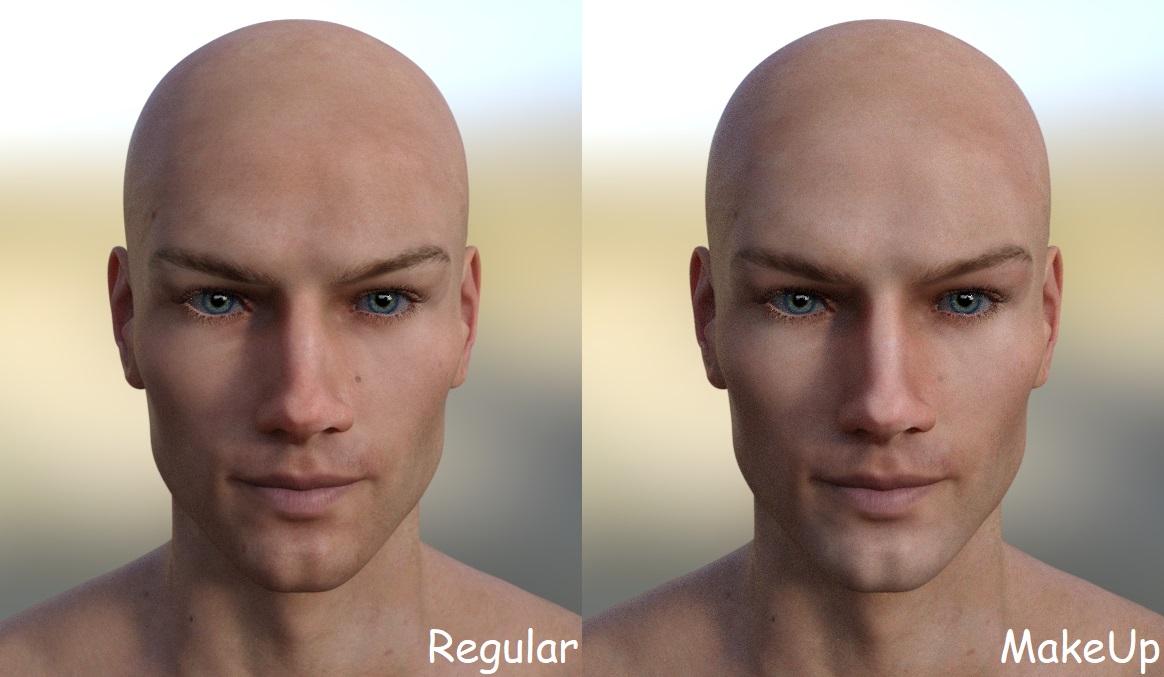
MimicMolly's Renders & WIPsA month ago, I decided to give Phoenix1966's Sean for M8 a "light makeup/countoured" face. I have a render in mind that requires him to have an "airbrushed" face. So I briefly converted his texture's UV to Base Female with Map Transfer and used this resource (.PSD files), by adjusting the layers and changing up the colors. Then I used Map Transfer again to make it Base Male. I'm surprised there was even a difference.
 Daz to Blender Beta: How To Download Release Versions, Manually Install, and Replace Old Installs
Padone said:
update. @DAZ_Sam As for 2.3.6 general release the issues above are not fixed. Also @DAZ_Bryce reports a 2.3.7 that doesn't exist in the repository, may be he intended 2.3.6.
https://www.daz3d.com/forums/discussion/498796/updates-daz-to-blender
Thank you for the catch! That was a mistake by us actually. 2.3.7 has been added to Daz Release as well which has added support to 2.93 as well.
Also wasn't able to get the morph fixes into the release in time but, add a beta release 2.3.8 with some morph optimizations and fixes.
Currently the morph sliders do not work as they should as they do not take into account the parent sliders. For example Eye Blink and Eye Blink Left are both applied the driver is recieving 2, still need to work on that so they take into account the other drivers.Who is this girl?Super cheese sandwich said:
I saw her here: https://www.daz3d.com/dforce-nirv-straight-long-hair-for-genesis-8-and-genesis-81-females
Image attached. Is she for sale?

I looked too and I don't see her as currently available but hopefully she will be and that image is a tease of the future.
Oddly, I've been trying to recreate a character very similar to her, one that I discoverd randomly on DA. The artist was Jennova (I think?) and I recognised the smile more than anything else. I was trying to find that original smile so I could Face Transfer it before working on the rest. This character is so close it's kind of uncanny.Fiingers crossed for a release very soon. :-)
Daz to Cinema 4D Bridge - Meet the Teambrucek5 said:
Greetings;
I just installed the updated (May 30th 2021) Bridge for C4D and are have many failures, many I didn't before with the previsous version. I'm using Cinema 4D R1, DAZ 4.12.
Many Genisus 8 charaters simply don't transer, some do. When it does work, and select morphs, the charaters doesn't transfer as designed, instead a base charater transfers with a million morphs. The previsous version sent the designed charater and only the additional posing morphs which was diificult to mange, but at least much less. I suggest it only export the posing morphs that that settings have changed.
Some charaters transfer with their bones all messed up.
When using the morph option on, in Cinema 4D the plug-in crashes before propting to save with materials.
When using the morph option off, in Cinema 4D the plug-in does propting to save with materials. If you select to convert to Redshift materials, I get a message box indicating conversion is still in progress (even after 30 minutes). When you continue, it make Redshift materials with only bump maps (no defuse, or anything else).
If I use Cinema 4D to open tthe FBX file the Bridge created, Cinema 4D indicates it's an invalid format.
Bruce Kingsley
Sorry to see all the problems you are having! So just verifying are you are using R1?
The older version can be found here.
https://github.com/daz3d/DazToC4D/releases/tag/1.1
If the morphs aren't exporting as expect there may be an error in your current install. So, the Redshift Materials are currently not supported. You can follow our GitHub for the quickest turnaround for them.
Being with all the errors you are seeing I recommend opening up a ticket so we give you direct support in solving the issue.What's popping? The NFT Bubble!Tech and finance have two special things going for them... not a lot of people understand how they work.
The world of finance though has regulations (albeit not as many as it used to or should) that more or less encourages most people to sorta play loosely by the rules...
Tech, well not so much... stuff that would never fly in real life, flourishes in the virtual world... Like the fact that you don't really own any of the stuff you buy... if you look into the EULA of most devices and even to some extent certain cars and machines (read about the great John Deere debacle).
If you bought a lamp or a drill and you weren't allowed to change the bulb yourself or the drill bits for the drill were proprietary, people would storm the castle... or more likely just not buy the things... But slap a USB port on the thing call it "sMart" and hook it up to the Internet of Things and the world's your oyster... hell, six months later you can brick the friggin' thing and there's really little as far as consequences (look up half the dead IOT crap from unsecure security cameras to a juice maker that had to be the most expensive joke/scam I've ever heard of)... the USB port is like a magical shield protecting you from liability because once you add it, the product requires you agree to a End User License Agreement, which realistically can (and often does) say anything the manufacturer feels beneficial to them... most people don't read the EULA, and even if they do, they still "Agree" because sending it back is too much trouble.
The same with apps... Wanna get around regulations or regional rules? Make it an app!... Wanna make a few bucks off of dopes who don't understand how stuff works?... make it an app... Wanna displace an existing service or product while offering a far lesser substitute... make it a friggin' app!...
And on top of all that monetize the customer by collecting their data hand over fist!!
Once you link something to the magical world of tech, you can get away with anything... imagine if you tried putting a microphone in a doll that recorded children's conversations and shared the data with company that shared that data with a defense contractor who used it to help "fine tune voice controlled devices", you'd get your ass handed to you and... oh wait, that happened and nothing happened other than the doll was bricked in some countries (Germany banned the doll and ordered people to destroy it because it violated "spying" laws) and the company promised not to do it again... pinky promise, swear on my pet hamster's grave, will never do it again...Why?... it had a USB port.
Magic.
None of that is going away any time soon.
And I'm afraid Crypto and NFTs are not going away any time soon either.
Why?
Because it's a magical, mystical, mysterious coupling of tech and finance.
People will milk this as long as possible and beyond... as long as there are cryptobros out there wielding acronyms like "NPoS", "RSI" and "TLT" or words like "fiat on-ramp" or "dead cat bounce" there will be people out there who will stare in wide wonder like Phillip J. Fry with a fistful of wing wangs and shout, "shut up and take my money!!!"...
Because of FOMO (Fear Of Missing Out) nobody, wants anyone to ELI5 (Explain Like I'm 5) the actual workings of any of this, or DYOR (Do Your Own Research) or look like a FUDster (someone who spreads Fear, Uncertainty and Doubt because they don't have faith)... they just want to believe there is a magical money machine out there they don't currently have access to and if they follow along with the suggestions and guidance of a bunch of folks who "just wanna help them make money too" (because that's a thing), they'll get their slice of the pie... only that pie is not the pie they are being sold, they are getting a getting a picture of pie with no cash value...
Just look at Muti Level Marketing... that sh*t shoulda died a undignified death years ago, but it's still there... still making the folks at the top of the pyramid a bazillion bucks while the mooks at the bottom are left holding a damp sweat sock... (I was going to say "moist jock strap", but that sounded too crude).
In fact some aspects of MLM has merged with other internet shenanigans and is stronger than ever.MLM still exists because people can be sold a get rich quick scheme as long as they can point to a few individuals who seem to have gotten rich quickly, regardless if the actual pathway to those riches are being correctly or accurately portrayed, or if they are practical or genuine at all.
Same with NFTs and Cypto in general.
Yeah... sorry for my lack of enthusiasm, but these sort of things don't go away easily, and when they sorta do, they just morph into something stupider or worse.
It would take effort to either fix the wrong/bad parts crypto/NFT or to regulate the bad parts of all things crypto... and I think by now we should all know how those sorta things work out... human nature dictates that we don't start bailing out the water until the deck is level with the surface of sea.
Sorry to be a buzzkill.
I have some problems not with the program but with my story, please helpHello dear Friends,
my name is Arnold I am 58 Y old and just came back to DAZ. I used DAZ when Sallys hair came out. At that time I was the owner of a small copany, we did things for Industrie and commercial. The short story is this: I use computers since 1980 and do know a bit and kept to be informed. I was married and have two, now grown men, boys. I failed to get a 80 hours/week, family and the finance department straight. In the last 6 to 7 Years I lost almost everything. three Years ago I had an accident and almost died. I am back now but it will take some more Years to get the things back into place.
I used to work with: NEXTStep, MAC, Windows (from 2.0) Open BSD and othe Unix derivates. For my work I used Autocad and different other CADs, Rhino and Plugins like Brazil, T-Splines, not to mention that I photographed, used the (then) complete Adobe suite. Since I am going back to remember more and more I gave it a shot and said, ok I do have only a computer and my rememberance of my skills. mathematics, 3D applications, cyber sec and rendering (which was a big part of my work back then). I photographed as well and was not that bad.
Since three Years I've lost everything, I'm not alowed to have contract with anyone due to the Schufa I can not make anything. I work for 1,25 € an hour because they would grab the rest. I dont want to beg here and I do not want any letter of sympathy or donations.
I just need a very brief explanation to what I REALLY need to buy from DAZ. I saw Gen8 Body morphs but I can't find them anymore, I wanted Face morph, Z natural breasts, natural Glute morphs. And maybe Evelyn and Lynn (very pretty though).
I have absolutely no Problem to make any body morphs, I know to set up a scene and how to render. I found out that Blender suits better to my wishes than Rhino with T-Splines or other Meshers.
So my point is this: I have 120,-Euro to spend on DAZ and don't know how to buy stuff from DAZ because I have no credit card, no paypal not even an bank account. I know this sounds rediculous but I need the possibility to send cash and get the really neccessary plugins.
I really would be very thankfull of any serious answer to my problem. Again I will pay for my stuff and I don't want anything for free here. Maybe there is a possibility I didn't figured out yet.
Thanx all and have fun (and never give up)
Daz Studio remains in memoryjhoffmann said:
Richard Haseltine said:
If it's using variable amounts of memory and a full CPU thread leave it, it's almost certainly just working on clear-up - even a single figure, if it has a lot of morphs available, can take a fair bit of clearing up.
Clean up what? Why should I let Daz spent 3 minutes releasing memory when I can simply Get-Process DazStudio | Stop-Process and re-open it? I've already saved the scene to disk, there shouldn't be any disk activity that Daz needs to do.
It is cleanly releasing memory - which with a morph-laden figutr can take a while - saving the layout, closing out the database, gettign plug-ins to shut down properly, and so on. Some of those operations should definitely not be left hanging.
Teeth and Mouth Realism HDSo is the issue odd teeth on custom morphs you create yourself? Ideally you want to have no morphs applied when exporting the mesh for morph editing.
New install on new PCCatherine3678ab said:
The Key for Face Transfer would be in your Account on the page for serial numbers.
I know where to find the license key, the problem is where do you enter it?
New install on new PCThe Key for Face Transfer would be in your Account on the page for serial numbers.
Daz 3D is part of

Connect
DAZ Productions, Inc.
7533 S Center View Ct #4664
West Jordan, UT 84084Licensing Agreement | Terms of Service | Privacy Policy | EULA
© 2026 Daz Productions Inc. All Rights Reserved.