-
[SOLVED] Combining Diffeomorphic import with Daz to Blender Brigdge animation?
The links I provided above are part of the diffeomorphic official documentation, where it is explained how to import poses and animations. Not sure where you were looking at or how you missed that. The second link explains that you need the retarget module, if you read the docs.
Sagan: A DAZ Studio to Blender Alembic ExporterOrion_Uk said:
If anyones still about, I could really do with an Alembic (abc) importer for Carrara 8.5 pro? (single file and animation export)...pretty pretty please?
use the obj sequence export option in Sagan and Digital Carvers Guild obj series import in Carrara
you can even add dynamic hair to it in Carrara
The toolbar on top disappearedOkay, this might be silly, but I swear I've dug through all the options and cannot find a way to bring it back - somehow, for some reason, the toolbar at the top with all sorts of basic functions (new/import/export, add light/camera, navigator/selection tools etc. etc.) just vanished. I can work around it, but since I'm used to having it from the very beginning, this is... not very handy.
Any idea what happened and how to re-enable it? Thanks!
Export Skeletal from Blender to DazStudioI want to export a simple sphere skinned to two bones and simple bone animation from Blender using fbx. after import sphere is huge and animation dosn't work correctly.
Anyone can show me a simple example of exporting skeletal rig from Blender to DazStudio?DAZ > Blender > Unity?Okay so I've tried just about everything at this stage with getting face expressions to import with animations from Daz to Unity. As far as I can tell, the Daz to Unity bridge does a decent job with exporting the characters, models, and textures - the animations are only slightly off which I'm sure I could fix, but I'm currently getting no face animations. I've looked into alembic exporter, normal FBX and OBJ export settings, Megafiers, and re-rigging within blender. Can someone tell me if I missed something with any of these methods or if anyone has a certain method for this? Would appreciate any detailed explanation or video links as I am a frustrated noob with a mission.
[SOLVED] Combining Diffeomorphic import with Daz to Blender Brigdge animation?Padone said:
Out of curiosity, where did you get that diffeomorphic doesn't import animations ?
Thanks for your answer,
I've been reading the official Diffeo blog. In their own documentation I cannot find anything about importing animations, hence I thought it's not possible.
I did some digging on their site and they have a plugin called "BVH/FBX Retargeter". Is this the plugin needed to import animations or do they just import automatically?
[SOLVED] Combining Diffeomorphic import with Daz to Blender Brigdge animation?Of course diffeomorphic can import daz animations. Just save the pose preset in daz studio then load it in blender on your figure. If the pose preset includes morphs other than bones, then you have to load those morphs in your figure first for the pose preset to work.
https://bitbucket.org/Diffeomorphic/import_daz/wiki/Posing
Furthermore with diffeomorphic you can also load and retarget mocaps both from fbx, bvh, mixamo, miku dance, facecap and livelink that is not possible with the daz bridge.
https://bitbucket.org/Diffeomorphic/import_daz/wiki/Morphs
Out of curiosity, where did you get that diffeomorphic doesn't import animations ?
[SOLVED] Combining Diffeomorphic import with Daz to Blender Brigdge animation?Hello everybody,
I'm a complete absolute noob in animation, and I'm trying to figure out the best workflow to export animations from DAZ to Blender.
Reason I want to do this is I really like AniMate2 and how the aniblocks work, etc. I find it extremely easy to work with, especially that I have a HUGE pose library that I can make into animations using puppeteer, etc etc...
Anyhow, I have been reading a lot about the 2 available export plugins. These are the key takeaways (from my understanding):
- The Diffeomorphic plugin is better at importing characters (compatible with geoshells, geografts and such), but can't import animations
- The official Blender Bridge can import animations, but can be buggy with geoshells, geografts etc.
So my question is:
Is there a way to import the scene+charatcer using Diffeo, and import the animation SEPARATELY using the Blender bridge and somehow apply the animation to the Diffeo-imported character?
Sorry it this is a silly question, I have no idea what I'm doing here, lol
 Is it possible to import Character Creator 4 figures into DAZ
Is it possible to import Character Creator 4 figures into DAZ?
Course on creating skin texturesSince you are asking very ludicrous questions, you should really just invest your time wisely and watch hours of tutorials on Substance Painter basics to get a sense of how basic things are done. In the time it took you to type that you could have easily masked it by hand since it is something that tikes 30 seconds to mask lips.
In general, you could import masks if absolutely needed.
There is also a polygon fill paint brush in Substance to assist with rapidly painting geometry- it will fill the geometry you paint over. https://helpx.adobe.com/substance-3d-painter/painting/tool-list/polygon-fill.html
Similar to Ellas Clothes for G8F?tyra_oeildeloup said:
I have the outfits you mentionned, tough Untamed Warrior is quite the challenge for me to get right on G8F...Barbarian Fantasy fits like a charm really :)
Did you use autofit or did you follow tutorials explaining how to convert clothes manually ?
Autofit will remove any custom bones from an outfit and the Untamed Warrior has a truckload of them so it must be converted in a way preserving bones. Luckily, they are ways to do it between G3 and G8.
Of the top of my head, they are slight variations between the two tutorials (I think Sickleyield changes the pose of the character while Jay Versluis changes the pose of the clothes), but the end result should be fine in both cases.
Riversoft Art is also selling clothes converters for G3 to G8 and vice-versa. I never tested them, but they should provide good results too, with the advantages of doing the grunt work for you and adding the metadata so that converted clothes are available through Smart Content. And the disadvantage of costing money of course.
Regarding the tutorials, text versions:
https://www.deviantart.com/sickleyield/journal/Tutorial-Convert-Clothing-G3-to-G8-G8-to-G3-686682065
https://www.versluis.com/2021/11/converting-clothing-from-3-to-8/
Video versions if you prefer to learn that way:
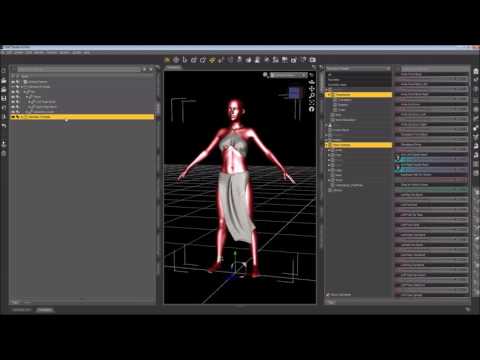
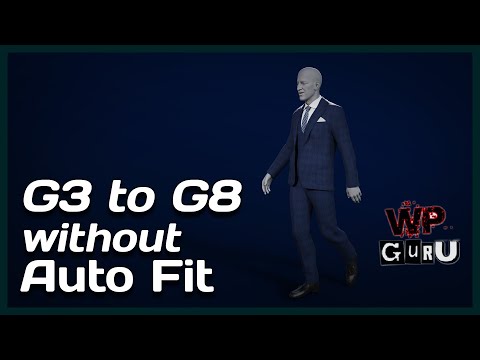
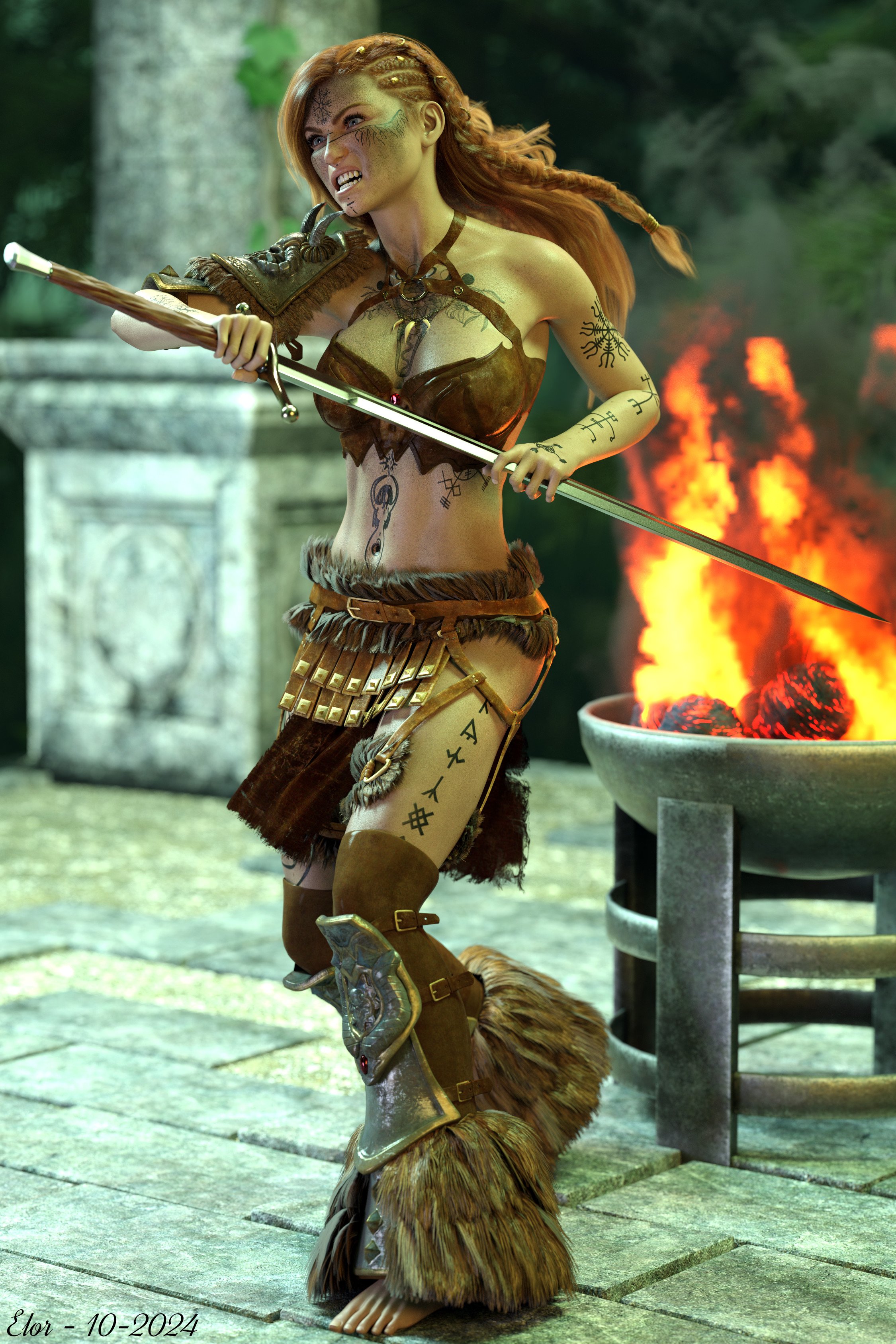
In the end, the Untamed Warrior outfit looks fine once converted (following either tutorial). I linked all products used in my gallery, 'Pommeling' autofit away
 (no idea if pommeling exists in English, but it still sounded like what she's doing, bashing someone with the pommel of her sword). I also linked the various clothing converters, but only if someone viewing the render prefer to use them.
For this render, I redid the conversion but it's one of the outfit I converted first and I don't remember having problem with it back then. By default, they are no Smoothing Modifiers on any of the clothes. Maybe there is a good reason, but I didn't have the time to fix them with Blender or Hexagon. so I added them to fix a couple of poke-through on the top and the legs.
 Course on creating skin textures
lilweep said:
That is never going to help you bake a detialed curvature map unless you have enough high resolution detail on your mesh to generate interesting curvature detail in a baked map.
Oh, no, no, of course! I am not teilling thet I had inexisting detials that magically appear! I am just telling that now, parts like nostrill and ears are darken correctly. I worried about these parts didn't react to the curvature generator, but now, they react.
Yes, the number overlaid tells you how many UDIM textures there are.
If you want to import a set of textures in this format, e.g., you said before you importanted bump maps from G8M, then you have to label the texture map file like so before you import them:
Bump_1001, Bump_1002, Bump_1003, etc.
This way Substance will know to import them as a set of UDIM textures. I shudder to think how you have imported them so far.Thank you very much, I will try! For now, I imported them from their DS directory, without changing enything, and to make them act on the character, I just dragged them on it. I guess it is not the best way at all...

Sorry but im not going to help if you crop the screenshots that much. It could be your layers not set up properly, which you cropped from screenshot.
Ah ok, sorry about that! I am not sure of what you need, so I restarted the carvature bake from zero in a new file and I made a video of what I did. I hope it will be helpfull...
Course on creating skin texturesyuyu.atem said:
Ah! I didn't realize that the settings that are used in the tutorial were'nt adapted in my case! I changes the settings especially by sitting the "fine" channel to 1 intead the "sharp" channel, and it works much better, thank you ver much!
That is never going to help you bake a detialed curvature map unless you have enough high resolution detail on your mesh to generate interesting curvature detail in a baked map.
lilweep said:
I have no idea wI have no idea what you mean - it would be helpful if you didnt severely crop all your screenshots. You only show the tiniest part of your screen and i have no idea what you are alooking at. What i will say is that clearly the bake isnt on one UDIM because there is a giant 4 overlaid on those maps, which represents a 4 x UDIM set of textures
Ah, do you mean that even if I can see only one image, it is a set of 4 map, is it that? I am not familiarized with how work maps and baking in Substance Painter, as you could notice, so I didn't understand what the number on the image meant...
Yes, the number overlaid tells you how many UDIM textures there are.
If you want to import a set of textures in this format, e.g., you said before you importanted bump maps from G8M, then you have to label the texture map file like so before you import them:
Bump_1001, Bump_1002, Bump_1003, etc.
This way Substance will know to import them as a set of UDIM textures. I shudder to think how you have imported them so far.By the way, it seems there is a huge difference between the torso and the rest of the body; is there a way to fix it directly in Substance Painter
Sorry but im not going to help if you crop the screenshots that much. It could be your layers not set up properly, which you cropped from screenshot.
or is it just due to the difference of texel density and it should be fixed by the InTheFlesh'item that use told me? I hadn't time to test it yet, I think I ill try it soom...
Thank you in advance for your answers!
It's very likely nothing to do with that.
Diffeomorphic moving objects in sceneThank you, reported to Thomas.
https://bitbucket.org/Diffeomorphic/import_daz/issues/2225/
update. Some progress has been done, but it turns out dbz fitting is not designed to import multiple figures posed in the scene. So this is a known limitation and not going to be fixed, we added a note in the docs for users to be aware.
https://bitbucket.org/Diffeomorphic/import_daz/wiki/Import/Mesh Fitting
Buy Something That Doesn't Work in Carrara? Post your Questions and Workarounds here. (please)RuudL said:
Cottage Garden Flowers Vol 3 - Persicaria
Loading the duf files in Carrara does result in an I/O error message.
After some research I found an unsupported option for the operation key, that causes the importer to abort the import with this rather non-specific I/O error message.
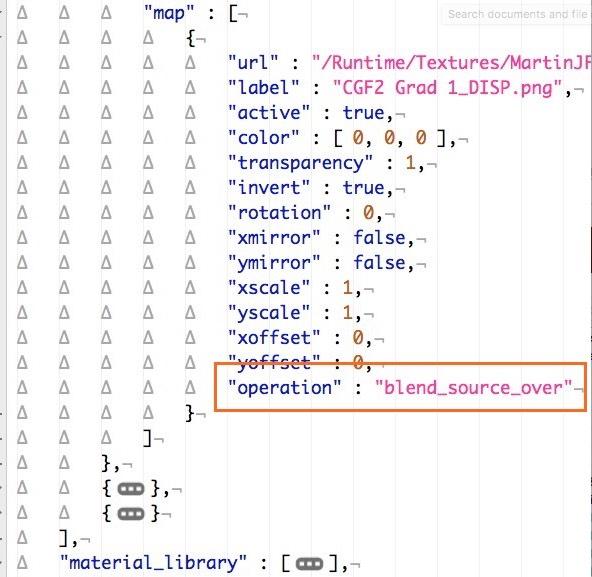
There are basically 2 solutions:
- change "blend_source_over" to an supported option (e.g. "alpha_blend")
- or remove the line entirely and also the comma at the end of the line above it.Thanks, on my to-do-a-render list !!!
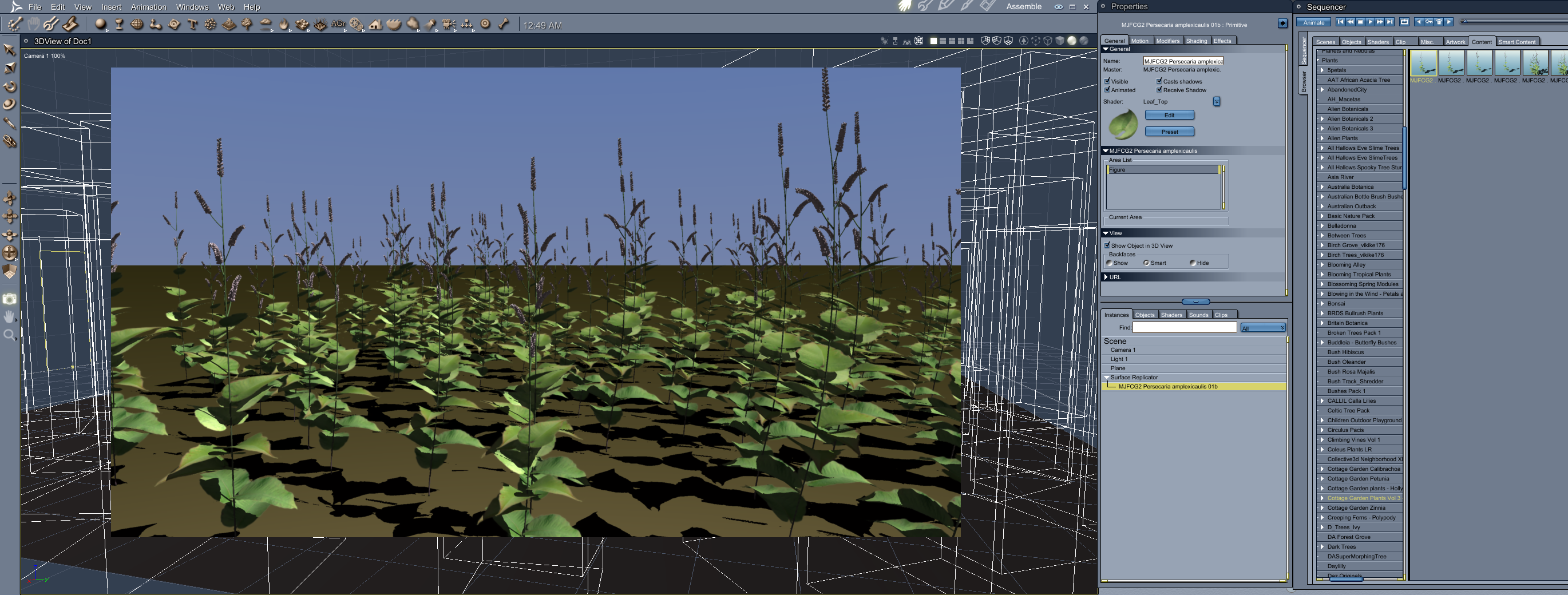
EDIT - a quickie after updating one to see that it works !
 Buy Something That Doesn't Work in Carrara? Post your Questions and Workarounds here. (please)
Cottage Garden Flowers Vol 3 - Persicaria
Loading the duf files in Carrara does result in an I/O error message.
After some research I found an unsupported option for the operation key, that causes the importer to abort the import with this rather non-specific I/O error message.
There are basically 2 solutions:
- change "blend_source_over" to an supported option (e.g. "alpha_blend")
- or remove the line entirely and also the comma at the end of the line above it.Course on creating skin texturesAnother thing, to avoid these artefacts (in attached), it can be better to bake mesh maps onto highly subdivided lowpoly mesh.
Having a highly subdivided lowpoly mesh in your project can slow down Substance Painter, so might be better to do the baking of mesh maps in separate projects. So: 1 project for baking mesh maps (with a highly subdivided lowpoly mesh), another project for painting (low subd low poly). You could import the baked mesh maps into the other project.Hair export from Daz to Clo3DMD \ CLO cannot import OBJ with pure polylines... One has to at least set Value 2 in Viewport Line Tessellation Sides property of the SBH before exporting OBJ in DS ~
Edit: However, with Value 2, the hair will just look sparse. If increase Value to 3, the hair geometry will be appr. 8 ~ 10 times heavy. So, the workaround is to stack 2 ~ 3 SBH geometry (with value 2)... or direcly use transmapped hair.
Daz Studio BETA - version 4.23.0.4! (*UPDATED*)barbult said:
crosswind reminded be of a problem I previously mentioned that has not been addressed as of 4.22.1.224. I submitted a ticket about it today. It doesn't work in 4.22.0.16 either. I don't know if it ever worked. Does anyone have any insight into why these invert checkboxes don't do anything?
Request #463282
Daz Studio OBJ Import does not invert the imported object when the invert checkbox is checked
...and the strange thing is that Invert options really work with OBJ Exporter but do nothing with OBJ Importer. And the stranger thing was that I just found a DS 4.10 version on one of my old laptops, then I tried with it, you know what, I got the same result of not working !
* Released * Mask Builder IINo, it doesnt import masks, it's used to create masks.
Daz 3D is part of

Connect
DAZ Productions, Inc.
7533 S Center View Ct #4664
West Jordan, UT 84084Licensing Agreement | Terms of Service | Privacy Policy | EULA
© 2026 Daz Productions Inc. All Rights Reserved.