-
Stop putting heels on everything!
SickleYield said:
Zwyt said:
WendyLuvsCatz said:
someone as I said before needs to create a deheeler
That sounds like an excellent project for Sickleyield, she makes products like that all the time.
Believe it or not, I tried starting on this once! I've even done deheelers for individual products I own. The problem is that the geometry of different shoes differs so much that there's not really a way to copy a morph that will properly shorten or flatten all sets of heels equally. Even with multiple morphs, I'm not sure it would work.
Cheers to you for trying! Unfortunately, based on my own attempts to adjust the heels on high-heeled footwear, that's what I expected would happen. But if anyone will crack it, I wouldn't bet against you being the one to do it!
 Daz to Blender: How to export the face shape?
When you say you made a morph, do you mean by sculpting in an external application or do you mean by having various existing morphss et to non-zero values?
A Pirate named VooDoo for G8.1M [commercial]RawArt said:
Looking for Opinions
In my promos, I highlighted the cool scarring and those unusual aspects of the character, and only loosely showed that there is also a really well done human morph and clean skin that can be used in regular renders as well. So he is not all scarred pirate.
Do you think maybe I should have focused on the Man first and have the fun weird stuff secondary in my promos?
I am afraid people may only see the cursed pirate.
(I am thinking of how to approach other characters in the future...cuz the clean skins are really pretty darn good if I say so myself)
For what it's worth, I remembered the original Voodoo and the later Adham, so I was looking at the other promos to see if there was a non-scarred version but not expecting it.
Maybe for future characters where you have different versions like this, the main promo image could be split with different backgrounds for each version to make it clear what's happening -- for example, showing half the head with the scarred version, and half with the unscarred version, each with a different background, or something like that.
A Pirate named VooDoo for G8.1M [commercial]RawArt said:
Looking for Opinions
In my promos, I highlighted the cool scarring and those unusual aspects of the character, and only loosely showed that there is also a really well done human morph and clean skin that can be used in regular renders as well. So he is not all scarred pirate.
Do you think maybe I should have focused on the Man first and have the fun weird stuff secondary in my promos?
I am afraid people may only see the cursed pirate.
(I am thinking of how to approach other characters in the future...cuz the clean skins are really pretty darn good if I say so myself)
If I'm being completely honest, this is kind of what happened with me. I saw the cursed pirate, and I DID see the picture of the cleaned up version, but since there were only a limited amount of renders of that I made the (innaccurate assumption) that the clean version was an option, but not a primary value add. So I skipped it...
Now, having seen the render above, I think I will reconsider and into the cart it goes.
This all certainly MY OPINION, and since you asked for feedback here I thought I would share, but it was absolutely clear this was a high quality product. I just don't have a use for the "voodoo man", and I thought that was the primary focus.
Honestly, though, if you can only put in limiteed promos or pics then I think your approach is fine... the primary WOW factor for most will be the unique voodoo bits, but if you can add more promos than you already did then even just one that highlights how the regular man stands up next to a regular G8M would have been the selling factor for me.
A Pirate named VooDoo for G8.1M [commercial]Looking for Opinions
In my promos, I highlighted the cool scarring and those unusual aspects of the character, and only loosely showed that there is also a really well done human morph and clean skin that can be used in regular renders as well. So he is not all scarred pirate.
Do you think maybe I should have focused on the Man first and have the fun weird stuff secondary in my promos?
I am afraid people may only see the cursed pirate.
(I am thinking of how to approach other characters in the future...cuz the clean skins are really pretty darn good if I say so myself)
Daz to Cinema 4D Bridge - Meet the TeamHi,
I recently upgrade to the 1.3 version and it completely stops exporting morphs for Gensesis 8. When I import into C4D R23, the pose morph tag and all the morph sliders are there, but they don't do anything. The mesh just remains static. This is the last time I ever update DAZ or any corresponding plugins like this one as each update ruins my projects more and more and I end up loseing months of work because of the slew of bugs each update brings. I've had enough. Can someone please post a link to the 1.0 version of the C4D bridge?
ThanksStop putting heels on everything!Zwyt said:
WendyLuvsCatz said:
someone as I said before needs to create a deheeler
That sounds like an excellent project for Sickleyield, she makes products like that all the time.
Believe it or not, I tried starting on this once! I've even done deheelers for individual products I own. The problem is that the geometry of different shoes differs so much that there's not really a way to copy a morph that will properly shorten or flatten all sets of heels equally. Even with multiple morphs, I'm not sure it would work.
Buy Something That Doesn't Work in Carrara? Post your Questions and Workarounds here. (please)Why a waste?
For me wanting to use it in Carrara, I'd start by opening Daz Studio and load in Genesis 3 and Genesis 1 and deselect and hide them both.
Load in the clothing and run the Transfer Utility to first convert from G8F to G3F, then save to the Genesis 3 Female > Clothing library under the name of the product, then delete the newly converted one and load in the one I just saved and convert it to Genesis 1, and save it to my Genesis 1 library, again under the name of the product.
EDIT: When running the Transfer Utility, I always expand the view "Show Options", put a check in the "Reverse Source Shape From Target", and deselect (at the bottom) "Parent to..."
see Content Generation Conversion for more details
Carrara doesn't have dForce, but it does have availlable the even more impressive and amazing VWD Cloth and Hair! So I'd use that.
Helpful articles:
Content Creation Tools - aka Daz Studio's Carrara Toolkit
Ten Years After - The Making of Dartanbeck.comAnimating Dart scenes now.
Still in the process of finalizing his look - and it's going to take animation renders to make the final call - for his episode 1 look, that is. Both he and Rosie have many different costumes and such. Right now it's his hair and shaders that are being worked out.
Being a quasi-Genesis 1, 2, 3, 8, M4 figure (Genesis 1 base) he's being just as much fun as Rosie to animate!
 I just made a Genesis 1 conversion of Linday's Long Wet Male Hair and gave it one of the preset initial shapes that comes with the original product (After conversion, morph poses and MAT files all still work on the converted item) and it gives him almost a Geralt of Rivia look, but with Dart's much more friendly face.
When I get a little further I'll post some screen shots of him.
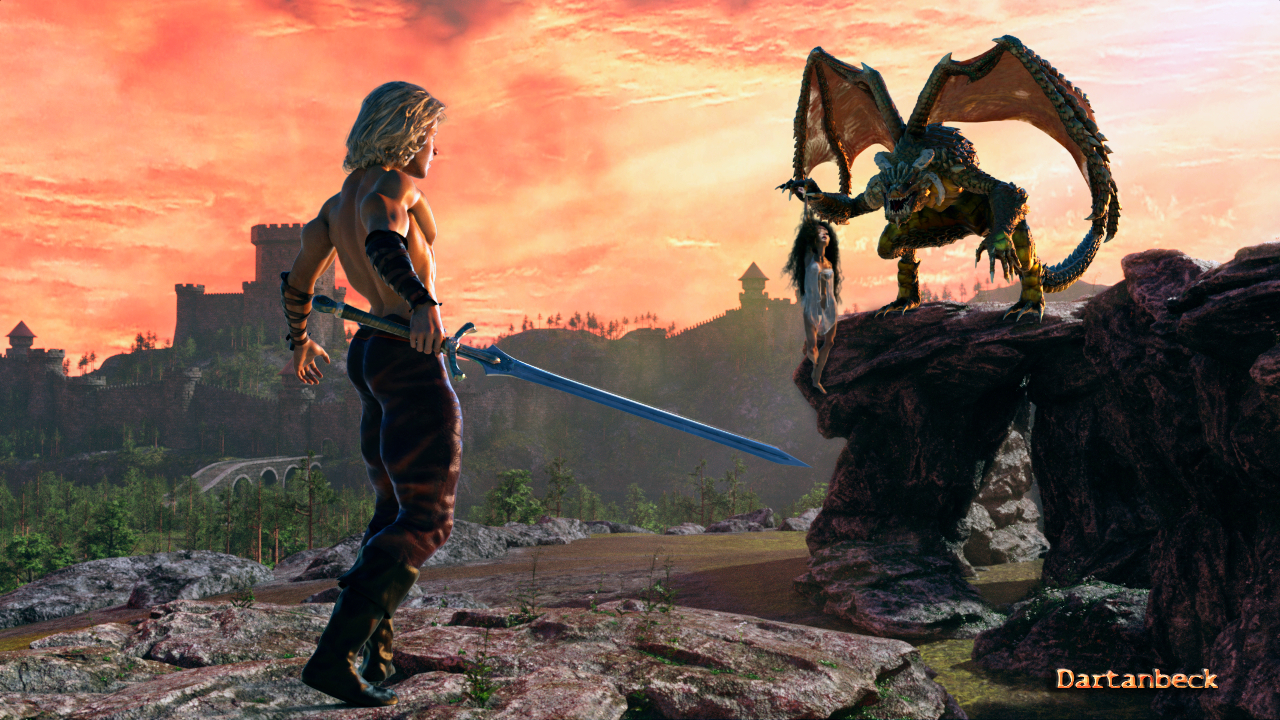
This is almost the same as he is now, except that in this he's wearing Dorian Hair for Genesis 3 that I've converted. That's Aeon Soul's Legend Sword he's holding. I Love That Sword!!!
 Auto Muscle Enhancer HD [Commercial]
mikethe3dguy said:
Working on a visual novel and just spent a frustrating week trying to cross-gender a female character from G8M so I can use AME G8M on her. Way too many stumbling blocks to make it worth it, with clothing and shoe fit problems, hair challenges, breast challenges, eyelash challenges, limitations in accessories I can use (jewelry and fingernails for example). It just goes on and on. This works well enough (though still very challenging) for basic still images, but if you have varied requirements imposed by scene, and constraints based on story, scenario and character requirements multiplied across hundreds of renders in a dozen or more chapters of a story it's just not going to fly.
The hope of a female version of AME for my character is something I should have abandoned long ago. At this point I've caused many months of project delay. It's time to "pull the trigger" on my VN project and move on without it.
It looks like DMaster has moved on from Daz content creation, since he hasn't logged in for months now. I wish him well in whatever new life chapter he's started. I can't imagine having to recover from the same loss he's faced. AME when coupled with ASE is one of the most amazing Daz products I've used.
In practice I totally agree with the challenges of converting the G8M into a G8F facsimile. Things that help are saving material and wearable presets so they can be easily accessed again after they are set up. Especially the wearable presets, this can save all the clothing and hair (including body hair) in an easily accessible location. This however does involve some "up front" work. Still failures do occur.
I haven't posted in awhile, because I didn't have any new stuff to add from my previous posts. I have been trying to figure out more in the ERC realm, and studying D.Masters work along with others, finally led me to a workable solution. I have saved out my morphs and the accompanying ERC freezes, along with a Master Control that mimics D.Masters Flex control and the Musculature HD product. Attached are some images of the Baseline G8F cloned onto the G8M platform with AME/ASE Musculature HD Flex Control and Finally my own enhancements to get the final look I was pursuing. I have saved these as Morph assets, and they are now available with every figure I open, not just a saved figure. I haven't figured out all the ERC controls yet (probably never will!), but this does get me one step closer. I have nothing but admiration for these product developers! My enhancements only include arm and calf morphs currently (12 total) with ERC to the hand and forearm controls. I can now start from a stock figure, and pose at will with just a few settings. If there is interest, I can try to put a class together, but it would be significant, I have been studying and experimenting for quite awhile to get here.
Happy to answer questions and keep the Enhancements going!!
TD
Shark Tail@ArtAngel, now that you mentioned the Count I can see his morph in there! Yes, you can see which combination of dials you used by opening the Parameters Tab (Windows>Pane>Parameters) and, with your character selected, click on "Currently Used". That will list all the morph dials being used by the character.
Love the render, thank you for sharing! I'm surprised the tail worked on females (or are you using transgender morphs?). The ear morphs really worked out great to finish the look!
Bringing in marvelous designer items into dazprobably the transfer utility has not transferred the rigging perfectly - typical in the crotch area. It is a complicated area. You can
1. do the transfer utility step using a very tight version of the garment to ensure the rigging transfer is more successful
2.adjust weight maps
3. fix with JCMs.
But can you not just do the pose and sim in Marvelous Designer, rather than using transfer utility to rig the item? I ask because the product creation pipeline is more complex than just simulating in marvelous designer.
Is blender right for me & is it possible to animate daz scene in blender & export animation to daz.Robinson said:
You're right here. My experience of Diffeo so far is multiple "eh?" moments, inadequate documentation for all the options, and nowhere to go when it doesn't work as you expect (I don't expect this question to get answered). Oh and Blender won't make it obvious what to expect either. Put it this way, animating in Daz, Blender, Maya, etc. is *easy*, but the latter want you to be an expert at rigging too, so you can understand and debug problems. It's a completely different skill. What we need is, as with Daz, a standard rig setup for G1, G2, G3, G8, a morph and JCMs configured for your character. Nobody should need to fiddle with a hundred settings on an importer. It's so frustrating.
This was my experience too. I have to say that I am not now the adventurous type that I was years ago so learning new software is no longer easy nor exciting. So every time I have attempted to grok the DAZ/Diffeo/Blender workflow I hit a roadblock. Whether it was material conversions or geografts/geoshells or morphs/shape keys or IK I found that every step I took required learning something more about Blender. Not that learning is a bad thing but is disheartening when you set out to do one seemingly simple task and are led down the garden path to the forest of know-how that is required to operate adequately in Blender. Rigging, the material node system and even just posing in Blender (which, to me, is a pain compared to posing in DAZ Studio) - these are all things that take a lot of study and understanding. It might be a breeze for some but not for me. So I inevitably fall back on the clearly inferior tools available in DAZ Studio.
DAZ tends to charge for plugins that only go some way to providing working and useful utilities. Mesh Grabber is an example of such an addon but, for me, it turned out that I actually preferred exporting to Blender to use the Edit and Sculpt tools. For once, I found Blender preferable. Not so with animation, however. I still use the paid-for KeyMate and GraphMate rather than take on learning how to export and animate in Blender. Probably short-sighted but perhaps I am learning about my limits. It seems to me that DAZ has made the decision that it will never be able to offer the tools that Blender has for free so I hope that future efforts will be directed at greater synergy with Blender so that we don't need to re-rig, re-texture, resize or all the other things that Diffeo attempts to do for us.
Long load times? This may help! - Morphs ManagerHere is an idea for a morph disabler thatI I'd pay for.
Instead of manually checking which morph folders to disable, have the ability to take a duf. file scene that was already created. The program would then look at all associated morphs that were used (ie non 0/default value) for that scene. Then it would automatically disable all morphs that were not used.The current method I use to disable morphs I don't need is to use content gatherer to extract all used morphs in a scene, put it in it's own directory and use the content manager directory to enable only that morph directory. All other morphs are in their own directory seperate from other content.
MimicMolly's Renders & WIPsShark Tail for G8M is the first new non-DAZ Original release I've bought in a long time. I was sold on the fact his shark body fins are posable. I applied the geoshell transition following the instructions of the Read Me.
Anyway, I'm trying to set up a scene that has been in my mind for a while. But it's already taken more than a day, not sure if I'll even bother to render it because once an art project starts taking too long, I lose interest in completing it. (Or in this case, lose interest in rendering it as a finished piece.) Just in case that happens, here is the recipe I used to give this custom character, whom I've sharkified, proper shark teeth.
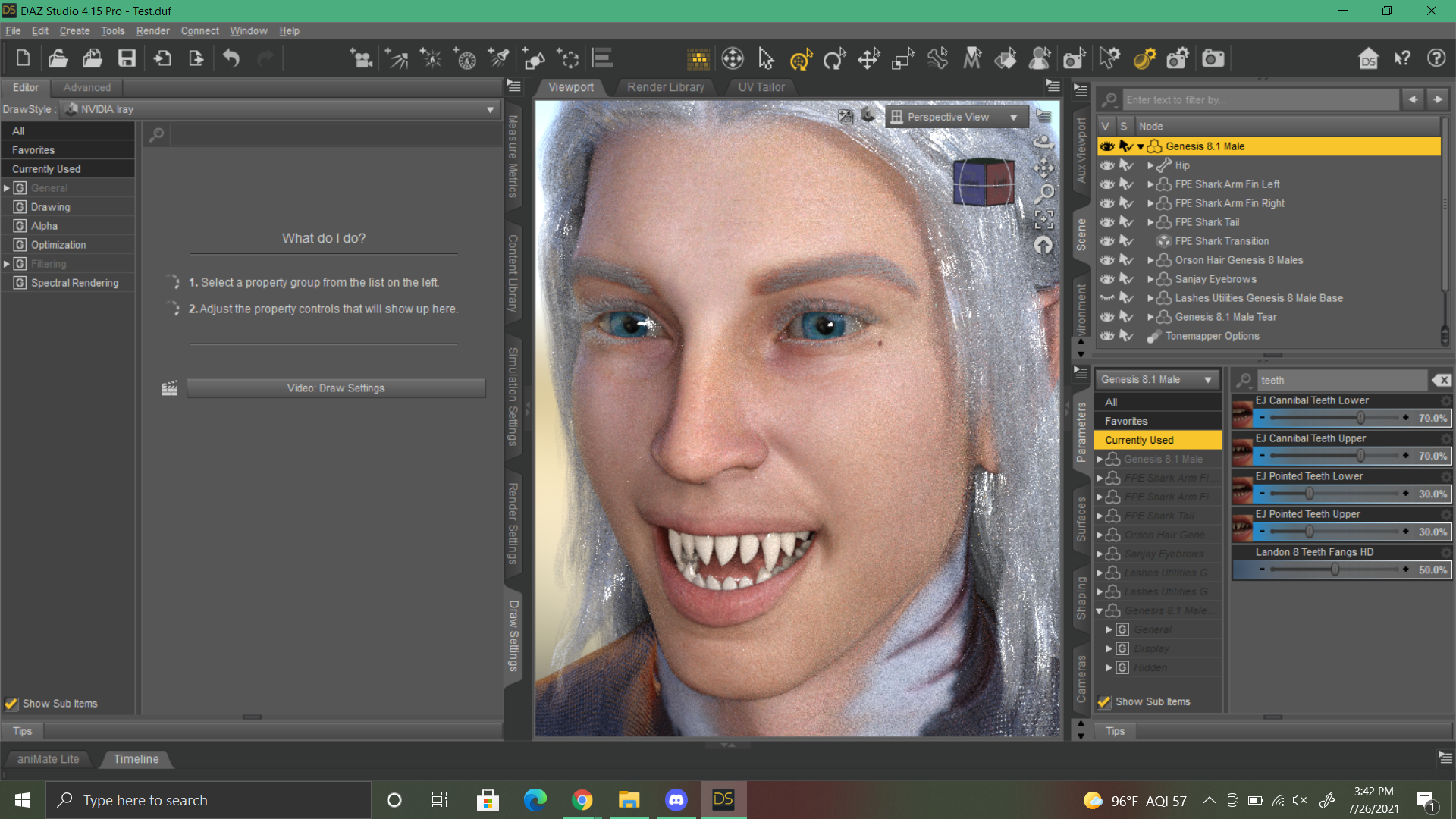
I cannot easily recreate this character with regular G8M because he uses Kota 8.1's Head at 30% and that morph is pretty crucial to his overall head shape.
Morph Loader Pro stopped working.Lagrange said:
I'm back just to say how awful 4.15 is. Though you helped me with Morph Loader there are still NUMEROUS fatal problems which really turn 4.15 into a joke. I really regret I moved from previous version and I don't know how to find it now.
Issues:
1. Somehow Daz began to duplicate all of my pictures on the Desktop. I always have something there before I move pics to right folders, sometimes there are renders or humor stuff. And now Daz while being opened constantly generates doubled pics for all of them. Small size and "_icon" word added to each name. I don't know how to disable it. I don't know what a dumbаss could ever implement such an idea. A program just spams desktop with nonsense duplicates. This is not even an initial render folder...
Daz Studio geenrates thumbnails for images in the Render Library folder. This does not default to the desktop. You set the location used in Window>Panes(Tabs)>Redner Library by opening the option menu (the lined button in the top corner, or rright-click the tab) and selecting Render Directroy Manager.... Just point it to a holding folder. You can still save you renders to the desktop if you like, use File>Save Last Render or, at the bottom of the render window, click the button below the Name label and select the option to use a folder rather than a render library and select the desktop
2. In Render menu "Environment" point is now hidden untill you make first render of the scene. This means I can't disable "draw ground" right away.
Create>New Environment Options Node
3. Rendering became SIGNIFICANTLY longer. A single character with no background could be completed in 2-3 min before. Now 2-3 min is not even enough to reach 1% ready.
Were you able to do GPU renders before? Unfortunately the version of iray included in 4.15.0.2 has a higher minimum driver version than is vailable on the Mac platform
4. Constantly crashes. May be because of some light or render presets. Actually I never managed to get a single render of a dressed up and lighted character in 4.15.
May be related to 3.
Morph Loader Pro stopped working.I'm back just to say how awful 4.15 is. Though you helped me with Morph Loader there are still NUMEROUS fatal problems which really turn 4.15 into a joke. I really regret I moved from previous version and I don't know how to find it now.
Issues:
1. Somehow Daz began to duplicate all of my pictures on the Desktop. I always have something there before I move pics to right folders, sometimes there are renders or humor stuff. And now Daz while being opened constantly generates doubled pics for all of them. Small size and "_icon" word added to each name. I don't know how to disable it. I don't know what a dumbаss could ever implement such an idea. A program just spams desktop with nonsense duplicates. This is not even an initial render folder...
2. In Render menu "Environment" point is now hidden untill you make first render of the scene. This means I can't disable "draw ground" right away.
3. Rendering became SIGNIFICANTLY longer. A single character with no background could be completed in 2-3 min before. Now 2-3 min is not even enough to reach 1% ready.
4. Constantly crashes. May be because of some light or render presets. Actually I never managed to get a single render of a dressed up and lighted character in 4.15.
How in the world such a shi as 4.15 could ever make it up to release... Unbelievable.
How to delete all keyframesOK, this is insane. I have no idea why I cannot delete every keyframe related to expression. I can't copy, paste, or delete, and I'm stuck with a bunch of keyframes for literally every single expression morph I own that do nothing.
What are these keyframes with the T inside of them? How do I just delete all of this crap?
I have watched every video I could find on this and nobody addresses this. It is not intuitive... anybody know how to just delete all of these things away?
EDIT: OK, I found a video by Jay that indicates what that T is and confirms that I'm actually looking at the real keyframe, but I still cannot delete any of them. Is it possible this has something to do with me either having used powerpose or AFE? I find that sometimes both of those cause irreperable damage to my scene... I can't believe it's this hard to just delete a keyframe. I seriously don't want to have to scratch all of this because of something stupid like that!
Permanent Installation of AssetsOkay, time to update the steps based on the latest information, since this may be useful for anyone else who wants to install assets on the D:; then, if they reinstall Windows or get a new PC and so do a fresh install of Daz Studio, Daz Studio will be able to find and use those installed assets exactly as before, so they don't have to download and install the assets all over again.
STEP 1: PREPARATION
If necessary, uninstall all current Daz stuff from the PC to start fresh.
Use Daz Central (DC) or Daz Install Manager (DIM) to uninstall Daz Studio (DS) and content (whichever one you used to install DS in the first place), then uninstall DC/DIM through Windows.
Then do any manual cleanup - see the instructions at https://helpdaz.zendesk.com/hc/en-us/articles/360055963392-How-do-I-uninstall-delete-Daz-Studio- but note that some of the folders names may be different, and the guide misses out a few folders (e.g. I had a Daz 3D folder on the root on my C: that needed deleting).STEP 2: INSTALL AND RUN DIM
Download DIM from https://www.daz3d.com/install-manager-info/
Install DIM on the C: at its default location.
Run it, tick "Work Offline" (so you can set preferences). This will temporarily disable the password box. Enter your email and click Start.STEP 3: SET UP DIM
We want to set locations on the D:, so they can be easily backed up and will also survive Windows reinstalls.
In the top right corner is a small Gear icon (Settings). Go to Settings>Advanced Settings.
Go to the Downloads tab – this is where we set the location to save the files you download from your store account.
It has two options. There is a Package Archive C:/Users/Public/Documents/DAZ 3D/InstallManager/Downloads and a Thumbnail Archive C:/Users/Public/Documents/DAZ 3D/InstallManager/Thumbnails
Package Archive is the zip files downloaded from the Daz store.
Thumbnail Archive is apparently optional, some kind of preview in DS. Nothing is added to it by DIM installing assets, so things are probably only added by DS. However, since it will get downloaded anyway, and they don’t take up much space compared to the main assets, it makes sense to back them up too.
Since I want to back them up, and they are different content types, I will be using a nested folder structure where the downloads and installed files all go under D:\image creation\Daz 3D\assets\
So I set the Package Archive as D:\image creation\Daz 3D\assets\downloads
and the Thumbnail Archive as D:\image creation\Daz 3D\assets\thumbnails
Leave all other settings alone.
Next go to the Installation tab. This allows you to set and add Content (Runtime) install paths.
Again, there are multiple options.
There is a Manifest Archive at C:/Users/Public/Documents/DAZ 3D/InstallManager/ManifestFiles
There is a Content Database Base of C:/Users/NA/AppData/Roaming/DAZ 3D/cms
And there is a Recommended folder of C:/Users/Public/Documents/My DAZ 3D Library (which has an ellipsis after it but clicking it does nothing).
Manifest Archive is for the files that DS uses to track what it has installed.
Content Database Base is the database used by the Content Management System. It is accessed and managed by PostgreSQL and has no DS content in it. DS and DIM update it based on product metadata. To avoid losing any metadata it should be on the D: drive and included in back ups. This location will be the same as the ContentCluster path you can set in DS Edit>Preferences>CMS Settings.
So I set the Manifest Archive as D:\image creation\Daz 3D\assets\manifest
and the Content Database Base as D:\image creation\Daz 3D\assets\cms
However, I had an issue with this step! Every time I changed the Content Database Base to D:\image creation\Daz 3D\assets\cms, and Accepted it, then went back in, it had reset to C:/Users/NA/AppData/Roaming/DAZ 3D/cms (there were no error messages). This seems to be a bug. One option was to skip this step temporarily, let DIM go online, install DS, then try changing it inside DS (Edit>Preferences>CMS Settings, the ContentCluster location). But I found that once I installed DS and logged in, then came back to DIM, DIM then let me finally change the location of the CMS, so all was good. For some reason it would only let me after I installed DS.
We also need to set a folder (a fifth location) for the actual files that DIM unpacks from downloaded zips and installs, which is the key ones to move to the D:. By default this is the Content Folder, which shows as C:/Users/Public/Documents/My DAZ 3D Library. First click the + in the bottom left of the window. Give the path a label such as “content” and choose a location on your D: (for me it was on my D:\image creation\Daz 3D\assets\content). Any added locations will be available in the Content Path Shortcuts drop-down selection box above, so change it to the one you want there. You can then delete the original default option so you only have the D: option for content.
You can confirm the patsh etc in the main interface window “Ready to Install” tab: click on Show Details.
That’s five folders set, so the hard work should be done.STEP 4: SET UP DAZ STUDIO
We have set up DIM. If you haven’t done it already, let DIM go online and install DS. DIM should have transferred all the correct paths into DS, but we can double check for peace of mind.
Open DS.
Edit>Preferences>Content tab>Content Directory Manager.
(You can also open preferences with F2.)
That lets you expand the path trees for where thinsg will be stored.
The CMS Cluster Directory should be whatever you set in DIM (D:\image creation\Daz 3D\assets\cms).
Content (in both DAZ Studio Formats and Poser Formats) should be whatever you set (mine were both D:\image creation\Daz 3D\assets\content as I expected).
Daz Connect Data isn’t something set by DIM, so will be a C: location. Daz Connect means installing content from within DS rather than via DIM (and doesn’t work for all content). As such, since we are using DIM, it makes sense to ignore that and install everything via DIM. So you can leave that alone.
This hopefully just confirms that DIM correctly set the directories and transferred those locations to DS.
I don’t think there’s a way to set a default for saving your scenes etc in DS, but I created a folder at D:\image creation\Daz 3D\my presets and will manually save scenes and characters there, so they get backed up and can also be transferred to a new PC or survive Windows reinstallation.STEP 5: DOWNLOAD AND INSTALL CONTENT/ASSETS
Now that everything is set up, we can install all the assets we bought.
Open DIM. Make sure you are “Working Online” (enter your password).
The “Ready to Download” tab should be populated with everything you bought on the Daz Store, plus Daz Studio and some freebie starter content.
TIP to save space and time: hide anything that you don’t want to download and install that might be things you don’t need such as Hexagon, or a bridge for Photoshop (if you aren’t going to use that). To the right of each line is a right-facing triangle. Click that for a menu, and you can hide any items you don’t want to install and they’ll disappear (you can view the hidden items at any time by clicking “Display Hidden”, and unhide them in the same way).
My big tip is that many things I’d bought had the same file twice – once with ds at the end, once with ps. According to https://www.daz3d.com/forums/discussion/28450/ds-ps they are pretty much the same thing, and the ds version will work better in Daz. Also, the ps (Poser) version would often not work as smart content anyway. So, we want to just download and install the ds versions, and hide the ps. Installing both just doubles the storage, and unfortunately that is the default DIM chooses. So it may be worth filtering it – type ps onto the top right filter box. Ignore false positives (e.g. files where ps are next to each other liks “special ops poses” but identify real ps files and hide them using the right triangle menu I mentioned. For me that prevented DIM downloading and installing 94 items, or 12.3GB of unnecessary files. The downside is that I had to hide all 94 items individually, two clicks for each (and since the button is small and right next to the install button, I accidentally downloaded a few and had to delete them again). The little menu ignores the fact that you may have selected multiple items with the check marks on the left, making you hide each individually. Also be aware that if you hide ps packages in DIM in this way, then if you ever you reinstall DIM (e.g. on a new PC, or reinstalling the OS), you may well find them all back again and offered for install, so will need to hide them again (another 188 clicks …).
If ever you use the filter box, remember to click the x in it when you are finished, to cancel the filter and reveal all the files again. Also, the filter box is handy for finding a particular item.
A big bonus of DIM is multiple downloads. Daz Central (and Daz Connect) only let me download items one at a time (if I tried to download multiple items in DC it cancelled previous ones and only downloaded the last one I clicked on). But DIM lets you download multiple items – or even everything – at once. You can re-sort the packages by size or name and select groups. If you tick “Install After Download” it will do it for you. Because I don’t have superfast Internet, and have to share it with my partner (and use the same network for work), it took me three days to download and install what I currently own. That’s why I don’t want to ever have to do it again if I get a new PC or reinstall Windows – hopefully this method means the content will be there on my D: for future installs of DS!
DIM downloaded and installed everything to the folders I set.
(Also, I did NOT click “Delete Packages Once Installed” on the “Ready To Install” tab; this way, if something goes wrong with my plan, at least I can reinstall the assets from the downloaded files, saving the three day task of downloading them all again. The downside is content appears twice on my D: and takes up twice the space – once as the installer, once as the installed version. Maybe one day, if I find this system works even after reinstalling Windows or getting a new PC, I will then have the confidence to delete the downloaded installers and free up a lot of space – currently the installers alone take up 119GB).STEP 6: TEST CONTENT IN DAZ STUDIO
Check the items show up fine and work in DS, showing up as Smart Content if applicable, that there are no problems that might require a refund.
Note that in DIM the installation tab shows if a product has installed Metadata. If so, there will be a checkmark underneath the “Smart” column, letting you know it will show under “Smart Content” in DAZ Studio 4 and higher. Most items will have metadata, but some may not have user-facing files (e.g. morph sets may add new sliders to the figure without having any presets to click). Additonal parts of a file that is so big it is in more than one part may not show as having metadata either. If there are properly installed products which don't have the data to appear in database-driven views (Smart Content) but which do have user-facing files you should still be able to find them in the Content Library pane under daz Studio formats (or Poser formats) and then the content directory name. This often applies to older items.
I have noticed one problem: some items I installed via DIM show up in DS, but are greyed out, as if they aren’t installed. I’m not sure what has happened there, or how to fix it. If I right click install within DS then it uses Daz Connect, so would download the item again (when it is already downloaded and stored on my D: by DIM), plus it would store it on the C: unless I change that path too. Using multiple install methods is perhaps asking for trouble, so I want to work out why DIM is not working for some items instead. Is this a known issue? Some of the items it applies to: Genesis 3 Starter Essentials; Rocker Outfit for Geneis 3 Females; Shadow Thief Outfit for Geneis 8 Females; Genesis 8 Starter Essentials; Nyala HD for Genesis 8 Female; Daz Studio Iray HDR Outdoor Environments; and others.STEP 7: REGULAR BACKUPS
I do a full backup of my D: regularly. So this would now mean I am also backing up the downloaded asset zip files in one folder, the installed Daz assets in another (doubling the storage requirements but meaning I am covered for a few potential scenarios), and things like the cms, thumbnails, manifests, and my presets in other D: folders. I also save one caleld “previews” which lets me browse what I have bought – each product gets a folder within a structure that categorises it (people, hair, lighting, poses etc), with a link to the product page, a txt file with the full description, and all the preview images from the product page. This is really useful to store as products are sometimes withdrawn, and that information is no longer available – there are a few items where I can no longer get the preview images, which si a shame as they give ideas for how to use the content, or illustrate all the options. Ideally all that info would be available in a zip for everything you buy, which would save manually having to save every image via the browser.
NB: do backups only when DS, DIM, and other applications using the cms are all closed and there are no PostgreSQL processes running.STEP 8: REINSTALLING WINDOWS / GETTING A NEW PC
If I reinstall Windows, or get a new computer (where I'd copy my D: backup contents to the new PC's D:) I would perform steps 2-4 above, choosing the same paths (so they actually now point to installed content on the D:). That should mean DIM and DS see and use all my existing content, so it doesn’t need redownloading or reinstalling again, saving me days.
Worst case scenario is that I reinstall Windows then all the Daz software, as above, but DIM and Daz Studio don't "see" the previously-installed Daz assets. In that case, as long as DIM can see the downloaded zip files, I can manually delete the installed assets from my D:, leaving that folder empty; then point DIM at my previous downloads and reinstall everything from the downloaded zip files. (Which at least saves downloading everything again.)Z Miracle of Life Shape and Poses - solvedI solved it searching in the forum for issues with other shapes
and the solution was to manually install Genesis 8 Female body morphs
i copy past what suggested in this thread
https://www.daz3d.com/forums/discussion/384386/help-genesis-8-female-body-morphs-not-working-solved
- Download manual install file from your Product Library page
- Unpack it
- Copy the morph files in the /data/ folder into the matching folder in the Connect installation, overwriting the existing files
this must be done with DAZ|Studio closed
it worked, after doing it the Z item works perfectly!
Daz 3D is part of

Connect
DAZ Productions, Inc.
7533 S Center View Ct #4664
West Jordan, UT 84084Licensing Agreement | Terms of Service | Privacy Policy | EULA
© 2026 Daz Productions Inc. All Rights Reserved.