How Do you Apply Physics to Skirts on Characters brought to Unity with DTUBridge?
 nokoteb99
Posts: 944
I've been struggling with this one because nothing seems to work. So you send a G8 Girl character with a skirt. You have a wallk animation or sitting animation but all the legs have poke through. There's stuff like Tail Animator and dynamic Bone but apparently those depend on bones but upon the DTU bridge process clothes that appears in Unity no longer has children so no bones or nothing so those things no longer work. I also tried Magica 2 and it doesn't seem to work. I tried this tutorial from 3 years ago( cause it seems to be the only one that the makers from magica released that gives you a decent overview of the process) https://www.youtube.com/watch?v=YmXUkOs5ErY but it didnt work( skin pokes through from the sides of the skirt and also from the front and also from the back) and it seems complicated to even do on a Daz Shapely character( Like do you have to place the thigh capsule colliders at precise positions and the buttock sphere colliders too or what , cause if it's precise, how the heck do we know where to place them? ). On the video there,They use a anime like character that doesn't have much of a shape. They use magica capsule colliders for the legs and magica shere colliders for the buttocks but they didnt really do anything for my bigger thigh, thicker thigh and bigger buttock girls. Basically more realistic girls. In fact i tried my best to align the buttock capsule collider with the edge of the buttock cause my girl had big buttocks and then i just saw bunch of poke through, i had to move the spheres outside of her body to stop the poke through but then that looked ridiculous. And there's no tutorials that cover how to do i t for Daz, then there's a bunch of parameters, it looks lik you're doing math when you just want to put a skirt that will move nicely in annimation . So is there anything that works for Daz Characters sent to Unity through DTU? Or is there just nothing and we're forced to just use pants and shorts.

Daz 3D is part of 
Connect
DAZ Productions, Inc.
7533 S Center View Ct #4664
West Jordan, UT 84084
Licensing Agreement | Terms of Service | Privacy Policy | EULA
© 2026 Daz Productions Inc. All Rights Reserved.
Comments
That is interesting problem to solve in Unity. Usually I just send Daz characters to Unity, that does not need advanced clothes.
Some of RawArt creatures does not need any clothes at all, to be shown on YouTube without a problem.
There are many assets in Unity store that works with clothes. Will need to try the ones, I have already purchased.
Have tried "PUT IT ON - Clothing Fitting" and it is the easiest to use so far, but I need to explore it more.
There are also "Tools for Magica Cloth 2 - FREE", that help with creating colliders.
"Clothing Culler" looks promising, but it requires more elaborate setup.
"Cloth Dynamic" is free, but has mixed reviews.
Below is my try with "PUT IT ON - Clothing Fitting"
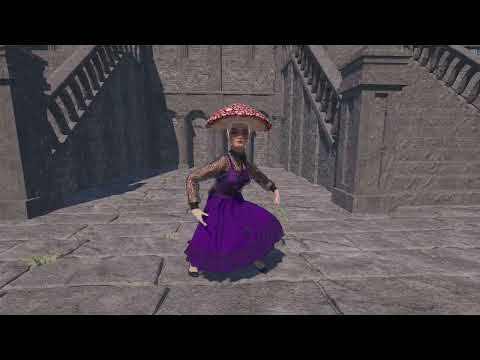
Used:
https://www.daz3d.com/mushra-for-genesis-9
https://www.daz3d.com/dforce-dark-charming-outfit-for-genesis-9
https://www.daz3d.com/dforce-bellatrice-outfit-for-genesis-9
https://www.daz3d.com/ancient-staircases-1
Please check my video on YouTube: