Help wanted with Window Lights
 sueya
Posts: 870
sueya
Posts: 870
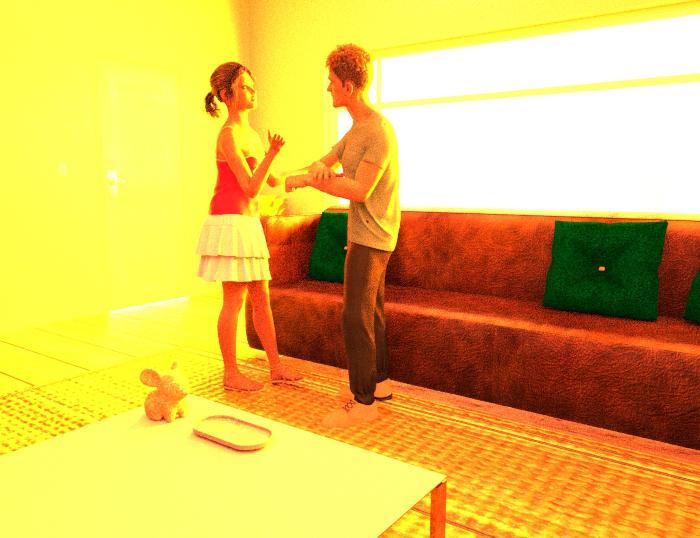
I have just added Iray window lights
to this scene. As you can see I can't see the scene behind the window. Please can someone advise me as to how I can get it to show up. This scene is 80% rendered but I would expect the background to show up by now.
Post edited by sueya on

Daz 3D is part of 
Connect
DAZ Productions, Inc.
7533 S Center View Ct #4664
West Jordan, UT 84084
Licensing Agreement | Terms of Service | Privacy Policy | EULA
© 2026 Daz Productions Inc. All Rights Reserved.
Comments
Looks like the emission value is way too high so it's washing out the window.
Also check your ToneMapping settings.
I just want to point out that once a pixel is white, it will never be anything else but white. So as soon as you saw the large white blob in the window, the background was never going to show up. IRAY is entirely addative. Nothing is going to subtract light from the image.
Also check the Environment Map and Environment Intensity settings in Environment. The default to 2.0 and 1.0 by default. But I find a lot of HDRIs are overly bright. Map determines the brightness of the HDRI image and Intensity the brightness of the light cast by the HDRI.
Someone mentioned tonemapping. I would start with the environment. Changing f-stop or exposure has other effects. But the environment settings are like changing the luminosity of an emissive surface.
Iray does work with a higher bit-depth internally, which a Beauty Pass canvas can capture, so it may be possible to get detail from a pixel that is white in an 8 bit image.
In the Window Lights the light itself is meant to be providing the environment light, and is emissive to do so. The idea of the product is to be more efficient than a wrap-around HDRI when there is only one aperture for the light to coem through (though I ray does somewhat optimise this itself)
Changing ISO, f-stop, or shutter speed has no effect beyond tone - these are not physical cameras where each option has other effects too.
That doesn't change the image OP posted. Once that preview image showed white, it wasn't changing. I don't think canvases were in use here. Did I miss where the said they were posting a Beauty canvas?
I don't own the product. I just assumed it was HDRI. If it's an emissive, they can change the luminosity in the surfaces tab. https://www.daz3d.com/iray-light-manager-pro Is also worth investing in.
These modify Exposure and thus they affect the point where the internal 16-bit image is converted to 8-bit.
For example, by default Exposure is 13 and ISO is 100. Set ISO to 200 and Exposure becomes 14.
I decided to reload the window background and lights. The default version looks much better. I also opened the door a little to add more light.
I also increased the spread angle of the spot light.