Catsuit morph
 tombraider4ever
Posts: 780
tombraider4ever
Posts: 780
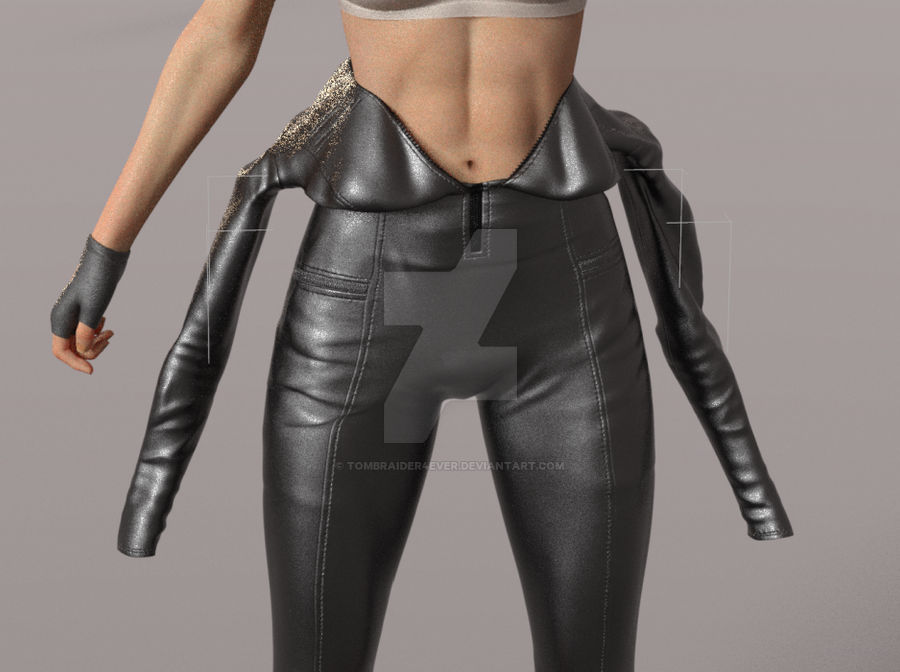
I bought this catsuit, https://www.daz3d.com/dforce-su-sexy-latex-for-genesis-9 mostly for the super cool morph, w the character w the catsuit top hanging around her waits, I use it on G8.1, by an autofit clone I bought here at daz, no issues with it.
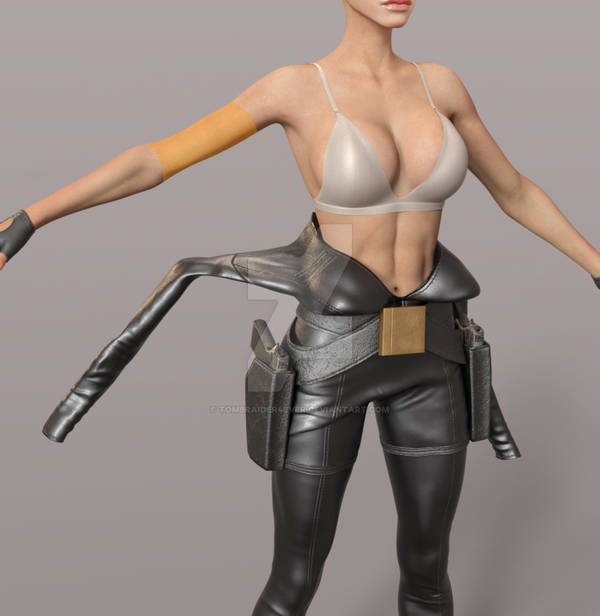
I now know why there is no character wearing that morph on the promo, just the catsuit........ It can't be used, if you pose her upper body in the smallest way - the arms, not fun having them in the starting pose..... if you pose the arms and the rest the upperbody part of the catsuit moves with it! So left w turing it into an obj I guess, with the pose, add the textures - can that be done?
It is the same on G9. I admire the artist behind the outfit, Sue Yee, very much, one of my fav creators. BUT THIS....
Should have been warned by the fact that that pick w that morph has no body w it.... Who in their right mind makes poses - art - w the arms and hands COMPLETELY IN THE T POSE - T POSE FOR GEN 8.1 or G9?
I don't want to return it, it looks DAMN AMAZING fully on her also, so want to keep it . But I WOULD LOVE IF that morp can be made usable somehow, it looks AMAZING, have it on my G8.1 Lara character, looks like cl Lara is dressing, diled in the morph not fully, so we can see her belt and guns still.. Please Sue Yee - can you make this morph function? OR make a new catsuit - the same look - but working, - an addon - WOULD TOTALLY BUY IT at once.
I should not have to open a ticket, why - this effects all that buys it. Could a mod report the outfit to Daz? if that can be done of course.
And it the meantime - what is the best way to use the catsuit w that morph? pose Lara's legs - copy the outfit model - convert to obj - can that be done without effecting the original model? is there any way at all to use the catsuit morph? it looks so good, was so much looking forward to make art w it.
Have used daz for years, I know how to put on an outfit and dial in a morph, can it be done wrongly? and it's the same on G9 - base g9.
Not sharing this to shame the artist, sharing this so she can make an update, I would totally buy an update if I have to.
Not accepting opening a ticket, this is not on my end... should effect all users resonably. If someone uses it perfectly I will open a ticket.
And the no body on the morph promo speaks volume I think.
Shes covered, does the cover need to be more to have the picks here? let me know and I will make the change and edit.
.
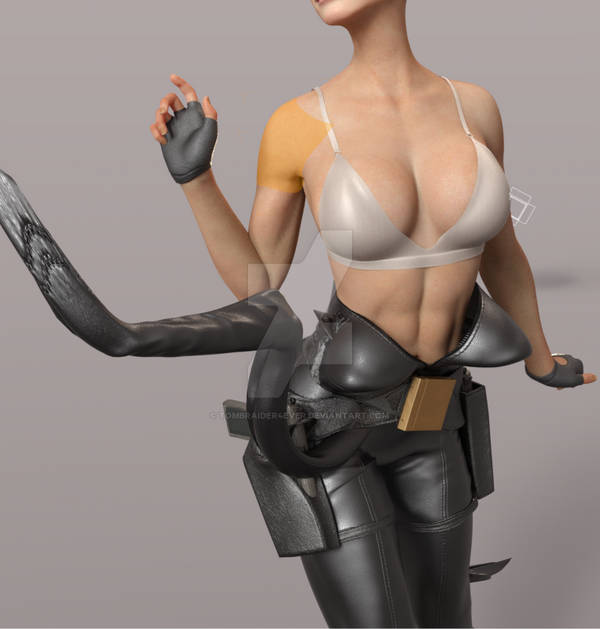
Looks this amazing w her unposed , I want to use it so bad, looks so good, cl Lara dressing for her adventure
 .
.
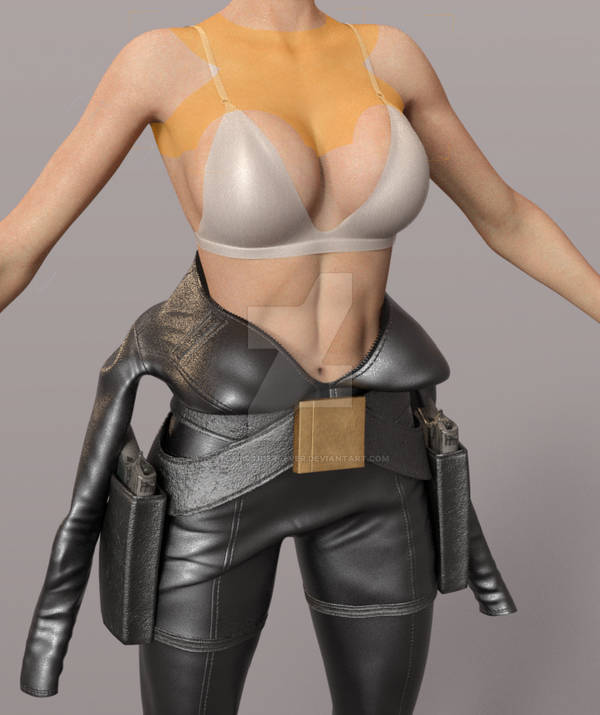
outfit promo here, w no mannequin w that morph promo -
It is the SAME w the morph DIALED IN FULLY. So that's not the issue.
 EDIT:
EDIT:
I realise now, thinking more about it, that the lack of model in that morph promo could be down to modestly. Still needs some words though - can't be used out of the box.

Daz 3D is part of 
Connect
DAZ Productions, Inc.
7533 S Center View Ct #4664
West Jordan, UT 84084
Licensing Agreement | Terms of Service | Privacy Policy | EULA
© 2026 Daz Productions Inc. All Rights Reserved.
Comments
Long post, so adding this here in a new post, morph dialed in fully here, arm just posed a little bit...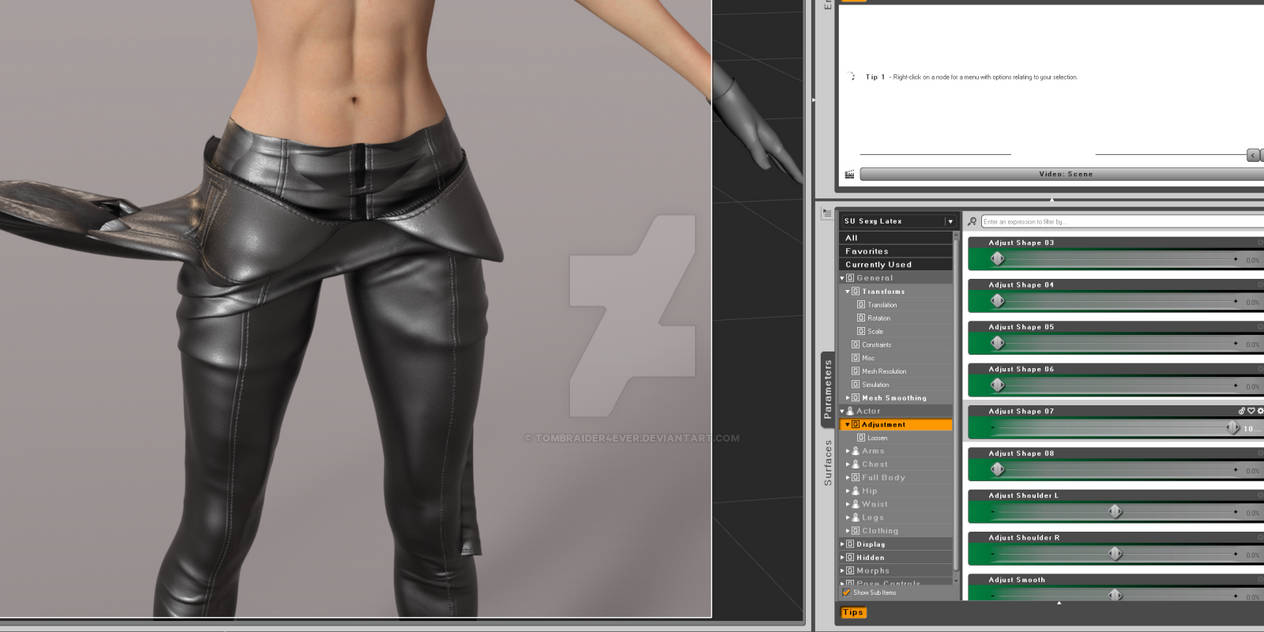
Same on G9. Base G9. Morph fully dialed in and partly on g9.
I don't have it.
But I will assume if you simulate it from the default pose, it should work.
Thanks, I will try that, did not think of that it might not work without dforce. I think it will still move when the animation moves her,why would that be different? But I will try now, and edit the posts if it works.
It is simulating now, does not look good. When finished I will see if I had the default, alt click - dforce settings and try again if not.
Dforced it here, default settings for everything in dforce, from memorized pose. Just posed the arms a little bit. The around her waist morph at about 81 %, full collides with itself.
But I will try that also and show so it's clear that there is a bug. Have no reason to think that it's different on G9, tried it, not dforce, but moved g9 - moved the catsuit top. So WILL BE the same in dforce.
the morph at 100 % here, just the arms posed a bit, all on default dforce settings, from memorized pose. No matter how you do it - dforce - pretty sure the arms WILL move when she does... It's like glued, but at a distance.
Just the arms posed.
When I say memorized pose, from that, I mean from the unedited DEFAULT POSE.
No time to test DFORCE IT on g9, but the arms bug - was THE SAME - NO CHANGE FOR THE BETTER AT ALL. so why would the dforce work by some magic on g9. The arms are glued at a distance no matter what I do.
If an item has 100% dynamic strength (and no dForce weightmap) it will only follow the simulation and not the rigging.
I don't have it either, so it's just a guess, but did you try using two characters?
One invisible, wearing the catsuit, one visible, both with the same morphs, the main difference being their poses: all bones not interacting badly with the morphed catsuits should be posed exactly the same, but if let's say you want Lara pointing a gun to a target, you do that on the visible character.
It won't work for all poses, but should work on more.
The short answer is "No, this cannot be made to function the way you are saying". As others have said, this is a pose that is supposed to be used in combination with simulation.
The reason is that Daz Studio does not allow figures to have variable weight mapping. If part of the mesh is rigged to the arms, it will *always* follow the arms, even if you morph the outfit to change the sleeves to be near the waist; there's no way to change that without an entirely separate asset within the package.
The only workaround is that during simulation, a fully dynamic object will ignore its bone weights, and thus be able to drape without following the arms. Note however that *after* simulation, its new shape will revert to following its rigging, so reposing after a simulation will often result in a mess.
There is nothing Sue Yee can do about this; it's a limitation within the software.
Thanks for the reply , I DID think of that of course, but I think that an outfit should be fully working without doing such stuff, should say clearly in the advert for the sale - use only w two figures ect. Can't be used normally. SO at the very least the sales post should be edited to say that it can't be used normally. And that adds to the rendering time.
Thanks for the reply . So there is a way but my ys of using daz is not enough knowledge. It should say - around her waist morph - only for skilled users, involves ect .... HOw do I do what you say? is there a tutorial somewhere? and again - should NOT have to look up complicated tutorials to use an outfit morph. How do I make it ignore it's boneweights and then don't .
See here a G9, DIALED IN FEMALE as I guess it's made for females, then just posed the arms, then dialed in the morph fully, so that's BASE G9, BASE FEMALE, MORPH AT 100 - SHOULD WORK AT 100. I saw the arms move like they were still on her when simulated, then explosion. NO weird character, g9 base female, morph at 100, default dforce settings, from default.
If complicated dforce settings was involved then the settings should have came w the outift. If it was possible on a posed character then why did the artist that made it not pose it on the model in the promo? we see no model ... someth is not right.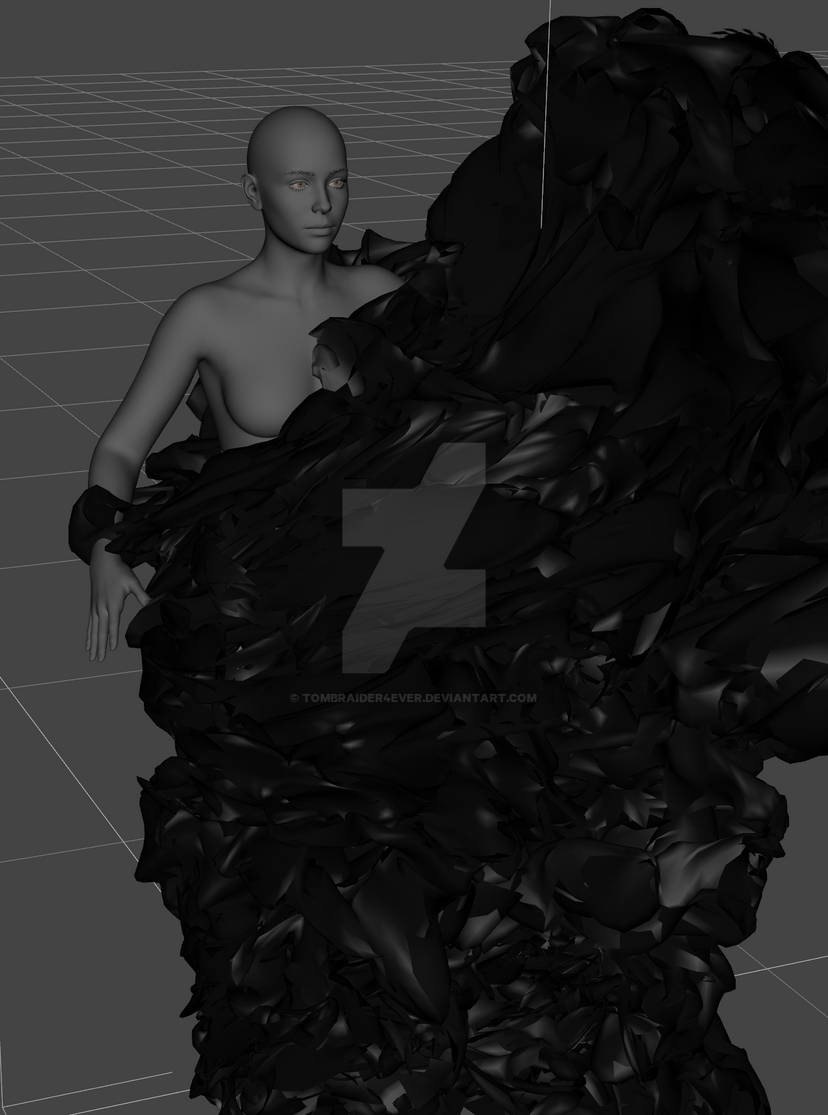
I have no more time to test this now or reply but I would appreciate a tutorial on what you said - ignore bone weights when dforcing.
And I was right in any case - should say that normal dforce is not possible w that morph. Have seen adds w that specified - use this and that dforce settings. , a big fan
 . Always. Just wanted to be able to use the morph.
If this is considered accepted for stuff sold at daz - if I have no right to complain then I'm sorry, feel free to delete the thread. As I said - love her outfits
One thing that may work a little, and it may not be enough to make you happy, is to pose the character, then go into the bone heirarchy of the jumpsuit and then pose the arms of the jumpsuit. Take off limits on the jumpsuit limbs as necessary. This then could get the jumpsuit to a close enough pose to your desired shape for dForce to be able to finish the job. It is what I regard as a last resort thing to do, but it may work.
There is another drastic resort, which I simply can't do, but an experienced DAZzer like @Matt_Castle may be able to get to work is this:
Delete or re-name the rigging of upper part of the jumpsuit for a second jumpsuit version. That way the upper part of the jumpsuit would be posable and dForceable, while not following the character, and the hip, pelvis & legs follow the character because they have the same rigging and are fitted to the character. I've not tried anything like it, but based on the fact that the rigging of hair allows this (same rigging to the head, then bones for shaping the back & sides - see the Akhelloos hair below with its non Genesis bones displayed for an example), it should be possible to make clothing do the same. I don't know if it would merely be a matter of renaming the bones or whether something more sophisticated would be needed.
If it worked, it'd be fantastic.
Regards,
Richard
Thank you all for replying and trying to help me .
.
I did try posing the the arms of the catsuit but that deforms them, all movement/rotations, that's one of the first things I tried, but it's kind of you to advice it .
.
The other solution you said sounds interesting - so 2 catsuits, one hidden to her waist and other other hidden legs I guess, rename the bones of the ones w the upper part, if they can be hidden w bones, that is not always the case I find. No idea why, But I will try that. I hope Sue-Yee makes a seperate catsuit, exactly the same, but made to just be worn like that, would buy it in a heartbeat .
.
I will reply more later, and write what I test and how it goes, now I have no time, have to go.
And I sincerily appologize if using that catsuit w weightmaps and not w maps and renaming bones is something everyone knows and no issue, did not mean any harm.
LOVE SUE-YEE .
.
But - I do in any case think that some words changed is in order - like - some skills involved in using the around her waist morph, does not work out of the box. , the sweat stains.....
 , love everyth about her stuff besides that morph.
Love her stuff still, morphs for more folds ----
Regrettably, the only real options for this kind of feature are either to rely on dForce (and simulation is always at least somewhat finicky), or to not include them at all.
(There is theoretically some very complicated set up that can be done, but it's not entirely reliable either, causes other side-effects, and you'd still really need to rely on dForce to some extent).
It also becomes somewhat inviable for creators to include this stuff at all if they need to commit the effort to provide lengthy guides to the (frankly arcane) art of dForce.
The big things I can say about dForce (which I would say I'm fairly good at):
Firstly, Sue Yee never comes to Daz Forums. You can fill a support ticket with the option: Contact PA / Vendor if you'd like to ~~
Actually you can easily make it yourself (as Richard mentioned...) by deleting the related bones and save a separate Wearable Preset with which you can use in the case you mentioned above.
0) 1stly, download this free script: https://www.mikededes.com/delete-selected-bones/ Place it into your Daz Library\Scripts\ folder.
1) Right-click on the auto-fitted Latex > Expand All. Shift + Select from Abdomen Lower to Right Pectoral (screenshot 1)
2) Dbl-click to run the script to delete selected bones. Wait for a while till it's finished.
3) Dial the morph and save it as a Wearable Preset. Then always load the preset in the cases that you need the bodysuit with this morph (screenshot 2)
We've done this on quite a few similar cases even if the vendors didn't provide separate presets for whatever reasons ~~ As for the explosion issue in simulation, I may give you optimal settings if needed but I have to reproduce the issue firstly ~~ It works so far so well.
Crosswind, thank you, that's a very elegant way of doing the job.
Regards,
Richard
I don't recommend saving as a wearable preset first; edited geometries should always be saved as Prop/Figure first to create library references.
*Then* you can save them into a wearable preset (even potentially saving over the preset you already made). Failure to do this embeds the geometry in every scene file it's used in, bloating scene files. It's better to store a single copy in your library that can be referenced.
Thank you so much everyone that replied and for trying to help me w this, so kind of you .
.
The script sounds great, hope it works on my Linux pc, I have daz working. I will save first as a figure then as a wearable preset if I am succsessful. One question - does this mean that the original catsuit looses those bones - or just the preset/figure?
Thanks in advance for replies .
.
And will the no bones catsuit top dforce?
I have no time now, will test later tonight and let you know how it goes, and share an artw here if I am successfull .
.
The advice I got here, all of them, will be very useful .
.
A question on that script, crosswind , is it available somewhere else? I am forced to make an accoun there, and agree to privacy policy and a useragreement, w things being what they are now, w data collected everywhere, to ai and to sell stuff I really hate those agreements. So - do you know of a way to find that script without logging in? sorry to ask, I just have a big problem w trusting stuff w things being what they are in the world and online. NOT saying that there is something wrong w that web page of course, never. Looks like a great page , I just don't want to sign a user agreement to use one single script.
If it is only avaliable there, can the bones be deleted inside daz, with no script? and as I asked, will the original catsuit have it's bones left if I save the preset to my library - figures, then wearable preset?
Thanks for the help w this , sorry to be difficult
 , it's just all the "data" collecting including the art we share online againsts our will, does not grow trust. Even if the page you linked to look completely trustworthy
 . My red flag is up at all times unfortunately, hard experience
 .
.
EDIT:
A websearch found these helpful words from this forums:
To delete a bone.
Tools -> Joint editor
Select the redundant bone.
Right click delete Bone.
I expect you would need to resave the prop at that point to maintain changes after saving and reopening the scene file.
Becareful not to save over the original file with your modified prop or you will need to reinstall the original.
Will try that instead of the script unless it is somewhere without logg in.
If I would find someth to buy there, looks like a nice store , then I would reconsider making an acccount there, but not for a single script.
Promised myself less user agreements in my life.
I'm a bit old, 54, in my ds we could use the phone, watch tv ect without signing legal documents.
I remember when I thought 54 is old...
This has been an interesting thread. I hope you'll let us know how this works for you.
I managed to delete all the bones of her upper body, as in the screenshot, saved it as a figure, loaded it, it still follows her arms a little bit but it's way better. It behaves very strangely during simulation though, it moves down then up, then down then up.. so something is not correct, no idea what. I had the dforce on detault settings, but made the gravity higher on other tries , and less air resistance, and played w some other values, no idea what they are. No matter what I do - can't be dfored. It tires to drape down, then it moves up again, finishes in the same state as it was in before . Sorry to ask again, but any advice on the dforce settings? I had her w her belt and guns, then tried without them - same.
Photos here so you can see, as I said, deleted the bones, saved as a figure, loaded, converted to dymaic surface or what it is called, then tried the default dforce settings, then all kinds, and made it heavier and w less air restiance. Same, tries to draping down, does so - then something forces it up again, down, then up.
The first sc shot - before
The second sc shot after.
Not much difference.
I made some dform morphs for her sleeves to move them from her guns in the holsters, over them
but it refuses to dforce no matter what, bounces up again. Guns holsters or not - same.
If possible I would love her in the holster belt the guns, and the catsuit top nicely draped over it
I guess I can get away w the arms being stiff, the latex, but I am a perfectionist when it comes to my art so I can't stand them sticking out like that.
Now I am off to work w my art, I have bad mental health, feel I was born to make my Lara fanart and share it, feel it is the meaning of life itself , crazy but true for me. So I work on it 24/7 as it lifts me up above all the misery and it is a lifeline to me. And I want and need to make my art and share it until the ends of time and beyond that, but none of us has that time, and I certainly have not, being 54, overweight w diabetest type2 and worry freak. So I have to do the most w the time I DO have.
I appologize for oversharing , sorry, I am an open person and it is important to me that no one thinks I am rude for not answering right away if I get more replies I mean
 . I have no more time tonight,
Will reply later tonight, early morning, or late night tomorrow. If I get more replies I mean. More attempts tomorrow.
https://www.daz3d.com/forums/plugins/ckeditor/js/ckeditor/plugins/smiley/images/embarrassed_smile.png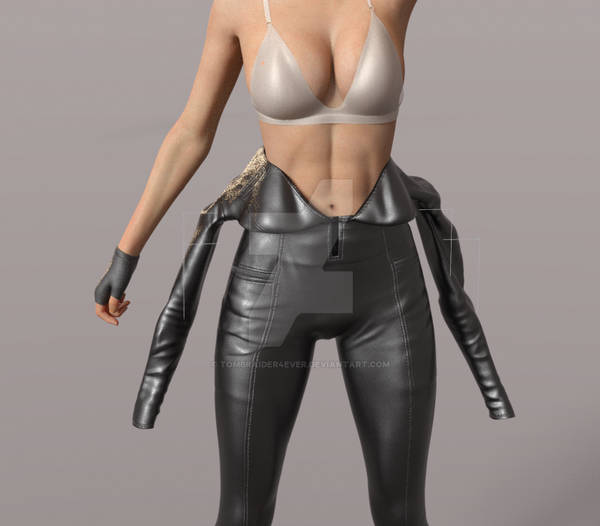
@tombraider4ever
Some notes and tricks from me:
0) The script can batch delete bones as deleting bones with Joint Editor is tedious. MikeD, the site owner, is one of the PAs in here... just feel free to register and download it. If you still didn't make it, I could share the script by crediting him.
1) When saving a figure asset, as long as you save it with the Vendor Name of your own rather than overwrite the existing assets, the original version will be intact. If you're not gonna use this wearable in hundreds of scenes and aren't short of disk space, saving a Wearable Preset will just do~
2) Still following the arm a bit is expected, as we just removed the weights by deleteting Bones but an arm pose will still trigger corrective morphs (pJCMs). You can Show Hidden Properties in Parameters pane, then zero the relevant pJCM properties on the bodysuit.
3) I dbl-checked the bodysuit, found there're three Rigid Follow Nodes with zippers... one of them is under Spine 3. Suggest not AutoFit directly because it'll remove the Bone as well as the RFN. So, firstly load the G9 bodysuit into the scene, go to the bone : Spine 1, drag the RFN to the root node of the bodysuit, then AutoFit to G8F. After AutoFit, tweak the Transforms of three RFNs so as to move the zippers to the right position.
As for the simulation with dForce, lower dynamic strength as well as some default settings may bring the item unstable movement in the simulation. I tweaked the settings on dynamic surfaces as well as simulation settings, pls try with the attached material preset.
Change the settings as per the screenshot 1 in Simulation Settings, then load the material preset (just incl. simulation data) to the bodysuit ~ Finetune the settings as you wish ~ Good luck !
@crosswind
Edit - nevermind, found the rigid follower now w the univeral tool . I love learning things in Daz, tech stuff, I rarely do as I don't feel I have the time, just have time to create my art before I drop dead. So work work work 24/7. But learn things - sometimes I websearch and learn something, like you teaching me - LOVE it
 .
.
I have a hard day today, a doctors appointment, a birthmark, uneven, just found, to look up. I have death anxiety every day, always fear the worst, not accepted the big D. So scared, sorry 4 word, shitless.
This, concentrating on this, is just what I need . My art to the rescue as always
 , and kind people online on my soc media pages, and here at my forum thread here
 -
-
Thank you so much for the reply and for trying to help me
Trying to follow your tutorial now, moved the rigig follower things to the main model bone - the catsuit name , all 3, then autofitted, and then moved to their correct bones. Now I'm on moving them to the correct place, the zippers, first the left one, w that I remembered to to move the rigid
thing instead of the zipper, done, then to the right one and now I forgot about the rigid thing and moved the right zipper instead, the rigid follower node is invisible, how do I move it to the correct place if I can't see it? I mean move them on the catsuít.
Edit again:
This artw of mine has nothing to do w this thread, working on a render w the catsuit, trying to have it working and see, but decided that I needed to manifest, hopefully, good news for my b mark checkup 10.15 today, wsday late night for me, turned the d upside downt due to bad m heath.
Sorry to be off topic, just feels that this manifesting is more powerful if I share it on more places . It's on my insta and 2 bluesky acc also.
Hope it is not too big for the forum, resized, the full artw is 2500 * 2160.
The water marks are, in this day of horrible gen ai stealing, pointless to most people I guess. ME - I see it like this - you know that a thief, all of them, can force the lock to open the door or break a window to get in - you still lock the door, don't you? to do, but if not I feel like I work for the f....s.

Breaks my
End of offtopic, feel free to delete this off topic picture if necessary.
Meow, c'est la vie lol ~ and nice artwork by the way !
As for moving RFN, just select the RFN node in Scene pane, you'll see the gizmo in Viewport, then move it near to the right position till you see it. Finetune its rotations.
Thank you so much for the kind support and help also w this, means a lot to me!
I did find the RFN, got a symbol of it by selecting the univeral tool, and moved into place - and done all you said - success .
.
Saved as a figure asset, might save as a wearable preset later, choose another name so should be ok.
I got a nice recult w the pose I choose, and the sleeves sticking out a bit lower is most likely more realistic w that kind of catsuit, but I decided to hell w realism , I'm a perfectionist when it comes to my art, so made 1 morph to move the righ back out , neck part, out as it stuck to her back w the pose, and 1 morph for the lower right arm - was enough for that sleeve, to move it in, and 2 for the left sleeve, saved. Might only be usable in that pose, but if so then I will make more dform morphs, love that btw, a small tiny bit of 3d modelling, all I can do. My Lara ch was made using detailed face - head and body morphs, no characters, so my work but not actual blender modelling.
 .
.
This is how it looks now, sc shot fr the pre rendering mode, will work more on this, and deciding between loong loose hair, getting dressed, or braid, done her hair already
The modesty thing I did, made the lace bra covering silk, scared of censoring and bad comments, f..k that, w that doc appointment soon, changing it back to lace - naughty lace . The pose covers the naugthy bits, so not so brave of me really
 .
.
More off topic, sorry, just a quick, will share the artw made thanks to the help I got here when it's done, but since I brought it up - the doctor thought - 99% sure - that what I thouhght was un uneven b mark was a small injury - said keep a close look at it so it doesn't grow or become more or are still there after 1 m.
All said at appointment yesterday, today - looking at it - it's smaller . SO he was right
 .
.
First injury during m 54 y w no bits possible to scratch off, and no blood coming fr it - was stuck like glue.
Happy - high on life itself .
.
Now back to the topic - the render is looking great, not started yet, have her in the catsuit, lace bra, modest pose, and w Lindays wet hair - the one pulled back w possible pose all over one shoulder - my nr 1 fav hair . She looks amazing. Can't wait to finish it and start the rendering later, will share the finished render here
 .
.
 , the Daz forums is an AWESOME one
 .
.
Thanks again for all the kind help I got
My finished artw w the catsuit here:
Full size here: https://tombraider.se/Album/2026/August/Catsuit%20dress_undress_color.png . I made a no color splash vers also, will share that later
 . She is coverd by the pose, if still not allowed, could you leave the link?
  .
.
Nice work!
Thank you so much for the support, that' so kind of you!
