G9 wearing G8F Clothes - some issues with saved files
 richardandtracy
Posts: 8,133
richardandtracy
Posts: 8,133
I am having a few issues with G9 wearing G8 clothes that I'd like to eliminate if possible.
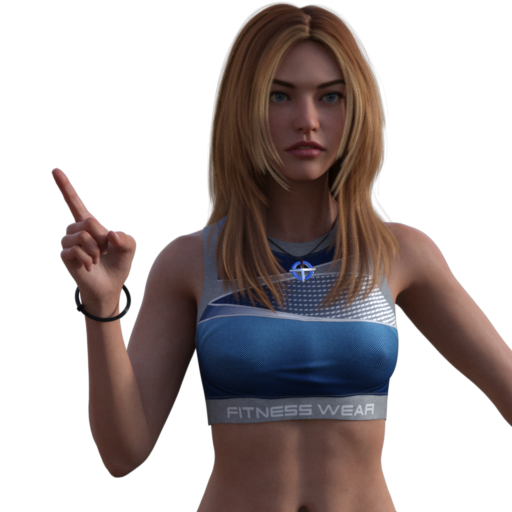
I put A G9 character in G8 clothes, and the autofit seems to work fine, as below.
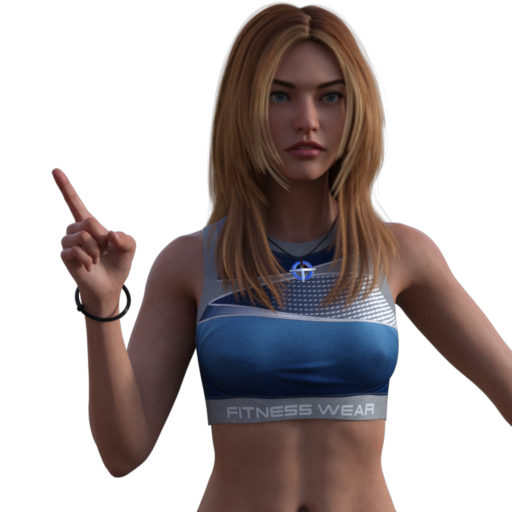
Looks as good as I can hope for. Then I save the file, re-open, and it's different. There's a bump in the top between her breasts as if a different projection morph is being used.
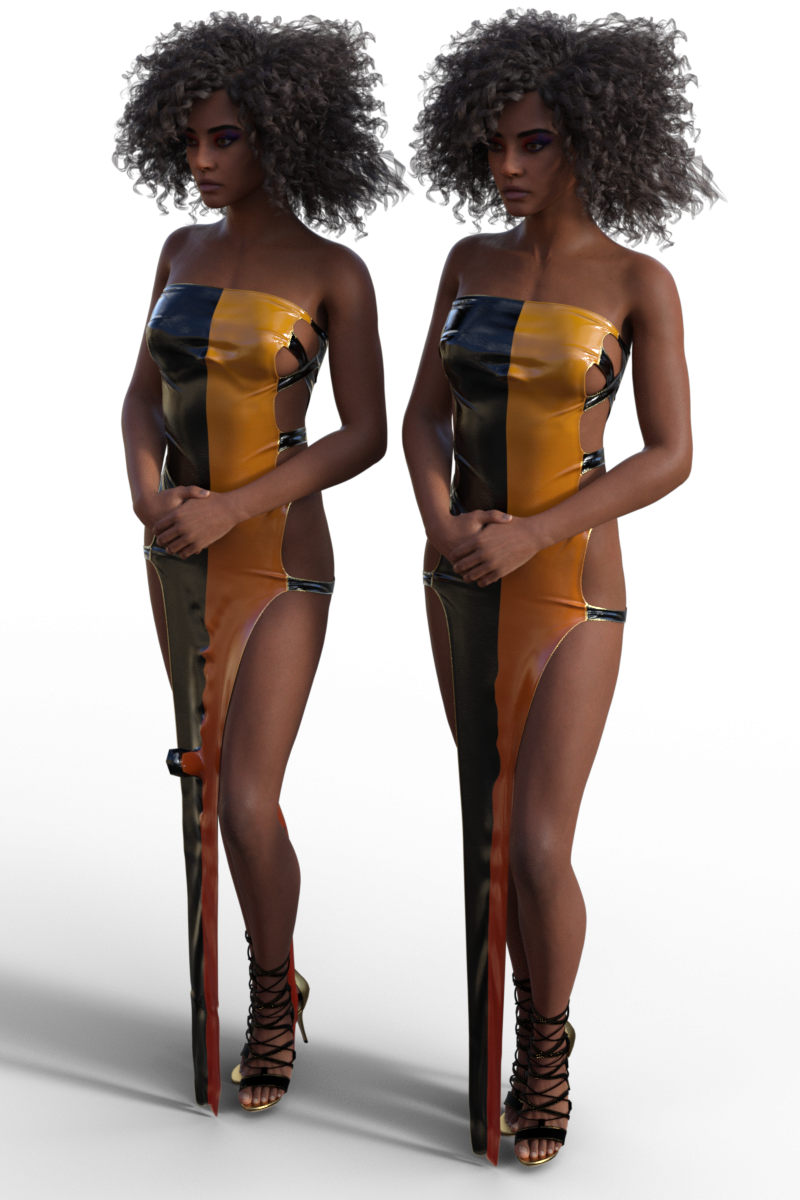
A more extreme case is with the clothing below. The dress is a G8 dress by Lilflame on MSO Dola. The dress on the right is freshly loaded and simulated. The character on the left is the character on the right saved as a scene subset and loaded into the scene without closing the scene. What on earth are the artefacts in the dress's skirt section?
Anyone have any ideas?
Regards,
Richard

Daz 3D is part of 
Connect
DAZ Productions, Inc.
7533 S Center View Ct #4664
West Jordan, UT 84084
Licensing Agreement | Terms of Service | Privacy Policy | EULA
© 2026 Daz Productions Inc. All Rights Reserved.
Comments
I tried MSO Dola with Lilflame'sLittle Messy Dress. I rendered it when loading the items; I saved the file and reopened it and rendered again, then I closed DS4 and loaded the scene and rendered it again. They all look the same to me. There isn't a bump added between the breasts after the file is saved and reopened in this case.
That was a bad test. Both MSO Dola and the dress are for G9, so no autofit was used.
So I tried again with MSO Dola for G9 and Chemise a la Reine for G8F. I rendered after adding the items to the scene, Then I loaded a New Scene to clear it out and reloaded the saved scene and rendered again. They do look different there is a tiny difference in the pleat area between the breasts and quite a lot of difference in the bottom of the skirt. I did this in DS 4.24.0.4 Public Build. I don't know why it happens, but it is not good!
May sound daft, but it's not a chest/cleavage slider or something resetting between loadings? Is it actually the outfit that's changing, or the figure?
@Barbult, thanks for confirming that I'm not alone with this.
@garrett_3d, The figure doesn't change as far as I can tell. In the case of MSO Kim (the first one) everything is left as default.
Must admit it has been a bit of a pain with the top one as I'm going through creating a series of 130 partial poses in G8 & then converting to G9 and it's taking a significant time to get through the project. Each re-start of the scene file I've set up for cameras etc, I have to delete MSO Kim's top, re-load, autofit, adjust against pokethrough and then continue. It's really as if the chest projection morph is lost during the saving/re-load process in the case of MSO Kim.
I really haven't the faintest idea what's going on with Dola's dress. Turning up smoothing actually makes the artefacts worse after saving.
Regards,
Richard
It's a known issue.
The projection templates don't work 100% of the time, on any genesis figure, and if the rigging is just a bit out of template, it'll do weird stuff like this.
What's happening is, it doesn't know exactly where to assign certain polygons, and just "Best guesses" which breaks the figure.
The problem is evident in the pre-saved version of the Conflict dress by lil flame in richardandtracy's image. There's a noticeable zig zaging running down the skirt area.
If you switch to "hidden line" it'll be really obvious that the center line polys are getting squashed and warped.
When you save, the now broken asset, the changes in the vertices are saved and when reloaded it gets even worse.
Unfortunately, there's only one way to sovle this problem, i'm aware of, and it's to rerig and reweight map the figure.
The breast issue is exactly the same, it just doesn't know where to assign the polys.
As for the 1st case, I see the similar issue from time to time... because 1stly AutoFit naturally brings that kinda "projection shape" on some tight clothing like the top in OP's case, 2ndly, the true culprit is Smoothing Type > Base Shape Matching. Each time when you reload the scene or a Scene-Subset / Preset, Smoothing Iteration is calculated based on Smoothing Type, i.e. Base Shape Matching option will bring you that "bumpier shape".
A quick fix is to use Generic option as Smoothing Type... then you won't see the worse shape in the cleavage after reloading the scene. An even better option for fixing it is to:
1) Increase Smoothing Iteration to 4 ~ 5, export the top to OBJ with Base Resolution. Reset Smoothing Iteration.
2) Figure > Geometery > Update Base Geometry... > Update Vertex Positions... by using the OBJ. (see ss1).
Did you try to save the autofitted clothes as a new Figure/Prop assets? Even if it doesn't solve your problem, you would at least save the time needed to autofit them.
@DrunkMonkeyProductions, thanks. So it is an autofit issue and not really me seeing something unique. I wonder why DS sometimes 'forgets' about the projection morph?
@Crosswind, thanks for the explanation & offering a solution. I'll probably go ahead with that.
@Elor, I haven't saved any G8 clothes as G9 yet. To be honest, I use my TriAx version of V3 more frequently than G9, so haven't felt the need so far. It's beginning to look worthwhile to create a G9 version.
Thank you all for your help
Richard
As for the 2nd dress, I don't have MSO Dola but I could reproduce the issue on Victoria 9 (as well as G9 Base... only the shape was not that bad ~) (ss2)
I have to say the culprit is as same as the one in the first case. If you change Smoothing Type to Generic, the issue will be gone after you load the Scene Subset or the Scene. (ss3)
Crosswind, switch to "Hidden line" then tell me this is a "smoothing" problem.
It's not "forgetting" anything, the original rigging of the asset was "non-standard".
In the case of the COnflict dress, the center seciont is assigned to the "Pelvis" area of G8f, all the way to the floor.
If you just load the dress, not fitted, and hover your mouse over it, you'll see it's really weirdly broken up in the skirt area.
When autofit tries to assign the polygons, it just breaks the whole rig because ti can't follow the original rigging.
ss1 is with no Smoothing at all after Auto Fit.
ss2 is with Smoothing Type > Base Shape Match
ss3 is with Smoothing Type > Generic.
As I said before, 1stly Auto Fit naturally brings the imperfect projection shape on certain types of clothing (e.g. tight, loin, tutu, etc.), improper way of Smoothing makes the shape worse which is the true culprit in Richard's case.
But yes, if using tailor-made projection templates, people can get much better transfer results. I myself made a few unique templates for rigging clothing.
I have to say, at least in this case, neither the weight from Pelvis (ss1) nor the weight from shins (ss2) is the root cause... though the transferred weights are imperfect. Besides, Smoothing Brush on these weights doesn't remove the "iterated bump shape" ~~
Edit: By the way, we usually get the job done by fixing FBM on the dress by using sculpting software > heavily Smoothing, or Update Base Geometry after rigging on a Genesis Base. Most of the experienced PAs do so, AFAIK. That is the most optimal way, in most cases.
The "root cause" is the auto fit projection broke the rigging and messed up the weight maps because of it. The exploding polygon is a result of the smoothing modifier being applied to a broken mesh.
I've attached a couple images to show just how broken this is.
The first image is the comparison of weight maps, the second is rigging.
In both cases, the "Pelvis" is selected.
Once again I have to thank you both. It looks as if I should have all the tools needed to deal with this myself now you've shown me the issues. I really need to know how to rig clothing and tweak weight maps. My current prop modelling of mechanical items has meant I haven't needed to know much about weight maps. Time to change that.
Much appreciated.
Richard
Well, first, Pelvis weight or its transferred rigging from Auto Fit or rerigging with Clones usually creates triangular shape in figure's crotch area rather than in between figure's thighs. Your screenshots just show the triangular issue.
But the issue in Richard's OP and my test (i.e. that bumpy shape issue...) with the Dress does come from the "root cause" : a smoothed shape from Smoothing Type > Base Shape Matching, i.e. the matching shape is baked into the Dress before fitting / rigging ~
I can prove it in another way as I further dived more into identifying the culprit ~ ~lol
1) Load a V9. Load the dress into the scene without fitting. Alt Shift + G, Vertex Slection Mode, Select All. Add the selected vertices to Rigidiy Gruop > Participants and References. In Rigidity Group Editor, add Modifier/Smoothing. (ss1)
2) Edit > Figure > Shape > Clear Generated Morphs. The smoothed morph will be removed.
3) Fit the dress to V9 (ss2 ~ ss3)
4) Save the Scene or a Subset, reload them, you won't see that weird bump (ss4)
5) Switch Smoothing Type to Generic, crank up Smoothing Iterations a bit (ss5)
In general, with the above process by removing, you'll see no bump issue... though the dress still needs more fix.
Edit: IMO, vendors should avoid rigging clothing with Smoothing Modifier + Base Shape Matching option. Add Smoothing Modifier if really needed before saving Wearable Presets. Even if there was a poke-thru or imperfection, should've used Update Base Geometry with a smoothed or fixed mesh, then removed Smoothing Modifier before transfer rigging ~~
Thanks to your case, Richard ! I've learnt something new.
I use autofit as the start of the conversion process, I "figure/prop asset" the result, then take the mesh into modeling program to fix the distortions autofit causes, (it's worse going from a female shape to an androgynous shape) I then replace the mesh with the fixed version.
I never save a fresh autofit as a scene so this is just a guess, but odds are the projection templates and possibly mesh smoothing are getting turned off as DS no longer sees the item as a fresh autofit.