
Daz 3D is part of 
Connect
DAZ Productions, Inc.
7533 S Center View Ct #4664
West Jordan, UT 84084
Licensing Agreement | Terms of Service | Privacy Policy | EULA
© 2026 Daz Productions Inc. All Rights Reserved.
Comments
They are actively testing my fix.
Ack! Sorry. I wish I had more hours in the day!
Hi folks,
I've been setting up a number of new film sets with various Riversoft Now-Billboards but now its time to sort the camera movement and angles etc, I'm getting errors when clicking on any of the 3 Now Billboard scripts. Having wasted almost a day trawling various forums, websites, YouTube etc etc, I finally landed on this forum. Would anyone happen to know where I can find working scripts for Daz Studio6 version 6.25 (running on MacOS Sequoia, and Windows 11 Pro) ?
Hoping we can get this resolved before Monday 10th August as we have the studio Execs coming in to catch up on the set builds :-). Many thanks for any help.
Jon
Here is a dump of the errors in the latest logfile:
Loading script: /Volumes/PROD004_CGI/DAZ 3D/Applications/Data/DAZ 3D/My DAZ 3D Library/scripts/riversoft art/now-crowd billboards/now-crowd move away.dse
2026-08-06 17:33:38.764 [WARNING] :: Script Error (/Volumes/PROD004_CGI/DAZ 3D/Applications/Data/DAZ 3D/My DAZ 3D Library/scripts/riversoft art/now-crowd billboards/now-crowd move away.dse): Line 39
2026-08-06 17:33:38.764 [WARNING] :: ReferenceError: Could not load module at: data/RiverSoft Art/2025Common/RSConstants.dsa
2026-08-06 17:33:38.764 [WARNING] :: Error in script execution: /Volumes/PROD004_CGI/DAZ 3D/Applications/Data/DAZ 3D/My DAZ 3D Library/scripts/riversoft art/now-crowd billboards/now-crowd move away.dse
2026-08-06 17:34:30.413 [WARNING] :: /src/sdksource/fileoutput/dzassetoutfile.cpp(11618): No geometries match the vertex count of morph "PHMEyelashesCurl"
2026-08-06 17:34:30.419 [WARNING] :: /src/sdksource/fileoutput/dzassetoutfile.cpp(11618): No geometries match the vertex count of morph "PHMEyelashesCurl"
2026-08-06 17:34:30.426 [WARNING] :: /src/sdksource/fileoutput/dzassetoutfile.cpp(11618): No geometries match the vertex count of morph "PHMEyelashesCurl"
2026-08-06 17:34:30.433 [WARNING] :: /src/sdksource/fileoutput/dzassetoutfile.cpp(11618): No geometries match the vertex count of morph "PHMEyelashesCurl"
2026-08-06 17:34:30.441 [WARNING] :: /src/sdksource/fileoutput/dzassetoutfile.cpp(11618): No geometries match the vertex count of morph "PHMEyelashesCurl"
If you have a deadline, you would be better off using both DS6 and DS4. Applying the scripts in DS4 and then rendering in DS6. This is the place to get an answer to your question. But deadlines don't care about "right answers". :)
Just an update: Thanks for the comments and tips. Alas we've had to abandon the Now Billboards libraries, and now replacing these with Genesis 2 and 3 figures instead. Given there seems to be an ongoing issue with the Now Billboards scripts, we'll probably go ahead and create our own at some point. Thank goodness we have the rendering firepower so we don't have to rely on the Now Billboard libraries but must be a right pain in the backside for those that can't make the switch.
@jb,
If you have the scripts from the DS 4 version of RiverSoft Arts’ billboards, replacing the update scripts in DS 6 with the older DS 4 scripts will get the scripts working in DS 6. I did this two days ago as a trial. I then decided to install the latest DIM updates again of the RiverSoft Arts scripts that have received recent updates, and the problem with the Now-Crowd Change Billboard Angle script and Now-Crowd Orient Billboard script have been fixed for both DS 4 and DS 6.
They're not fixed for me in DS4.24.0.4 public build. I didn't try DS6, because if DS4 doesn't work, I don't care; it is broken. The latest I have in DIM is dated 8/4/2026. I installed Now-Crowd Billboards - Modern City Life. Neither script in that package works. Does your DIM have something more recent?
2026-08-07 17:33:58.759 [INFO] :: Loading script: N:/DAZ 3D/Studio/My DIM Library/scripts/riversoft art/now-crowd billboards/now-crowd change billboard angle.dse
2026-08-07 17:33:58.762 [DEBUG] :: FOUND: N:/DAZ 3D/Studio/My DIM Library/data/RiverSoft Art/2025Common/RSConstants.dsa
2026-08-07 17:33:58.770 [DEBUG] :: FOUND: N:/DAZ 3D/Studio/My DIM Library/data/RiverSoft Art/2025Common/RSBuildPanels.dsa
2026-08-07 17:33:58.772 [DEBUG] :: FOUND: N:/DAZ 3D/Studio/My DIM Library/data/RiverSoft Art/2025Common/RSAdvHelperFunctions.dse
2026-08-07 17:33:58.783 [WARNING] :: Script Error: Line 556
2026-08-07 17:33:58.783 [WARNING] :: ReferenceError: Can't find variable: sChangeBBIntroText
2026-08-07 17:33:58.783 [WARNING] :: Stack Trace:
<anonymous>()@N:/DAZ 3D/Studio/My DIM Library/scripts/riversoft art/now-crowd billboards/now-crowd change billboard angle.dse:556
2026-08-07 17:33:58.784 [WARNING] :: Error in script execution: N:/DAZ 3D/Studio/My DIM Library/scripts/riversoft art/now-crowd billboards/now-crowd change billboard angle.dse
Ok, this is what I have given to Daz for testing: Now-Crowd Scripts Update.zip It should work for people I hope. It is only the scripts - you will have to manually install.
The scripts in that Zip file are in a folder called Billboard Doctor, not in a Now-Crowd Billboards folder. Is that correct? I don't own a product called Billboard Doctor.
That was a mistake about the top-level folder, but the scripts are for now-crowd.
So are we supposed to take them out of Bilboard Doctor folder and put them in Now-Crowd Billboards folder in our Content Library?
My Content Library is kind of a confusing mess by now, after all these install and uninstall operations. I have a Scripts/RiverSoft Arr/Now-Crowd Billboards with scripts in it, and I have Scripts/Now-Crowd Billboards folder with scripts in it. I see that Santa's Elves installs both of those folders (see attached screenshot from DIM show installed files). Where do the scripts in you updated ZIP file really belong? Which incorrect locations can be deleted?
I would put it in Scripts/RiverSoft Art/Now-Crowd Billboards (for the main scripts - the support scripts folder structure is fixed).
Thanks for the response. I will do that.
If I may jump in... These new user-facing scripts are the ones that come with the newly updated Now-Crowd products from the last week. They work properly in DS6, but not at all in DS4.24 (Error loading script). The older Scripts run in DS4.24, but even if the "Change Billboard Angle" opens, it does nothing. I do not have a version from before all these changes, and I do not recall if they actually functioned properly. (I seem to recall that they did with Santa's Elves, but didn't really get into the Now-Crowd products before)
Barbult: The scripts in the Santa's Elves package are actually one of each, older and newer. The ones in "Scripts\Now-Crowd Billboards" are the outlier, and have the older version. Those in "Scripts\Riversoft Arts\Now-Crowd Billboards" are the newer ones.
Note that there are more scripts in the data folder under "data\RiverSoft Art\Common" and "data\RiverSoft Art\2025Common", which I assume are called depending which version of Studio is running. The updated packages do not alter the older data scripts, but the older user-facing scipts were changed last month (still not on par with the updates last week, or in RiverSoft Art's little package), so something broke there for DS4.24.
The user facing scripts in RiverSoft Art's Zip file from today are working for me in DS4.24.0.4 public build. I installed them manually from the Zip file, but then I had to copy the files from Scripts\Billboard Doctor to Scripts\RiverSoft Art\Now-Crowd Billboards AND, to get the Santa's Elves scripts to work, I had to also copy them to Scripts\Now-Crowd Billboards. I think the Billboard Doctor folder can be deleted after copying the files to the correct location(s).
I haven't tried them in DS6 yet, after all this folder reorganization to get them working in DS4.
So, I saved a scene with a bunch of billboards in DS4. I opened the scene in DS6 latest public build. I selected all the billboards and applied the Change Billboard Angle and then Orient Billboard. The result was not the same as in DS4. So, one must wonder what is going on now. DS4 seems more correct to me. Honestly, they are different, and I don't know which is "correct".
Set Change Billboard Angle to Horizontal 90 and Vertical 60 and apply. Then apply Orient Billboard.
I still can't get the new scripts to run at all in DS4.24(.03, I don't think the step to 0.4 would make a difference). Always the same error:
[WARNING] :: Failed to load script: L:/3D/LocalLibrary/Scripts/RiverSoft Art/Now-Crowd Billboards/Now-Crowd Change Billboard Angle.dse
All good in DS6 latest beta
--
The second image looks correct. The first has no change in orientation at all, other than facing the camera.
Did you also update the files in /data to the ones in the Zip file? And you took the files out of Billboard Doctor in the Zip file and put them in Scripts/RiverSoft Art/Now-Crowd Billboards?
The images I posted above were after applying Change Billboard Angle to Horizontal 90 and Vertical 60 and then applying Orient Billboard. So you are only seeing the final view.
Here is the scene starting billboard configuration:
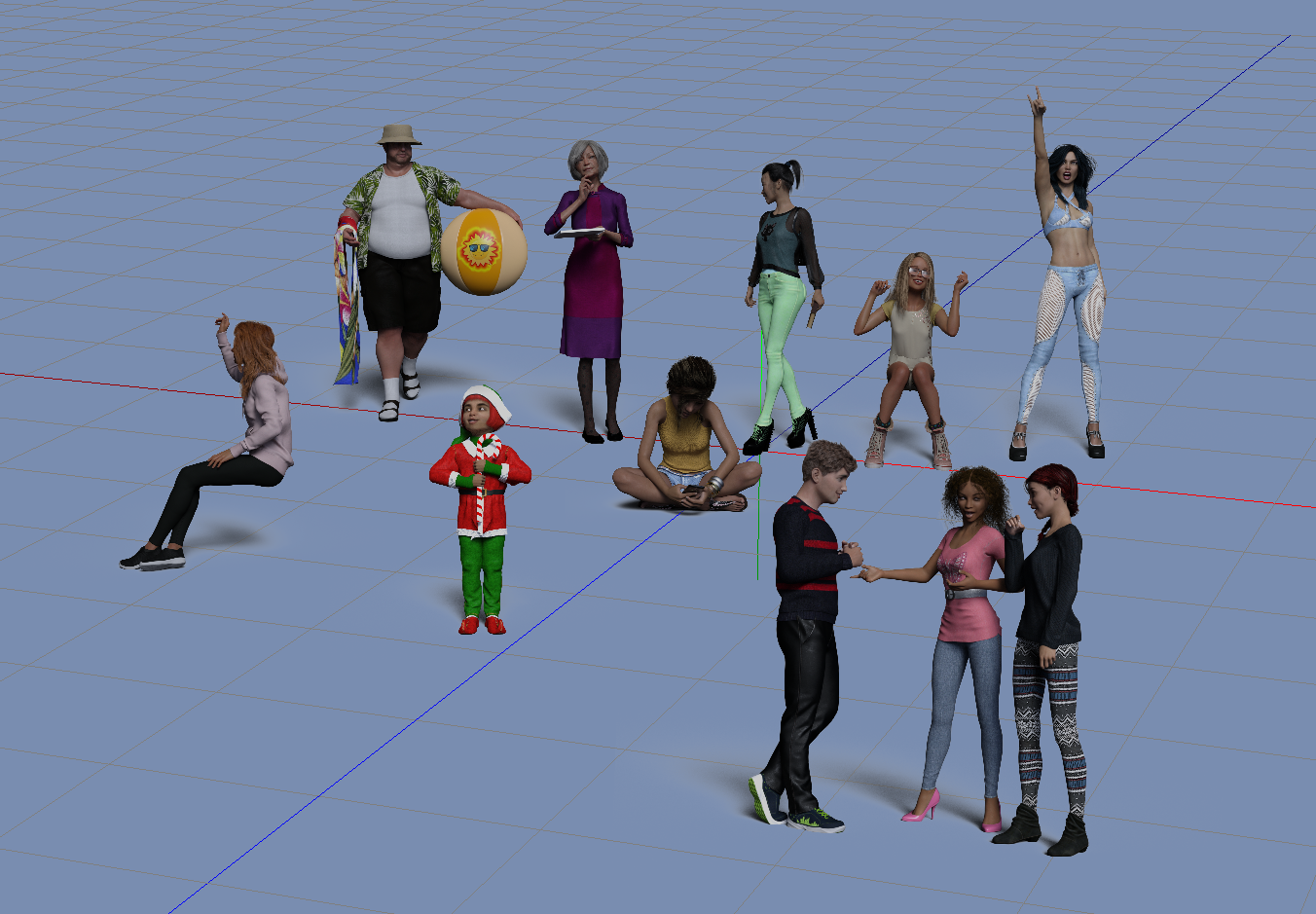
Here is the DS4 Change Billboard Angle result:
Here is the corresponding DS6 Change Billboard Angle. The billboards are rotated the same way in DS6 as in DS4.
Now here is the DS4 Orient Billboard result: The billboards have all rotated back to the original configuration of Vertical 0 and Horizontal 0.
And Here is the DS6 Orient Billboard result. They did not change from the result of Change Billboard Orientation. That may be correct, since I didn't change the camera angle.
So the conclusion is that DS4 and DS6 Orient Billboard do not have the same result. That must be a bug in one or the other.
I decided to start over and re-install the few Now-Crowd products that I was playing with. The files from RiverSoft Arts are in the updated Now-Crowd products. I checked the files individually to see if they are the same, and they are.
There are still about half that still have the old user-facing scripts, so they overwrite the newer ones if you aren't careful to restore them after. The data scripts in Common (used by the old scripts) are unchanged, and the new scripts use the data scripts in 2025Common.
Tomorrow...
Unbelievable. The updated products have the new 2025Common folder and files, but they don't get installed. They are NOT included in the manifest, so the new scripts do not work in DS6. Dragged the folder out of the package, dropped it in the proper place, and now they do.
Still can't get the new scripts to run in DS4.24.
I will look into the bug.
Hmm. One of my images must have been accidently deleted. I had a lot of problems getting them uploaded and displayed. At least you get the gist of what doesn't match between DS6 and DS4.
A new update for Now-Crowd Billboards – School Life (01 of 12) showed up in DIM today. I last updated it on July 17. Will this update break scripts in Daz Studio 4? Daz Studio 6?
There are two versions of the scripts, one from last year (Aug 22, 2025, which is in the "older" revisions from July 2026), and one from this August (technically Jul 30 on the file modified date, but added to the packages starting Aug 03).
If these new ones are the newest, I can run them no problem in DS6 (assuming they get installed, see previous post), but I suspect I will get the usual [WARNING] :: Failed to load script... in DS4.24.
The data files for DS4.24 have not changed, just the top level user-facing scripts, but I have not been able to run them in DS4.24.
ETA: Have some errands to run, will check back in a couple of hours...
If you have the scripts for the DDS 4.24 version, you can copy them into the corresponding folder in DS 6 and they should work. They did for me for Alien Civilizations and Modern City Life when I did that last week. I subsequently installed the DIM updates for each of those sets of billboards updates and the updates did not break the scripts in DS 4.24 or DS 6.
The scripts may "run" but are you sure they are doing what they are supposed to do? Did you see my post showing that DS6 and DS4 behave differently with the scripts supplied by RiverSoft Art in the ZIP file he attached? There are way too many versions of these files now. I am beginning to think we all have something different installed. Even DIM is not installing all the files correctly, according to NorthOf45 who investigated closely. I manually installed (and then corrected the location of) the files in the ZIP file posted here. It's a big mess, but I trust RiverSoft Art to get it resolved eventually. The DS6 upgrades and DS4 compatibility have proven to be a huge challenge for PAs and the Daz DIM packagers.
First, I do not understand this DS4.24 folder vs. DS6 folder (unless you use different libraries for each). The user-facing scripts go in your Library in "\Scripts\RiverSoft Art\Now-Crowd Billboards" (the exception being Santa's Elves, which has a left-over folder "\Scripts\Now-Crowd Billboards" with the original user-facing scripts, or at least, the previous version from Aug 2025 (modified date))
The user-facing scripts (I'll call them "old" before the updates, and "new" with the updates) are located in "\Scripts\RiversSoft Art\Now-Crowd Billboards by default, regardless of which version. It will always contain the last version installed, so an older product could overwrite with their old version of the scripts.
1) "old"
2) "new"
There are two sets of data scripts, and both are included in the updated packages from Aug 2026, but upon examination, the 2025Common files are not actually installed! (not included in the manifest). You will have to pull them out manually from any package that has them and drop them in the appropriate location. They will then be available for all and any to use from then on.
1) "\data\RiverSoft Art\Common" (earlier version)
2) "data\RiverSoft Art\2025Common" (newer version)
Having run the new scripts in DS6, I can see in the log they use the new data scripts in "data\RiverSoft Art\2025Common"
2026-08-09 00:00:00.230 [DEBUG] :: FOUND: [...]data/RiverSoft Art/2025Common/RSConstants.dsa
2026-08-09 00:00:00.230 [DEBUG] :: FOUND: [...]data/RiverSoft Art/2025Common/BBConstants.dsa
2026-08-09 00:00:00.231 [DEBUG] :: FOUND: [...]data/RiverSoft Art/2025Common/RSBuildPanels.dsa
2026-08-09 00:00:00.232 [DEBUG] :: FOUND: [...]data/RiverSoft Art/2025Common/RSAdvHelperFunctions.dse
2026-08-09 00:00:00.234 [DEBUG] :: FOUND: [...]data/RiverSoft Art/2025Common/RSBillboardFunctions.dse
Whereas running the "old" scripts in DS4.24 uses the older scripts in "data\RiverSoft Art\Common"
2026-08-08 19:02:45.307 [DEBUG] :: FOUND: [...]data/RiverSoft Art/Common/RSConstants.dsa
2026-08-08 19:02:45.308 [DEBUG] :: FOUND: [...]data/RiverSoft Art/Common/BBConstants.dsa
2026-08-08 19:02:45.309 [DEBUG] :: FOUND: [...]data/RiverSoft Art/Common/RSBuildPanels.dsa
2026-08-08 19:02:45.309 [DEBUG] :: FOUND: [...]data/RiverSoft Art/Common/RSHelperFunctions.dse
2026-08-08 19:02:45.311 [DEBUG] :: FOUND: [...]data/RiverSoft Art/Common/RSAdvHelperFunctions.dse
2026-08-08 19:02:45.312 [DEBUG] :: FOUND: [...]data/RiverSoft Art/Common/RSBillboardFunctions.dse
Running the "old" scripts in DS6 seems to works, but "Change Billboard Angle" does nothing (no new bitmap is loaded corresponding to the rotations selected). The others seem to work okay, but there are warnings in the log.
2026-08-10 19:52:22.024 [INFO] :: Loading script: [...]/Scripts/RiverSoft Art/Now-Crowd Billboards/Older/Now-Crowd Change Billboard Angle.dse
2026-08-10 19:52:22.030 [DEBUG] :: FOUND: [...]data/RiverSoft Art/Common/RSConstants.dsa
2026-08-10 19:52:22.030 [WARNING] :: Global include() is deprecated. Refactor "[...]data/RiverSoft Art/Common/RSConstants.dsa" to use require().
2026-08-10 19:52:22.040 [DEBUG] :: FOUND: [...]data/RiverSoft Art/Common/BBConstants.dsa
2026-08-10 19:52:22.040 [WARNING] :: Global include() is deprecated. Refactor "[...]data/RiverSoft Art/Common/BBConstants.dsa" to use require().
2026-08-10 19:52:22.047 [DEBUG] :: FOUND: [...]data/RiverSoft Art/Common/RSBuildPanels.dsa
2026-08-10 19:52:22.047 [WARNING] :: Global include() is deprecated. Refactor "[...]data/RiverSoft Art/Common/RSBuildPanels.dsa" to use require().
2026-08-10 19:52:22.062 [DEBUG] :: FOUND: [...]data/RiverSoft Art/Common/RSHelperFunctions.dse
2026-08-10 19:52:22.062 [WARNING] :: Global include() is deprecated. Refactor "[...]data/RiverSoft Art/Common/RSHelperFunctions.dse" to use require().
2026-08-10 19:52:22.071 [DEBUG] :: FOUND: [...]data/RiverSoft Art/Common/RSAdvHelperFunctions.dse
2026-08-10 19:52:22.071 [WARNING] :: Global include() is deprecated. Refactor "[...]data/RiverSoft Art/Common/RSAdvHelperFunctions.dse" to use require().
2026-08-10 19:52:22.080 [DEBUG] :: FOUND: [...]data/RiverSoft Art/Common/RSBillboardFunctions.dse
2026-08-10 19:52:22.080 [WARNING] :: Global include() is deprecated. Refactor "[...]data/RiverSoft Art/Common/RSBillboardFunctions.dse" to use require().
Finally , the "new" scripts do not work with DS4.24 at all. (Same error for all three)
2026-08-10 20:05:17.011 [INFO] :: Loading script: [...]/Scripts/RiverSoft Art/Now-Crowd Billboards/Newer/Now-Crowd Change Billboard Angle.dse
2026-08-10 20:05:17.012 [WARNING] :: Failed to load script: ...]/Scripts/RiverSoft Art/Now-Crowd Billboards/Newer/Now-Crowd Change Billboard Angle.dse
I need a drink