[Released] Voxelizer Bundle [Commercial]
 RiverSoft Art
Posts: 6,977
RiverSoft Art
Posts: 6,977
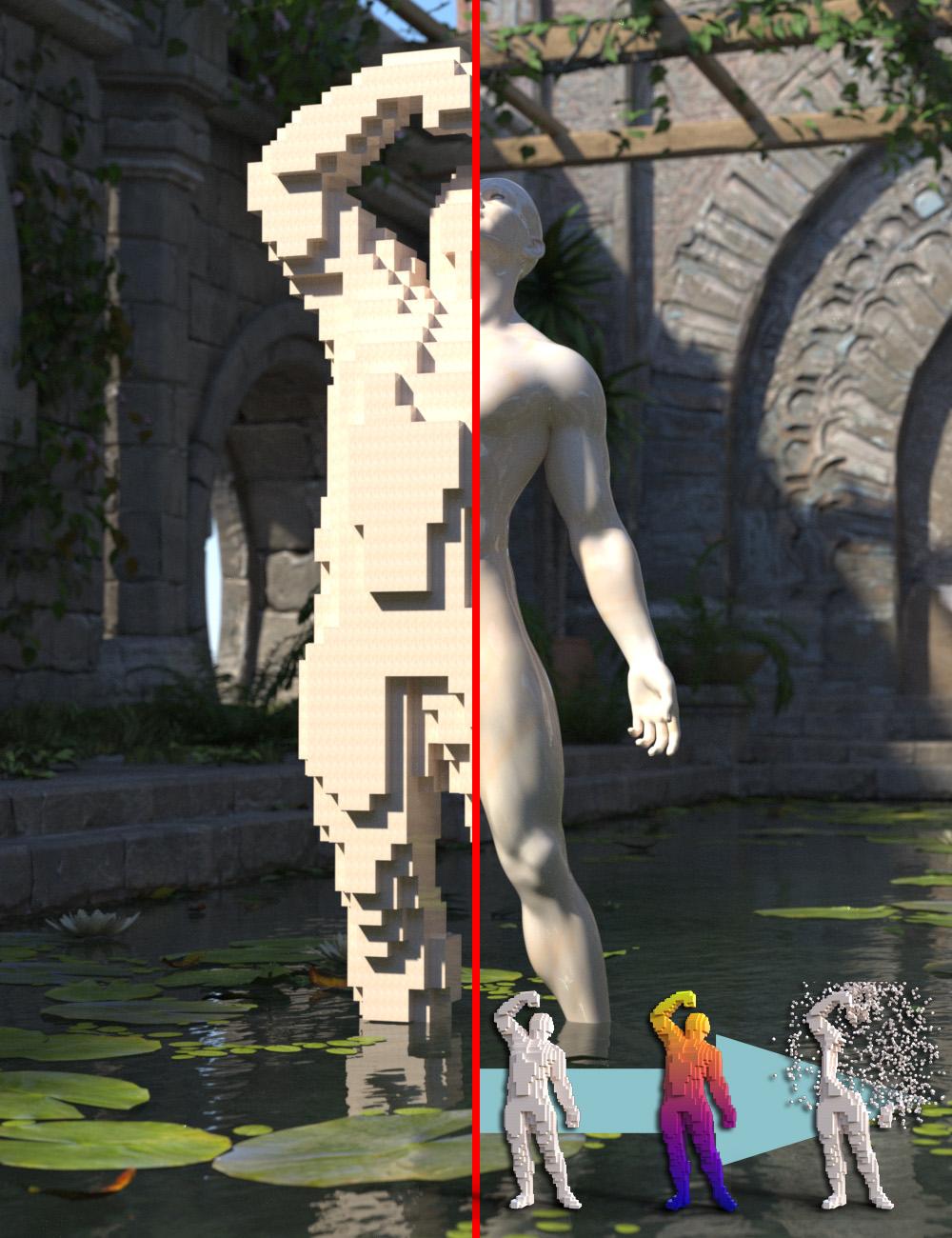 The Voxelizer Bundle brings together everything you need to transform any figure, prop, or scene into a living swarm of primitives, then color it, animate it, and break it apart. Voxelizer rebuilds your mesh as thousands of independent spheres, cubes, pyramids, or copies of any object using nine packing strategies ranging from Minecraft-style surfaces to crystal lattice pyramids and strand-aware hair fills. Colorize samples the source mesh so every primitive inherits the correct color, while Dynamics adds explosions, collapses, wind effects, and other physics-inspired motion. Together they create a complete workflow for shaping, coloring, and animating voxel-based scenes. Compatible with both Daz Studio 4.24 and Daz Studio 6.
- Voxelizer: Create fills using spheres, cubes, pyramids, or copies of any scene object with nine packing strategies, live primitive count estimation, and a built-in preview camera. Render efficiently with instances or enable Use Copies for full per primitive editing.
- Voxelizer Colorize: Automatically sample colors from the source mesh with five color modes, six built-in palettes plus custom palettes, gradient editing with alpha, follower-aware sampling, strand-aware gradients for dForce hair, and standalone recolor support.
- Voxelizer Dynamics: Animate voxel fills using seven motion types including explosions, wind, kinetic strikes, and structural collapse. Motion is baked to ERC keyframes for easy editing on the DAZ Studio timeline.
- Integrated Workflow: Colorize and Dynamics appear as native tabs inside the Voxelizer interface and can also run independently to recolor or animate existing voxel groups.
- Compatible with Daz Studio 4.24 and Daz Studio 6 with automatic settings persistence across the complete bundle.
Voxelizer
Turn any figure, prop, or scene into a swarm of primitives. Genesis 9 in 3,000 cubes. A sci-fi dragon as a cloud of glowing spheres. A medieval tower built from tessellating pyramids. One click, one fill, one new aesthetic for your render — Voxelizer is your gateway to Minecraft-style voxel art, crystalline faceted sculpture, particle-cloud renders, and a dozen other visual languages that traditional rendering can't reach.
Four primitive types. Nine packing strategies. Real creative range. Fill with spheres, cubes, pyramids, or copies of any scene object — voxelize a vase with miniatures of itself, fill a Genesis figure with rocks, line a sword with smaller swords. Pick your packing: dense surface voxelization for clean Minecraft-style cubes, organic Poisson seeding for natural surface coverage, hexagonal close-packing for honeycomb interiors, or interleaved pyramids that tessellate tip-to-tip like crystal lattices. Voxelize strand-based dForce hair too — two strand-aware strategies turn flowing hair into clouds of cubes, spheres, or strand aligned pyramids.
Real-time creative feedback that respects your machine. A live primitive-count estimate updates as you drag the Size slider, so you can dial in fill density before you commit — no costly surprises, no thirty minute "oops, that was too small" recoveries. One click of Suggest Size auto-targets a comfortable ~1,000 prims for fast iteration. The Preview Camera orbits and frames your fill before you accept. Settings save automatically between runs.
Smart materials, no plugin required. Cycle through palette colors, paint a solid color, or copy the source material — preserving metal as metal, glass as glass, emissive as emissive. Need accurate per-prim color sampled from the source texture? Drop in Voxelizer Colorize and every cube paints itself from the figure it's voxelizing. Want destruction? Voxelizer Dynamics adds physics — explode, blast, wind-sweep, kinetic-strike, or slowly disintegrate your fills with one click. Plugins integrate as native tabs in the Voxelizer dialog and enable themselves automatically when their prerequisites are met.
Per-prim creative control. Switch on Use Copies and every primitive becomes an independent node you can recolor, restyle, or hand-tune directly in the Surfaces pane like any other Daz Studio asset — select a region of cubes and assign them a new material, swap shaders, or apply surface presets to taste.
Built for both versions of Daz Studio. Fully compatible with DS 4.24 and DS 6, with automatic settings persistence. From Minecraft-style cube portraits to dissolving glass figures to physics-driven destruction shots — if you can see it in primitives, you can build it with Voxelizer.
Features
• Four Primitive Types: Fill with Spheres, Cubes, Pyramids, or copies of another scene object for endless creative styles.
• Nine Packing Strategies: Choose how primitives are distributed — Surface Cubic, Surface Shell, Surface Seeded, Slab, Cubic, Hexagonal Close-Packed, Interleaved, Vertex Cloud, and Strand Following. The first seven suit different mesh sources — densely-tessellated figures, coarsely tessellated architecture, thin shells, thick walls, or solid interiors. The last two are strand-based dForce hair-aware: Vertex Cloud emits axis-aligned prims at every hair cell, Strand Following emits the same cells with each prim oriented along its hair tangent.
• Live Estimate: See an estimated primitive count update as you drag the Size slider, so you can pick a count before committing to a fill.
• Smart Color Modes: Cycle through palette colors, apply a solid color, or copy the source surface material to each primitive.
• Instanced or Unique: Render fast with instances by default, or check Use Copies to enable per prim decoration by installed plugins.
• Plugin Architecture: Add-on products such as Voxelizer Colorize and Voxelizer Dynamics integrate as additional tabs in the Voxelizer dialog and automatically enable or disable based on your settings.
• Preview Camera: Orbit, zoom, and frame your fill before committing.
• DS 6 Support: Fully compatible with the latest version of Daz Studio.

Daz 3D is part of 
Connect
DAZ Productions, Inc.
7533 S Center View Ct #4664
West Jordan, UT 84084
Licensing Agreement | Terms of Service | Privacy Policy | EULA
© 2026 Daz Productions Inc. All Rights Reserved.
Comments
sounds awesome
hopefully means I can stake my vampires and turn them to dust in DAZ Studio
Thanks. I am working on a tutorial video, but this was one of the mini-videos for it:
https://www.facebook.com/share/v/1EF4LDC1HF/
This looks so amazing! I know your stuff usually is, but just to be on the safe side, is this Mac compatible? I keep seeing amazing stuff in the store that I would LOVE, but so much of it won't work with Macs :(
Thanks. Yes it works. Since the beginning of this year, I have been developing and testing on both Windows and Macs.
Oh good!!! Thank you so much for supporting both ^_^
Just don't tell Thanos about this, or he will get mad having to go through all that hassle to get the Infinity stones, when all he had to do was use this product.
And they are released!
https://www.daz3d.com/voxelizer-bundle
https://www.daz3d.com/voxelizer
https://www.daz3d.com/voxelizer-colorize
https://www.daz3d.com/voxelizer-dynamics
You're welcome!
In honor of the Stonemason/RiverSoft Art Megasale today, I voxelized and blew up Stonemason's Cambot
It does not work in Daz Studio 4.24. Please look at the error:
2026-08-06 22:52:36.288 [WARNING] :: Script Error: Line 353
2026-08-06 22:52:36.288 [WARNING] :: ReferenceError: Can't find variable: TObject
2026-08-06 22:52:36.288 [WARNING] :: Stack Trace:
<anonymous>()@E:/DazLibE/data/RiverSoft Art/2025Common/RSVoxelizerFunctions.dse:353
2026-08-06 22:53:24.895 [INFO] :: Loading script: E:/DazLibE/Scripts/RiverSoft Art/Voxelizer/Voxelizer.dse
2026-08-06 22:53:24.919 [WARNING] :: Script Error: Line 353
2026-08-06 22:53:24.919 [WARNING] :: ReferenceError: Can't find variable: TObject
2026-08-06 22:53:24.920 [WARNING] :: Stack Trace:
<anonymous>()@E:/DazLibE/data/RiverSoft Art/2025Common/RSVoxelizerFunctions.dse:353
2026-08-06 22:53:24.921 [WARNING] :: Error in script execution: E:/DazLibE/Scripts/RiverSoft Art/Voxelizer/Voxelizer.dse
@Artini it might be important to note what version of Daz Studio you were using when you got the error. Was this in DS4, DS6, or both?
I use DS4, because DS6 does not have bridge to Unity, which I use all the time.
This is strange. The log should be showing a LOT of files FOUND before executing the RSVoxelizerFunctions unit. Restart DS4.24 please and try again - what does the log show? If you execute the Voxelizer Group Info.dse, what does the log show?
This is a simple scene, just after starting Daz Studio 4.24 and there is another error.
2026-08-07 16:54:22.580 [INFO] :: Loading script: E:/DazLibE/Scripts/RiverSoft Art/Voxelizer/Voxelizer Group Info.dse
2026-08-07 16:54:22.589 [DEBUG] :: FOUND: E:/DazLibE/data/RiverSoft Art/2025Common/RSConstants.dsa
2026-08-07 16:54:22.608 [DEBUG] :: FOUND: E:/DazLibE/data/RiverSoft Art/2025Common/RSBuildPanels.dsa
2026-08-07 16:54:22.626 [DEBUG] :: FOUND: E:/DazLibE/data/RiverSoft Art/2025Common/RSClasses.dse
2026-08-07 16:54:22.637 [DEBUG] :: FOUND: E:/DazLibE/data/RiverSoft Art/2025Common/RSUtilityConstants.dsa
2026-08-07 16:54:22.656 [DEBUG] :: FOUND: E:/DazLibE/data/RiverSoft Art/2025Common/RSUtilityFunctions.dse
2026-08-07 16:54:22.667 [DEBUG] :: FOUND: E:/DazLibE/data/RiverSoft Art/2025Common/RS2020HelperFunctions.dse
2026-08-07 16:54:22.679 [DEBUG] :: FOUND: E:/DazLibE/data/RiverSoft Art/2025Common/RS2021HelperFunctionsConstants.dsa
2026-08-07 16:54:22.696 [DEBUG] :: FOUND: E:/DazLibE/data/RiverSoft Art/2025Common/RS2021HelperFunctions.dse
2026-08-07 16:54:22.708 [DEBUG] :: FOUND: E:/DazLibE/data/RiverSoft Art/2025Common/RS2025HelperFunctions.dse
2026-08-07 16:54:22.721 [DEBUG] :: FOUND: E:/DazLibE/data/RiverSoft Art/2025Common/RSVoxelizerConstants.dsa
2026-08-07 16:54:22.738 [WARNING] :: Script Error: Line 306
2026-08-07 16:54:22.738 [WARNING] :: ReferenceError: Can't find variable: TRSDialog
2026-08-07 16:54:22.738 [WARNING] :: Stack Trace:
<anonymous>()@E:/DazLibE/Scripts/RiverSoft Art/Voxelizer/Voxelizer Group Info.dse:306
2026-08-07 16:54:22.739 [WARNING] :: Error in script execution: E:/DazLibE/Scripts/RiverSoft Art/Voxelizer/Voxelizer Group Info.dse
Have reinstalled Voxelizer bundle on C: drive and have run all of the scripts.
Still does not work in Daz Studio 4.24. Please see log files below. Thanks in advance to help fixing these problems.
2026-08-08 15:54:13.337 [INFO] :: Loading script: C:/Users/Public/Documents/My DAZ 3D Library/Scripts/RiverSoft Art/Voxelizer/Voxelizer Group Info.dse
2026-08-08 15:54:13.343 [DEBUG] :: FOUND: C:/Users/Public/Documents/My DAZ 3D Library/data/RiverSoft Art/2025Common/RSConstants.dsa
2026-08-08 15:54:13.366 [DEBUG] :: FOUND: C:/Users/Public/Documents/My DAZ 3D Library/data/RiverSoft Art/2025Common/RSBuildPanels.dsa
2026-08-08 15:54:13.389 [DEBUG] :: FOUND: C:/Users/Public/Documents/My DAZ 3D Library/data/RiverSoft Art/2025Common/RSClasses.dse
2026-08-08 15:54:13.399 [DEBUG] :: FOUND: C:/Users/Public/Documents/My DAZ 3D Library/data/RiverSoft Art/2025Common/RSUtilityConstants.dsa
2026-08-08 15:54:13.422 [DEBUG] :: FOUND: C:/Users/Public/Documents/My DAZ 3D Library/data/RiverSoft Art/2025Common/RSUtilityFunctions.dse
2026-08-08 15:54:13.433 [DEBUG] :: FOUND: C:/Users/Public/Documents/My DAZ 3D Library/data/RiverSoft Art/2025Common/RS2020HelperFunctions.dse
2026-08-08 15:54:13.448 [DEBUG] :: FOUND: C:/Users/Public/Documents/My DAZ 3D Library/data/RiverSoft Art/2025Common/RS2021HelperFunctionsConstants.dsa
2026-08-08 15:54:13.466 [DEBUG] :: FOUND: C:/Users/Public/Documents/My DAZ 3D Library/data/RiverSoft Art/2025Common/RS2021HelperFunctions.dse
2026-08-08 15:54:13.479 [DEBUG] :: FOUND: C:/Users/Public/Documents/My DAZ 3D Library/data/RiverSoft Art/2025Common/RS2025HelperFunctions.dse
2026-08-08 15:54:13.492 [DEBUG] :: FOUND: C:/Users/Public/Documents/My DAZ 3D Library/data/RiverSoft Art/2025Common/RSVoxelizerConstants.dsa
2026-08-08 15:54:13.510 [WARNING] :: Script Error: Line 306
2026-08-08 15:54:13.510 [WARNING] :: ReferenceError: Can't find variable: TRSDialog
2026-08-08 15:54:13.510 [WARNING] :: Stack Trace:
<anonymous>()@C:/Users/Public/Documents/My DAZ 3D Library/Scripts/RiverSoft Art/Voxelizer/Voxelizer Group Info.dse:306
2026-08-08 15:54:13.511 [WARNING] :: Error in script execution: C:/Users/Public/Documents/My DAZ 3D Library/Scripts/RiverSoft Art/Voxelizer/Voxelizer Group Info.dse
2026-08-08 15:56:16.310 [INFO] :: Loading script: C:/Users/Public/Documents/My DAZ 3D Library/Scripts/RiverSoft Art/Voxelizer/Voxelizer.dse
2026-08-08 15:56:16.348 [WARNING] :: Script Error: Line 353
2026-08-08 15:56:16.349 [WARNING] :: ReferenceError: Can't find variable: TObject
2026-08-08 15:56:16.349 [WARNING] :: Stack Trace:
<anonymous>()@C:/Users/Public/Documents/My DAZ 3D Library/data/RiverSoft Art/2025Common/RSVoxelizerFunctions.dse:353
2026-08-08 15:56:16.350 [WARNING] :: Error in script execution: C:/Users/Public/Documents/My DAZ 3D Library/Scripts/RiverSoft Art/Voxelizer/Voxelizer.dse
2026-08-08 15:57:23.741 [INFO] :: Loading script: C:/Users/Public/Documents/My DAZ 3D Library/Scripts/RiverSoft Art/Voxelizer/Voxelizer Select Prims.dse
2026-08-08 15:57:23.745 [DEBUG] :: FOUND: C:/Users/Public/Documents/My DAZ 3D Library/data/RiverSoft Art/2025Common/RSConstants.dsa
2026-08-08 15:57:23.746 [DEBUG] :: FOUND: C:/Users/Public/Documents/My DAZ 3D Library/data/RiverSoft Art/2025Common/RSBuildPanels.dsa
2026-08-08 15:57:23.747 [DEBUG] :: FOUND: C:/Users/Public/Documents/My DAZ 3D Library/data/RiverSoft Art/2025Common/RSClasses.dse
2026-08-08 15:57:23.749 [DEBUG] :: FOUND: C:/Users/Public/Documents/My DAZ 3D Library/data/RiverSoft Art/2025Common/RSUtilityConstants.dsa
2026-08-08 15:57:23.750 [DEBUG] :: FOUND: C:/Users/Public/Documents/My DAZ 3D Library/data/RiverSoft Art/2025Common/RSUtilityFunctions.dse
2026-08-08 15:57:23.751 [DEBUG] :: FOUND: C:/Users/Public/Documents/My DAZ 3D Library/data/RiverSoft Art/2025Common/RS2020HelperFunctions.dse
2026-08-08 15:57:23.755 [DEBUG] :: FOUND: C:/Users/Public/Documents/My DAZ 3D Library/data/RiverSoft Art/2025Common/RS2021HelperFunctionsConstants.dsa
2026-08-08 15:57:23.756 [DEBUG] :: FOUND: C:/Users/Public/Documents/My DAZ 3D Library/data/RiverSoft Art/2025Common/RS2021HelperFunctions.dse
2026-08-08 15:57:23.761 [DEBUG] :: FOUND: C:/Users/Public/Documents/My DAZ 3D Library/data/RiverSoft Art/2025Common/RS2025HelperFunctions.dse
2026-08-08 15:57:23.764 [DEBUG] :: FOUND: C:/Users/Public/Documents/My DAZ 3D Library/data/RiverSoft Art/2025Common/RSVoxelizerConstants.dsa
2026-08-08 15:57:23.768 [WARNING] :: Script Error: Line 466
2026-08-08 15:57:23.768 [WARNING] :: ReferenceError: Can't find variable: TRSDialog
2026-08-08 15:57:23.768 [WARNING] :: Stack Trace:
<anonymous>()@C:/Users/Public/Documents/My DAZ 3D Library/Scripts/RiverSoft Art/Voxelizer/Voxelizer Select Prims.dse:466
2026-08-08 15:57:23.769 [WARNING] :: Error in script execution: C:/Users/Public/Documents/My DAZ 3D Library/Scripts/RiverSoft Art/Voxelizer/Voxelizer Select Prims.dse
2026-08-08 15:58:46.817 [INFO] :: Loading script: C:/Users/Public/Documents/My DAZ 3D Library/Scripts/RiverSoft Art/Voxelizer/Voxelizer Dynamics.dse
2026-08-08 15:58:46.861 [WARNING] :: Script Error: Line 353
2026-08-08 15:58:46.861 [WARNING] :: ReferenceError: Can't find variable: TObject
2026-08-08 15:58:46.861 [WARNING] :: Stack Trace:
<anonymous>()@C:/Users/Public/Documents/My DAZ 3D Library/data/RiverSoft Art/2025Common/RSVoxelizerFunctions.dse:353
2026-08-08 15:58:46.862 [WARNING] :: Error in script execution: C:/Users/Public/Documents/My DAZ 3D Library/Scripts/RiverSoft Art/Voxelizer/Voxelizer Dynamics.dse
2026-08-08 16:00:22.128 [INFO] :: Loading script: C:/Users/Public/Documents/My DAZ 3D Library/Scripts/RiverSoft Art/Voxelizer/Voxelizer Colorize.dse
2026-08-08 16:00:22.149 [WARNING] :: Script Error: Line 353
2026-08-08 16:00:22.149 [WARNING] :: ReferenceError: Can't find variable: TObject
2026-08-08 16:00:22.149 [WARNING] :: Stack Trace:
<anonymous>()@C:/Users/Public/Documents/My DAZ 3D Library/data/RiverSoft Art/2025Common/RSVoxelizerFunctions.dse:353
2026-08-08 16:00:22.150 [WARNING] :: Error in script execution: C:/Users/Public/Documents/My DAZ 3D Library/Scripts/RiverSoft Art/Voxelizer/Voxelizer Colorize.dse
Ok, one more try. I sent you a new link in a message. Please try that version. Thanks.
I have an older product that does something roughly similar (but no coloring or dynamics and only DS 4), but it takes many many hours to process. I assume this product works significantly faster... what kind of process times are people seeing?
It depends on the complexity of the mesh, how many voxels you are creating, and whether they are instances or copies. I can voxelize this Stonemason model (65K vertices, 58K facets) with 1938 10-cm voxels in 34 seconds on a second generation Mac Mini.
Thanks for the fix, 4.22 works for my installation of Daz Studio 4.24.
Need to figure out, how to get tabs Colorize and Dynamics in Voxelizer script.
I have copied over C:/Users/Public/Documents/My DAZ 3D Library/data/RiverSoft Art/2025Common with the contents from .zip files
starting from Voxelizer, Voxelizer Colorize and Voxelizer Dynamics ovewriting contents..
One of my first voxelizations. Took around 10 minutes to complete on the laptop with AMD Ryzen 7 3.1GHz, 24 GB of RAM..
Before:
After:
Another example of voxelization with different voxels.
Old Stone Walls 1
https://www.daz3d.com/old-stone-walls-1
Before
After
Awesome feature of Voxelizer is ability to fill objects with the other objects.
Below is an example of Sandstone Wall 1
https://www.daz3d.com/sandstone-walls-1
filled with one of the bottles from
https://www.daz3d.com/vintage-perfume-bottles
Thanks for sharing Artini! If you can verify the fixes for the Dynamics and Colorize, I will submit this update to Daz.
You were no kidding in the documentation about time to complete.
I am testing Colorize modul and it took over 1 hour to voxelize.
I show the settings just to remember to avoid use them so often.
After
Settings
I am surprised with your time. That is a pretty low poly mesh - I would expect only a couple minutes at worst. How much memory do you have? Did you have a lot of applications open? If you start hitting the page file, things can get slow rapidly.
Scripts are just slow in general.
I have 24 GB of RAM in my laptop.
The last part of the bundle: Dynamics

That was pretty quick 2-3 minutes to voxelize.
Rendering video with the Viewport in Daz Studio took another couple of minutes.
Please watch my video on YouTube
Thanks for sharing @Artini!
24GB. Hmmm, very strange that it took so long. I guess it depends on what model of Ryzen 7 you have, but the CPU on my Windows machine is from 2018 - I would expect people to blow me out of the water. I optimized the software a LOT.
Thanks for all of the comments, @RiverSoft Art
Just want to add, how awesome tools you have created. Well done.