Pose Copy/Mirror Scripts for G9, G8(.1) & G3
 richardandtracy
Posts: 8,219
richardandtracy
Posts: 8,219
Please find below a little script that you may find useful.
You can copy a pose from any G8 character (male or female) to another other G8 character (male or female). You can choose quickly which part of the body to copy. The script can copy parts of the body, trunk, head or face rig. The script can also mirror the pose.
I don't think it does anything you can't do elsewhere, but I hope you will find it easier to use the script than the alternative means. The copy/mirror can be full body, hips and pelvis, left & right leg, torso, left arm, right arm, left hand, right hand and neck/head. You can also copy the poses associated with the face rig. It allows poses to be easily transferred between males and females.
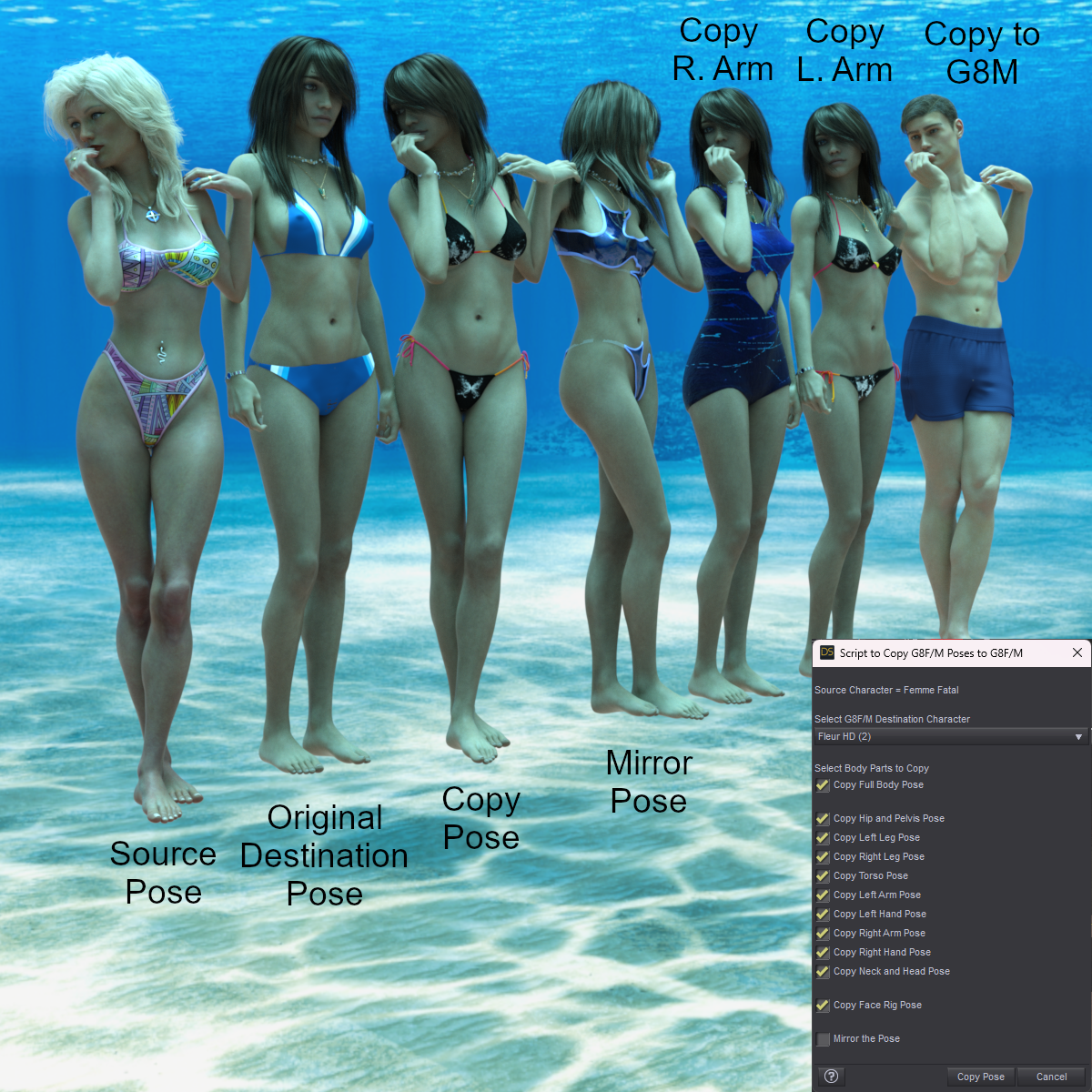
To use:
- Select the G8 pose Source character. You can do this by selecting any bone in the character.
- Run the script.
- A drop down list appears of all compatible destination characters appears. Select the destination character.
- Choose which part/parts of the body you wish to copy/mirror. The Checkbox titles will change to reflect your current selection.
- Press the 'Copy Pose' button.
13 June, Added Genesis 8.1 to the possible source and destination figures to use (yes, I forgot, DOH).
I hope it proves to be useful.
Regards,
Richard.

Daz 3D is part of 
Connect
DAZ Productions, Inc.
7533 S Center View Ct #4664
West Jordan, UT 84084
Licensing Agreement | Terms of Service | Privacy Policy | EULA
© 2026 Daz Productions Inc. All Rights Reserved.
Comments
sounds like it is Thanx
great ! thanks !
I hope it's useful. I was asked about doing it by a gentleman on Renderosity, and I have to say I wasn't initially convinced that it would be useful. However, it turns out that with large character and morph libraries, the 'Edit| Copy Figure' and then 'Edit| Paste Selected Items Pose' can take a huge amount of time.
This script is pretty much fixed in how long it takes to run - a few seconds. I also found it useful to copy and mirror hand poses from one character to another (Male or Female). It took a bit of time to program - I tend to be a brute ignorance and force type of programmer, which means a lot of simple statements to run through. Oddly, this method seems to work faster than sophisticated ones with loops, arrays etc.
Anyway, I learnt a lot about automatically selecting the correct characters and am fairly pleased with it.
Regards,
Richard.
I had one of those revelation moments, and I realised I had forgotten to make G8.1 an acceptable source/ destination character.
The script is now amended to work with G8.1 too.
My apologies.
Regards,
Richard.
How about G9, or don't you use that generation?
In all honesty, virtually the only time I use G9 is for converting my freebie G8 poses to work on G9 and rendering the associated freebie promo images. However, in this case I was explicitly asked to do the script for G8, which is why G8 was the target generation.
I'm happy to re-work the script for G9 as it is the 'current' generation, and maybe for G3 for the fun of it. The 'learning experience' relating to how to select appropriate destination characters from the scene was the longest and most challenging part of the script, even though it only amounts to around 10 lines of code. That section is also pretty easy to aim at G9 instead. After that, the script re-work is just text editing. G9 has fewer facial bones than G8, so the face rig section would be shortened a bit.
I'll see what I can do. It won't be instant as I am currently exceedingly busy and having to work weekends too.
Regards,
Richard
I was just curious why you did not target the current generation. You answered that question. You do not need to create a G9 script, just because I asked about it. You are busy, so put that on the way back burner for "someday, maybe".
I did wonder about asking if you could do this, but didn't like to pester you, so many thanks both for the original script and for extending it to include 8.1.
This is a really useful script. I just downloaded it and will use it. Thanks a lot.:)
Thank you.
I don't think it can do much that's new, but possibly can be useful.
Regards,
Richard
Sounds like an useful script, thanks.
If it works for G8 does it work for G3? They have similar rigging IIRC.
It definitely doesn't cater for G3 at the moment. I went through a lot of learning to find out how to exclude props, rigged props, V3, V4, G1, G2, G3, G9 and stand alone characters (like Cat Zeus) from the list of source & destination characters. I tested the script with a whole bunch of characters in a scene, 4 G8's (3fem,1mel), a G3, G9, V3,V4,G1, G2, Cat Zeus and one dumb and one rigged prop. All characters had clothes, hair, jewellery and some geoshells, and most were grouped with their clothes in scene groups. All in an effort to make the thing do something silly. It worked properly in the end.
I am planning (after Barbult's comment above) to do different but similar scripts for G3 & G9.
The similarity of G3 bone names to G8 bone names makes it almost entirely compatible from the beginning. However, I am not entirely up to speed with the G3 face rig, so cannot comment on that.. yet. I honestly think that creating a promo image will probably take as long as doing the script conversion.
G9 is a bit more of a task, and it does make sense to do it. In most cases G9 has equivalent bones to G8 bones, which would just involve bone name changes. G9 has fewer face rig bones than G8, so I'd probably be editing and deleting rather than editing and adding to the script, and that's quicker. I am happy to do it, and plan on doing so.
Regards
Richard
OK. G3 script pretty much jobbed. 50 minutes. Would have been less if I hadn't made a new test scene within that time (guess who's overconfident and has probably missed something big..! Always happens.).
G3's head/face rig is vastly simpler than G8's. None of the lip, cheek, eyelid or eyebrow bones etc exist. I have to confess I was very surprised. G8 is actually a big step up in terms of bone quantities in the figure. I have a little more testing to do and need to add the heel bone copy sections.
After that, a Promo image to show V7, FWSA Safa and Lucian7 doing the poses too and then can release the script.
Regards,
Richard.
As promised, please find the G3F/M copy/mirror poses script below.
Regards,
Richard
This looks like a surprisingly useful tool for my kit. Thank you.
I'm curious as to why your models are submerged near Grand Cayman, if you don't mind me asking.
Hallelujah!
Disciple
Hmm, the answer's a bit convoluted but makes sense in the end.
The scripts deal with poses. To confirm that the poses are correctly copied from one character to another it's best not to have too much clothing in the way that could prevent checking. This means swimsuits, as they show a lot of the body without having inappropriate overtones. To have a reason for the swimwear, I put the models underwater... In the surf means they'd be obsured by waves, and on the beach.. well, I don't have a beach HDRI I really like. Also, the generally blue colour given by Namtar3D's underwater HDRI lends a distinctive colour scheme to the promos that I've stuck with for many of my scripts - so it could be thought of as a 'brand look', in a way. Finally, I actually think the HDRI is really good, and I like using it.
Regards,
Richard.
Genesis 9 uses Control Bones to control the eyes and mouth, so my guess is with your script, you should (I know nothing about writing scripts) just have to care about Genesis 9 and not care at all about the eyes and mouth: I don't remember ever having to select either the mouth or the eyes to pose them: I simply select the relevant bone on Genesis 9, apply some changes on it, and the eyes or the mouth will automatically move too.
Source for the name, this video by Josh Darling:
OK, after quite a lot of experimentation I have finally come up with a G9 to G9 Copy Pose Script that I'm fairly happy with.
The script follows largely the same concept as for previous generations for the body, where the bone rotations are copied from the source character to the destination character. The way the head facial poses are treated is quite different. On G8 it's possible to pose the eyes, eyebrows and lips etc using the bones themselves and relevant controllers mostly follow to match, and when they don't match, it's as if the controller zero is set in a new position. That is very far from the case with G9, and setting the bones seems to completely mess up the controllers. So, each and every G9 standard facial controller is copied from the source character to the destination character (if the facial pose is selected for copying) and it's also mirrored if necessary.
Copying the facial controllers has a side effect. If you pose the eyes in the same way as on the older generations, and use the Side-Side or Up-Down sliders on each eye, that part of the pose will not copy.
I belong to the brute ignorance and force school of programming, so the script is quite long (over 4,000 lines of code) but very simple. I hope it is useful to someone.
The characters shown in the image are CB Lores and Thorne's little goblin 'Nala'.
Regards,
Richard.
Very useful, thank you very much!
Hello richard I use your G9 scrip to mirror a hand on a pose I converd from GF8, It work, I had to do some addusment for the hand to interact more natural with the poolladder, after I play with the hand twist value the pose look fine. Thanks this going to make posing character and creating poses more easy. Whish you a happy day, take care.
I am currently putting together a series of sign language letter poses (British/Australian/New Zealand (BANZSL) and American(ASL), possibly venturing into French (LSF), Spanish (LSE) and German (DGS) which are similar to ASL). I'm doing all 26 of each language for both G8 & G9. While converting the sign language poses from G8 to G9 I thought it'd be useful to only copy the poses on the relevant bones from G8 to G9, and I tweaked my 'G8 to G9 Pose Transfer Script' to make this easier. This made me think that it might actually be useful to adapt the 'Pose Copy' script so selected G8 limb poses (and possibly face poses) could be copied/mirrored onto G9 as per the Copy scripts earlier in this thread.
Would anyone find this useful? I'd be only doing G8 to G9 and trying to use the G9 controllers where possible. This is going to be a mammoth task to correlate the controller movement to G8 bone movements, so I'd like to check that someone might use it before doing a heap of nugatory work.
Additionally, sorry to ask - I'm having trouble finding photos of American sign language letters. Most of the letters are shown as drawings of disembodied hands on a chart and I'm not sure if I'm getting them right. Does anyone know of photos of someone doing the ASL letters? Preferably a complete torso so that I know where the hand is relative to the torso. I will say that ASL, being derived from but not exactly the same as LSF, using only a single hand is a lot quicker to do poses for than BANZSL which uses both hands.
Regards,
Richard
They are already products for ASL on Daz Store (released alongside Victoria 8.1), one is a pose product (with renders showing all letters), one is an animations product.
Maybe it's better to focus on non US sign languages?
I already have 26 poses for BANZSL for each of G8 & G9, and 26 G8 poses for ASL as well as 9 ASL poses converted to G9. Just want to confirm they're right.
As for the paid product here - Just looked it up. There are 10 signs language word poses in the product. None are letters which is what I'm doing, so there is no overlap, possibly they're complimentary.
Like ASL, LSF, LSE and DGS are all based on old French sign language (1760 to approx 1800) so the letters are very similar to each other. Belgium & Luxemburg seem to use DGS while the Netherlands use another varient derived from the Old French sign language. Oddly enough, Sri Lanka uses a varient of BANZSL while India uses ISL - unrelated to either Old British or Old French sign language and predates both by centuries.
Regards,
Richard
I was speaking about these two products (each included in one of the two V8.1 bundles) and both have poses / animations for the 26 letters:
I was not trying to warn you about sharing your own ASL poses here due to their existence (I don't think there is a rule against sharing a freebie offering the same thing as a paid product) but as I didn't understand you already have done them so from my point of view, warning you about their existences would have allowed you to focus on SLs who didn't have already existing poses.
But, well, as you already did them, my point is moot.