Base Joint Correctives Issue
 Quriosyty
Posts: 26
Quriosyty
Posts: 26
Recently I have noticed that when I pose my G9 figures I am getting some rather unrealistic results in areas where the figure bends. After much investigation I have tracked down what seems to be the issue and it centres around the function Base Joint Correctives.
In the images I have attached you can see that in Figure #1 I have left the Base Joint Correctives setting at its default of 100% and the leg bend looks terrible - the rear thigh has started to deform before the calf has made contact. The elbow bend, though not perfect, is better.
In Figure #2 I have dialled down the Base Joint Correctives setting to 25% which has fixed the leg bend issue but deformed the elbow bend into a highly unrealisic state.
I just can't seem to stop this happening and it is ruining all of my modelling.
I've been back to look at some of my earlier G9 renders and this issue was not present a couple of months ago.
Any ideas?

Daz 3D is part of 
Connect
DAZ Productions, Inc.
7533 S Center View Ct #4664
West Jordan, UT 84084
Licensing Agreement | Terms of Service | Privacy Policy | EULA
© 2026 Daz Productions Inc. All Rights Reserved.
Comments
You probably have a hidden rogue JCM that shouldn’t be enabled by default. To identify which morph is causing it, try the following:
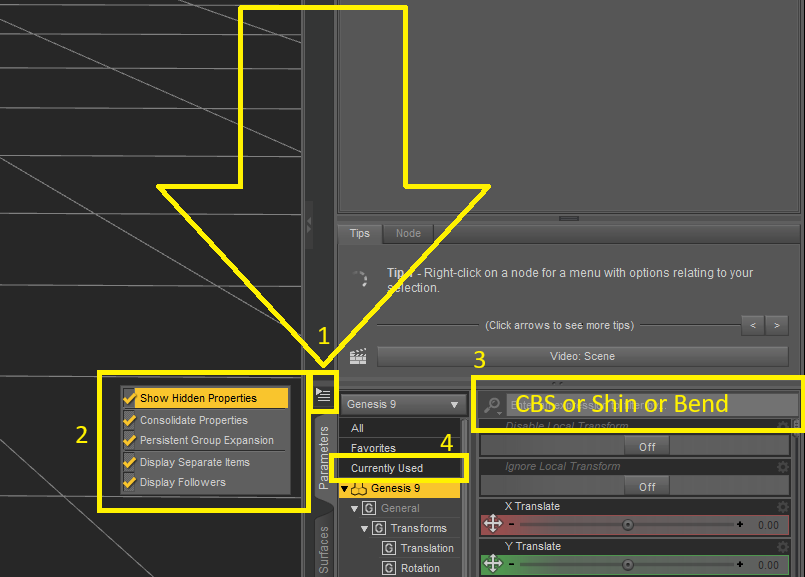
>Activate Show Hidden Properties
>Load a new Genesis 9 figure, select the Left Shin, and set the bend value to 90.
>Select the figure in the Scene pane.
>With the figure selected, use the search bar to look for terms like “CBS”, “Shin”, or “Bend”, then switch the filter to Currently Used.
Normally, you should only see the default morph
body_cbs_shin_x90p_lactive, but you’ll probably also find the rogue morph there as well (usually something with the character name plusshin_x90p...).Thanks. I'll give that a try. BTW - the image you posted doesn't show and has been replaced by a marker which reads "Content not viewable in your region". If the image was to illustrate something which could have helped me could you try reposting with the unviewable element removed? Not sure what it is because I cannot see the image :0)
Oh! And by the way - if I do find this rogue JCM is there any way of disabling it so that it doesn't happen again?
I uploaded the image to IMGUR which may be blocked in other regions, I'll try using another website.

I don't know exactly how to fix the morph (can be simply dialed down but that won't really fix the issue), but if you just want to browse the folder containing it, click the Cog icon on the right side of any morph to open its properties. At the end of the File Path field, click the three dots (“...”) to open its folder.
It may depend on the JCM, but usually, the problem is with one that should only be active if you're using a specific character. If it's the case, it's easy to fix it because you'll only have to tell Daz Studio to only activate that JCM if the character it was made for is active.
So once you find it, someone should be able to tell you what to do.
Thanks to both of you. I'll have a go at fixing it and let you know if I require any further assistance. (Not Victoria - your second posting of the image worked. Thanks again.)
Okay so we are all good. It turned out that the problem was with a JCM file in the product shown in the image below - E3D Alina for Genesis 9. I tried a few things to fix it but, as Not Victoria feared, simply dialing the property down created huge problems in other areas so for the time being I've simply removed all of the product files. It's a shame beacuse she was a nice character but at least I can now use the other 3,747 resources I have installed. Which is nice
Once again, thank you both so much for your help with this issue.
Have you filed a ticket to Daz, so it gets noticed and can be fixed?
No. But I will. Thanks for the suggestion.
Actually I've never done that before. I've trawled through the site but can't find out how to do it. Any clues?
Do you have the name of the problematic JCM ? And a screenshot of how it is set in the Property Hierachy?
To open the Property Hierachy on that JCM, in the Parameters tab, switch to Edit Mode, then right click on the problematic JCM and select Show in Property Hierarchy.
Example with a JCM from Vicky 9:
The usual mistake is that the body morph of the character is not set as a 2nd Stage controller, but maybe it's another one.
Go to help center (Link is in the footer of all pages, if you ever need to find it again), sign in there, then submit a request to tech support.
Thank you. I did find that page but wasn't sure it was the correct place to submit such a report.
Thanks for this. Much appreciated. I've removed the files currently to make DAZ work again so I'm unable to do this. I might reinstall them at some stage and try your fix. It's good to know this for potential future problems anyway.
I've got to say - the DAZ community is super helpful. Thanks to everyone who has taken the time to sort out my little issue :-0)