Need help with Mac set up with new SSD

Hey all

I'm so sad right now. I effed up my reinstall of daz3 and contents from my Mac to the T7 Samsung ssd I just got, and everything I try to delete and re-do is just not working, and I feel like every YouTube video I come across isn't being plain enough to baby-step guide me. I apparently need folders nesting/path creation for Mac like I'm five years old, and I'm at wit's end.

I feel like my issue starts with trying to create a root folder in the ssd and it degresses from there. Because I try to change the path in DIM after I create a folder in the ssd, then go to change it also in Daz studio under Preferences/ Content etc etc, then I go look at the ssd info in Finder and Daz just made a new folder for itself in there. But! It will let me download all my content to the folder I created, then it says the PostgreSQL CRM path isn't working, and sure enough it's using the new folder Daz3 just made and not *my* folder, and gives me an error message that CMS isn't connected. I've tried uninstalling and reinstalling PostgreSQL CMS and few times. But it's sending it to the folder Daz made because I see it in the Log.
 

Is there a BASICS folder path/nesting tutorial out there for Mac users that are ignorant like me ???? 
 

Thank you :'(

Post edited by arctic_shadows on

Comments

  • ElorElor Posts: 3,737

    Maybe @Totte will have a better idea, but my suggestion is to not change the default location of DIM download folder on Mac: when I tried to do it, DIM failed to install some elements (I think it was mainly plugins and softwares, but it's a been a while so my memory is a bit fuzzy).

    My current setup is:

    • Daz Studio and related softwares are stored on my internal SSD
    • DIM Download folder is at its default location (once in a while, I move the downloaded packages elsewhere to keep enough free space on my internat SSD)
    • My Library is at the default location (inside the Documents folder) (I didn't try to move it to be honest, I prefer to keep it in a folder backed up by Time Machine).
    • My Daz 3D Library, the library with all my content is on an external SSD, same with the libraries with freebies and items from other stores.
  • TotteTotte Posts: 14,994
    edited May 4

    Hi,

    My setups are as follows ( using external SSDs ). I have the same setup on two machines and on a third older mac one with old spinning drives, bu the concept is the same, much what Elor said.

    (a) Install DIM, Studio and CMS on you internal drive, they dont use that much space. 
    (b) On the Content SSD, Named StudDuo ( because the old machine had a raid name DuoDisk, and when I got my MacStudio ( it was shortened to MacStud in some terminal software and I thought that was funny ), but the drive can be named anything, just make sure it is formatted Case Insensitive! I also put Downloads and Thumbnail on another drive, StudExtra.
    (c) On that drive I have A Folder named DazBoot, in which I have several folders, CleanDaz, ThirdParty, Tests etc, but lets focus on DazClean, where I install all content from Daz store. (The reason is to avoid bad 3rd party content corrupting the  Daz base files.)
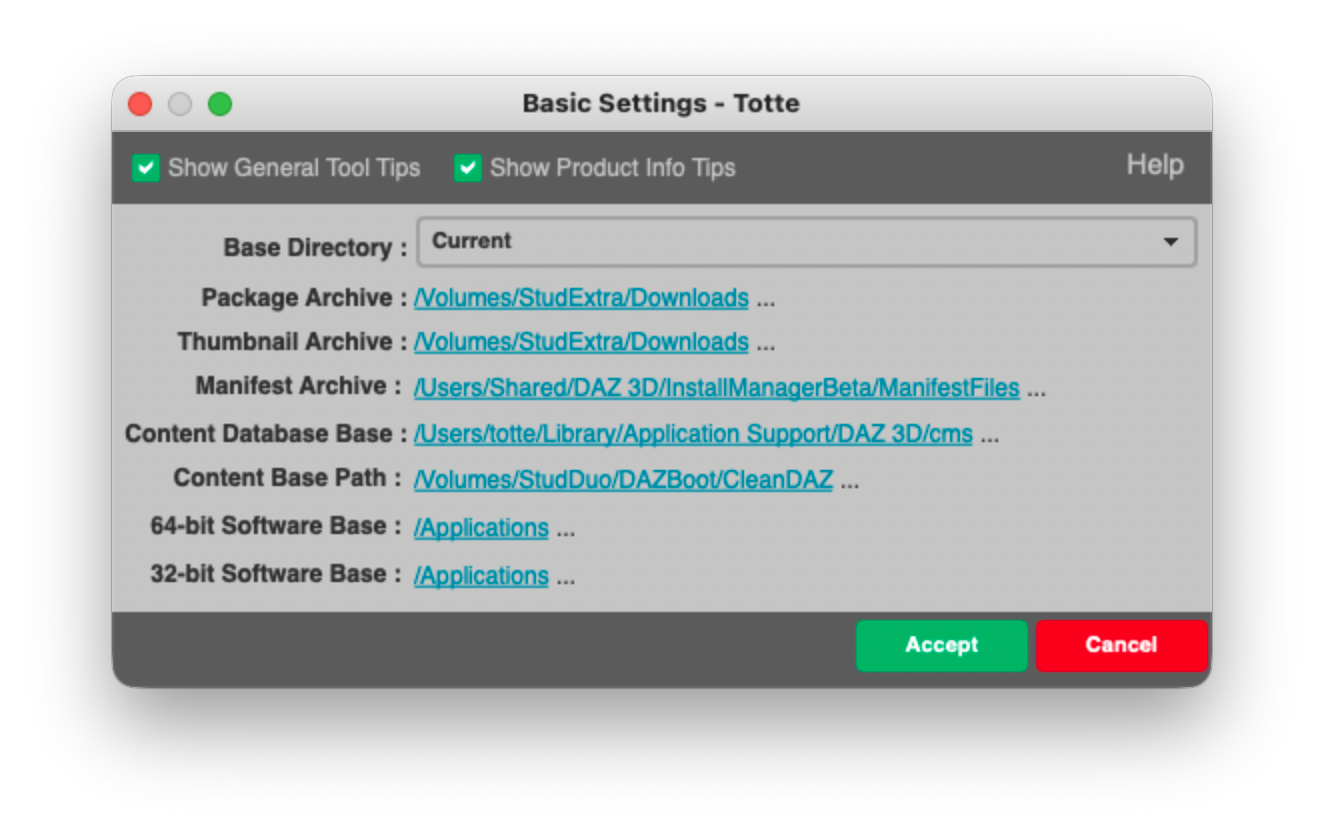
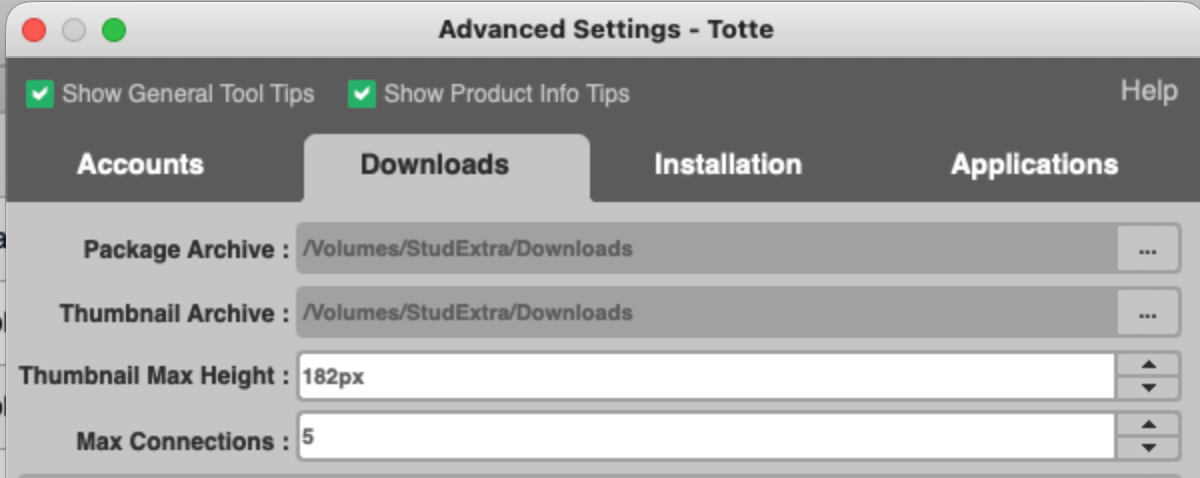
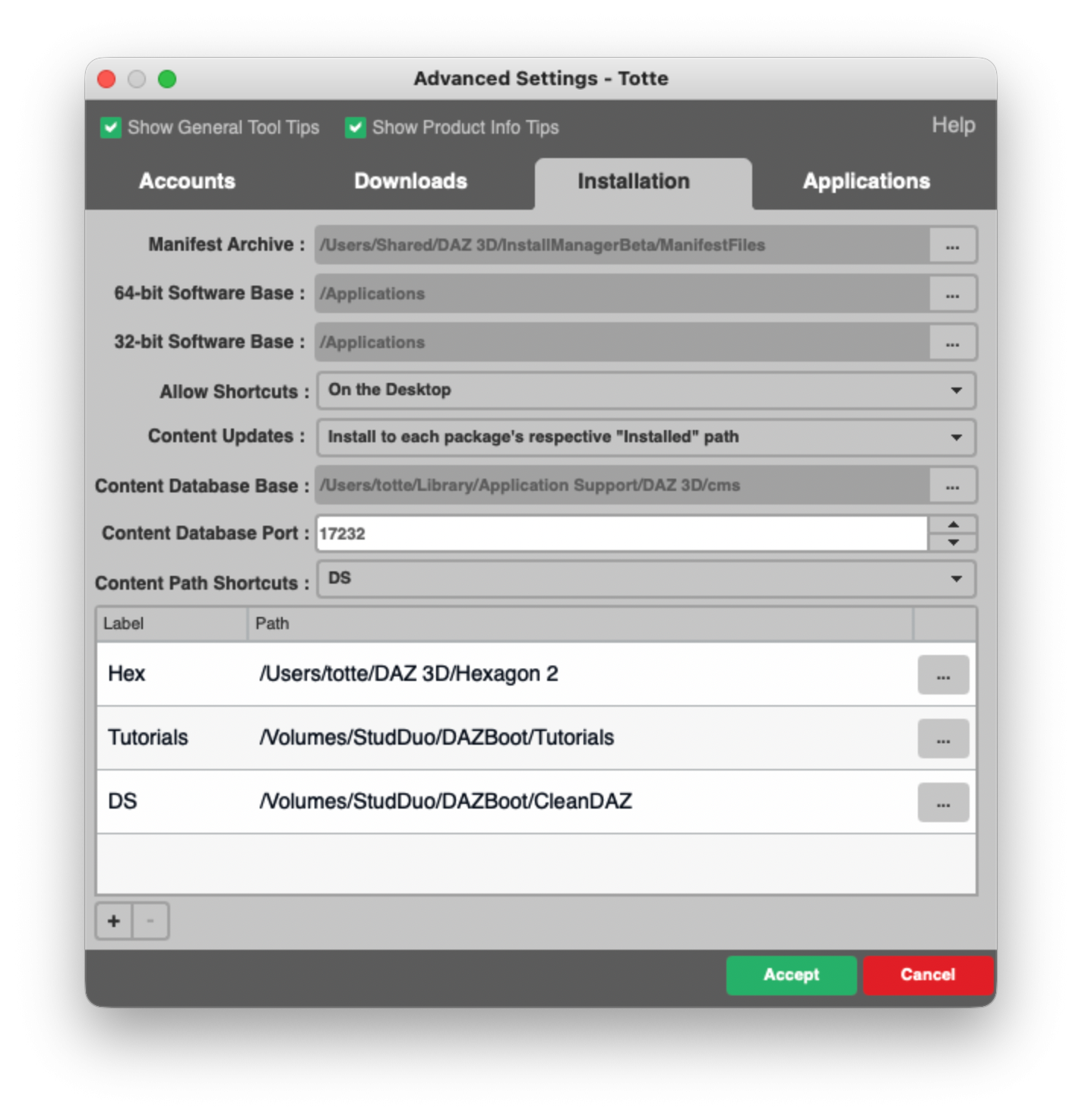
    (d) Then in DIM I have this setup

    Basic:

    Downloads:


    Advanced;


    (e) And in Studio


    Important is, that if you copied your content folder from the internal to external drive, you need to do some CMS management and reimport metadata so it sets up the correct paths.

    I hope this helps.I listen to this thread so if you have more questions, I'll try to answer.
     

    DImbasic.png
    1324 x 836 - 498K
    DIMDL.png
    1200 x 478 - 241K
    DIMADV.png
    1424 x 1474 - 837K
    DSSetup.png
    643 x 392 - 178K
    Post edited by Totte on
  • arctic_shadowsarctic_shadows Posts: 24

    Elor said:

    Maybe @Totte will have a better idea, but my suggestion is to not change the default location of DIM download folder on Mac: when I tried to do it, DIM failed to install some elements (I think it was mainly plugins and softwares, but it's a been a while so my memory is a bit fuzzy).

    My current setup is:

    • Daz Studio and related softwares are stored on my internal SSD
    • DIM Download folder is at its default location (once in a while, I move the downloaded packages elsewhere to keep enough free space on my internat SSD)
    • My Library is at the default location (inside the Documents folder) (I didn't try to move it to be honest, I prefer to keep it in a folder backed up by Time Machine).
    • My Daz 3D Library, the library with all my content is on an external SSD, same with the libraries with freebies and items from other stores.

     Thank you for this! 

  • arctic_shadowsarctic_shadows Posts: 24

    Totte said:

    Hi,

    My setups are as follows ( using external SSDs ). I have the same setup on two machines and on a third older mac one with old spinning drives, bu the concept is the same, much what Elor said.

    (a) Install DIM, Studio and CMS on you internal drive, they dont use that much space. 
    (b) On the Content SSD, Named StudDuo ( because the old machine had a raid name DuoDisk, and when I got my MacStudio ( it was shortened to MacStud in some terminal software and I thought that was funny ), but the drive can be named anything, just make sure it is formatted Case Insensitive! I also put Downloads and Thumbnail on another drive, StudExtra.
    (c) On that drive I have A Folder named DazBoot, in which I have several folders, CleanDaz, ThirdParty, Tests etc, but lets focus on DazClean, where I install all content from Daz store. (The reason is to avoid bad 3rd party content corrupting the  Daz base files.)
    (d) Then in DIM I have this setup

    Basic:

    Downloads:


    Advanced;


    (e) And in Studio


    Important is, that if you copied your content folder from the internal to external drive, you need to do some CMS management and reimport metadata so it sets up the correct paths.

    I hope this helps.I listen to this thread so if you have more questions, I'll try to answer.


    Thank you. Yeah I wasn't having any luck reinstalling metadata either. I will take another look at my folders and will probably be back with more questions. I appreciate it, thank you. 

  • arctic_shadowsarctic_shadows Posts: 24

    arctic_shadows said:

    Totte said:

    Hi,

    My setups are as follows ( using external SSDs ). I have the same setup on two machines and on a third older mac one with old spinning drives, bu the concept is the same, much what Elor said.

    (a) Install DIM, Studio and CMS on you internal drive, they dont use that much space. 
    (b) On the Content SSD, Named StudDuo ( because the old machine had a raid name DuoDisk, and when I got my MacStudio ( it was shortened to MacStud in some terminal software and I thought that was funny ), but the drive can be named anything, just make sure it is formatted Case Insensitive! I also put Downloads and Thumbnail on another drive, StudExtra.
    (c) On that drive I have A Folder named DazBoot, in which I have several folders, CleanDaz, ThirdParty, Tests etc, but lets focus on DazClean, where I install all content from Daz store. (The reason is to avoid bad 3rd party content corrupting the  Daz base files.)
    (d) Then in DIM I have this setup

    Basic:

    Downloads:


    Advanced;


    (e) And in Studio


    Important is, that if you copied your content folder from the internal to external drive, you need to do some CMS management and reimport metadata so it sets up the correct paths.

    I hope this helps.I listen to this thread so if you have more questions, I'll try to answer.


    Thank you. Yeah I wasn't having any luck reinstalling metadata either. I will take another look at my folders and will probably be back with more questions. I appreciate it, thank you. 

    Hello. When you mentioned:(a) Install DIM, Studio and CMS on you internal drive, they dont use that much space.  - are you somehow installing CMS outside of DIM? Because I had let DIM download the PostgreSQL CMS packet on its own. 

    I had further read somewhere to try uninstalling it and re-installing it. Then tried re downloading metadata, but I still get that error message saying the CMS is not connected.

  • arctic_shadowsarctic_shadows Posts: 24
    edited May 5

    Its the content cluster folder that's in the wrong place I think


    Edit: I think I got it. I wasn't hitting Apply and then Accept and then exiting out of Daz Studio. Hope it keeps working. lol THANK YOU

    Post edited by arctic_shadows on
  • TotteTotte Posts: 14,994

    arctic_shadows said: Hello. When you mentioned:(a) Install DIM, Studio and CMS on you internal drive, they dont use that much space.  - are you somehow installing CMS outside of DIM? Because I had let DIM download the PostgreSQL CMS packet on its own. 

    I had further read somewhere to try uninstalling it and re-installing it. Then tried re downloading metadata, but I still get that error message saying the CMS is not connected.

    Nope, but one thing that can happen to the CMS is that if you do Repair Permissions in Disk Utility, it might ( depending on macOS version and moon phase and other random factors), apply Apple default permissions to ~/Library/Application Support and it's subdirectories, and Postgres is kind of picky that it should be the only one to access it's files, so it wont start if the permissions on the datafiles are wrong. If that happens you need to reset the permissions back for the  ~/Library/Application Support/DAZ 3D/cms folder tree. I did a small applescript to do that, that you can find here: http://4eyes.code66.se/wp-content/uploads/2020/04/Fix-DSCMS.app_.zip
     

Sign In or Register to comment.