
Daz 3D is part of 
Connect
DAZ Productions, Inc.
7533 S Center View Ct #4664
West Jordan, UT 84084
Licensing Agreement | Terms of Service | Privacy Policy | EULA
© 2026 Daz Productions Inc. All Rights Reserved.
Comments
I am so glad you like it ! Thank you for sharing your definition with others.
Yes, LAM only uses the file in data/RiverSoft Art... You have to overwrite it to have LAM use it (though you can always get back to it with the clear button). Creating your own file allows you to save it elsewhere and not have them overwritten when an update comes out. You can hack what file LAM uses though. If you open data/RiverSoft Art/2025Common/RSLook2026Constants.dsa in a text editor and change this line:
var FIGURESLIST_FILE = 'data/RiverSoft Art/Data/Look At Me Figures.txt';
As long as it is a relative path of a filename, that is what LAM will use going forward.
Ah, sorry about that. That was something I meant to add and forgot.
Creating your own file allows you to save your definitions elsewhere and not have them overwritten when an update comes out. You can also share it with others.
Thank you for all the great answers. I understand now that saving the definitions to my own file is more of a backup, in case the regular file gets restored to its default state by an update or clear action (or destroyed by the DS6 column naming bug.) So now I just let it use the default file to store my changed/additions and make a copy to my own file as a backup. I also saved a copy of the default file state after installation, for good measure.
RiverSoft Art is still number one in customer support!
Is this a known bug, or do I need to report it?
Yes, it is me AGAIN with another task I need advice on.
I am trying to create a Character Definition for Mr. Rattlepaws. His node name is the rather ambiguous "Item_1", and his label is "Rattlepaws". He has a lot of bones, but none of them is named "head". Instead, he has "Skull". The Look At Me III scripts would not let me access the Character Definition tab, or any of the controls, when Rattlepaws was selected. They complained that they were unable to find head bone.
So, I thought I would outsmart it and just manually add an entry with a text editor. I did that, but the scripts still would not let me control Mr. Rattlepaws. The scripts still complain about unable to find head bone. I loaded a supported character, and selected it, which let me access the Character Definition tab and scroll to see that my Rattlepaws entry was there and looked as I expected.
So, why do the scripts still look for a head bone when I have specified other names for the bones of this character? Is there some legacy code there at the beginning that thinks every character must have a bone named head?
EDIT: I decided I could implement yet another level of "outsmarting" to get this to work. I just added a "Head" bone to Mr. Rattlepaws, even though I didn't intend to ever use that new bone. I just made it a sibling bone of the last tail bone, because I thought that might cause the least level of interference with the existing poses. It worked. Now I can access the Character Definition tab when he is selected, and i can modify his definition. I'm still experimenting with which bones to assign, because he has so so many spine and neck bones.
Suggestion: It would be nice if instead of X to indicate propagation to the next higher (toward hip) bone, we could specify a number of bones to propagate through. Mr. Rattlepaws has 20 spine bones and 7 neck bones. Moving just a pair of those bones makes the movement a little abrupt.
SO, I settled on a Mr. Rattlepaws configuration to use for now, which differs quite a bit from my first guess above.
Here are two Mr. Rattlepaws looking and lauging at a third in the middle, wearing a yellow feather boa. I started with some product poses for each one and then used Look Into My Eyes III to make them look at the center Mr. Rattlepaws. It worked fine once I added that Head bone.
Thank you for that bug report - I need to handle it when there is not even a head bone. That is a well done test render - funny to see . I think I encountered this bug right at the end - I think it disappears if at least one selected figure has a head, but that is from the dim recesses of my memory so I am not sure.
I'm having a problem with Look At That III, when the target figure (Daz house cat in this example) is parented to a bone of the primary figure (G9 Left Hand Anchor in this example). The primary figure's eyes move, but the target figure's head moves. The primary figure's head does not move, but should have. The target's head should not have moved. I think this same kind of problem (or similar) happened in previous Look at That versions, but I don't remember whether there was a solution. If I unparent the target figure, then when the primary figure (G9 in this case) moves his spine bones, the target figure (cat in this case) is no longer attached and moving with the G9 hand. Is there a solution to this that I have forgotten?
I did this in DS 4.24.0.4. I didn't test in DS 6.
So, I got an inspiration to try Look at Each Other III and be sure that the second figure's dials were all 0. But alas, G9 still didin't turn his head and the cat did. So that was not the solution.
Bug Report?
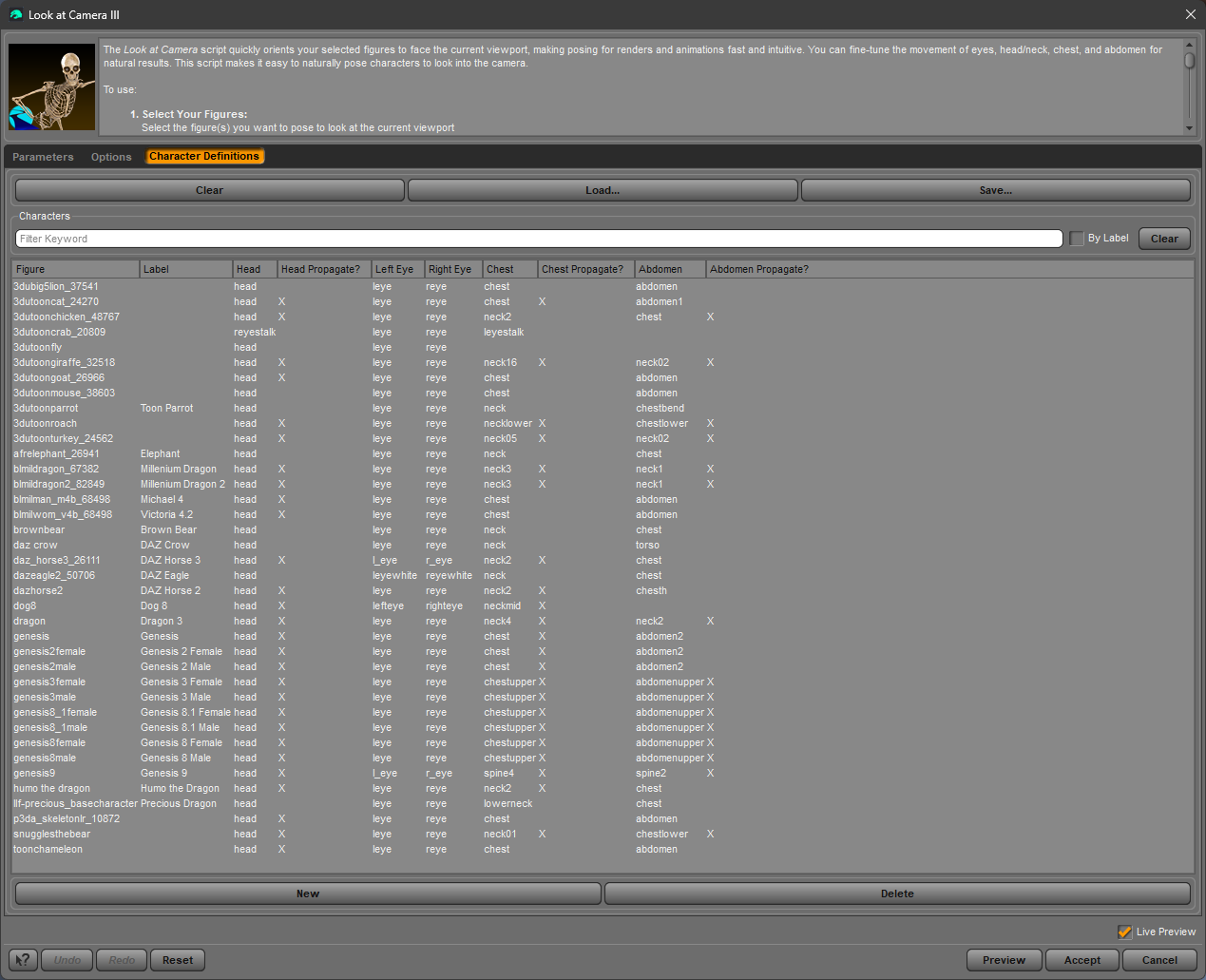
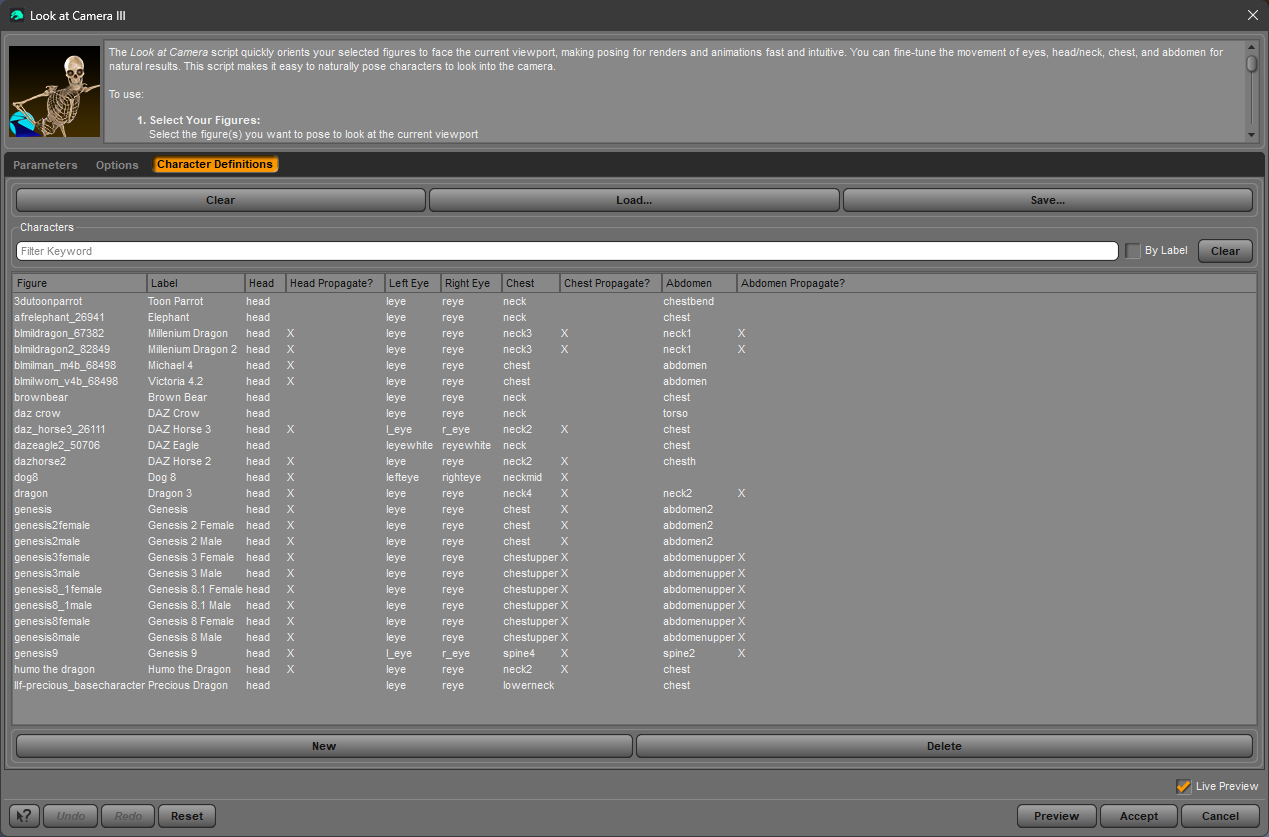
The Character Definitions that appear after using the Clear button do not match the Character Definitions that were in place immediately after installing the program. At installation time there were many more definitions. After Clear, many were gone. I discovered this is DS 4.24.0.4. I did not test it in DS6.
Character Definitions immediately after Look at Me III installation with DIM
Character Definitions after Clear
Bug Report or User Error? EDIT: This was user error, not a bug. A VERTEX must be selected, not a POLYGON. The manual is clear about this.
Look at Geometry III works very reliably for me in DS6, but almost never in DS4.24.0.4, which gives me an error message, even though I believe I have followed exactly the same process as in DS6. I have two figures selected and a prop selected last. That prop has one polygon selected with the Geometry Editor. After I OK the error message, my selected figures do not change pose at all.
The script struggles to figure out what figure should be moved if they are on the same hierarchy. The best solution is to unparent, use Look At XXX, and then reparent. Sorry.
Have you selected a VERTEX (not a polygon)?
The Clear resets the figure definitions from code defined in the data/RiverSoft Art/2025Common/RSLook2025Constants.dsa file. Once the Look at me figures.txt gets overwritten by your changes, the only way to get that back is from the install zip.
No, I'm definitely using polygon selection for the geometry on the prop. I did another test in 4.24.0.4 today, this time with a G8F and a cube primitive. Same error occurs. Does Look at Geometry III consistently work for you in DS4?
The situation I am describing here does not have to do with losing information I have added. The Clear operation removes character definitions that were present when the product was installed by DIM. The first screenshot was taken right after reinstallation from DIM. The second screenshot was taken right after executing the Clear operation, with nothing changed in between. For example, after installing the product, the Character Definitions contain information for 11 3DU characters. After Clear, there is only 1 3DU character (the 3dutoonparrot).
There is no RSLook2025Constants.dsa file in the folder you referenced, but there is a RSLook2026Constants.dsa. So I assume that is the file you mean. I can see in that file, that 3dutoonparrot is present, but the other 3DU characters are not. Perhaps you added definitions to Look at me figures.txt but did not update RSLook2026Constants.dsa to match.
You have to select a VERTEX, not a POLYGON.
RTFM, Barb!!! Vertex is clearly stated in the manual. I don't know why I don't see these things when I read it.
That's why I thought this could be user error rather than a bug. Evidently my DS6 Geometry Editor was set to vertex without me knowing it. The prop I used there was such dense geometry that it was easy to catch a vertex wherever I clicked, thinking I was selecting a polygon. Yes, selecting a vertex works properly in both DS6 and DS4. Thank you again for assisting me. Your patience is greatly appreciated. I'm glad to be over this hurdle, since working in DS4 is so much easier now with access to all my scripts and plugins.
Yes, that is what I meant. The constants file was much harder to add stuff so I just created a base set of figures and ignored it unless the user needs to reset to a stable list.
OK, I didn't realize you did not intend the delivered and cleared to match. It surprised me. Now I know. Thanks for clarifying. And thanks for adding extras to the DIM file.
Does this work for Daz Studio 6? Or still only for the Daz 4.24?
Look at Me III was working in DS 6, now the latest update has broken it. No longer working. I can send a log file if it helps.
Look at Me II does work in DS 6.
Which script doesn't work ?
My LAM3 updated last week. Since then I've used all but the geometry scripts without any issues. LAM2 updated last night. I haven't used it.
For me, all of the scripts in LAM3 don't work. I'm in the middle of doing promos, but when I'm done I will have a look into it. I uninstalled both LAM2 and LAM3 and reinstalled them. Only LAM2 works in DS 6. Haven't tried DS 4 yet.
Ok, LAM3 is working for me again (DS6)... not sure what is going on, but I'll take it. Sorry for the confusion.
Both LAM II & III support DS4.24 and DS6 as of this week.
Hello,
What change did the last update provide? I looked at the readme page but there is no information regarding the recently released update.
The change log is on the wiki page of LAMII... I think it's almost the same for LAMIII
https://docs.daz3d.com/public/read_me/index/62000_62999/62757/start ;