

[Released] Look At Me III [Commercial]

2

Comments

  • RiverSoft ArtRiverSoft Art Posts: 6,877

    diogenese19348 said:

    Being that DS6 is now in beta it would be nice if all new script products stated whether they supported it or not.  It's the main reason I bought this one, I do have DLAM II and use it regularly, I am starting to use DS6 more and a lot of older scripts don't work with it.

    DS6 is a huge change in the scripting, especially because of how I designed my scripts. I definitely will let people know if a product supports DS2026 - all my upcoming products will.

  • RiverSoft ArtRiverSoft Art Posts: 6,877

    Random said:

    Still on 4.24+ using Look at me ii a lot. On the fence but bought this update and now am glad. More responsive in capability and speed. Thanks!

    You're welcome! I think this is a fantastic upgrade - it contains my wishlist of features for LAM smiley

  • RiverSoft ArtRiverSoft Art Posts: 6,877

    SilverGirl said:

    Just popping in to say I love that last promo pic. Way to subvert expectations. laugh

    I wanted to show continuity with LAMII - I thought this was a playful way to modify LAMII's main promo.

  • RiverSoft ArtRiverSoft Art Posts: 6,877

    jmucchiello said:

    AnEye4Art said:

    A perfect companion to this would be: Don't Look At Me. Or: My Eyes Are Up Here. Heck I'd buy it.

    Just put a null where they shouldn't look. And Look At That. :) 

    EDIT: Look At Geometry III does this. And needs a feature request: In the camera section, being able to change the DrawStyle would be useful. Selecting Geometry works best in one of the mesh draw styles. But looking at a figure's eyes in mesh display isn't easy.

    Feature request noted. smiley

  • ArtiniArtini Posts: 10,655
    edited March 19

    I guess it does not work with instances.

    I have tried to make instances to look at the elephant in the middle, but got only the error message.

    I have to make my own script for such cases.


    Elephant01scr.jpg
    1330 x 989 - 398K
    Elephant01scr02.jpg
    351 x 97 - 12K
    Post edited by Artini on
  • RiverSoft ArtRiverSoft Art Posts: 6,877

    Artini said:

    I guess it does not work with instances.

    I have tried to make instances to look at the elephant in the middle, but got only the error message.

    I have to make my own script for such cases.

    No, they do not work for instances, as far as for posing. Instances are just a node with no head or eyes.

  • LeanaLeana Posts: 13,115

    An instance is an exact copy of the source object, so it's not surprising the script can't repose them.

    You'd probably need to pose the original to look at the center elephant, then create instances with a radial distribution around the center elephant (there's a tool in Code66 Toolbox 3 which looks like it could help with that, if you have it)

  • ArtiniArtini Posts: 10,655

    Leana said:

    An instance is an exact copy of the source object, so it's not surprising the script can't repose them.

    You'd probably need to pose the original to look at the center elephant, then create instances with a radial distribution around the center elephant (there's a tool in Code66 Toolbox 3 which looks like it could help with that, if you have it)

    Yes, I have purchased it. Need to explore it more.


  • ArtiniArtini Posts: 10,655
    edited March 19

    Works nicely with 3D Universe animals.

    LAM3pic01.jpg
    1920 x 1080 - 499K
    Post edited by Artini on
  • RiverSoft ArtRiverSoft Art Posts: 6,877

    Artini said:

    Works nicely with 3D Universe animals.

    Thanks for sharing @Artini!

  • HavosHavos Posts: 5,655
    edited April 19

    I bought this during MM, and only today I have had had the chance to test the new script out.

    I an suffering an issue that is so funtamental, I assume I must be doing something wrong. The problem is that the lower neck bone is not being changed by the script, which obviously massively constraints how much it can twist the head. I am suffering this issue on Genesis 9 (ie bone: neck 1) and Genesis 8.1 (Male and Female), so bone Neck Lower.

    To test I simply loaded the figures in the default prose, moved the Camera to about 90 degrees to the side of the figure and used Look At Camera III. I switched off eye movement and any body movement. The head failed to actual look at the camera in this case, and the lower neck twist stayed at 0. 

    If I use Look at Camera II, this script successfully moves the head, and both neck bones, and can thus actual look at the camera.

    I tested Look at each other III, and I got the same problem, the lower neck bone is not moved. With the figures side by side, they could not look at each other. Using Look at each other II, it worked just fine.

    What am I doing wrong, any idea why the lower neck is not moved?


    Post edited by Havos on
  • RiverSoft ArtRiverSoft Art Posts: 6,877
    edited April 19

    Havos said:

    I bought this during MM, and only today I have had had the chance to test the new script out.

    I an suffering an issue that is so funtamental, I assume I must be doing something wrong. The problem is that the lower neck bone is not being changed by the script, which obviously massively constraints how much it can twist the head. I am suffering this issue on Genesis 9 (ie bone: neck 1) and Genesis 8.1 (Male and Female), so bone Neck Lower.

    To test I simply loaded the figures in the default prose, moved the Camera to about 90 degrees to the side of the figure and used Look At Camera III. I switched off eye movement and any body movement. The head failed to actual look at the camera in this case, and the lower neck twist stayed at 0. 

    If I use Look at Camera II, this script successfully moves the head, and both neck bones, and can thus actual look at the camera.

    I tested Look at each other III, and I got the same problem, the lower neck bone is not moved. With the figures side by side, they could not look at each other. Using Look at each other II, it worked just fine.

    What am I doing wrong, any idea why the lower neck is not moved?

    Look at Me II embedded a lot of specific code for each generation it could support. Look at Me III is designed to expand and to give you more control over what bones are used to look at something. By default for G9, LAM uses Head and Neck2 for the head slider, Spine4/Spine3 for the Chest, and Spine2/1 for the abdomen. Go to the Character Definitions tab and look for the genesis9 row, change the Chest column to be neck1. The propagate columns mean that it should distribute the looking over the named bone and the next bone towards the hip if there is an X in the column (so for chest set to neck1, it would use neck1 and spine4). With no X, LAM ONLY uses the named bone for that slider.


    Post edited by RiverSoft Art on
  • jmucchiellojmucchiello Posts: 1,270

    I thought Look At Me 2 didn't affect Neck1 either. At least, not in my experience.

  • HavosHavos Posts: 5,655
    edited April 20

    RiverSoft Art said:

    Havos said:

    I bought this during MM, and only today I have had had the chance to test the new script out.

    I an suffering an issue that is so funtamental, I assume I must be doing something wrong. The problem is that the lower neck bone is not being changed by the script, which obviously massively constraints how much it can twist the head. I am suffering this issue on Genesis 9 (ie bone: neck 1) and Genesis 8.1 (Male and Female), so bone Neck Lower.

    To test I simply loaded the figures in the default prose, moved the Camera to about 90 degrees to the side of the figure and used Look At Camera III. I switched off eye movement and any body movement. The head failed to actual look at the camera in this case, and the lower neck twist stayed at 0. 

    If I use Look at Camera II, this script successfully moves the head, and both neck bones, and can thus actual look at the camera.

    I tested Look at each other III, and I got the same problem, the lower neck bone is not moved. With the figures side by side, they could not look at each other. Using Look at each other II, it worked just fine.

    What am I doing wrong, any idea why the lower neck is not moved?

    Look at Me II embedded a lot of specific code for each generation it could support. Look at Me III is designed to expand and to give you more control over what bones are used to look at something. By default for G9, LAM uses Head and Neck2 for the head slider, Spine4/Spine3 for the Chest, and Spine2/1 for the abdomen. Go to the Character Definitions tab and look for the genesis9 row, change the Chest column to be neck1. The propagate columns mean that it should distribute the looking over the named bone and the next bone towards the hip if there is an X in the column (so for chest set to neck1, it would use neck1 and spine4). With no X, LAM ONLY uses the named bone for that slider.

    OK. Thanks for that. I am still surprised that neck1 is not used out of the box, as that is pretty important for proper head movement. I understand you wanted the script to support as many figures as possible, but I would have thought 99% of the time people will be using this for Genesis 8 or 9.

    I can alter the bone names as you suggest, although it means there will always be one bone not used, since the three sections can only move 6 bones in total, and not the 7 available.

    Would you recommend I stick with Look at Me II when moving Genesis 8 or 9?, or are there advantages of III for these figures (other than the ability to look at a specific pixel).

    Post edited by Havos on
  • RiverSoft ArtRiverSoft Art Posts: 6,877
    edited April 20

    Havos said:

    RiverSoft Art said:

    Havos said:

    I bought this during MM, and only today I have had had the chance to test the new script out.

    I an suffering an issue that is so funtamental, I assume I must be doing something wrong. The problem is that the lower neck bone is not being changed by the script, which obviously massively constraints how much it can twist the head. I am suffering this issue on Genesis 9 (ie bone: neck 1) and Genesis 8.1 (Male and Female), so bone Neck Lower.

    To test I simply loaded the figures in the default prose, moved the Camera to about 90 degrees to the side of the figure and used Look At Camera III. I switched off eye movement and any body movement. The head failed to actual look at the camera in this case, and the lower neck twist stayed at 0. 

    If I use Look at Camera II, this script successfully moves the head, and both neck bones, and can thus actual look at the camera.

    I tested Look at each other III, and I got the same problem, the lower neck bone is not moved. With the figures side by side, they could not look at each other. Using Look at each other II, it worked just fine.

    What am I doing wrong, any idea why the lower neck is not moved?

    Look at Me II embedded a lot of specific code for each generation it could support. Look at Me III is designed to expand and to give you more control over what bones are used to look at something. By default for G9, LAM uses Head and Neck2 for the head slider, Spine4/Spine3 for the Chest, and Spine2/1 for the abdomen. Go to the Character Definitions tab and look for the genesis9 row, change the Chest column to be neck1. The propagate columns mean that it should distribute the looking over the named bone and the next bone towards the hip if there is an X in the column (so for chest set to neck1, it would use neck1 and spine4). With no X, LAM ONLY uses the named bone for that slider.

    OK. Thanks for that. I am still surprised that neck1 is not used out of the box, as that is pretty important for proper head movement. I understand you wanted the script to support as many figures as possible, but I would have thought 99% of the time people will be using this for Genesis 8 or 9.

    I can alter the bone names as you suggest, although it means there will always be one bone not used, since the three sections can only move 6 bones in total, and not the 7 available.

    Would you recommend I stick with Look at Me II when moving Genesis 8 or 9?, or are there advantages of III for these figures (other than the ability to look at a specific pixel).

    I vastly prefer LAM III. The configuration is awesome as so many figures DON'T use regular names. I also like that the real-time feedback (drag a slider and the head moves, not just on release like with LAM II) - it is also faster. I love the Undo/Redo and camera to see the pose better. Finally, of course, it works with DS6/2026

    Post edited by RiverSoft Art on
  • HavosHavos Posts: 5,655

    jmucchiello said:

    I thought Look At Me 2 didn't affect Neck1 either. At least, not in my experience.

    It does for me, though it moves head and neck 2 first, then neck 1 if the first two can not move enough (within limits).

  • barbultbarbult Posts: 26,815

    I'm trying to follow the PDF instructions for Look at Me III to customize bones for LowPi. I cannot figure out why it keeps telling me that Torso1 and Torso2 bones are not in LowPi. The instructions say to use bone names, not bone labels, but I don't know how to find a bone name.


    Screenshot 2026-04-19 234822.png
    850 x 266 - 24K
    Screenshot 2026-04-19 233534.png
    1969 x 748 - 177K
  • RiverSoft ArtRiverSoft Art Posts: 6,877

    barbult said:

    I'm trying to follow the PDF instructions for Look at Me III to customize bones for LowPi. I cannot figure out why it keeps telling me that Torso1 and Torso2 bones are not in LowPi. The instructions say to use bone names, not bone labels, but I don't know how to find a bone name.

    Select any node/bone, go to the Scene pane, and click Info tab. The bone name is the Name: spine1


    Screenshot 2026-04-20 at 7.27.58 AM.png
    292 x 254 - 23K
  • barbultbarbult Posts: 26,815

    Thank you for responding so quickly to my LowPi bone name question. I looked in the Scene pane Info tab, and it shows that the bone names are Torso1 and Torso2,  just like the bone label. So now I am still confused about why Look At Me III Character Definition won't accept those bone names. I see that all the bone names listed, for the characters you support by default, are lower case. Do you not accept mixed case bone names, like Torso1 and Torso2?

    Screenshot 2026-04-20 090627 Get Bone Name From Scene Info.png
    389 x 493 - 25K
    Screenshot 2026-04-20 091154.png
    335 x 492 - 25K
  • RiverSoft ArtRiverSoft Art Posts: 6,877

    barbult said:

    Thank you for responding so quickly to my LowPi bone name question. I looked in the Scene pane Info tab, and it shows that the bone names are Torso1 and Torso2,  just like the bone label. So now I am still confused about why Look At Me III Character Definition won't accept those bone names. I see that all the bone names listed, for the characters you support by default, are lower case. Do you not accept mixed case bone names, like Torso1 and Torso2?

    I may be forcing a comparison with lower case. Try torso1 and torso2

  • barbultbarbult Posts: 26,815

    RiverSoft Art said:

    barbult said:

    Thank you for responding so quickly to my LowPi bone name question. I looked in the Scene pane Info tab, and it shows that the bone names are Torso1 and Torso2,  just like the bone label. So now I am still confused about why Look At Me III Character Definition won't accept those bone names. I see that all the bone names listed, for the characters you support by default, are lower case. Do you not accept mixed case bone names, like Torso1 and Torso2?

    I may be forcing a comparison with lower case. Try torso1 and torso2

    Yes! That worked. 

  • barbultbarbult Posts: 26,815
    edited April 20

    Look at Geometry III

    Two LowPi characters looking at a selected polygon on a balloon.

    Two Standing LowPis looking at Geometry Balloon.jpg
    2619 x 1725 - 1M
    Post edited by barbult on
  • barbultbarbult Posts: 26,815

    Wow, looking again at the manual today, I see the answers I didn't see yesterday. How could I have missed this??? I apologize for wasting your time answering what you already documented exactly. Thank you for helping me anyway!

    Edit the Character Definition: Enter bone names, not the labels, for each of the bone groups. ALWAYS ENTER BONE NAMES IN LOWER CASE, e.g., neckupper instead of neckUpper. You can find out bone names by selecting a node (before starting the script) and switching to the Info tab in the Scene pane.

  • RiverSoft ArtRiverSoft Art Posts: 6,877

    barbult said:

    Wow, looking again at the manual today, I see the answers I didn't see yesterday. How could I have missed this??? I apologize for wasting your time answering what you already documented exactly. Thank you for helping me anyway!

    Edit the Character Definition: Enter bone names, not the labels, for each of the bone groups. ALWAYS ENTER BONE NAMES IN LOWER CASE, e.g., neckupper instead of neckUpper. You can find out bone names by selecting a node (before starting the script) and switching to the Info tab in the Scene pane.

    No problem. I forgot I had already documented it in the manual too. laugh

  • barbultbarbult Posts: 26,815
    Thanks. The most surprising thing to me was that I had searched the document for "bone name" and didn't find that reference. Then later reopening the very same PDF from browser history, there it was. User error, no doubt. The scripts are working well for me in DS4 and DS6.
  • RiverSoft ArtRiverSoft Art Posts: 6,877

    barbult said:

    Thanks. The most surprising thing to me was that I had searched the document for "bone name" and didn't find that reference. Then later reopening the very same PDF from browser history, there it was. User error, no doubt. The scripts are working well for me in DS4 and DS6.

    I am happy to hear that! 

  • barbultbarbult Posts: 26,815

    I'm very happy with the new character definition capability. I've always wanted to use these scripts with LowPi, but all they could do was turn LowPi's head, because the other bone names were so nonstandard. I've experimented with a couple different configurations for LowPi and settled on this for now (see screenshot). Maybe it will be useful for someone else interested in configuring LowPi, or as an example of a user created character definition for a nonstandard character rigging.
    LowPi doesn't even have eye bones, so the only way for him to look at something is to turn other bones, like his neck, head, and/or two torso bones. 
     

    Screenshot 2026-04-20 110935.png
    1028 x 479 - 57K
  • barbultbarbult Posts: 26,815
    edited April 22

    It appears to me that a character definition file saved in DS6.25.2026.9715 cannot by used in DS4.24.0.4. The DS6 saved file contains Column 0, Columns 1, etc. instead of Figure, Label, etc. When the file is saved in DS6 is loaded in DS4, the entire Character Definition section appears blank (see attached screenshot).
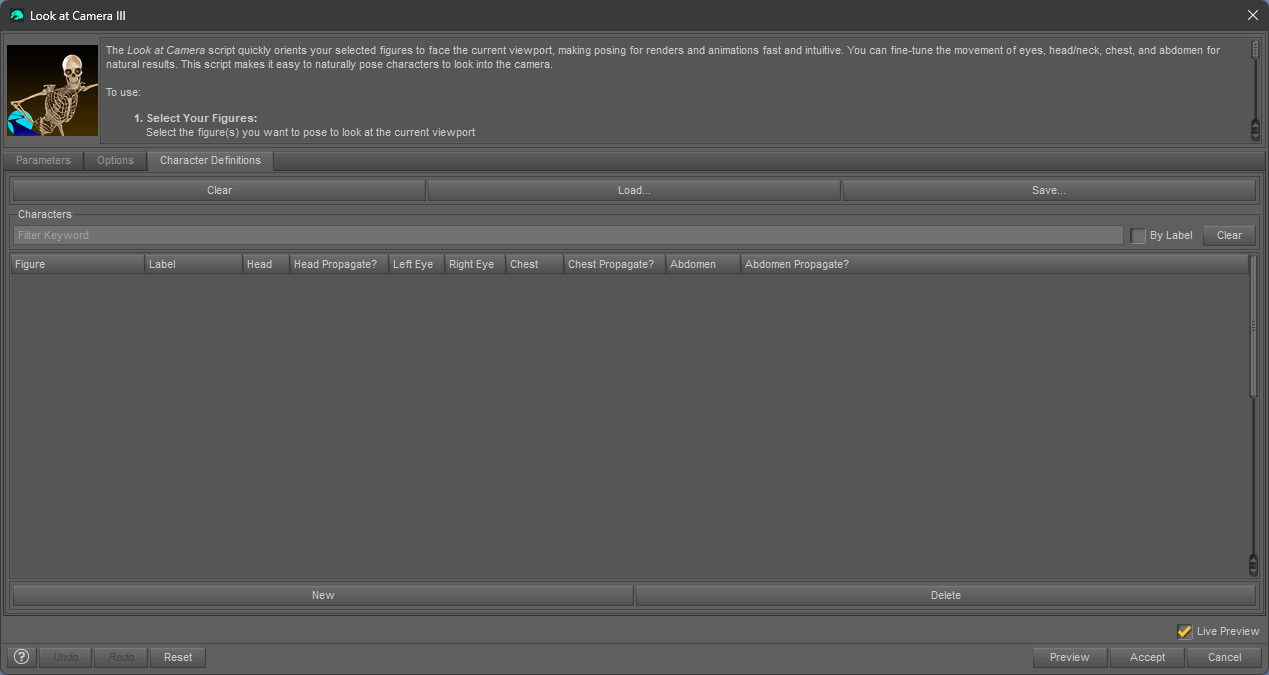
    Only generic eyes and head controls are available in the Parameters tab. Others are listed as Unused, grayed out, and inactive ( see attached screenshot).
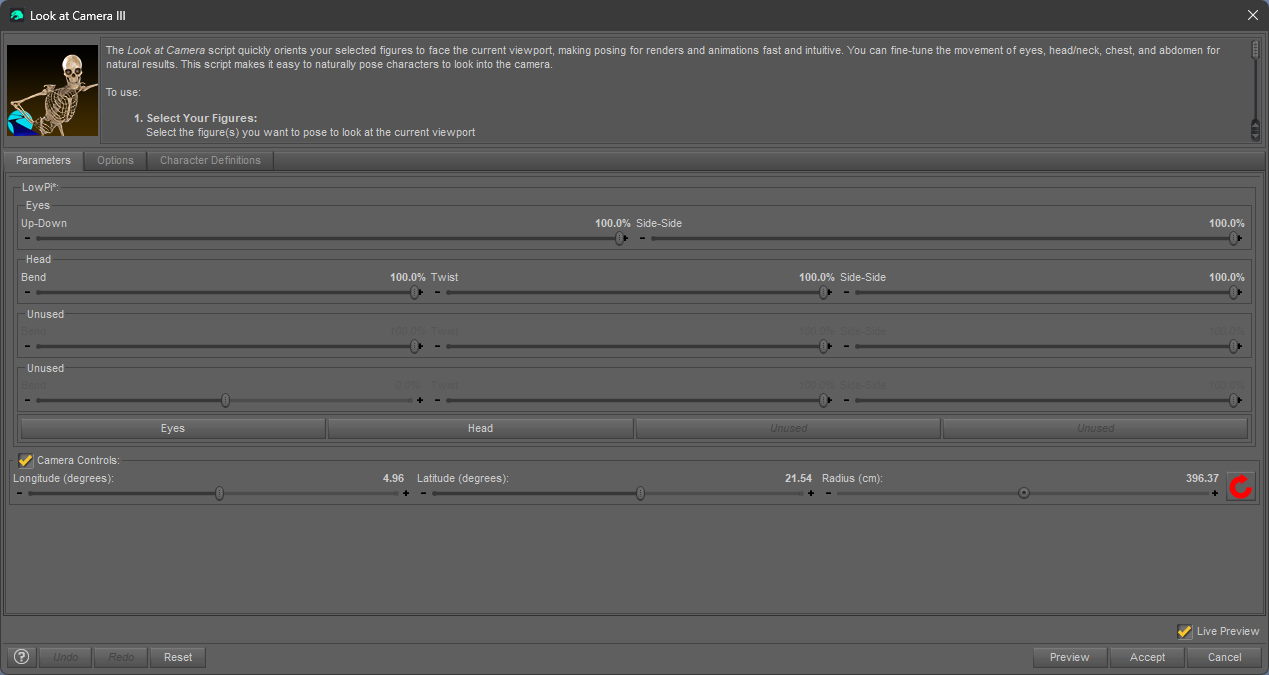
    Here is a snippet from a saved DS6 file:

        "Body Parts" : {
            "type" : "settings",
            "value" : {
                "Body Parts1" : {
                    "type" : "settings",
                    "value" : {
                        "Column 0" : "toonchameleon",
                        "Column 1" : "",
                        "Column 2" : "head",
                        "Column 3" : "X",
                        "Column 4" : "leye",
                        "Column 5" : "reye",
                        "Column 6" : "chest",
                        "Column 7" : "",
                        "Column 8" : "abdomen",
                        "Column 9" : ""
                    }
                },

    Here is a snippet from a saved DS4 file:

        "Body Parts" : {
            "type" : "settings",
            "value" : {
                "Body Parts1" : {
                    "type" : "settings",
                    "value" : {
                        "Figure" : "3dubig5lion_37541",
                        "Label" : "",
                        "Head" : "head",
                        "Head Propagate?" : "",
                        "Left Eye" : "leye",
                        "Right Eye" : "reye",
                        "Chest" : "chest",
                        "Chest Propagate?" : "",
                        "Abdomen" : "abdomen",
                        "Abdomen Propagate?" : ""
                    }
                },

    Also, I noticed that the two saved files seem to have the figures listed in the opposite order. You can see that in the snippets above. The file saved in DS6 starts with toonchameleon. The file saved with DS4 starts with 3dubig5lion_37541.

    On the other hand, Character Definition files created in DS4 can be loaded and used in DS6, but get loaded in reverse order, with toonchameleon at the top of the list (opposite of the order created and displayed in DS4).

    Can you reproduce any of these problems?

    Screenshot 2026-04-22 000037.png
    1269 x 675 - 50K
    Screenshot 2026-04-22 000055.png
    1269 x 675 - 58K
    Post edited by barbult on
  • barbultbarbult Posts: 26,815
    edited April 22

    I'm still digging into this great Character Definition capability. Here are more questions:

    1. After I save my own separate version of a character definition file, as recommended by the manual, how do I get Look At Me III to use that file each time I run one of the scripts, instead of always loading the original default file? The only thing I can figure out is that I either have to overwrite that original file with my included character definitions, or I have to manually load my file every single time I run one of the scripts.
    2. When I load a Character Definition file, it would sure be handy if Look At Me III remembered the last folder I saved a file in or loaded a file from. It has become cumbersome to manually navigate to my library /data/RiverSoft Art/data every time and try to remember that path.
    3. When I load a Character Definition file and make changes to it, as soon as I Accept the changes I made, the script asks if I want to save those changes to be used later. If I say yes, which seems like the natural thing to do, it overwrites the default Look At Me Figures file instead of the file I just loaded and modified. Why? I was expecting it to save the file I just updated. Perhaps I don't understand the intent of the manual's recommendation to save my definition changes to a separate file. 

    Thanks for your ever patient support!

    Post edited by barbult on
  • RiverSoft ArtRiverSoft Art Posts: 6,877

    barbult said:

    It appears to me that a character definition file saved in DS6.25.2026.9715 cannot by used in DS4.24.0.4. The DS6 saved file contains Column 0, Columns 1, etc. instead of Figure, Label, etc. When the file is saved in DS6 is loaded in DS4, the entire Character Definition section appears blank (see attached screenshot).

    Only generic eyes and head controls are available in the Parameters tab. Others are listed as Unused, grayed out, and inactive ( see attached screenshot).

    Here is a snippet from a saved DS6 file:

        "Body Parts" : {
            "type" : "settings",
            "value" : {
                "Body Parts1" : {
                    "type" : "settings",
                    "value" : {
                        "Column 0" : "toonchameleon",
                        "Column 1" : "",
                        "Column 2" : "head",
                        "Column 3" : "X",
                        "Column 4" : "leye",
                        "Column 5" : "reye",
                        "Column 6" : "chest",
                        "Column 7" : "",
                        "Column 8" : "abdomen",
                        "Column 9" : ""
                    }
                },

    Here is a snippet from a saved DS4 file:

        "Body Parts" : {
            "type" : "settings",
            "value" : {
                "Body Parts1" : {
                    "type" : "settings",
                    "value" : {
                        "Figure" : "3dubig5lion_37541",
                        "Label" : "",
                        "Head" : "head",
                        "Head Propagate?" : "",
                        "Left Eye" : "leye",
                        "Right Eye" : "reye",
                        "Chest" : "chest",
                        "Chest Propagate?" : "",
                        "Abdomen" : "abdomen",
                        "Abdomen Propagate?" : ""
                    }
                },

    Also, I noticed that the two saved files seem to have the figures listed in the opposite order. You can see that in the snippets above. The file saved in DS6 starts with toonchameleon. The file saved with DS4 starts with 3dubig5lion_37541.

    On the other hand, Character Definition files created in DS4 can be loaded and used in DS6, but get loaded in reverse order, with toonchameleon at the top of the list (opposite of the order created and displayed in DS4).

    Can you reproduce any of these problems?

    Yes, I can reproduce them. You discovered a bug in DS6 with the column naming. Until that is fixed, this bug in LAM will also be there. I managed to mitigate the bug as you saw in one direction though.

Sign In or Register to comment.