Problem with Transfering Figure With heels
 nokoteb99
Posts: 943
nokoteb99
Posts: 943
Does anyone know how to fix this? When i send a character using Daz to Blender Bridge( the most current as of 3/26/2026) and Blender 3.6 and send a character with heels who feels planted on the ground with correct feet rotation, in Blender the feet are rotated much more downwards . Why does this happen, and how can i fix it. There's a video around similar to what i mean 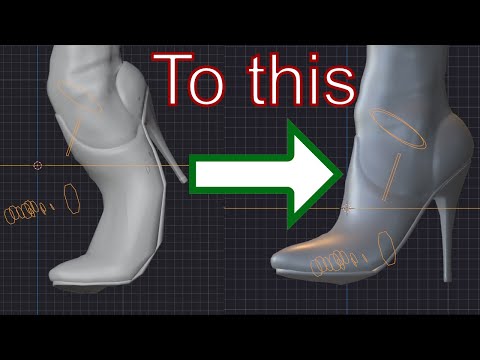
they fix it easy but in their step where they reparent the heels and select the figure(human) and select bake, my computer just freezes.
So that aint gonna work. What to do. Why doesn't just Blender Bridege send them exactly how they are in pose?

Daz 3D is part of 
Connect
DAZ Productions, Inc.
7533 S Center View Ct #4664
West Jordan, UT 84084
Licensing Agreement | Terms of Service | Privacy Policy | EULA
© 2026 Daz Productions Inc. All Rights Reserved.
Comments
Here is how mine looks when i send it in to Blender via Daz To Blender Bridge( latest) and Using Blender 3.6. Any help? By the way what are all those annoying circles, squares and something on the botom like a hexagon or something with arrows in four directions that appear after the Transfer. I've never used Daz To Blender Bridge and it's the first time i've seen it. And when i try to delete or hide those thing, they just dont go awway :)
The "annoying circles and squares" is the rig that you use for posing and animation. As for fixing the feet the video you referenced should work, but you can also try to save the figure in rest pose, that is, without the feet pose in daz studio.
edit > figure > restore > figure pose
p.s. I don't use the daz bridge myself as I prefer diffeomorphic, so I'm not a daz bridge expert and may miss something. I just replied here as no one else did.
That looks like a case that a morph (or Pose Control property) of feet / toes on the figure is dialed. Some vendors make default feet / toes pose by using this way. So, check if you have such a case... by: Select your figure, in Parameters pane > Currently Used, any properties dialed for the shoes ? like what I show in screenshot 1 down below ~~
Then you can easily fix it by:
1) in DTB export options dialogue, export the feet / toes morph (screenshot 2) before Send to Blender.
2) you should be able to get the correct result in Blender (sceenshot 3)
Also check this post in this thread if the above way doesn't work for you : https://www.daz3d.com/forums/discussion/comment/9271911/#Comment_9271911 i.e. check Include Animation in FBX export dialogue when Send to Blender ... (as DTB also uses FBX format)