

• Daz 3D
  • Shop
  • 3D Software
    • Daz Studio Premier
    • Daz Studio
    • Install Manager
    • Partnerships
    • AI Training data
    • Exporters
    • Daz to Roblox
    • Daz to Maya
    • Daz to Blender
    • Daz to Unreal
    • Daz to Unity
    • Daz to 3ds Max
    • Daz to Cinema 4D
  • 3D Models
    • Genesis 9
    • Genesis 8.1
    • Free 3D Models
  • Community
    • Gallery
    • Forums
    • Blog
    • Press
    • Help
  • Memberships
    • Daz Premier
    • Daz Plus
    • Daz Base
    • Compare
  • Download Studio
ADVANCED SEARCH
  • Menu
  • Daz 3D
ADVANCED SEARCH
Add image
  • Shop
  • 3d Software
    • Daz Studio Premier
    • Daz Studio
    • Install Manager
    • Partnerships
    • AI Training data
    • Exporters
    • Daz to Roblox
    • Daz to Maya
    • Daz to Blender
    • Daz to Unreal
    • Daz to Unity
    • Daz to 3ds Max
    • Daz to Cinema 4D
  • 3D Models
    • Genesis 9
    • Genesis 8.1
    • Free 3D Models
  • Community
    • Our Community
    • Gallery
    • Forums
    • Blog
    • Press
    • Help
  • Memberships
    • Daz Premier
    • Daz Plus
    • Daz Base
    • Compare

Notifications

You currently have no notifications.

Loading...
    • Categories
    • Recent Discussions
Daz 3D Forums > 3rd Party Software > Blender Discussion

Daz3d to Blender Workflow

«1…45678910»

Comments

  • PadonePadone Posts: 3,995
    May 2020

    @aelghazi From what I know if the vram is not enough then cycles goes out of core automatically, this seems to match with your low gpu high cpu profile. I don't know where you could exactly see when this happens may be switching the system console window.

    Anyway you should trust the task manager and keep the scene into vram boundaries, since especially if you have a single card other apps may take some vram as well. I'd set the max texture size to 2K in the simplify panel and see what happens. As for the denoiser you may use intel that's somewhat better especially for low samples.

    And yes, the development version fixes the rounded teeth, among other things. I'm keeping a list of the relevant changes in the first post of the discussion below. That's also in my signature.

    https://www.daz3d.com/forums/discussion/389931/

    https://hdrmaps.com/blog/Blender-2-81-and-new-intel-denoiser/

    https://docs.blender.org/manual/en/latest/render/cycles/render_settings/simplify.html

    https://docs.blender.org/manual/en/latest/render/cycles/gpu_rendering.html

  • nicsttnicstt Posts: 11,715
    May 2020 edited May 2020

    Intel's denoiser is insanely good. Don't use the normal one, just set up the denoiser as I have (minus the depth of field if you're not using it). My experiences of transfering stuff to Blender are very encouraging and I can see me buying an AMD card next; they compare favourably with Nvidia's best.

    This one https://www.scan.co.uk/products/amd-radeon-pro-wx-9100 looks interesting; I'll likely wait to see what the new reveals are though.

    ... It seems to be great on skin too, which is more than can be said for the Iray one.

    You'll notice i include a little of the original image, I just like a little of the 'grain' effect.

    Depth of Field - Compositing Render Passes.jpg
    1009 x 767 - 101K
    Depth of Field - Compositing Render Nodes.jpg
    1550 x 728 - 157K
    Post edited by nicstt on May 2020
  • starkadhstarkadh Posts: 52
    May 2020

    Just a question: is there a way to export the poses of the model too with this plugin?

  • aelghaziaelghazi Posts: 45
    May 2020
    Padone said:

    @aelghazi From what I know if the vram is not enough then cycles goes out of core automatically, this seems to match with your low gpu high cpu profile. I don't know where you could exactly see when this happens may be switching the system console window.

    Anyway you should trust the task manager and keep the scene into vram boundaries, since especially if you have a single card other apps may take some vram as well. I'd set the max texture size to 2K in the simplify panel and see what happens. As for the denoiser you may use intel that's somewhat better especially for low samples.

    And yes, the development version fixes the rounded teeth, among other things. I'm keeping a list of the relevant changes in the first post of the discussion below. That's also in my signature.


    Padone said:

    https://www.daz3d.com/forums/discussion/389931/

    https://hdrmaps.com/blog/Blender-2-81-and-new-intel-denoiser/

    https://docs.blender.org/manual/en/latest/render/cycles/render_settings/simplify.html

    https://docs.blender.org/manual/en/latest/render/cycles/gpu_rendering.html

    well I thing if there is not enough memory tje render wont even start and you will get the message cuda error, i dont thing it will jump from GPU to CPU if GPU is selected. And thank you for the links, I ll have a look at them and install the developement version of diffeo and see if the teeth are looking better.

  • benniewoodellbenniewoodell Posts: 1,999
    May 2020
    starkadh said:

    Just a question: is there a way to export the poses of the model too with this plugin?

    Yes. If you save the character file in Daz with the pose itself, it'll be brought into Blender as that pose. If you bring in the character in the A or T pose, once you get done merging the rigs, go down to posing and click import pose, and simply import the pose you want. To make it even easier to find, in Daz, I just save it as a pose preset and click on that in Blender. 

  • Leonides02Leonides02 Posts: 1,379
    May 2020
    benniewoodell said:
    starkadh said:

    Just a question: is there a way to export the poses of the model too with this plugin?

    Yes. If you save the character file in Daz with the pose itself, it'll be brought into Blender as that pose. If you bring in the character in the A or T pose, once you get done merging the rigs, go down to posing and click import pose, and simply import the pose you want. To make it even easier to find, in Daz, I just save it as a pose preset and click on that in Blender. 

    What about props and scenes? 

    I create single images in DAZ. Is there really any reason to switch to Blender?


  • TheMysteryIsThePointTheMysteryIsThePoint Posts: 3,216
    May 2020
    Leonides02 said:
    I create single images in DAZ. Is there really any reason to switch to Blender?

    Not "switch" to Blender, but rather "add Blender"...

    Better VFX like cloth, fluid, smoke, and fire sim, the chaos addon, particles, volumetrics, vastly better modeling tools to easily fix things, the cloth brush, fibermesh hair simulation without being a PA, EEVEE, a better scripting API that is better documented.

    Daz content in Blender is an extremely powerful combination and it gets easier to do every day.

  • nicsttnicstt Posts: 11,715
    May 2020
    starkadh said:

    Just a question: is there a way to export the poses of the model too with this plugin?

    You can import groups or single.

    In the pose tab (under properties section and need to be in pose mode iirc) in blender you can save them; make sure you click the shield button to keep the library even when not in use. Individual poses will need renaming.

  • aelghaziaelghazi Posts: 45
    May 2020

    Guys quick question, I imported to blender a T Rex, very realistic model , got imported with skeleton perfectly with diffeo, same way as a character, then I applied a BVH that I have for T REX using the BVH retargeter from diffeo, but I get error and it doesnt apply, I tried many BVH for T Rex but same thing, getting errors. Any one knows how to solve this ?

  • benniewoodellbenniewoodell Posts: 1,999
    May 2020
    aelghazi said:

    Guys quick question, I imported to blender a T Rex, very realistic model , got imported with skeleton perfectly with diffeo, same way as a character, then I applied a BVH that I have for T REX using the BVH retargeter from diffeo, but I get error and it doesnt apply, I tried many BVH for T Rex but same thing, getting errors. Any one knows how to solve this ?

    The only way I've gotten the BVH importer to work is by having the character in the A or T pose to begin with on frame 0 otherwise I always get the error as well. Are you starting him out in his base pose? 

  • aelghaziaelghazi Posts: 45
    May 2020

    Guys quick question, I imported to blender a T Rex, very realistic model , got imported with skeleton perfectly with diffeo, same way as a character, then I applied a BVH that I have for T REX using the BVH retargeter from diffeo, but I get error and it doesnt apply, I tried many BVH for T Rex but same thing, getting errors. Any one knows how to solve this ?

    benniewoodell said:
    aelghazi said:

    Guys quick question, I imported to blender a T Rex, very realistic model , got imported with skeleton perfectly with diffeo, same way as a character, then I applied a BVH that I have for T REX using the BVH retargeter from diffeo, but I get error and it doesnt apply, I tried many BVH for T Rex but same thing, getting errors. Any one knows how to solve this ?

    The only way I've gotten the BVH importer to work is by having the character in the A or T pose to begin with on frame 0 otherwise I always get the error as well. Are you starting him out in his base pose? 


    benniewoodell said:
    aelghazi said:

    Guys quick question, I imported to blender a T Rex, very realistic model , got imported with skeleton perfectly with diffeo, same way as a character, then I applied a BVH that I have for T REX using the BVH retargeter from diffeo, but I get error and it doesnt apply, I tried many BVH for T Rex but same thing, getting errors. Any one knows how to solve this ?

    The only way I've gotten the BVH importer to work is by having the character in the A or T pose to begin with on frame 0 otherwise I always get the error as well. Are you starting him out in his base pose? 

    the t rex yes, first pose as it was in daz, i guess there is no t pose of a t rex, right ?

  • starkadhstarkadh Posts: 52
    May 2020 edited May 2020


    benniewoodell said:

    Yes. If you save the character file in Daz with the pose itself, it'll be brought into Blender as that pose. If you bring in the character in the A or T pose, once you get done merging the rigs, go down to posing and click import pose, and simply import the pose you want. To make it even easier to find, in Daz, I just save it as a pose preset and click on that in Blender. 

    I didn't get, I'm sorry... after I launch the script in daz and after I launch the plugin on Blender, I am not able to find any command that let me import a pose... No import pose: where I can find it?
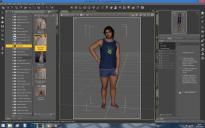
    See? From this position I save the pose file and launch the script "daz to blender".
    image


    Then I go on Blender, launch the plug-in and this is the result. An A pose mode model (I censored the model because if I export the clothing too my pc gives me problems and I know how much the nude pics bother people here in the forum) and in the pose tab there are the buttons I highlighted in the red rectangle.
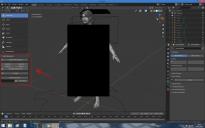
    Where is the import pose command?
    image

    1.jpg
    1680 x 1050 - 347K
    2.jpg
    1680 x 1050 - 387K
    Post edited by starkadh on May 2020
  • benniewoodellbenniewoodell Posts: 1,999
    May 2020

    @aelghazi hmmm, I guess if you imported it right from the original pose in Daz, that would be the T pose. I don't have the T Rex, so I have no idea outside of the T pose, I wish I could help more on this one. 

    @starkadh it looks like you're using a different Blender importer called Daz to Blender 8, I use the diffeomorphic tool, I honestly don't know how your importer works. Sorry. 

  • aelghaziaelghazi Posts: 45
    May 2020

    Guys quick question, I imported to blender a T Rex, very realistic model , got imported with skeleton perfectly with diffeo, same way as a character, then I applied a BVH that I have for T REX using the BVH retargeter from diffeo, but I get error and it doesnt apply, I tried many BVH for T Rex but same thing, getting errors. Any one knows how to solve this ?

    benniewoodell said:
    aelghazi said:

    Guys quick question, I imported to blender a T Rex, very realistic model , got imported with skeleton perfectly with diffeo, same way as a character, then I applied a BVH that I have for T REX using the BVH retargeter from diffeo, but I get error and it doesnt apply, I tried many BVH for T Rex but same thing, getting errors. Any one knows how to solve this ?

    The only way I've gotten the BVH importer to work is by having the character in the A or T pose to begin with on frame 0 otherwise I always get the error as well. Are you starting him out in his base pose? 


    benniewoodell said:
    aelghazi said:

    Guys quick question, I imported to blender a T Rex, very realistic model , got imported with skeleton perfectly with diffeo, same way as a character, then I applied a BVH that I have for T REX using the BVH retargeter from diffeo, but I get error and it doesnt apply, I tried many BVH for T Rex but same thing, getting errors. Any one knows how to solve this ?

    The only way I've gotten the BVH importer to work is by having the character in the A or T pose to begin with on frame 0 otherwise I always get the error as well. Are you starting him out in his base pose? 

    the t rex yes, first pose as it was in daz, i guess there is no t pose of a t rex, right ?

    benniewoodell said:

    @aelghazi hmmm, I guess if you imported it right from the original pose in Daz, that would be the T pose. I don't have the T Rex, so I have no idea outside of the T pose, I wish I could help more on this one. 

    @starkadh it looks like you're using a different Blender importer called Daz to Blender 8, I use the diffeomorphic tool, I honestly don't know how your importer works. Sorry. 

    yeah is kind of tricky to know what is the t pose of a t rex and how to get it, I tried daz to blender 8, its a good plugin but it doesnt import properly the type of characters I want, however the good thing about daztoblender8 is that the shapekeys are imported as well.

  • starkadhstarkadh Posts: 52
    May 2020


    benniewoodell said:

    @starkadh it looks like you're using a different Blender importer called Daz to Blender 8, I use the diffeomorphic tool, I honestly don't know how your importer works. Sorry. 

    Sorry: diffeomorphic... what?

  • aelghaziaelghazi Posts: 45
    May 2020

    Guys quick question, I imported to blender a T Rex, very realistic model , got imported with skeleton perfectly with diffeo, same way as a character, then I applied a BVH that I have for T REX using the BVH retargeter from diffeo, but I get error and it doesnt apply, I tried many BVH for T Rex but same thing, getting errors. Any one knows how to solve this ?

    benniewoodell said:
    aelghazi said:

    Guys quick question, I imported to blender a T Rex, very realistic model , got imported with skeleton perfectly with diffeo, same way as a character, then I applied a BVH that I have for T REX using the BVH retargeter from diffeo, but I get error and it doesnt apply, I tried many BVH for T Rex but same thing, getting errors. Any one knows how to solve this ?

    The only way I've gotten the BVH importer to work is by having the character in the A or T pose to begin with on frame 0 otherwise I always get the error as well. Are you starting him out in his base pose? 


    benniewoodell said:
    aelghazi said:

    Guys quick question, I imported to blender a T Rex, very realistic model , got imported with skeleton perfectly with diffeo, same way as a character, then I applied a BVH that I have for T REX using the BVH retargeter from diffeo, but I get error and it doesnt apply, I tried many BVH for T Rex but same thing, getting errors. Any one knows how to solve this ?

    The only way I've gotten the BVH importer to work is by having the character in the A or T pose to begin with on frame 0 otherwise I always get the error as well. Are you starting him out in his base pose? 

    the t rex yes, first pose as it was in daz, i guess there is no t pose of a t rex, right ?

    benniewoodell said:

    @aelghazi hmmm, I guess if you imported it right from the original pose in Daz, that would be the T pose. I don't have the T Rex, so I have no idea outside of the T pose, I wish I could help more on this one. 

    @starkadh it looks like you're using a different Blender importer called Daz to Blender 8, I use the diffeomorphic tool, I honestly don't know how your importer works. Sorry. 

    yeah is kind of tricky to know what is the t pose of a t rex and how to get it, I tried daz to blender 8, its a good plugin but it doesnt import properly the type of characters I want, however the good thing about daztoblender8 is that the shapekeys are imported as well.

    starkadh said:


    benniewoodell said:

    @starkadh it looks like you're using a different Blender importer called Daz to Blender 8, I use the diffeomorphic tool, I honestly don't know how your importer works. Sorry. 

    Sorry: diffeomorphic... what?

    https://diffeomorphic.blogspot.com/p/daz-importer-version-14.html

  • starkadhstarkadh Posts: 52
    May 2020 edited May 2020


    aelghazi said:

    https://diffeomorphic.blogspot.com/p/daz-importer-version-14.html

    It's great... really! thanks!
     

    Post edited by starkadh on May 2020
  • starkadhstarkadh Posts: 52
    May 2020 edited May 2020
    benniewoodell said:

    @starkadh it looks like you're using a different Blender importer called Daz to Blender 8, I use the diffeomorphic tool, I honestly don't know how your importer works. Sorry. 

    @benniewoodell  waaait, you meant this when you wrote "once you get done merging the rigs", right? Because the poses are applied on the character... but not on his hair (nor the beard or the clothing) that stay in the default position.
    How can I fix this thing merging the rigs? May you explain to me?

    it's the only problem still have! Fixed it, I will can finally work!

    Post edited by starkadh on May 2020
  • nicsttnicstt Posts: 11,715
    May 2020


    starkadh said:


    benniewoodell said:

    Yes. If you save the character file in Daz with the pose itself, it'll be brought into Blender as that pose. If you bring in the character in the A or T pose, once you get done merging the rigs, go down to posing and click import pose, and simply import the pose you want. To make it even easier to find, in Daz, I just save it as a pose preset and click on that in Blender. 

    I didn't get, I'm sorry... after I launch the script in daz and after I launch the plugin on Blender, I am not able to find any command that let me import a pose... No import pose: where I can find it?

    See? From this position I save the pose file and launch the script "daz to blender".
    image


    Then I go on Blender, launch the plug-in and this is the result. An A pose mode model (I censored the model because if I export the clothing too my pc gives me problems and I know how much the nude pics bother people here in the forum) and in the pose tab there are the buttons I highlighted in the red rectangle.
    Where is the import pose command?
    image

    If you work your way through the process, once you've got everything set up, select a bone, then change to pose mode; Properties Section > Object Data Properties (little running stick figure) is where the pose library is; the Diffe plugin has the section in it to import a pose, or a library.

  • mindsongmindsong Posts: 1,724
    May 2020
    aelghazi said:

    Guys quick question, I imported to blender a T Rex, very realistic model , got imported with skeleton perfectly with diffeo, same way as a character, then I applied a BVH that I have for T REX using the BVH retargeter from diffeo, but I get error and it doesnt apply, I tried many BVH for T Rex but same thing, getting errors. Any one knows how to solve this ?

    there's a 't' pose for older figures, and the 'a' pose for the newer figures, etc. but - these are usually all bones set to zero offsets and rotations as the figure is configured (e.g. Gn1 with all bones zero is a 't', G8F all zero-d is 'a' pose.

    Perhaps when you export the T-rex, if you clear all of the poses (edit->figure->zero-pose, I think), and then do the export, perhaps the exported t-rex will cooperate better with the BVH files.

    (just an idea),

    --ms

  • shavonnewshavonnew Posts: 34
    May 2020

    Hmm I'm having a strange issue where the eyelashes don't follow along with the eyelids when it is closed. I know it can follow because on my other model, the eyelashes follow along. I've attached the scene collection for both. I'm not sure why I have the squiggly green pose man on my eyelashes/peachfuzz/eyebrow on the first one but I assume that's part of the problem!

    Capture9.PNG
    1191 x 872 - 896K
    Capture8.PNG
    1240 x 860 - 855K
  • nicsttnicstt Posts: 11,715
    May 2020

    Under Morphs, did you transfer expressions? It's the section before Finishing.


    Edit: The following is my check list; for anyone starting out, I'd start with just up to corrections; test it works, then start again and continue. It's a great way of getting used to the process and picking up mistakes in our workflow - at least it was for me. I like breaking long processes into sections.

    Export To Blender

    - Save Character at high res
    - Save json at base
    -- either with or without a pose

    ----------------------------------------------------
    Import in Blender
    --------------------------
    ** CORRECTIONS
    * Rig is selected when file imports
    - A to select all
    - Merge Rigs
    - I look to make sure correct at this stage before continueing.

    * Make all Bones Poseable

    --------------------------
    ** MATERIALS
    * Save Local Textures
    - will need to save Blend File first

    --------------------------
    ** MORPHS
    * Update Morph Paths

    * Load Face Units
    * Load Expressions
    * Load Visemes
    * Load Correctives

    * Transfer Correctives
    - Select item (clothing item), then G8
    - Transfer Correctives - dialogue box opens - try defaults (Both and Auto) and click Transfer Correctives


    * Transfer Expressions
    - Select item (eye lashes/brows item), then G8
    - Transfer Expressions - dialogue box opens - try defaults (Both and Auto) and click Transfer Expressions

    --------------------------
    ** FINISHING

    * Merge Anatomy
    - If genitals, tail, horns, or other geocraft is included, this will need doing
    - Ensure G8 is selected (active selected in Outliner)
    - select geocrafts, then G8
    - Merge Anatomy (should say if wrong order)


    * Apply Reset Pose to current pose (presuming figure was imported in A/T pose?)

    * Don't optimise poses or convert to rigify if intend to load poses. (I always load poses.)


  • starkadhstarkadh Posts: 52
    May 2020
    nicstt said:


    ** FINISHING

    * Merge Anatomy
    - If genitals, tail, horns, or other geocraft is included, this will need doing
    - Ensure G8 is selected (active selected in Outliner)
    - select geocrafts, then G8
    - Merge Anatomy (should say if wrong order)

    I fear I didn't get how to merge anatomy... Because the poses are applied on the character... but not on his hair (nor the beard or the clothing or genitas...) that stay in the default position.
    How can I fix this thing merging the rigs? May you explain to me?

  • nicsttnicstt Posts: 11,715
    May 2020 edited May 2020

    My checklist is a summary of the very detailed and comprehensive instructions provided with the plugin.

    Do it after everything else.

    The first thing you do is merge rigs.

    (- the two * indicate a section heading; * a sub-section; a dash instructions or comments relating to said sub-section.)

    ** CORRECTIONS
    * Rig is selected when file imports
    - A to select all
    - Merge Rigs
    - I look to make sure correct at this stage before continueing.

    * Make all Bones Poseable

    After importing do the above.

    I expect that the merge anatomy is at the end due to the changes it will make to the geometry; you can add morphs once that is done for example.

    You need to select the meshes to merge ( however many there are) then Genesis X; then merge anatomy.

    Edit:

    If after merging rigs, you want to go straight to merge anatomy, you can. It's your choice, but it would be trial and error (unless it says in the instructions, which I don't recall, what it messes up and/or prevents) to what works.

    This is why I would recommend doing it in stages; making sure it's working and you are familiar with the process makes troubleshooting much easier.

    Post edited by nicstt on May 2020
  • TheMysteryIsThePointTheMysteryIsThePoint Posts: 3,216
    May 2020

    @shavonnew has inspired me to try working more with hair. Since 2.83, it's become immeasurably better, so I figured I'd give it a try again, instead of using a converter I wrote to convert dForce meshes into Blender particle systems.

    I am EXTREMELY impressed with Blender. There are some collision issues to fix, but this is what happens when you create a scalp object, slap a particle system on it, set the kink type to just a little bit wavy, groom the hair back a bit, and then basically let it fall where it may. Not bad for about 10 minutes of work... finally I can see elf ears! :)

    I would be in heaven if someone knew how to apply the sim results so that it becomes the new edit mesh that could be groomed and simulated a second time. With that, I think one could acheive exactly what one was looking for with just two iterations.

    straight_hair_experiment.png
    1920 x 1080 - 1M
  • aelghaziaelghazi Posts: 45
    May 2020
    mindsong said:
    aelghazi said:

    Guys quick question, I imported to blender a T Rex, very realistic model , got imported with skeleton perfectly with diffeo, same way as a character, then I applied a BVH that I have for T REX using the BVH retargeter from diffeo, but I get error and it doesnt apply, I tried many BVH for T Rex but same thing, getting errors. Any one knows how to solve this ?

    there's a 't' pose for older figures, and the 'a' pose for the newer figures, etc. but - these are usually all bones set to zero offsets and rotations as the figure is configured (e.g. Gn1 with all bones zero is a 't', G8F all zero-d is 'a' pose.

    Perhaps when you export the T-rex, if you clear all of the poses (edit->figure->zero-pose, I think), and then do the export, perhaps the exported t-rex will cooperate better with the BVH files.

    (just an idea),

    --ms

    thanks I will try it out and see

  • PadonePadone Posts: 3,995
    May 2020

    @TheMysteryIsThePoint You can also convert the standard daz transmapped hair to particles with diffeomorphic. Now it works with 2.8 too.

    http://diffeomorphic.blogspot.com/p/hair.html

  • TheMysteryIsThePointTheMysteryIsThePoint Posts: 3,216
    May 2020
    Padone said:

    @TheMysteryIsThePoint You can also convert the standard daz transmapped hair to particles with diffeomorphic. Now it works with 2.8 too.

    http://diffeomorphic.blogspot.com/p/hair.html

    Once again, @Padone, thank you. The converter I wrote only works with one type of dForce hair so far. I can use this for the other types. But what I am finding is that the hair particle system doesn't seem to respect the initial style of the hair, so as soon as you simulate it, it eventually loses all the detail. This doesn't seem to happend with children that have a kink type. But maybe I'm doing something wrong... I'll try it with the Importer.

  • SnowSultanSnowSultan Posts: 3,773
    May 2020

    Can someone tell me if there is a way to lock the names of surfaces in Blender so they do not get renamed when a different material is applied to them? For example, when I import a DAZ figure, "Slot 1" is technically the Torso surface, but it is named "Torso" based on what it was called in Studio - all of that is fine. However, if I accidentally apply the Arms or Cornea material to it, the name changes and if you don't remember that "Slot 1" is the actual Torso surface, it can be incredibly frustrating to find that misnamed surface again. What I basically want to do is either rename the Slot values to actual surface names, or have something like the Surface Selection tool in Studio that lets me directly select a surface.

    Thanks in advance for any help.

  • TheMysteryIsThePointTheMysteryIsThePoint Posts: 3,216
    May 2020
    SnowSultan said:

    Can someone tell me if there is a way to lock the names of surfaces in Blender so they do not get renamed when a different material is applied to them? For example, when I import a DAZ figure, "Slot 1" is technically the Torso surface, but it is named "Torso" based on what it was called in Studio - all of that is fine. However, if I accidentally apply the Arms or Cornea material to it, the name changes and if you don't remember that "Slot 1" is the actual Torso surface, it can be incredibly frustrating to find that misnamed surface again. What I basically want to do is either rename the Slot values to actual surface names, or have something like the Surface Selection tool in Studio that lets me directly select a surface.

    Thanks in advance for any help.

    No, there is no way around it. It really seems like there should be that level of indirection, but the Blender devs argue that it is the responsibility of a material asset manager. It's one of my few pet peeves with Blender.

«1…45678910»
Sign In or Register to comment.
Adding to Cart…

Daz 3D is part of Tafi

Connect

DAZ Productions, Inc.
7533 S Center View Ct #4664
West Jordan, UT 84084

HELP

Contact Us

Tutorials

Help Center

Sell Your 3D Content

Affiliate Program

Documentation Center

Open Source

Consent Preferences

JOIN DAZ

Memberships

Blog

About Us

Press

Careers

Bridges

Community

In the Studio

Gallery

Forum

DAZ STORE

Shop

Freebies

Published Artists

Licensing Agreement | Terms of Service | Privacy Policy | EULA

© 2025 Daz Productions Inc. All Rights Reserved.