Bend Control for Genesis 8 Male(s) - Where is it?
 gerterasmus
Posts: 287
gerterasmus
Posts: 287
in The Commons
Hi
Can anyone help me locate this in DAZ? Bought it a while ago but never bothered with it. Now I want to use it, but cant find it.

Daz 3D is part of 
Connect
DAZ Productions, Inc.
7533 S Center View Ct #4664
West Jordan, UT 84084
Licensing Agreement | Terms of Service | Privacy Policy | EULA
© 2026 Daz Productions Inc. All Rights Reserved.
Comments
Will be located here on your figure Pose Controls/Hip/Bend Control and here Pose Controls/Legs/Bend Control
Thanks, but... pictures? Sorry, blond.
I can find glute control and G3 Bend control.
You mean you can't find it in your product library for download, or on your figure?
It's downloaded and installed (and uninstalled and reinstalled ad infinitum). Can't find it in Smart Content or on figure
it will be under parameters, presumably, as they are morphs.
And I can't find them in parameters.
It's like it's not installed at all, but I know it is.
It should be under pose controls > hip and pose controls > legs in parameter section, if you have genesis 8 male root selected.
Just uninstalled and reinstalled it.Still Nothing.
@Zev0 Please help.
I took a screen shot of my viewport. I'm assuming this is what you're referring to? It's not showing up under this category?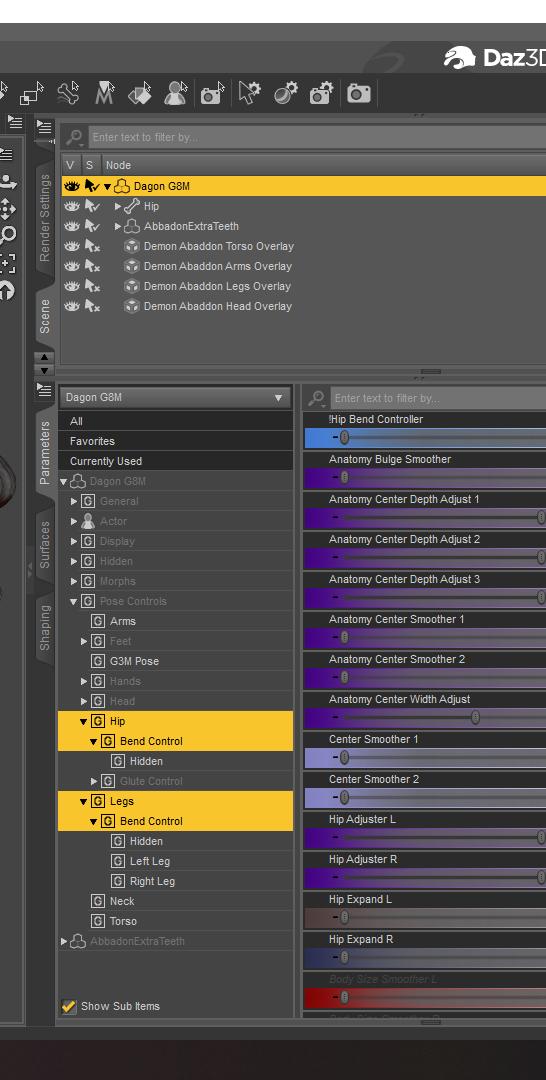
I see them in parameters > actor > pose controls in legs, hip and torso so I was going to have you use the search function to look for bend control in the parameters first to see if you see the two controllers. If not, deinstalled and reinstall.
The only other thing I can think of is that the morphs are not loading because they are in the wrong place in the data folder. The morphs load from the data folder each time you launch a figure.
On your computer navigate to the folder as indicated at the top of my picture (and below) and check they are there.
My Library-data-DAZ 3D-Genesis 8-Male-Morphs-Zev0-Bend Control
Looked there, and no Zev0 folder there. I have Glute Control for G8M and Bend Control for G3M and I have no problem finding them.
I've uninstalled it and reinstalled using DIM. If I uninstall it, it doesn't show up in DAZ under the install tab.
IIRC when you uninstall in DIM and still have the zip available it should put the file in 'Ready To Install' not back into 'Ready To Download'. Do you have anything in your DIM 'Ready To Install' tab? If not look for it in 'Ready to Download'.
Another solution would be to open the zip file and manually drag the data folder from the zip into your main My Library folder. This will make sure it is installing in the right place. Make sure to drag it into the main folder not inside the My Library-data folder or you will end with a nested data folder and it won't work.
Note - Your zip will be named differently to mine, I rename all my zips so they appear alphabetically not in IM number order.
Perhaps you can go to your product library here at DAZ3D, manually download the zip file, open it up and hand install it? Might resolve this faster for you!